instrument cluster GMC SIERRA 1500 2009 Owner's Manual
[x] Cancel search | Manufacturer: GMC, Model Year: 2009, Model line: SIERRA 1500, Model: GMC SIERRA 1500 2009Pages: 602, PDF Size: 3.22 MB
Page 255 of 602
RIGHT REAR DOOR OPEN (Crew Cab)
This message displays and a chime sounds if the
passenger side rear door is not fully closed and the
vehicle is shifted out of P (Park). Stop and turn off the
vehicle, check the door for obstructions, and close the
door again. Check to see if the message still appears on
the DIC.
SERVICE 4 WHEEL DRIVE
This message displays if a problem occurs with the
four-wheel-drive system. If this message appears, stop
as soon as possible and turn off the vehicle. Make sure
the key is in the LOCK/OFF position for at least one
minute and then restart the vehicle and check for the
message on the DIC display. If the message is still
displayed or appears again when you begin driving, the
four-wheel-drive system needs service. See your
dealer/retailer.
SERVICE AIR BAG
This message displays if there is a problem with the
airbag system. Have your dealer/retailer inspect the
system for problems. SeeAirbag Readiness Light on
page 3-37andAirbag System on page 1-72for more
information.
SERVICE BATTERY CHARGING
SYSTEM
On some vehicles, this message displays if there is a
problem with the battery charging system. Under certain
conditions, the charging system light may also turn on in
the instrument panel cluster. SeeCharging System Light
on page 3-41. Driving with this problem could drain the
battery. Turn off all unnecessary accessories. Have the
electrical system checked as soon as possible. See your
dealer/retailer.
SERVICE BRAKE SYSTEM
This message displays along with the brake system
warning light if there is a problem with the brake system.
SeeBrake System Warning Light on page 3-42. If this
message appears, stop as soon as possible and turn
off the vehicle. Restart the vehicle and check for the
message on the DIC display. If the message is still
displayed or appears again when you begin driving,
the brake system needs service as soon as possible.
See your dealer/retailer.
3-71
Page 258 of 602
TIGHTEN GAS CAP
This message may display along with the check engine
light on the instrument panel cluster if the vehicle’s fuel
cap is not tightened properly. SeeMalfunction Indicator
Lamp on page 3-45. Reinstall the fuel cap fully. See
Filling the Tank on page 5-11. The diagnostic system can
determine if the fuel cap has been left off or improperly
installed. A loose or missing fuel cap allows fuel to
evaporate into the atmosphere. A few driving trips with
the cap properly installed should turn this light and
message off.
TIRE LEARNING ACTIVE
If your vehicle has the Tire Pressure Monitor System
(TPMS), this message displays when the system is
re-learning the tire positions on your vehicle. See “DIC
Operation and Displays (Without DIC Buttons)” earlier in
this section for more information. The tire positions must
be re-learned after rotating the tires or after replacing a
tire or sensor. SeeTire Inspection and Rotation on
page 5-84,Tire Pressure Monitor System on page 5-79,
andInflation - Tire Pressure on page 5-76for more
information.
TRACTION CONTROL OFF
If your vehicle has StabiliTrak, this message displays
when the Traction Control System (TCS) is turned
off. Adjust your driving accordingly. SeeStabiliTrak
®
System on page 4-6for more information.
TRAILER CONNECTED
On vehicles with the Integrated Trailer Brake Control
(ITBC) system, this message displays briey when a
trailer with electric brakes is rst connected to the vehicle.
This message clears itself after several seconds. This
message also clears if you acknowledge it. After this
message clears, the TRAILER GAIN/OUTPUT display
appears in the DIC.
See “TRAILER GAIN/OUTPUT” underDIC Operation and
Displays (With DIC Buttons) on page 3-53orDIC
Operation and Displays (Without DIC Buttons) on
page 3-59and “Integrated Trailer Brake Control System”
underTowing a Trailer on page 4-53for more
information.
3-74
Page 259 of 602
TRANSMISSION HOT IDLE ENGINE
Notice:If you drive your vehicle while the
transmission uid is overheating and the
transmission temperature warning is displayed on
the instrument panel cluster and/or DIC, you
can damage the transmission. This could lead to
costly repairs that would not be covered by
your warranty. Do not drive your vehicle with
overheated transmission uid or while the
transmission temperature warning is displayed.
This message displays along with a sound if the
transmission uid in the vehicle gets hot. Driving with
the transmission uid temperature high can cause
damage to the vehicle. Stop the vehicle and let it idle to
allow the transmission to cool. This message clears and
the chime stops when the uid temperature reaches a
safe level.
TURN SIGNAL ON
This message displays and a chime sounds if a turn
signal is left on for 3/4 of a mile (1.2 km). Move the turn
signal/multifunction lever to the off position.
WASHER FLUID LOW ADD FLUID
This message displays when the windshield washer
uid is low. Fill the windshield washer uid reservoir as
soon as possible. SeeEngine Compartment Overview
on page 5-16for the location of the windshield
washer uid reservoir. Also, seeWindshield Washer
Fluid on page 5-40for more information.
DIC Vehicle Customization
(With DIC Buttons)
Your vehicle may have customization capabilities that
allow you to program certain features to one preferred
setting. Customization features can only be programmed
to one setting on the vehicle and cannot be programmed
to a preferred setting for two different drivers.
All of the customization options may not be available on
your vehicle. Only the options available will be
displayed on the DIC.
The default settings for the customization features were
set when your vehicle left the factory, but may have
been changed from their default state since then.
The customization preferences are automatically
recalled.
3-75
Page 333 of 602
If the system fails to turn on or activate, the StabiliTrak
light along with one of the following messages will
be displayed on the Driver Information Center (DIC):
TRACTION CONTROL OFF, SERVICE TRACTION
CONTROL, STABILITRAK OFF, SERVICE
STABILITRAK. If these DIC messages appear, make
sure the StabiliTrak system has not been turned
off using the StabiliTrak on/off button. Then turn the
steering wheel clockwise from the nine o’clock position
to the three o’clock position. If this clears the
message(s), the vehicle does not need servicing. If this
does not clear the message(s), then turn the vehicle
off, wait 15 seconds, and then turn it back on again to
reset the system. If any of these messages still
appear on the DIC, the vehicle should be taken in for
service. For more information on the DIC messages,
seeDriver Information Center (DIC) on page 3-53.
The StabiliTrak light will
ash on the instrument
panel cluster when the
system is both on and
activated.
The system may be heard or felt while it is working; this
is normal.The traction control disable
button is located on the
instrument panel below the
climate controls.
The traction control part of StabiliTrak can be turned off
by pressing and releasing the StabiliTrak button if
both systems (traction control and StabiliTrak) were
previously on. To disable both TCS and StabiliTrak,
press and hold the button for ve seconds.
TCS and StabiliTrak can be turned on by pressing and
releasing the StabiliTrak button if not automatically
shut off for any other reason.
When TCS or StabiliTrak is turned off, the StabiliTrak
light and the appropriate message will be displayed
on the DIC to warn the driver. The vehicle will still have
brake-traction control when traction control is off, but
will not be able to use the engine speed management
system. See “Traction Control Operation” next for
more information.
When the traction control system has been turned off,
system noises may still be heard as a result of the
brake-traction control coming on.
4-7
Page 395 of 602
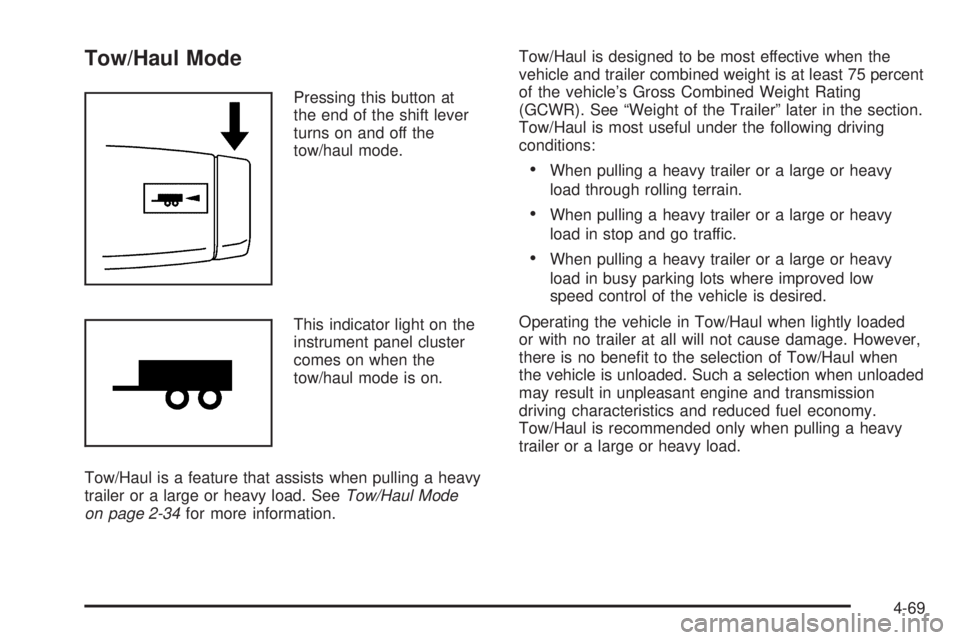
Tow/Haul Mode
Pressing this button at
the end of the shift lever
turns on and off the
tow/haul mode.
This indicator light on the
instrument panel cluster
comes on when the
tow/haul mode is on.
Tow/Haul is a feature that assists when pulling a heavy
trailer or a large or heavy load. SeeTow/Haul Mode
on page 2-34for more information.Tow/Haul is designed to be most effective when the
vehicle and trailer combined weight is at least 75 percent
of the vehicle’s Gross Combined Weight Rating
(GCWR). See “Weight of the Trailer” later in the section.
Tow/Haul is most useful under the following driving
conditions:
When pulling a heavy trailer or a large or heavy
load through rolling terrain.
When pulling a heavy trailer or a large or heavy
load in stop and go traffic.
When pulling a heavy trailer or a large or heavy
load in busy parking lots where improved low
speed control of the vehicle is desired.
Operating the vehicle in Tow/Haul when lightly loaded
or with no trailer at all will not cause damage. However,
there is no benet to the selection of Tow/Haul when
the vehicle is unloaded. Such a selection when unloaded
may result in unpleasant engine and transmission
driving characteristics and reduced fuel economy.
Tow/Haul is recommended only when pulling a heavy
trailer or a large or heavy load.
4-69
Page 490 of 602
Federal Communications Commission
(FCC) and Industry and Science
Canada
The Tire Pressure Monitor System (TPMS) operates
on a radio frequency and complies with Part 15 of
the FCC Rules. Operation is subject to the following
two conditions:
1. This device may not cause harmful interference.
2. This device must accept any interference received,
including interference that may cause undesired
operation.
Vehicles with TPMS operate on a radio frequency and
comply with RSS-210 of Industry and Science Canada.
Operation is subject to the following two conditions:
1. This device may not cause interference.
2. This device must accept any interference received,
including interference that may cause undesired
operation of the device.
Changes or modications to this system by other than
an authorized service facility could void authorization to
use this equipment.
Tire Pressure Monitor Operation
This vehicle may have a Tire Pressure Monitor
System (TPMS). The TPMS is designed to warn
the driver when a low tire pressure condition exists.
TPMS sensors are mounted onto each tire and wheel
assembly, excluding the spare tire and wheel assembly.
The TPMS sensors monitor the air pressure in the
vehicle’s tires and transmits the tire pressure readings
to a receiver located in the vehicle.
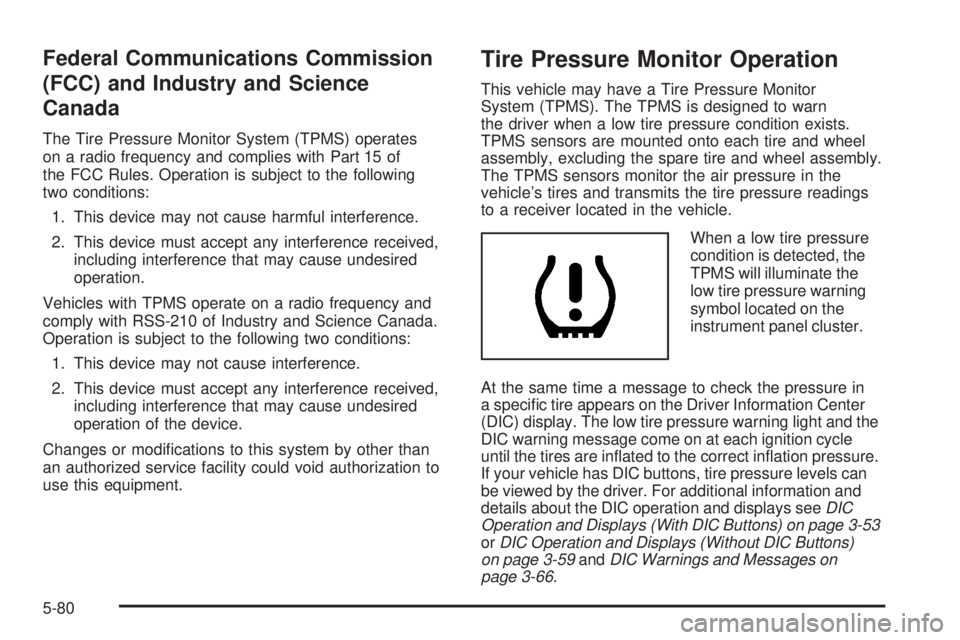
When a low tire pressure
condition is detected, the
TPMS will illuminate the
low tire pressure warning
symbol located on the
instrument panel cluster.
At the same time a message to check the pressure in
a specic tire appears on the Driver Information Center
(DIC) display. The low tire pressure warning light and the
DIC warning message come on at each ignition cycle
until the tires are inated to the correct ination pressure.
If your vehicle has DIC buttons, tire pressure levels can
be viewed by the driver. For additional information and
details about the DIC operation and displays seeDIC
Operation and Displays (With DIC Buttons) on page 3-53
orDIC Operation and Displays (Without DIC Buttons)
on page 3-59andDIC Warnings and Messages on
page 3-66.
5-80
Page 493 of 602
The TPMS sensor matching process is outlined below:
1. Set the parking brake.
2. Turn the ignition switch to ON/RUN with the
engine off.
3. Press the Remote Keyless Entry (RKE) transmitter’s
LOCK and UNLOCK buttons at the same time for
approximately ve seconds. The horn sounds twice
to signal the receiver is in relearn mode and TIRE
LEARNING ACTIVE message displays on the DIC
screen.
If your vehicle does not have RKE, press the Driver
Information Center (DIC) vehicle information button
until the PRESS
VTO RELEARN TIRE POSITIONS
message displays. The horn sounds twice to signal
the receiver is in relearn mode and TIRE LEARNING
ACTIVE message displays on the DIC screen.
If your vehicle does not have RKE or DIC buttons,
press the trip odometer reset stem located on the
instrument panel cluster until the PRESS
VTO
RELEARN TIRE POSITIONS message displays.
The horn sounds twice to signal the receiver is
in relearn mode and TIRE LEARNING ACTIVE
message displays on the DIC screen.
4. Start with the driver side front tire.5. Remove the valve cap from the valve cap stem.
Activate the TPMS sensor by increasing or
decreasing the tire’s air pressure for ve seconds,
or until a horn chirp sounds. The horn chirp,
which may take up to 30 seconds to sound,
conrms that the sensor identication code has
been matched to this tire and wheel position.
6. Proceed to the passenger side front tire, and repeat
the procedure in Step 5.
7. Proceed to the passenger side rear tire, and repeat
the procedure in Step 5.
8. Proceed to the driver side rear tire, and repeat the
procedure in Step 5. The horn sounds two times
to indicate the sensor identication code has been
matched to the driver side rear tire, and that the
TPMS sensor matching process is no longer active.
The TIRE LEARNING ACTIVE message on the DIC
display screen goes off.
9. Turn the ignition switch to LOCK/OFF.
10. Set all four tires to the recommended air pressure
level as indicated on the Tire and Loading
Information label.
11. Put the valve caps back on the valve stems.
5-83
Page 539 of 602
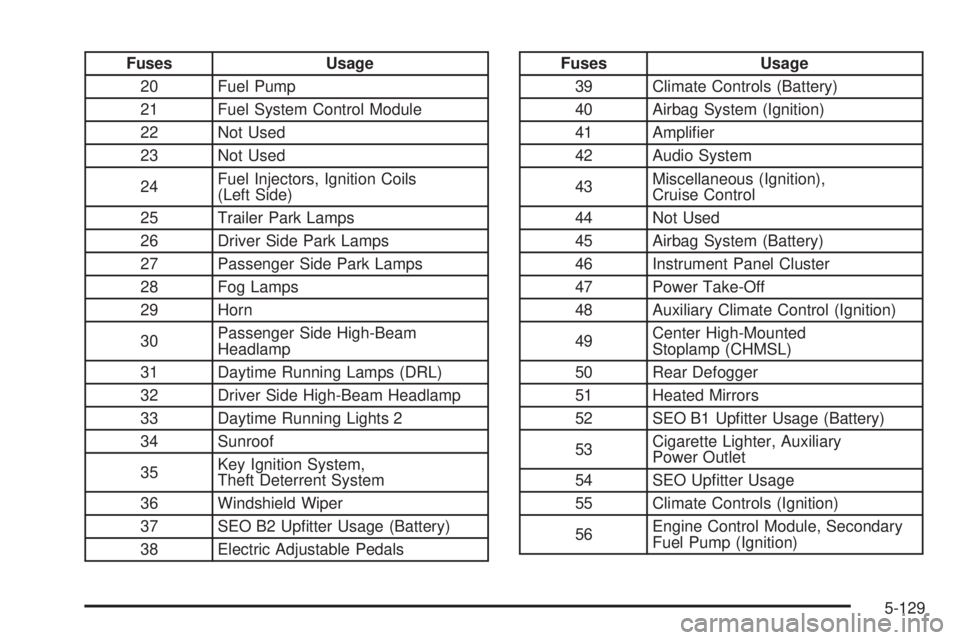
Fuses Usage
20 Fuel Pump
21 Fuel System Control Module
22 Not Used
23 Not Used
24Fuel Injectors, Ignition Coils
(Left Side)
25 Trailer Park Lamps
26 Driver Side Park Lamps
27 Passenger Side Park Lamps
28 Fog Lamps
29 Horn
30Passenger Side High-Beam
Headlamp
31 Daytime Running Lamps (DRL)
32 Driver Side High-Beam Headlamp
33 Daytime Running Lights 2
34 Sunroof
35Key Ignition System,
Theft Deterrent System
36 Windshield Wiper
37 SEO B2 Uptter Usage (Battery)
38 Electric Adjustable PedalsFuses Usage
39 Climate Controls (Battery)
40 Airbag System (Ignition)
41 Amplier
42 Audio System
43Miscellaneous (Ignition),
Cruise Control
44 Not Used
45 Airbag System (Battery)
46 Instrument Panel Cluster
47 Power Take-Off
48 Auxiliary Climate Control (Ignition)
49Center High-Mounted
Stoplamp (CHMSL)
50 Rear Defogger
51 Heated Mirrors
52 SEO B1 Uptter Usage (Battery)
53Cigarette Lighter, Auxiliary
Power Outlet
54 SEO Uptter Usage
55 Climate Controls (Ignition)
56Engine Control Module, Secondary
Fuel Pump (Ignition)
5-129
Page 594 of 602
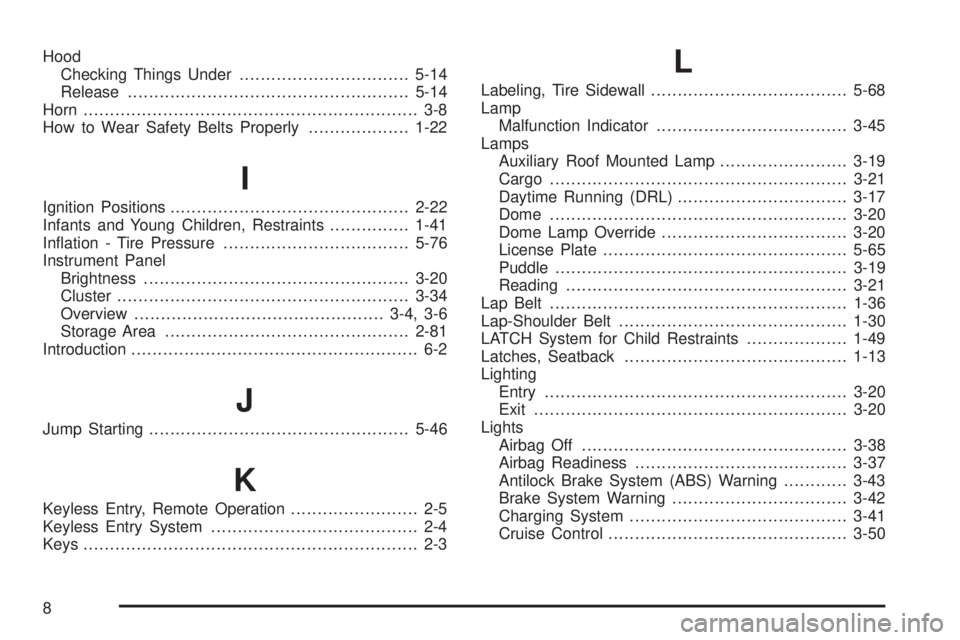
Hood
Checking Things Under................................5-14
Release.....................................................5-14
Horn ............................................................... 3-8
How to Wear Safety Belts Properly...................1-22
I
Ignition Positions.............................................2-22
Infants and Young Children, Restraints...............1-41
Ination - Tire Pressure...................................5-76
Instrument Panel
Brightness..................................................3-20
Cluster.......................................................3-34
Overview...............................................3-4, 3-6
Storage Area..............................................2-81
Introduction...................................................... 6-2
J
Jump Starting.................................................5-46
K
Keyless Entry, Remote Operation........................ 2-5
Keyless Entry System....................................... 2-4
Keys............................................................... 2-3
L
Labeling, Tire Sidewall.....................................5-68
Lamp
Malfunction Indicator....................................3-45
Lamps
Auxiliary Roof Mounted Lamp........................3-19
Cargo........................................................3-21
Daytime Running (DRL)................................3-17
Dome ........................................................3-20
Dome Lamp Override...................................3-20
License Plate..............................................5-65
Puddle.......................................................3-19
Reading.....................................................3-21
Lap Belt........................................................1-36
Lap-Shoulder Belt...........................................1-30
LATCH System for Child Restraints...................1-49
Latches, Seatback..........................................1-13
Lighting
Entry.........................................................3-20
Exit...........................................................3-20
Lights
Airbag Off..................................................3-38
Airbag Readiness........................................3-37
Antilock Brake System (ABS) Warning............3-43
Brake System Warning.................................3-42
Charging System.........................................3-41
Cruise Control.............................................3-50
8