remote control GMC SIERRA 1500 2009 Owner's Manual
[x] Cancel search | Manufacturer: GMC, Model Year: 2009, Model line: SIERRA 1500, Model: GMC SIERRA 1500 2009Pages: 602, PDF Size: 3.22 MB
Page 289 of 602
Stopping and Resuming Playback
To stop playing a DVD without turning off the system,
press the
cbutton on the remote control, or press the
pushbutton located under the stop or the play/pause
symbol tags displayed on the radio. If the radio head is
sourced to something other than DVD-V, press the
DVD/CD AUX button to make DVD-V the active source.
To resume DVD playback, press the
r/jbutton on the
remote control, or press the pushbutton located under the
play/pause symbol tag displayed on the radio. The DVD
should resume play from where it last stopped if the disc
has not been ejected and the stop button has not been
pressed twice on the remote control. If the disc has been
ejected or the stop button has been pressed twice on the
remote control, the disc resumes playing at the beginning
of the disc.
Ejecting a Disc
Press theZbutton on the radio to eject the disc. If a
disc is ejected from the radio, but not removed, the radio
reloads the disc after a short period of time. The disc is
stored in the radio. The radio does not resume play of the
disc automatically. If the RSA system is sourced to the
DVD, the movie when reloaded into the DVD player
begins to play again. In case loading and reading of a
DVD or CD cannot be completed (unknown format, etc.),
and the disc fails to eject, press and hold the DVD
Z
button more than ve seconds to force the disc to eject.
DVD Radio Error Messages
Player Error:This message displays when there are
disc load or eject problems.
Disc Format Error:This message displays, if the disc
is inserted with the disc label wrong side up, or if
the disc is damaged.
Disc Region Error:This message displays, if the disc
is not from a correct region.
No Disc Inserted:This message displays, if no disc is
present when the
Zor DVD/CD AUX button is
pressed on the radio.
Using the Auxiliary Input Jack
The radio system has an auxiliary input jack located on
the lower right side of the faceplate. This is not an audio
output; do not plug the headphone set into the front
auxiliary input jack. An external audio device such as an
iPod, laptop computer, MP3 player, CD player, etc. can
be connected to the auxiliary input jack for use as another
source for audio listening.
Drivers are encouraged to set up any auxiliary device
while the vehicle is in P (Park). SeeDefensive Driving on
page 4-2for more information on driver distraction.
3-105
Page 300 of 602
To change from playback by artist to playback by album,
press the pushbutton located below the Sort By label.
From the sort screen, push one of the buttons below the
album button. Press the pushbutton below the back label
to return to the main music navigator screen. Now the
album name displays on the second line between the
arrows and songs from the current album begin to play.
Once all songs from that album are played, the player
moves to the next album in alphabetical order on the
CD-R or CD-RW and begins playing MP3/WMA les from
that album.
To exit music navigator mode, press the pushbutton
below the Back label to return to normal MP3/WMA
playback.
BAND:Press this button to listen to the radio when a
CD or a DVD is playing. The CD or DVD remains inside
the radio for future listening or viewing entertainment.DVD/CD AUX (Auxiliary):Press this button to cycle
through DVD, CD, or Auxiliary when listening to the radio.
The DVD/CD text label and a message showing track or
chapter number displays when a disc is in either slot.
Press this button again and the system automatically
searches for an auxiliary input device, such as a portable
audio player. If a portable audio player is not connected,
“No Aux Input Device” displays. If a disc is in both the
DVD slot and the CD slot the DVD/CD AUX button cycles
between the two sources and not indicate “No Aux Input
Device”. If a front auxiliary device is connected, the
DVD/CD AUX button cycles through all available options,
such as: DVD slot, CD slot, Front Auxiliary, and Rear
Auxiliary (if available). See “Using the Auxiliary Input
Jack(s)” earlier in this section, or “Audio/Video (A/V)
Jacks” under,Rear Seat Entertainment (RSE) System on
page 3-129for more information.
If a MP3/WMA is inserted into top DVD slot, the rear seat
operator can turn on the video screen and use the remote
control to navigate the CD (tracks only) through the
remote control.
3-116
Page 313 of 602
This device complies with Part 15 of the FCC Rules.
Operation is subject to the following two conditions:
1. This device may not cause harmful interference.
2. This device must accept any interference received,
including interference that may cause undesired
operation.
This device complies with RSS-210 of Industry Canada.
Operation is subject to the following two conditions:
1. This device may not cause interference.
2. This device must accept any interference received,
including interference that may cause undesired
operation of the device.
Changes or modications to this system by other than
an authorized service facility could void authorization to
use this equipment.
Rear Seat Entertainment (RSE)
System
The vehicle may have a DVD Rear Seat Entertainment
(RSE) system. The RSE system works with the vehicle’s
audio system. The DVD player is part of the front radio.
The RSE system includes a radio with a DVD player, a
video display screen, audio/video jacks, two wireless
headphones, and a remote control. SeeRadio(s) on
page 3-87for more information on the vehicle’s audio/
DVD system.
Before Driving
The RSE is designed for rear seat passengers only.
The driver cannot safely view the video screen
while driving and should not try to do so.
In severe or extreme weather conditions the RSE system
might not work until the temperature is within the
operating range. The operating range for the RSE system
is above−4°F (−20°C) or below 140°F (60°C). If the
temperature of the vehicle is outside of this range, heat
or cool the vehicle until the temperature is within the
operating range of the RSE system.
Parental Control
The RSE system may have a Parental Control feature,
depending on which radio the vehicle has. To start
Parental Control, press and hold the radio power button
for more than two seconds to stop all system features
such as: radio, video screen, RSA, DVD and/or CD.
While Parental Control is on, a padlock icon displays.
The radio can be turned back on with a single press of the
power button, but the RSE system will remain under
Parental Control.
To turn Parental Control off, press and hold the radio
power button for more than two seconds. The RSE
returns from where it was previously left and the padlock
icon disappears from the radio display.
3-129
Page 316 of 602
To use the auxiliary inputs of the RSE system, connect an
external auxiliary device to the color-coded A/V jacks and
turn both the auxiliary device and the video screen power
on. If the video screen is in the DVD player mode,
pressing the AUX (auxiliary) button on the remote control
switches the video screen from the DVD player mode to
the auxiliary device. The radio can listen to the audio of
the connected auxiliary device by sourcing to auxiliary.
SeeRadio(s) on page 3-87for more information.
How to Change the RSE Video Screen
Settings
The screen display mode (normal, full, and zoom), screen
brightness, and setup menu language can be changed
from the on screen setup menu. To change any feature,
do the following:
1. Press the
z(display) menu button on the remote
control.
2. Use the remote control menu
n,q,p,o
(navigation) arrows and ther(enter) button
to use the setup menu.
3. Press the
zbutton again to remove the setup
menu from the screen.
Audio Output
Audio from the DVD player or auxiliary inputs can be
heard through the following possible sources:
Wireless Headphones
Vehicle Speakers
Vehicle wired headphone jacks on the rear seat
audio system, if the vehicle has this feature.
The RSE system always transmits the audio signal to the
wireless headphones, if there is audio available. See
“Headphones” earlier in this section for more information.
The DVD player is capable of outputting audio to the
wired headphone jacks on the RSA system, if the vehicle
has this feature. The DVD player can be selected as an
audio source on the RSA system. SeeRear Seat Audio
(RSA) on page 3-138for more information.
When a device is connected to the A/V jacks, or the
radio’s auxiliary input jack, if the vehicle has this
feature, the rear seat passengers are able to hear audio
from the auxiliary device through the wireless or wired
headphones. The front seat passengers are able to listen
to playback from this device through the vehicle speakers
by selecting AUX as the source on the radio.
3-132
Page 317 of 602
Video Screen
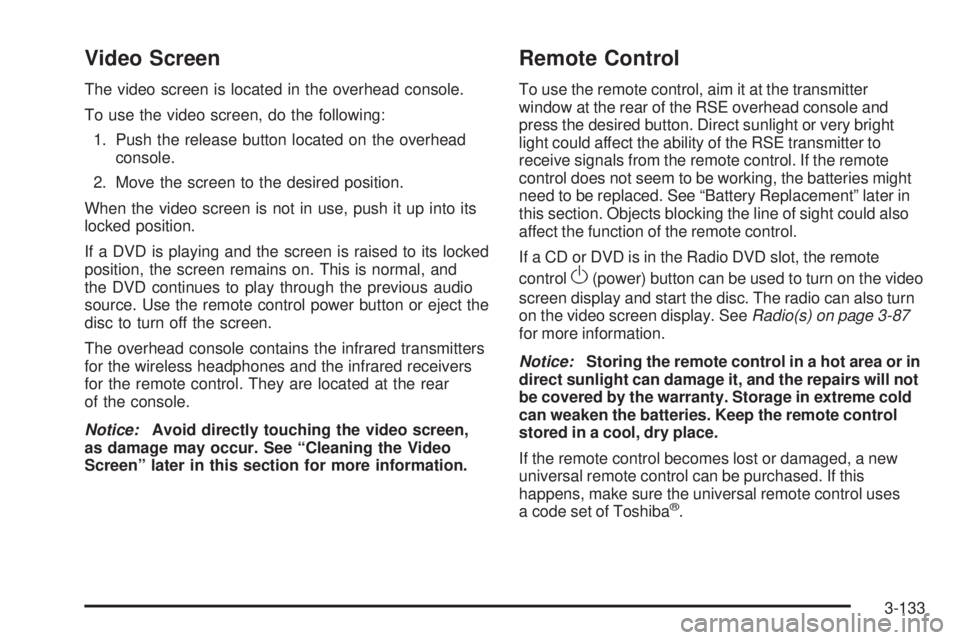
The video screen is located in the overhead console.
To use the video screen, do the following:
1. Push the release button located on the overhead
console.
2. Move the screen to the desired position.
When the video screen is not in use, push it up into its
locked position.
If a DVD is playing and the screen is raised to its locked
position, the screen remains on. This is normal, and
the DVD continues to play through the previous audio
source. Use the remote control power button or eject the
disc to turn off the screen.
The overhead console contains the infrared transmitters
for the wireless headphones and the infrared receivers
for the remote control. They are located at the rear
of the console.
Notice:Avoid directly touching the video screen,
as damage may occur. See “Cleaning the Video
Screen” later in this section for more information.
Remote Control
To use the remote control, aim it at the transmitter
window at the rear of the RSE overhead console and
press the desired button. Direct sunlight or very bright
light could affect the ability of the RSE transmitter to
receive signals from the remote control. If the remote
control does not seem to be working, the batteries might
need to be replaced. See “Battery Replacement” later in
this section. Objects blocking the line of sight could also
affect the function of the remote control.
If a CD or DVD is in the Radio DVD slot, the remote
control
O(power) button can be used to turn on the video
screen display and start the disc. The radio can also turn
on the video screen display. SeeRadio(s) on page 3-87
for more information.
Notice:Storing the remote control in a hot area or in
direct sunlight can damage it, and the repairs will not
be covered by the warranty. Storage in extreme cold
can weaken the batteries. Keep the remote control
stored in a cool, dry place.
If the remote control becomes lost or damaged, a new
universal remote control can be purchased. If this
happens, make sure the universal remote control uses
a code set of Toshiba
®.
3-133
Page 318 of 602
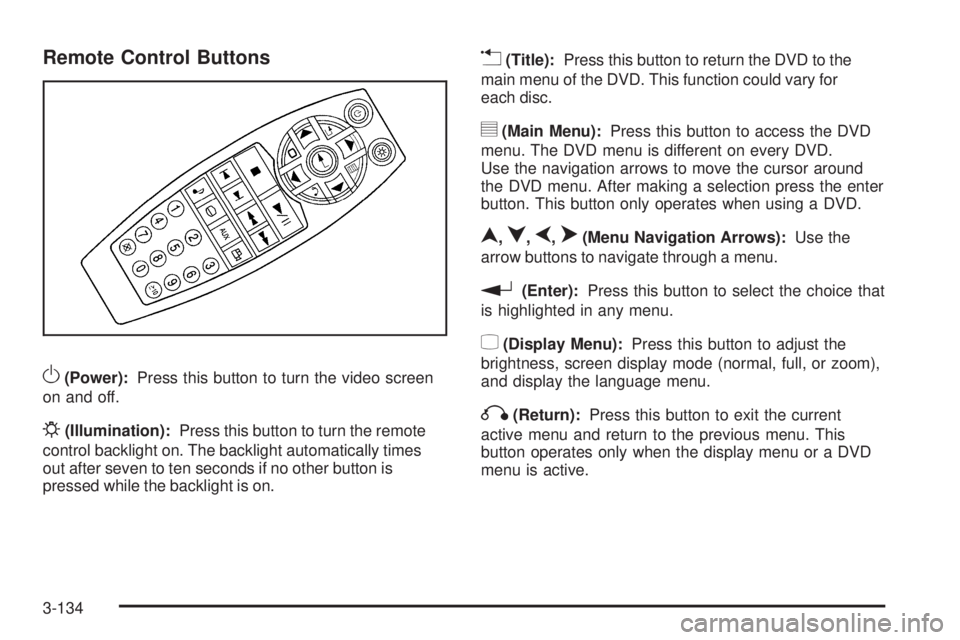
Remote Control Buttons
O(Power):Press this button to turn the video screen
on and off.
P(Illumination):Press this button to turn the remote
control backlight on. The backlight automatically times
out after seven to ten seconds if no other button is
pressed while the backlight is on.
v(Title):Press this button to return the DVD to the
main menu of the DVD. This function could vary for
each disc.
y(Main Menu):Press this button to access the DVD
menu. The DVD menu is different on every DVD.
Use the navigation arrows to move the cursor around
the DVD menu. After making a selection press the enter
button. This button only operates when using a DVD.
n,q,p,o(Menu Navigation Arrows):Use the
arrow buttons to navigate through a menu.
r(Enter):Press this button to select the choice that
is highlighted in any menu.
z(Display Menu):Press this button to adjust the
brightness, screen display mode (normal, full, or zoom),
and display the language menu.
q(Return):Press this button to exit the current
active menu and return to the previous menu. This
button operates only when the display menu or a DVD
menu is active.
3-134
Page 320 of 602
d(Camera):Press this button to change camera
angles on DVDs that have this feature while a DVD is
playing. The format and content of this function vary for
each disc.
1 through 0 (Numeric Keypad):The numeric keypad
provides the capability of direct chapter or track
number selection.
\(Clear):Press this button within three seconds after
entering a numeric selection, to clear all numerical inputs.
}10 (Double Digit Entries):Press this button to
select chapter or track numbers greater than nine.
Press this button before entering the number.
Battery Replacement
To change the remote control batteries, do the following:
1. Slide the rear cover back on the remote control.
2. Replace the two batteries in the compartment. Make
sure they are installed correctly using the diagram
on the inside of the remote control.
3. Replace the battery cover.If the remote control is to be stored for a long period of
time, remove the batteries and keep them in a cool,
dry place.
Problem Recommended Action
No power. The ignition might not be
turned ON/RUN or in
ACC/ACCESSORY.
The picture does not ll the
screen. There are black
borders on the top and
bottom or on both sides or
it looks stretched out.Check the display mode
settings in the setup menu
by pressing the display
menu button on the remote
control.
In auxiliary mode, the
picture moves or scrolls.Check the auxiliary input
connections at both
devices.
The remote control does
not work.Check to make sure there
is no obstruction between
the remote control and the
transmitter window.
Check the batteries to
make sure they are not
dead or installed
incorrectly.
3-136
Page 594 of 602
Hood
Checking Things Under................................5-14
Release.....................................................5-14
Horn ............................................................... 3-8
How to Wear Safety Belts Properly...................1-22
I
Ignition Positions.............................................2-22
Infants and Young Children, Restraints...............1-41
Ination - Tire Pressure...................................5-76
Instrument Panel
Brightness..................................................3-20
Cluster.......................................................3-34
Overview...............................................3-4, 3-6
Storage Area..............................................2-81
Introduction...................................................... 6-2
J
Jump Starting.................................................5-46
K
Keyless Entry, Remote Operation........................ 2-5
Keyless Entry System....................................... 2-4
Keys............................................................... 2-3
L
Labeling, Tire Sidewall.....................................5-68
Lamp
Malfunction Indicator....................................3-45
Lamps
Auxiliary Roof Mounted Lamp........................3-19
Cargo........................................................3-21
Daytime Running (DRL)................................3-17
Dome ........................................................3-20
Dome Lamp Override...................................3-20
License Plate..............................................5-65
Puddle.......................................................3-19
Reading.....................................................3-21
Lap Belt........................................................1-36
Lap-Shoulder Belt...........................................1-30
LATCH System for Child Restraints...................1-49
Latches, Seatback..........................................1-13
Lighting
Entry.........................................................3-20
Exit...........................................................3-20
Lights
Airbag Off..................................................3-38
Airbag Readiness........................................3-37
Antilock Brake System (ABS) Warning............3-43
Brake System Warning.................................3-42
Charging System.........................................3-41
Cruise Control.............................................3-50
8
Page 596 of 602
Malfunction Indicator Lamp...............................3-45
Manual Lumbar Controls.................................... 1-6
Manual Seats................................................... 1-4
Manual Windows............................................2-16
Memory Seat, Mirrors, and Pedals...................... 1-8
Message
DIC Warnings and Messages........................3-66
Mirrors
Automatic Dimming Rearview........................2-57
Manual Rearview Mirror................................2-57
Outside Convex Mirror.................................2-60
Outside Heated Mirrors................................2-60
Outside Manual Mirrors................................2-57
Outside Power Foldaway Mirrors....................2-59
Outside Power Mirrors..................................2-58
Outside Towing Mirrors.................................2-58
Park Tilt .....................................................2-60
MP3 ..................................................3-106, 3-111
N
Navigation System, Privacy..............................7-19
Navigation/Radio System, see Navigation
Manual.....................................................3-118
New Vehicle Break-In......................................2-22
Noise Control System, Tampering......................5-57
O
Odometer......................................................3-35
Odometer, Trip...............................................3-35
Off-Road .......................................................4-13
Driving.......................................................4-13
Recovery....................................................4-10
Oil
Engine.......................................................5-17
Engine Oil Life System.................................5-20
Pressure Gage............................................3-48
Pressure Light.............................................3-49
Older Children, Restraints................................1-38
Online Owner Center........................................ 7-5
OnStar, Privacy..............................................7-19
OnStar
®System, see OnStar®Manual...............2-70
Operation, Universal Home Remote System........2-74
Outlet Adjustment............................................3-33
Outlets
Accessory Power.........................................3-22
Outside
Convex Mirror.............................................2-60
Heated Mirrors............................................2-60
Manual Mirrors............................................2-57
Power Foldaway Mirrors...............................2-59
Power Mirrors.............................................2-58
Towing Mirrors............................................2-58
10
Page 600 of 602
Snow Plow....................................................4-40
Spare Tire....................................................5-114
Installing...................................................5-100
Removing...................................................5-95
Storing.....................................................5-110
Specications and Capacities..........................5-131
Speedometer..................................................3-35
StabiliTrak
®Indicator Light...............................3-44
StabiliTrak®System.......................................... 4-6
Start Vehicle, Remote....................................... 2-7
Starting the Engine.........................................2-24
Steering.......................................................... 4-9
Steering Wheel Controls, Audio.......................3-140
Steering Wheel, Tilt Wheel................................. 3-8
Storage Areas
Cargo Management System..........................2-83
Center Console...........................................2-81
Cupholders.................................................2-80
Glove Box..................................................2-80
Instrument Panel.........................................2-81
Luggage Carrier..........................................2-82
Rear Seat Armrest.......................................2-82
Stuck in Sand, Mud, Ice, or Snow.....................4-32
Sun Visors.....................................................2-18
Sunroof.........................................................2-84
T
Tachometer....................................................3-35
Tailgate.........................................................2-13
Taillamps
Turn Signal, Stoplamps and Back-up Lamps....5-63
Tampering with Noise Control System
Prohibited...................................................5-57
Text Telephone (TTY) Users............................... 7-6
Theft-Deterrent Feature..................................3-140
Theft-Deterrent Systems...................................2-18
Content Theft-Deterrent................................2-18
PASS-Key
®III+ Electronic Immobilizer............2-20
PASS-Key®III+ Electronic Immobilizer
Operation................................................2-20
Throttle, Adjustable..........................................2-26
Tilt Wheel........................................................ 3-8
Time, Setting..................................................3-85
Tire
Pressure Light.............................................3-45
Tires.............................................................5-67
Aluminum or Chrome-Plated Wheels,
Cleaning...............................................5-120
Buying New Tires........................................5-86
Chains.......................................................5-92
Changing a Flat Tire....................................5-94
14