power steering GMC SIERRA 1500 2011 User Guide
[x] Cancel search | Manufacturer: GMC, Model Year: 2011, Model line: SIERRA 1500, Model: GMC SIERRA 1500 2011Pages: 594, PDF Size: 7.88 MB
Page 298 of 594
Black plate (4,1)GMC Sierra Owner Manual - 2011
9-4 Driving and Operating
And, of course, actual stopping
distances vary greatly with the
surface of the road, whether it is
pavement or gravel; the condition
of the road, whether it is wet, dry,
or icy; tire tread; the condition of the
brakes; the weight of the vehicle;
and the amount of brake force
applied.
Avoid needless heavy
braking. Some people drive in
spurts—heavy acceleration
followed by heavy braking —rather
than keeping pace with traffic.
This is a mistake. The brakes
might not have time to cool between
hard stops. The brakes will wear
out much faster with a lot of heavy
braking. Keeping pace with the
traffic and allowing realistic following
distances eliminates a lot of
unnecessary braking. That means
better braking and longer brake life.
If the engine ever stops while the
vehicle is being driven, brake
normally but do not pump the brakes. If the brakes are pumped,
the pedal could get harder to push
down. If the engine stops, there will
still be some power brake assist but
it will be used when the brake is
applied. Once the power assist is
used up, it can take longer to stop
and the brake pedal will be harder
to push.
Adding non‐dealer accessories
can affect vehicle performance.
See
Accessories and Modifications
on page 10‑3.
Steering
Power Steering
If the vehicle is a hybrid, see
the hybrid supplement for more
information.
If power steering assist is lost
because the engine stops or the
power steering system is not
functioning, the vehicle can be
steered but it will take more effort.
Steering Tips
It is important to take curves at a
reasonable speed.
Traction in a curve depends on the
condition of the tires and the road
surface, the angle at which the
curve is banked, and vehicle speed.
While in a curve, speed is the one
factor that can be controlled.
If there is a need to reduce speed,
do it before entering the curve, while
the front wheels are straight.
Try to adjust the speed so you can
drive through the curve. Maintain a
reasonable, steady speed. Wait to
accelerate until out of the curve,
and then accelerate gently into
the straightaway.
Page 307 of 594
Black plate (13,1)GMC Sierra Owner Manual - 2011
Driving and Operating 9-13
Driving Uphill
Once you decide it is safe to drive
up the hill:
.Use a low gear and get a firm
grip on the steering wheel.
.Get a smooth start up the hill
and try to maintain speed.
Not using more power than
needed can avoid spinning
the wheels or sliding.
{WARNING
Turning or driving across steep
hills can be dangerous. You could
lose traction, slide sideways, and
possibly roll over. You could be
seriously injured or killed. When
driving up hills, always try to go
straight up.
.Try to drive straight up the hill if
at all possible. If the path twists
and turns, you might want to find
another route.
.Ease up on the speed as you
approach the top of the hill.
.Attach a flag to the vehicle to
be more visible to approaching
traffic on trails or hills.
.Sound the horn as you approach
the top of the hill to let opposing
traffic know you are there.
.Use headlamps even during the
day to make the vehicle more
visible to oncoming traffic.
{WARNING
Driving to the top (crest) of a
hill at full speed can cause an
accident. There could be a
drop-off, embankment, cliff,
or even another vehicle. You
could be seriously injured or
killed. As you near the top of a
hill, slow down and stay alert.If the vehicle stalls, or is about to
stall, and you cannot make it up
the hill:
.Push the brake pedal to stop
the vehicle and keep it from
rolling backwards and apply
the parking brake.
.If the engine is still running, shift
the transmission to R (Reverse),
release the parking brake, and
slowly back down the hill in
R (Reverse).
.If the engine has stopped
running, you need to restart it.
With the brake pedal pressed
and the parking brake still
applied, shift the transmission to
P (Park) and restart the engine.
Then, shift to R (Reverse),
release the parking brake,
and slowly back down the
hill as straight as possible
in R (Reverse).
Page 330 of 594
Black plate (36,1)GMC Sierra Owner Manual - 2011
9-36 Driving and Operating
A (STOPPING THE ENGINE/
LOCK/OFF):When the vehicle is
stopped, turn the ignition switch to
LOCK/OFF to turn the engine off.
Retained Accessory Power (RAP)
will remain active. See Retained
Accessory Power (RAP) on
page 9‑40.
This position locks the ignition.
It also locks the transmission on
automatic transmission vehicles.
The key can be removed in
LOCK/OFF.
Do not turn the engine off when the
vehicle is moving. This will cause a
loss of power assist in the brake
and steering systems and disable
the airbags. In an emergency:
1. Brake using a firm and steady
pressure. Do not pump the
brakes repeatedly. This may
deplete power assist, requiring
increased brake pedal force.
2. Shift the vehicle to neutral. This can be done while the vehicle is
moving. After shifting to neutral,
firmly apply the brakes and steer
the vehicle to a safe location.
3. Come to a complete stop, shift to P (Park), and turn the ignition
to LOCK/OFF. On vehicles with
an automatic transmission, the
shift lever must be in P (Park)
to turn the ignition switch to the
LOCK/OFF position.
4. Set the parking brake. See Parking Brake on page 9‑69. The steering can bind with the
wheels turned off center. If this
happens, move the steering wheel
from right to left while turning the
key to ACC/ACCESSORY. If this
doesn't work, then the vehicle
needs service.
Notice:
Using a tool to force the
key to turn in the ignition could
cause damage to the switch or
break the key. Use the correct
key, make sure it is all the way in,
and turn it only with your hand.
If the key cannot be turned by
hand, see your dealer.
B (ACC/ACCESSORY): This
position lets things like the radio
and the windshield wipers operate
while the engine is off. Use this
position if the vehicle must be
pushed or towed.
Page 348 of 594
Black plate (54,1)GMC Sierra Owner Manual - 2011
9-54 Driving and Operating
Drive Systems
Four-Wheel Drive
If the vehicle has Four-Wheel
Drive, you can send the engine's
driving power to all four wheels
for extra traction. To get the most
satisfaction out of Four-Wheel
Drive, you must be familiar with its
operation. Read the following before
using Four-Wheel Drive. See the
appropriate text for the transfer
case in the vehicle.
Notice:Driving on clean, dry
pavement in Four-Wheel Drive
High or Four-Wheel Drive Low for
an extended period of time may
cause premature wear on the
vehicle's powertrain. Do not
drive on clean, dry pavement
in Four-Wheel Drive High or
Four-Wheel Drive Low for
extended periods of time. While driving on clean dry pavement
and during tight turns, you may
experience vibration in the steering
system.
If the vehicle has StabiliTrak®,
shifting into Four-Wheel Drive
Low will turn Traction Control and
StabiliTrak off. See StabiliTrak
®
System on page 9‑70.
Front Axle
The front axle engages and
disengages automatically when you
shift the transfer case. Some delay
for the axle to engage or disengage
is normal.
Manual Transfer Case
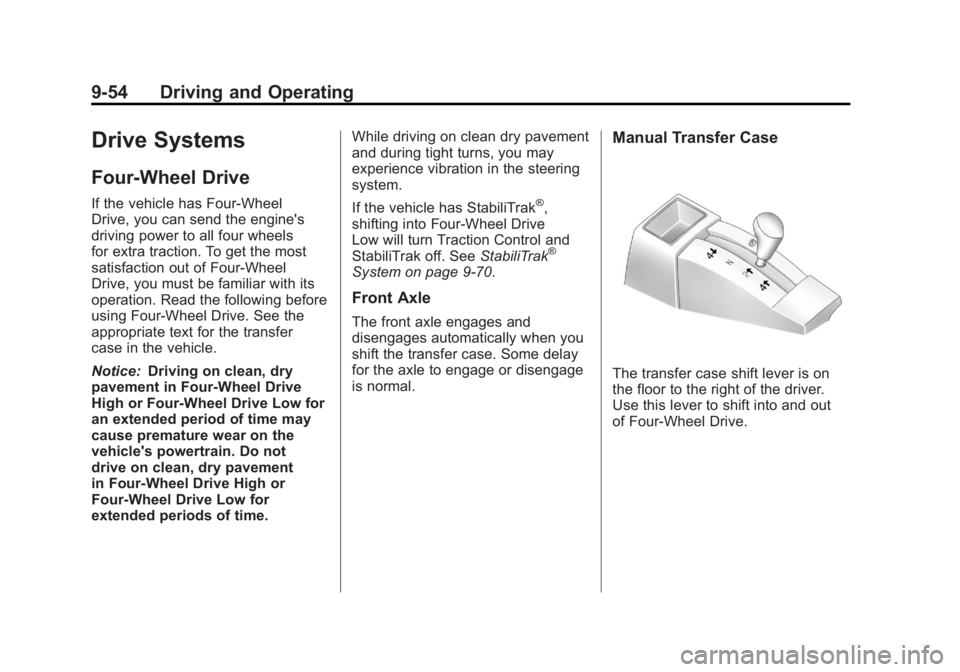
The transfer case shift lever is on
the floor to the right of the driver.
Use this lever to shift into and out
of Four-Wheel Drive.
Page 363 of 594
Black plate (69,1)GMC Sierra Owner Manual - 2011
Driving and Operating 9-69
Braking in Emergencies
ABS allows the driver to steer and
brake at the same time. In many
emergencies, steering can help
more than even the very best
braking.
Parking Brake
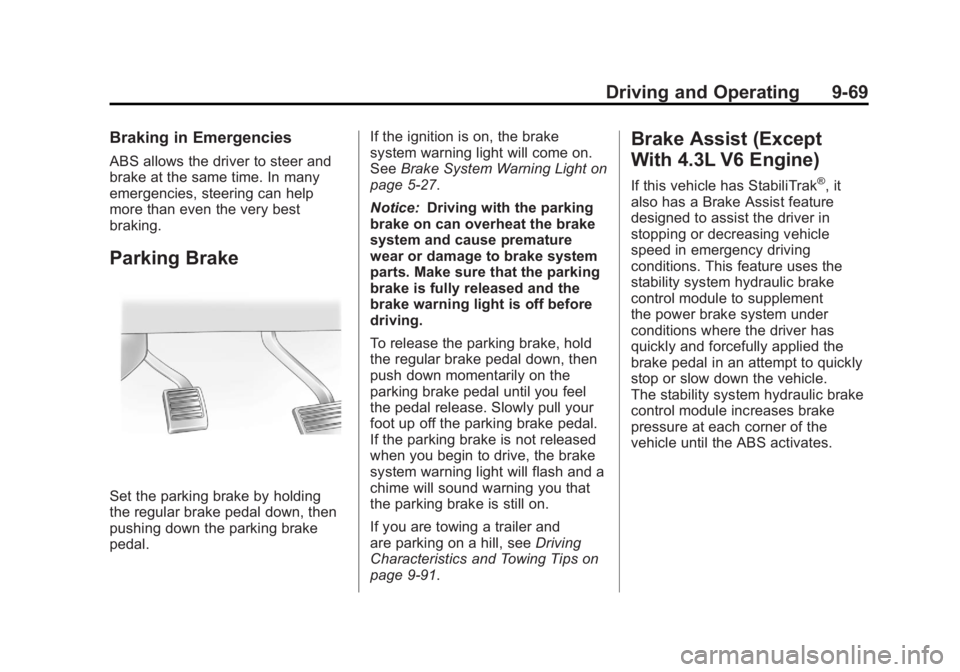
Set the parking brake by holding
the regular brake pedal down, then
pushing down the parking brake
pedal.If the ignition is on, the brake
system warning light will come on.
See
Brake System Warning Light on
page 5‑27.
Notice: Driving with the parking
brake on can overheat the brake
system and cause premature
wear or damage to brake system
parts. Make sure that the parking
brake is fully released and the
brake warning light is off before
driving.
To release the parking brake, hold
the regular brake pedal down, then
push down momentarily on the
parking brake pedal until you feel
the pedal release. Slowly pull your
foot up off the parking brake pedal.
If the parking brake is not released
when you begin to drive, the brake
system warning light will flash and a
chime will sound warning you that
the parking brake is still on.
If you are towing a trailer and
are parking on a hill, see Driving
Characteristics and Towing Tips on
page 9‑91.
Brake Assist (Except
With 4.3L V6 Engine)
If this vehicle has StabiliTrak®, it
also has a Brake Assist feature
designed to assist the driver in
stopping or decreasing vehicle
speed in emergency driving
conditions. This feature uses the
stability system hydraulic brake
control module to supplement
the power brake system under
conditions where the driver has
quickly and forcefully applied the
brake pedal in an attempt to quickly
stop or slow down the vehicle.
The stability system hydraulic brake
control module increases brake
pressure at each corner of the
vehicle until the ABS activates.
Page 413 of 594
Black plate (119,1)GMC Sierra Owner Manual - 2011
Driving and Operating 9-119
When trailering, make sure of the
following:
.The ITBC system is used only
with trailers that are equipped
with electric brakes.
.All applicable local and federal
laws and regulations are
followed.
.All electrical and mechanical
connections to the trailer are
made correctly.
.The trailer’s brakes are in proper
working condition.
.The trailer and vehicle are
properly loaded for the towing
condition.
The ITBC system is a
factory-installed item. Out‐of‐factory
installation of this system should not
be attempted. GM is not responsible
for warranty or performance of the
system resulting from out‐of‐factory
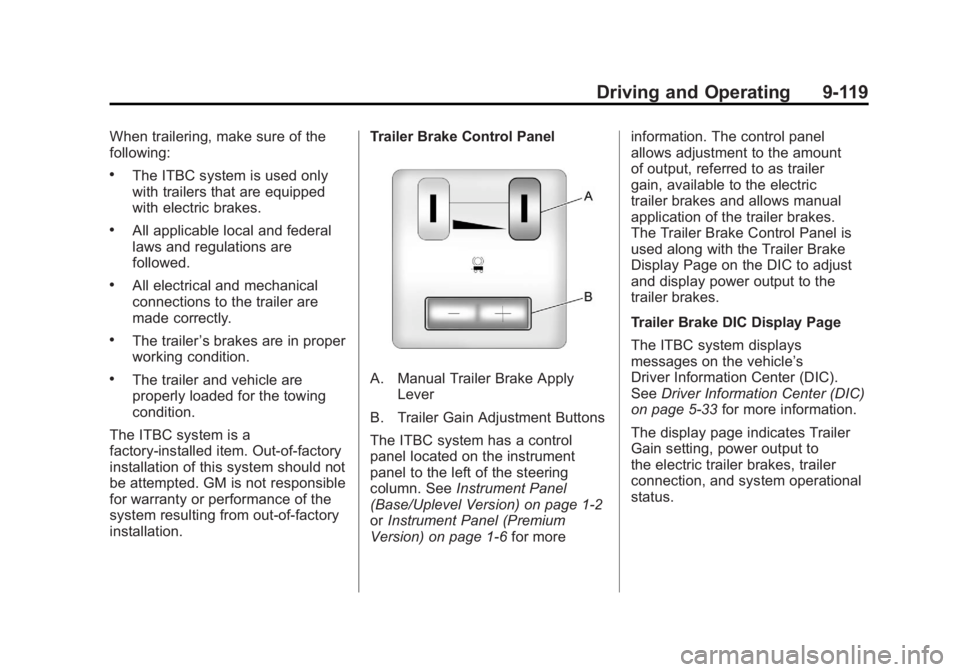
installation. Trailer Brake Control PanelA. Manual Trailer Brake Apply
Lever
B. Trailer Gain Adjustment Buttons
The ITBC system has a control
panel located on the instrument
panel to the left of the steering
column. See Instrument Panel
(Base/Uplevel Version) on page 1‑2
or Instrument Panel (Premium
Version) on page 1‑6 for moreinformation. The control panel
allows adjustment to the amount
of output, referred to as trailer
gain, available to the electric
trailer brakes and allows manual
application of the trailer brakes.
The Trailer Brake Control Panel is
used along with the Trailer Brake
Display Page on the DIC to adjust
and display power output to the
trailer brakes.
Trailer Brake DIC Display Page
The ITBC system displays
messages on the vehicle’s
Driver Information Center (DIC).
See
Driver Information Center (DIC)
on page 5‑33 for more information.
The display page indicates Trailer
Gain setting, power output to
the electric trailer brakes, trailer
connection, and system operational
status.
Page 425 of 594
Black plate (1,1)GMC Sierra Owner Manual - 2011
Vehicle Care 10-1
Vehicle Care
General Information
General Information . . . . . . . . . . 10-2
California Proposition65 Warning . . . . . . . . . . . . . . . . . 10-3
California Perchlorate Materials Requirements . . . . 10-3
Accessories and Modifications . . . . . . . . . . . . . . . 10-3
Vehicle Checks
Doing Your OwnService Work . . . . . . . . . . . . . . . 10-4
Hood . . . . . . . . . . . . . . . . . . . . . . . . 10-5
Engine Compartment Overview . . . . . . . . . . . . . . . . . . . 10-6
Engine Oil . . . . . . . . . . . . . . . . . . . 10-7
Engine Oil Life System . . . . . 10-11
Automatic Transmission Fluid (4-Speed
Transmission) . . . . . . . . . . . . . 10-13
Automatic Transmission Fluid (6-Speed
Transmission) . . . . . . . . . . . . . 10-16
Engine Air Cleaner/Filter . . . . 10-19
Cooling System . . . . . . . . . . . . 10-20
Engine Coolant . . . . . . . . . . . . . 10-22 Engine Overheating . . . . . . . . 10-25
Overheated Engine
Protection
Operating Mode . . . . . . . . . . . 10-28
Engine Fan . . . . . . . . . . . . . . . . . 10-28
Power Steering Fluid . . . . . . . 10-29
Washer Fluid . . . . . . . . . . . . . . . 10-29
Brakes . . . . . . . . . . . . . . . . . . . . . 10-30
Brake Fluid . . . . . . . . . . . . . . . . . 10-32
Battery . . . . . . . . . . . . . . . . . . . . . 10-34
Four-Wheel Drive . . . . . . . . . . . 10-34
Front Axle . . . . . . . . . . . . . . . . . . 10-36
Rear Axle . . . . . . . . . . . . . . . . . . 10-37
Noise Control System . . . . . . 10-38
Starter Switch Check . . . . . . . 10-39
Automatic Transmission Shift
Lock Control Function
Check . . . . . . . . . . . . . . . . . . . . . 10-40
Ignition Transmission Lock Check . . . . . . . . . . . . . . . . . . . . . 10-40
Park Brake and P (Park) Mechanism Check . . . . . . . . 10-40
Wiper Blade Replacement . . . . . . . . . . . . . . 10-41
Glass Replacement . . . . . . . . 10-41
Headlamp Aiming
Headlamp Aiming . . . . . . . . . . 10-42
Bulb Replacement
Bulb Replacement . . . . . . . . . . 10-44
Halogen Bulbs . . . . . . . . . . . . . . 10-44
Headlamps . . . . . . . . . . . . . . . . . 10-44
Pick-Up Box Identification and Fender Marker
Lamps . . . . . . . . . . . . . . . . . . . . 10-45
Taillamps (Chassis Cab Models) . . . . . . . . . . . . . . . . . . . 10-46
Taillamps, Turn Signal, Stoplamps, and Back-Up
Lamps . . . . . . . . . . . . . . . . . . . . 10-46
Center High-Mounted Stoplamp (CHMSL) and
Cargo Lamp . . . . . . . . . . . . . . 10-47
License Plate Lamp . . . . . . . . 10-48
Replacement Bulbs . . . . . . . . . 10-48
Electrical System
Electrical System Overload . . . . . . . . . . . . . . . . . . 10-49
Fuses and Circuit Breakers . . . . . . . . . . . . . . . . . . 10-50
Engine Compartment Fuse Block . . . . . . . . . . . . . . . . . . . . . 10-50
Instrument Panel Fuse Block . . . . . . . . . . . . . . . . . . . . . 10-54
Page 431 of 594
Black plate (7,1)GMC Sierra Owner Manual - 2011
Vehicle Care 10-7
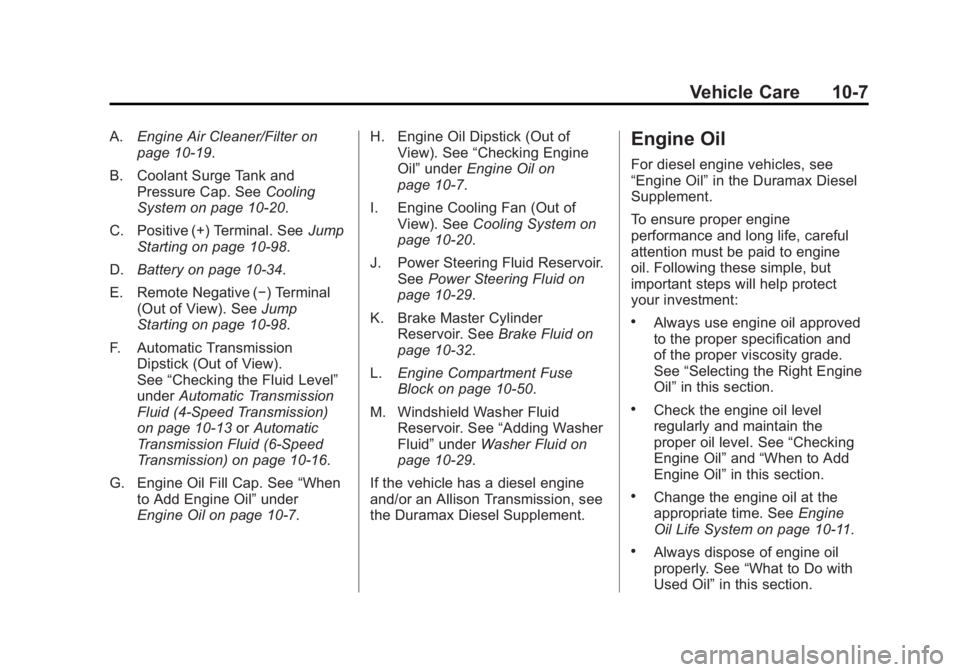
A.Engine Air Cleaner/Filter on
page 10‑19.
B. Coolant Surge Tank and Pressure Cap. See Cooling
System on page 10‑20.
C. Positive (+) Terminal. See Jump
Starting on page 10‑98.
D. Battery on page 10‑34.
E. Remote Negative (−) Terminal (Out of View). See Jump
Starting on page 10‑98.
F. Automatic Transmission Dipstick (Out of View).
See “Checking the Fluid Level”
under Automatic Transmission
Fluid (4-Speed Transmission)
on page 10‑13 orAutomatic
Transmission Fluid (6-Speed
Transmission) on page 10‑16.
G. Engine Oil Fill Cap. See “When
to Add Engine Oil” under
Engine Oil on page 10‑7. H. Engine Oil Dipstick (Out of
View). See “Checking Engine
Oil” under Engine Oil on
page 10‑7.
I. Engine Cooling Fan (Out of View). See Cooling System on
page 10‑20.
J. Power Steering Fluid Reservoir. See Power Steering Fluid on
page 10‑29.
K. Brake Master Cylinder Reservoir. See Brake Fluid on
page 10‑32.
L. Engine Compartment Fuse
Block on page 10‑50.
M. Windshield Washer Fluid Reservoir. See “Adding Washer
Fluid” under Washer Fluid on
page 10‑29.
If the vehicle has a diesel engine
and/or an Allison Transmission, see
the Duramax Diesel Supplement.Engine Oil
For diesel engine vehicles, see
“Engine Oil” in the Duramax Diesel
Supplement.
To ensure proper engine
performance and long life, careful
attention must be paid to engine
oil. Following these simple, but
important steps will help protect
your investment:
.Always use engine oil approved
to the proper specification and
of the proper viscosity grade.
See “Selecting the Right Engine
Oil” in this section.
.Check the engine oil level
regularly and maintain the
proper oil level. See “Checking
Engine Oil” and“When to Add
Engine Oil” in this section.
.Change the engine oil at the
appropriate time. See Engine
Oil Life System on page 10‑11.
.Always dispose of engine oil
properly. See “What to Do with
Used Oil” in this section.
Page 453 of 594
Black plate (29,1)GMC Sierra Owner Manual - 2011
Vehicle Care 10-29
Power Steering Fluid
SeeEngine Compartment Overview
on page 10‑6 for reservoir location.
When to Check Power Steering
Fluid
It is not necessary to regularly
check power steering fluid unless
there is a leak suspected in the
system or an unusual noise is
heard. A fluid loss in this system
could indicate a problem. Have the
system inspected and repaired.
How to Check Power Steering
Fluid
To check the power steering fluid:
1. Turn the key off and let the
engine compartment cool down.
2. Wipe the cap and the top of the reservoir clean.
3. Unscrew the cap and wipe the dipstick with a clean rag.
4. Replace the cap and completely tighten it.
5. Remove the cap again and look at the fluid level on the dipstick.
The level should be at the
FULL COLD mark. If necessary,
add only enough fluid to bring the
level up to the mark.
What to Use
To determine what kind of fluid to
use, see Recommended Fluids and
Lubricants on page 11‑8. Always
use the proper fluid.
Notice: Use of the incorrect fluid
may damage the vehicle and the
damages may not be covered by
the vehicle's warranty. Always
use the correct fluid listed in
Recommended Fluids and
Lubricants on page 11‑8.
Washer Fluid
What to Use
When windshield washer fluid needs
to be added, be sure to read the
manufacturer's instructions before
use. Use a fluid that has sufficient
protection against freezing in an
area where the temperature may
fall below freezing.
Page 478 of 594
Black plate (54,1)GMC Sierra Owner Manual - 2011
10-54 Vehicle Care
RelaysUsage
REAR
DEFOG Rear Defogger
RUN/CRNK Switched Power
Instrument Panel Fuse
Block
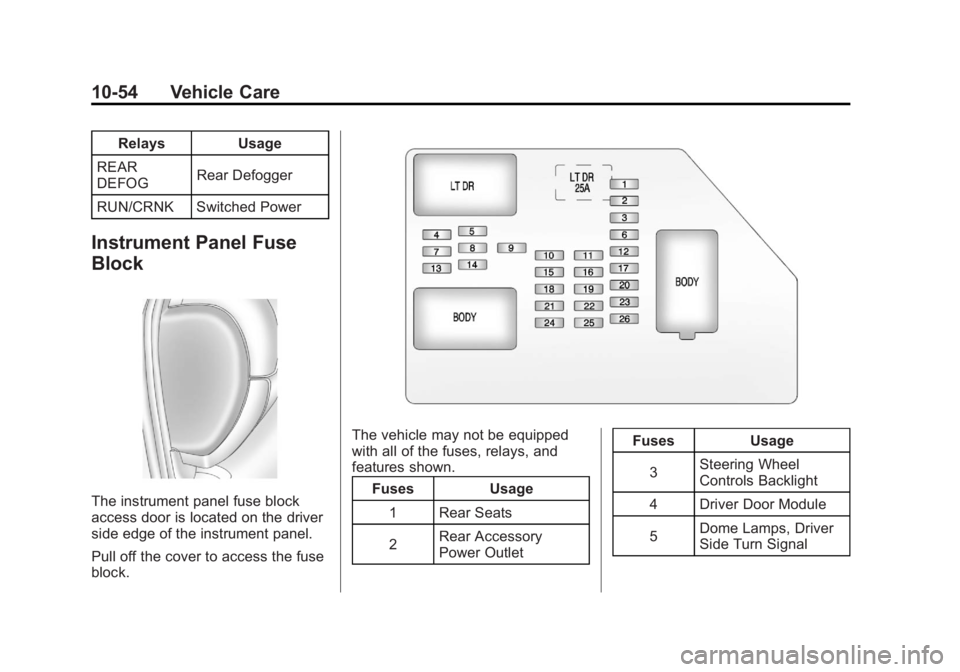
The instrument panel fuse block
access door is located on the driver
side edge of the instrument panel.
Pull off the cover to access the fuse
block.
The vehicle may not be equipped
with all of the fuses, relays, and
features shown. Fuses Usage
1 Rear Seats
2 Rear Accessory
Power Outlet Fuses Usage
3 Steering Wheel
Controls Backlight
4 Driver Door Module
5 Dome Lamps, Driver
Side Turn Signal