rear view mirror GMC SIERRA 1500 2011 User Guide
[x] Cancel search | Manufacturer: GMC, Model Year: 2011, Model line: SIERRA 1500, Model: GMC SIERRA 1500 2011Pages: 594, PDF Size: 7.88 MB
Page 314 of 594
Black plate (20,1)GMC Sierra Owner Manual - 2011
9-20 Driving and Operating
Other Rainy Weather Tips
Besides slowing down, other wet
weather driving tips include:
.Allow extra following distance.
.Pass with caution.
.Keep windshield wiping
equipment in good shape.
.Keep the windshield washer fluid
reservoir filled.
.Have good tires with proper
tread depth. SeeTires on
page 10‑57.
.Turn off cruise control.
Highway Hypnosis
Always be alert and pay attention
to your surroundings while driving.
If you become tired or sleepy, find
a safe place to park the vehicle
and rest.
Other driving tips include:
.Keep the vehicle well ventilated.
.Keep interior temperature cool.
.Keep your eyes moving —scan
the road ahead and to the sides.
.Check the rearview mirror and
vehicle instruments often.
Hill and Mountain Roads
Driving on steep hills or through
mountains is different than driving
on flat or rolling terrain. Tips for
driving in these conditions include:
.Keep the vehicle serviced and in
good shape.
.Check all fluid levels and brakes,
tires, cooling system, and
transmission.
.Shift to a lower gear when going
down steep or long hills.
{WARNING
If you do not shift down, the
brakes could get so hot that they
would not work well. You would
then have poor braking or even
none going down a hill. You could
crash. Shift down to let the engine
assist the brakes on a steep
downhill slope.
Page 373 of 594
Black plate (79,1)GMC Sierra Owner Manual - 2011
Driving and Operating 9-79
Vehicles without Navigation
System
The Rear Vision Camera system is
designed to help the driver when
backing up by displaying a view of
the area behind the vehicle. When
the key is in the ON/RUN position
and the driver shifts the vehicle
into R (Reverse), the video image
automatically appears on the inside
rearview mirror. Once the driver
shifts out of R (Reverse), the video
image automatically disappears
from the inside rearview mirror.
Turning the Rear Vision Camera
System Off or On
To turn off the RVC system, press
and hold
z, located on the inside
rearview mirror, until the left
indicator light turns off. The RVC
display is now disabled. To turn the RVC system on again,
press and hold
zuntil the left
indicator light illuminates. The RVC
system display is now enabled and
the display will appear in the mirror
normally.
Vehicles with Navigation
System
The RVC system is designed to
help the driver when backing up by
displaying a view of the area behind
the vehicle. When the driver shifts
the vehicle into R (Reverse), the
video image automatically appears
on the navigation screen. Once the
driver shifts out of R (Reverse), the
navigation screen will go back to the
last screen that had been displayed,
after a delay. Turning the Rear Vision Camera
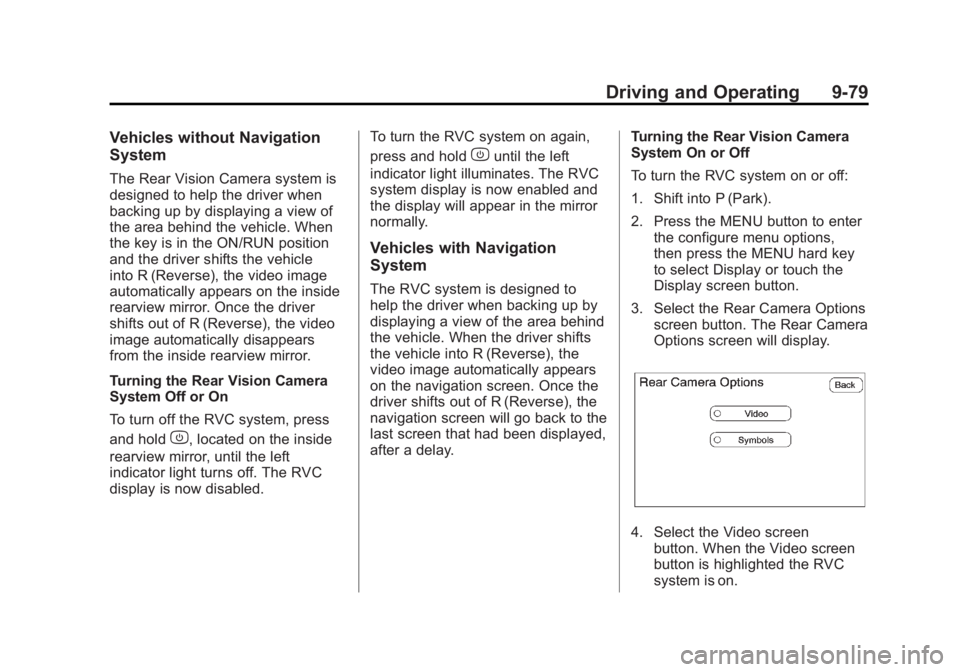
System On or Off
To turn the RVC system on or off:
1. Shift into P (Park).
2. Press the MENU button to enter
the configure menu options,
then press the MENU hard key
to select Display or touch the
Display screen button.
3. Select the Rear Camera Options screen button. The Rear Camera
Options screen will display.
4. Select the Video screenbutton. When the Video screen
button is highlighted the RVC
system is on.
Page 377 of 594
Black plate (83,1)GMC Sierra Owner Manual - 2011
Driving and Operating 9-83
When the System Does Not
Seem to Work Properly
The RVC system might not work
properly or display a clear image if:
.The RVC is turned off.
See“Turning the Rear Camera
System On or Off” earlier in this
section.
.It is dark.
.The sun or the beam of
headlights is shining directly
into the camera lens.
.Ice, snow, mud, or anything else
builds up on the camera lens.
Clean the lens, rinse it with
water, and wipe it with a soft
cloth.
.The back of the vehicle is in an
accident. If this happens, the
position and mounting angle
of the camera can change or
the camera can be affected.
Be sure to have the camera
and its position and mounting
angle checked at your dealer.
The RVC system display in the
rearview mirror may turn off or not
appear as expected due to one
of the following conditions. If this
occurs the left indicator light on
the mirror will flash.
.A slow flash may indicate a
loss of video signal, or no video
signal present during the reverse
cycle.
.A fast flash may indicate that
the display has been on for the
maximum allowable time during
a reverse cycle, or the display
has reached an Over
Temperature limit.
The fast flash conditions are
used to protect the video
device from high temperature
conditions. Once conditions
return to normal the device will
reset and the green indicator
will stop flashing.
During any of these fault conditions,
the display will be blank and the
indicator will continue to flash as
long as the vehicle is in R (Reverse)
or until the conditions return to
normal.
Pressing and holding
zwhen the
left indicator light is flashing will turn
off the video display along with the
left indicator light.
Page 589 of 594
Black plate (9,1)GMC Sierra Owner Manual - 2011
INDEX i-9
Messages (cont.)Fuel System . . . . . . . . . . . . . . . . . . 5-46
Key and Lock . . . . . . . . . . . . . . . . . 5-46
Lamp . . . . . . . . . . . . . . . . . . . . . . . . . 5-46
Object Detection System . . . . . 5-46
Ride Control System . . . . . . . . . . 5-47
Starting the Vehicle . . . . . . . . . . . 5-48
Tire . . . . . . . . . . . . . . . . . . . . . . . . . . . 5-49
Transmission . . . . . . . . . . . . . . . . . 5-50
Vehicle . . . . . . . . . . . . . . . . . . . . . . . 5-41
Vehicle Reminder . . . . . . . . . . . . . 5-50
Washer Fluid . . . . . . . . . . . . . . . . . 5-51
Mirrors Automatic Dimming
Rearview . . . . . . . . . . . . . . . . . . . . 2-18
Convex . . . . . . . . . . . . . . . . . . . . . . . 2-15
Folding . . . . . . . . . . . . . . . . . . . . . . . 2-16
Heated . . . . . . . . . . . . . . . . . . . . . . . 2-17
Manual . . . . . . . . . . . . . . . . . . . . . . . 2-15
Manual Rearview . . . . . . . . . . . . . 2-18
Park Tilt . . . . . . . . . . . . . . . . . . . . . . 2-17
Power . . . . . . . . . . . . . . . . . . . . . . . . 2-16
Trailer Tow . . . . . . . . . . . . . . . . . . . . 2-15
Monitor System, Tire Pressure . . . . . . . . . . . . . . . . . . . . 10-68N
NavigationVehicle Data Recordingand Privacy . . . . . . . . . . . . . . . 13-18
New Vehicle Break-In . . . . . . . . . . 9-34
Noise Control System . . . . . . . . 10-38
O
Object Detection System Messages . . . . . . . . . . . . . . . . . . . . 5-46
Odometer . . . . . . . . . . . . . . . . . . . . . . 5-14 Trip . . . . . . . . . . . . . . . . . . . . . . . . . . . 5-14
Off-Road . . . . . . . . . . . . . . . . . . . . . . . 9-7
Driving . . . . . . . . . . . . . . . . . . . . . . . . . 9-7
Recovery . . . . . . . . . . . . . . . . . . . . . . 9-5
Oil Engine . . . . . . . . . . . . . . . . . . . . . . . . 10-7
Engine Oil Life System . . . . . .10-11
Engine Oil PressureGauge . . . . . . . . . . . . . . . . . . . . . . 5-16
Messages . . . . . . . . . . . . . . . . . . . . 5-45
Pressure Light . . . . . . . . . . . . . . . . 5-31 Older Children, Restraints . . . . . 3-49
Online Owner Center . . . . . . . . . . 13-6
OnStar
®System . . . . . . . . . . . . . . . 1-36
Operation, Infotainment System . . . . . . . . . . . . . . . . . . . . . . . . 7-2
Outlets Power . . . . . . . . . . . . . . . . . . . . . . . . 5-10
Overheated Engine Protection
Operating Mode . . . . . . . . . . . . . 10-28
Overheating, Engine . . . . . . . . . . 10-25
P
Park
Shifting Into . . . . . . . . . . . . . . . . . . . 9-41
Shifting Out of . . . . . . . . . . . . . . . . 9-43
Park Tilt Mirrors . . . . . . . . . . . . . . . . 2-17
Parking Assist, Ultrasonic . . . . . . . . . . . . . 9-76
Brake . . . . . . . . . . . . . . . . . . . . . . . . . 9-69
Brake and P (Park)Mechanism Check . . . . . . . . 10-40
Over Things That Burn . . . . . . . 9-43
Page 590 of 594
Black plate (10,1)GMC Sierra Owner Manual - 2011
i-10 INDEX
Passenger Airbag StatusIndicator . . . . . . . . . . . . . . . . . . . . . 5-23
Passenger Sensing System . . . 3-40
Perchlorate Materials Requirements, California . . . . . 10-3
Personalization Vehicle . . . . . . . . . . . . . . . . . . . . . . . 5-52
Phone Bluetooth . . . . . . . . . . . . . . . . . . . . . 7-50
Pickup Conversion to Chassis Cab . . . . . . . . . . . . . . . . 9-129
Pickup-Box Identification and Fender Marker
Lamps . . . . . . . . . . . . . . . . . . . . . . 10-45
Power Door Locks . . . . . . . . . . . . . . . . . . . . 2-8
Mirrors . . . . . . . . . . . . . . . . . . . . . . . . 2-16
Outlets . . . . . . . . . . . . . . . . . . . . . . . 5-10
Protection, Battery . . . . . . . . . . . . 6-10
Retained Accessory (RAP) . . . 9-40
Seat Adjustment . . . . . . . . . . . . . . . 3-4
Steering Fluid . . . . . . . . . . . . . . . 10-29
Windows . . . . . . . . . . . . . . . . . . . . . 2-19 Pregnancy, Using Safety
Belts . . . . . . . . . . . . . . . . . . . . . . . . . 3-26
Privacy Radio FrequencyIdentification (RFID) . . . . . . . 13-19
Program Courtesy Transportation . . . . .13-11
Proposition 65 Warning, California . . . . . . . . . . . . . . . . . . . . . 10-3
R
Radio FrequencyIdentification (RFID) . . . . . . . . 13-19
Statement . . . . . . . . . . . . . . . . . . 13-19
Radios AM-FM Radio . . . . . . . . . . . . . . . . . . 7-8
CD/DVD Player . . . . . . . . . . . . . . . 7-22
Reception . . . . . . . . . . . . . . . . . . . . 7-14
Satellite . . . . . . . . . . . . . . . . . . . . . . . 7-10
Reading Lamps . . . . . . . . . . . . . . . . . 6-9
Rear Axle . . . . . . . . . . . . . . . . . . . . . 10-37 Locking . . . . . . . . . . . . . . . . . . . . . . . 9-73 Rear Doors . . . . . . . . . . . . . . . . . . . . 2-10
Rear Seat Audio (RSA)
System . . . . . . . . . . . . . . . . . . . . . . . 7-48
Rear Seat Entertainment System . . . . . . . . . . . . . . . . . . . . . . . 7-39
Rear Seat Audio (RSA) . . . . . . . 7-48
Rear Seats . . . . . . . . . . . . . . 3-10, 3-11
Rear Vision Camera (RVC) . . . . 9-78
Rear Windows . . . . . . . . . . . . . . . . . 2-20
Rearview Mirrors . . . . . . . . . . . . . . 2-18 Automatic Dimming . . . . . . . . . . . 2-18
Reclining Seatbacks . . . . . . . . . . . . 3-6
Recommended Fluids and Lubricants . . . . . . . . . . . . . . . . . . . . 11-8
Recommended Fuel . . . . . . . . . . . 9-84
Records Maintenance . . . . . . . . . . . . . . . . .11-12
Recreational Vehicle Towing . . . . . . . . . . . . . . . . . . . . .10-103
Reimbursement Program, GM Mobility . . . . . . . . . . . . . . . . . . 13-7
Remote Keyless Entry (RKE) System . . . . . . . . . . . . . . . . . . . . . . . . 2-3