instrument cluster GMC SIERRA 1500 2011 Owner's Manual
[x] Cancel search | Manufacturer: GMC, Model Year: 2011, Model line: SIERRA 1500, Model: GMC SIERRA 1500 2011Pages: 594, PDF Size: 7.88 MB
Page 365 of 594
Black plate (71,1)GMC Sierra Owner Manual - 2011
Driving and Operating 9-71
When the vehicle is started
and begins to move, the system
performs several diagnostic checks
to insure there are no problems.
The system may be heard or
felt while it is working. This is
normal and does not mean there
is a problem with the vehicle.
The system should initialize
before the vehicle reaches 32 km/h
(20 mph). In some cases, it may
take approximately 3.2 km (2 mi) of
driving before the system initializes.
If cruise control is being used when
StabiliTrak activates, the cruise
control automatically disengages.
The cruise control can be
re-engaged when road conditions
allow. SeeCruise Control on
page 9‑73 for more information.
If the system fails to turn on or
activate, the StabiliTrak light
along with one of the following
messages will be displayed
on the Driver Information
Center (DIC): TRACTION CONTROL OFF, SERVICE
TRACTION CONTROL,
STABILITRAK OFF, SERVICE
STABILITRAK. If these DIC
messages appear, make sure the
StabiliTrak system has not been
turned off using the StabiliTrak
on/off button. Then turn the vehicle
off, wait 15 seconds, and turn it
back on again to reset the system.
If any of these messages still
appear on the DIC, the vehicle
should be taken in for service.
For more information on the DIC
messages, see
Ride Control
System Messages on page 5‑47.
The StabiliTrak light will flash on the
instrument panel cluster when the
system is both on and activated. The system may be heard or felt
while it is working; this is normal.
The traction control disable button
is located on the instrument panel
below the climate controls.
The Traction Control System (TCS)
part of StabiliTrak can be turned
off by pressing and releasing the
StabiliTrak button. To disable both
TCS and StabiliTrak, press and
hold
5untilFilluminates and the
appropriate DIC message displays.
TCS and StabiliTrak can be turned
on by pressing and releasing the
StabiliTrak button if they are not
automatically shut off for any other
reason.
Page 368 of 594
Black plate (74,1)GMC Sierra Owner Manual - 2011
9-74 Driving and Operating
When the brakes are applied, cruise
control is turned off.
For vehicles with an Allison or
Hydra‐Matic 6‐speed automatic
transmission, see“Grade Braking
and Cruise Grade Braking
(Allison Transmission) under
Tow/Haul Mode on page 9‑51
for an explanation of how cruise
control interacts with the Range
Selection Mode, tow/haul and
grade braking systems.
For vehicles with the StabiliTrak
system that begins to limit wheel
spin while you are using cruise
control, the cruise control will
automatically disengage. See
StabiliTrak
®System on page 9‑70.
When road conditions allow the
cruise control to be safely used
again, it can be turned back on.
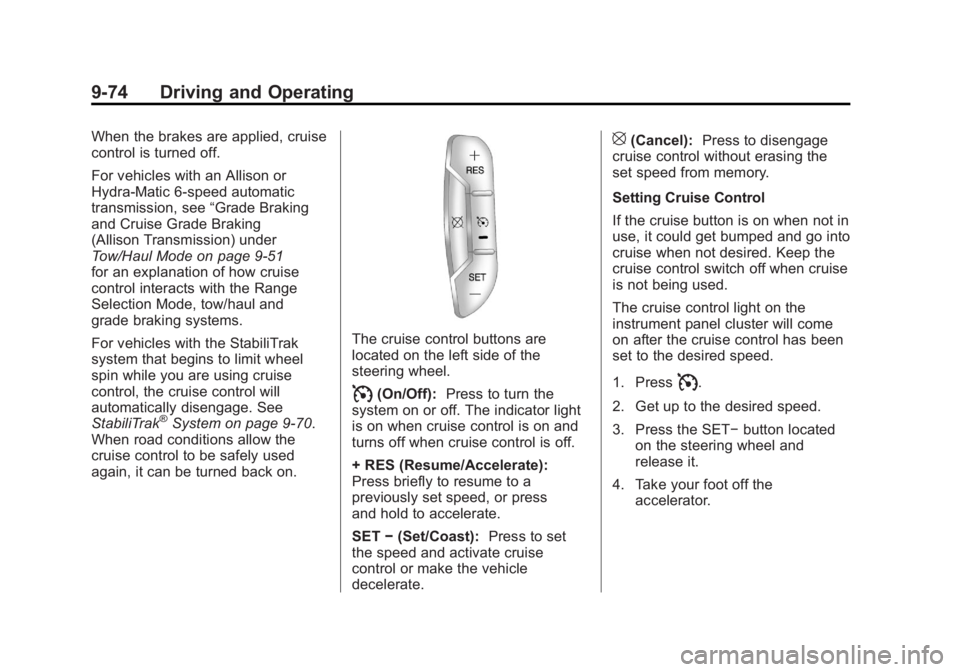
The cruise control buttons are
located on the left side of the
steering wheel.
I(On/Off): Press to turn the
system on or off. The indicator light
is on when cruise control is on and
turns off when cruise control is off.
+ RES (Resume/Accelerate):
Press briefly to resume to a
previously set speed, or press
and hold to accelerate.
SET −(Set/Coast): Press to set
the speed and activate cruise
control or make the vehicle
decelerate.
[(Cancel): Press to disengage
cruise control without erasing the
set speed from memory.
Setting Cruise Control
If the cruise button is on when not in
use, it could get bumped and go into
cruise when not desired. Keep the
cruise control switch off when cruise
is not being used.
The cruise control light on the
instrument panel cluster will come
on after the cruise control has been
set to the desired speed.
1. Press
I.
2. Get up to the desired speed.
3. Press the SET− button located
on the steering wheel and
release it.
4. Take your foot off the accelerator.
Page 411 of 594
Black plate (117,1)GMC Sierra Owner Manual - 2011
Driving and Operating 9-117
If the vehicle is equipped with an
Integrated Trailer Brake Control
(ITBC) System, the blunt cuts
exist, but are not connected further
in the harness. If an aftermarket
trailer brake controller is installed,
the ITBC must be disconnected.
Do not power both ITBC and
aftermarket controllers to control
the trailer brakes at the same time.
Tow/Haul Mode
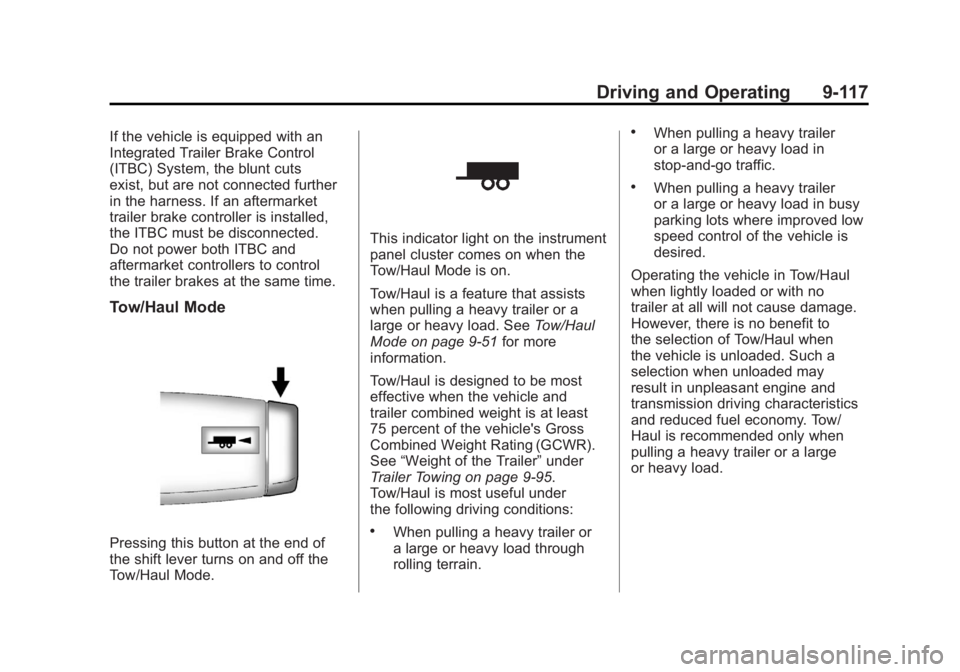
Pressing this button at the end of
the shift lever turns on and off the
Tow/Haul Mode.
This indicator light on the instrument
panel cluster comes on when the
Tow/Haul Mode is on.
Tow/Haul is a feature that assists
when pulling a heavy trailer or a
large or heavy load. SeeTow/Haul
Mode on page 9‑51 for more
information.
Tow/Haul is designed to be most
effective when the vehicle and
trailer combined weight is at least
75 percent of the vehicle's Gross
Combined Weight Rating (GCWR).
See “Weight of the Trailer” under
Trailer Towing on page 9‑95.
Tow/Haul is most useful under
the following driving conditions:
.When pulling a heavy trailer or
a large or heavy load through
rolling terrain.
.When pulling a heavy trailer
or a large or heavy load in
stop-and-go traffic.
.When pulling a heavy trailer
or a large or heavy load in busy
parking lots where improved low
speed control of the vehicle is
desired.
Operating the vehicle in Tow/Haul
when lightly loaded or with no
trailer at all will not cause damage.
However, there is no benefit to
the selection of Tow/Haul when
the vehicle is unloaded. Such a
selection when unloaded may
result in unpleasant engine and
transmission driving characteristics
and reduced fuel economy. Tow/
Haul is recommended only when
pulling a heavy trailer or a large
or heavy load.
Page 418 of 594
Black plate (124,1)GMC Sierra Owner Manual - 2011
9-124 Driving and Operating
SERVICE TRAILER BRAKE
SYSTEM: This message will be
displayed when there is a problem
with the ITBC system. If this
message persists over multiple
ignition cycles, there is a problem
with the ITBC system. Take the
vehicle to an authorized GM dealer
to have the ITBC system diagnosed
and repaired.
If either the CHECK TRAILER
WIRING or SERVICE TRAILER
BRAKE SYSTEM message is
displayed while driving the vehicle,
power is no longer available
to the trailer brakes. When traffic
conditions allow, carefully pull the
vehicle over to the side of the road
and turn the ignition off. Check the
wiring connection to the trailer and
turn the ignition back on. If either of
these messages continues, either
the vehicle or trailer needs service.An authorized GM dealer may
be able to diagnose and repair
problems with the trailer. However,
any diagnosis and repair of the
trailer is not covered under the
vehicle warranty. Please contact
your trailer dealer for assistance
with trailer repairs and trailer
warranty information.
Trailer Sway
Control (TSC)
Trailer Sway Control (TSC)
2500 and 3500 series vehicles with
StabiliTrak have a Trailer Sway
Control (TSC) feature. If the vehicle
is towing a trailer and the system
detects that the trailer is swaying,
the vehicle's brakes are applied
without the driver pressing the brake
pedal. If the vehicle is equipped with
the Integrated Trailer Brake Control
(ITBC) system, StabiliTrak may also
apply the trailer brakes. The TCS/
StabiliTrak warning light will flash on
the instrument panel cluster to notify
the driver to reduce speed. If the
trailer continues to sway, StabiliTrak
will reduce engine torque to help
slow the vehicle.
Adding non‐dealer accessories can
affect the vehicle's performance.
See
Accessories and Modifications
on page 10‑3 for more information.
Page 476 of 594
Black plate (52,1)GMC Sierra Owner Manual - 2011
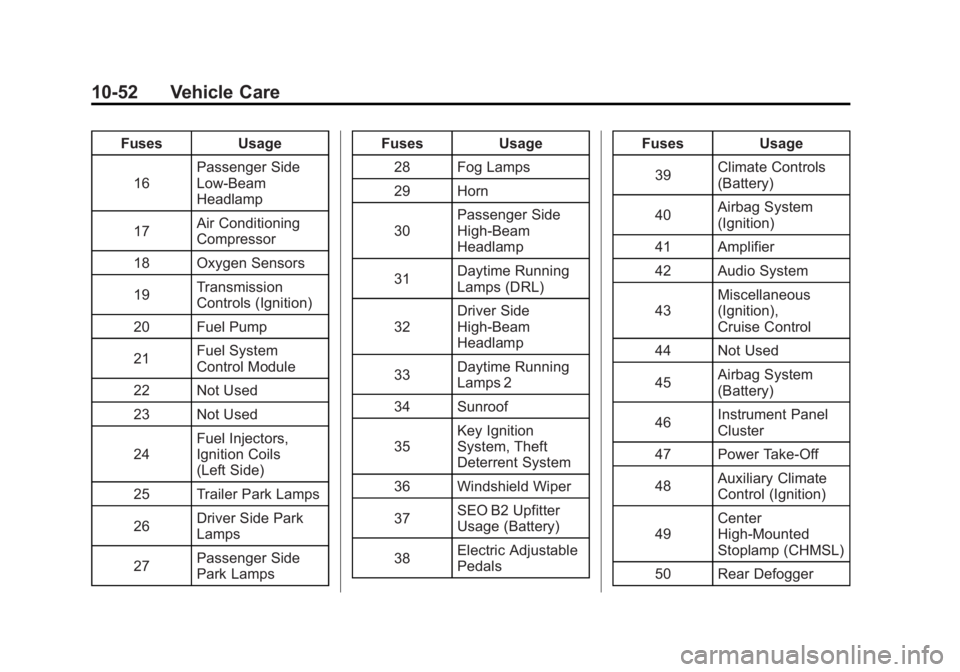
10-52 Vehicle Care
FusesUsage
16 Passenger Side
Low-Beam
Headlamp
17 Air Conditioning
Compressor
18 Oxygen Sensors
19 Transmission
Controls (Ignition)
20 Fuel Pump
21 Fuel System
Control Module
22 Not Used
23 Not Used
24 Fuel Injectors,
Ignition Coils
(Left Side)
25 Trailer Park Lamps
26 Driver Side Park
Lamps
27 Passenger Side
Park Lamps Fuses
Usage
28 Fog Lamps
29 Horn
30 Passenger Side
High-Beam
Headlamp
31 Daytime Running
Lamps (DRL)
32 Driver Side
High-Beam
Headlamp
33 Daytime Running
Lamps 2
34 Sunroof
35 Key Ignition
System, Theft
Deterrent System
36 Windshield Wiper
37 SEO B2 Upfitter
Usage (Battery)
38 Electric Adjustable
Pedals Fuses
Usage
39 Climate Controls
(Battery)
40 Airbag System
(Ignition)
41 Amplifier
42 Audio System
43 Miscellaneous
(Ignition),
Cruise Control
44 Not Used
45 Airbag System
(Battery)
46 Instrument Panel
Cluster
47 Power Take-Off
48 Auxiliary Climate
Control (Ignition)
49 Center
High-Mounted
Stoplamp (CHMSL)
50 Rear Defogger
Page 493 of 594
Black plate (69,1)GMC Sierra Owner Manual - 2011
Vehicle Care 10-69
When the malfunction indicator
is illuminated, the system may
not be able to detect or signal low
tire pressure as intended. TPMS
malfunctions may occur for a variety
of reasons, including the installation
of replacement or alternate tires or
wheels on the vehicle that prevent
the TPMS from functioning properly.
Always check the TPMS malfunction
telltale after replacing one or more
tires or wheels on your vehicle to
ensure that the replacement or
alternate tires and wheels allow
the TPMS to continue to function
properly.
SeeTire Pressure Monitor
Operation on page 10‑69 for
additional information.Federal Communications
Commission (FCC) and
Industry Canada
See Radio Frequency Statement on
page 13‑19 for information
regarding Part 15 of the Federal
Communications Commission
(FCC) rules and Industry Canada
Standards RSS-210/220/310.
Tire Pressure Monitor
Operation
This vehicle may have a Tire
Pressure Monitor System (TPMS).
The TPMS is designed to warn the
driver when a low tire pressure
condition exists. TPMS sensors are
mounted onto each tire and wheel
assembly, excluding the spare tire
and wheel assembly. The TPMS
sensors monitor the air pressure
in the tires and transmit the tire
pressure readings to a receiver
located in the vehicle.
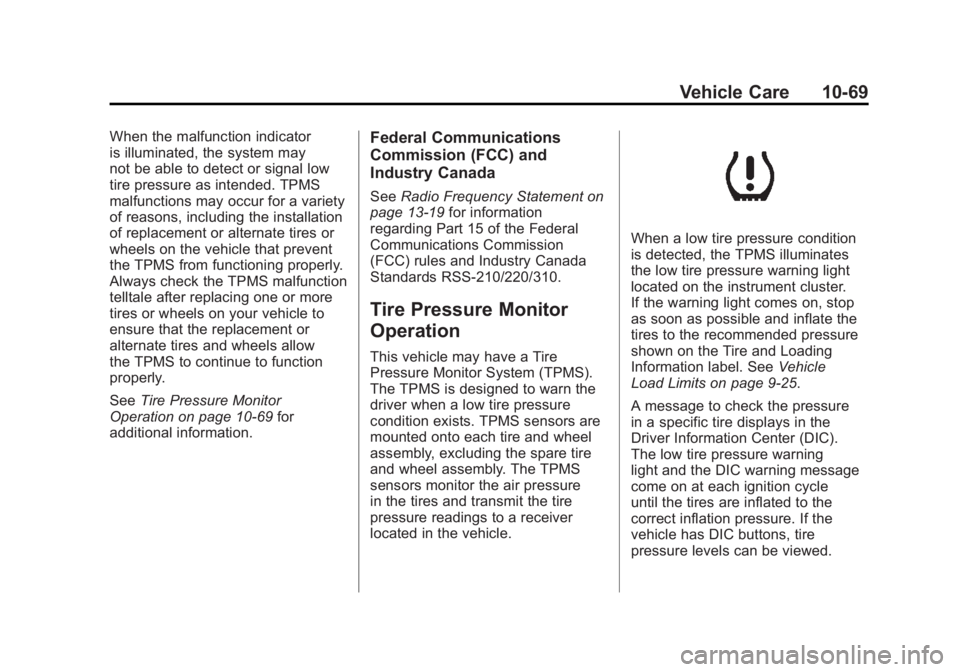
When a low tire pressure condition
is detected, the TPMS illuminates
the low tire pressure warning light
located on the instrument cluster.
If the warning light comes on, stop
as soon as possible and inflate the
tires to the recommended pressure
shown on the Tire and Loading
Information label. See Vehicle
Load Limits on page 9‑25.
A message to check the pressure
in a specific tire displays in the
Driver Information Center (DIC).
The low tire pressure warning
light and the DIC warning message
come on at each ignition cycle
until the tires are inflated to the
correct inflation pressure. If the
vehicle has DIC buttons, tire
pressure levels can be viewed.
Page 496 of 594
Black plate (72,1)GMC Sierra Owner Manual - 2011
10-72 Vehicle Care
There are two minutes to match
the first tire/wheel position, and
five minutes overall to match all
four tire/wheel positions. If it takes
longer, the matching process stops
and must be restarted.
The TPMS sensor matching
process is:
1. Set the parking brake.
2. Turn the ignition to ON/RUN withthe engine off.
3. Press the Remote Keyless Entry (RKE) transmitter's LOCK
and UNLOCK buttons at the
same time for approximately
five seconds. The horn sounds
twice to signal the receiver
is in relearn mode and TIRE
LEARNING ACTIVE message
displays on the DIC screen.
If the vehicle does not have
RKE, press the Driver
Information Center (DIC) vehicle
information button until the
PRESS
VTO RELEARN TIRE
POSITIONS message displays. The horn sounds twice to signal
the receiver is in relearn mode
and TIRE LEARNING ACTIVE
message displays on the DIC
screen.
If the vehicle does not have RKE
or DIC buttons, press the trip
odometer reset stem located on
the instrument panel cluster until
the PRESS
VTO RELEARN
TIRE POSITIONS message
displays. The horn sounds
twice to signal the receiver
is in relearn mode and TIRE
LEARNING ACTIVE message
displays on the DIC screen.
4. Start with the driver side front tire.
5. Place the relearn tool against the tire sidewall, near the valve
stem. Then press the button
to activate the TPMS sensor.
A horn chirp confirms that the
sensor identification code has
been matched to this tire and
wheel position. 6. Proceed to the passenger
side front tire, and repeat the
procedure in Step 5.
7. Proceed to the passenger side rear tire, and repeat the
procedure in Step 5.
8. Proceed to the driver side rear tire, and repeat the procedure
in Step 5. The horn sounds two
times to indicate the sensor
identification code has been
matched to the driver side rear
tire, and the TPMS sensor
matching process is no longer
active. The TIRE LEARNING
ACTIVE message on the DIC
display screen goes off.
9. Turn the ignition switch to LOCK/OFF.
10. Set all four tires to the recommended air pressure
level as indicated on the Tire
and Loading Information label.
Page 583 of 594
Black plate (3,1)GMC Sierra Owner Manual - 2011
INDEX i-3
Center High-MountedStoplamp (CHMSL) and
Cargo Lamp . . . . . . . . . . . . . . . . . 10-47
Center Seat . . . . . . . . . . . . . . . . . . . . 3-3
Chains, Tire . . . . . . . . . . . . . . . . . . 10-83
Charging System Light . . . . . . . . . . . . . . . . . 5-24
Check Engine Light . . . . . . . . . . . . . . . . . . 5-25
IgnitionTransmission Lock . . . . . . . . 10-40
Child Restraints Infants and YoungChildren . . . . . . . . . . . . . . . . . . . . . 3-51
Lower Anchors and Tethers for Children . . . . . . . . . 3-57
Older Children . . . . . . . . . . . . . . . . 3-49
Securing . . . . . . . . . . 3-66, 3-69, 3-78
Systems . . . . . . . . . . . . . . . . . . . . . . 3-54 Cigarette Lighter . . . . . . . . . . . . . . . 5-11
Circuit Breakers . . . . . . . . . . . . . . 10-50
Cleaning
Exterior Care . . . . . . . . . . . . . . 10-108
Interior Care . . . . . . . . . . . . . . . 10-112
Climate Control Systems . . . 8-1, 8-4 Air Conditioning . . . . . . . . . . 8-1, 8-4
Dual Automatic . . . . . . . . . . . . . . . . 8-5
Heating . . . . . . . . . . . . . . . . . . . 8-1, 8-4
Clock . . . . . . . . . . . . . . . . . . . . . . . . . . . 5-8
Cluster, Instrument . . . . . . . . . . . . 5-13
Collision Damage Repair . . . . . 13-12
Compass . . . . . . . . . . . . . . . . . . . . . . . 5-6
Control of a Vehicle . . . . . . . . . . . . . 9-3
Convex Mirrors . . . . . . . . . . . . . . . . 2-15
Coolant Engine . . . . . . . . . . . . . . . . . . . . . . 10-22
Engine TemperatureGauge . . . . . . . . . . . . . . . . . . . . . . 5-17 Cooling System . . . . . . . . . . . . . . . 10-20
Engine Messages . . . . . . . . . . . . 5-44
Courtesy Transportation Program . . . . . . . . . . . . . . . . . . . . . 13-11
Cruise Control . . . . . . . . . . . . . . . . . 9-73 Light . . . . . . . . . . . . . . . . . . . . . . . . . . 5-32
Cupholders . . . . . . . . . . . . . . . . . . . . . 4-1
Customer Assistance . . . . . . . . . . 13-6
Offices . . . . . . . . . . . . . . . . . . . . . . . . 13-5
Text Telephone (TTY)Users . . . . . . . . . . . . . . . . . . . . . . . 13-6
Customer Information Service PublicationsOrdering Information . . . . . . 13-15
Customer Satisfaction Procedure . . . . . . . . . . . . . . 13-1, 13-3
Page 587 of 594
Black plate (7,1)GMC Sierra Owner Manual - 2011
INDEX i-7
High-Beam On Light . . . . . . . . . . . 5-32
High-Speed Operation . . . . . . . . 10-67
Highway Hypnosis . . . . . . . . . . . . . 9-20
Hill and Mountain Roads . . . . . . . 9-20
Hill Start Assist (HSA) . . . . . . . . . 9-70
Hood . . . . . . . . . . . . . . . . . . . . . . . . . . 10-5
Horn . . . . . . . . . . . . . . . . . . . . . . . . . . . . 5-5
How to Wear Safety BeltsProperly . . . . . . . . . . . . . . . . . . . . . . 3-15
I
Idle SystemFast . . . . . . . . . . . . . . . . . . . . . . . . . . 9-39
Ignition Positions . . . . . . . . . . . . . . 9-35
Ignition Transmission Lock Check . . . . . . . . . . . . . . . . . . . . . . . 10-40
Immobilizer . . . . . . . . . . . . . . . . . . . . 2-13 Infants and Young Children,
Restraints . . . . . . . . . . . . . . . . . . . . 3-51
Infotainment . . . . . . . . . . . . . . . . . . . . 7-1
Instrument Cluster . . . . . . . . . . . . . 5-13
Instrument Panel Storage Area . . . . . . . . . . . . . . . . . . 4-1
Introduction . . . . . . . . . . . . . . . . . . . . . . . iii
J
Jump Starting . . . . . . . . . . . . . . . . . 10-98
K
Key and Lock Messages . . . . . . . 5-46
Keyless Entry
Remote (RKE) System . . . . . . . . 2-3
Keys . . . . . . . . . . . . . . . . . . . . . . . . . . . . 2-2
L
Labeling, Tire Sidewall . . . . . . . . 10-58
Lamp Messages . . . . . . . . . . . . . . . 5-46
Lamps
Auxiliary RoofMounted Lamp . . . . . . . . . . . . . . . 6-7
Cargo . . . . . . . . . . . . . . . . . . . . . . . . . . 6-8
Daytime Running (DRL) . . . . . . . 6-4
Dome . . . . . . . . . . . . . . . . . . . . . . . . . . 6-8
Exterior Controls . . . . . . . . . . . . . . . 6-1
Exterior Lamps Off
Reminder . . . . . . . . . . . . . . . . . . . . 6-3
License Plate . . . . . . . . . . . . . . . 10-48
Malfunction Indicator . . . . . . . . . 5-25
Pick-Up Box Identification and Fender Marker . . . . . . . . 10-45
Reading . . . . . . . . . . . . . . . . . . . . . . . 6-9
Taillamps . . . . . . . . . . . . . . . . . . . 10-46