window GMC SIERRA 1500 2011 Owner's Guide
[x] Cancel search | Manufacturer: GMC, Model Year: 2011, Model line: SIERRA 1500, Model: GMC SIERRA 1500 2011Pages: 594, PDF Size: 7.88 MB
Page 100 of 594
Black plate (32,1)GMC Sierra Owner Manual - 2011
3-32 Seats and Restraints
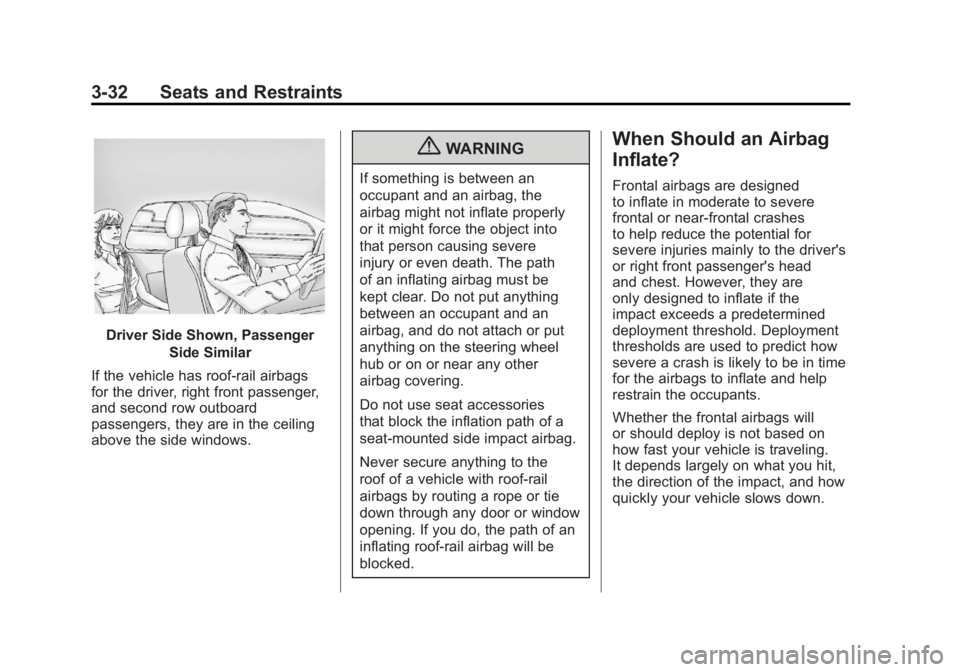
Driver Side Shown, PassengerSide Similar
If the vehicle has roof-rail airbags
for the driver, right front passenger,
and second row outboard
passengers, they are in the ceiling
above the side windows.
{WARNING
If something is between an
occupant and an airbag, the
airbag might not inflate properly
or it might force the object into
that person causing severe
injury or even death. The path
of an inflating airbag must be
kept clear. Do not put anything
between an occupant and an
airbag, and do not attach or put
anything on the steering wheel
hub or on or near any other
airbag covering.
Do not use seat accessories
that block the inflation path of a
seat-mounted side impact airbag.
Never secure anything to the
roof of a vehicle with roof-rail
airbags by routing a rope or tie
down through any door or window
opening. If you do, the path of an
inflating roof-rail airbag will be
blocked.
When Should an Airbag
Inflate?
Frontal airbags are designed
to inflate in moderate to severe
frontal or near-frontal crashes
to help reduce the potential for
severe injuries mainly to the driver's
or right front passenger's head
and chest. However, they are
only designed to inflate if the
impact exceeds a predetermined
deployment threshold. Deployment
thresholds are used to predict how
severe a crash is likely to be in time
for the airbags to inflate and help
restrain the occupants.
Whether the frontal airbags will
or should deploy is not based on
how fast your vehicle is traveling.
It depends largely on what you hit,
the direction of the impact, and how
quickly your vehicle slows down.
Page 102 of 594
Black plate (34,1)GMC Sierra Owner Manual - 2011
3-34 Seats and Restraints
The vehicle may or may not have
seat‐mounted side impact and
roof-rail airbags. SeeAirbag System
on page 3‑29. Seat‐mounted side
impact and roof-rail airbags are
intended to inflate in moderate to
severe side crashes. In addition,
these roof-rail airbags are intended
to inflate during a rollover or in a
severe frontal impact. Seat‐mounted
side impact and roof-rail airbags will
inflate if the crash severity is above
the system's designed threshold
level. The threshold level can vary
with specific vehicle design.
Roof-rail airbags are not
intended to inflate in rear impacts.
A seat‐mounted side impact airbag
is intended to deploy on the side
of the vehicle that is struck. Both
roof-rail airbags will deploy when
either side of the vehicle is struck,
or if the sensing system predicts
that the vehicle is about to roll over,
or in a severe frontal impact. In any particular crash, no one
can say whether an airbag should
have inflated simply because of
the damage to a vehicle or because
of what the repair costs were.
For frontal airbags, inflation is
determined by what the vehicle hits,
the angle of the impact, and how
quickly the vehicle slows down.
For seat‐mounted side impact and
roof-rail airbags, deployment is
determined by the location and
severity of the side impact. In a
rollover event, roof-rail airbag
deployment is determined by
the direction of the roll.What Makes an Airbag
Inflate?
In a deployment event, the sensing
system sends an electrical signal
triggering a release of gas from the
inflator. Gas from the inflator fills the
airbag causing the bag to break out
of the cover and deploy. The inflator,
the airbag, and related hardware are
all part of the airbag module.
Frontal airbag modules are located
inside the steering wheel and
instrument panel. For vehicles with
seat‐mounted side impact airbags,
there are airbags modules in the
side of the front seatbacks closest
to the door. For vehicles with
roof-rail airbags, there are airbag
modules in the ceiling of the vehicle,
near the side windows that have
occupant seating positions.
Page 104 of 594
Black plate (36,1)GMC Sierra Owner Manual - 2011
3-36 Seats and Restraints
Airbag inflation does not prevent
the driver from seeing out of the
windshield or being able to steer the
vehicle, nor does it prevent people
from leaving the vehicle.
{WARNING
When an airbag inflates, there
may be dust in the air. This dust
could cause breathing problems
for people with a history of
asthma or other breathing trouble.
To avoid this, everyone in the
vehicle should get out as soon
as it is safe to do so. If you have
breathing problems but cannot
get out of the vehicle after an
airbag inflates, then get fresh air
by opening a window or a door.
If you experience breathing
problems following an airbag
deployment, you should seek
medical attention.The vehicle may have a feature
that may automatically unlock the
doors, turn on the interior lamps and
hazard warning flashers, and shut
off the fuel system after the airbags
inflate. You can lock the doors, turn
off the interior lamps and hazard
warning flashers by using the
controls for those features.
{WARNING
A crash severe enough to inflate
the airbags may have also
damaged important functions
in the vehicle, such as the fuel
system, brake and steering
systems, etc. Even if the vehicle
appears to be drivable after a
moderate crash, there may be
concealed damage that could
make it difficult to safely operate
the vehicle.
Use caution if you should attempt
to restart the engine after a crash
has occurred.In many crashes severe enough to
inflate the airbag, windshields are
broken by vehicle deformation.
Additional windshield breakage
may also occur from the right
front passenger airbag.
.Airbags are designed to inflate
only once. After an airbag
inflates, you will need some
new parts for the airbag system.
If you do not get them, the
airbag system will not be there
to help protect you in another
crash. A new system will include
airbag modules and possibly
other parts. The service manual
for your vehicle covers the need
to replace other parts.
Page 122 of 594
Black plate (54,1)GMC Sierra Owner Manual - 2011
3-54 Seats and Restraints
Child Restraint Systems
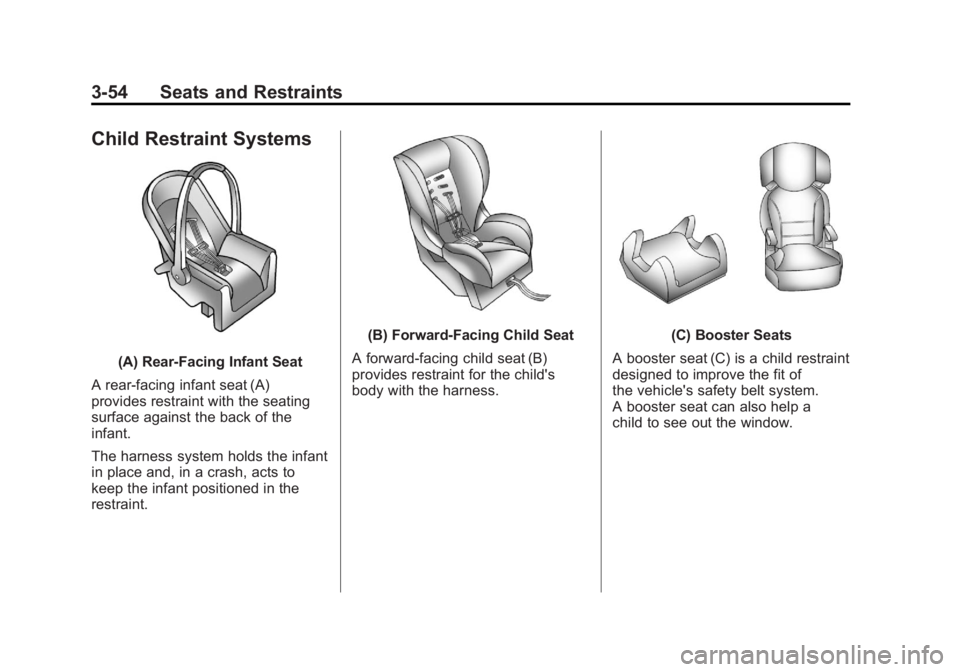
(A) Rear‐Facing Infant Seat
A rear-facing infant seat (A)
provides restraint with the seating
surface against the back of the
infant.
The harness system holds the infant
in place and, in a crash, acts to
keep the infant positioned in the
restraint.
(B) Forward-Facing Child Seat
A forward-facing child seat (B)
provides restraint for the child's
body with the harness.(C) Booster Seats
A booster seat (C) is a child restraint
designed to improve the fit of
the vehicle's safety belt system.
A booster seat can also help a
child to see out the window.
Page 154 of 594
Black plate (6,1)GMC Sierra Owner Manual - 2011
5-6 Instruments and Controls
Windshield Washer
{WARNING
In freezing weather, do not use
the washer until the windshield
is warmed. Otherwise the
washer fluid can form ice on the
windshield, blocking your vision.
L(Washer Fluid):Push the
paddle marked with the windshield
washer symbol at the top of the
multifunction lever, to spray washer
fluid on the windshield. The wipers
clear the window and then either
stop or return to the preset speed.
Compass
The vehicle may have a compass in
the Driver Information Center (DIC).
Compass Zone
The zone is set to zone eight upon
leaving the factory. Your dealer
will set the correct zone for your
location.
Under certain circumstances,
such as during a long-distance,
cross-country trip or moving to
a new state or province, it will
be necessary to compensate for
compass variance by resetting the
zone through the DIC if the zone
is not set correctly.
Compass variance is the difference
between the earth's magnetic north
and true geographic north. If the
compass is not set to the zone
where you live, the compass may
give false readings. The compass
must be set to the variance zone in
which the vehicle is traveling. To adjust for compass variance, use
the following procedure:
Compass Variance (Zone)
Procedure
1. Do not set the compass zone
when the vehicle is moving.
Only set it when the vehicle
is in P (Park).
Press the vehicle information
button until PRESS
VTO
CHANGE COMPASS ZONE
displays. Or, if the vehicle does
not have DIC buttons, press the
trip odometer reset stem until
CHANGE COMPASS ZONE
displays.
Page 156 of 594
Black plate (8,1)GMC Sierra Owner Manual - 2011
5-8 Instruments and Controls
To calibrate the compass, use the
following procedure:
Compass Calibration Procedure
1. Before calibrating the compass,make sure the compass zone
is set to the variance zone in
which the vehicle is located.
See “Compass Variance (Zone)
Procedure” earlier in this
section.
Do not operate any switches
such as window, sunroof,
climate controls, or seats during
the calibration procedure.
2. Press the vehicle information button until PRESS
VTO
CALIBRATE COMPASS
displays. Or, if the vehicle
does not have DIC buttons,
press the trip odometer
reset stem until CALIBRATE
COMPASS displays. 3. Press the set/reset button to
start the compass calibration.
Or, if the vehicle does not have
DIC buttons, press and hold
the trip odometer reset stem
for two seconds to start the
compass calibration.
4. The DIC will display CALIBRATING: DRIVE IN
CIRCLES. Drive the vehicle
in tight circles at less than
8 km/h (5 mph) to complete the
calibration. The DIC will display
CALIBRATION COMPLETE
for a few seconds when the
calibration is complete. The DIC
display will then return to the
previous menu.
Clock
AM-FM Radio and AM‐FM
Radio with CD Player
To set the clock:
1. Turn the ignition key to
ACC/ACCESSORY or ON/RUN,
then press the
Obutton to turn
the radio on.
2. Press the
Hbutton until the hour
numbers begin to flash, then
turn the
fknob to increase or
decrease the hour.
3. Press the
Hbutton until the
minute numbers begin to flash,
then turn the
fknob to increase
or decrease the minutes.
Page 226 of 594
Black plate (10,1)GMC Sierra Owner Manual - 2011
6-10 Lighting
The battery can be discharged at
idle if the electrical loads are very
high. This is true for all vehicles.
This is because the generator
(alternator) may not be spinning
fast enough at idle to produce all
the power that is needed for very
high electrical loads.
A high electrical load occurs when
several of the following are on,
such as: headlamps, high beams,
fog lamps, rear window defogger,
climate control fan at high speed,
heated seats, engine cooling fans,
trailer loads, and loads plugged into
accessory power outlets.
EPM works to prevent excessive
discharge of the battery. It does this
by balancing the generator's output
and the vehicle's electrical needs.
It can increase engine idle speed
to generate more power, whenever
needed. It can temporarily reduce
the power demands of some
accessories.Normally, these actions occur
in steps or levels, without being
noticeable. In rare cases at the
highest levels of corrective action,
this action may be noticeable to the
driver. If so, a Driver Information
Center (DIC) message might be
displayed, such as BATTERY
SAVER ACTIVE, BATTERY
VOLTAGE LOW, or LOW BATTERY.
If one of these messages displays,
it is recommended that the driver
reduce the electrical loads as much
as possible. See
Driver Information
Center (DIC) on page 5‑33.
Battery Power Protection
This feature shuts off the dome and
reading lamps, if they are left on
for more than 10 minutes after the
ignition is turned off. The cargo
lamp shuts off after 20 minutes.
This prevents the battery from
running down.
Page 269 of 594
Black plate (43,1)GMC Sierra Owner Manual - 2011
Infotainment System 7-43
When a device is connected to the
A/V jacks, or the radio's auxiliary
input jack if the vehicle has this
feature, the rear seat passengers
are able to hear audio from the
auxiliary device through the wireless
or wired headphones. The front seat
passengers are able to listen to
playback from this device through
the vehicle speakers by selecting
AUX as the source on the radio.
Video Screen
The video screen is located in the
overhead console.
To use the video screen:
1. Push the release button locatedon the overhead console.
2. Move the screen to the desired position. When the video screen is not in
use, push it up into its locked
position.
If a DVD is playing and the screen
is raised to its locked position,
the screen remains on. This is
normal, and the DVD continues to
play through the previous audio
source. Use the remote control
power button or eject the disc to
turn off the screen.
The overhead console contains
the infrared transmitters for the
wireless headphones and the
infrared receivers for the remote
control. They are located at the
rear of the console.
Notice:
Avoid directly touching
the video screen, as damage may
occur. See “Cleaning the Video
Screen” later in this section for
more information.
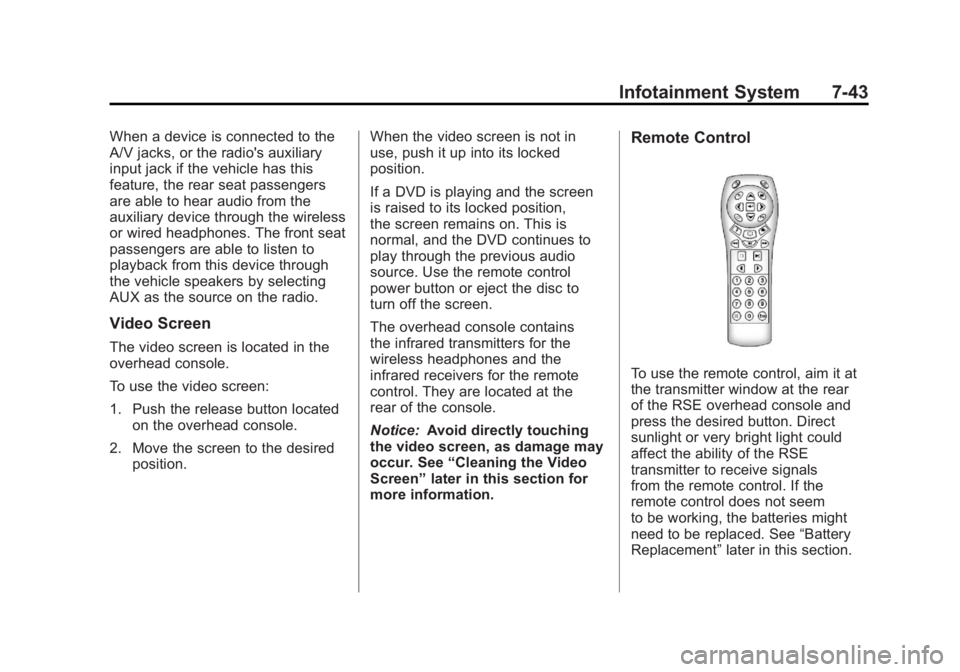
Remote Control
To use the remote control, aim it at
the transmitter window at the rear
of the RSE overhead console and
press the desired button. Direct
sunlight or very bright light could
affect the ability of the RSE
transmitter to receive signals
from the remote control. If the
remote control does not seem
to be working, the batteries might
need to be replaced. See “Battery
Replacement” later in this section.
Page 272 of 594
Black plate (46,1)GMC Sierra Owner Manual - 2011
7-46 Infotainment System
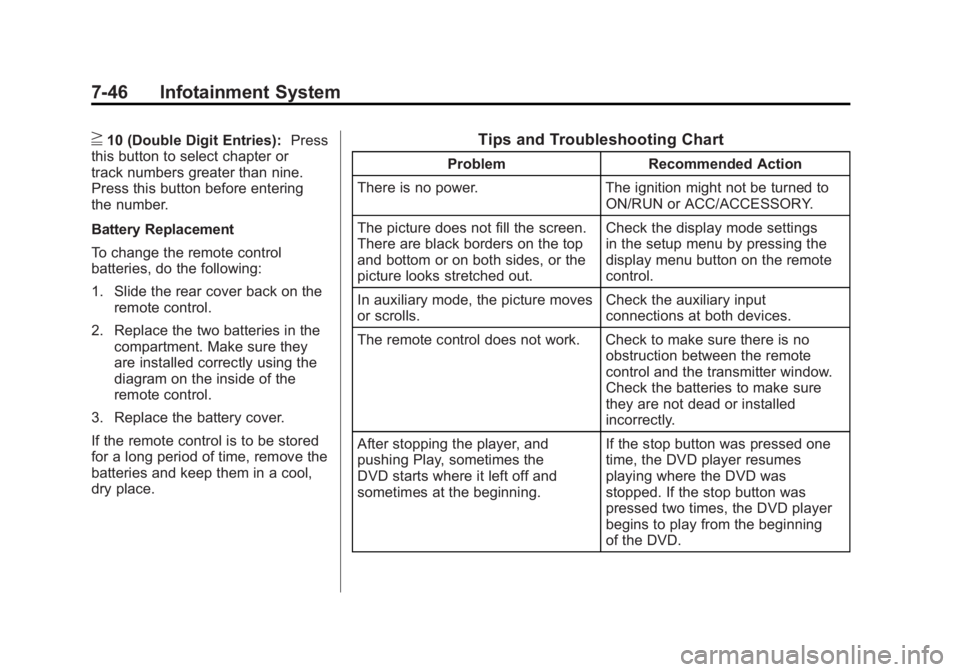
}10 (Double Digit Entries):Press
this button to select chapter or
track numbers greater than nine.
Press this button before entering
the number.
Battery Replacement
To change the remote control
batteries, do the following:
1. Slide the rear cover back on the remote control.
2. Replace the two batteries in the compartment. Make sure they
are installed correctly using the
diagram on the inside of the
remote control.
3. Replace the battery cover.
If the remote control is to be stored
for a long period of time, remove the
batteries and keep them in a cool,
dry place.Tips and Troubleshooting Chart
Problem Recommended Action
There is no power. The ignition might not be turned to
ON/RUN or ACC/ACCESSORY.
The picture does not fill the screen.
There are black borders on the top
and bottom or on both sides, or the
picture looks stretched out. Check the display mode settings
in the setup menu by pressing the
display menu button on the remote
control.
In auxiliary mode, the picture moves
or scrolls. Check the auxiliary input
connections at both devices.
The remote control does not work. Check to make sure there is no obstruction between the remote
control and the transmitter window.
Check the batteries to make sure
they are not dead or installed
incorrectly.
After stopping the player, and
pushing Play, sometimes the
DVD starts where it left off and
sometimes at the beginning. If the stop button was pressed one
time, the DVD player resumes
playing where the DVD was
stopped. If the stop button was
pressed two times, the DVD player
begins to play from the beginning
of the DVD.
Page 283 of 594
Black plate (1,1)GMC Sierra Owner Manual - 2011
Climate Controls 8-1
Climate Controls
Climate Control Systems
Climate Control Systems(with Air Conditioning) . . . . . . . 8-1
Climate Control Systems (with Heater Only) . . . . . . . . . . . 8-4
Dual Automatic Climate Control System . . . . . . . . . . . . . . . . . . . . . . 8-5
Air Vents
Air Vents . . . . . . . . . . . . . . . . . . . . . 8-11
Climate Control Systems
Climate Control Systems (with Air Conditioning)
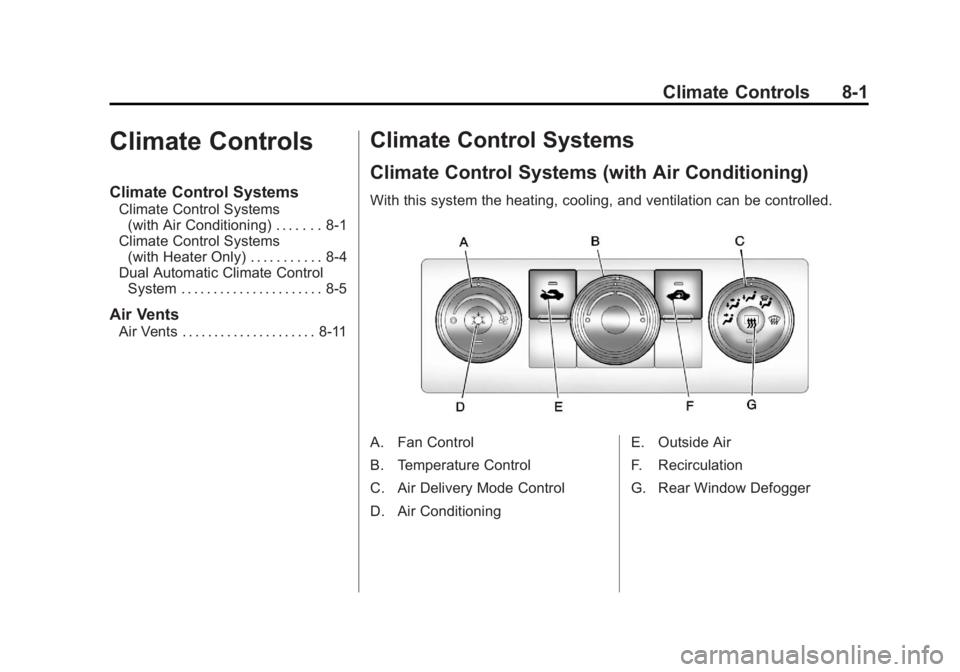
With this system the heating, cooling, and ventilation can be controlled.
A. Fan Control
B. Temperature Control
C. Air Delivery Mode Control
D. Air Conditioning E. Outside Air
F. Recirculation
G. Rear Window Defogger