steering GMC SIERRA 1500 2011 Workshop Manual
[x] Cancel search | Manufacturer: GMC, Model Year: 2011, Model line: SIERRA 1500, Model: GMC SIERRA 1500 2011Pages: 594, PDF Size: 7.88 MB
Page 363 of 594
Black plate (69,1)GMC Sierra Owner Manual - 2011
Driving and Operating 9-69
Braking in Emergencies
ABS allows the driver to steer and
brake at the same time. In many
emergencies, steering can help
more than even the very best
braking.
Parking Brake
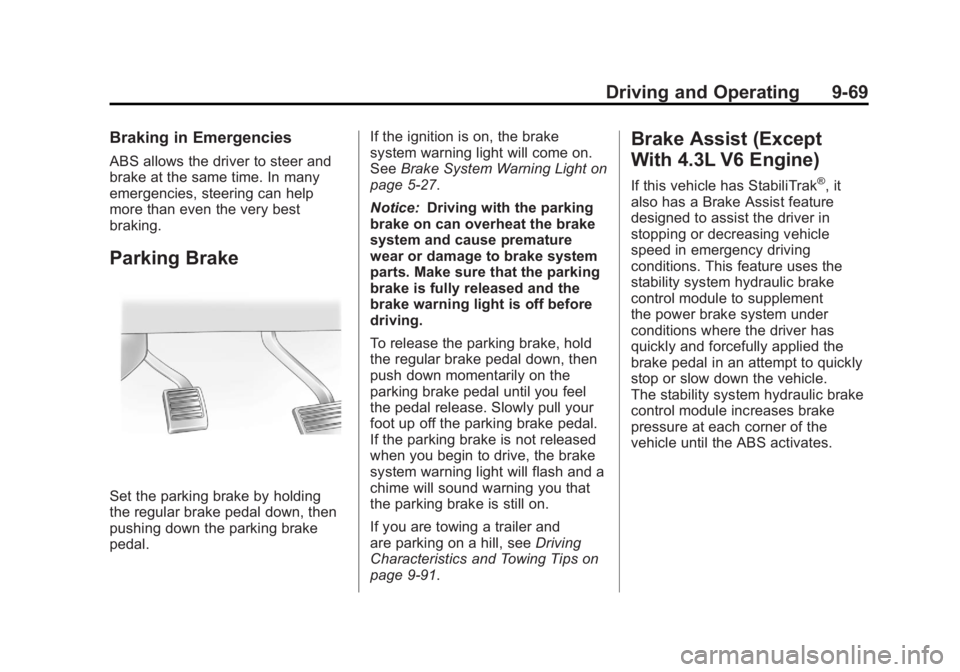
Set the parking brake by holding
the regular brake pedal down, then
pushing down the parking brake
pedal.If the ignition is on, the brake
system warning light will come on.
See
Brake System Warning Light on
page 5‑27.
Notice: Driving with the parking
brake on can overheat the brake
system and cause premature
wear or damage to brake system
parts. Make sure that the parking
brake is fully released and the
brake warning light is off before
driving.
To release the parking brake, hold
the regular brake pedal down, then
push down momentarily on the
parking brake pedal until you feel
the pedal release. Slowly pull your
foot up off the parking brake pedal.
If the parking brake is not released
when you begin to drive, the brake
system warning light will flash and a
chime will sound warning you that
the parking brake is still on.
If you are towing a trailer and
are parking on a hill, see Driving
Characteristics and Towing Tips on
page 9‑91.
Brake Assist (Except
With 4.3L V6 Engine)
If this vehicle has StabiliTrak®, it
also has a Brake Assist feature
designed to assist the driver in
stopping or decreasing vehicle
speed in emergency driving
conditions. This feature uses the
stability system hydraulic brake
control module to supplement
the power brake system under
conditions where the driver has
quickly and forcefully applied the
brake pedal in an attempt to quickly
stop or slow down the vehicle.
The stability system hydraulic brake
control module increases brake
pressure at each corner of the
vehicle until the ABS activates.
Page 368 of 594
Black plate (74,1)GMC Sierra Owner Manual - 2011
9-74 Driving and Operating
When the brakes are applied, cruise
control is turned off.
For vehicles with an Allison or
Hydra‐Matic 6‐speed automatic
transmission, see“Grade Braking
and Cruise Grade Braking
(Allison Transmission) under
Tow/Haul Mode on page 9‑51
for an explanation of how cruise
control interacts with the Range
Selection Mode, tow/haul and
grade braking systems.
For vehicles with the StabiliTrak
system that begins to limit wheel
spin while you are using cruise
control, the cruise control will
automatically disengage. See
StabiliTrak
®System on page 9‑70.
When road conditions allow the
cruise control to be safely used
again, it can be turned back on.
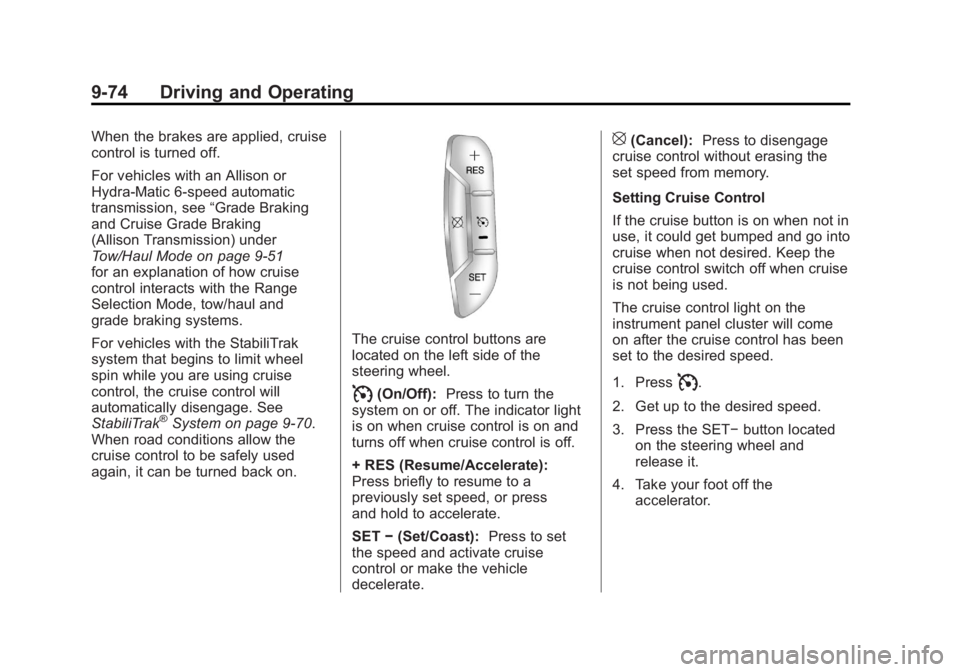
The cruise control buttons are
located on the left side of the
steering wheel.
I(On/Off): Press to turn the
system on or off. The indicator light
is on when cruise control is on and
turns off when cruise control is off.
+ RES (Resume/Accelerate):
Press briefly to resume to a
previously set speed, or press
and hold to accelerate.
SET −(Set/Coast): Press to set
the speed and activate cruise
control or make the vehicle
decelerate.
[(Cancel): Press to disengage
cruise control without erasing the
set speed from memory.
Setting Cruise Control
If the cruise button is on when not in
use, it could get bumped and go into
cruise when not desired. Keep the
cruise control switch off when cruise
is not being used.
The cruise control light on the
instrument panel cluster will come
on after the cruise control has been
set to the desired speed.
1. Press
I.
2. Get up to the desired speed.
3. Press the SET− button located
on the steering wheel and
release it.
4. Take your foot off the accelerator.
Page 369 of 594
Black plate (75,1)GMC Sierra Owner Manual - 2011
Driving and Operating 9-75
Resuming a Set Speed
If the cruise control is set at a
desired speed and then the brakes
are applied, the cruise control is
disengaged without erasing the
set speed from memory.
Once the vehicle speed reaches
about 40 km/h (25 mph) or more,
press the +RES button on the
steering wheel. The vehicle returns
to the previous set speed and stays
there.
Increasing Speed While Using
Cruise Control
If the cruise control system is
already activated,
.Press and hold the +RES button
on the steering wheel until the
desired speed is reached, then
release it.
.To increase vehicle speed in
small amounts, press the +RES
button. Each time this is done,
the vehicle goes about 1.6 km/h
(1 mph) faster.Reducing Speed While Using
Cruise Control
If the cruise control system is
already activated,
.Press and hold the SET–
button
on the steering wheel until the
desired lower speed is reached,
then release it.
.To slow down in small amounts,
press the SET– button on the
steering wheel briefly. Each time
this is done, the vehicle goes
about 1.6 km/h (1 mph) slower.
Passing Another Vehicle While
Using Cruise Control
Use the accelerator pedal to
increase the vehicle speed. When
you take your foot off the pedal,
the vehicle will slow down to the
previous set cruise speed. Using Cruise Control on Hills
How well the cruise control will work
on hills depends upon the vehicle
speed, load, and the steepness of
the hills. While going up steep hills,
you might have to step on the
accelerator pedal to maintain the
vehicle speed. While going downhill,
you might have to brake or shift to
a lower gear to keep the vehicle
speed down. When the brakes
are applied the cruise control is
disengaged.
Page 370 of 594
Black plate (76,1)GMC Sierra Owner Manual - 2011
9-76 Driving and Operating
Ending Cruise Control
There are three ways to end cruise
control:
.To disengage cruise control;
step lightly on the brake pedal.
.Press[on the steering wheel.
.To turn off the cruise control,
press
Ion the steering wheel.
Erasing Speed Memory
The cruise control set speed is
erased from memory by pressing
the
Ibutton or if the ignition is
turned off.
Object Detection
Systems
Ultrasonic Parking Assist
For vehicles with the Ultrasonic
Rear Parking Assist (URPA) system,
it operates at speeds less than
8 km/h (5 mph), and assists the
driver with parking and avoiding
objects while in R (Reverse).
The sensors on the rear bumper
are used to detect the distance to
an object up to 2.5 m (8 ft) behind
the vehicle, and at least 25.4 cm
(10 in) off the ground.
{WARNING
The Ultrasonic Rear Parking
Assist (URPA) system does not
replace driver vision. It cannot
detect:
.Objects that are below the
bumper, underneath the
vehicle, or too close or far
from the vehicle.
.Children, pedestrians,
bicyclists, or pets.
If you do not use proper care
before and while backing, vehicle
damage, injury, or death could
occur. Even with URPA, always
check behind the vehicle before
backing up. While backing, be
sure to look for objects and check
the vehicle's mirrors.
Page 387 of 594
Black plate (93,1)GMC Sierra Owner Manual - 2011
Driving and Operating 9-93
Passing
More passing distance is
needed when towing a trailer.
The combination will not accelerate
as quickly and is longer so it is
necessary to go much farther
beyond the passed vehicle before
returning to the lane.
Backing Up
Hold the bottom of the steering
wheel with one hand. To move the
trailer to the left, move that hand
to the left. To move the trailer to
the right, move your hand to the
right. Always back up slowly and,
if possible, have someone
guide you.
Making Turns
Notice:Making very sharp turns
while trailering could cause the
trailer to come in contact with
the vehicle. The vehicle could be
damaged. Avoid making very
sharp turns while trailering.
When turning with a trailer,
make wider turns than normal.
Do this so the trailer will not strike
soft shoulders, curbs, road signs,
trees, or other objects. Avoid jerky
or sudden maneuvers. Signal well
in advance.
If the trailer turn signal bulbs burn
out, the arrows on the instrument
panel will still flash for turns. It is
important to check occasionally to
be sure the trailer bulbs are still
working.
Driving on Grades
Reduce speed and shift to a
lower gear beforestarting down
a long or steep downgrade. If the
transmission is not shifted down,
the brakes might get hot and no
longer work well.
Vehicles can tow in D (Drive).
Shift the transmission to a lower
gear if the transmission shifts too
often under heavy loads and/or
hilly conditions.
The Tow/Haul Mode may be used
if the transmission shifts too often.
See Tow/Haul Mode on page 9‑51.
When towing at high altitude on
steep uphill grades, consider the
following: Engine coolant will boil
at a lower temperature than at
normal altitudes. If the engine is
turned off immediately after towing
at high altitude on steep uphill
grades, the vehicle may show
signs similar to engine overheating.
Page 410 of 594
Black plate (116,1)GMC Sierra Owner Manual - 2011
9-116 Driving and Operating
Camper/Fifth-Wheel Trailer Wiring
Package
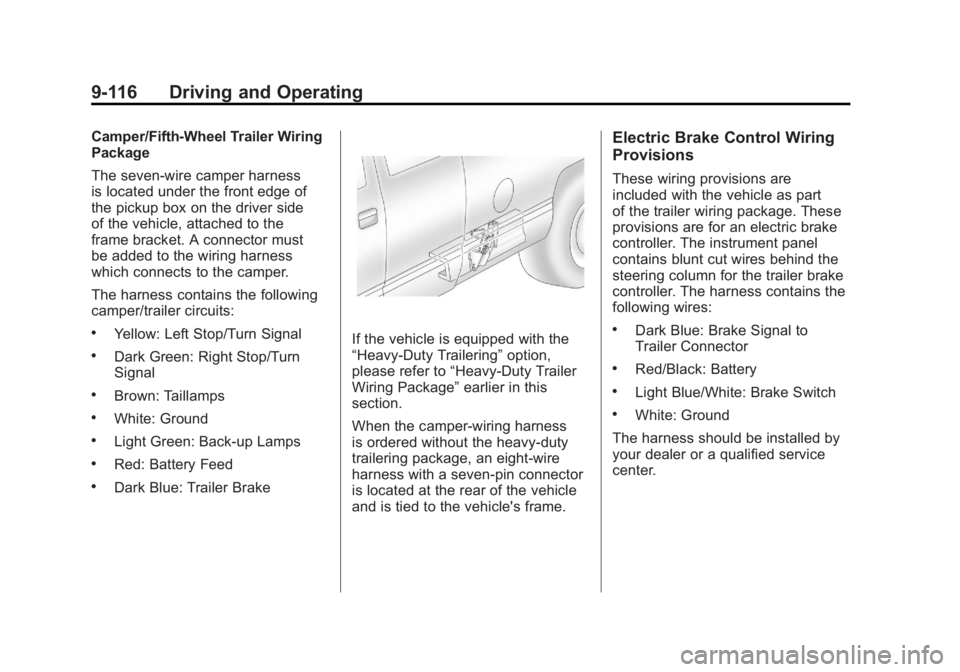
The seven-wire camper harness
is located under the front edge of
the pickup box on the driver side
of the vehicle, attached to the
frame bracket. A connector must
be added to the wiring harness
which connects to the camper.
The harness contains the following
camper/trailer circuits:
.Yellow: Left Stop/Turn Signal
.Dark Green: Right Stop/Turn
Signal
.Brown: Taillamps
.White: Ground
.Light Green: Back-up Lamps
.Red: Battery Feed
.Dark Blue: Trailer Brake
If the vehicle is equipped with the
“Heavy-Duty Trailering”option,
please refer to “Heavy-Duty Trailer
Wiring Package” earlier in this
section.
When the camper-wiring harness
is ordered without the heavy-duty
trailering package, an eight-wire
harness with a seven-pin connector
is located at the rear of the vehicle
and is tied to the vehicle's frame.
Electric Brake Control Wiring
Provisions
These wiring provisions are
included with the vehicle as part
of the trailer wiring package. These
provisions are for an electric brake
controller. The instrument panel
contains blunt cut wires behind the
steering column for the trailer brake
controller. The harness contains the
following wires:
.Dark Blue: Brake Signal to
Trailer Connector
.Red/Black: Battery
.Light Blue/White: Brake Switch
.White: Ground
The harness should be installed by
your dealer or a qualified service
center.
Page 413 of 594
Black plate (119,1)GMC Sierra Owner Manual - 2011
Driving and Operating 9-119
When trailering, make sure of the
following:
.The ITBC system is used only
with trailers that are equipped
with electric brakes.
.All applicable local and federal
laws and regulations are
followed.
.All electrical and mechanical
connections to the trailer are
made correctly.
.The trailer’s brakes are in proper
working condition.
.The trailer and vehicle are
properly loaded for the towing
condition.
The ITBC system is a
factory-installed item. Out‐of‐factory
installation of this system should not
be attempted. GM is not responsible
for warranty or performance of the
system resulting from out‐of‐factory
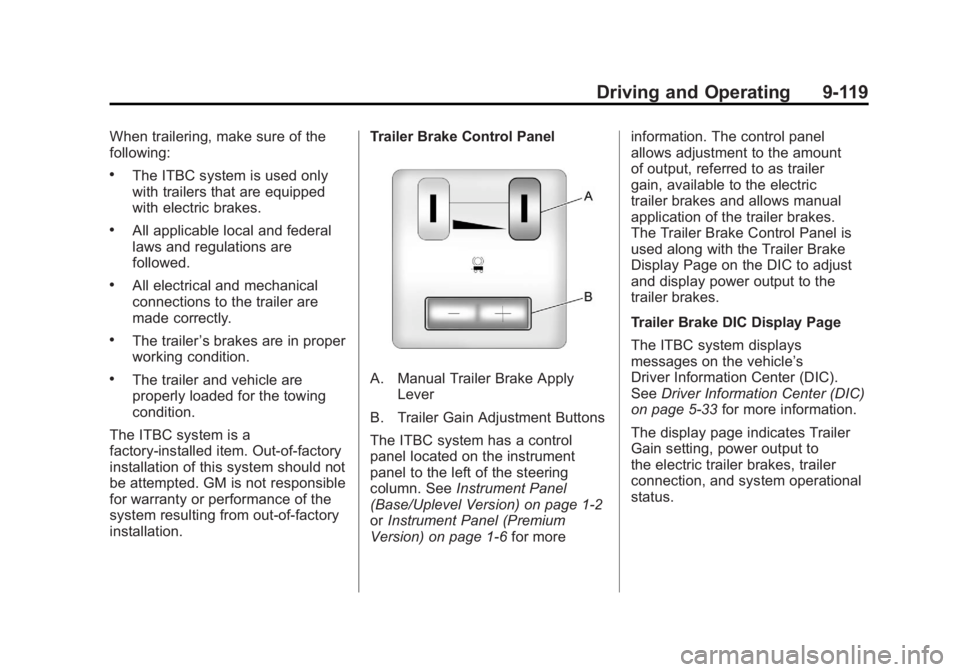
installation. Trailer Brake Control PanelA. Manual Trailer Brake Apply
Lever
B. Trailer Gain Adjustment Buttons
The ITBC system has a control
panel located on the instrument
panel to the left of the steering
column. See Instrument Panel
(Base/Uplevel Version) on page 1‑2
or Instrument Panel (Premium
Version) on page 1‑6 for moreinformation. The control panel
allows adjustment to the amount
of output, referred to as trailer
gain, available to the electric
trailer brakes and allows manual
application of the trailer brakes.
The Trailer Brake Control Panel is
used along with the Trailer Brake
Display Page on the DIC to adjust
and display power output to the
trailer brakes.
Trailer Brake DIC Display Page
The ITBC system displays
messages on the vehicle’s
Driver Information Center (DIC).
See
Driver Information Center (DIC)
on page 5‑33 for more information.
The display page indicates Trailer
Gain setting, power output to
the electric trailer brakes, trailer
connection, and system operational
status.
Page 425 of 594
Black plate (1,1)GMC Sierra Owner Manual - 2011
Vehicle Care 10-1
Vehicle Care
General Information
General Information . . . . . . . . . . 10-2
California Proposition65 Warning . . . . . . . . . . . . . . . . . 10-3
California Perchlorate Materials Requirements . . . . 10-3
Accessories and Modifications . . . . . . . . . . . . . . . 10-3
Vehicle Checks
Doing Your OwnService Work . . . . . . . . . . . . . . . 10-4
Hood . . . . . . . . . . . . . . . . . . . . . . . . 10-5
Engine Compartment Overview . . . . . . . . . . . . . . . . . . . 10-6
Engine Oil . . . . . . . . . . . . . . . . . . . 10-7
Engine Oil Life System . . . . . 10-11
Automatic Transmission Fluid (4-Speed
Transmission) . . . . . . . . . . . . . 10-13
Automatic Transmission Fluid (6-Speed
Transmission) . . . . . . . . . . . . . 10-16
Engine Air Cleaner/Filter . . . . 10-19
Cooling System . . . . . . . . . . . . 10-20
Engine Coolant . . . . . . . . . . . . . 10-22 Engine Overheating . . . . . . . . 10-25
Overheated Engine
Protection
Operating Mode . . . . . . . . . . . 10-28
Engine Fan . . . . . . . . . . . . . . . . . 10-28
Power Steering Fluid . . . . . . . 10-29
Washer Fluid . . . . . . . . . . . . . . . 10-29
Brakes . . . . . . . . . . . . . . . . . . . . . 10-30
Brake Fluid . . . . . . . . . . . . . . . . . 10-32
Battery . . . . . . . . . . . . . . . . . . . . . 10-34
Four-Wheel Drive . . . . . . . . . . . 10-34
Front Axle . . . . . . . . . . . . . . . . . . 10-36
Rear Axle . . . . . . . . . . . . . . . . . . 10-37
Noise Control System . . . . . . 10-38
Starter Switch Check . . . . . . . 10-39
Automatic Transmission Shift
Lock Control Function
Check . . . . . . . . . . . . . . . . . . . . . 10-40
Ignition Transmission Lock Check . . . . . . . . . . . . . . . . . . . . . 10-40
Park Brake and P (Park) Mechanism Check . . . . . . . . 10-40
Wiper Blade Replacement . . . . . . . . . . . . . . 10-41
Glass Replacement . . . . . . . . 10-41
Headlamp Aiming
Headlamp Aiming . . . . . . . . . . 10-42
Bulb Replacement
Bulb Replacement . . . . . . . . . . 10-44
Halogen Bulbs . . . . . . . . . . . . . . 10-44
Headlamps . . . . . . . . . . . . . . . . . 10-44
Pick-Up Box Identification and Fender Marker
Lamps . . . . . . . . . . . . . . . . . . . . 10-45
Taillamps (Chassis Cab Models) . . . . . . . . . . . . . . . . . . . 10-46
Taillamps, Turn Signal, Stoplamps, and Back-Up
Lamps . . . . . . . . . . . . . . . . . . . . 10-46
Center High-Mounted Stoplamp (CHMSL) and
Cargo Lamp . . . . . . . . . . . . . . 10-47
License Plate Lamp . . . . . . . . 10-48
Replacement Bulbs . . . . . . . . . 10-48
Electrical System
Electrical System Overload . . . . . . . . . . . . . . . . . . 10-49
Fuses and Circuit Breakers . . . . . . . . . . . . . . . . . . 10-50
Engine Compartment Fuse Block . . . . . . . . . . . . . . . . . . . . . 10-50
Instrument Panel Fuse Block . . . . . . . . . . . . . . . . . . . . . 10-54
Page 431 of 594
Black plate (7,1)GMC Sierra Owner Manual - 2011
Vehicle Care 10-7
A.Engine Air Cleaner/Filter on
page 10‑19.
B. Coolant Surge Tank and Pressure Cap. See Cooling
System on page 10‑20.
C. Positive (+) Terminal. See Jump
Starting on page 10‑98.
D. Battery on page 10‑34.
E. Remote Negative (−) Terminal (Out of View). See Jump
Starting on page 10‑98.
F. Automatic Transmission Dipstick (Out of View).
See “Checking the Fluid Level”
under Automatic Transmission
Fluid (4-Speed Transmission)
on page 10‑13 orAutomatic
Transmission Fluid (6-Speed
Transmission) on page 10‑16.
G. Engine Oil Fill Cap. See “When
to Add Engine Oil” under
Engine Oil on page 10‑7. H. Engine Oil Dipstick (Out of
View). See “Checking Engine
Oil” under Engine Oil on
page 10‑7.
I. Engine Cooling Fan (Out of View). See Cooling System on
page 10‑20.
J. Power Steering Fluid Reservoir. See Power Steering Fluid on
page 10‑29.
K. Brake Master Cylinder Reservoir. See Brake Fluid on
page 10‑32.
L. Engine Compartment Fuse
Block on page 10‑50.
M. Windshield Washer Fluid Reservoir. See “Adding Washer
Fluid” under Washer Fluid on
page 10‑29.
If the vehicle has a diesel engine
and/or an Allison Transmission, see
the Duramax Diesel Supplement.Engine Oil
For diesel engine vehicles, see
“Engine Oil” in the Duramax Diesel
Supplement.
To ensure proper engine
performance and long life, careful
attention must be paid to engine
oil. Following these simple, but
important steps will help protect
your investment:
.Always use engine oil approved
to the proper specification and
of the proper viscosity grade.
See “Selecting the Right Engine
Oil” in this section.
.Check the engine oil level
regularly and maintain the
proper oil level. See “Checking
Engine Oil” and“When to Add
Engine Oil” in this section.
.Change the engine oil at the
appropriate time. See Engine
Oil Life System on page 10‑11.
.Always dispose of engine oil
properly. See “What to Do with
Used Oil” in this section.
Page 453 of 594
Black plate (29,1)GMC Sierra Owner Manual - 2011
Vehicle Care 10-29
Power Steering Fluid
SeeEngine Compartment Overview
on page 10‑6 for reservoir location.
When to Check Power Steering
Fluid
It is not necessary to regularly
check power steering fluid unless
there is a leak suspected in the
system or an unusual noise is
heard. A fluid loss in this system
could indicate a problem. Have the
system inspected and repaired.
How to Check Power Steering
Fluid
To check the power steering fluid:
1. Turn the key off and let the
engine compartment cool down.
2. Wipe the cap and the top of the reservoir clean.
3. Unscrew the cap and wipe the dipstick with a clean rag.
4. Replace the cap and completely tighten it.
5. Remove the cap again and look at the fluid level on the dipstick.
The level should be at the
FULL COLD mark. If necessary,
add only enough fluid to bring the
level up to the mark.
What to Use
To determine what kind of fluid to
use, see Recommended Fluids and
Lubricants on page 11‑8. Always
use the proper fluid.
Notice: Use of the incorrect fluid
may damage the vehicle and the
damages may not be covered by
the vehicle's warranty. Always
use the correct fluid listed in
Recommended Fluids and
Lubricants on page 11‑8.
Washer Fluid
What to Use
When windshield washer fluid needs
to be added, be sure to read the
manufacturer's instructions before
use. Use a fluid that has sufficient
protection against freezing in an
area where the temperature may
fall below freezing.