sunroof GMC SIERRA 1500 2011 Owners Manual
[x] Cancel search | Manufacturer: GMC, Model Year: 2011, Model line: SIERRA 1500, Model: GMC SIERRA 1500 2011Pages: 594, PDF Size: 7.88 MB
Page 7 of 594
Black plate (1,1)GMC Sierra Owner Manual - 2011
In Brief 1-1
In Brief
Instrument Panel
Instrument Panel(Base/Uplevel Version) . . . . . . 1-2
Instrument Panel (Premium Version) . . . . . . . . . . . 1-6
Initial Drive Information
Initial Drive Information . . . . . . . . 1-8
Remote Keyless Entry (RKE)System . . . . . . . . . . . . . . . . . . . . . . 1-8
Remote Vehicle Start . . . . . . . . . 1-9
Door Locks . . . . . . . . . . . . . . . . . . . 1-9
Windows . . . . . . . . . . . . . . . . . . . . . 1-10
Seat Adjustment . . . . . . . . . . . . . 1-11
Memory Features . . . . . . . . . . . . 1-13
Heated Seats . . . . . . . . . . . . . . . . 1-15
Head Restraint Adjustment . . . . . . . . . . . . . . . . . 1-15 Safety Belts . . . . . . . . . . . . . . . . . . 1-15
Sensing System for
Passenger Airbag . . . . . . . . . . 1-16
Mirror Adjustment . . . . . . . . . . . . 1-16
Steering Wheel Adjustment . . . . . . . . . . . . . . . . . 1-17
Throttle and Brake Pedal Adjustment . . . . . . . . . . . . . . . . . 1-18
Interior Lighting . . . . . . . . . . . . . . 1-18
Exterior Lighting . . . . . . . . . . . . . 1-19
Windshield Wiper/Washer . . . . 1-20
Climate Controls . . . . . . . . . . . . . 1-20
Transmission . . . . . . . . . . . . . . . . 1-23
Four-Wheel Drive . . . . . . . . . . . . 1-24
Vehicle Features
Radio(s) . . . . . . . . . . . . . . . . . . . . . 1-26
Satellite Radio . . . . . . . . . . . . . . . 1-27
Portable Audio Devices . . . . . . 1-28
Bluetooth
®. . . . . . . . . . . . . . . . . . . 1-28
Steering Wheel Controls . . . . . 1-28 Cruise Control . . . . . . . . . . . . . . . 1-29
Navigation System . . . . . . . . . . . 1-30
Driver Information
Center (DIC) . . . . . . . . . . . . . . . 1-30
Rear Vision
Camera (RVC) . . . . . . . . . . . . . 1-31
Ultrasonic Parking Assist . . . . 1-31
Power Outlets . . . . . . . . . . . . . . . 1-32
Universal Remote System . . . 1-32
Sunroof . . . . . . . . . . . . . . . . . . . . . . 1-32
Performance and Maintenance
StabiliTrak®System . . . . . . . . . 1-33
Tire Pressure Monitor . . . . . . . . 1-34
Engine Oil Life System . . . . . . 1-34
Fuel E85 (85% Ethanol) . . . . . 1-35
Driving for Better Fuel Economy . . . . . . . . . . . . . . . . . . . 1-35
Roadside Assistance Program . . . . . . . . . . . . . . . . . . . . 1-36
OnStar
®. . . . . . . . . . . . . . . . . . . . . 1-36
Page 38 of 594
Black plate (32,1)GMC Sierra Owner Manual - 2011
1-32 In Brief
Power Outlets
Accessory power outlets can be
used to plug in electrical equipment,
such as a cell phone, MP3
player, etc.
The vehicle may have two
accessory power outlets located
below the climate control system,
or may have one accessory power
outlet and one cigarette lighter.
The cigarette lighter is designed
to fit only in the receptacle closest
to the driver.
There may be another accessory
power outlet in the rear cargo area.
If the vehicle has a floor console,
there is an accessory power outlet
inside the storage bin and one on
the rear of the floor console.
The accessory power outlets are
powered, even when the ignition is
in LOCK/OFF. Continuing to use
power outlets while the ignition is in
LOCK/OFF may cause the vehicle's
battery to run down.
SeePower Outlets on page 5‑10.
Universal Remote System
This system provides a way
to replace up to three remote
control transmitters used to
activate devices such as garage
door openers, security systems,
and home automation devices.
Read the instructions completely
before attempting to program the
transmitter. Because of the steps
involved, it may be helpful to
have another person assist with
programming the transmitter.
SeeUniversal Remote System on
page 5‑61.
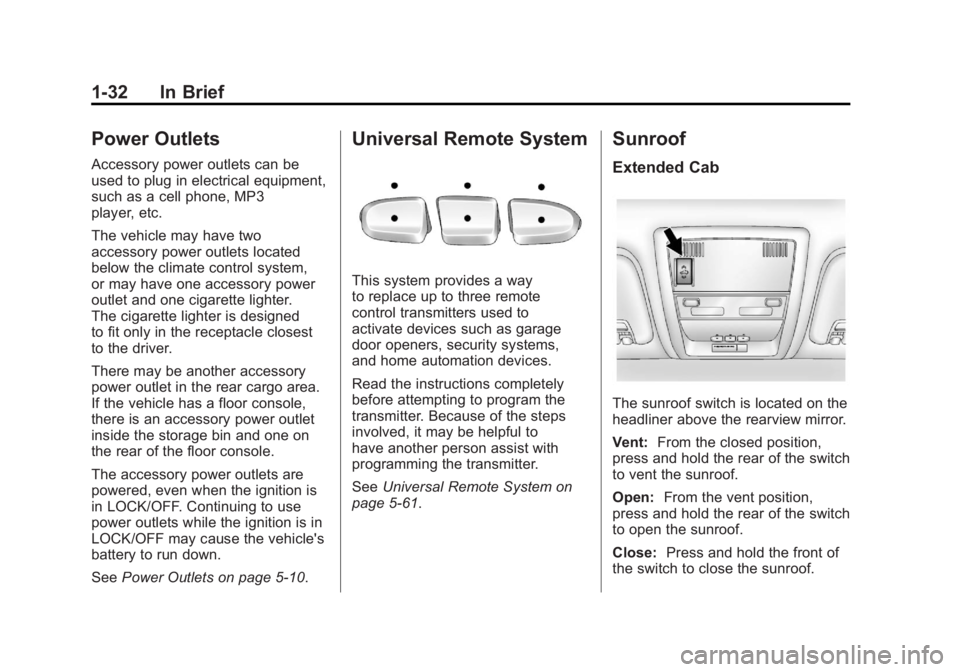
Sunroof
Extended Cab
The sunroof switch is located on the
headliner above the rearview mirror.
Vent: From the closed position,
press and hold the rear of the switch
to vent the sunroof.
Open: From the vent position,
press and hold the rear of the switch
to open the sunroof.
Close: Press and hold the front of
the switch to close the sunroof.
Page 39 of 594
Black plate (33,1)GMC Sierra Owner Manual - 2011
In Brief 1-33
The sunroof also has a roller
sunshade that can be used to block
the rays of the sun. To open the
sunshade, press and unlatch it, and
roll it back. To close, pull it forward
and latch it into the closed position.
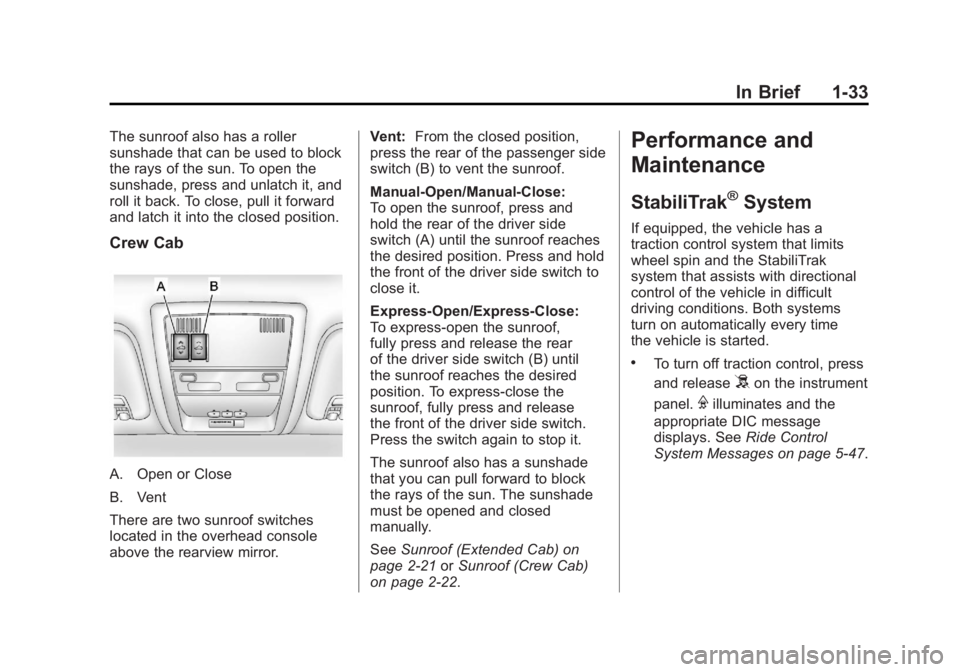
Crew Cab
A. Open or Close
B. Vent
There are two sunroof switches
located in the overhead console
above the rearview mirror.Vent:
From the closed position,
press the rear of the passenger side
switch (B) to vent the sunroof.
Manual-Open/Manual-Close:
To open the sunroof, press and
hold the rear of the driver side
switch (A) until the sunroof reaches
the desired position. Press and hold
the front of the driver side switch to
close it.
Express-Open/Express-Close:
To express-open the sunroof,
fully press and release the rear
of the driver side switch (B) until
the sunroof reaches the desired
position. To express-close the
sunroof, fully press and release
the front of the driver side switch.
Press the switch again to stop it.
The sunroof also has a sunshade
that you can pull forward to block
the rays of the sun. The sunshade
must be opened and closed
manually.
See Sunroof (Extended Cab) on
page 2‑21 orSunroof (Crew Cab)
on page 2‑22.
Performance and
Maintenance
StabiliTrak®System
If equipped, the vehicle has a
traction control system that limits
wheel spin and the StabiliTrak
system that assists with directional
control of the vehicle in difficult
driving conditions. Both systems
turn on automatically every time
the vehicle is started.
.To turn off traction control, press
and release
5on the instrument
panel.
Filluminates and the
appropriate DIC message
displays. See Ride Control
System Messages on page 5‑47.
Page 45 of 594
Black plate (1,1)GMC Sierra Owner Manual - 2011
Keys, Doors and Windows 2-1
Keys, Doors and
Windows
Keys and Locks
Keys . . . . . . . . . . . . . . . . . . . . . . . . . . 2-2
Remote Keyless Entry (RKE)System . . . . . . . . . . . . . . . . . . . . . . 2-3
Remote Keyless Entry (RKE) System Operation . . . . . . . . . . . 2-3
Remote Vehicle Start . . . . . . . . . 2-5
Door Locks . . . . . . . . . . . . . . . . . . . 2-8
Power Door Locks . . . . . . . . . . . . 2-8
Delayed Locking . . . . . . . . . . . . . . 2-8
Automatic Door Locks . . . . . . . . . 2-9
Lockout Protection . . . . . . . . . . . . 2-9
Safety Locks . . . . . . . . . . . . . . . . . . 2-9
Doors
Rear Doors (Extended Cab) . . . . . . . . . . . . 2-10
Tailgate . . . . . . . . . . . . . . . . . . . . . . 2-10
Vehicle Security
Vehicle Security . . . . . . . . . . . . . . 2-12
Anti-Theft Alarm System . . . . . 2-12
Immobilizer . . . . . . . . . . . . . . . . . . 2-13
Immobilizer Operation . . . . . . . 2-13
Exterior Mirrors
Convex Mirrors . . . . . . . . . . . . . . 2-15
Manual Mirrors . . . . . . . . . . . . . . . 2-15
Trailer-Tow Mirrors . . . . . . . . . . . 2-15
Power Mirrors . . . . . . . . . . . . . . . . 2-16
Folding Mirrors . . . . . . . . . . . . . . . 2-16
Heated Mirrors . . . . . . . . . . . . . . . 2-17
Park Tilt Mirrors . . . . . . . . . . . . . . 2-17
Interior Mirrors
Manual Rearview Mirror . . . . . . 2-18
Automatic Dimming Rearview Mirror . . . . . . . . . . . . . . . . . . . . . . . 2-18
Windows
Windows . . . . . . . . . . . . . . . . . . . . . 2-18
Manual Windows . . . . . . . . . . . . 2-19
Power Windows . . . . . . . . . . . . . 2-19
Rear Windows . . . . . . . . . . . . . . . 2-20
Sun Visors . . . . . . . . . . . . . . . . . . . 2-20
Roof
Sunroof (Extended Cab) . . . . . 2-21
Sunroof (Crew Cab) . . . . . . . . . 2-22
Page 63 of 594
Black plate (19,1)GMC Sierra Owner Manual - 2011
Keys, Doors and Windows 2-19
The vehicle aerodynamics are
designed to improve fuel economy
performance. This may result in
a pulsing sound when either rear
window is down and the front
windows are up. To reduce the
sound, open either a front window
or the sunroof (if equipped).
Manual Windows
Turn the hand crank on each door
to manually raise or lower the
manual windows.
Power Windows
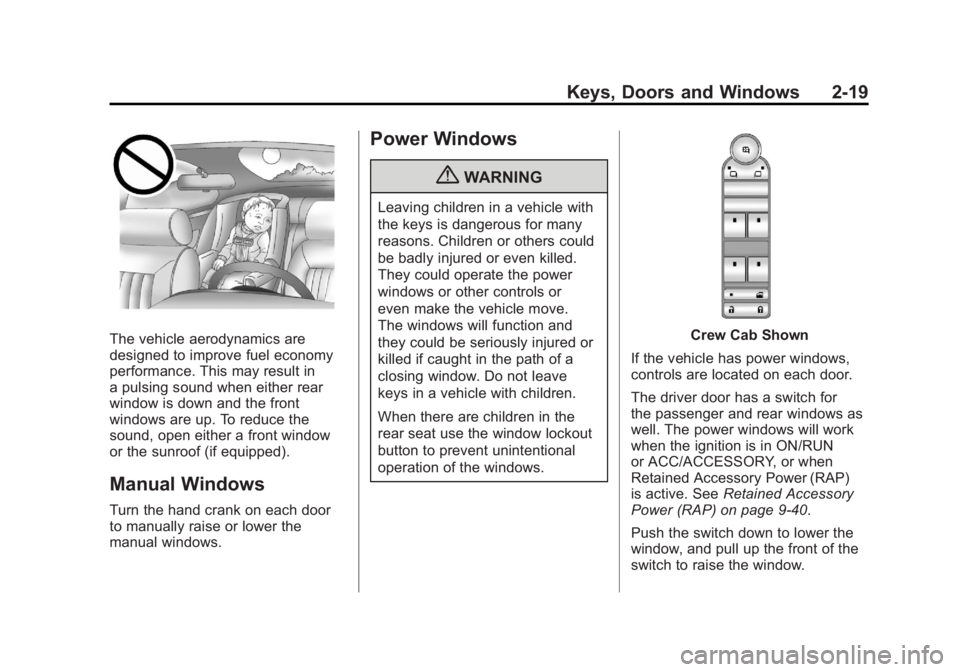
{WARNING
Leaving children in a vehicle with
the keys is dangerous for many
reasons. Children or others could
be badly injured or even killed.
They could operate the power
windows or other controls or
even make the vehicle move.
The windows will function and
they could be seriously injured or
killed if caught in the path of a
closing window. Do not leave
keys in a vehicle with children.
When there are children in the
rear seat use the window lockout
button to prevent unintentional
operation of the windows.
Crew Cab Shown
If the vehicle has power windows,
controls are located on each door.
The driver door has a switch for
the passenger and rear windows as
well. The power windows will work
when the ignition is in ON/RUN
or ACC/ACCESSORY, or when
Retained Accessory Power (RAP)
is active. See Retained Accessory
Power (RAP) on page 9‑40.
Push the switch down to lower the
window, and pull up the front of the
switch to raise the window.
Page 65 of 594
Black plate (21,1)GMC Sierra Owner Manual - 2011
Keys, Doors and Windows 2-21
Roof
Sunroof (Extended Cab)
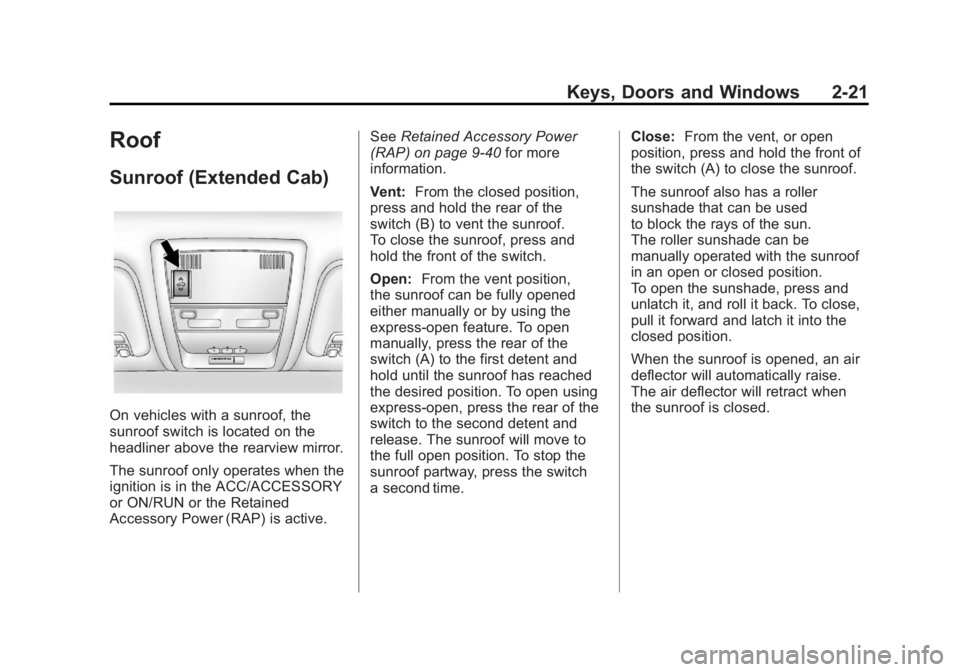
On vehicles with a sunroof, the
sunroof switch is located on the
headliner above the rearview mirror.
The sunroof only operates when the
ignition is in the ACC/ACCESSORY
or ON/RUN or the Retained
Accessory Power (RAP) is active.See
Retained Accessory Power
(RAP) on page 9‑40 for more
information.
Vent: From the closed position,
press and hold the rear of the
switch (B) to vent the sunroof.
To close the sunroof, press and
hold the front of the switch.
Open: From the vent position,
the sunroof can be fully opened
either manually or by using the
express-open feature. To open
manually, press the rear of the
switch (A) to the first detent and
hold until the sunroof has reached
the desired position. To open using
express-open, press the rear of the
switch to the second detent and
release. The sunroof will move to
the full open position. To stop the
sunroof partway, press the switch
a second time. Close:
From the vent, or open
position, press and hold the front of
the switch (A) to close the sunroof.
The sunroof also has a roller
sunshade that can be used
to block the rays of the sun.
The roller sunshade can be
manually operated with the sunroof
in an open or closed position.
To open the sunshade, press and
unlatch it, and roll it back. To close,
pull it forward and latch it into the
closed position.
When the sunroof is opened, an air
deflector will automatically raise.
The air deflector will retract when
the sunroof is closed.
Page 66 of 594
Black plate (22,1)GMC Sierra Owner Manual - 2011
2-22 Keys, Doors and Windows
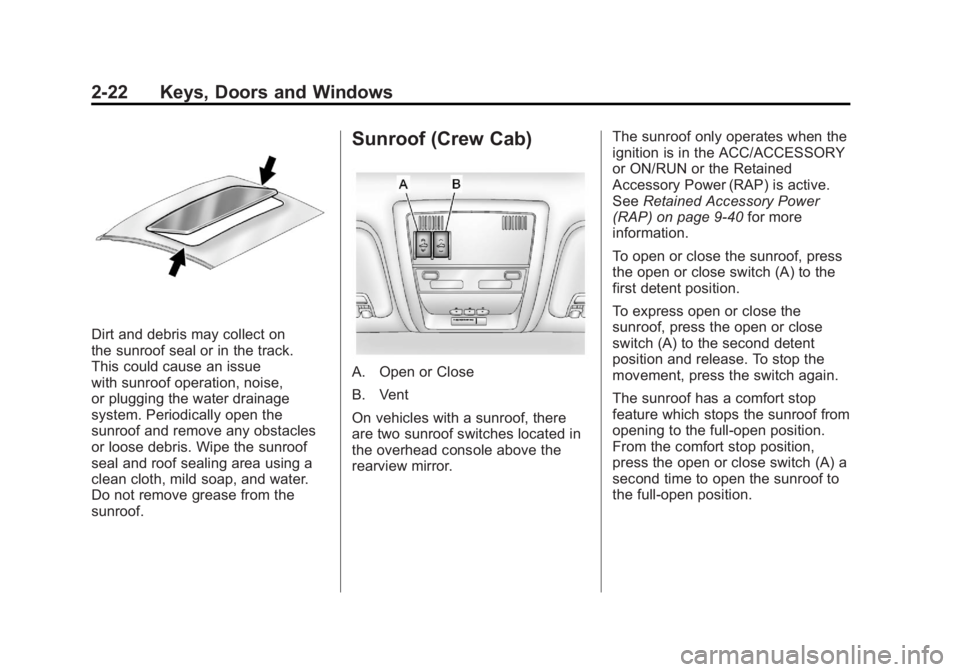
Dirt and debris may collect on
the sunroof seal or in the track.
This could cause an issue
with sunroof operation, noise,
or plugging the water drainage
system. Periodically open the
sunroof and remove any obstacles
or loose debris. Wipe the sunroof
seal and roof sealing area using a
clean cloth, mild soap, and water.
Do not remove grease from the
sunroof.
Sunroof (Crew Cab)
A. Open or Close
B. Vent
On vehicles with a sunroof, there
are two sunroof switches located in
the overhead console above the
rearview mirror.The sunroof only operates when the
ignition is in the ACC/ACCESSORY
or ON/RUN or the Retained
Accessory Power (RAP) is active.
See
Retained Accessory Power
(RAP) on page 9‑40 for more
information.
To open or close the sunroof, press
the open or close switch (A) to the
first detent position.
To express open or close the
sunroof, press the open or close
switch (A) to the second detent
position and release. To stop the
movement, press the switch again.
The sunroof has a comfort stop
feature which stops the sunroof from
opening to the full-open position.
From the comfort stop position,
press the open or close switch (A) a
second time to open the sunroof to
the full-open position.
Page 67 of 594
Black plate (23,1)GMC Sierra Owner Manual - 2011
Keys, Doors and Windows 2-23
To automatically vent or close the
sunroof, press the vent open or
close switch (B).
When the sunroof is opened, an air
deflector will automatically raise.
The air deflector will retract when
the sunroof is closed.
The sunroof also has a sunshade
which can be pulled forward to block
sun rays. The sunshade must be
opened and closed manually.
If an object is in the path of the
sunroof while it is closing, the
anti-pinch feature will detect the
object and stop the sunroof.
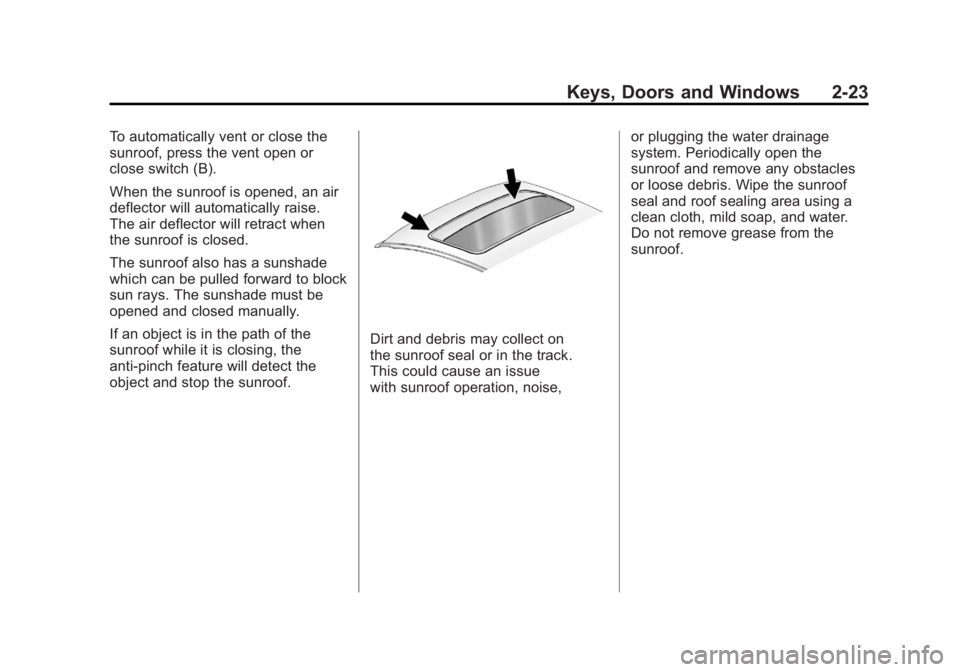
Dirt and debris may collect on
the sunroof seal or in the track.
This could cause an issue
with sunroof operation, noise,or plugging the water drainage
system. Periodically open the
sunroof and remove any obstacles
or loose debris. Wipe the sunroof
seal and roof sealing area using a
clean cloth, mild soap, and water.
Do not remove grease from the
sunroof.
Page 156 of 594
Black plate (8,1)GMC Sierra Owner Manual - 2011
5-8 Instruments and Controls
To calibrate the compass, use the
following procedure:
Compass Calibration Procedure
1. Before calibrating the compass,make sure the compass zone
is set to the variance zone in
which the vehicle is located.
See “Compass Variance (Zone)
Procedure” earlier in this
section.
Do not operate any switches
such as window, sunroof,
climate controls, or seats during
the calibration procedure.
2. Press the vehicle information button until PRESS
VTO
CALIBRATE COMPASS
displays. Or, if the vehicle
does not have DIC buttons,
press the trip odometer
reset stem until CALIBRATE
COMPASS displays. 3. Press the set/reset button to
start the compass calibration.
Or, if the vehicle does not have
DIC buttons, press and hold
the trip odometer reset stem
for two seconds to start the
compass calibration.
4. The DIC will display CALIBRATING: DRIVE IN
CIRCLES. Drive the vehicle
in tight circles at less than
8 km/h (5 mph) to complete the
calibration. The DIC will display
CALIBRATION COMPLETE
for a few seconds when the
calibration is complete. The DIC
display will then return to the
previous menu.
Clock
AM-FM Radio and AM‐FM
Radio with CD Player
To set the clock:
1. Turn the ignition key to
ACC/ACCESSORY or ON/RUN,
then press the
Obutton to turn
the radio on.
2. Press the
Hbutton until the hour
numbers begin to flash, then
turn the
fknob to increase or
decrease the hour.
3. Press the
Hbutton until the
minute numbers begin to flash,
then turn the
fknob to increase
or decrease the minutes.
Page 241 of 594
Black plate (15,1)GMC Sierra Owner Manual - 2011
Infotainment System 7-15
Fixed Mast Antenna
The fixed mast antenna can
withstand most car washes without
being damaged as long as it is
securely attached to the base.
If the mast becomes slightly bent,
straighten it out by hand. If the
mast is badly bent, replace it.
Occasionally check to make sure
the antenna is tightened to its base.
If tightening is required, tighten
by hand until fully seated plus
one quarter turn.
Satellite Radio Antenna
The XM Satellite Radio antenna
is located on the roof of the
vehicle. Keep the antenna clear
of obstructions for clear radio
reception.
If the vehicle has a sunroof, the
performance of the XM system
(if equipped) may be affected
if the sunroof is open.
Audio Players
CD Player
Care of the CD Player
Do not add any label to a CD.
It could get caught in the CD.
If a CD is recorded on a personal
computer and a description label is
needed, try labeling the top of the
recorded CD with a marking pen.
The use of CD lens cleaners
is not advised, due to the risk of
contaminating the lens of the CD
optics with lubricants internal to
the CD player mechanism.Notice:
If a label is added to
a CD, or more than one CD is
inserted into the slot at a time,
or an attempt is made to play
scratched or damaged CDs, the
CD player could be damaged.
While using the CD player, use
only CDs in good condition
without any label, load one CD at
a time, and keep the CD player
and the loading slot free of
foreign materials, liquids, and
debris.
If an error displays, see “CD Player
Messages” later in this section.