parking brake GMC SIERRA 1500 2013 User Guide
[x] Cancel search | Manufacturer: GMC, Model Year: 2013, Model line: SIERRA 1500, Model: GMC SIERRA 1500 2013Pages: 534, PDF Size: 7.85 MB
Page 293 of 534
Black plate (27,1)GMC Sierra Owner Manual - 2013 - crc - 8/14/12
Driving and Operating 9-27
If the vehicle starts briefly but
then stops again, do the same
thing. This clears the extra
gasoline from the engine. Do not
race the engine immediately
after starting it. Operate the
engine and transmission gently
until the oil warms up and
lubricates all moving parts.
Fast Idle System
If the vehicle has this feature it is
available only with cruise control.
The manual fast idle switch is
operated using the cruise control
buttons located on the left hand side
of the steering wheel.
This system can be used to
increase engine idle speed
whenever the following conditions
are met:
.The parking brake is set.
.The brake pedal is not pressed.
.The vehicle must not be moving
and the accelerator must not be
pressed.To control the fast idle:
.To enable the Fast Idle System,
press and release the cruise
control on/off button and ensure
that the switch indicator light
is lit.
.Press and release the cruise
control SET-button. Engine
speed will be held at
approximately 1200 RPM.
When the fast idle is active the
Driver Information Center (DIC) will
display “FAST IDLE ON.”
One of the following actions will turn
off the fast idle:
.Pressing the brake.
.Selecting the cruise control
cancel button.
.Releasing the parking brake.
.The transmission shift lever is
moved out of P (Park) or
N (Neutral).
.Selecting the cruise control on/
off button when it was
previously on.
.Pressing the cruise control
SET-button a second time.
.Pressing the accelerator greater
than a quarter of the way down.
.Turning the ignition switch to the
LOCK/OFF position.
Retained Accessory
Power (RAP)
The following vehicle accessories
can be used for up to 10 minutes
after the engine is turned off:
.Audio System
.Power Windows
.OnStar System (if equipped)
.Sunroof (if equipped)
These features work when the key
is in ON/RUN or ACC/
ACCESSORY. Once the key is
turned from ON/RUN to LOCK/OFF,
the windows and sunroof continue
to work up to 10 minutes until any
door is opened. The radio continues
to work for up to 10 minutes or until
the driver door is opened.
Page 294 of 534
Black plate (28,1)GMC Sierra Owner Manual - 2013 - crc - 8/14/12
9-28 Driving and Operating
Engine Coolant Heater
The engine heater can provide
easier starting and better fuel
economy during engine warm-up in
cold weather conditions at or below
−18°C (0°F). Vehicles with an
engine heater should be plugged in
at least four hours before starting.
An internal thermostat in the
plug-end of the cord may exist
which will prevent engine coolant
heater operation at temperatures
above−18°C (0°F).
If the vehicle has a diesel engine,
see the Duramax Diesel supplement
for more information.
To Use the Engine Coolant
Heater
1. Turn off the engine.
2. Open the hood and unwrap the electrical cord. The cord is
secured to the Engine
Compartment Fuse Block with a
clip. Carefully remove the wire tie which bundles the electrical
plug. Do not cut the
electrical cord.
3. Plug the cord into a normal, grounded 110-volt AC outlet.
{WARNING
Plugging the cord into an
ungrounded outlet could cause an
electrical shock. Also, the wrong
kind of extension cord could
overheat and cause a fire. You
could be seriously injured. Plug
the cord into a properly grounded
three-prong 110-volt AC outlet.
If the cord will not reach, use a
heavy-duty three-prong extension
cord rated for at least 15 amps.
4. Before starting the engine, be sure to unplug and store the
cord as it was before to keep it
away from moving engine parts.
If you do not, it could be
damaged. The length of time the heater should
remain plugged in depends on
several factors. Ask a dealer in the
area where you will be parking the
vehicle for the best advice on this.
Shifting Into Park
{WARNING
It can be dangerous to get out of
the vehicle if the shift lever is not
fully in P (Park) with the parking
brake firmly set. The vehicle can
roll. If you have left the engine
running, the vehicle can move
suddenly. You or others could be
injured. To be sure the vehicle will
not move, even when you are on
fairly level ground, use the steps
that follow. With four-wheel drive,
if the transfer case is in
N (Neutral), the vehicle will be
free to roll, even if the shift lever
is in P (Park). Be sure the transfer
(Continued)
Page 295 of 534
Black plate (29,1)GMC Sierra Owner Manual - 2013 - crc - 8/14/12
Driving and Operating 9-29
WARNING (Continued)
case is in a drive gear. If towing a
trailer, seeDriving Characteristics
and Towing Tips on page 9‑71.
1. Hold the brake pedal down, then set the parking brake.
See Parking Brake on page 9‑51
for more information.
2. Move the shift lever into the P (Park) position by pulling the
shift lever toward you and
moving it up as far as it will go.
3. Be sure the transfer case is in a drive gear —not in N (Neutral).
4. Turn the ignition key to LOCK/OFF.
5. Remove the key and take it with you. If you can leave the vehicle
with the ignition key in your
hand, the vehicle is in P (Park).
Leaving the Vehicle With the
Engine Running
{WARNING
It can be dangerous to leave the
vehicle with the engine running.
The vehicle could move suddenly
if the shift lever is not fully in
P (Park) with the parking brake
firmly set.
If you have four-wheel drive and
the transfer case is in N (Neutral),
the vehicle will be free to roll,
even if the shift lever is in
P (Park). So be sure the transfer
case is in a drive gear —not in
N (Neutral).
And, if you leave the vehicle with
the engine running, it could
overheat and even catch fire. You
or others could be injured. Do not
leave the vehicle with the engine
running unless you have to. If you have to leave the vehicle with
the engine running, be sure your
vehicle is in P (Park) and the
parking brake is firmly set before
you leave it. After you move the shift
lever into P (Park), hold the regular
brake pedal down. Then, see if you
can move the shift lever away from
P (Park) without first pulling it toward
you. If you can, it means that the
shift lever was not fully locked into
P (Park).
Torque Lock
If you are parking on a hill and you
do not shift your transmission into
P (Park) properly, the weight of the
vehicle may put too much force on
the parking pawl in the
transmission. You may find it difficult
to pull the shift lever out of P (Park).
This is called torque lock. To
prevent torque lock, set the parking
brake and then shift into P (Park)
properly before you leave the driver
seat. To find out how,
Shifting Into
Park on page 9‑28.
Page 296 of 534
Black plate (30,1)GMC Sierra Owner Manual - 2013 - crc - 8/14/12
9-30 Driving and Operating
When you are ready to drive, move
the shift lever out of P (Park) before
you release the parking brake.
If torque lock does occur, you may
need to have another vehicle push
yours a little uphill to take some of
the pressure from the parking pawl
in the transmission, then you will be
able to pull the shift lever out of
P (Park).
Shifting out of Park
This vehicle is equipped with an
electronic shift lock release system.
The shift lock release is
designed to:
.Prevent ignition key removal
unless the shift lever is in
P (Park) with the shift lever
button fully released.
.Prevent movement of the shift
lever out of P (Park), unless the
ignition is in ON/RUN or ACC/
ACCESSORY and the regular
brake pedal is applied.The shift lock release is always
functional except in the case of an
uncharged or low voltage (less than
9 volt) battery.
If the vehicle has an uncharged
battery or a battery with low voltage,
try charging or jump starting the
battery. See
Jump Starting on
page 10‑82 for more information.
To shift out of P (Park) use the
following:
1. Apply the brake pedal.
2. Move the shift lever to the desired position.
If you still are unable to shift out of
P (Park):
1. Ease the pressure on the shift lever.
2. While holding down the brake pedal, press the shift lever all
the way into P (Park).
3. Move the shift lever to the desired position. If you are still having a problem
shifting, then have the vehicle
serviced soon.
Parking over Things
That Burn
{WARNING
Things that can burn could touch
hot exhaust parts under the
vehicle and ignite. Do not park
over papers, leaves, dry grass,
or other things that can burn.
Active Fuel Management®
Vehicles with V8 engines may have
Active Fuel Management. This
system allows the engine to operate
on either all or half of its cylinders,
depending on the driving conditions.
Page 299 of 534
Black plate (33,1)GMC Sierra Owner Manual - 2013 - crc - 8/14/12
Driving and Operating 9-33
especially when the vehicle has a
heavy load, you might notice an
increase in the effort to shift out of
P (Park). See“Torque Lock” under
Shifting Into Park on page 9‑28 for
more information.
{WARNING
It is dangerous to get out of the
vehicle if the shift lever is not fully
in P (Park) with the parking brake
firmly set. The vehicle can roll.
Do not leave the vehicle when the
engine is running. If you have left
the engine running, the vehicle
can move suddenly. You or others
could be injured. To be sure the
vehicle will not move, even when
you are on fairly level ground,
always set the parking brake and
move the shift lever to P (Park).
See Shifting Into Park on
page 9‑28 andDriving
Characteristics and Towing Tips
on page 9‑71.
{WARNING
If you have Four-Wheel Drive, the
vehicle will be free to roll —even
if the shift lever is in P (Park) —if
the transfer case is in Neutral. So,
be sure the transfer case is in a
drive gear, Two-Wheel Drive High
or Four-Wheel Drive High or
Four-Wheel Drive Low —not in
Neutral. See Shifting Into Park on
page 9‑28.
R (Reverse): Use this gear to
back up.
Notice: Shifting to R (Reverse)
while the vehicle is moving
forward could damage the
transmission. The repairs would
not be covered by the vehicle
warranty. Shift to R (Reverse) only
after the vehicle is stopped.
To rock the vehicle back and forth to
get out of snow, ice, or sand without
damaging the transmission, see If
the Vehicle Is Stuck on page 9‑14. N (Neutral):
In this position, the
engine does not connect with the
wheels. To restart when you are
already moving, use N (Neutral)
only. Also, use N (Neutral) when the
vehicle is being towed.
{WARNING
Shifting into a drive gear while the
engine is running at high speed is
dangerous. Unless your foot is
firmly on the brake pedal, the
vehicle could move very rapidly.
You could lose control and hit
people or objects. Do not shift
into a drive gear while the engine
is running at high speed.
Notice: Shifting out of P (Park) or
N (Neutral) with the engine
running at high speed may
damage the transmission. The
repairs would not be covered by
the vehicle warranty. Be sure the
engine is not running at high
speed when shifting the vehicle.
Page 306 of 534
Black plate (40,1)GMC Sierra Owner Manual - 2013 - crc - 8/14/12
9-40 Driving and Operating
If the vehicle has StabiliTrak®,
shifting into Four-Wheel Drive Low
will turn Traction Control and
StabiliTrak off. See StabiliTrak
®
System on page 9‑53.
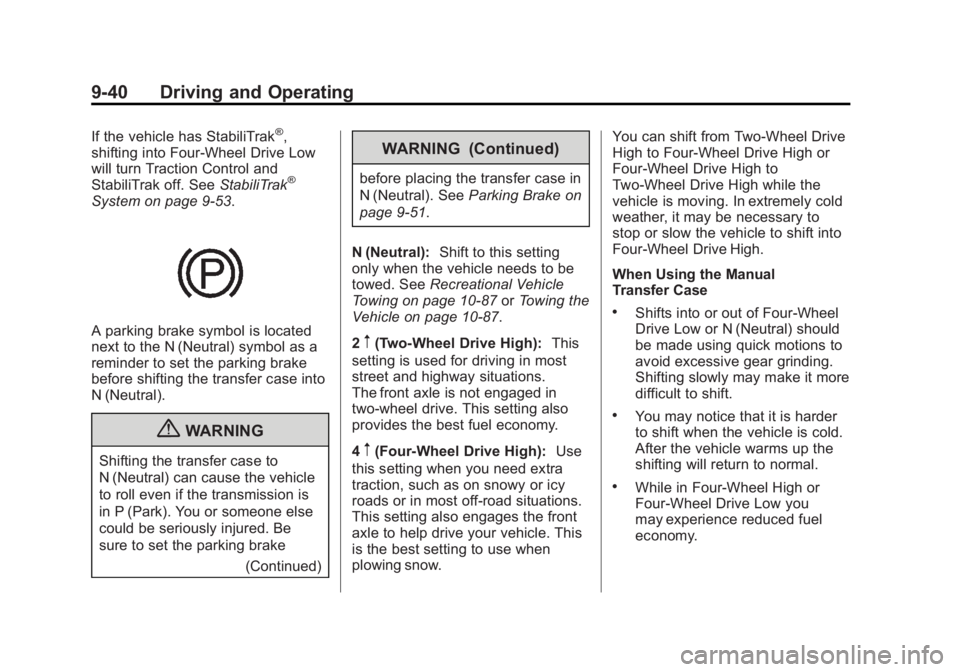
A parking brake symbol is located
next to the N (Neutral) symbol as a
reminder to set the parking brake
before shifting the transfer case into
N (Neutral).
{WARNING
Shifting the transfer case to
N (Neutral) can cause the vehicle
to roll even if the transmission is
in P (Park). You or someone else
could be seriously injured. Be
sure to set the parking brake
(Continued)
WARNING (Continued)
before placing the transfer case in
N (Neutral). SeeParking Brake on
page 9‑51.
N (Neutral): Shift to this setting
only when the vehicle needs to be
towed. See Recreational Vehicle
Towing on page 10‑87 orTowing the
Vehicle on page 10‑87.
2
m(Two-Wheel Drive High): This
setting is used for driving in most
street and highway situations.
The front axle is not engaged in
two-wheel drive. This setting also
provides the best fuel economy.
4
m(Four-Wheel Drive High): Use
this setting when you need extra
traction, such as on snowy or icy
roads or in most off-road situations.
This setting also engages the front
axle to help drive your vehicle. This
is the best setting to use when
plowing snow. You can shift from Two-Wheel Drive
High to Four-Wheel Drive High or
Four-Wheel Drive High to
Two-Wheel Drive High while the
vehicle is moving. In extremely cold
weather, it may be necessary to
stop or slow the vehicle to shift into
Four-Wheel Drive High.
When Using the Manual
Transfer Case
.Shifts into or out of Four-Wheel
Drive Low or N (Neutral) should
be made using quick motions to
avoid excessive gear grinding.
Shifting slowly may make it more
difficult to shift.
.You may notice that it is harder
to shift when the vehicle is cold.
After the vehicle warms up the
shifting will return to normal.
.While in Four-Wheel High or
Four-Wheel Drive Low you
may experience reduced fuel
economy.
Page 307 of 534
Black plate (41,1)GMC Sierra Owner Manual - 2013 - crc - 8/14/12
Driving and Operating 9-41
.Avoid driving in Four-Wheel
Drive on clean, dry pavement.
It may cause your tires to wear
faster, make the transfer case
harder to shift, and run noisier.
.If the transfer case shifter is in
the N (Neutral) position and you
have difficulty reaching the
selected transfer case mode,
with the engine running, shift the
transmission momentarily to
D (Drive) and then back to
N (Neutral). This will realign the
gear teeth in the transfer case
and allow you to complete the
shift.
Shifting from Two-Wheel Drive
High to Four-Wheel Drive High
.Shifts between Two-Wheel Drive
High and Four-Wheel Drive High
can be made at any vehicle
speed.
.Shift the transfer case lever in
one continuous motion into
either the Four-Wheel Drive High
or Two-Wheel Drive High
position.
.Shifting from Two-Wheel Drive
High to Four-Wheel Drive High
while the vehicle is in motion
may require that moderate force
be applied to the shift lever for a
few seconds before Four-Wheel
Drive High can be engaged,
especially in cold weather.
.In extremely cold weather, it may
be necessary to slow or stop the
vehicle to shift into Four-Wheel
Drive High.
.While in Four-Wheel Drive High,
the vehicle can be driven at any
posted legal speed limit.
Shifting In or Out of Four-Wheel
Drive Low
Notice: Shifting the transfer case
into Four-Wheel-Drive Low while
moving at speeds faster than
5 km/h (3 mph) may cause
premature wear to the transfer case, and may cause the gears to
grind. To avoid causing
premature wear, and grinding the
gears, do not shift the transfer
case into Four-Wheel-Drive Low
while the vehicle is moving faster
than 5 km/h (3 mph).
.Shifting into Four-Wheel Drive
Low should be done, if possible,
with the vehicle at a slight roll,
5 km/h (3 mph) or less.
.Shift the transmission into
N (Neutral).
{WARNING
Shifting the transfer case to
N (Neutral) can cause the vehicle
to roll even if the transmission is
in P (Park). You or someone else
could be seriously injured. Be
sure to set the parking brake
before placing the transfer case in
N (Neutral). See
Parking Brake on
page 9‑51.
Page 308 of 534
Black plate (42,1)GMC Sierra Owner Manual - 2013 - crc - 8/14/12
9-42 Driving and Operating
.Shifting into Four-Wheel Drive
Low with the vehicle at a stop
may be more difficult. You may
be unable to complete the shift
to Four-Wheel Drive Low, and
the transfer case will end up in
N (Neutral). This is normal, and
is a function of the gear teeth
aligning in the transfer case.
When this happens, make sure
the engine is on, shift the
transmission momentarily to
D (Drive) and back to
N (Neutral), and then complete
the transfer case shift.
.Shift the transfer case shift lever
in one continuous motion into
the Four-Wheel Drive Low
position.
.When in Four-Wheel Drive Low
do not drive faster than
72 km/h (45 mph). This will
reduce wear and extend the life
of your transfer case.Shifting In or Out of Neutral
1. With the vehicle running and the
engine at an idle, set the parking
brake.
2. Place the transmission into N (Neutral).
Shift the transfer case in one
continuous motion into or out of the
N (Neutral) position.
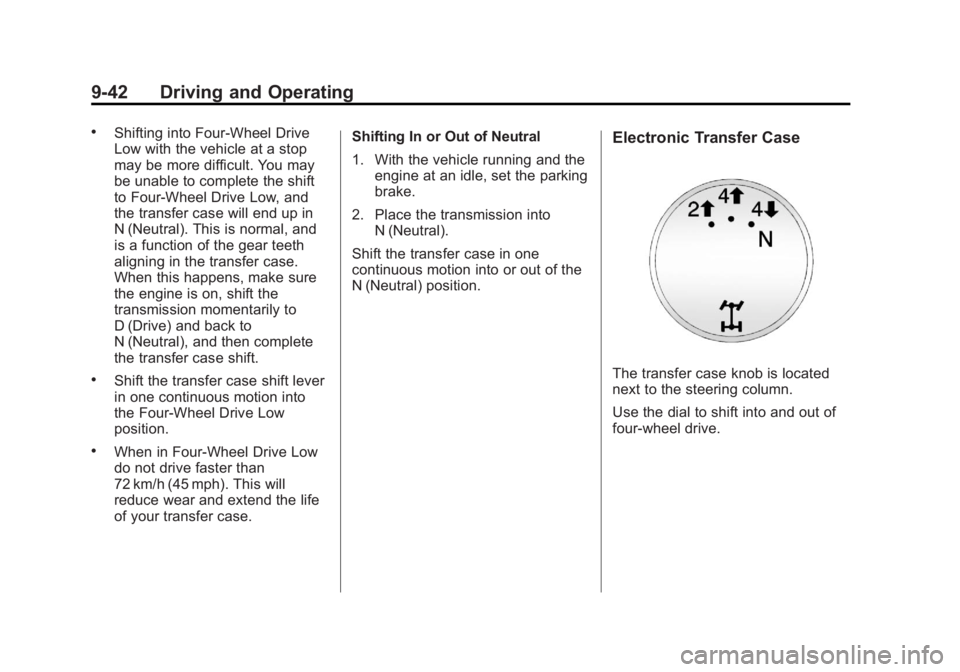
Electronic Transfer Case
The transfer case knob is located
next to the steering column.
Use the dial to shift into and out of
four-wheel drive.
Page 310 of 534
Black plate (44,1)GMC Sierra Owner Manual - 2013 - crc - 8/14/12
9-44 Driving and Operating
{WARNING
Shifting the transfer case to
N (Neutral) can cause the vehicle
to roll even if the transmission is
in P (Park). You or someone else
could be seriously injured. Be
sure to set the parking brake
before placing the transfer case in
N (Neutral). SeeParking Brake on
page 9‑51.
N (Neutral): Shift the vehicle's
transfer case to N (Neutral) only
when towing the vehicle. See
Recreational Vehicle Towing on
page 10‑87 orTowing the Vehicle
on page 10‑87 for more information.
If the SERVICE 4 WHEEL DRIVE
message stays on, you should take
the vehicle to your dealer for
service. See “SERVICE 4 WHEEL
DRIVE” underTransmission
Messages on page 5‑44. Shifting Into Two-Wheel
Drive High
Turn the knob to the Two-Wheel
Drive High position. This can be
done at any speed, except when
shifting from Four-Wheel Drive Low.
See
“Shifting Out of Four-Wheel
Drive Low” for more information.
Shifting Into Four-Wheel
Drive Low
When Four-Wheel Drive Low is
engaged, vehicle speed should be
kept below 72 km/h (45 mph).
Extended high-speed operation in
Four-Wheel Drive Low may damage
or shorten the life of the drivetrain.
To shift to the Four-Wheel Drive
Low position, the ignition must be in
ON/RUN and the vehicle must be
stopped or moving less than 5 km/h
(3 mph) with the transmission in
N (Neutral). The preferred method
for shifting into Four-Wheel Drive
Low is to have the vehicle moving
1.6 to 3.2 km/h (1 to 2 mph). Turn the
knob to the Four-Wheel Drive Low
position. You must wait for the Four-Wheel Drive Low indicator light
to stop flashing and remain on
before shifting the transmission
in gear.
Notice:
Shifting the transmission
into gear before the requested
mode indicator light has stopped
flashing could damage the
transfer case. To help avoid
damaging the vehicle, always wait
for the mode indicator lights to
stop flashing before shifting the
transmission into gear.
It is typical for the vehicle to exhibit
significant engagement noise and
bump when shifting between
Four-Wheel Drive Low and
Four-Wheel Drive High ranges or
from transfer case N (Neutral) with
the engine running.
If the knob is turned to the
Four-Wheel Drive Low position
when the vehicle is in gear and/or
moving more than 5 km/h (3 mph),
the Four-Wheel Drive Low indicator
light will flash for 30 seconds and
not complete the shift. After
Page 311 of 534
Black plate (45,1)GMC Sierra Owner Manual - 2013 - crc - 8/14/12
Driving and Operating 9-45
30 seconds the transfer case will
shift to Four-Wheel Drive
High mode. With the vehicle moving
less than 5 km/h (3 mph), and the
transmission in N (Neutral), attempt
the shift again.
Shifting Out of Four-Wheel
Drive Low
To shift from Four-Wheel Drive Low
to Four-Wheel Drive High,
or Two-Wheel Drive High, the
vehicle must be stopped or moving
less than 5 km/h (3 mph) with the
transmission in N (Neutral) and the
ignition in ON/RUN. The preferred
method for shifting out of
Four-Wheel Drive Low is to have
the vehicle moving 1.6 to 3.2 km/h
(1 to 2 mph). Turn the knob to the
Four-Wheel Drive High or
Two-Wheel Drive High position. You
must wait for the Four-Wheel Drive
High or Two-Wheel Drive High
indicator light to stop flashing and
remain on before shifting the
transmission into gear.Notice:
Shifting the transmission
into gear before the requested
mode indicator light has stopped
flashing could damage the
transfer case. To help avoid
damaging the vehicle, always wait
for the mode indicator lights to
stop flashing before shifting the
transmission into gear.
It is typical for the vehicle to exhibit
significant engagement noise and
bump when shifting between
Four-Wheel Drive Low and
Four-Wheel Drive High ranges or
from transfer case N (Neutral) with
the engine running.
If the knob is turned to the
Four-Wheel Drive High,
or Two-Wheel Drive High switch
position when the vehicle is in gear
and/or moving more than
5 km/h (3 mph), the Four-Wheel
Drive High, AUTO, or Two-Wheel
Drive High indicator light will flash
for 30 seconds but will not complete
the shift. With the vehicle moving less than 5 km/h (3 mph), and the
transmission in N (Neutral), attempt
the shift again.
Shifting into Neutral
To shift the transfer case to
N (Neutral) do the following:
1. Make sure the vehicle is parked
so that it will not roll.
2. Set the parking brake and press and hold the regular brake
pedal. See Parking Brake on
page 9‑51 for more information.
3. Start the vehicle or turn the ignition to ON/RUN.
4. Shift the transmission to N (Neutral).
5. Shift the transfer case to Two-Wheel Drive High.
6. Turn the transfer case dial clockwise to N (Neutral) until it
stops and hold it there until the
Neutral light starts blinking. This
will take at least 10 seconds.