instrument panel GMC SIERRA 1500 2013 Workshop Manual
[x] Cancel search | Manufacturer: GMC, Model Year: 2013, Model line: SIERRA 1500, Model: GMC SIERRA 1500 2013Pages: 534, PDF Size: 7.85 MB
Page 360 of 534
Black plate (94,1)GMC Sierra Owner Manual - 2013 - crc - 8/14/12
9-94 Driving and Operating
ITBC must be disconnected. Do not
power both ITBC and aftermarket
controllers to control the trailer
brakes at the same time.
Tow/Haul Mode
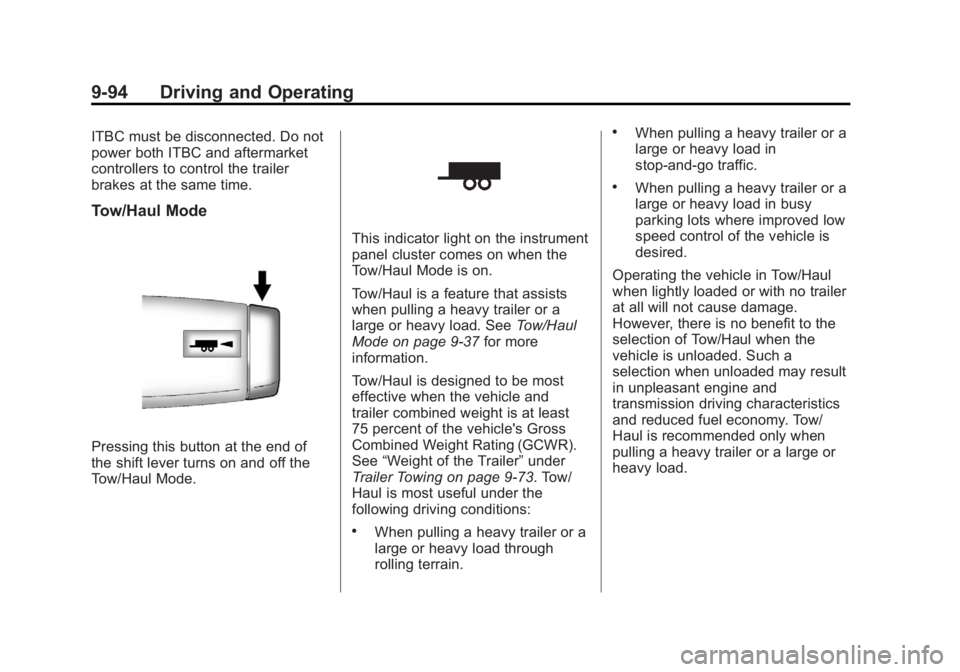
Pressing this button at the end of
the shift lever turns on and off the
Tow/Haul Mode.
This indicator light on the instrument
panel cluster comes on when the
Tow/Haul Mode is on.
Tow/Haul is a feature that assists
when pulling a heavy trailer or a
large or heavy load. SeeTow/Haul
Mode on page 9‑37 for more
information.
Tow/Haul is designed to be most
effective when the vehicle and
trailer combined weight is at least
75 percent of the vehicle's Gross
Combined Weight Rating (GCWR).
See “Weight of the Trailer” under
Trailer Towing on page 9‑73. Tow/
Haul is most useful under the
following driving conditions:
.When pulling a heavy trailer or a
large or heavy load through
rolling terrain.
.When pulling a heavy trailer or a
large or heavy load in
stop-and-go traffic.
.When pulling a heavy trailer or a
large or heavy load in busy
parking lots where improved low
speed control of the vehicle is
desired.
Operating the vehicle in Tow/Haul
when lightly loaded or with no trailer
at all will not cause damage.
However, there is no benefit to the
selection of Tow/Haul when the
vehicle is unloaded. Such a
selection when unloaded may result
in unpleasant engine and
transmission driving characteristics
and reduced fuel economy. Tow/
Haul is recommended only when
pulling a heavy trailer or a large or
heavy load.
Page 362 of 534
Black plate (96,1)GMC Sierra Owner Manual - 2013 - crc - 8/14/12
9-96 Driving and Operating
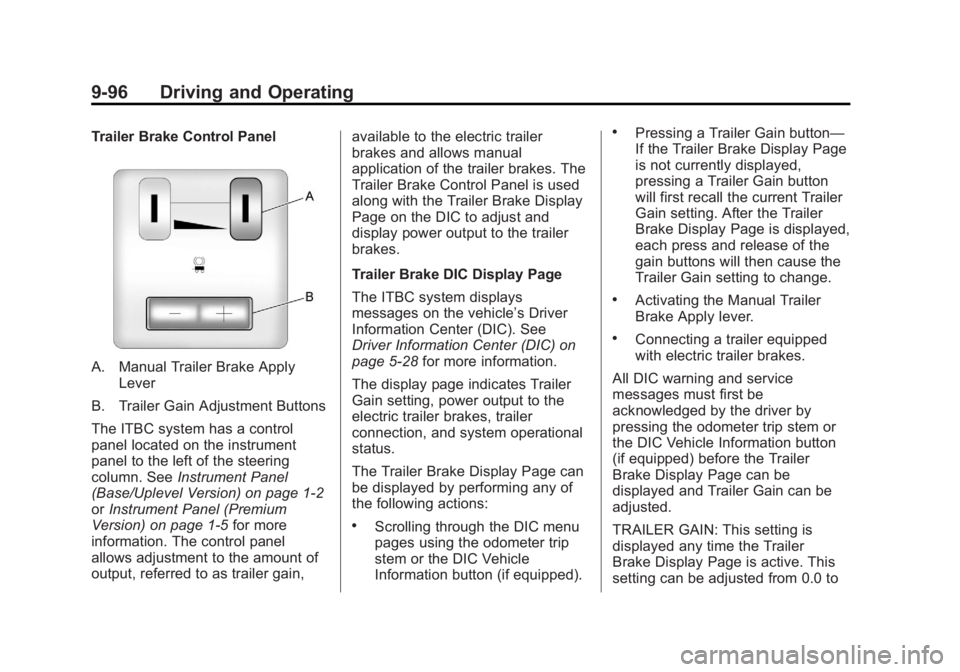
Trailer Brake Control Panel
A. Manual Trailer Brake ApplyLever
B. Trailer Gain Adjustment Buttons
The ITBC system has a control
panel located on the instrument
panel to the left of the steering
column. See Instrument Panel
(Base/Uplevel Version) on page 1‑2
or Instrument Panel (Premium
Version) on page 1‑5 for more
information. The control panel
allows adjustment to the amount of
output, referred to as trailer gain, available to the electric trailer
brakes and allows manual
application of the trailer brakes. The
Trailer Brake Control Panel is used
along with the Trailer Brake Display
Page on the DIC to adjust and
display power output to the trailer
brakes.
Trailer Brake DIC Display Page
The ITBC system displays
messages on the vehicle’s Driver
Information Center (DIC). See
Driver Information Center (DIC) on
page 5‑28
for more information.
The display page indicates Trailer
Gain setting, power output to the
electric trailer brakes, trailer
connection, and system operational
status.
The Trailer Brake Display Page can
be displayed by performing any of
the following actions:
.Scrolling through the DIC menu
pages using the odometer trip
stem or the DIC Vehicle
Information button (if equipped).
.Pressing a Trailer Gain button—
If the Trailer Brake Display Page
is not currently displayed,
pressing a Trailer Gain button
will first recall the current Trailer
Gain setting. After the Trailer
Brake Display Page is displayed,
each press and release of the
gain buttons will then cause the
Trailer Gain setting to change.
.Activating the Manual Trailer
Brake Apply lever.
.Connecting a trailer equipped
with electric trailer brakes.
All DIC warning and service
messages must first be
acknowledged by the driver by
pressing the odometer trip stem or
the DIC Vehicle Information button
(if equipped) before the Trailer
Brake Display Page can be
displayed and Trailer Gain can be
adjusted.
TRAILER GAIN: This setting is
displayed any time the Trailer
Brake Display Page is active. This
setting can be adjusted from 0.0 to
Page 366 of 534
Black plate (100,1)GMC Sierra Owner Manual - 2013 - crc - 8/14/12
9-100 Driving and Operating
If the CHECK TRAILER WIRING
message only re-appears when
connecting the trailer wiring
harness to the vehicle, the
electrical fault is on the
trailer side.
SERVICE TRAILER BRAKE
SYSTEM: This message will be
displayed when there is a problem
with the ITBC system. If this
message persists over multiple
ignition cycles, there is a problem
with the ITBC system. Take the
vehicle to an authorized GM dealer
to have the ITBC system diagnosed
and repaired.
If either the CHECK TRAILER
WIRING or SERVICE TRAILER
BRAKE SYSTEM message is
displayed while driving the vehicle, power is no longer available to the
trailer brakes. When traffic
conditions allow, carefully pull the
vehicle over to the side of the road
and turn the ignition off. Check the
wiring connection to the trailer and
turn the ignition back on. If either of
these messages continues, either
the vehicle or trailer needs service.
An authorized GM dealer may be
able to diagnose and repair
problems with the trailer. However,
any diagnosis and repair of the
trailer is not covered under the
vehicle warranty. Please contact
your trailer dealer for assistance
with trailer repairs and trailer
warranty information.Trailer Sway
Control (TSC)
Non-hybrid vehicles with StabiliTrak
have a Trailer Sway Control (TSC)
feature. If the vehicle is towing a
trailer and the system detects that
the trailer is swaying, the vehicle
brakes are applied without the driver
pressing the brake pedal. If the
vehicle is equipped with the
Integrated Trailer Brake Control
(ITBC) system, StabiliTrak may also
apply the trailer brakes. The TCS/
StabiliTrak warning light will flash on
the instrument panel cluster to notify
the driver to reduce speed. If the
trailer continues to sway, StabiliTrak
will reduce engine torque to help
slow the vehicle. See
StabiliTrak
®
System on page 9‑53 for more
information.
Adding non‐dealer accessories can
affect the vehicle performance. See
Accessories and Modifications on
page 10‑3 for more information.
Page 371 of 534
Black plate (1,1)GMC Sierra Owner Manual - 2013 - crc - 8/14/12
Vehicle Care 10-1
Vehicle Care
General Information
General Information . . . . . . . . . . 10-2
California Proposition65 Warning . . . . . . . . . . . . . . . . . 10-2
California Perchlorate Materials Requirements . . . . 10-3
Accessories and Modifications . . . . . . . . . . . . . . . 10-3
Vehicle Checks
Doing Your OwnService Work . . . . . . . . . . . . . . . 10-3
Hood . . . . . . . . . . . . . . . . . . . . . . . . 10-4
Engine Compartment Overview . . . . . . . . . . . . . . . . . . . 10-5
Engine Oil . . . . . . . . . . . . . . . . . . . 10-6
Engine Oil Life System . . . . . . 10-9
Automatic Transmission Fluid (4-Speed
Transmission) . . . . . . . . . . . . . 10-10
Automatic Transmission Fluid (6-Speed
Transmission) . . . . . . . . . . . . . 10-12
Engine Air Cleaner/Filter . . . . 10-15
Cooling System . . . . . . . . . . . . 10-16
Engine Coolant . . . . . . . . . . . . . 10-17 Engine Overheating . . . . . . . . 10-20
Overheated Engine
Protection
Operating Mode . . . . . . . . . . . 10-22
Engine Fan . . . . . . . . . . . . . . . . . 10-22
Power Steering Fluid . . . . . . . 10-23
Washer Fluid . . . . . . . . . . . . . . . 10-23
Brakes . . . . . . . . . . . . . . . . . . . . . 10-24
Brake Fluid . . . . . . . . . . . . . . . . . 10-25
Battery . . . . . . . . . . . . . . . . . . . . . 10-27
Four-Wheel Drive . . . . . . . . . . . 10-28
Front Axle . . . . . . . . . . . . . . . . . . 10-29
Rear Axle . . . . . . . . . . . . . . . . . . 10-30
Noise Control System . . . . . . 10-31
Starter Switch Check . . . . . . . 10-32
Automatic Transmission Shift
Lock Control Function
Check . . . . . . . . . . . . . . . . . . . . . 10-32
Ignition Transmission Lock Check . . . . . . . . . . . . . . . . . . . . . 10-32
Park Brake and P (Park) Mechanism Check . . . . . . . . 10-33
Wiper Blade Replacement . . . . . . . . . . . . . . 10-33
Glass Replacement . . . . . . . . 10-34
Headlamp Aiming
Headlamp Aiming . . . . . . . . . . 10-34
Bulb Replacement
Bulb Replacement . . . . . . . . . . 10-34
Halogen Bulbs . . . . . . . . . . . . . . 10-34
Headlamps, Front Turn Signal, Sidemarker, and
Parking Lamps . . . . . . . . . . . . 10-35
Pick-Up Box Identification and Fender Marker
Lamps . . . . . . . . . . . . . . . . . . . . 10-35
Taillamps (Chassis Cab Models) . . . . . . . . . . . . . . . . . . . 10-36
Taillamps, Turn Signal, Stoplamps, and Back-Up
Lamps . . . . . . . . . . . . . . . . . . . . 10-36
Center High-Mounted Stoplamp (CHMSL) and
Cargo Lamp . . . . . . . . . . . . . . 10-37
License Plate Lamp . . . . . . . . 10-37
Replacement Bulbs . . . . . . . . . 10-38
Electrical System
Electrical System Overload . . . . . . . . . . . . . . . . . . 10-38
Fuses and Circuit Breakers . . . . . . . . . . . . . . . . . . 10-39
Engine Compartment Fuse Block . . . . . . . . . . . . . . . . . . . . . 10-39
Instrument Panel Fuse Block . . . . . . . . . . . . . . . . . . . . . 10-43
Page 390 of 534
Black plate (20,1)GMC Sierra Owner Manual - 2013 - crc - 8/14/12
10-20 Vehicle Care
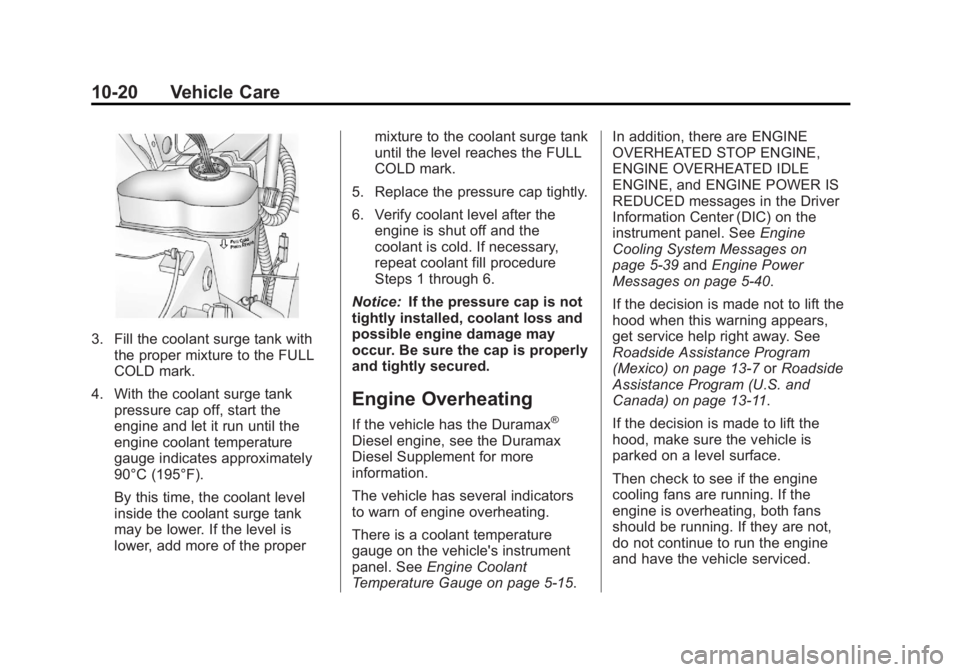
3. Fill the coolant surge tank withthe proper mixture to the FULL
COLD mark.
4. With the coolant surge tank pressure cap off, start the
engine and let it run until the
engine coolant temperature
gauge indicates approximately
90°C (195°F).
By this time, the coolant level
inside the coolant surge tank
may be lower. If the level is
lower, add more of the proper mixture to the coolant surge tank
until the level reaches the FULL
COLD mark.
5. Replace the pressure cap tightly.
6. Verify coolant level after the engine is shut off and the
coolant is cold. If necessary,
repeat coolant fill procedure
Steps 1 through 6.
Notice: If the pressure cap is not
tightly installed, coolant loss and
possible engine damage may
occur. Be sure the cap is properly
and tightly secured.
Engine Overheating
If the vehicle has the Duramax®
Diesel engine, see the Duramax
Diesel Supplement for more
information.
The vehicle has several indicators
to warn of engine overheating.
There is a coolant temperature
gauge on the vehicle's instrument
panel. See Engine Coolant
Temperature Gauge on page 5‑15. In addition, there are ENGINE
OVERHEATED STOP ENGINE,
ENGINE OVERHEATED IDLE
ENGINE, and ENGINE POWER IS
REDUCED messages in the Driver
Information Center (DIC) on the
instrument panel. See
Engine
Cooling System Messages on
page 5‑39 andEngine Power
Messages on page 5‑40.
If the decision is made not to lift the
hood when this warning appears,
get service help right away. See
Roadside Assistance Program
(Mexico) on page 13‑7 orRoadside
Assistance Program (U.S. and
Canada) on page 13‑11.
If the decision is made to lift the
hood, make sure the vehicle is
parked on a level surface.
Then check to see if the engine
cooling fans are running. If the
engine is overheating, both fans
should be running. If they are not,
do not continue to run the engine
and have the vehicle serviced.
Page 412 of 534
Black plate (42,1)GMC Sierra Owner Manual - 2013 - crc - 8/14/12
10-42 Vehicle Care
FusesUsage
36 Windshield Wiper
37 SEO B2 Upfitter Usage (Battery)
38 Electric Adjustable Pedals
39 Climate Controls (Battery)
40 Airbag System (Ignition)
41 Amplifier
42 Audio System
43 Miscellaneous (Ignition), Cruise
Control
44 Not Used
45 Airbag System (Battery)
46 Instrument Panel Cluster
47 Power Take-Off Fuses
Usage
48 Auxiliary Climate Control (Ignition)
49 Center High-Mounted
Stoplamp (CHMSL)
50 Rear Defogger
51 Heated Mirrors
52 SEO B1 Upfitter Usage (Battery)
53 Accessory Power Outlet
54 SEO Upfitter Usage
55 Climate Controls (Ignition)
56 Engine Control Module, Secondary
Fuel Pump
(Ignition) J-Case
Fuses Usage
57 Cooling Fan 1
58 Not Used
59 Heavy Duty Antilock Brake
System
60 Cooling Fan 2
61 Antilock Brake System 1
62 Starter
63 Stud 2 (Trailer Brakes)
64 Left Bussed Electrical Center 1
65 Not Used
66 Not Used
67 Transfer Case
Page 413 of 534
Black plate (43,1)GMC Sierra Owner Manual - 2013 - crc - 8/14/12
Vehicle Care 10-43
J-CaseFuses Usage
68 Stud 1 (Trailer Connector Battery
Power) (Optional -
40A Fuse
Required)
69 Mid-Bussed Electrical Center 1
70 Climate Control Blower
71 Not Used
72 Left Bussed Electrical Center 2
Relays Usage
FAN HI Cooling Fan High Speed
FAN LO Cooling Fan Low Speed
FAN CNTRL Cooling Fan Control Relays Usage
HDLP
LO/HID Low-Beam
Headlamp
FOG LAMP Front Fog Lamps
A/C
CMPRSR Air Conditioning
Compressor
STRTR Starter
PWR/TRN Powertrain
FUEL PMP Fuel Pump
PRK LAMP Parking Lamps
REAR
DEFOG Rear Defogger
RUN/CRNK Switched PowerInstrument Panel Fuse
Block
The instrument panel fuse block
access door is located on the driver
side edge of the instrument panel.
Pull off the cover to access the fuse
block.
Page 414 of 534
Black plate (44,1)GMC Sierra Owner Manual - 2013 - crc - 8/14/12
10-44 Vehicle Care
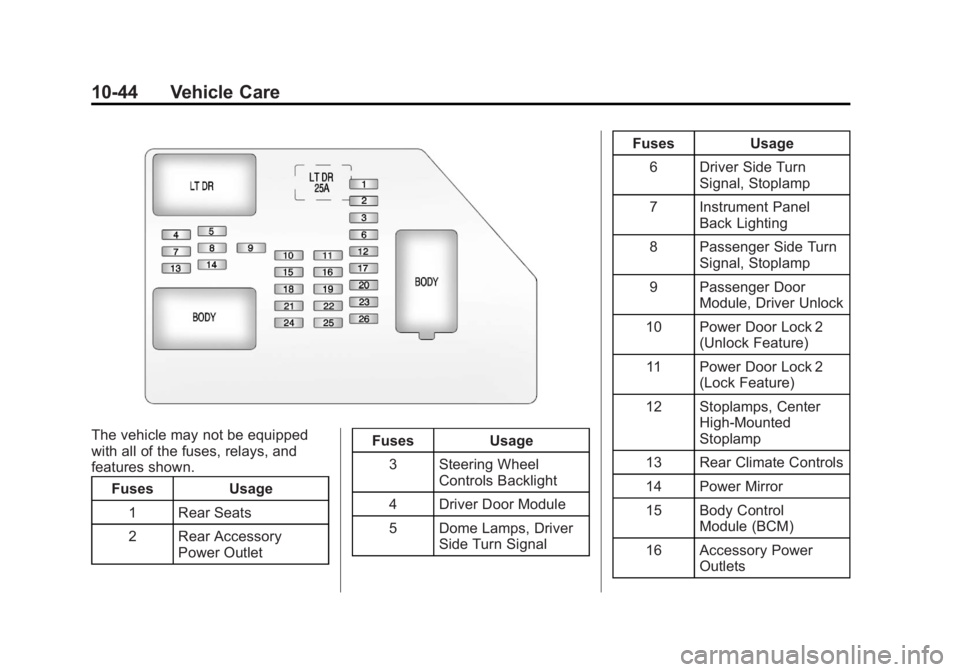
The vehicle may not be equipped
with all of the fuses, relays, and
features shown.Fuses Usage
1 Rear Seats
2 Rear Accessory Power Outlet Fuses Usage
3 Steering Wheel Controls Backlight
4 Driver Door Module
5 Dome Lamps, Driver Side Turn Signal Fuses Usage
6 Driver Side Turn Signal, Stoplamp
7 Instrument Panel Back Lighting
8 Passenger Side Turn Signal, Stoplamp
9 Passenger Door Module, Driver Unlock
10 Power Door Lock 2 (Unlock Feature)
11 Power Door Lock 2 (Lock Feature)
12 Stoplamps, Center High‐Mounted
Stoplamp
13 Rear Climate Controls
14 Power Mirror
15 Body Control Module (BCM)
16 Accessory Power Outlets
Page 415 of 534
Black plate (45,1)GMC Sierra Owner Manual - 2013 - crc - 8/14/12
Vehicle Care 10-45
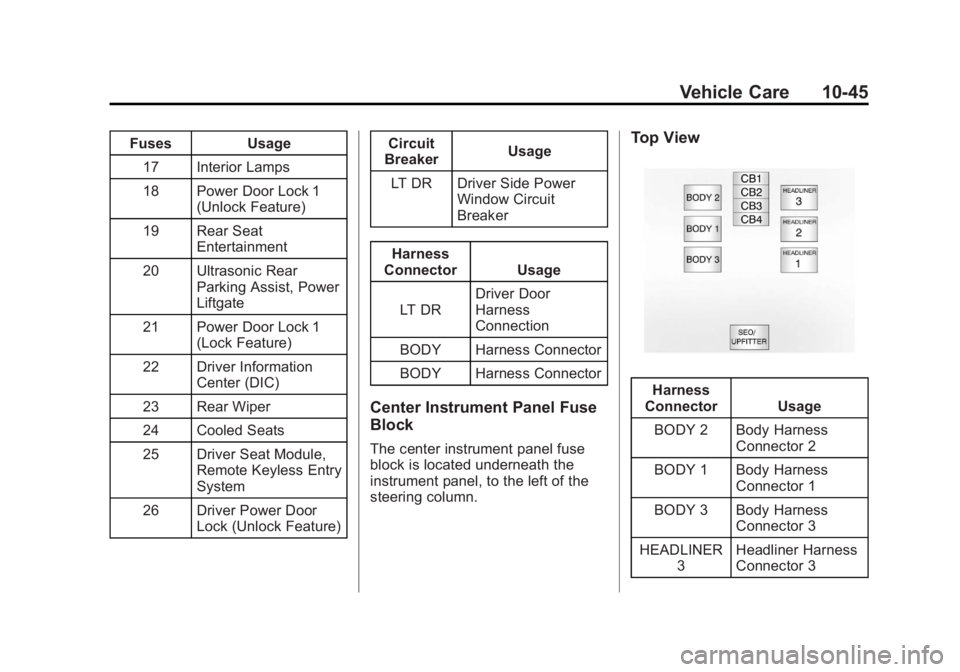
FusesUsage
17 Interior Lamps
18 Power Door Lock 1 (Unlock Feature)
19 Rear Seat Entertainment
20 Ultrasonic Rear Parking Assist, Power
Liftgate
21 Power Door Lock 1 (Lock Feature)
22 Driver Information Center (DIC)
23 Rear Wiper
24 Cooled Seats
25 Driver Seat Module, Remote Keyless Entry
System
26 Driver Power Door Lock (Unlock Feature) Circuit
Breaker Usage
LT DR Driver Side Power Window Circuit
Breaker
Harness
Connector Usage
LT DR Driver Door
Harness
Connection
BODY Harness Connector
BODY Harness Connector
Center Instrument Panel Fuse
Block
The center instrument panel fuse
block is located underneath the
instrument panel, to the left of the
steering column.
Top View
Harness
Connector Usage
BODY 2 Body Harness Connector 2
BODY 1 Body Harness Connector 1
BODY 3 Body Harness Connector 3
HEADLINER 3 Headliner Harness
Connector 3
Page 467 of 534
Black plate (97,1)GMC Sierra Owner Manual - 2013 - crc - 8/14/12
Vehicle Care 10-97
Instrument Panel, Leather,
Vinyl, & Other Plastic Surfaces
Use a soft microfiber cloth
dampened with water to remove
dust and loose dirt. For a more
thorough cleaning, use a soft
microfiber cloth dampened with a
mild soap solution.
Notice:Soaking or saturating
leather, especially perforated
leather, as well as other interior
surfaces, may cause permanent
damage. Wipe excess moisture
from these surfaces after
cleaning and allow them to dry
naturally. Never use heat, steam,
spot lifters, or spot removers. Do
not use cleaners that contain
silicone or wax-based products.
Cleaners containing these
solvents can permanently change
the appearance and feel of leather
or soft trim and are not
recommended. Do not use cleaners that increase
gloss, especially on the instrument
panel. Reflected glare can decrease
visibility through the windshield
under certain conditions.
Notice:
Use of air fresheners may
cause permanent damage to
plastics and painted surfaces.
If an air freshener comes in
contact with any plastic or
painted surface in the vehicle,
blot immediately and clean with a
soft cloth dampened with a mild
soap solution. Damage caused by
air fresheners would not be
covered by the vehicle warranty.
Care of Safety Belts
Keep belts clean and dry.
{WARNING
Do not bleach or dye safety belts.
It may severely weaken them. In
a crash, they might not be able to
(Continued)
WARNING (Continued)
provide adequate protection.
Clean safety belts only with mild
soap and lukewarm water.
Floor Mats
{WARNING
If a floor mat is the wrong size or
is not properly installed, it can
interfere with the pedals.
Interference with the pedals can
cause unintended acceleration
and/or increased stopping
distance which can cause a crash
and injury. Make sure the floor
mat does not interfere with the
pedals.