ABS GMC SIERRA 1500 2014 User Guide
[x] Cancel search | Manufacturer: GMC, Model Year: 2014, Model line: SIERRA 1500, Model: GMC SIERRA 1500 2014Pages: 542, PDF Size: 6.77 MB
Page 321 of 542
Black plate (53,1)GMC Sierra Owner Manual (GMNA-Localizing-U.S./Canada/Mexico-
5853626) - 2014 - 3rd crc - 8/15/13
Driving and Operating 9-53
Parking Brake
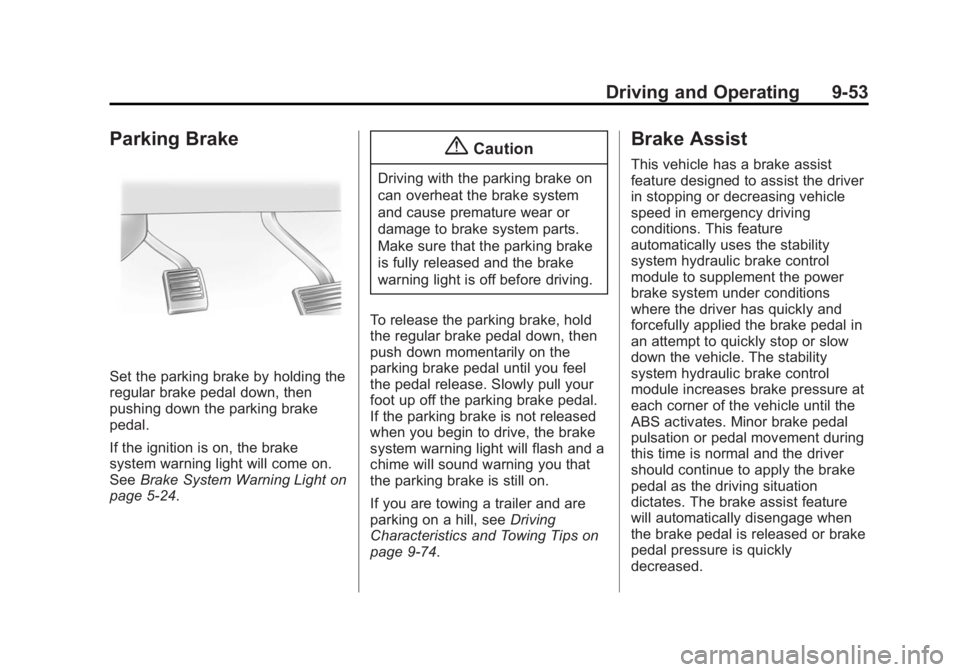
Set the parking brake by holding the
regular brake pedal down, then
pushing down the parking brake
pedal.
If the ignition is on, the brake
system warning light will come on.
SeeBrake System Warning Light on
page 5-24.
{Caution
Driving with the parking brake on
can overheat the brake system
and cause premature wear or
damage to brake system parts.
Make sure that the parking brake
is fully released and the brake
warning light is off before driving.
To release the parking brake, hold
the regular brake pedal down, then
push down momentarily on the
parking brake pedal until you feel
the pedal release. Slowly pull your
foot up off the parking brake pedal.
If the parking brake is not released
when you begin to drive, the brake
system warning light will flash and a
chime will sound warning you that
the parking brake is still on.
If you are towing a trailer and are
parking on a hill, see Driving
Characteristics and Towing Tips on
page 9-74.
Brake Assist
This vehicle has a brake assist
feature designed to assist the driver
in stopping or decreasing vehicle
speed in emergency driving
conditions. This feature
automatically uses the stability
system hydraulic brake control
module to supplement the power
brake system under conditions
where the driver has quickly and
forcefully applied the brake pedal in
an attempt to quickly stop or slow
down the vehicle. The stability
system hydraulic brake control
module increases brake pressure at
each corner of the vehicle until the
ABS activates. Minor brake pedal
pulsation or pedal movement during
this time is normal and the driver
should continue to apply the brake
pedal as the driving situation
dictates. The brake assist feature
will automatically disengage when
the brake pedal is released or brake
pedal pressure is quickly
decreased.
Page 345 of 542
Black plate (77,1)GMC Sierra Owner Manual (GMNA-Localizing-U.S./Canada/Mexico-
5853626) - 2014 - 3rd crc - 8/15/13
Driving and Operating 9-77
3. When the wheel chocks are inplace, release the regular brakes
until the chocks absorb the load.
4. Reapply the brake pedal. Then apply the parking brake and shift
into P (Park).
5. Release the brake pedal.
Leaving After Parking on a Hill
1. Apply and hold the brake pedal.
2. Start the engine.
3. Shift into a gear.
4. Release the parking brake.
5. Let up on the brake pedal.
6. Drive slowly until the trailer is clear of the chocks.
7. Stop and have someone pick up and store the chocks.
Maintenance when Trailer
Towing
The vehicle needs service more
often when pulling a trailer. See
Maintenance Schedule on
page 11-3. Things that are especially important in trailer
operation are automatic
transmission fluid, engine oil, axle
lubricant, belts, cooling system, and
brake system. It is a good idea to
inspect these before and during
the trip.
Check periodically to see that all
hitch nuts and bolts are tight.
Trailer Towing
If the vehicle has a diesel engine,
see the Duramax diesel
supplement.
If the vehicle is bi-fuel, see the
bi-fuel supplement.
Do not tow a trailer during break-in.
See
New Vehicle Break-In on
page 9-24.
{Warning
The driver can lose control when
pulling a trailer if the correct
equipment is not used or the
vehicle is not driven properly. For
example, if the trailer is too
heavy, the brakes may not work
well or even at all. The driver and
passengers could be seriously
injured. The vehicle may also be
damaged; the resulting repairs
would not be covered by the
vehicle warranty. Pull a trailer
only if all the steps in this section
have been followed. Ask your
dealer for advice and information
about towing a trailer with the
vehicle.
Page 412 of 542
Black plate (40,1)GMC Sierra Owner Manual (GMNA-Localizing-U.S./Canada/Mexico-
5853626) - 2014 - 3rd crc - 8/15/13
10-40 Vehicle Care
Fog Lamps
To replace the front fog lamp bulb:
1. Locate the fog lamp under thefront bumper.
2. Disconnect the electrical connector from the fog lamp bulb
assembly by pressing the
connector release.
3. Remove the bulb from the housing by squeezing the two
release tabs and pulling it
straight out of the assembly.
Taillamps (Chassis Cab
Models)
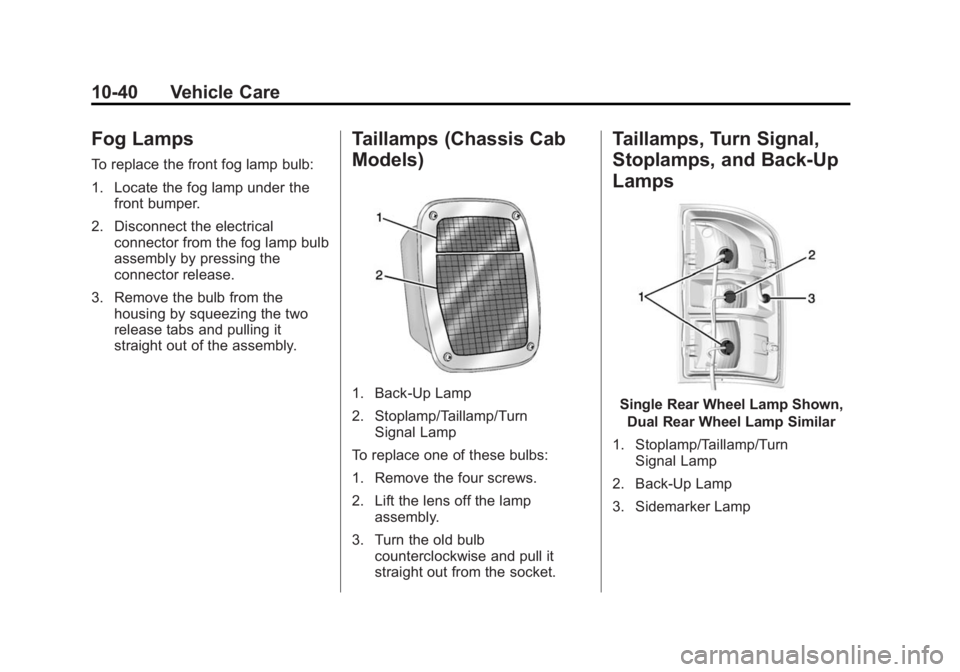
1. Back-Up Lamp
2. Stoplamp/Taillamp/TurnSignal Lamp
To replace one of these bulbs:
1. Remove the four screws.
2. Lift the lens off the lamp assembly.
3. Turn the old bulb counterclockwise and pull it
straight out from the socket.
Taillamps, Turn Signal,
Stoplamps, and Back-Up
Lamps
Single Rear Wheel Lamp Shown,
Dual Rear Wheel Lamp Similar
1. Stoplamp/Taillamp/Turn Signal Lamp
2. Back-Up Lamp
3. Sidemarker Lamp
Page 455 of 542
Black plate (83,1)GMC Sierra Owner Manual (GMNA-Localizing-U.S./Canada/Mexico-
5853626) - 2014 - 3rd crc - 8/15/13
Vehicle Care 10-83
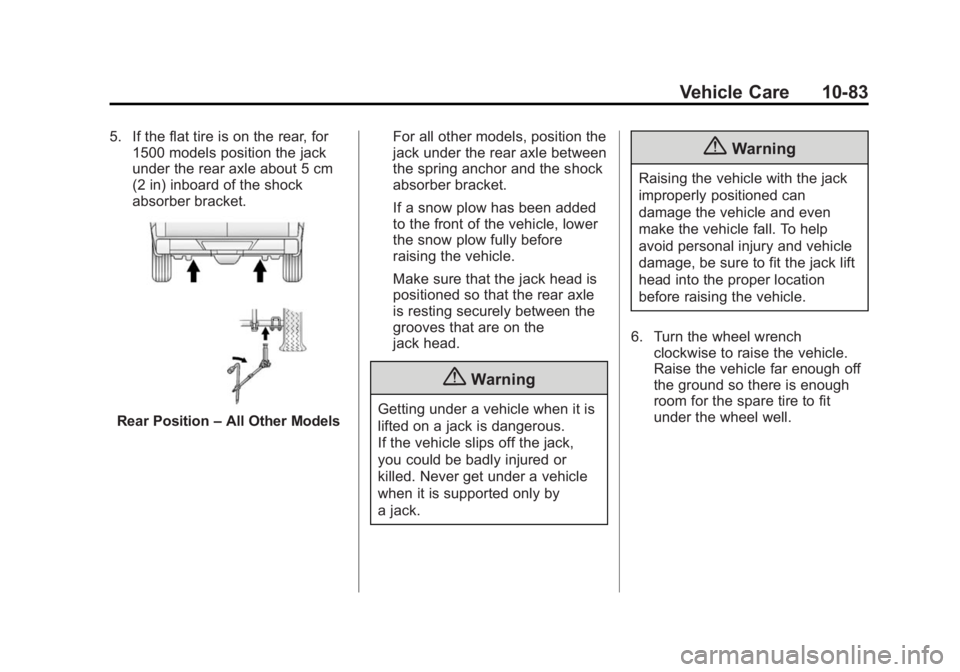
5. If the flat tire is on the rear, for1500 models position the jack
under the rear axle about 5 cm
(2 in) inboard of the shock
absorber bracket.
Rear Position –All Other Models For all other models, position the
jack under the rear axle between
the spring anchor and the shock
absorber bracket.
If a snow plow has been added
to the front of the vehicle, lower
the snow plow fully before
raising the vehicle.
Make sure that the jack head is
positioned so that the rear axle
is resting securely between the
grooves that are on the
jack head.
{Warning
Getting under a vehicle when it is
lifted on a jack is dangerous.
If the vehicle slips off the jack,
you could be badly injured or
killed. Never get under a vehicle
when it is supported only by
a jack.
{Warning
Raising the vehicle with the jack
improperly positioned can
damage the vehicle and even
make the vehicle fall. To help
avoid personal injury and vehicle
damage, be sure to fit the jack lift
head into the proper location
before raising the vehicle.
6. Turn the wheel wrench clockwise to raise the vehicle.
Raise the vehicle far enough off
the ground so there is enough
room for the spare tire to fit
under the wheel well.
Page 468 of 542
Black plate (96,1)GMC Sierra Owner Manual (GMNA-Localizing-U.S./Canada/Mexico-
5853626) - 2014 - 3rd crc - 8/15/13
10-96 Vehicle Care
Front Towing (Front Wheels Off
the Ground)–Four-Wheel-Drive
Vehicles
See your dealer for the procedure to
tow this vehicle.
Rear Towing (Rear Wheels Off
the Ground)
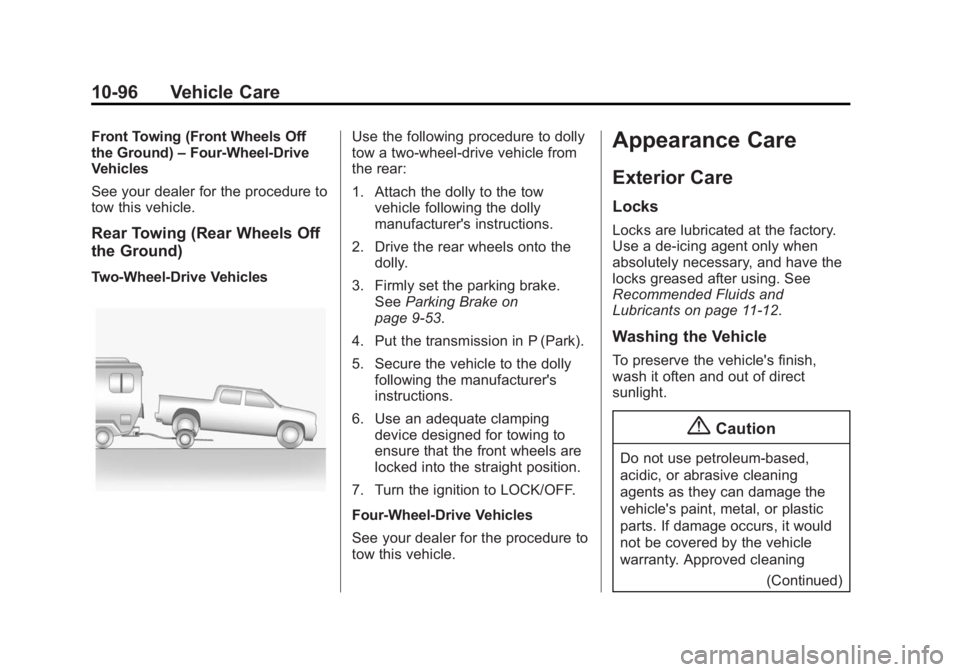
Two-Wheel-Drive Vehicles
Use the following procedure to dolly
tow a two-wheel-drive vehicle from
the rear:
1. Attach the dolly to the tow
vehicle following the dolly
manufacturer's instructions.
2. Drive the rear wheels onto the dolly.
3. Firmly set the parking brake. See Parking Brake on
page 9-53.
4. Put the transmission in P (Park).
5. Secure the vehicle to the dolly following the manufacturer's
instructions.
6. Use an adequate clamping device designed for towing to
ensure that the front wheels are
locked into the straight position.
7. Turn the ignition to LOCK/OFF.
Four-Wheel-Drive Vehicles
See your dealer for the procedure to
tow this vehicle.Appearance Care
Exterior Care
Locks
Locks are lubricated at the factory.
Use a de-icing agent only when
absolutely necessary, and have the
locks greased after using. See
Recommended Fluids and
Lubricants on page 11-12.
Washing the Vehicle
To preserve the vehicle's finish,
wash it often and out of direct
sunlight.
{Caution
Do not use petroleum-based,
acidic, or abrasive cleaning
agents as they can damage the
vehicle's paint, metal, or plastic
parts. If damage occurs, it would
not be covered by the vehicle
warranty. Approved cleaning (Continued)
Page 529 of 542
Black plate (1,1)GMC Sierra Owner Manual (GMNA-Localizing-U.S./Canada/Mexico-
5853626) - 2014 - 3rd crc - 8/15/13
INDEX i-1
A
Accessories andModifications . . . . . . . . . . . . . . . . . 10-3
Accessory Power . . . . . . . . . . . . . . 9-29
Active Fuel Management
®. . . . . 9-32
Add-On Electrical Equipment . . . . . . . . . . . . . . . . . . . 9-99
Adding a Snow Plow or Similar Equipment . . . . . . . . . . . . 9-99
Additional Information OnStar
®. . . . . . . . . . . . . . . . . . . . . . 14-5
Adjustable Throttle and Brake Pedal . . . . . . . . . . . . . . . . . . 9-24
Adjustments Lumbar, Front Seats . . . . . . . . . . . 3-4
Air Cleaner/Filter, Engine . . . . . 10-17
Air Filter, Passenger
Compartment . . . . . . . . . . . . . . . . . 8-9
Air Vents . . . . . . . . . . . . . . . . . . . . . . . 8-8
Airbag System Check . . . . . . . . . . . . . . . . . . . . . . . . 3-37
How Does an AirbagRestrain? . . . . . . . . . . . . . . . . . . . 3-27
Passenger Sensing System . . . . . . . . . . . . . . . . . . . . . . 3-31 Airbag System (cont'd)
What Makes an Airbag
Inflate? . . . . . . . . . . . . . . . . . . . . . . 3-26
What Will You See after an
Airbag Inflates? . . . . . . . . . . . . . 3-27
When Should an Airbag Inflate? . . . . . . . . . . . . . . . . . . . . . . 3-25
Where Are the Airbags? . . . . . . 3-23
Airbags
Adding Equipment to theVehicle . . . . . . . . . . . . . . . . . . . . . . 3-36
Light On-Off . . . . . . . . . . . . . . . . . . 5-18
On-Off Light . . . . . . . . . . . . . . . . . . 5-18
On-Off Switch . . . . . . . . . . . . . . . . 3-28
Passenger Status Indicator . . . 5-20
Readiness Light . . . . . . . . . . . . . . 5-18
Servicing Airbag-Equipped Vehicles . . . . . . . . . . . . . . . . . . . . . 3-35
System Check . . . . . . . . . . . . . . . . 3-21
Alarm Vehicle Security . . . . . . . . . . . . . . 2-11
All-Terrain Tires . . . . . . . . . . . . . . . 10-53
AM-FM Radio . . . . . . . . . . . . . . . . . . . 7-9
Antenna Multi-band . . . . . . . . . . . . . . . . . . . . 7-12 Antilock Brake
System (ABS) . . . . . . . . . . . . . . . . 9-52
Warning Light . . . . . . . . . . . . . . . . . 5-25
Appearance Care Exterior . . . . . . . . . . . . . . . . . . . . . 10-96
Interior . . . . . . . . . . . . . . . . . . . . . 10-101
Assistance Program,
Roadside . . . . . . . . . . . . . . . . . . . . . 13-5
Assistance Systems for Driving . . . . . . . . . . . . . . . . . . . . . . . 9-64
Assistance Systems for
Parking and Backing . . . . . . . . . 9-61
Audio Bluetooth . . . . . . . . . . . . . . . . . . . . . 7-22
Audio Players . . . . . . . . . . . . . . . . . 7-16 CD . . . . . . . . . . . . . . . . . . . . . . . . . . . 7-16
Audio System Fixed Mast Antenna . . . . . . . . . . 7-12
Radio Reception . . . . . . . . . . . . . . 7-11
Theft-Deterrent Feature . . . . . . . . 7-2
Automatic
Dimming Mirrors . . . . . . . . . . . . . . 2-17
Door Locks . . . . . . . . . . . . . . . . . . . . 2-9
Headlamp System . . . . . . . . . . . . . 6-3
Transmission . . . . . . . . . . . . . . . . . 9-34
Transmission Fluid . . . . . . . . . 10-14
Page 535 of 542
Black plate (7,1)GMC Sierra Owner Manual (GMNA-Localizing-U.S./Canada/Mexico-
5853626) - 2014 - 3rd crc - 8/15/13
INDEX i-7
Immobilizer . . . . . . . . . . . . . . . . . . . . 2-13
IndicatorVehicle Ahead . . . . . . . . . . . . . . . . 5-26
Infants and Young Children, Restraints . . . . . . . . . . . . . . . . . . . . 3-40
Infotainment . . . . . . . . . . . . . . . . . . . . 7-1
Infotainment System . . . . . . . . . . 13-15
Instrument Cluster . . . . . . . . . . . . . 5-10
Instrument Panel Storage Area . . . . . . . . . . . . . . . . . . 4-1
Interior Rearview Mirrors . . . . . . . 2-18
Internet Radio
Pandora . . . . . . . . . . . . . . . . . . . . . . 7-12
Introduction . . . . . . . . . . . . . . . . . . . . . . . iii
J
Jack Auxiliary . . . . . . . . . . . . . . . . . . . . . . 7-22
Jump Starting . . . . . . . . . . . . . . . . . 10-89
K
Key and Lock Messages . . . . . . . 5-38
Keyless Entry Remote (RKE) System . . . . . . . . 2-3
Keys . . . . . . . . . . . . . . . . . . . . . . . . . . . . 2-1
L
Labeling, Tire Sidewall . . . . . . . . 10-54
Lamps
Auxiliary RoofMounted Lamp . . . . . . . . . . . . . . . 6-6
Cargo . . . . . . . . . . . . . . . . . . . . . . . . . . 6-7
Daytime Running (DRL) . . . . . . . 6-3
Dome . . . . . . . . . . . . . . . . . . . . . . . . . . 6-7
Exterior Controls . . . . . . . . . . . . . . . 6-1
Exterior Lamps Off Reminder . . . . . . . . . . . . . . . . . . . . 6-2
License Plate . . . . . . . . . . . . . . . 10-42
Malfunction Indicator . . . . . . . . . 5-22
Messages . . . . . . . . . . . . . . . . . . . . 5-38
On Reminder . . . . . . . . . . . . . . . . . 5-29
Reading . . . . . . . . . . . . . . . . . . . . . . . 6-7
Taillamps . . . . . . . . . . . . . . . . . . . 10-40
Lane Departure Warning (LDW) . . . . . . . . . . . . . . . 9-66
Lane Departure Warning
Light . . . . . . . . . . . . . . . . . . . . . . . . . 5-26
Lap Belt . . . . . . . . . . . . . . . . . . . . . . . 3-19
Lap-Shoulder Belt . . . . . . . . . . . . . 3-14
LATCH System Replacing Parts after a
Crash . . . . . . . . . . . . . . . . . . . . . . . 3-58 LATCH, Lower Anchors and
Tethers for Children . . . . . . . . . . 3-46
LED Lighting . . . . . . . . . . . . . . . . . . 10-39
Light Hill Decent Control . . . . . . . . . . . 5-26
Lighting Entry . . . . . . . . . . . . . . . . . . . . . . . . . . 6-8
Exit . . . . . . . . . . . . . . . . . . . . . . . . . . . . 6-8
Illumination Control . . . . . . . . . . . . 6-6
LED . . . . . . . . . . . . . . . . . . . . . . . . 10-39
Lights
Airbag On-Off . . . . . . . . . . . . . . . . . 5-18
Airbag Readiness . . . . . . . . . . . . . 5-18
Antilock Brake System(ABS) Warning . . . . . . . . . . . . . . 5-25
Brake System Warning . . . . . . . 5-24
Charging System . . . . . . . . . . . . . 5-21
Cruise Control . . . . . . . . . . . . . . . . 5-29
Flash-to-Pass . . . . . . . . . . . . . . . . . . 6-3
Four-Wheel-Drive . . . . . . . . . . . . . 5-25
Front Fog Lamp . . . . . . . . . . . . . . 5-29
High-Beam On . . . . . . . . . . . . . . . . 5-29
High/Low Beam Changer . . . . . . 6-2
Lane Departure Warning . . . . . . 5-26
Low Fuel Warning . . . . . . . . . . . . 5-28
Safety Belt Reminders . . . . . . . . 5-17