locks GMC SIERRA 1500 2015 Owner's Manual
[x] Cancel search | Manufacturer: GMC, Model Year: 2015, Model line: SIERRA 1500, Model: GMC SIERRA 1500 2015Pages: 539, PDF Size: 6.81 MB
Page 359 of 539
Black plate (94,1)GMC Sierra Owner Manual (GMNA Localizing-U.S/Canada/Mexico-
7299746) - 2015 - crc - 11/11/13
9-94 Driving and Operating
.A trailer with electric brakes has
become disconnected (a
CHECK TRAILER WIRING
message will also display on
the DIC).
.There is a fault present in the
wiring to the trailer brakes (a
CHECK TRAILER WIRING
message will also display on
the DIC).
.The ITBC system is not working
due to a fault (a SERVICE
TRAILER BRAKE SYSTEM
message will also display in
the DIC).
Manual Trailer Brake Apply
The Manual Trailer Brake Apply
Lever is used to apply the trailer ’s
electric brakes independent of the
vehicle’s brakes. Sliding the lever to
the left will apply only the trailer
brakes. Use this lever to adjust
Trailer Gain to properly adjust the
power output to the trailer brakes. The trailer's and the vehicle's brake
lamps will come on when either
vehicle brakes or manual trailer
brakes are applied.
Trailer Gain Adjustment Procedure
Trailer Gain should be set for a
specific trailering condition and must
be adjusted anytime vehicle loading,
trailer loading, or road surface
conditions change.
{Warning
Trailer brakes that are
over-gained or under-gained may
not stop the vehicle and the trailer
as intended and can result in a
crash. Always follow the
instructions to set the Trailer Gain
for the proper trailer stopping
performance.
Use the following to adjust Trailer
Gain for each towing condition:
1. Drive the vehicle with the trailer
attached on a level road surface
representative of the towing
condition and free of traffic at
about 32 to 40 km/h (20 to
25 mph) and fully apply the
Manual Trailer Brake Apply
Lever.
Adjusting Trailer Gain at speeds
lower than 32 to 40 km/h (20 to
25 mph) may result in an
incorrect gain setting.
2. Adjust the Trailer Gain, using the Trailer Gain Adjustment Buttons,
to just below the point of trailer
wheel lock-up, indicated by
trailer wheel squeal or tire
smoke when a trailer wheel
locks.
Trailer wheel lock-up may not
occur if towing a heavily loaded
trailer. In this case, adjust the
Trailer Gain to the highest
allowable setting for the towing
condition.
Page 444 of 539
Black plate (77,1)GMC Sierra Owner Manual (GMNA Localizing-U.S/Canada/Mexico-
7299746) - 2015 - crc - 11/11/13
Vehicle Care 10-77
Warning (Continued)
6. Place wheel blocks on bothsides of the tire at the
opposite corner of the tire
being changed.
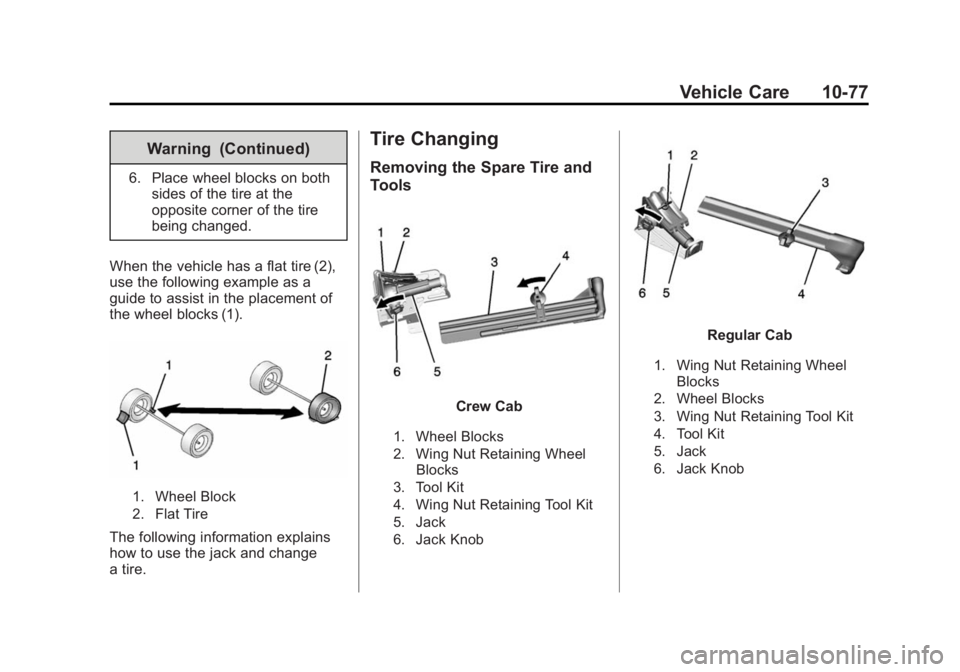
When the vehicle has a flat tire (2),
use the following example as a
guide to assist in the placement of
the wheel blocks (1).
1. Wheel Block
2. Flat Tire
The following information explains
how to use the jack and change
a tire.
Tire Changing
Removing the Spare Tire and
Tools
Crew Cab
1. Wheel Blocks
2. Wing Nut Retaining Wheel Blocks
3. Tool Kit
4. Wing Nut Retaining Tool Kit
5. Jack
6. Jack Knob
Regular Cab
1. Wing Nut Retaining Wheel Blocks
2. Wheel Blocks
3. Wing Nut Retaining Tool Kit
4. Tool Kit
5. Jack
6. Jack Knob
Page 445 of 539
Black plate (78,1)GMC Sierra Owner Manual (GMNA Localizing-U.S/Canada/Mexico-
7299746) - 2015 - crc - 11/11/13
10-78 Vehicle Care
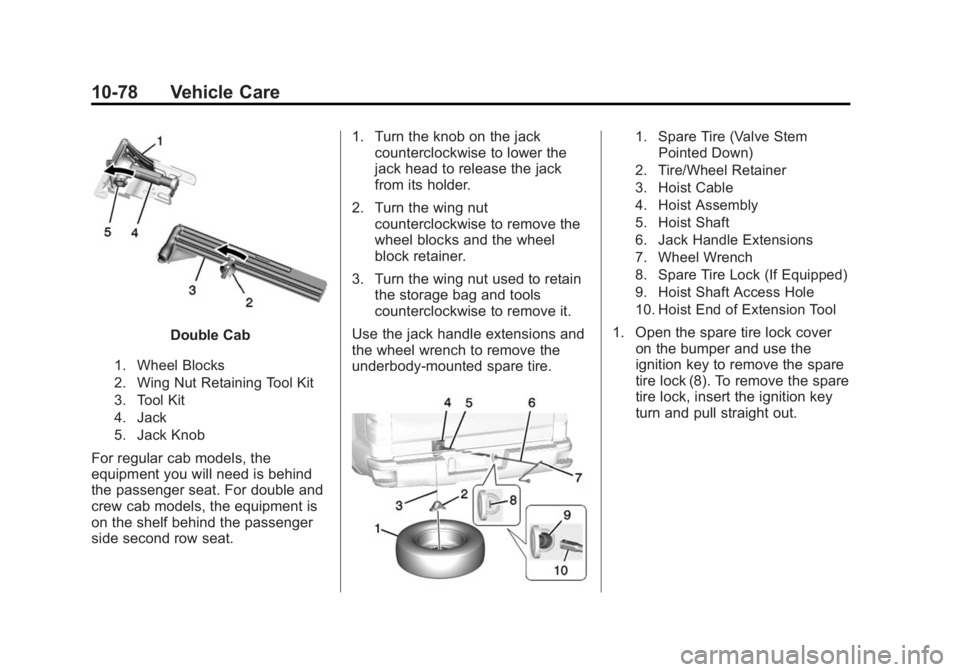
Double Cab
1. Wheel Blocks
2. Wing Nut Retaining Tool Kit
3. Tool Kit
4. Jack
5. Jack Knob
For regular cab models, the
equipment you will need is behind
the passenger seat. For double and
crew cab models, the equipment is
on the shelf behind the passenger
side second row seat.1. Turn the knob on the jack
counterclockwise to lower the
jack head to release the jack
from its holder.
2. Turn the wing nut counterclockwise to remove the
wheel blocks and the wheel
block retainer.
3. Turn the wing nut used to retain the storage bag and tools
counterclockwise to remove it.
Use the jack handle extensions and
the wheel wrench to remove the
underbody-mounted spare tire.
1. Spare Tire (Valve Stem Pointed Down)
2. Tire/Wheel Retainer
3. Hoist Cable
4. Hoist Assembly
5. Hoist Shaft
6. Jack Handle Extensions
7. Wheel Wrench
8. Spare Tire Lock (If Equipped)
9. Hoist Shaft Access Hole
10. Hoist End of Extension Tool
1. Open the spare tire lock cover on the bumper and use the
ignition key to remove the spare
tire lock (8). To remove the spare
tire lock, insert the ignition key
turn and pull straight out.
Page 447 of 539
Black plate (80,1)GMC Sierra Owner Manual (GMNA Localizing-U.S/Canada/Mexico-
7299746) - 2015 - crc - 11/11/13
10-80 Vehicle Care
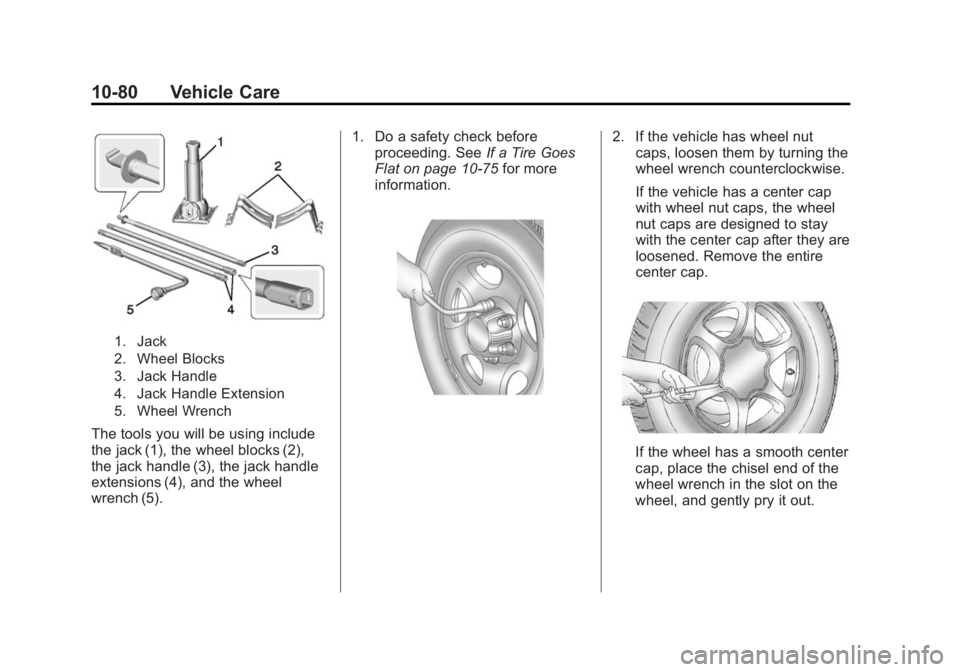
1. Jack
2. Wheel Blocks
3. Jack Handle
4. Jack Handle Extension
5. Wheel Wrench
The tools you will be using include
the jack (1), the wheel blocks (2),
the jack handle (3), the jack handle
extensions (4), and the wheel
wrench (5).1. Do a safety check before
proceeding. See If a Tire Goes
Flat on page 10-75 for more
information.
2. If the vehicle has wheel nut caps, loosen them by turning the
wheel wrench counterclockwise.
If the vehicle has a center cap
with wheel nut caps, the wheel
nut caps are designed to stay
with the center cap after they are
loosened. Remove the entire
center cap.
If the wheel has a smooth center
cap, place the chisel end of the
wheel wrench in the slot on the
wheel, and gently pry it out.
Page 454 of 539
Black plate (87,1)GMC Sierra Owner Manual (GMNA Localizing-U.S/Canada/Mexico-
7299746) - 2015 - crc - 11/11/13
Vehicle Care 10-87
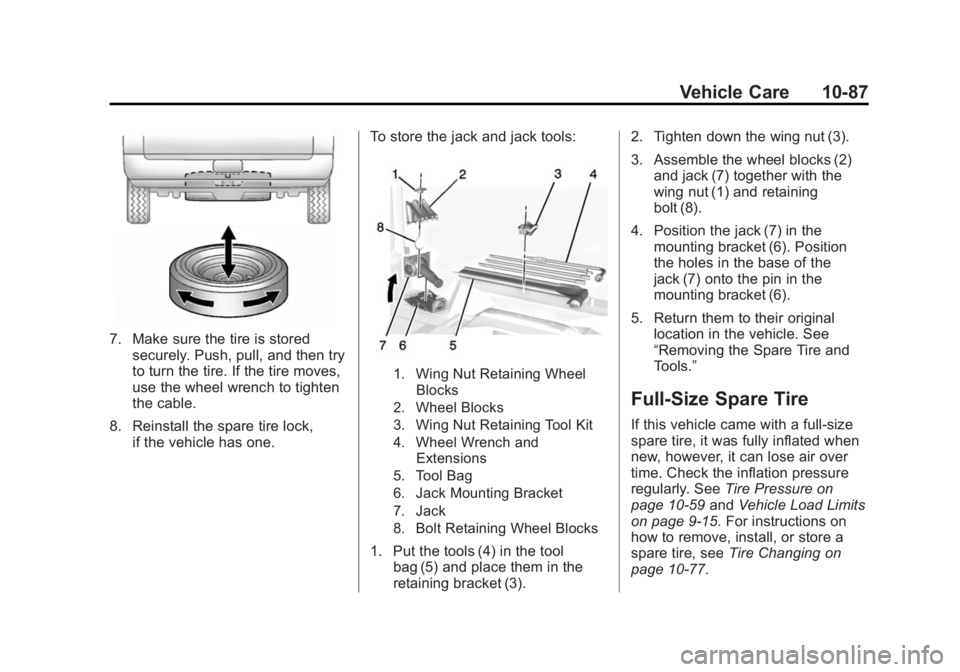
7. Make sure the tire is storedsecurely. Push, pull, and then try
to turn the tire. If the tire moves,
use the wheel wrench to tighten
the cable.
8. Reinstall the spare tire lock, if the vehicle has one. To store the jack and jack tools:
1. Wing Nut Retaining Wheel
Blocks
2. Wheel Blocks
3. Wing Nut Retaining Tool Kit
4. Wheel Wrench and Extensions
5. Tool Bag
6. Jack Mounting Bracket
7. Jack
8. Bolt Retaining Wheel Blocks
1. Put the tools (4) in the tool bag (5) and place them in the
retaining bracket (3). 2. Tighten down the wing nut (3).
3. Assemble the wheel blocks (2)
and jack (7) together with the
wing nut (1) and retaining
bolt (8).
4. Position the jack (7) in the mounting bracket (6). Position
the holes in the base of the
jack (7) onto the pin in the
mounting bracket (6).
5. Return them to their original location in the vehicle. See
“Removing the Spare Tire and
Tools.”
Full-Size Spare Tire
If this vehicle came with a full-size
spare tire, it was fully inflated when
new, however, it can lose air over
time. Check the inflation pressure
regularly. See Tire Pressure on
page 10-59 andVehicle Load Limits
on page 9-15. For instructions on
how to remove, install, or store a
spare tire, see Tire Changing on
page 10-77.
Page 465 of 539
Black plate (98,1)GMC Sierra Owner Manual (GMNA Localizing-U.S/Canada/Mexico-
7299746) - 2015 - crc - 11/11/13
10-98 Vehicle Care
Appearance Care
Exterior Care
Locks
Locks are lubricated at the factory.
Use a de-icing agent only when
absolutely necessary, and have the
locks greased after using. See
Recommended Fluids and
Lubricants on page 11-12.
Washing the Vehicle
To preserve the vehicle's finish,
wash it often and out of direct
sunlight.
{Caution
Do not use petroleum-based,
acidic, or abrasive cleaning
agents as they can damage the
vehicle's paint, metal, or plastic
parts. If damage occurs, it would
not be covered by the vehicle
warranty. Approved cleaning(Continued)
Caution (Continued)
products can be obtained from
your dealer. Follow all
manufacturer directions regarding
correct product usage, necessary
safety precautions, and
appropriate disposal of any
vehicle care product.
{Caution
Avoid using high-pressure
washes closer than 30 cm (12 in)
to the surface of the vehicle. Use
of power washers exceeding
8,274 kPa (1,200 psi) can result
in damage or removal of paint
and decals.
This symbol
eis on any
underhood compartment electrical
center that should not be power washed. This could cause damage
that would not be covered by the
vehicle warranty.
If using an automatic car wash,
follow with the car wash
instructions. The windshield wiper
and rear window wiper, if equipped,
must be off. Remove any
accessories that may be damaged
or interfere with the car wash
equipment.
Rinse the vehicle well, before
washing and after, to remove all
cleaning agents completely. If they
are allowed to dry on the surface,
they could stain.
Dry the finish with a soft, clean
chamois or an all-cotton towel to
avoid surface scratches and water
spotting.
Finish Care
Application of aftermarket clearcoat
sealant/wax materials is not
recommended. If painted surfaces
are damaged, see your dealer to
have the damage assessed and
Page 518 of 539
Black plate (3,1)GMC Sierra Owner Manual (GMNA Localizing-U.S/Canada/Mexico-
7299746) - 2015 - crc - 11/11/13
OnStar 14-3
Security
OnStar provides services including
Stolen Vehicle Assistance, Remote
Ignition Block, and Roadside
Assistance, if equipped. OnStar can
unlock the vehicle doors remotely,
if equipped with automatic door
locks, and can help police locate the
vehicle if it is stolen.
Navigation
OnStar navigation requires the
Directions & Connections
service plan.
Press
Qto receive directions or
have them sent to the vehicle
navigation screen, if equipped.
Destinations can also be forwarded
to the vehicle from MapQuest.com.
Turn-by-Turn Navigation
1. PressQto connect to a live
Advisor.
2. Request directions. 3. Directions are downloaded to the
vehicle.
4. Follow the voice-guided commands.
Using Voice Commands
During a Planned Route
Cancel Route
1. Press
=. System responds:
“OnStar ready,” then a tone. Say
“Cancel route.” System
responds: “Do you want to
cancel directions?”
2. Say “Yes.”System responds:
“OK, request completed, thank
you, goodbye.”
Route Preview
1. Press
=. System responds:
“OnStar ready,” then a tone.
2. Say “Route preview.” System
responds with the next three
maneuvers. Repeat
1. Press
=. System responds:
“OnStar ready,” then a tone.
2. Say “Repeat.” System responds
with the last direction given, then
responds with “OnStar ready,”
then a tone.
Get My Destination
1. Press
=. System responds:
“OnStar ready,” then a tone.
2. Say “Get my destination.”
System responds with the
address and the distance to the
destination, then responds with
“OnStar ready,” then a tone.
Other Navigation Services
Available from OnStar
OnStar eNav:Subscribers can
send destinations from
MapQuest.com to the vehicle
Turn-by-Turn Navigation or
screen-based navigation system (if
equipped). When ready, the
directions will be downloaded to the
vehicle.
Page 519 of 539
Black plate (4,1)GMC Sierra Owner Manual (GMNA Localizing-U.S/Canada/Mexico-
7299746) - 2015 - crc - 11/11/13
14-4 OnStar
Destination Download:PressQ,
then request the Advisor to
download directions to the
navigation system in the vehicle (if
equipped). After the call ends, press
the “Go” button on the navigation
screen to begin driving directions.
If directions are downloaded to the
navigation system, the route can
only be canceled through the
navigation system.
Destinations can also be
downloaded on the go. For
information about eNav or
Destination Download, see
www.onstar.com (U.S.) or
www.onstar.ca (Canada).
Connections
Directions & Connections includes
the services that follow to help
customers stay connected.
For coverage maps, see
www.onstar.com (U.S.) or
www.onstar.ca (Canada). WiFi Connectivity (If Equipped)
The vehicle has a WiFi hotspot that
provides a high-speed, wireless
Internet connection to connect
multiple mobile devices (data plan
required).
1. To retrieve WiFi hotspot
information, press
=and select
or say “WiFi settings.”
2. The WiFi settings will display the WiFi network name/SSID,
passphrase, and level of
encryption.
3. To change the SSID or passphrase, press
Qor call
1-888-4-ONSTAR to connect
with an Advisor.
OnStar RemoteLink
®Mobile App
(If Equipped)
Download the OnStar RemoteLink
mobile app to select Apple
®,
Android™, and BlackBerry®or
Windows 7 or 8 mobile devices.
From the mobile device, check the
vehicle’s fuel level, oil life, or tire pressure; or activate remote horn
and lights. Also remote start the
vehicle (if factory equipped) or
unlock the doors from anywhere
with a wireless connection (if
equipped with automatic locks).
With the Directions & Connections
service plan, a destination can be
sent to the vehicle. For OnStar
RemoteLink information and
compatibility, see www.onstar.com
(U.S.) or www.onstar.ca (Canada).
OnStar RemoteLink
®Key Fob
Services
This feature is included for five
years and allows for remote door
lock/unlock (if equipped with
automatic locks), remote start (if
factory equipped), or activation of
horn and lights from anywhere with
a wireless signal. Download the app
and start using it any time during the
trial period to get started.
OnStar Hands-Free Calling
This service allows calls to be made
and received from the vehicle.
Page 523 of 539
Black plate (8,1)GMC Sierra Owner Manual (GMNA Localizing-U.S/Canada/Mexico-
7299746) - 2015 - crc - 11/11/13
14-8 OnStar
Potential Issues
OnStar cannot perform Remote
Door Unlock or Stolen Vehicle
Assistance after the vehicle has
been off continuously for five days.
After five days, OnStar can contact
Roadside Assistance and a
locksmith to help gain access to the
vehicle.
Global Positioning
System (GPS)
.Obstruction of the GPS can
occur in a large city with tall
buildings; in parking garages;
around airports; in tunnels,
underpasses, or parking
garages; or in an area with very
dense trees. If GPS signals are
not available, the OnStar system
should still operate to call
OnStar. However, OnStar could
have difficulty identifying the
exact location.
.In emergency situations, OnStar
can use the last stored GPS
location to send to emergency
responders.
A temporary loss of GPS can cause
loss of the ability to send a
Turn-by-Turn Navigation route. The
Advisor may give a verbal route or
may ask for a call back after the
vehicle is driven into an open area.
Cellular and GPS Antennas
Do not place items over or near the
antenna to prevent blocking cellular
and GPS signal reception. Cellular
reception is required for OnStar to
send remote signals to the vehicle.
Unable to Connect to OnStar
Message
If there is limited cellular coverage
or the cellular network has reached
maximum capacity, this message
may come on. Press
Qto try the
call again or try again after driving a
few miles into another cellular area.
Vehicle and Power Issues
OnStar services require a vehicle
electrical system, wireless service,
and GPS satellite technologies to be
available and operating for features
to function properly. These systems
may not operate if the battery is
discharged or disconnected.
Add-on Electrical Equipment
The OnStar system is integrated
into the electrical architecture of the
vehicle. Do not add any electrical
equipment. See Add-On Electrical
Equipment on page 9-97. Added
electrical equipment may interfere
with the operation of the OnStar
system and cause it to not operate.
Privacy
The complete OnStar Privacy
Statement may be found at
www.onstar.com (U.S.),
or www.onstar.ca (Canada). We
recommend that you review it. If you
have any questions, call
1-888-4-ONSTAR (1-888-466-7827)
or press
Qto speak with an
Page 527 of 539
Black plate (2,1)GMC Sierra Owner Manual (GMNA Localizing-U.S/Canada/Mexico-
7299746) - 2015 - crc - 11/11/13
i-2 INDEX
AutomaticDimming Mirrors . . . . . . . . . . . . . . 2-16
Door Locks . . . . . . . . . . . . . . . . . . . . 2-8
Headlamp System . . . . . . . . . . . . . 6-3
Transmission . . . . . . . . . . . . . . . . . 9-33
Transmission Fluid . . . . . . . . . 10-14
Automatic Transmission
Manual Mode . . . . . . . . . . . . . . . . . 9-36
Shift Lock ControlFunction Check . . . . . . . . . . . 10-35
Auxiliary
Roof Mounted Lamp . . . . . . . . . . . 6-5
Auxiliary Jack . . . . . . . . . . . . . . . . . . 7-21
Axle, Front . . . . . . . . . . . . . . . . . . . . 10-32
Axle, Rear . . . . . . . . . . . . . . . . . . . . 10-33
B
Battery . . . . . . . . . . . . . . . . . . . . . . . 10-30 Jump Starting . . . . . . . . . . . . . . . 10-88
Load Management . . . . . . . . . . . . . 6-8
Power Protection . . . . . . . . . . . . . . 6-9
Voltage and ChargingMessages . . . . . . . . . . . . . . . . . . . 5-35
Blade Replacement, Wiper . . . 10-36
Blind Spot Mirrors . . . . . . . . . . . . . 2-16 Bluetooth
Overview . . . . . . . . 7-29, 7-31, 7-35, 7-40, 7-44
Bluetooth Audio . . . . . . . . . . . . . . . 7-21
Brake
Pedal and AdjustableThrottle . . . . . . . . . . . . . . . . . . . . . . 9-24
System Warning Light . . . . . . . . 5-24
Brakes . . . . . . . . . . . . . . . . . . . . . . . . 10-28
Antilock . . . . . . . . . . . . . . . . . . . . . . . 9-47
Assist . . . . . . . . . . . . . . . . . . . . . . . . . 9-49
Fluid . . . . . . . . . . . . . . . . . . . . . . . . 10-29
Parking . . . . . . . . . . . . . . . . . . . . . . . 9-48
System Messages . . . . . . . . . . . . 5-36
Braking . . . . . . . . . . . . . . . . . . . . . . . . . 9-3
Break-In, New Vehicle . . . . . . . . . 9-23
Bulb Replacement . . . . . . . . . . . . 10-40 Center High-Mounted
Stoplamp (CHMSL) and
Cargo Lamp . . . . . . . . . . . . . . . 10-40
Fog Lamps . . . . . . . . . . . . . 6-5, 10-38
Halogen Bulbs . . . . . . . . . . . . . . 10-37
Headlamp Aiming . . . . . . . . . . . 10-37
Headlamps . . . . . . . . . . . . . . . . . 10-37
Headlamps, Front Turn Signal, Sidemarker, and
Parking Lamps . . . . . . . . . . . . 10-38 Bulb Replacement (cont'd)
License Plate Lamps . . . . . . . 10-40
Taillamps . . . . . . . . . . . . . . . . . . . 10-39
Taillamps, Turn Signal,
Stoplamps, and
Back-up Lamps . . . . . . . . . . . 10-39
Buying New Tires . . . . . . . . . . . . . 10-69
C
Calibration . . . . . . . . . . . . . . . . . . . . . . 5-5
California Fuel Requirements . . . . . . . . . . . 9-65
Perchlorate MaterialsRequirements . . . . . . . . . . . . . . . 10-3
Warning . . . . . . . . . . . . . . . . . . . . . . 10-2
Canadian Vehicle Owners . . . . . . . . iii
Capacities and
Specifications . . . . . . . . . . . . . . . . 12-2
Carbon Monoxide Engine Exhaust . . . . . . . . . . . . . . . 9-32
Tailgate . . . . . . . . . . . . . . . . . . . . . . . . 2-9
Winter Driving . . . . . . . . . . . . . . . . 9-12
Card Reader SD . . . . . . . . . . . . . . . . . . . . . . . . . . . . 7-20
Cargo
Tie-Downs . . . . . . . . . . . . . . . . . . . . . 4-4