infotainment GMC SIERRA 1500 2015 Repair Manual
[x] Cancel search | Manufacturer: GMC, Model Year: 2015, Model line: SIERRA 1500, Model: GMC SIERRA 1500 2015Pages: 539, PDF Size: 6.81 MB
Page 253 of 539
Black plate (50,1)GMC Sierra Owner Manual (GMNA Localizing-U.S/Canada/Mexico-
7299746) - 2015 - crc - 11/11/13
7-50 Infotainment System
Free Type Project
Portions of this software are
copyright © 2013 The FreeType
Project (http://www.freetype.org). All
rights reserved.
iType
iType is a trademark of Monotype
Imaging Inc. registered in the U.S.
Patent & Trademark Office and may
be registered in certain other
jurisdictions.
Open Source SW
The open source code used in this
device can be downloaded at the
webpage shown in the information
at the center stack display. Further
information concerning the OSS
licenses is shown in the center
stack display.
QNX
Portions of this software are
copyright © 2008-2013, QNX
Software Systems. All rights
reserved.Part C
–EULA
Copyright 2013, Software Systems
GmbH & Co. KG. All Rights
Reserved.
The product you have purchased
("Product") contains Software
(Runtime Configuration No. 505962;
"Software") which is distributed by
or on behalf of the Product
manufacturer "Manufacturer") under
license from Software Systems Co.
("QSSC"). You may only use the
Software in the Product and in
compliance with the license terms
below.
Subject to the terms and conditions
of this License, QSSC hereby
grants you a limited, non-exclusive,
non-transferable license to use the
Software in the Product for the
purpose intended by the
Manufacturer. If permitted by the
Manufacturer, or by applicable law,
you may make one backup copy of
the Software as part of the Product
software. QSSC and its licensors
reserve all license+C31 rights not expressly granted herein, and retain
all right, title and interest in and to
all copies of the Software, including
all intellectual property rights
therein. Unless required by
applicable law you may not
reproduce, distribute or transfer,
or de-compile, disassemble or
otherwise attempt to unbundle,
reverse engineer, modify or create
derivative works of, the Software.
You agree: (1) not to remove, cover
or alter any proprietary notices,
labels or marks in or on the
Software, and to ensure that all
copies bear any notice contained on
the original; and (2) not to export the
Product or the Software in
contravention of applicable export
control laws.
EXCEPT TO THE EXTENT
OTHERWISE REQUIRED BY
APPLICABLE LAW, QSSC AND ITS
LICENSORS PROVIDE THE
SOFTWARE ON AN "AS IS" BASIS,
WITHOUT WARRANTIES OR
CONDITIONS OF ANY KIND,
EITHER EXPRESS OR IMPLIED
Page 254 of 539
Black plate (51,1)GMC Sierra Owner Manual (GMNA Localizing-U.S/Canada/Mexico-
7299746) - 2015 - crc - 11/11/13
Infotainment System 7-51
INCLUDING, WITHOUT
LIMITATION, ANY WARRANTIES
OR CONDITIONS OF TITLE,
NON-INFRINGEMENT,
MERCHANTABILITY OR FITNESS
FOR A PARTICULAR PURPOSE.
ANY WARRANTIES OR OTHER
PROVISIONS OFFERED BY THE
MANUFACTURER OR ITS
DISTRIBUTOR(S) THAT DIFFER
FROM THIS LICENSE ARE
OFFERED BY THE
MANUFACTURER OR ITS
DISTRIBUTOR(S) ALONE AND
NOT BY QSSC, ITS AFFILIATES
OR THEIR LICENSORS. YOU
ASSUME ANY RISKS
ASSOCIATED WITH YOUR USE
OF THE SOFTWARE UNDER THIS
LICENSE.
EXCEPT TO THE EXTENT
OTHERWISE REQUIRED BY
APPLICABLE LAW (SUCH AS IN
THE CASE OF DELIBERATE OR
GROSSLY NEGLIGENT ACTS), IN
NO EVENT SHALL QSSC, ITS
AFFILIATES OR THEIR
LICENSORS BE LIABLE TO YOUUNDER ANY LEGAL THEORY,
WHETHER IN TORT (INCLUDING
NEGLIGENCE), CONTRACT OR
OTHERWISE, FOR DAMAGES,
INCLUDING ANY DIRECT,
INDIRECT, SPECIAL, INCIDENTAL,
OR CONSEQUENTIAL DAMAGES
OF ANY CHARACTER ARISING AS
A RESULT OF THIS LICENSE OR
OUT OF THE USE OR INABILITY
TO USE THE PRODUCT
(INCLUDING BUT NOT LIMITED
TO DAMAGES FOR LOSS OF
GOODWILL, WORK STOPPAGE,
PRODUCT FAILURE OR
MALFUNCTION, OR ANY AND ALL
OTHER COMMERCIAL DAMAGES
OR LOSSES), EVEN IF QSSC, ITS
AFFILIATES OR THEIR
LICENSORS HAVE BEEN
ADVISED OF THE POSSIBILITY
OF SUCH DAMAGES.
WMA
This product is protected by certain
intellectual property rights of
Microsoft. Use or distribution of
such technology outside of this
product is prohibited without a
license from Microsoft.
For more information on the
Software, including any open source
software license terms (and
available source code) as well as
copyright attributions applicable to
the Runtime Configuration indicated
above, please contact the
Manufacturer or contact QSSC at
175 Terence Matthews Crescent,
Kanata, Ontario, Canada K2M 1W8
([email protected]).
END USER NOTICE
The marks of companies displayed
by this product to indicate business
locations are the marks of their
respective owners. The use of such
marks in this product does not imply
any sponsorship, approval,
or endorsement by such companies
of this product.
Page 255 of 539

Black plate (52,1)GMC Sierra Owner Manual (GMNA Localizing-U.S/Canada/Mexico-
7299746) - 2015 - crc - 11/11/13
7-52 Infotainment System
2NOTES
Page 268 of 539
Black plate (3,1)GMC Sierra Owner Manual (GMNA Localizing-U.S/Canada/Mexico-
7299746) - 2015 - crc - 11/11/13
Driving and Operating 9-3
{Warning
Taking your eyes off the road too
long or too often could cause a
crash resulting in injury or death.
Focus your attention on driving.
Refer to the infotainment section for
more information on using that
system and the navigation system,
if equipped, including pairing and
using a cell phone.
Defensive Driving
Defensive driving means “always
expect the unexpected.” The first
step in driving defensively is to wear
the safety belt. See Safety Belts on
page 3-12.
.Assume that other road users
(pedestrians, bicyclists, and
other drivers) are going to be
careless and make mistakes.
Anticipate what they might do
and be ready.
.Allow enough following distance
between you and the driver in
front of you.
.Focus on the task of driving.
Drunk Driving
Death and injury associated with
drinking and driving is a global
tragedy.
{Warning
Drinking and then driving is very
dangerous. Your reflexes,
perceptions, attentiveness, and
judgment can be affected by even
a small amount of alcohol. You
can have a serious —or even
fatal —collision if you drive after
drinking.
Do not drink and drive or ride with
a driver who has been drinking.
Ride home in a cab; or if you are
with a group, designate a driver
who will not drink.
Control of a Vehicle
Braking, steering, and accelerating
are important factors in helping to
control a vehicle while driving.
Braking
Braking action involves perception
time and reaction time. Deciding to
push the brake pedal is perception
time. Actually doing it is
reaction time.
Average driver reaction time is
about three-quarters of a second. In
that time, a vehicle moving at
100 km/h (60 mph) travels 20 m
(66 ft), which could be a lot of
distance in an emergency.
Helpful braking tips to keep in mind
include:
.Keep enough distance between
you and the vehicle in front
of you.
.Avoid needless heavy braking.
.Keep pace with traffic.
Page 322 of 539
Black plate (57,1)GMC Sierra Owner Manual (GMNA Localizing-U.S/Canada/Mexico-
7299746) - 2015 - crc - 11/11/13
Driving and Operating 9-57
The RVC and RPA will not work
properly if the tailgate is down. If the
tailgate is down, do not use these
systems.
When the vehicle is shifted into
R (Reverse), the RVC displays an
image of the area behind the vehicle
in the center stack display. The
previous screen displays when the
vehicle is shifted out of R (Reverse)
after a short delay. To return to the
previous screen sooner, press a
button on the infotainment system,
shift into P (Park), or reach a vehicle
speed of 8 km/h (5 mph).
{Warning
The RVC system does not display
children, pedestrians, bicyclists,
animals, or any other object
located outside the camera's field
of view, below the bumper,
or under the vehicle. Perceived
distances may be different from
actual distances. Do not back the(Continued)
Warning (Continued)
vehicle using only the RVC
screen, during longer, higher
speed backing maneuvers,
or where there could be cross
traffic. Failure to use proper care
before backing may result in
injury, death, or vehicle damage.
Always check behind and around
the vehicle before backing.
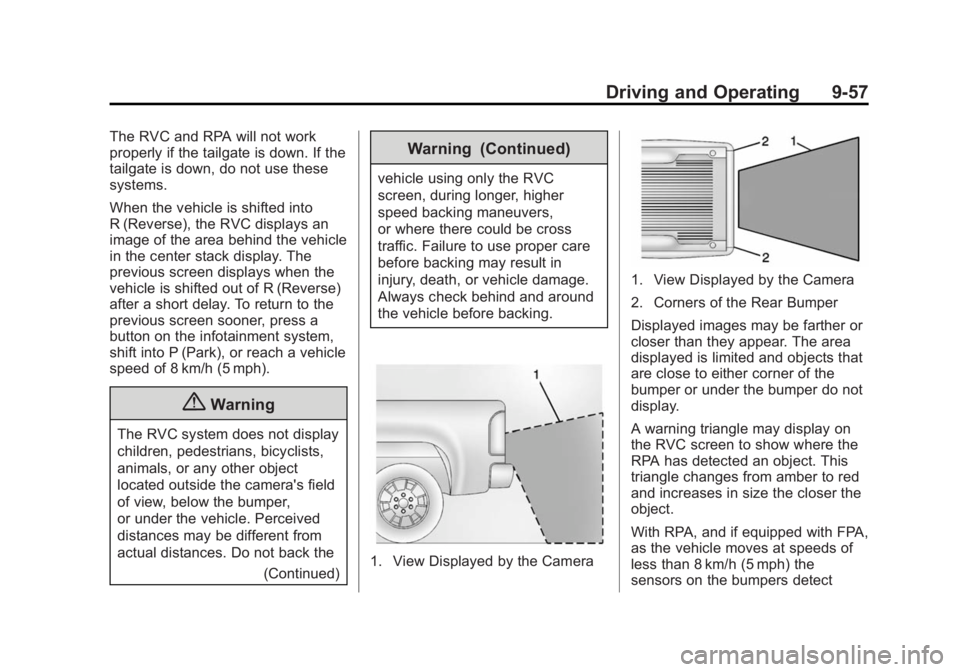
1. View Displayed by the Camera
1. View Displayed by the Camera
2. Corners of the Rear Bumper
Displayed images may be farther or
closer than they appear. The area
displayed is limited and objects that
are close to either corner of the
bumper or under the bumper do not
display.
A warning triangle may display on
the RVC screen to show where the
RPA has detected an object. This
triangle changes from amber to red
and increases in size the closer the
object.
With RPA, and if equipped with FPA,
as the vehicle moves at speeds of
less than 8 km/h (5 mph) the
sensors on the bumpers detect
Page 324 of 539
Black plate (59,1)GMC Sierra Owner Manual (GMNA Localizing-U.S/Canada/Mexico-
7299746) - 2015 - crc - 11/11/13
Driving and Operating 9-59
assist on again, select On in the
vehicle personalization menu. The
On with Towbar setting allows for
the parking assist to work properly
with a small item attached to the
trailer hitch. Turn off parking assist
when towing a trailer.
To turn the Rear Vision Camera
(RVC) system rear parking assist
symbols or guidance lines on or off:
1. On the infotainment systemHome screen, press the Settings
screen button, or turn the MENU
knob to highlight Settings and
press MENU.
2. Select Rear Camera.
3. Press Rear Park Assist Symbols or Guidance Lines and then
select Off or On.
Disconnecting the Rear Vision
Camera (RVC)
The RVC must be disconnected if
the tailgate needs to be removed. The RVC is disconnected by
removing the connector from the
electrical junction block mounted on
the left side of the cross member of
the vehicle frame. After
disconnecting, the cap mounted
next to the camera connector must
be relocated so that the open
terminals on the junction block are
covered.
Assistance Systems for
Driving
If equipped, when driving the
vehicle, Forward Collision Alert
(FCA) and Lane Departure Warning
(LDW) can help to avoid a crash or
reduce crash damage.
Forward Collision Alert
(FCA) System
If equipped, the FCA system may
help to avoid or reduce the harm
caused by front-end crashes. When
approaching a vehicle ahead too
quickly, FCA provides a red flashing
alert on the windshield and rapidlybeeps or pulses the driver seat.
FCA also lights an amber visual
alert if following another vehicle
much too closely.
FCA detects vehicles within a
distance of approximately 60 m
(197 ft) and operates at speeds
above 40 km/h (25 mph).
{Warning
FCA is a warning system and
does not apply the brakes. When
approaching a slower-moving or
stopped vehicle ahead too rapidly,
or when following a vehicle too
closely, FCA may not provide a
warning with enough time to help
avoid a crash. FCA does not warn
of pedestrians, animals, signs,
guardrails, bridges, construction
barrels, or other objects. Be ready
to take action and apply the
brakes. For more information, see
Defensive Driving on page 9-3.
Page 500 of 539
Black plate (1,1)GMC Sierra Owner Manual (GMNA Localizing-U.S/Canada/Mexico-
7299746) - 2015 - crc - 11/11/13
Customer Information 13-1
Customer
Information
Customer Information
Customer SatisfactionProcedure . . . . . . . . . . . . . . . . . . 13-1
Customer Assistance Offices . . . . . . . . . . . . . . . . . . . . . 13-3
Customer Assistance for Text Telephone (TTY) Users . . . . . 13-4
Online Owner Center . . . . . . . . 13-4
GM Mobility Reimbursement Program . . . . . . . . . . . . . . . . . . . . 13-5
Roadside Assistance Program . . . . . . . . . . . . . . . . . . . . 13-5
Scheduling Service Appointments . . . . . . . . . . . . . . 13-7
Courtesy Transportation Program . . . . . . . . . . . . . . . . . . . . 13-7
Collision Damage Repair . . . . 13-9
Service Publications Ordering Information . . . . . . 13-11
Radio Frequency Identification (RFID) . . . . . . . 13-12
Radio Frequency Statement . . . . . . . . . . . . . . . . . 13-12
Reporting Safety Defects
Reporting Safety Defects tothe United States
Government . . . . . . . . . . . . . . . 13-13
Reporting Safety Defects to the Canadian
Government . . . . . . . . . . . . . . . 13-13
Reporting Safety Defects to General Motors . . . . . . . . . . . 13-13
Vehicle Data Recording and
Privacy
Vehicle Data Recording andPrivacy . . . . . . . . . . . . . . . . . . . . 13-14
Event Data Recorders . . . . . . 13-14
OnStar
®. . . . . . . . . . . . . . . . . . . . 13-15
Infotainment System . . . . . . . . 13-15
Customer Information
Customer Satisfaction
Procedure
Your satisfaction and goodwill are
important to your dealer and to
GMC. Normally, any concerns with
the sales transaction or the
operation of the vehicle will be
resolved by your dealer's sales or
service departments. Sometimes,
however, despite the best intentions
of all concerned, misunderstandings
can occur. If your concern has not
been resolved to your satisfaction,
the following steps should be taken:
STEP ONE: Discuss your concern
with a member of dealership
management. Normally, concerns
can be quickly resolved at that level.
If the matter has already been
reviewed with the sales, service,
or parts manager, contact the owner
of your dealership or the general
manager.
Page 514 of 539
Black plate (15,1)GMC Sierra Owner Manual (GMNA Localizing-U.S/Canada/Mexico-
7299746) - 2015 - crc - 11/11/13
Customer Information 13-15
These data can help provide a
better understanding of the
circumstances in which crashes and
injuries occur. NOTE: EDR data are
recorded by your vehicle only if a
non-trivial crash situation occurs; no
data are recorded by the EDR under
normal driving conditions and no
personal data (e.g., name, gender,
age, and crash location) are
recorded. However, other parties,
such as law enforcement, could
combine the EDR data with the type
of personally identifying data
routinely acquired during a crash
investigation.
To read data recorded by an EDR,
special equipment is required, and
access to the vehicle or the EDR is
needed. In addition to the vehicle
manufacturer, other parties, such as
law enforcement, that have the
special equipment, can read the
information if they have access to
the vehicle or the EDR.
GM will not access this data or
share it with others except: with the
consent of the vehicle owner or,if the vehicle is leased, with the
consent of the lessee; in response
to an official request by police or
similar government office; as part of
GM's defense of litigation through
the discovery process; or, as
required by law. Data that GM
collects or receives may also be
used for GM research needs or may
be made available to others for
research purposes, where a need is
shown and the data is not tied to a
specific vehicle or vehicle owner.
OnStar®
If the vehicle is equipped with
OnStar®and has an active
subscription, additional data may be
collected through the OnStar
system. This includes information
about the vehicle’s operation;
collisions involving the vehicle; the
use of the vehicle and its features;
and, in certain situations, the
location and approximate GPS
speed of the vehicle. Refer to the OnStar Terms and Conditions and
Privacy Statement on the OnStar
website.
Infotainment System
If the vehicle is equipped with a
navigation system as part of the
infotainment system, use of the
system may result in the storage of
destinations, addresses, telephone
numbers, and other trip information.
See the infotainment manual for
information on stored data and for
deletion instructions.
Page 531 of 539
Black plate (6,1)GMC Sierra Owner Manual (GMNA Localizing-U.S/Canada/Mexico-
7299746) - 2015 - crc - 11/11/13
i-6 INDEX
Glass Replacement . . . . . . . . . . . 10-37
Glove Box . . . . . . . . . . . . . . . . . . . . . . 4-2
GM Mobility ReimbursementProgram . . . . . . . . . . . . . . . . . . . . . . 13-5
H
Halogen Bulbs . . . . . . . . . . . . . . . . 10-37
Hazard Warning Flashers . . . . . . . 6-4
Head Restraints . . . . . . . . . . . . . . . . 3-2
HeadlampsAiming . . . . . . . . . . . . . . . . . . . . . . 10-37
Automatic . . . . . . . . . . . . . . . . . . . . . . 6-3
Bulb Replacement . . . . . . . . . . 10-37
Daytime RunningLamps (DRL) . . . . . . . . . . . . . . . . . 6-3
Flash-to-Pass . . . . . . . . . . . . . . . . . . 6-3
Headlamps, Front Turn Signal, Sidemarker, and
Parking Lamps . . . . . . . . . . . . 10-38
High-Beam On Light . . . . . . . . . . 5-29
High/Low Beam Changer . . . . . . 6-2
Lamps On Reminder . . . . . . . . . 5-29
Heated
Steering Wheel . . . . . . . . . . . . . . . . 5-4
Heated and Cooled Front Seats . . . . . . . . . . . . . . . . . . . . . . . . . 3-8 Heated Mirrors . . . . . . . . . . . . . . . . . 2-16
Heater
Engine Coolant . . . . . . . . . . . . . . . 9-28
Heating and Air Conditioning . . . . . . . . . . . . . . . 8-1, 8-3
High-Beam On Light . . . . . . . . . . . 5-29
High-Speed Operation . . . . . . . . 10-61
Hill and Mountain Roads . . . . . . . 9-12
Hill Descent Control (HDC) . . . . 9-52
Hill Descent Control Light . . . . . . 5-26
Hill Start Assist (HSA) . . . . . . . . . 9-49
Home Page . . . . . . . . . . . . . . . . . . . . . 7-5
Hood . . . . . . . . . . . . . . . . . . . . . . . . . . 10-4
Horn . . . . . . . . . . . . . . . . . . . . . . . . . . . . 5-4
How to Wear Safety Belts Properly . . . . . . . . . . . . . . . . . . . . . . 3-13
I
Idle System
Fast . . . . . . . . . . . . . . . . . . . . . . . . . . 9-27
Ignition Positions . . . . . . . . . . . . . . 9-24
Ignition Transmission Lock Check . . . . . . . . . . . . . . . . . . . . . . . 10-35
Immobilizer . . . . . . . . . . . . . . . . . . . . 2-12
Indicator Vehicle Ahead . . . . . . . . . . . . . . . . 5-26 Infants and Young Children,
Restraints . . . . . . . . . . . . . . . . . . . . 3-39
Infotainment . . . . . . . . . . . . . . . . . . . . 7-1
Infotainment System . . . . . . . . . . 13-15
Instrument Cluster . . . . . . . . . . . . . 5-10
Instrument Panel Storage Area . . . . . . . . . . . . . . . . . . 4-1
Interior Rearview Mirrors . . . . . . . 2-17
Internet Radio Pandora . . . . . . . . . . . . . . . . . . . . . . 7-12
Introduction . . . . . . . . . . . . . . . . . . . . . . . iii
J
Jack
Auxiliary . . . . . . . . . . . . . . . . . . . . . . 7-21
Jump Starting . . . . . . . . . . . . . . . . . 10-88
K
Key and Lock Messages . . . . . . . 5-39
Keyless Entry Remote (RKE) System . . . . . . . . 2-3
Keys . . . . . . . . . . . . . . . . . . . . . . . . . . . . 2-1
Page 534 of 539
Black plate (9,1)GMC Sierra Owner Manual (GMNA Localizing-U.S/Canada/Mexico-
7299746) - 2015 - crc - 11/11/13
INDEX i-9
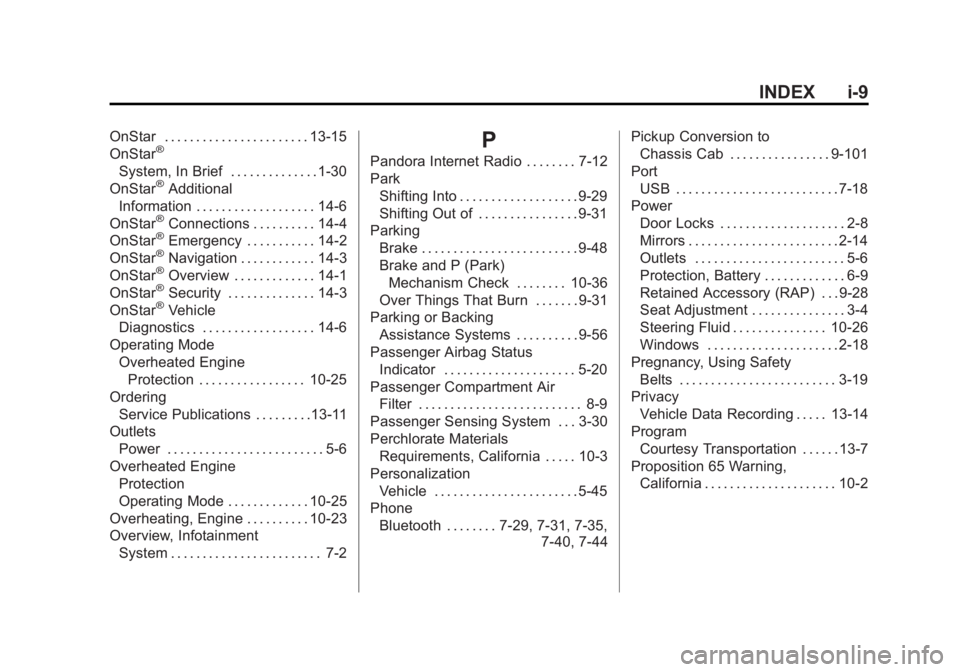
OnStar . . . . . . . . . . . . . . . . . . . . . . . 13-15
OnStar®
System, In Brief . . . . . . . . . . . . . . 1-30
OnStar®Additional
Information . . . . . . . . . . . . . . . . . . . 14-6
OnStar
®Connections . . . . . . . . . . 14-4
OnStar®Emergency . . . . . . . . . . . 14-2
OnStar®Navigation . . . . . . . . . . . . 14-3
OnStar®Overview . . . . . . . . . . . . . 14-1
OnStar®Security . . . . . . . . . . . . . . 14-3
OnStar®Vehicle
Diagnostics . . . . . . . . . . . . . . . . . . 14-6
Operating Mode Overheated EngineProtection . . . . . . . . . . . . . . . . . 10-25
Ordering
Service Publications . . . . . . . . .13-11
Outlets Power . . . . . . . . . . . . . . . . . . . . . . . . . 5-6
Overheated Engine Protection
Operating Mode . . . . . . . . . . . . . 10-25
Overheating, Engine . . . . . . . . . . 10-23
Overview, Infotainment System . . . . . . . . . . . . . . . . . . . . . . . . 7-2
P
Pandora Internet Radio . . . . . . . . 7-12
Park
Shifting Into . . . . . . . . . . . . . . . . . . . 9-29
Shifting Out of . . . . . . . . . . . . . . . . 9-31
Parking Brake . . . . . . . . . . . . . . . . . . . . . . . . . 9-48
Brake and P (Park)
Mechanism Check . . . . . . . . 10-36
Over Things That Burn . . . . . . . 9-31
Parking or Backing
Assistance Systems . . . . . . . . . . 9-56
Passenger Airbag Status Indicator . . . . . . . . . . . . . . . . . . . . . 5-20
Passenger Compartment Air Filter . . . . . . . . . . . . . . . . . . . . . . . . . . 8-9
Passenger Sensing System . . . 3-30
Perchlorate Materials Requirements, California . . . . . 10-3
Personalization
Vehicle . . . . . . . . . . . . . . . . . . . . . . . 5-45
Phone Bluetooth . . . . . . . . 7-29, 7-31, 7-35, 7-40, 7-44Pickup Conversion to
Chassis Cab . . . . . . . . . . . . . . . . 9-101
Port USB . . . . . . . . . . . . . . . . . . . . . . . . . . 7-18
Power Door Locks . . . . . . . . . . . . . . . . . . . . 2-8
Mirrors . . . . . . . . . . . . . . . . . . . . . . . . 2-14
Outlets . . . . . . . . . . . . . . . . . . . . . . . . 5-6
Protection, Battery . . . . . . . . . . . . . 6-9
Retained Accessory (RAP) . . . 9-28
Seat Adjustment . . . . . . . . . . . . . . . 3-4
Steering Fluid . . . . . . . . . . . . . . . 10-26
Windows . . . . . . . . . . . . . . . . . . . . . 2-18
Pregnancy, Using Safety Belts . . . . . . . . . . . . . . . . . . . . . . . . . 3-19
Privacy
Vehicle Data Recording . . . . . 13-14
Program Courtesy Transportation . . . . . . 13-7
Proposition 65 Warning, California . . . . . . . . . . . . . . . . . . . . . 10-2