wheel GMC SIERRA 1500 2015 Manual Online
[x] Cancel search | Manufacturer: GMC, Model Year: 2015, Model line: SIERRA 1500, Model: GMC SIERRA 1500 2015Pages: 539, PDF Size: 6.81 MB
Page 317 of 539
Black plate (52,1)GMC Sierra Owner Manual (GMNA Localizing-U.S/Canada/Mexico-
7299746) - 2015 - crc - 11/11/13
9-52 Driving and Operating
StabiliTrak will automatically turn on
if the vehicle exceeds 56 km/h
(35 mph). Traction control will
remain off.
The vehicle has a Trailer Sway
Control (TSC) feature and a Hill
Start Assist (HSA) feature. See
Trailer Sway Control (TSC) on
page 9-96orHill Start Assist (HSA)
on page 9-49.
Adding accessories can affect the
vehicle performance. See
Accessories and Modifications on
page 10-3.
Hill Descent
Control (HDC)
If equipped, HDC can be used when
driving downhill. It sets and
maintains vehicle speed while
descending a very steep incline in a
forward or reverse gear.
The HDC switch is on the center
stack, below the climate controls. Press
5to enable or disable HDC.
Vehicle speed must be below
50 km/h (31 mph).
The HDC light displays on the
instrument cluster when enabled.
HDC can maintain vehicle speeds
between 3 and 22 km/h (2 and
14 mph) on an incline greater than
or equal to a 10% grade. A blinking
HDC light indicates the system is
actively applying the brakes to
maintain vehicle speed.
When HDC is activated, the initial
HDC speed is set to the current
driving speed. It can be increased or
decreased by applying the
accelerator or brake pedal. This
adjusted speed becomes the new
set speed. HDC will remain enabled between
22 and 60 km/h (14 and 37 mph);
however vehicle speed cannot be
set or maintained in this range.
It will automatically disable if the
vehicle speed is above 80 km/h
(50 mph) or above 60 km/h
(37 mph) for at least 30 seconds.
5
must be pressed again to
re-enable HDC.
When enabled, if the vehicle is at a
speed above 22 km/h (14 mph) and
less than 60 km/h (37 mph), a DIC
message will display. See
Vehicle
Speed Messages on page 5-45.
Locking Rear Axle
Vehicles with a locking rear axle can
give more traction on snow, mud,
ice, sand, or gravel. It works like a
standard axle most of the time, but
when traction is low, this feature will
allow the rear wheel with the most
traction to move the vehicle.
Page 318 of 539
Black plate (53,1)GMC Sierra Owner Manual (GMNA Localizing-U.S/Canada/Mexico-
7299746) - 2015 - crc - 11/11/13
Driving and Operating 9-53
Cruise Control
With cruise control a speed of about
40 km/h (25 mph) or more can be
maintained without keeping your
foot on the accelerator. Cruise
control does not work at speeds
below about 40 km/h (25 mph).
{Warning
Cruise control can be dangerous
where you cannot drive safely at
a steady speed. Do not use the
cruise control on winding roads or
in heavy traffic.
Cruise control can be dangerous
on slippery roads. On such roads,
fast changes in tire traction can
cause excessive wheel slip, and
you could lose control. Do not use
cruise control on slippery roads.
If equipped with an Allison or
Hydra-Matic 6-speed automatic
transmission, see “Tow/Haul Mode
Grade Braking” underTow/Haul Mode on page 9-37
for an
explanation of how cruise control
interacts with the Range Selection
Mode, Tow/Haul Mode, and Grade
Braking systems.
If the cruise control is being used
and the Traction Control System
(TCS) or StabiliTrak begins to limit
wheel spin, the cruise control will
automatically disengage. See
Traction Control/Electronic Stability
Control on page 9-50. If a collision
alert occurs when cruise control is
activated, cruise control is
disengaged. See Forward Collision
Alert (FCA) System on page 9-59.
When road conditions allow you to
safely use it again, cruise control
can be turned back on.
If the brakes are applied, the cruise
control disengages.
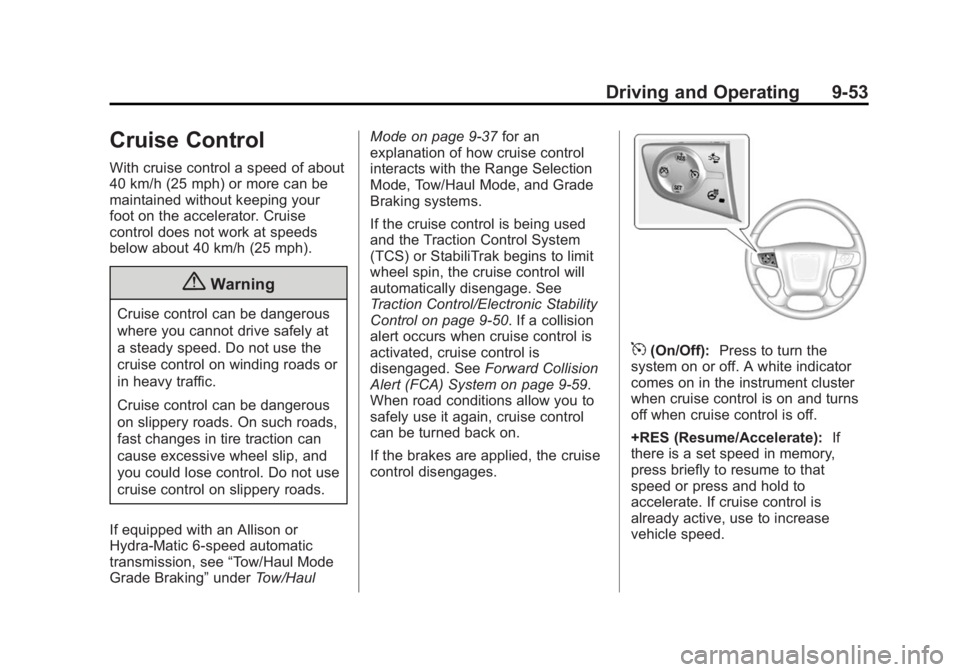
5(On/Off): Press to turn the
system on or off. A white indicator
comes on in the instrument cluster
when cruise control is on and turns
off when cruise control is off.
+RES (Resume/Accelerate): If
there is a set speed in memory,
press briefly to resume to that
speed or press and hold to
accelerate. If cruise control is
already active, use to increase
vehicle speed.
Page 319 of 539

Black plate (54,1)GMC Sierra Owner Manual (GMNA Localizing-U.S/Canada/Mexico-
7299746) - 2015 - crc - 11/11/13
9-54 Driving and Operating
SET−(Set/Coast): Press briefly to
set the speed and activate cruise
control. If cruise control is already
active, use to decrease vehicle
speed.
*(Cancel): Press to disengage
cruise control without erasing the
set speed from memory.
Setting Cruise Control
If
5is on when not in use, SET− or
+RES could get pressed and go into
cruise when not desired. Keep
5
off when cruise is not being used.
1. Press
5to turn the cruise
system on.
2. Get up to the desired speed.
3. Press and release the SET− button on the steering wheel.
4. Remove foot from the accelerator. The cruise control indicator on the
instrument cluster turns green after
cruise control has been set to the
desired speed. SeeInstrument
Cluster on page 5-10.
Resuming a Set Speed
If the cruise control is set at a
desired speed and then the brakes
are applied or
*is pressed, the
cruise control is disengaged without
erasing the set speed from memory.
Once the vehicle speed reaches
about 40 km/h (25 mph) or more,
press the +RES button briefly on the
steering wheel. The vehicle returns
to the previous set speed.
Increasing Speed While Using
Cruise Control
If the cruise control system is
already activated:
.Press and hold the +RES button
on the steering wheel until the
desired speed is reached, then
release it.
.To increase vehicle speed in
small increments, briefly press
the +RES button. For each
press, the vehicle goes about
1.6 km/h (1 mph) faster.
The speedometer reading can be
displayed in either English or metric
units. See Instrument Cluster on
page 5-10. The increment value
used depends on the units
displayed.
Reducing Speed While Using
Cruise Control
If the cruise control system is
already activated:
.Press and hold the SET– button
on the steering wheel until the
desired lower speed is reached,
then release it.
.To slow down in small
increments, briefly press the
SET– button. For each press,
the vehicle goes about 1.6 km/h
(1 mph) slower.
Page 325 of 539
Black plate (60,1)GMC Sierra Owner Manual (GMNA Localizing-U.S/Canada/Mexico-
7299746) - 2015 - crc - 11/11/13
9-60 Driving and Operating
FCA can be disabled with the FCA
steering wheel control.
Detecting the Vehicle Ahead
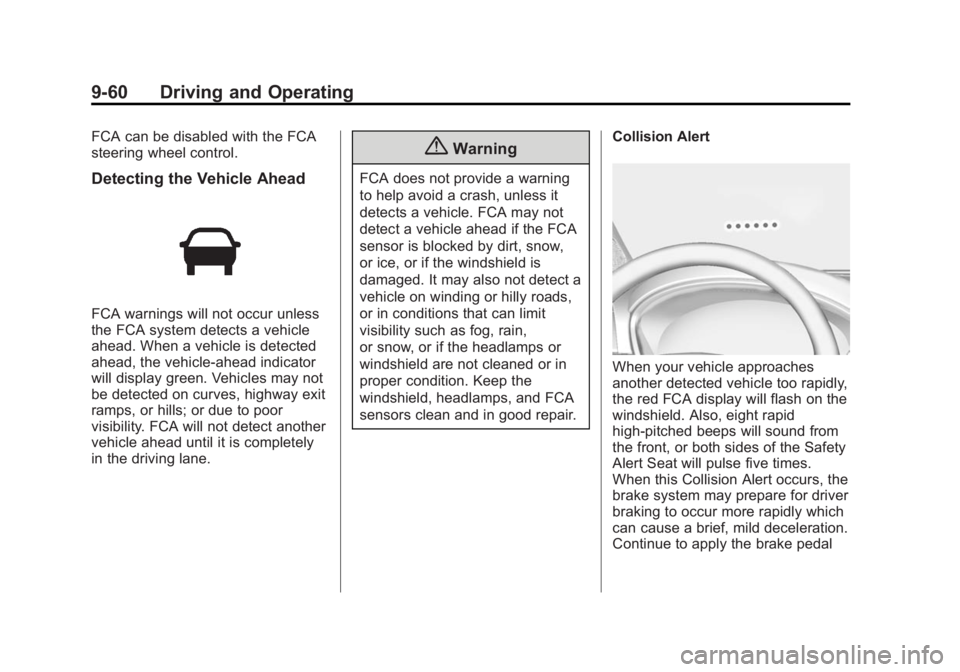
FCA warnings will not occur unless
the FCA system detects a vehicle
ahead. When a vehicle is detected
ahead, the vehicle-ahead indicator
will display green. Vehicles may not
be detected on curves, highway exit
ramps, or hills; or due to poor
visibility. FCA will not detect another
vehicle ahead until it is completely
in the driving lane.
{Warning
FCA does not provide a warning
to help avoid a crash, unless it
detects a vehicle. FCA may not
detect a vehicle ahead if the FCA
sensor is blocked by dirt, snow,
or ice, or if the windshield is
damaged. It may also not detect a
vehicle on winding or hilly roads,
or in conditions that can limit
visibility such as fog, rain,
or snow, or if the headlamps or
windshield are not cleaned or in
proper condition. Keep the
windshield, headlamps, and FCA
sensors clean and in good repair.Collision Alert
When your vehicle approaches
another detected vehicle too rapidly,
the red FCA display will flash on the
windshield. Also, eight rapid
high-pitched beeps will sound from
the front, or both sides of the Safety
Alert Seat will pulse five times.
When this Collision Alert occurs, the
brake system may prepare for driver
braking to occur more rapidly which
can cause a brief, mild deceleration.
Continue to apply the brake pedal
Page 326 of 539
Black plate (61,1)GMC Sierra Owner Manual (GMNA Localizing-U.S/Canada/Mexico-
7299746) - 2015 - crc - 11/11/13
Driving and Operating 9-61
as needed. Cruise control may be
disengaged when the Collision Alert
occurs.
Tailgating Alert
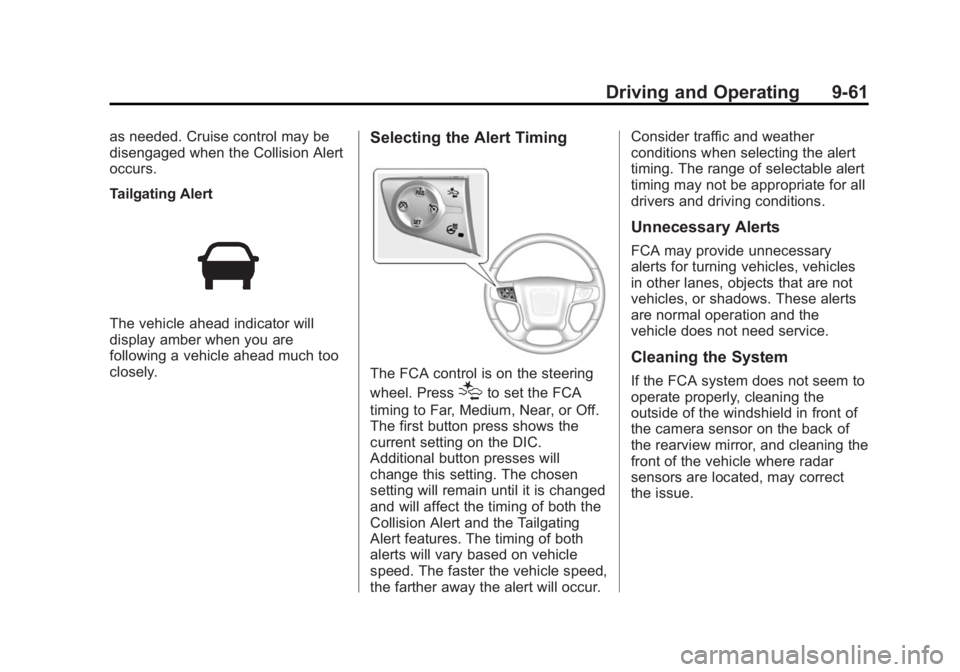
The vehicle ahead indicator will
display amber when you are
following a vehicle ahead much too
closely.
Selecting the Alert Timing
The FCA control is on the steering
wheel. Press
[to set the FCA
timing to Far, Medium, Near, or Off.
The first button press shows the
current setting on the DIC.
Additional button presses will
change this setting. The chosen
setting will remain until it is changed
and will affect the timing of both the
Collision Alert and the Tailgating
Alert features. The timing of both
alerts will vary based on vehicle
speed. The faster the vehicle speed,
the farther away the alert will occur. Consider traffic and weather
conditions when selecting the alert
timing. The range of selectable alert
timing may not be appropriate for all
drivers and driving conditions.
Unnecessary Alerts
FCA may provide unnecessary
alerts for turning vehicles, vehicles
in other lanes, objects that are not
vehicles, or shadows. These alerts
are normal operation and the
vehicle does not need service.
Cleaning the System
If the FCA system does not seem to
operate properly, cleaning the
outside of the windshield in front of
the camera sensor on the back of
the rearview mirror, and cleaning the
front of the vehicle where radar
sensors are located, may correct
the issue.
Page 335 of 539
Black plate (70,1)GMC Sierra Owner Manual (GMNA Localizing-U.S/Canada/Mexico-
7299746) - 2015 - crc - 11/11/13
9-70 Driving and Operating
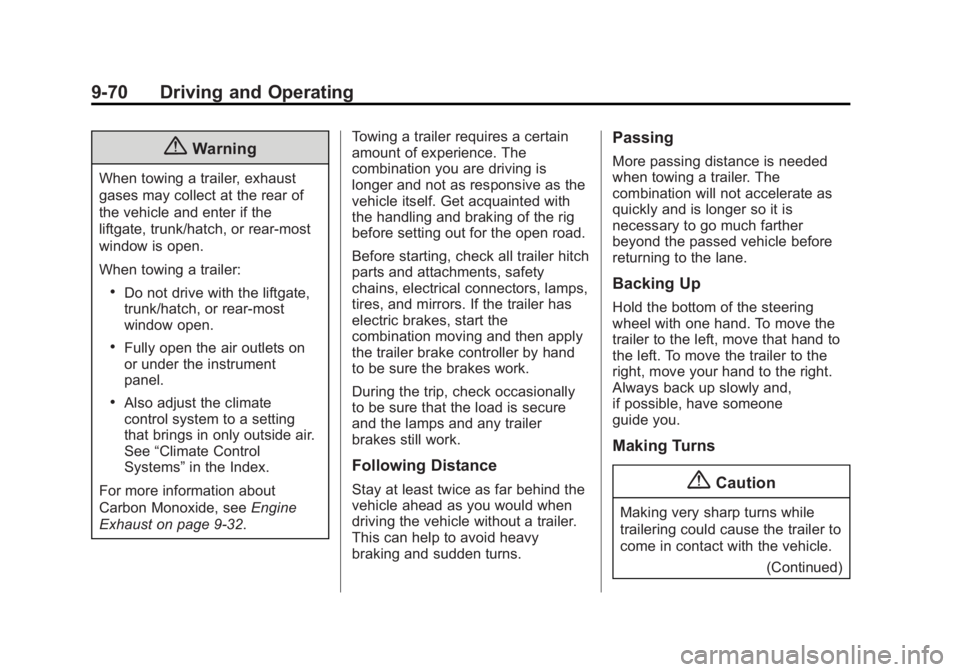
{Warning
When towing a trailer, exhaust
gases may collect at the rear of
the vehicle and enter if the
liftgate, trunk/hatch, or rear-most
window is open.
When towing a trailer:
.Do not drive with the liftgate,
trunk/hatch, or rear-most
window open.
.Fully open the air outlets on
or under the instrument
panel.
.Also adjust the climate
control system to a setting
that brings in only outside air.
See“Climate Control
Systems” in the Index.
For more information about
Carbon Monoxide, see Engine
Exhaust on page 9-32. Towing a trailer requires a certain
amount of experience. The
combination you are driving is
longer and not as responsive as the
vehicle itself. Get acquainted with
the handling and braking of the rig
before setting out for the open road.
Before starting, check all trailer hitch
parts and attachments, safety
chains, electrical connectors, lamps,
tires, and mirrors. If the trailer has
electric brakes, start the
combination moving and then apply
the trailer brake controller by hand
to be sure the brakes work.
During the trip, check occasionally
to be sure that the load is secure
and the lamps and any trailer
brakes still work.
Following Distance
Stay at least twice as far behind the
vehicle ahead as you would when
driving the vehicle without a trailer.
This can help to avoid heavy
braking and sudden turns.
Passing
More passing distance is needed
when towing a trailer. The
combination will not accelerate as
quickly and is longer so it is
necessary to go much farther
beyond the passed vehicle before
returning to the lane.
Backing Up
Hold the bottom of the steering
wheel with one hand. To move the
trailer to the left, move that hand to
the left. To move the trailer to the
right, move your hand to the right.
Always back up slowly and,
if possible, have someone
guide you.
Making Turns
{Caution
Making very sharp turns while
trailering could cause the trailer to
come in contact with the vehicle.
(Continued)
Page 336 of 539
Black plate (71,1)GMC Sierra Owner Manual (GMNA Localizing-U.S/Canada/Mexico-
7299746) - 2015 - crc - 11/11/13
Driving and Operating 9-71
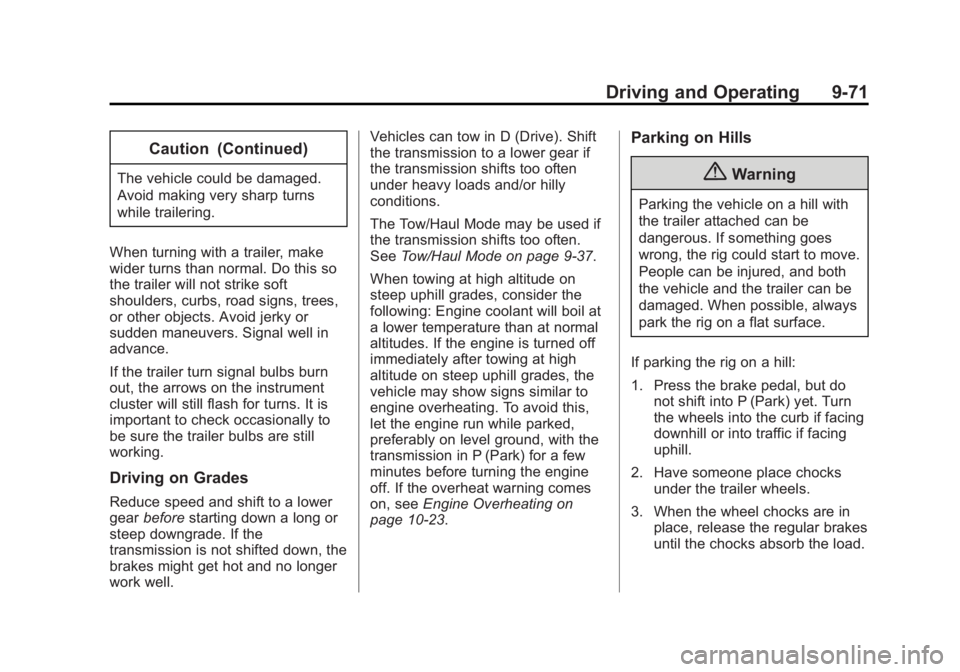
Caution (Continued)
The vehicle could be damaged.
Avoid making very sharp turns
while trailering.
When turning with a trailer, make
wider turns than normal. Do this so
the trailer will not strike soft
shoulders, curbs, road signs, trees,
or other objects. Avoid jerky or
sudden maneuvers. Signal well in
advance.
If the trailer turn signal bulbs burn
out, the arrows on the instrument
cluster will still flash for turns. It is
important to check occasionally to
be sure the trailer bulbs are still
working.
Driving on Grades
Reduce speed and shift to a lower
gear before starting down a long or
steep downgrade. If the
transmission is not shifted down, the
brakes might get hot and no longer
work well. Vehicles can tow in D (Drive). Shift
the transmission to a lower gear if
the transmission shifts too often
under heavy loads and/or hilly
conditions.
The Tow/Haul Mode may be used if
the transmission shifts too often.
See
Tow/Haul Mode on page 9-37.
When towing at high altitude on
steep uphill grades, consider the
following: Engine coolant will boil at
a lower temperature than at normal
altitudes. If the engine is turned off
immediately after towing at high
altitude on steep uphill grades, the
vehicle may show signs similar to
engine overheating. To avoid this,
let the engine run while parked,
preferably on level ground, with the
transmission in P (Park) for a few
minutes before turning the engine
off. If the overheat warning comes
on, see Engine Overheating on
page 10-23.
Parking on Hills
{Warning
Parking the vehicle on a hill with
the trailer attached can be
dangerous. If something goes
wrong, the rig could start to move.
People can be injured, and both
the vehicle and the trailer can be
damaged. When possible, always
park the rig on a flat surface.
If parking the rig on a hill:
1. Press the brake pedal, but do not shift into P (Park) yet. Turn
the wheels into the curb if facing
downhill or into traffic if facing
uphill.
2. Have someone place chocks under the trailer wheels.
3. When the wheel chocks are in place, release the regular brakes
until the chocks absorb the load.
Page 338 of 539
Black plate (73,1)GMC Sierra Owner Manual (GMNA Localizing-U.S/Canada/Mexico-
7299746) - 2015 - crc - 11/11/13
Driving and Operating 9-73
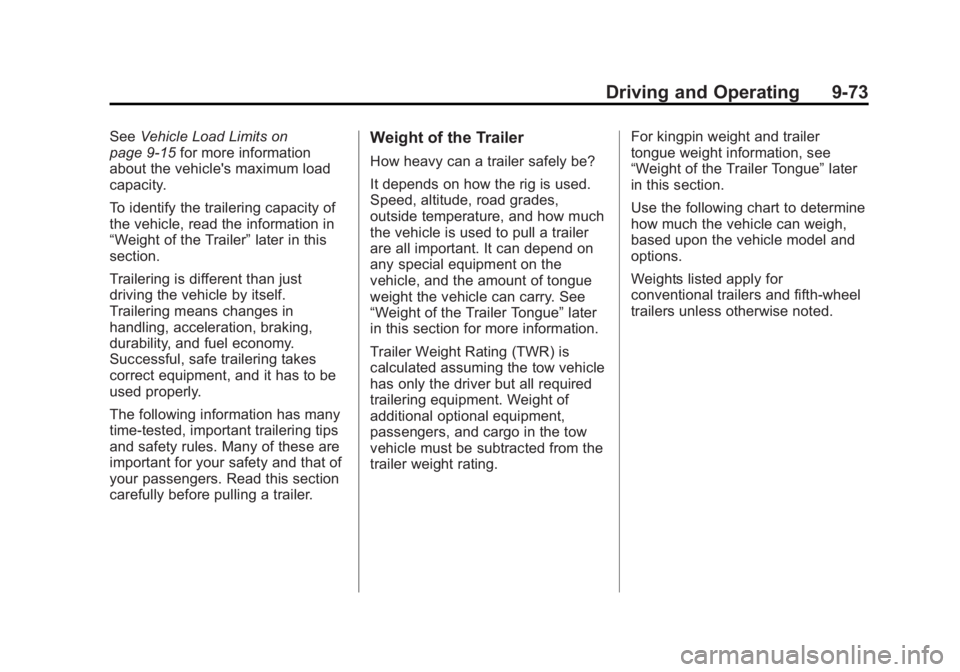
SeeVehicle Load Limits on
page 9-15 for more information
about the vehicle's maximum load
capacity.
To identify the trailering capacity of
the vehicle, read the information in
“Weight of the Trailer” later in this
section.
Trailering is different than just
driving the vehicle by itself.
Trailering means changes in
handling, acceleration, braking,
durability, and fuel economy.
Successful, safe trailering takes
correct equipment, and it has to be
used properly.
The following information has many
time-tested, important trailering tips
and safety rules. Many of these are
important for your safety and that of
your passengers. Read this section
carefully before pulling a trailer.Weight of the Trailer
How heavy can a trailer safely be?
It depends on how the rig is used.
Speed, altitude, road grades,
outside temperature, and how much
the vehicle is used to pull a trailer
are all important. It can depend on
any special equipment on the
vehicle, and the amount of tongue
weight the vehicle can carry. See
“Weight of the Trailer Tongue” later
in this section for more information.
Trailer Weight Rating (TWR) is
calculated assuming the tow vehicle
has only the driver but all required
trailering equipment. Weight of
additional optional equipment,
passengers, and cargo in the tow
vehicle must be subtracted from the
trailer weight rating. For kingpin weight and trailer
tongue weight information, see
“Weight of the Trailer Tongue”
later
in this section.
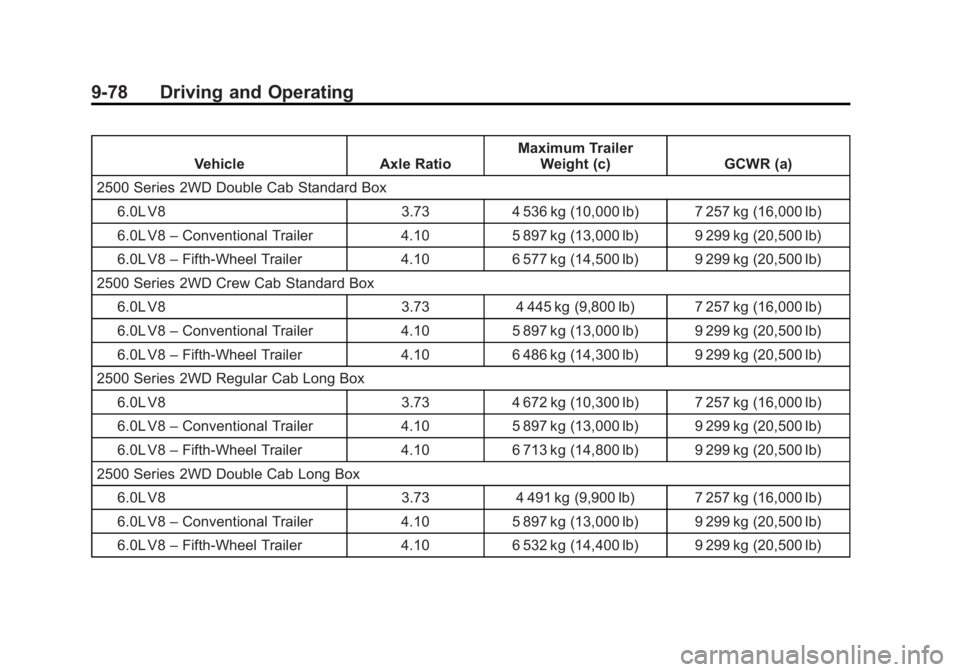
Use the following chart to determine
how much the vehicle can weigh,
based upon the vehicle model and
options.
Weights listed apply for
conventional trailers and fifth-wheel
trailers unless otherwise noted.
Page 343 of 539
Black plate (78,1)GMC Sierra Owner Manual (GMNA Localizing-U.S/Canada/Mexico-
7299746) - 2015 - crc - 11/11/13
9-78 Driving and Operating
VehicleAxle RatioMaximum Trailer
Weight (c) GCWR (a)
2500 Series 2WD Double Cab Standard Box
6.0L V8 3.734 536 kg (10,000 lb) 7 257 kg (16,000 lb)
6.0L V8 –Conventional Trailer 4.105 897 kg (13,000 lb) 9 299 kg (20,500 lb)
6.0L V8 –Fifth-Wheel Trailer 4.106 577 kg (14,500 lb) 9 299 kg (20,500 lb)
2500 Series 2WD Crew Cab Standard Box 6.0L V8 3.734 445 kg (9,800 lb) 7 257 kg (16,000 lb)
6.0L V8 –Conventional Trailer 4.105 897 kg (13,000 lb) 9 299 kg (20,500 lb)
6.0L V8 –Fifth-Wheel Trailer 4.106 486 kg (14,300 lb) 9 299 kg (20,500 lb)
2500 Series 2WD Regular Cab Long Box 6.0L V8 3.734 672 kg (10,300 lb) 7 257 kg (16,000 lb)
6.0L V8 –Conventional Trailer 4.105 897 kg (13,000 lb) 9 299 kg (20,500 lb)
6.0L V8 –Fifth-Wheel Trailer 4.106 713 kg (14,800 lb) 9 299 kg (20,500 lb)
2500 Series 2WD Double Cab Long Box 6.0L V8 3.734 491 kg (9,900 lb) 7 257 kg (16,000 lb)
6.0L V8 –Conventional Trailer 4.105 897 kg (13,000 lb) 9 299 kg (20,500 lb)
6.0L V8 –Fifth-Wheel Trailer 4.106 532 kg (14,400 lb) 9 299 kg (20,500 lb)
Page 344 of 539
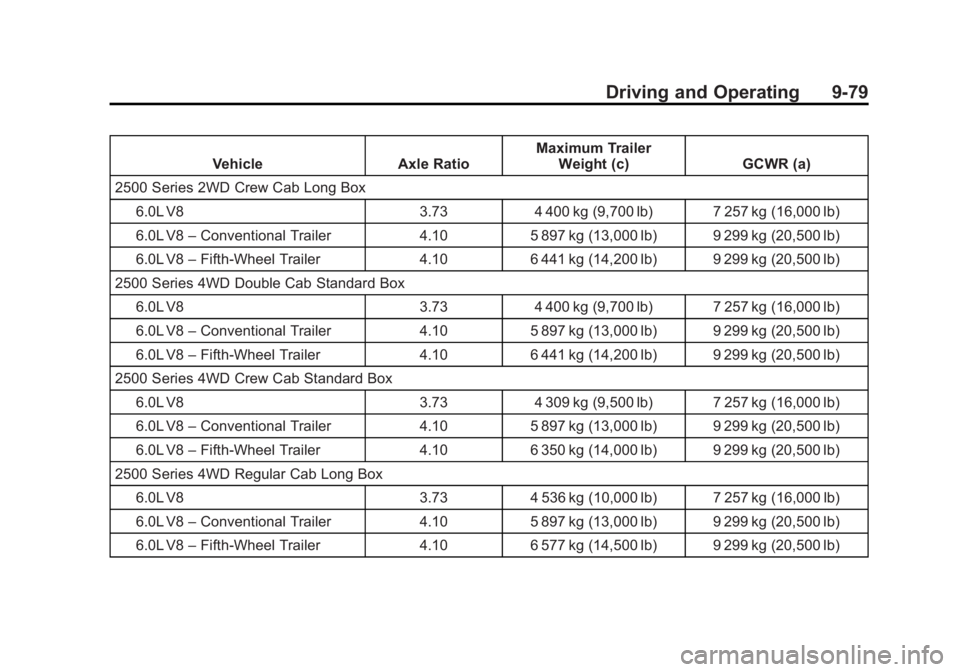
Black plate (79,1)GMC Sierra Owner Manual (GMNA Localizing-U.S/Canada/Mexico-
7299746) - 2015 - crc - 11/11/13
Driving and Operating 9-79
VehicleAxle RatioMaximum Trailer
Weight (c) GCWR (a)
2500 Series 2WD Crew Cab Long Box
6.0L V8 3.734 400 kg (9,700 lb) 7 257 kg (16,000 lb)
6.0L V8 –Conventional Trailer 4.105 897 kg (13,000 lb) 9 299 kg (20,500 lb)
6.0L V8 –Fifth-Wheel Trailer 4.106 441 kg (14,200 lb) 9 299 kg (20,500 lb)
2500 Series 4WD Double Cab Standard Box 6.0L V8 3.734 400 kg (9,700 lb) 7 257 kg (16,000 lb)
6.0L V8 –Conventional Trailer 4.105 897 kg (13,000 lb) 9 299 kg (20,500 lb)
6.0L V8 –Fifth-Wheel Trailer 4.106 441 kg (14,200 lb) 9 299 kg (20,500 lb)
2500 Series 4WD Crew Cab Standard Box 6.0L V8 3.734 309 kg (9,500 lb) 7 257 kg (16,000 lb)
6.0L V8 –Conventional Trailer 4.105 897 kg (13,000 lb) 9 299 kg (20,500 lb)
6.0L V8 –Fifth-Wheel Trailer 4.106 350 kg (14,000 lb) 9 299 kg (20,500 lb)
2500 Series 4WD Regular Cab Long Box 6.0L V8 3.734 536 kg (10,000 lb) 7 257 kg (16,000 lb)
6.0L V8 –Conventional Trailer 4.105 897 kg (13,000 lb) 9 299 kg (20,500 lb)
6.0L V8 –Fifth-Wheel Trailer 4.106 577 kg (14,500 lb) 9 299 kg (20,500 lb)