USB GMC SIERRA 1500 2017 Owner's Manual
[x] Cancel search | Manufacturer: GMC, Model Year: 2017, Model line: SIERRA 1500, Model: GMC SIERRA 1500 2017Pages: 494, PDF Size: 7.66 MB
Page 200 of 494
GMC Sierra/Sierra Denali Owner Manual (GMNA-Localizing-U.S./Canada/
Mexico-9955992) - 2017 - crc - 5/3/16
Infotainment System 199
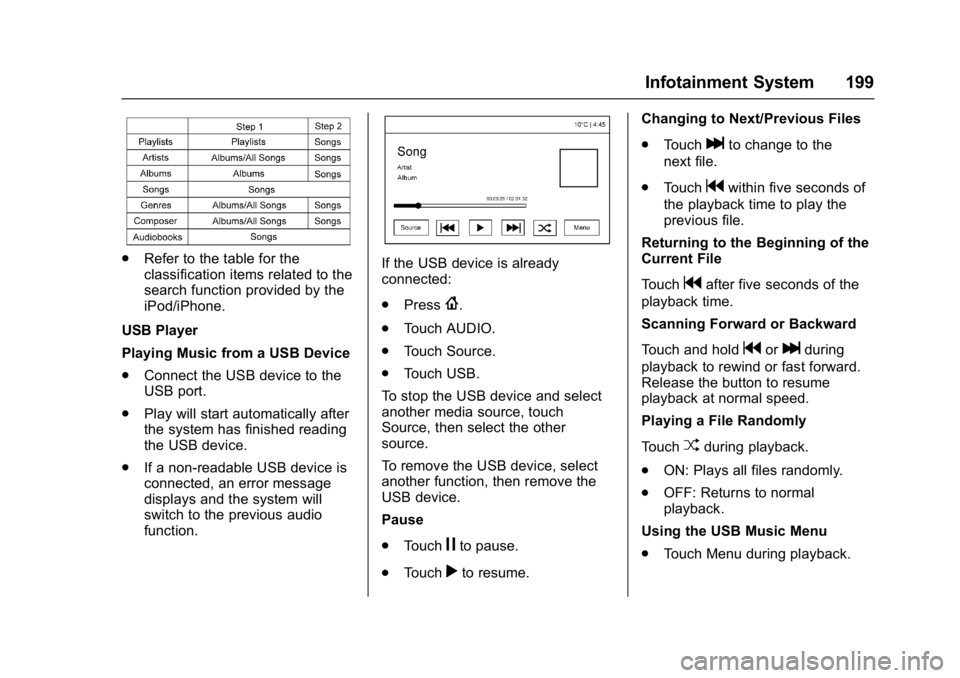
.Refer to the table for the
classification items related to the
search function provided by the
iPod/iPhone.
USB Player
Playing Music from a USB Device
. Connect the USB device to the
USB port.
. Play will start automatically after
the system has finished reading
the USB device.
. If a non-readable USB device is
connected, an error message
displays and the system will
switch to the previous audio
function.If the USB device is already
connected:
.Press
{.
. Touch AUDIO.
. Touch Source.
. Touch USB.
To stop the USB device and select
another media source, touch
Source, then select the other
source.
To remove the USB device, select
another function, then remove the
USB device.
Pause
. Touch
jto pause.
. Touch
rto resume. Changing to Next/Previous Files
.
Touch
lto change to the
next file.
. Touch
gwithin five seconds of
the playback time to play the
previous file.
Returning to the Beginning of the
Current File
Touch
gafter five seconds of the
playback time.
Scanning Forward or Backward
Touch and hold
gorlduring
playback to rewind or fast forward.
Release the button to resume
playback at normal speed.
Playing a File Randomly
Touch
Zduring playback.
. ON: Plays all files randomly.
. OFF: Returns to normal
playback.
Using the USB Music Menu
. Touch Menu during playback.
Page 201 of 494

GMC Sierra/Sierra Denali Owner Manual (GMNA-Localizing-U.S./Canada/
Mexico-9955992) - 2017 - crc - 5/3/16
200 Infotainment System
.Touch the desired menu.
Browse Music 1. Touch Browse Music.
2. Touch the desired music.
Tone Settings
. Touch Tone Settings. The Tone
Settings menu is displayed. See
“Tone Settings” inAM-FM Radio
(Base Radio with Touchscreen)
0 186 orAM-FM Radio (Base
Radio) 0184.
Auto Volume
. Touch Auto Volume. The Auto
Volume menu is displayed. See
“Auto Volume” inAM-FM Radio
(Base Radio with Touchscreen)
0 186 orAM-FM Radio (Base
Radio) 0184. Traffic Program
(If Equipped)
. Touch On or Off.
MTP (Media Transfer Protocol)
. Connect a MTP supported
device.
. Play will start automatically after
the system has finished reading
the MTP device.
. If a non-readable MTP device is
connected, an error message
displays and the system will
switch to the previous audio
function.
iPod/iPhone Player
This feature is limited to models
supporting the iPod/iPhone
connection.
Playing Music Files
. Connect the iPod/iPhone to the
USB port.
. Play will start from the previously
played point after the system
has finished reading the USB
device. .
If a non-readable USB device is
connected, an error message
displays and the system will
switch to the previous audio
function.
If the iPod/iPhone is already
connected:
1. Press
{.
2. Touch AUDIO.
3. Touch Source.
4. Touch iPod.
To stop the device and select
another media source, touch
Source, then select the other
source.
To remove the device, select
another function, then remove the
device.
Pause
. Touch
jto pause.
. Touch
rto resume.
Changing to Next/Previous Song
. Touch
lto change to the
next song.
Page 202 of 494

GMC Sierra/Sierra Denali Owner Manual (GMNA-Localizing-U.S./Canada/
Mexico-9955992) - 2017 - crc - 5/3/16
Infotainment System 201
.Touchgwithin two seconds of
the playback time to play the
previous file.
Returning to the Beginning of the
Current File
Touch
gafter two seconds of the
playback time.
Scanning Forward or Backward
Touch and hold
gorlduring
playback to rewind or fast forward.
Release the button to resume
playback at normal speed.
Playing a File Randomly
Touch
Zduring playback.
. ON: Plays all files randomly.
. OFF: Returns to normal
playback.
Using the iPod Menu
. Touch Menu during playback.
. Touch the appropriate
play mode.
Browse Music 1. Touch Browse Music. 2. Touch the desired music.
Tone Settings
. Touch Tone Settings. The Tone
Settings menu is displayed. See
“Tone Settings” under“Base
Radio with Touchscreen” in
AM-FM Radio (Base Radio with
Touchscreen) 0186 orAM-FM
Radio (Base Radio) 0184.
Auto Volume
. Touch Auto Volume. The Auto
Volume menu is displayed. See
“Auto Volume” under“Base
Radio with Touchscreen” in
AM-FM Radio (Base Radio with
Touchscreen) 0186 orAM-FM
Radio (Base Radio) 0184.
Picture System Information
The infotainment system can view
picture files stored on a USB
storage device and devices that
support Media Transfer
Protocol (MTP).
.
Supported file extensions: .jpg,
.bmp, .png, .gif.
. Animated GIF files are not
supported. .
Some files may not operate due
to a different recording format or
the condition of the file.
Viewing Pictures 1. Connect the USB device to the USB port.
2. Touch the screen to open to full screen. Touch the screen again
to return to the previous
screen.
If the USB device is already
connected:
1. Press
{.
2. Touch GALLERY.
Some features are disabled while
the vehicle is in motion.
Viewing a Slide Show
1. Touch
zfrom the picture
screen.
2. Touch the screen to cancel the slide show during the slide
show playback.
Page 203 of 494

GMC Sierra/Sierra Denali Owner Manual (GMNA-Localizing-U.S./Canada/
Mexico-9955992) - 2017 - crc - 5/3/16
202 Infotainment System
Viewing a Previous or Next
Picture
Touch
SorTfrom the picture
screen.
Rotating a Picture
Touch
wfrom the picture screen.
Enlarging a Picture
Touch
xfrom the picture screen.
Using the USB Picture Menu 1. Touch MENU from the picture screen.
2. Touch the appropriate menu: .Slide Show Time: Allows
selection of the slide show
interval.
. Clock, Temp. Display:
Allows selection of On or
Off to show the clock and
temperature on the full
screen.
. Display Settings: Adjusts
for Brightness and Contrast.
3. Touch
0to exit.
Auxiliary Jack
This vehicle may have an AUX jack
in the center console or armrest.
See Center Console Storage 0109.
Possible auxiliary audio sources
include:
. Laptop computer
. Audio music player
This jack is not an audio output. Do
not plug headphones into the
auxiliary input jack. Auxiliary
devices should be set up while the
vehicle is in P (Park).
Connect a 3.5 mm (1/8 in) cable
from the auxiliary device to the
auxiliary input jack.
If an auxiliary device has already
been connected, but a different
source is currently active, press the
MEDIA faceplate button repeatedly
to scroll through all of the available
audio source screens, until the AUX
source screen is shown.
Base Radio
Playing from the AUX Jack
An auxiliary device is played
through the audio system and
controlled through the device itself.
AUX Menu
Press the MENU knob to display the
AUX menu and the following may
display:
Tone Settings : Select to adjust
Bass, Midrange, Treble, Balance,
Fade, and EQ (Equalizer). See
“Tone Settings” inAM-FM Radio
(Base Radio with Touchscreen)
0 186 orAM-FM Radio (Base
Radio) 0184.
Auto Volume : If equipped, see
“Playing an Audio CD.”
DSP : If equipped, this feature
adjusts the pre-defined settings.
See “DSP” inAM-FM Radio (Base
Radio with Touchscreen) 0186 or
AM-FM Radio (Base Radio) 0184.
Page 226 of 494
GMC Sierra/Sierra Denali Owner Manual (GMNA-Localizing-U.S./Canada/
Mexico-9955992) - 2017 - crc - 5/3/16
Infotainment System 225
2. Connect your Android phone orApple iPhone by using the
compatible phone USB cable
and plugging into a USB data
port. For best performance, use
the device’ s factory-provided
USB cable. Aftermarket or
third-party cables may
not work.
The PROJECTION icon on the
Home Page will change to
ANDROID AUTO or APPLE
CARPLAY depending on the phone.
Android Auto and/or Apple CarPlay
may automatically launch upon USB
connection. If not, press the
ANDROID AUTO and/or APPLE
CARPLAY icon on the Home Page
to launch.
For further information on how to set
up Android Auto and Apple CarPlay
in the vehicle, see my. gmc.com or
see Customer Assistance
Offices 0459.
Android Auto is provided by Google
and is subject to Google’s terms
and privacy policy. CarPlay is
provided by Apple and is subject to
Apple’ s terms and privacy policy. For Android Auto support see
https://support.google.com/
androidauto or Apple CarPlay
support at https://www.apple.com/
ios/carplay/ for more information.
Apple or Google may change or
suspend availability at any time.
Android Auto is a trademark of
Google Inc.; Apple CarPlay is a
trademark of Apple Inc.Trademarks and
License Agreements
FCC Information
See
Radio Frequency
Statement 0467.
"Made for iPod" and "Made for
iPhone" mean that an electronic
accessory has been designed to
connect specifically to iPod or
iPhone and has been certified by
the developer to meet Apple
performance standards. Apple is not
responsible for the operation of this
device or its compliance with safety
and regulatory standards. Please
note that the use of this accessory
with iPod or iPhone may affect
wireless performance. iPhone
®,
iPod®, iPod classic®, iPod nano®,
Page 381 of 494
GMC Sierra/Sierra Denali Owner Manual (GMNA-Localizing-U.S./Canada/
Mexico-9955992) - 2017 - crc - 5/3/16
380 Vehicle Care
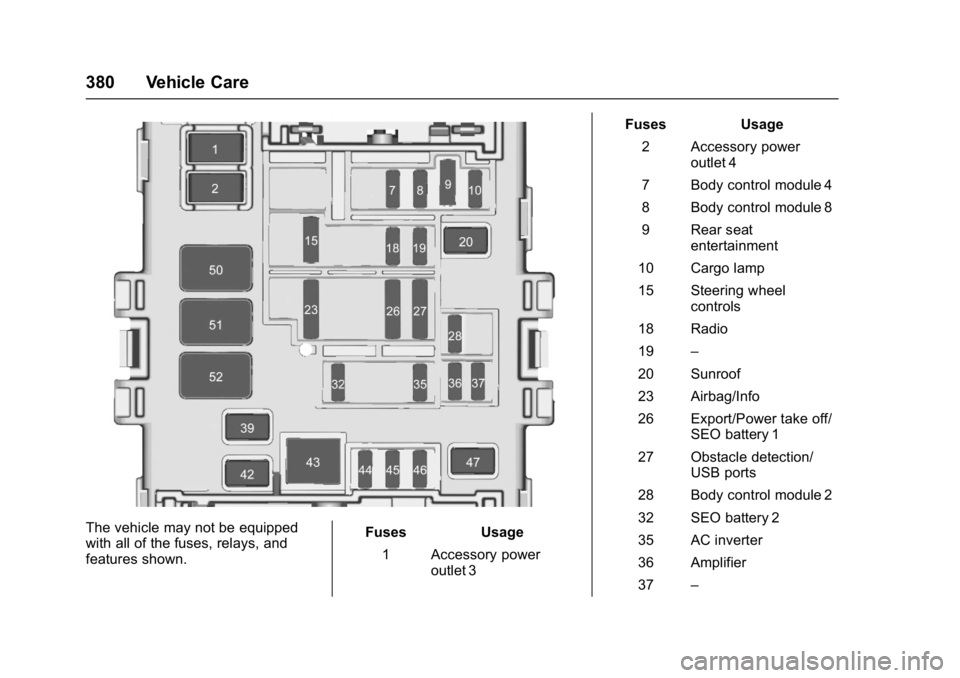
The vehicle may not be equipped
with all of the fuses, relays, and
features shown.Fuses Usage
1 Accessory power outlet 3 Fuses Usage
2 Accessory power outlet 4
7 Body control module 4
8 Body control module 8
9 Rear seat entertainment
10 Cargo lamp
15 Steering wheel controls
18 Radio
19 –
20 Sunroof
23 Airbag/Info
26 Export/Power take off/ SEO battery 1
27 Obstacle detection/ USB ports
28 Body control module 2
32 SEO battery 2
35 AC inverter
36 Amplifier
37 –
Page 490 of 494

GMC Sierra/Sierra Denali Owner Manual (GMNA-Localizing-U.S./Canada/
Mexico-9955992) - 2017 - crc - 5/3/16
Index 489
OutletsPower . . . . . . . . . . . . . . . . . . . . . . . . .117
Overheated Engine Protection Operating Mode . . . . 362
Overheating, Engine . . . . . . . . . . . . 360
Overview . . . . . . . . . . . . . . . . . . 178, 179
P
Park Shifting Into . . . . . . . . . . . . . . . . . . . 264
Shifting Out of . . . . . . . . . . . . . . . . 265
Parking
Brake . . . . . . . . . . . . . . . . . . . . . . . . . 282
Brake and P (Park)Mechanism Check . . . . . . . . . . 371
Over Things That Burn . . . . . . . 266
Parking Assist . . . . . . . . . . . . . . . . . . 291
Parking or Backing
Assistance Systems . . . . . . . . . . 291
Passenger Airbag Status Indicator . . . . . . . . . . . . . . . . . . . . . . 132
Passenger Compartment Air Filter . . . . . . . . . . . . . . . . . . . . . . . . . . 235
Passenger Sensing System . . . . . 75
Perchlorate Materials Requirements, California . . . . . . 341
Personalization Vehicle . . . . . . . . . . . . . . . . . . . . . . . 155 Phone
Apple CarPlay and
Android Auto . . . . . . . . . . . . . . . . 224
Bluetooth . . . . . . . . 210, 212, 216, 220
Pickup Conversion to
Chassis Cab . . . . . . . . . . . . . . . . . . 337
Port USB . . . . . . . . . . . . . . . . . . . . . 193, 196
Power Door Locks . . . . . . . . . . . . . . . . . . . . . 35
Mirrors . . . . . . . . . . . . . . . . . . . . . . . . . . 42
Outlets . . . . . . . . . . . . . . . . . . . . . . . .117
Protection, Battery . . . . . . . . . . . . 175
Retained Accessory (RAP) . . . 262
Seat Adjustment . . . . . . . . . . . . . . . . 52
Steering Fluid . . . . . . . . . . . . . . . . . 363
Windows . . . . . . . . . . . . . . . . . . . . . . . 46
Power Assist Steps . . . . . . . . . . . . . . 37
Pregnancy, Using Safety Belts . . . 64
Privacy Vehicle Data Recording . . . . . . . 469
Program
Courtesy Transportation . . . . . . 463
Proposition 65 Warning,
California . . . . . . . . . . . .340, 366, 418
R
Radio Frequency Statement . . . . 467
Radio Reception . . . . . . . . . . . . . . . . 190
RadiosAM-FM Radio . . . . . . . . . . . . 184, 186
Satellite . . . . . . . . . . . . . . . . . . . . . . . 188
Reading Lamps . . . . . . . . . . . . . . . . . 173
Rear Axle . . . . . . . . . . . . . . . . . . . . . . . 368 Locking . . . . . . . . . . . . . . . . . . . . . . . 286
Rear Seats . . . . . . . . . . . . . . . . . . 57, 58
Rear Vision Camera (RVC) . . . . . 291
Rear Windows . . . . . . . . . . . . . . . . . . . 48
Rearview Mirrors . . . . . . . . . . . . . . . . 45 Automatic Dimming . . . . . . . . . . . . . 45
Reclining Seatbacks . . . . . . . . . . . . . 53
Recognition Voice . . . . . . . . . . . . . . . . . . . . . . . . . 204
Recommended Fluids and Lubricants . . . . . . . . . . . . . . . . . . . . . 447
Records Maintenance . . . . . . . . . . . . . . . . . . 451
Recreational Vehicle Towing . . . . 423
Reimbursement Program, GM Mobility . . . . . . . . . . . . . . . . . . . 461
Remote Keyless Entry (RKE) System . . . . . . . . . . . . . . . . . . . . . . . . . 31
Remote Vehicle Start . . . . . . . . . . . . 33
Page 493 of 494

GMC Sierra/Sierra Denali Owner Manual (GMNA-Localizing-U.S./Canada/
Mexico-9955992) - 2017 - crc - 5/3/16
492 Index
Tires (cont'd)Uniform Tire Quality
Grading . . . . . . . . . . . . . . . . . . . . . 403
Wheel Alignment and Tire
Balance . . . . . . . . . . . . . . . . . . . . . 404
Wheel Replacement . . . . . . . . . . 404
When It Is Time for New Tires . . . . . . . . . . . . . . . . . . . . . . . . 400
Winter . . . . . . . . . . . . . . . . . . . . . . . . 384
Tow/Haul Mode . . . . . . . . . . . . . . . . . 273
Tow/Haul Mode Light . . . . . . . . . . . 136
Towing Driving Characteristics . . . . . . . . 304
Equipment . . . . . . . . . . . . . . . . . . . . 324
General Information . . . . . . . . . . 304
Recreational Vehicle . . . . . . . . . . 423
Trailer . . . . . . . . . . . . . . . . . . . . . . . . 307
Trailer Sway Control (TSC) . . . 333
Vehicle . . . . . . . . . . . . . . . . . . . . . . . 422
Traction Control System (TCS)/StabiliTrak
®Light . . . . . . . . . . . . 138
Off Light . . . . . . . . . . . . . . . . . . . . . . 137
Traction Control/Electronic Stability Control . . . . . . . . . . . . . . . 284
Trademarks and License Agreements . . . . . . . . . . . . . . . . . . . 225 Trailer
Sway Control (TSC) . . . . . . . . . . 333
Tow Mirrors . . . . . . . . . . . . . . . . . . . . . 41
Towing . . . . . . . . . . . . . . . . . . . . . . . . 307
Transfer Case . . . . . . . . . . . . . . . . . . 274
Transmission Automatic . . . . . . . . . . . . . . . . . . . . . 267
Fluid, Automatic . . . . . . . . . 352, 354
Messages . . . . . . . . . . . . . . . . . . . . 152
Temperature Gauge . . . . . . . . . . 128
Transportation Program,
Courtesy . . . . . . . . . . . . . . . . . . . . . . 463
Trip Odometer . . . . . . . . . . . . . . . . . . 125
Truck-Camper Loading Information . . . . . . . . . . . . . . . . . . . . 256
Turn and Lane-Change
Signals . . . . . . . . . . . . . . . . . . . . . . . . 170
Turn Signal Bulb Replacement . . . . . . . . . . . . 374
U
Uniform Tire Quality Grading . . . 403
Universal Remote System . . . . . . 162Operation . . . . . . . . . . . . . . . . . . . . . 164
Programming . . . . . . . . . . . . . . . . . 162
Updates
Software . . . . . . . . . . . . . . . . . . . . . . 184
USB Port . . . . . . . . . . . . . . . . . . 193, 196
Using This Manual . . . . . . . . . . . . . . . . 2
V
Vehicle Alarm System . . . . . . . . . . . . . . . . . . 38
Canadian Owners . . . . . . . . . . . . . . . 2
Control . . . . . . . . . . . . . . . . . . . . . . . 239
Identification Number (VIN) . . . 452
Load Limits . . . . . . . . . . . . . . . . . . . 250
Messages . . . . . . . . . . . . . . . . . . . . 144
Personalization . . . . . . . . . . . . . . . 155
Reminder Messages . . . . . . . . . . 153
Remote Start . . . . . . . . . . . . . . . . . . . 33
Security . . . . . . . . . . . . . . . . . . . . . . . . 38
Speed Messages . . . . . . . . . . . . . 154
Towing . . . . . . . . . . . . . . . . . . . . . . . . 422
Vehicle Ahead Indicator . . . . . . . . 137
Vehicle Care Tire Pressure . . . . . . . . . . . . . . . . . 391
Vehicle Data Recording and Privacy . . . . . . . . . . . . . . . . . . . . . . . . 469
Ventilation, Air . . . . . . . . . . . . . . . . . . 234
Visors . . . . . . . . . . . . . . . . . . . . . . . . . . . 48
Voice Recognition . . . . . . . . . . . . . . 204
Voltage Devices and Wiring . . . . 376
Voltmeter Gauge . . . . . . . . . . . . . . . 128