climate control GMC SIERRA 1500 2017 Owners Manual
[x] Cancel search | Manufacturer: GMC, Model Year: 2017, Model line: SIERRA 1500, Model: GMC SIERRA 1500 2017Pages: 494, PDF Size: 7.66 MB
Page 2 of 494
GMC Sierra/Sierra Denali Owner Manual (GMNA-Localizing-U.S./Canada/
Mexico-9955992) - 2017 - crc - 5/3/16
ContentsIntroduction . . . . . . . . . . . . . . . . . . . . . . 2
In Brief . . . . . . . . . . . . . . . . . . . . . . . . . . . 5
Keys, Doors, and Windows . . . . . 28
Seats and Restraints . . . . . . . . . . . 50
Storage . . . . . . . . . . . . . . . . . . . . . . . 108
Instruments and Controls . . . . . . 112
Lighting . . . . . . . . . . . . . . . . . . . . . . . 166
Infotainment System . . . . . . . . . . 176
Climate Controls . . . . . . . . . . . . . . 231
Driving and Operating . . . . . . . . . 237
Vehicle Care . . . . . . . . . . . . . . . . . . 339
Service and Maintenance . . . . . 437
Technical Data . . . . . . . . . . . . . . . . 452
Customer Information . . . . . . . . . 457
Reporting Safety Defects . . . . . . 468
OnStar . . . . . . . . . . . . . . . . . . . . . . . . 471
Index . . . . . . . . . . . . . . . . . . . . 481
Page 6 of 494
GMC Sierra/Sierra Denali Owner Manual (GMNA-Localizing-U.S./Canada/
Mexico-9955992) - 2017 - crc - 5/3/16
In Brief 5
In Brief
Instrument Panel
Instrument Panel . . . . . . . . . . . . . . . . 6
Initial Drive Information
Initial Drive Information . . . . . . . . . . 8
Remote Keyless Entry (RKE)System . . . . . . . . . . . . . . . . . . . . . . . . 8
Remote Vehicle Start . . . . . . . . . . . 9
Door Locks . . . . . . . . . . . . . . . . . . . . . 9
Windows . . . . . . . . . . . . . . . . . . . . . . . . 9
Seat Adjustment . . . . . . . . . . . . . . . 10
Memory Features . . . . . . . . . . . . . . 11
Heated and Ventilated Seats . . . 11
Head Restraint Adjustment . . . . 12
Safety Belts . . . . . . . . . . . . . . . . . . . . 12
Passenger Sensing System . . . 12
Mirror Adjustment . . . . . . . . . . . . . . 13
Interior Lighting . . . . . . . . . . . . . . . . 14
Exterior Lighting . . . . . . . . . . . . . . . 15
Windshield Wiper/Washer . . . . . . 15
Climate Controls . . . . . . . . . . . . . . . 16
Transmission . . . . . . . . . . . . . . . . . . 17
Four-Wheel Drive . . . . . . . . . . . . . . 17
Vehicle Features
Infotainment System . . . . . . . . . . . 19
Radio(s) . . . . . . . . . . . . . . . . . . . . . . . 19
Satellite Radio . . . . . . . . . . . . . . . . . 19 Portable Audio Devices . . . . . . . . 20
Bluetooth
®. . . . . . . . . . . . . . . . . . . . . 20
Steering Wheel Controls . . . . . . . 20
Cruise Control . . . . . . . . . . . . . . . . . 21
Driver Information Center (DIC) . . . . . . . . . . . . . . . . . 21
Forward Collision Alert (FCA) System . . . . . . . . . . . . . . . . . . . . . . . 22
Forward Automatic Braking (FAB) . . . . . . . . . . . . . . . . 22
Lane Departure Warning (LDW) . . . . . . . . . . . . . . . 22
Lane Keep Assist (LKA) . . . . . . . 22
Rear Vision Camera (RVC) . . . . 23
Parking Assist . . . . . . . . . . . . . . . . . 23
Power Outlets . . . . . . . . . . . . . . . . . 23
Universal Remote System . . . . . 23
Sunroof . . . . . . . . . . . . . . . . . . . . . . . . 24
Performance and Maintenance
Traction Control/Electronic Stability Control . . . . . . . . . . . . . . 24
Tire Pressure Monitor . . . . . . . . . . 25
Fuel (Except L86 6.2L Engine) . . . . . . . . . . . . . . . . . . . . . . . 25
Fuel (L86 6.2L Engine) . . . . . . . . 25
E85 or FlexFuel . . . . . . . . . . . . . . . . 26
Engine Oil Life System . . . . . . . . 26
Driving for Better Fuel Economy . . . . . . . . . . . . . . . . . . . . . 26 Roadside Assistance
Program . . . . . . . . . . . . . . . . . . . . . . 27
Page 8 of 494

GMC Sierra/Sierra Denali Owner Manual (GMNA-Localizing-U.S./Canada/
Mexico-9955992) - 2017 - crc - 5/3/16
In Brief 7
1.Instrument Panel Illumination
Control 0172.
2. Integrated Trailer Brake Control (ITBC) System (If Equipped).
See Towing Equipment 0324.
3. Exterior Lamp Controls 0166.
Fog Lamps 0171 (If
Equipped).
4. Air Vents 0234.
5. Turn Signal Lever. See Turn
and Lane-Change
Signals 0170.
Windshield Wiper/
Washer 0114.
6. Favorite Switches (Out of View). See Steering Wheel
Controls 0113.
Volume Switches (Out of View).
See Steering Wheel
Controls 0113.
7. Instrument Cluster 0121.
8. Hazard Warning
Flashers 0170
9. Shift Lever. See Automatic
Transmission 0267. Tow/Haul Selector Button (If
Equipped). See
Tow/Haul
Mode 0273.
Range Selection Mode (If
Equipped). See Manual
Mode 0270.
10. Light Sensor. See Automatic
Headlamp System 0169.
11. Infotainment 0176.
12. Heated and Ventilated Front
Seats 055 (If Equipped).
13. Power Outlet (Alternating Current) (If Equipped). See
Power Outlets 0117.
14. Power Outlets 0117.
15. USB Port. See Infotainment 0176.
16.
gTraction Control/Electronic
Stability Control 0284.
0Pedal Adjust Switch (If
Equipped). See Adjustable
Throttle and Brake
Pedal 0258.
{Cargo Lamp 0172.
XParking Assist Button (If
Equipped). See Assistance
Systems for Parking or
Backing 0291.
ALane Keep Assist (LKA)
(1500 Series) 0298 (If
Equipped).
@Lane Departure Warning
(LDW) (2500/3500 Series)
0 296 (If Equipped).
5Hill Descent Control Switch
(If Equipped). See Hill Descent
Control (HDC) 0286.
qExhaust Brake (If
Equipped). See “Exhaust
Brake” in the Duramax diesel
supplement.
Auxiliary Button (If Equipped).
See Add-On Electrical
Equipment 0334.
17. Dual Automatic Climate Control
System 0231.
18. Steering Wheel Controls 0113
(If Equipped).
Page 17 of 494
GMC Sierra/Sierra Denali Owner Manual (GMNA-Localizing-U.S./Canada/
Mexico-9955992) - 2017 - crc - 5/3/16
16 In Brief
The windshield wiper control is on
the turn signal lever.
The windshield wipers are controlled
by turning the band with
zon it.
1:Fast wipes.
w:Slow wipes.
3INT : Turn the band up for more
frequent wipes or down for less
frequent wipes.
OFF : Turns the windshield
wipers off.
8: For a single wipe, turn to8,
then release. For several wipes,
hold the band on
8longer.
Lm: Push the paddle at the top of
the lever to spray washer fluid on
the windshield.
See Windshield Wiper/
Washer 0114.
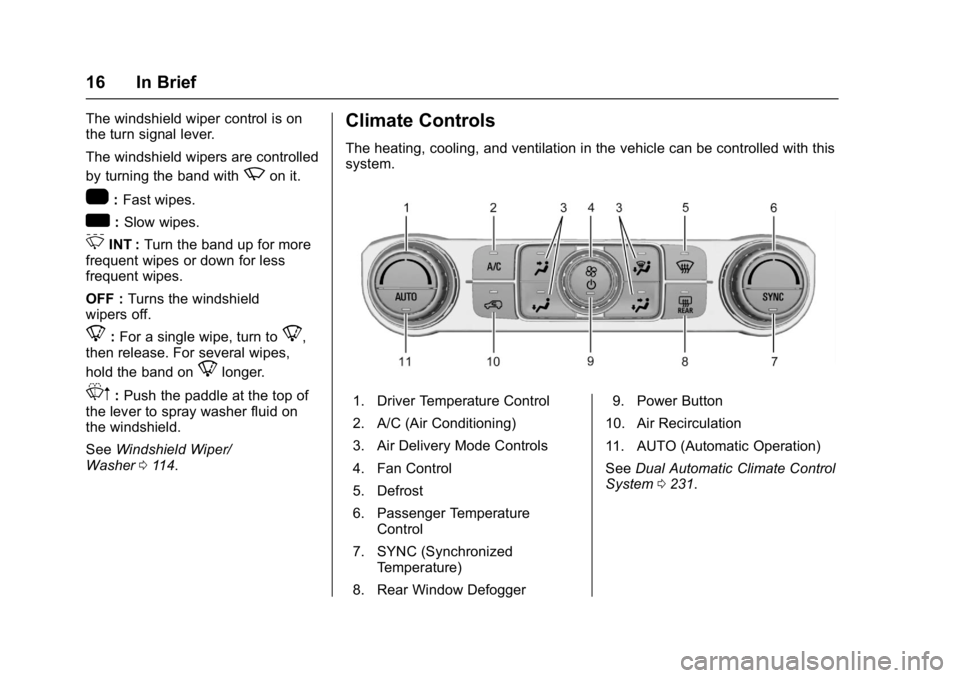
Climate Controls
The heating, cooling, and ventilation in the vehicle can be controlled with this
system.
1. Driver Temperature Control
2. A/C (Air Conditioning)
3. Air Delivery Mode Controls
4. Fan Control
5. Defrost
6. Passenger Temperature
Control
7. SYNC (Synchronized Temperature)
8. Rear Window Defogger 9. Power Button
10. Air Recirculation
11. AUTO (Automatic Operation)
See Dual Automatic Climate Control
System 0231.
Page 24 of 494
GMC Sierra/Sierra Denali Owner Manual (GMNA-Localizing-U.S./Canada/
Mexico-9955992) - 2017 - crc - 5/3/16
In Brief 23
Rear Vision
Camera (RVC)
If equipped, RVC displays a view of
the area behind the vehicle on the
infotainment display when the
vehicle is shifted into R (Reverse) to
aid with parking and low-speed
backing maneuvers.
SeeAssistance Systems for Parking
or Backing 0291.
Parking Assist
If equipped, Rear Parking
Assist (RPA) uses sensors on the
rear bumper to assist with parking
and avoiding objects while in
R (Reverse). It operates at speeds
less than 8 km/h (5 mph). RPA may
display a warning triangle on the
Rear Vision Camera screen and a
graphic on the instrument cluster to
provide the object distance. In
addition, multiple beeps or seat
pulses may occur if very close to an
object.
The vehicle may also have the Front
Parking Assist system. See
Assistance Systems for Parking
or Backing 0291.
Power Outlets
Accessory power outlets can be
used to plug in electrical equipment,
such as a cell phone, MP3
player, etc.
The vehicle may have up to four
accessory power outlets.
Vehicles with a Center Console
.
One or two in front of the
cupholders on the center
console.
. One inside the center console.
. One on the rear of the center
console.
Vehicles with Bench Seats
. One on the center stack below
the climate control system.
. One or two in the storage area
on the bench seat.
Lift the cover to access and replace
when not in use.
See Power Outlets 0117.
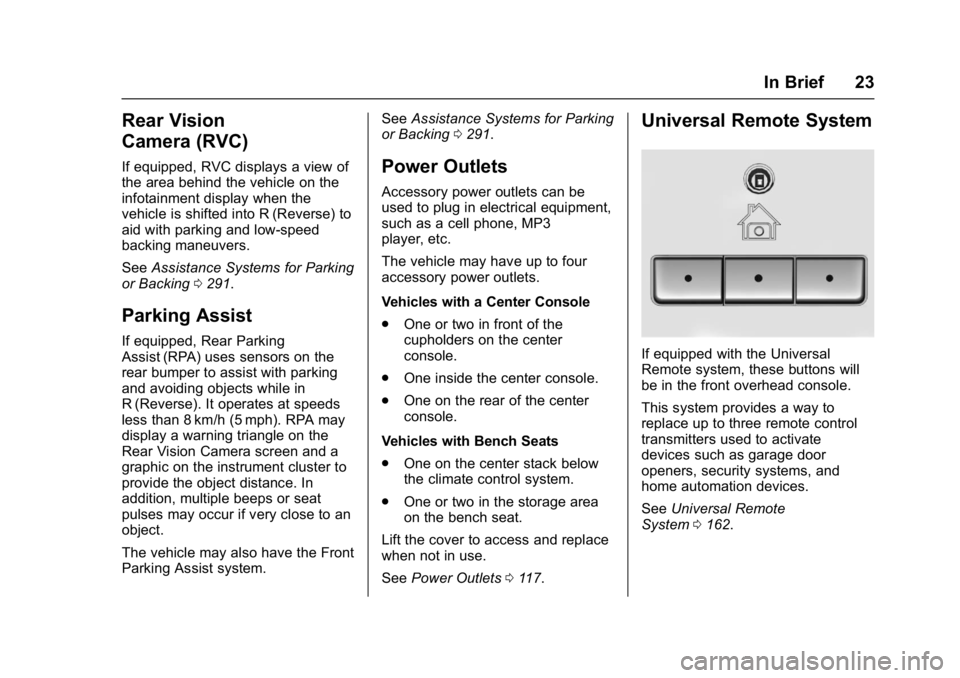
Universal Remote System
If equipped with the Universal
Remote system, these buttons will
be in the front overhead console.
This system provides a way to
replace up to three remote control
transmitters used to activate
devices such as garage door
openers, security systems, and
home automation devices.
See Universal Remote
System 0162.
Page 34 of 494
GMC Sierra/Sierra Denali Owner Manual (GMNA-Localizing-U.S./Canada/
Mexico-9955992) - 2017 - crc - 5/3/16
Keys, Doors, and Windows 33
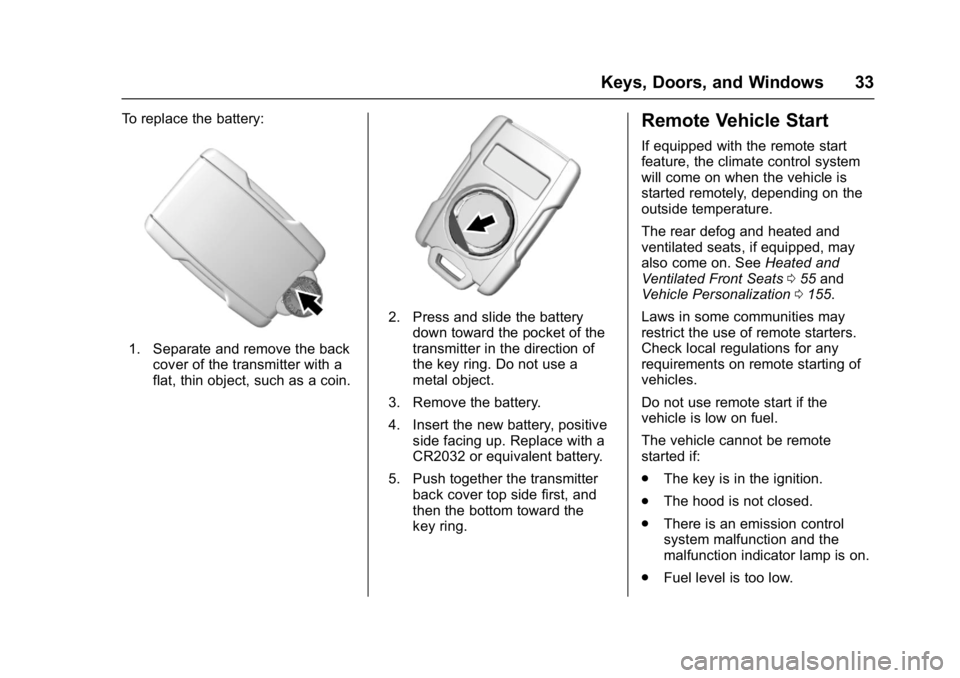
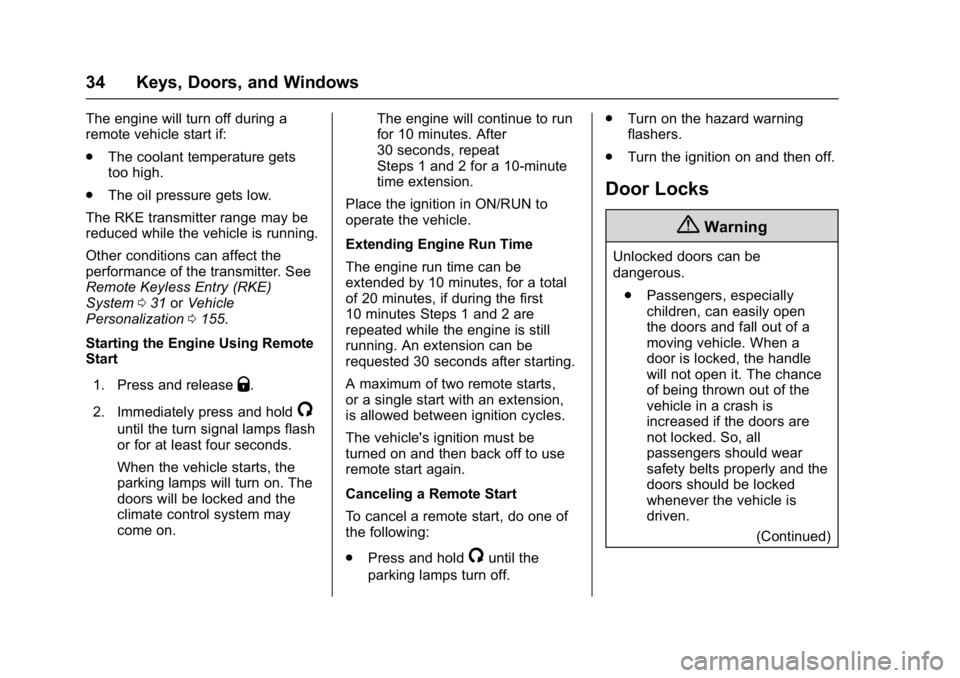
To replace the battery:
1. Separate and remove the backcover of the transmitter with a
flat, thin object, such as a coin.
2. Press and slide the batterydown toward the pocket of the
transmitter in the direction of
the key ring. Do not use a
metal object.
3. Remove the battery.
4. Insert the new battery, positive side facing up. Replace with a
CR2032 or equivalent battery.
5. Push together the transmitter back cover top side first, and
then the bottom toward the
key ring.
Remote Vehicle Start
If equipped with the remote start
feature, the climate control system
will come on when the vehicle is
started remotely, depending on the
outside temperature.
The rear defog and heated and
ventilated seats, if equipped, may
also come on. See Heated and
Ventilated Front Seats 055 and
Vehicle Personalization 0155.
Laws in some communities may
restrict the use of remote starters.
Check local regulations for any
requirements on remote starting of
vehicles.
Do not use remote start if the
vehicle is low on fuel.
The vehicle cannot be remote
started if:
. The key is in the ignition.
. The hood is not closed.
. There is an emission control
system malfunction and the
malfunction indicator lamp is on.
. Fuel level is too low.
Page 35 of 494
GMC Sierra/Sierra Denali Owner Manual (GMNA-Localizing-U.S./Canada/
Mexico-9955992) - 2017 - crc - 5/3/16
34 Keys, Doors, and Windows
The engine will turn off during a
remote vehicle start if:
.The coolant temperature gets
too high.
. The oil pressure gets low.
The RKE transmitter range may be
reduced while the vehicle is running.
Other conditions can affect the
performance of the transmitter. See
Remote Keyless Entry (RKE)
System 031 orVehicle
Personalization 0155.
Starting the Engine Using Remote
Start
1. Press and release
Q.
2. Immediately press and hold
/
until the turn signal lamps flash
or for at least four seconds.
When the vehicle starts, the
parking lamps will turn on. The
doors will be locked and the
climate control system may
come on. The engine will continue to run
for 10 minutes. After
30 seconds, repeat
Steps 1 and 2 for a 10-minute
time extension.
Place the ignition in ON/RUN to
operate the vehicle.
Extending Engine Run Time
The engine run time can be
extended by 10 minutes, for a total
of 20 minutes, if during the first
10 minutes Steps 1 and 2 are
repeated while the engine is still
running. An extension can be
requested 30 seconds after starting.
A maximum of two remote starts,
or a single start with an extension,
is allowed between ignition cycles.
The vehicle's ignition must be
turned on and then back off to use
remote start again.
Canceling a Remote Start
To cancel a remote start, do one of
the following:
. Press and hold
/until the
parking lamps turn off. .
Turn on the hazard warning
flashers.
. Turn the ignition on and then off.
Door Locks
{Warning
Unlocked doors can be
dangerous.
. Passengers, especially
children, can easily open
the doors and fall out of a
moving vehicle. When a
door is locked, the handle
will not open it. The chance
of being thrown out of the
vehicle in a crash is
increased if the doors are
not locked. So, all
passengers should wear
safety belts properly and the
doors should be locked
whenever the vehicle is
driven.
(Continued)
Page 45 of 494
GMC Sierra/Sierra Denali Owner Manual (GMNA-Localizing-U.S./Canada/
Mexico-9955992) - 2017 - crc - 5/3/16
44 Keys, Doors, and Windows
See“Rear Window Defogger” under
Dual Automatic Climate Control
System 0231.
Automatic Dimming
Mirror
If equipped, the driver outside mirror
automatically adjusts for the glare of
the headlamps from behind. This
feature comes on when the vehicle
is started.
Blind Spot Mirrors
If equipped, there is a small convex
mirror built into the upper and outer
corner of the driver outside rearview
mirror. It can show objects that may
be in the vehicle's blind zone.
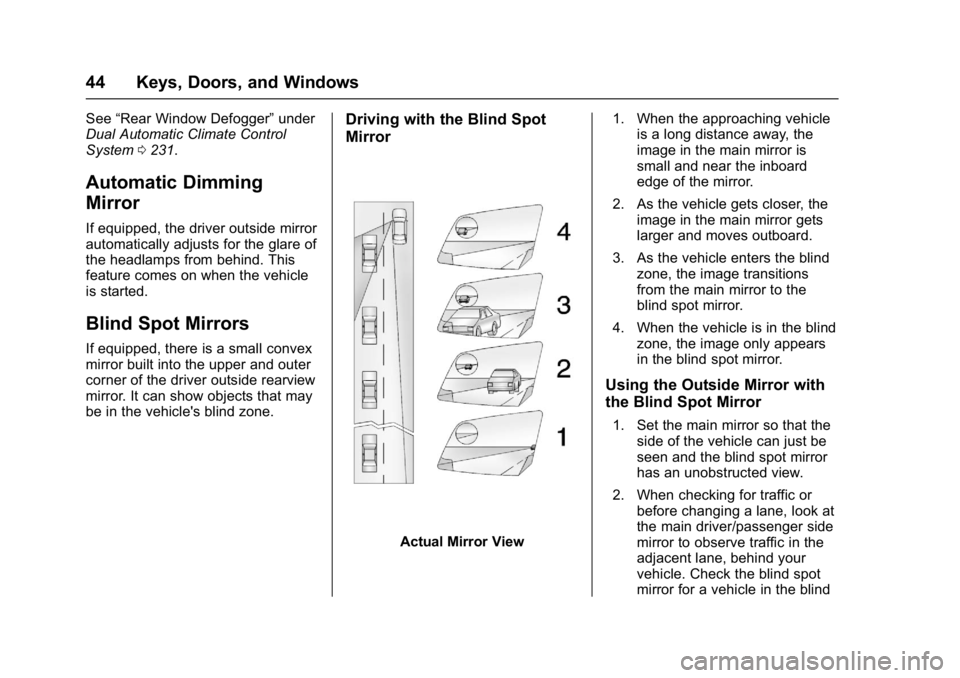
Driving with the Blind Spot
Mirror
Actual Mirror View 1. When the approaching vehicle
is a long distance away, the
image in the main mirror is
small and near the inboard
edge of the mirror.
2. As the vehicle gets closer, the image in the main mirror gets
larger and moves outboard.
3. As the vehicle enters the blind zone, the image transitions
from the main mirror to the
blind spot mirror.
4. When the vehicle is in the blind zone, the image only appears
in the blind spot mirror.
Using the Outside Mirror with
the Blind Spot Mirror
1. Set the main mirror so that theside of the vehicle can just be
seen and the blind spot mirror
has an unobstructed view.
2. When checking for traffic or before changing a lane, look at
the main driver/passenger side
mirror to observe traffic in the
adjacent lane, behind your
vehicle. Check the blind spot
mirror for a vehicle in the blind
Page 118 of 494
GMC Sierra/Sierra Denali Owner Manual (GMNA-Localizing-U.S./Canada/
Mexico-9955992) - 2017 - crc - 5/3/16
Instruments and Controls 117
Power Outlets
Power Outlets 12 Volt Direct
Current
Accessory power outlets can be
used to plug in electrical equipment,
such as a cell phone, MP3
player, etc.
The vehicle may have up to four
accessory power outlets.
Vehicles with a Center Console
.One or two in front of the
cupholders on the center
console.
. One inside the center console.
. One on the rear of the center
console.
Vehicles with Bench Seats
. One on the center stack below
the climate control system.
. One or two in the storage area
on the bench seat.
Lift the cover to access and replace
when not in use. The power outlets on the center
stack and in front of the cupholders
are powered at all times. The power
outlets inside the storage area and
on the rear of the console are
powered when the ignition is in ON/
RUN or ACC/ACCESSORY,
or when RAP is active.
{Warning
Power is always supplied to the
outlets. Do not leave electrical
equipment plugged in when the
vehicle is not in use because the
vehicle could catch fire and cause
injury or death.
Caution
Leaving electrical equipment
plugged in for an extended period
of time while the vehicle is off will
drain the battery. Always unplug
electrical equipment when not in
use and do not plug in equipment
that exceeds the maximum
15 amp rating.Certain power accessory plugs may
not be compatible with the
accessory power outlet and could
overload vehicle or adapter fuses.
If a problem is experienced, see
your dealer.
When adding electrical equipment,
be sure to follow the proper
installation instructions included with
the equipment. See
Add-On
Electrical Equipment 0334.
Caution
Hanging heavy equipment from
the power outlet can cause
damage not covered by the
vehicle warranty. The power
outlets are designed for
accessory power plugs only, such
as cell phone charge cords.
Page 146 of 494
GMC Sierra/Sierra Denali Owner Manual (GMNA-Localizing-U.S./Canada/
Mexico-9955992) - 2017 - crc - 5/3/16
Instruments and Controls 145
Battery Voltage and
Charging Messages
BATTERY LOW START
VEHICLE
When the vehicle’s battery is
severely discharged, this message
will display and four chimes will
sound. Start the vehicle
immediately. If the vehicle is not
started and the battery continues to
discharge, the climate controls,
heated seats, and audio systems
will shut off and the vehicle may
require a jump start. These systems
will function again after the vehicle
is started.
BATTERY SAVER ACTIVE
This message displays when the
battery voltage drops below
expected levels and features are
disabled. Turn off all unnecessary
accessory features.
SERVICE BATTERY
CHARGING SYSTEM
On some vehicles, this message
displays if there is a problem with
the battery charging system. Under
certain conditions, the charging
system light may also turn on in the
instrument cluster. See Charging
System Light 0132. Driving with this
problem could drain the battery.
Turn off all unnecessary
accessories. Have the electrical
system checked as soon as
possible. See your dealer.
TRANSPORT MODE ON
This message is displayed when the
vehicle is in transport mode. Some
features can be disabled while in
this mode, including Remote
Keyless Entry (RKE), remote start,
and the vehicle alarm system. Take
the vehicle to your dealer for service
to turn transport mode off.
Brake System Messages
BRAKE FLUID LOW
This message is displayed when the
brake fluid level is low. See Brake
Fluid 0365.
SERVICE BRAKE ASSIST
This message may be displayed
when there is a problem with the
brake boost assist system. When
this message is displayed, the brake
boost assist motor might be heard
operating and you might notice
pulsation in the brake pedal. This is
normal under these conditions. Take
the vehicle to your dealer for
service.
SERVICE TRAILER BRAKE
SYSTEM
On vehicles with the Integrated
Trailer Brake Control (ITBC) system,
this message displays and a chime
may sound when there is a problem
with the ITBC system.
When this message displays, power
is no longer available to the trailer
brakes.