glove box GMC SIERRA 1500 2017 Owners Manual
[x] Cancel search | Manufacturer: GMC, Model Year: 2017, Model line: SIERRA 1500, Model: GMC SIERRA 1500 2017Pages: 494, PDF Size: 7.66 MB
Page 21 of 494
GMC Sierra/Sierra Denali Owner Manual (GMNA-Localizing-U.S./Canada/
Mexico-9955992) - 2017 - crc - 5/3/16
20 In Brief
SeeSatellite Radio (Base Radio)
0 188 orSatellite Radio (Base
Radio with Touchscreen) 0188.
Portable Audio Devices
This vehicle may have a 3.5 mm
(1/8 in) auxiliary input jack and USB
ports in the center console or
armrest. There may be a USB port
in the upper glove box. External
devices such as iPods
®, laptop
computers, MP3 players, and USB
storage devices may be connected,
depending on the audio system.
See USB Port (Base Radio) 0193
or USB Port (Base Radio with
Touchscreen) 0196 andAuxiliary
Jack 0202.
Bluetooth®
The Bluetooth®system allows users
with a Bluetooth-enabled cell phone
to make and receive hands-free
calls using the vehicle audio system
and controls. The Bluetooth-enabled cell phone
must be paired with the in-vehicle
Bluetooth system before it can be
used in the vehicle. Not all phones
will support all functions.
See
Bluetooth (Voice Recognition -
Base Radio) 0216 orBluetooth
(Infotainment Controls - Base
Radio) 0212 orBluetooth
(Overview) 0210 orBluetooth
(Infotainment Controls - Base Radio
with Touchscreen) 0220.
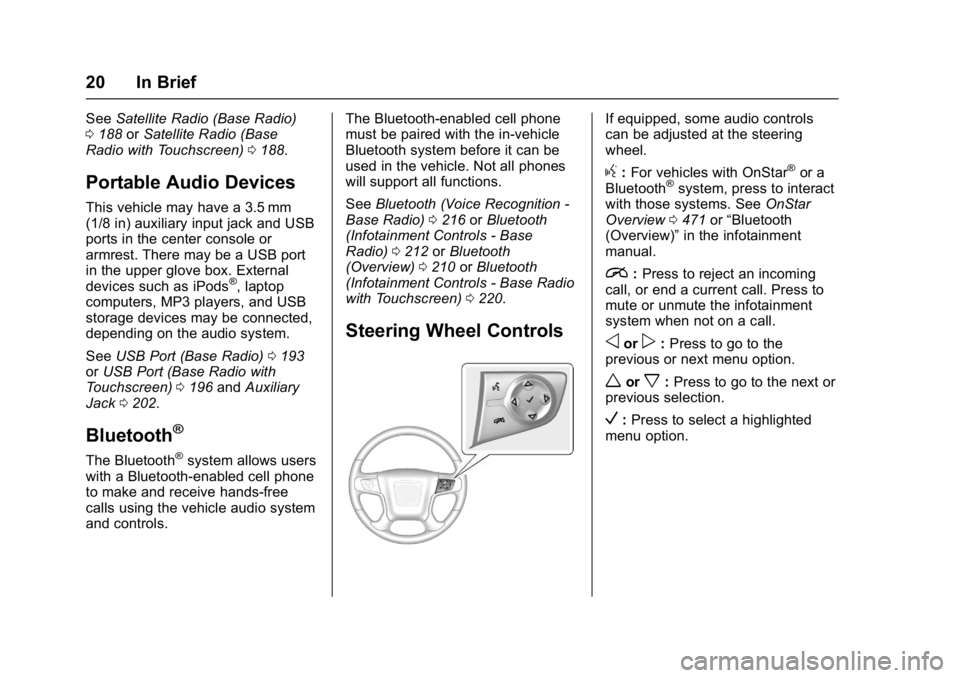
Steering Wheel Controls
If equipped, some audio controls
can be adjusted at the steering
wheel.
g:For vehicles with OnStar®or a
Bluetooth®system, press to interact
with those systems. See OnStar
Overview 0471 or“Bluetooth
(Overview)” in the infotainment
manual.
i: Press to reject an incoming
call, or end a current call. Press to
mute or unmute the infotainment
system when not on a call.
oorp: Press to go to the
previous or next menu option.
worx: Press to go to the next or
previous selection.
V: Press to select a highlighted
menu option.
Page 31 of 494
GMC Sierra/Sierra Denali Owner Manual (GMNA-Localizing-U.S./Canada/
Mexico-9955992) - 2017 - crc - 5/3/16
30 Keys, Doors, and Windows
Interference from radio-frequency
identification (RFID) tags may
prevent the key from starting the
vehicle. Keep RFID tags away from
the key when starting the vehicle.
The key is used for the ignition, all
door locks and glove box,
if equipped.
Programming Keys
Follow these procedures to program
up to eight keys to the vehicle.Programming with Two
Recognized Keys
To program a new key:
1. Insert the original, already programmed key in the ignition
and turn the key to the ON/
RUN position.
2. Turn the key to LOCK/OFF, and remove the key.
3. Quickly, within five seconds, insert the second original
already programmed key in the
ignition and turn the key to the
ON/RUN position.
4. Turn the key to LOCK/OFF, and remove the key.
5. Insert the key to be programmed and turn it to the
ON/RUN position within
five seconds.
6. The security light will turn off once the key has been
programmed.
7. Repeat Steps 1–5 if additional keys are to be programmed.
If a key is lost or damaged, see your
dealer to have a new key made. Programming without
Recognized Keys
Program a new key to the vehicle
when a recognized key is not
available. Canadian regulations
require that owners see their dealer.
If two currently recognized keys are
not available, follow this procedure
to program the first key.
This procedure will take
approximately 30 minutes to
complete for the first key. The
vehicle must be off and all of the
keys you wish to program must be
with you.
1. Insert the new vehicle key into the ignition.
2. Turn to ON/RUN. The security light will come on.
3. Wait 10 minutes until the security light turns off.
4. Turn the ignition to LOCK/OFF.
5. Repeat Steps 2–4 two more times. After the third time, turn
to ON/RUN; the key is learned
Page 109 of 494
GMC Sierra/Sierra Denali Owner Manual (GMNA-Localizing-U.S./Canada/
Mexico-9955992) - 2017 - crc - 5/3/16
108 Storage
Storage
Storage Compartments
Storage Compartments . . . . . . . 108
Instrument Panel Storage . . . . 108
Glove Box . . . . . . . . . . . . . . . . . . . . 108
Cupholders . . . . . . . . . . . . . . . . . . . 108
Sunglasses Storage . . . . . . . . . . 109
Center Console Storage . . . . . . 109
Floor Console Storage . . . . . . . . 110
Additional Storage Features
Cargo Tie-Downs . . . . . . . . . . . . . 110
Storage
Compartments
{Warning
Do not store heavy or sharp
objects in storage compartments.
In a crash, these objects may
cause the cover to open and
could result in injury.
Instrument Panel Storage
Card Holder
If equipped, there is a card holder
on the front instrument panel to the
left of the steering wheel.
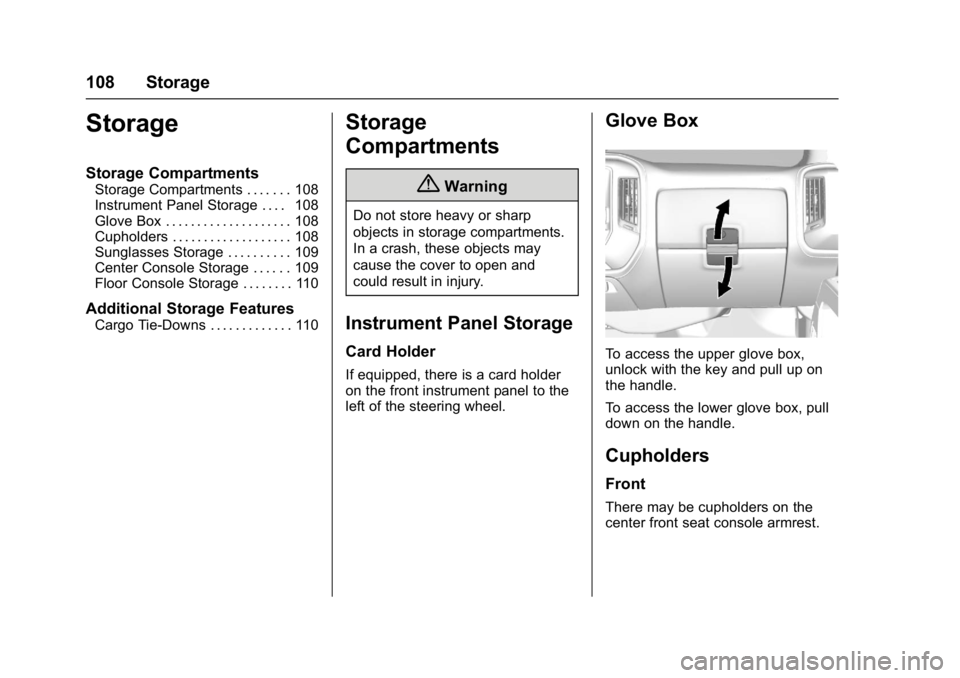
Glove Box
To access the upper glove box,
unlock with the key and pull up on
the handle.
To access the lower glove box, pull
down on the handle.
Cupholders
Front
There may be cupholders on the
center front seat console armrest.
Page 195 of 494
GMC Sierra/Sierra Denali Owner Manual (GMNA-Localizing-U.S./Canada/
Mexico-9955992) - 2017 - crc - 5/3/16
194 Infotainment System
The vehicle may have USB ports in
the front of the center console,
armrest, or one in the upper glove
box. SeeCenter Console Storage
0 109 andGlove Box 0108.
USB MP3 Player and USB Drives
. The USB MP3 players and USB
drives connected must comply
with the USB Mass Storage
Class specification (USB MSC).
. Hard disk drives are not
supported.
. Supported file system is FAT32.
To play a USB device:
. Connect the USB.
. Press MEDIA on the faceplate
until the connected device is
shown.
While the USB source is active,
press the corresponding faceplate
button for the icons on the screen to
operate USB function:
.
t
.u
.j/r
.Z
For information on how to use the
screen icons, see “Playing an
Audio CD.”
USB Menu
Press MENU to display the USB
menu and the following may display:
Browse : Select to display the files
and folders on the USB device.
Tone Settings : Select to adjust
Bass, Midrange, Treble, Balance,
Fade, and EQ (Equalizer). See
“Tone Settings” inAM-FM Radio
(Base Radio with Touchscreen)
0 186 orAM-FM Radio (Base
Radio) 0184.
Auto Volume : If equipped, see
“Auto Volume” inAM-FM Radio
(Base Radio with Touchscreen)
0 186 orAM-FM Radio (Base
Radio) 0184.
EQ (Equalizer) : If equipped, this
feature adjusts the equalizer
settings. See “EQ (Equalizer)
Settings” inAM-FM Radio (Base
Radio with Touchscreen) 0186 or
AM-FM Radio (Base Radio) 0184.
Playing from an iPod®/iPad®/
iPhone®
This feature supports the following
devices:
. iPod nano
®(1st, 2nd, 3rd, and
4th generation)
. iPod with video (5.0 and 5.5
generation)
. iPod classic
®(6th generation)
. iPod touch
®(1st and 2nd
generation)
. iPad
. iPhone 3G, iPhone 3GS,
iPhone 4
There may be problems with
operation and function in the
following situations:
. When connecting a device with
a more recent version of the
firmware installed than is
supported by the infotainment
system.
. When connecting a device on
which firmware from other
providers is installed.
Page 236 of 494
GMC Sierra/Sierra Denali Owner Manual (GMNA-Localizing-U.S./Canada/
Mexico-9955992) - 2017 - crc - 5/3/16
Climate Controls 235
.Keep the path under the front
seats clear of objects to help
circulate the air inside of the
vehicle more effectively.
. Use of non-GM approved hood
deflectors can adversely affect
the performance of the system.
Check with your dealer before
adding equipment to the outside
of the vehicle.Maintenance
Passenger Compartment
Air Filter
The filter reduces the dust, pollen,
and other airborne irritants from
outside air that is pulled into the
vehicle.
The filter should be replaced as part
of routine scheduled maintenance.
See Maintenance Schedule 0438.
To find out what type of filter to use,
see Maintenance Replacement
Parts 0449.
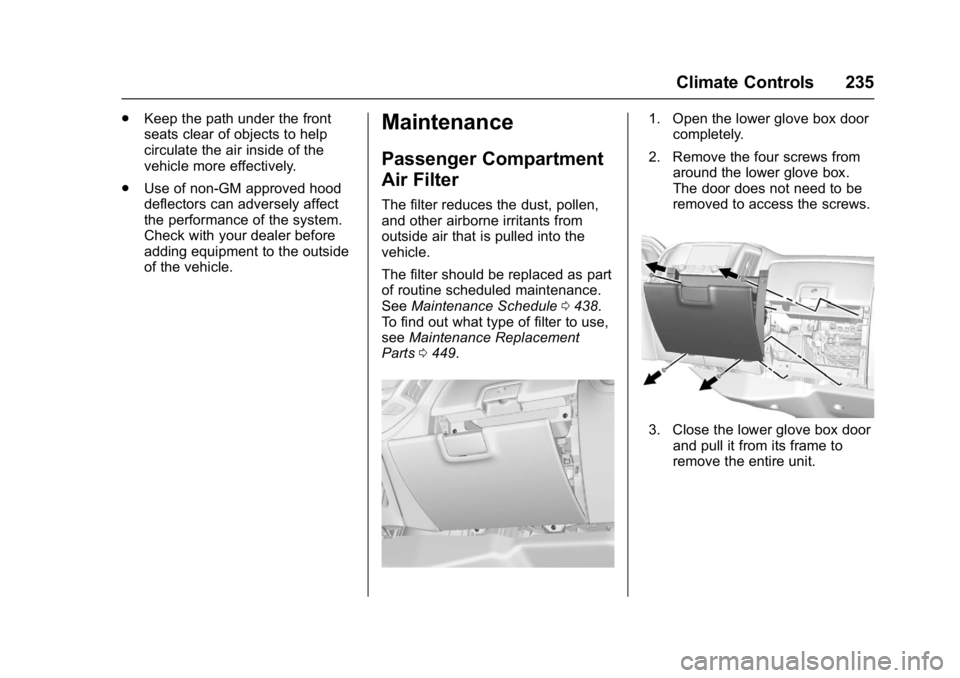
1. Open the lower glove box door
completely.
2. Remove the four screws from around the lower glove box.
The door does not need to be
removed to access the screws.
3. Close the lower glove box doorand pull it from its frame to
remove the entire unit.
Page 237 of 494
GMC Sierra/Sierra Denali Owner Manual (GMNA-Localizing-U.S./Canada/
Mexico-9955992) - 2017 - crc - 5/3/16
236 Climate Controls
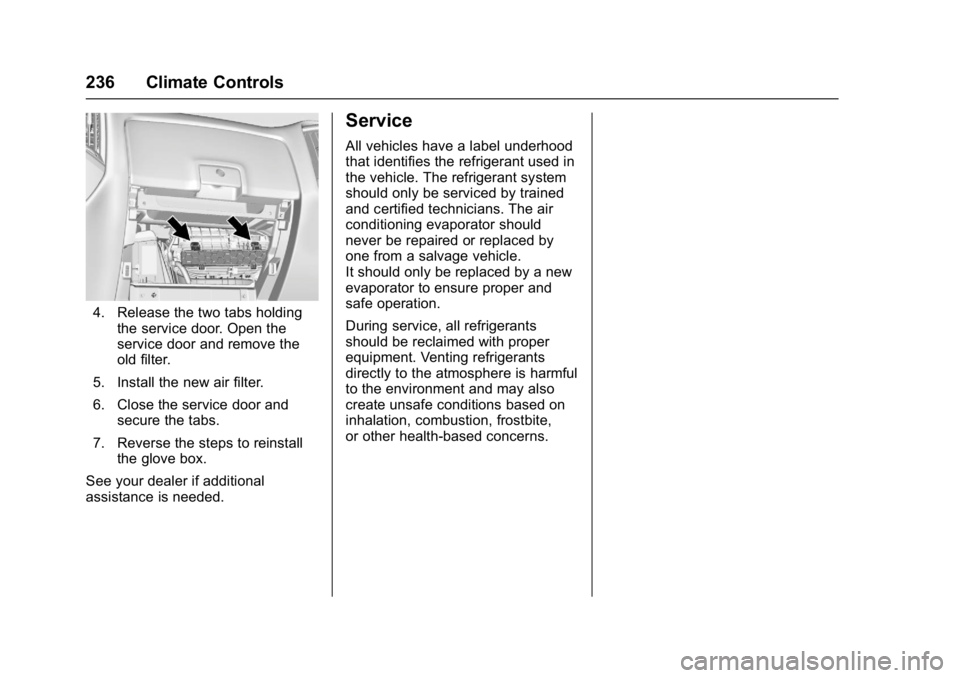
4. Release the two tabs holdingthe service door. Open the
service door and remove the
old filter.
5. Install the new air filter.
6. Close the service door and secure the tabs.
7. Reverse the steps to reinstall the glove box.
See your dealer if additional
assistance is needed.
Service
All vehicles have a label underhood
that identifies the refrigerant used in
the vehicle. The refrigerant system
should only be serviced by trained
and certified technicians. The air
conditioning evaporator should
never be repaired or replaced by
one from a salvage vehicle.
It should only be replaced by a new
evaporator to ensure proper and
safe operation.
During service, all refrigerants
should be reclaimed with proper
equipment. Venting refrigerants
directly to the atmosphere is harmful
to the environment and may also
create unsafe conditions based on
inhalation, combustion, frostbite,
or other health-based concerns.
Page 257 of 494
GMC Sierra/Sierra Denali Owner Manual (GMNA-Localizing-U.S./Canada/
Mexico-9955992) - 2017 - crc - 5/3/16
256 Driving and Operating
equipment. See www.gmupfitter.com
for additional pickup box load
bearing structural information.
Truck-Camper Loading
Information
A vehicle-specific Truck-Camper
Loading Information label is
attached to the inside of the
vehicle's glove box. This label
indicates if a slide-in camper
can be carried, how much of a
load the vehicle can carry, and
how to correctly spread out the
load. It will help to match the
right slide-in camper to the
vehicle.
Your dealer can help make a
good vehicle-camper match and
help determine the Cargo
Weight Rating (CWR).
When installing and loading a
slide-in camper, check the
manufacturer's instructions.When carrying a slide-in
camper, the total cargo load of
the vehicle is the weight of the
camper plus:
.Everything added to the
camper after it left the
factory.
.Everything in the camper.
.All the people inside.
The CWR is the maximum
weight of the load the vehicle
can carry. It does not include the
weight of the people inside. But,
use about 68 kg (150 lb) for
each seat.
The total cargo load must not be
more than the vehicle's CWR.
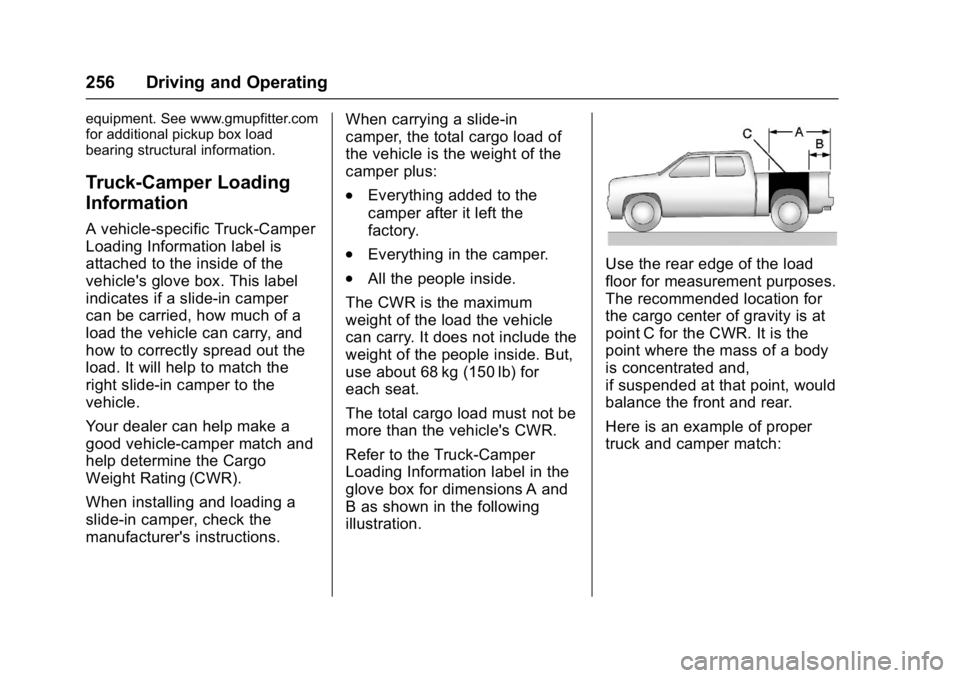
Refer to the Truck-Camper
Loading Information label in the
glove box for dimensions A and
B as shown in the following
illustration.Use the rear edge of the load
floor for measurement purposes.
The recommended location for
the cargo center of gravity is at
point C for the CWR. It is the
point where the mass of a body
is concentrated and,
if suspended at that point, would
balance the front and rear.
Here is an example of proper
truck and camper match:
Page 453 of 494
GMC Sierra/Sierra Denali Owner Manual (GMNA-Localizing-U.S./Canada/
Mexico-9955992) - 2017 - crc - 5/3/16
452 Technical Data
Technical Data
Vehicle Identification
Vehicle IdentificationNumber (VIN) . . . . . . . . . . . . . . . 452
Service Parts Identification Label . . . . . . . . . . . . . . . . . . . . . . . . 452
Vehicle Data
Capacities andSpecifications . . . . . . . . . . . . . . . 453
Engine Drive Belt Routing . . . . 456
Vehicle Identification
Vehicle Identification
Number (VIN)
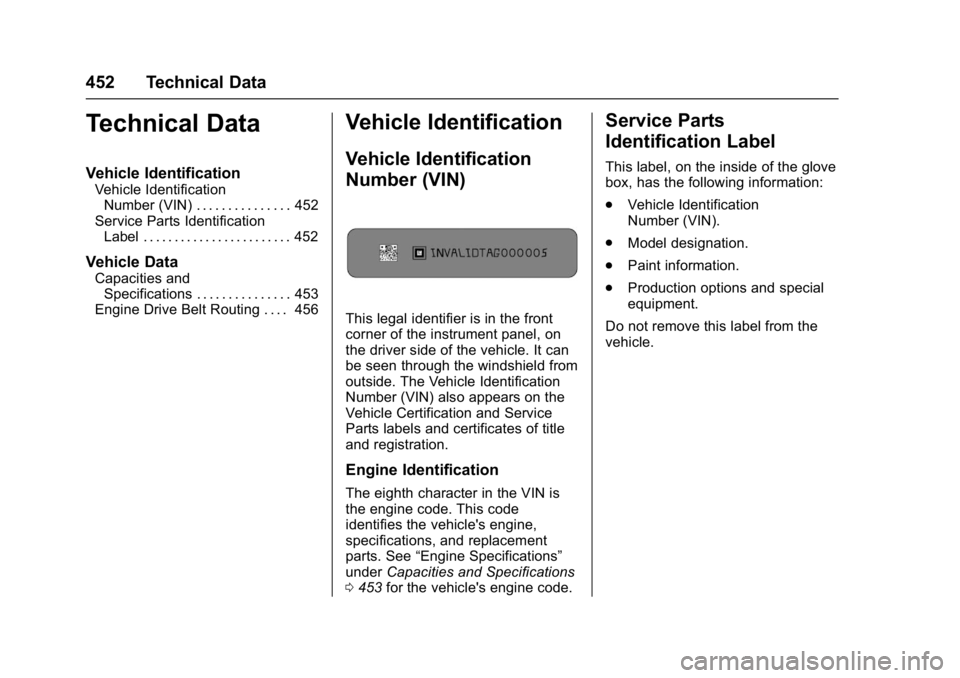
This legal identifier is in the front
corner of the instrument panel, on
the driver side of the vehicle. It can
be seen through the windshield from
outside. The Vehicle Identification
Number (VIN) also appears on the
Vehicle Certification and Service
Parts labels and certificates of title
and registration.
Engine Identification
The eighth character in the VIN is
the engine code. This code
identifies the vehicle's engine,
specifications, and replacement
parts. See “Engine Specifications”
under Capacities and Specifications
0 453 for the vehicle's engine code.
Service Parts
Identification Label
This label, on the inside of the glove
box, has the following information:
.
Vehicle Identification
Number (VIN).
. Model designation.
. Paint information.
. Production options and special
equipment.
Do not remove this label from the
vehicle.
Page 487 of 494

GMC Sierra/Sierra Denali Owner Manual (GMNA-Localizing-U.S./Canada/
Mexico-9955992) - 2017 - crc - 5/3/16
486 Index
General Information (cont'd)Towing . . . . . . . . . . . . . . . . . . . . . . . . 304
Vehicle Care . . . . . . . . . . . . . . . . . . 340
Glass Replacement . . . . . . . . . . . . . 372
Glove Box . . . . . . . . . . . . . . . . . . . . . . 108
GM Mobility Reimbursement
Program . . . . . . . . . . . . . . . . . . . . . . . 461
H
Halogen Bulbs . . . . . . . . . . . . . . . . . . 373
Hazard Warning Flashers . . . . . . . 170
Head Restraints . . . . . . . . . . . . . . . . . 51
HeadlampsAiming . . . . . . . . . . . . . . . . . . . . . . . . 373
Automatic . . . . . . . . . . . . . . . . . . . . . 169
Bulb Replacement . . . . . . . . . . . . 373
Daytime Running
Lamps (DRL) . . . . . . . . . . . . . . . . 169
Flash-to-Pass . . . . . . . . . . . . . . . . . 169
High Intensity Discharge
(HID) Lighting . . . . . . . . . . . . . . . 373
High-Beam On Light . . . . . . . . . . 140
High/Low Beam Changer . . . . . 168
Lamps On Reminder . . . . . . . . . 140
Heated Steering Wheel . . . . . . . . . . . . . . . .114
Heated and Ventilated Front Seats . . . . . . . . . . . . . . . . . . . . . . . . . . 55
Heated Mirrors . . . . . . . . . . . . . . . . . . . 43 Heater
Engine Coolant . . . . . . . . . . . . . . . 262
High Voltage Devices and Wiring . . . . . . . . . . . . . . . . . . . . . . . . . 376
High-Beam On Light . . . . . . . . . . . . 140
High-Speed Operation . . . . . . . . . . 393
Hill and Mountain Roads . . . . . . . . 247
Hill Descent Control (HDC) . . . . . 286
Hill Descent Control Light . . . . . . . 136
Hill Start Assist (HSA) . . . . . . . . . . 283
Home Page . . . . . . . . . . . . . . . . 181, 183
Hood . . . . . . . . . . . . . . . . . . . . . . . . . . . 342
Horn . . . . . . . . . . . . . . . . . . . . . . . . . . . . 114
How to Wear Safety Belts Properly . . . . . . . . . . . . . . . . . . . . . . . . 60
I
Idle SystemFast . . . . . . . . . . . . . . . . . . . . . . . . . . 261
Ignition Positions . . . . . . . . . . . . . . . 259
Ignition Transmission Lock Check . . . . . . . . . . . . . . . . . . . . . . . . . 371
Immobilizer . . . . . . . . . . . . . . . . . . . . . . 40
Indicator Vehicle Ahead . . . . . . . . . . . . . . . . 137
Infants and Young Children,
Restraints . . . . . . . . . . . . . . . . . . . . . . 83
Infotainment . . . . . . . . . . . . . . . . . . . . 176
Infotainment System . . . . . . . . . . . . 470 Instrument Cluster . . . . . . . . . . . . . . 121
Instrument Panel
Storage Area . . . . . . . . . . . . . . . . . 108
Interior Rearview Mirrors . . . . . . . . . 45
Introduction . . . . . . . . . . . . . . . . . . . . . . . 2
J
Jack Auxiliary . . . . . . . . . . . . . . . . . . . . . . 202
Jump Starting - North America . . . . . . . . . . . . . . . . . . . . . . . 418
K
Key and Lock Messages . . . . . . . . 148
Keyless EntryRemote (RKE) System . . . . . . . . . 31
Keys . . . . . . . . . . . . . . . . . . . . . . . . . . . . . 28
L
Labeling, Tire Sidewall . . . . . . . . . . 385
Lamps
Auxiliary RoofMounted Lamp . . . . . . . . . . . . . . 171
Cargo . . . . . . . . . . . . . . . . . . . . . . . . . 172
Daytime Running (DRL) . . . . . . 169
Dome . . . . . . . . . . . . . . . . . . . . . . . . . 173
Exterior Controls . . . . . . . . . . . . . . 166
Exterior Lamps Off Reminder . . . . . . . . . . . . . . . . . . . 168
Malfunction Indicator . . . . . . . . . 133
Page 492 of 494

GMC Sierra/Sierra Denali Owner Manual (GMNA-Localizing-U.S./Canada/
Mexico-9955992) - 2017 - crc - 5/3/16
Index 491
Shift Lock Control FunctionCheck, Automatic
Transmission . . . . . . . . . . . . . . . . . . 371
Shifting Into Park . . . . . . . . . . . . . . . . . . . . . . 264
Out of Park . . . . . . . . . . . . . . . . . . . 265
Signals, Turn and
Lane-Change . . . . . . . . . . . . . . . . . 170
Snow Plow . . . . . . . . . . . . . . . . . . . . . 334
Software Updates . . . . . . . . . . . . . . 184
Special Application Services . . . . 444
Specifications and Capacities . . . . . . . . . . . . . . . . . . . . . 453
Speedometer . . . . . . . . . . . . . . . . . . . 125
StabiliTrak OFF Light . . . . . . . . . . . . . . . . . . . . . 137
Start Assist, Hill . . . . . . . . . . . . . . . . . 283
Start Vehicle, Remote . . . . . . . . . . . 33
Starter Switch Check . . . . . . . . . . . 371
Starting the Engine . . . . . . . . . . . . . 260
Steering . . . . . . . . . . . . . . . . . . . . . . . . 240 Fluid, Power . . . . . . . . . . . . . . . . . . 363
Heated Wheel . . . . . . . . . . . . . . . . .114
Wheel Adjustment . . . . . . . . . . . . .113
Wheel Controls . . . . . . . . . . . . . . . .113
Steering System Messages . . . . . 151
Steps Power Assist . . . . . . . . . . . . . . . . . . . 37 Stoplamps and Back-up Lamps
Bulb Replacement . . . . . . . . . . . . 374
Storage Areas Center Console . . . . . . . . . . . . . . . 109
Floor Console . . . . . . . . . . . . . . . . .110
Glove Box . . . . . . . . . . . . . . . . . . . . 108
Instrument Panel . . . . . . . . . . . . . 108
Sunglasses . . . . . . . . . . . . . . . . . . . 109
Storage Compartments . . . . . . . . . 108
Stuck Vehicle . . . . . . . . . . . . . . . . . . . 249
Sun Visors . . . . . . . . . . . . . . . . . . . . . . . 48
Sunglass Storage . . . . . . . . . . . . . . . 109
Sunroof . . . . . . . . . . . . . . . . . . . . . . . . . . 48
Switches Airbag On-Off . . . . . . . . . . . . . . . . . . . 73
Symbols . . . . . . . . . . . . . . . . . . . . . . . . . . 3
System
Forward CollisionAlert (FCA) . . . . . . . . . . . . . . . . . . 293
Infotainment . . . . . . . . . . . . . 176, 470
Noise Control . . . . . . . . . . . . . . . . . 370
Systems Driver Assistance . . . . . . . . . . . . . 290
T
Tachometer . . . . . . . . . . . . . . . . . . . . . 125
Tailgate . . . . . . . . . . . . . . . . . . . . . . . . . . 36 Taillamps
Bulb Replacement . . . . . . . . . . . . 374
Text Telephone (TTY) Users . . . . 460
Theft-Deterrent Systems . . . . . . . . . 40 Immobilizer . . . . . . . . . . . . . . . . . . . . . 40
Throttle, Adjustable . . . . . . . . . . . . . 258
Time . . . . . . . . . . . . . . . . . . . . . . . . . . . . 115
Tires . . . . . . . . . . . . . . . . . . . . . . . . . . . . 383 All-Season . . . . . . . . . . . . . . . . . . . . 384
All-Terrain . . . . . . . . . . . . . . . . . . . . 385
Buying New Tires . . . . . . . . . . . . . 401
Chains . . . . . . . . . . . . . . . . . . . . . . . . 405
Changing . . . . . . . . . . . . . . . . . . . . . 408
Designations . . . . . . . . . . . . . . . . . 388
Different Size . . . . . . . . . . . . . . . . . 402
Full-Size Spare . . . . . . . . . . . . . . . 417
If a Tire Goes Flat . . . . . . . . . . . . 406
Inspection . . . . . . . . . . . . . . . . . . . . 397
Low Profile . . . . . . . . . . . . . . . . . . . 385
Messages . . . . . . . . . . . . . . . . . . . . 151
Pressure . . . . . . . . . . . . . . . . . . . . . . 393
Pressure Light . . . . . . . . . . . . . . . . 138
Pressure Monitor Operation . . 394
Pressure Monitor System . . . . . 393
Rotation . . . . . . . . . . . . . . . . . . . . . . 398
Sidewall Labeling . . . . . . . . . . . . . 385
Terminology and Definitions . . 389