infotainment GMC SIERRA 1500 2017 Owners Manual
[x] Cancel search | Manufacturer: GMC, Model Year: 2017, Model line: SIERRA 1500, Model: GMC SIERRA 1500 2017Pages: 494, PDF Size: 7.66 MB
Page 2 of 494
GMC Sierra/Sierra Denali Owner Manual (GMNA-Localizing-U.S./Canada/
Mexico-9955992) - 2017 - crc - 5/3/16
ContentsIntroduction . . . . . . . . . . . . . . . . . . . . . . 2
In Brief . . . . . . . . . . . . . . . . . . . . . . . . . . . 5
Keys, Doors, and Windows . . . . . 28
Seats and Restraints . . . . . . . . . . . 50
Storage . . . . . . . . . . . . . . . . . . . . . . . 108
Instruments and Controls . . . . . . 112
Lighting . . . . . . . . . . . . . . . . . . . . . . . 166
Infotainment System . . . . . . . . . . 176
Climate Controls . . . . . . . . . . . . . . 231
Driving and Operating . . . . . . . . . 237
Vehicle Care . . . . . . . . . . . . . . . . . . 339
Service and Maintenance . . . . . 437
Technical Data . . . . . . . . . . . . . . . . 452
Customer Information . . . . . . . . . 457
Reporting Safety Defects . . . . . . 468
OnStar . . . . . . . . . . . . . . . . . . . . . . . . 471
Index . . . . . . . . . . . . . . . . . . . . 481
Page 6 of 494
GMC Sierra/Sierra Denali Owner Manual (GMNA-Localizing-U.S./Canada/
Mexico-9955992) - 2017 - crc - 5/3/16
In Brief 5
In Brief
Instrument Panel
Instrument Panel . . . . . . . . . . . . . . . . 6
Initial Drive Information
Initial Drive Information . . . . . . . . . . 8
Remote Keyless Entry (RKE)System . . . . . . . . . . . . . . . . . . . . . . . . 8
Remote Vehicle Start . . . . . . . . . . . 9
Door Locks . . . . . . . . . . . . . . . . . . . . . 9
Windows . . . . . . . . . . . . . . . . . . . . . . . . 9
Seat Adjustment . . . . . . . . . . . . . . . 10
Memory Features . . . . . . . . . . . . . . 11
Heated and Ventilated Seats . . . 11
Head Restraint Adjustment . . . . 12
Safety Belts . . . . . . . . . . . . . . . . . . . . 12
Passenger Sensing System . . . 12
Mirror Adjustment . . . . . . . . . . . . . . 13
Interior Lighting . . . . . . . . . . . . . . . . 14
Exterior Lighting . . . . . . . . . . . . . . . 15
Windshield Wiper/Washer . . . . . . 15
Climate Controls . . . . . . . . . . . . . . . 16
Transmission . . . . . . . . . . . . . . . . . . 17
Four-Wheel Drive . . . . . . . . . . . . . . 17
Vehicle Features
Infotainment System . . . . . . . . . . . 19
Radio(s) . . . . . . . . . . . . . . . . . . . . . . . 19
Satellite Radio . . . . . . . . . . . . . . . . . 19 Portable Audio Devices . . . . . . . . 20
Bluetooth
®. . . . . . . . . . . . . . . . . . . . . 20
Steering Wheel Controls . . . . . . . 20
Cruise Control . . . . . . . . . . . . . . . . . 21
Driver Information Center (DIC) . . . . . . . . . . . . . . . . . 21
Forward Collision Alert (FCA) System . . . . . . . . . . . . . . . . . . . . . . . 22
Forward Automatic Braking (FAB) . . . . . . . . . . . . . . . . 22
Lane Departure Warning (LDW) . . . . . . . . . . . . . . . 22
Lane Keep Assist (LKA) . . . . . . . 22
Rear Vision Camera (RVC) . . . . 23
Parking Assist . . . . . . . . . . . . . . . . . 23
Power Outlets . . . . . . . . . . . . . . . . . 23
Universal Remote System . . . . . 23
Sunroof . . . . . . . . . . . . . . . . . . . . . . . . 24
Performance and Maintenance
Traction Control/Electronic Stability Control . . . . . . . . . . . . . . 24
Tire Pressure Monitor . . . . . . . . . . 25
Fuel (Except L86 6.2L Engine) . . . . . . . . . . . . . . . . . . . . . . . 25
Fuel (L86 6.2L Engine) . . . . . . . . 25
E85 or FlexFuel . . . . . . . . . . . . . . . . 26
Engine Oil Life System . . . . . . . . 26
Driving for Better Fuel Economy . . . . . . . . . . . . . . . . . . . . . 26 Roadside Assistance
Program . . . . . . . . . . . . . . . . . . . . . . 27
Page 8 of 494

GMC Sierra/Sierra Denali Owner Manual (GMNA-Localizing-U.S./Canada/
Mexico-9955992) - 2017 - crc - 5/3/16
In Brief 7
1.Instrument Panel Illumination
Control 0172.
2. Integrated Trailer Brake Control (ITBC) System (If Equipped).
See Towing Equipment 0324.
3. Exterior Lamp Controls 0166.
Fog Lamps 0171 (If
Equipped).
4. Air Vents 0234.
5. Turn Signal Lever. See Turn
and Lane-Change
Signals 0170.
Windshield Wiper/
Washer 0114.
6. Favorite Switches (Out of View). See Steering Wheel
Controls 0113.
Volume Switches (Out of View).
See Steering Wheel
Controls 0113.
7. Instrument Cluster 0121.
8. Hazard Warning
Flashers 0170
9. Shift Lever. See Automatic
Transmission 0267. Tow/Haul Selector Button (If
Equipped). See
Tow/Haul
Mode 0273.
Range Selection Mode (If
Equipped). See Manual
Mode 0270.
10. Light Sensor. See Automatic
Headlamp System 0169.
11. Infotainment 0176.
12. Heated and Ventilated Front
Seats 055 (If Equipped).
13. Power Outlet (Alternating Current) (If Equipped). See
Power Outlets 0117.
14. Power Outlets 0117.
15. USB Port. See Infotainment 0176.
16.
gTraction Control/Electronic
Stability Control 0284.
0Pedal Adjust Switch (If
Equipped). See Adjustable
Throttle and Brake
Pedal 0258.
{Cargo Lamp 0172.
XParking Assist Button (If
Equipped). See Assistance
Systems for Parking or
Backing 0291.
ALane Keep Assist (LKA)
(1500 Series) 0298 (If
Equipped).
@Lane Departure Warning
(LDW) (2500/3500 Series)
0 296 (If Equipped).
5Hill Descent Control Switch
(If Equipped). See Hill Descent
Control (HDC) 0286.
qExhaust Brake (If
Equipped). See “Exhaust
Brake” in the Duramax diesel
supplement.
Auxiliary Button (If Equipped).
See Add-On Electrical
Equipment 0334.
17. Dual Automatic Climate Control
System 0231.
18. Steering Wheel Controls 0113
(If Equipped).
Page 20 of 494
GMC Sierra/Sierra Denali Owner Manual (GMNA-Localizing-U.S./Canada/
Mexico-9955992) - 2017 - crc - 5/3/16
In Brief 19
Vehicle Features
Infotainment System
The base radio and base radio with
touchscreen information is included
in this manual. See the infotainment
manual for information on the
uplevel radios, audio players,
phone, navigation system, Rear
Seat Entertainment (RSE), and
voice or speech recognition,
if equipped.
Radio(s)
Base Radio
O:Press to turn the system on.
Press and hold to turn it off. When
on, press to mute; press again to
unmute. Turn to increase or
decrease the volume.
RADIO : Press to choose between
FM, AM, and SiriusXM
®,
if equipped.
MEDIA : Press to change the audio
source between CD, USB, AUX,
and Bluetooth
®Audio, if equipped.
{: Press to go to the Home Page. MENU :
Press to select a menu.
g:Press to seek the previous
station or track.
l: Press to seek the next station
or track.
See “Base Radio” inOverview
(Base Radio with Touchscreen)
0 178 orOverview (Base
Radio) 0179.
Base Radio with Touchscreen
O:Press to turn the system on.
Press and hold to turn it off. When
on, press to mute; press again to
unmute. Turn to increase or
decrease the volume.
{: Press to go to the Home Page.
7:Press to seek the previous
station or track.
6: Press to seek the next station
or track.
See “Base Radio with Touchscreen”
in Overview (Base Radio with
Touchscreen) 0178 orOverview
(Base Radio) 0179.
Setting the Clock
See Clock 0115.
Satellite Radio
Vehicles with a SiriusXM®satellite
radio tuner and a valid SiriusXM
satellite radio subscription can
receive SiriusXM programming.
SiriusXM Satellite Radio
Service
SiriusXM is a satellite radio service
based in the 48 contiguous United
States and 10 Canadian provinces.
SiriusXM satellite radio has a wide
variety of programming and
commercial-free music, coast to
coast, and in digital-quality sound.
A fee is required to receive the
SiriusXM service.
For more information refer to:
. www.siriusxm.com or call
1-888-601-6296 (U.S.).
. www.siriusxm.ca or call
1-877-438-9677 (Canada).
Page 21 of 494
GMC Sierra/Sierra Denali Owner Manual (GMNA-Localizing-U.S./Canada/
Mexico-9955992) - 2017 - crc - 5/3/16
20 In Brief
SeeSatellite Radio (Base Radio)
0 188 orSatellite Radio (Base
Radio with Touchscreen) 0188.
Portable Audio Devices
This vehicle may have a 3.5 mm
(1/8 in) auxiliary input jack and USB
ports in the center console or
armrest. There may be a USB port
in the upper glove box. External
devices such as iPods
®, laptop
computers, MP3 players, and USB
storage devices may be connected,
depending on the audio system.
See USB Port (Base Radio) 0193
or USB Port (Base Radio with
Touchscreen) 0196 andAuxiliary
Jack 0202.
Bluetooth®
The Bluetooth®system allows users
with a Bluetooth-enabled cell phone
to make and receive hands-free
calls using the vehicle audio system
and controls. The Bluetooth-enabled cell phone
must be paired with the in-vehicle
Bluetooth system before it can be
used in the vehicle. Not all phones
will support all functions.
See
Bluetooth (Voice Recognition -
Base Radio) 0216 orBluetooth
(Infotainment Controls - Base
Radio) 0212 orBluetooth
(Overview) 0210 orBluetooth
(Infotainment Controls - Base Radio
with Touchscreen) 0220.
Steering Wheel Controls
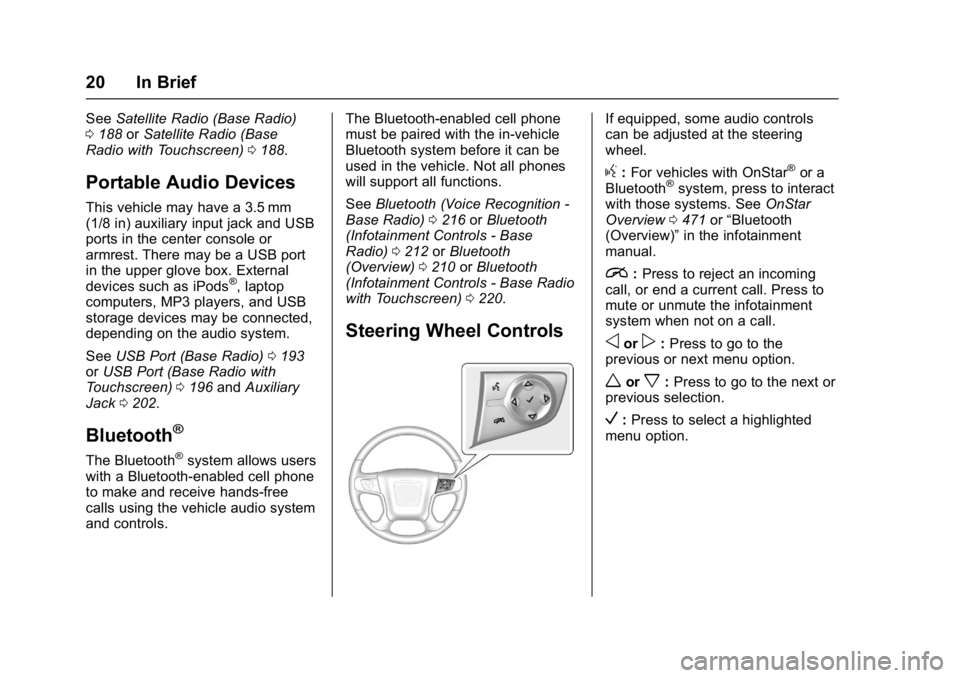
If equipped, some audio controls
can be adjusted at the steering
wheel.
g:For vehicles with OnStar®or a
Bluetooth®system, press to interact
with those systems. See OnStar
Overview 0471 or“Bluetooth
(Overview)” in the infotainment
manual.
i: Press to reject an incoming
call, or end a current call. Press to
mute or unmute the infotainment
system when not on a call.
oorp: Press to go to the
previous or next menu option.
worx: Press to go to the next or
previous selection.
V: Press to select a highlighted
menu option.
Page 24 of 494
GMC Sierra/Sierra Denali Owner Manual (GMNA-Localizing-U.S./Canada/
Mexico-9955992) - 2017 - crc - 5/3/16
In Brief 23
Rear Vision
Camera (RVC)
If equipped, RVC displays a view of
the area behind the vehicle on the
infotainment display when the
vehicle is shifted into R (Reverse) to
aid with parking and low-speed
backing maneuvers.
SeeAssistance Systems for Parking
or Backing 0291.
Parking Assist
If equipped, Rear Parking
Assist (RPA) uses sensors on the
rear bumper to assist with parking
and avoiding objects while in
R (Reverse). It operates at speeds
less than 8 km/h (5 mph). RPA may
display a warning triangle on the
Rear Vision Camera screen and a
graphic on the instrument cluster to
provide the object distance. In
addition, multiple beeps or seat
pulses may occur if very close to an
object.
The vehicle may also have the Front
Parking Assist system. See
Assistance Systems for Parking
or Backing 0291.
Power Outlets
Accessory power outlets can be
used to plug in electrical equipment,
such as a cell phone, MP3
player, etc.
The vehicle may have up to four
accessory power outlets.
Vehicles with a Center Console
.
One or two in front of the
cupholders on the center
console.
. One inside the center console.
. One on the rear of the center
console.
Vehicles with Bench Seats
. One on the center stack below
the climate control system.
. One or two in the storage area
on the bench seat.
Lift the cover to access and replace
when not in use.
See Power Outlets 0117.
Universal Remote System
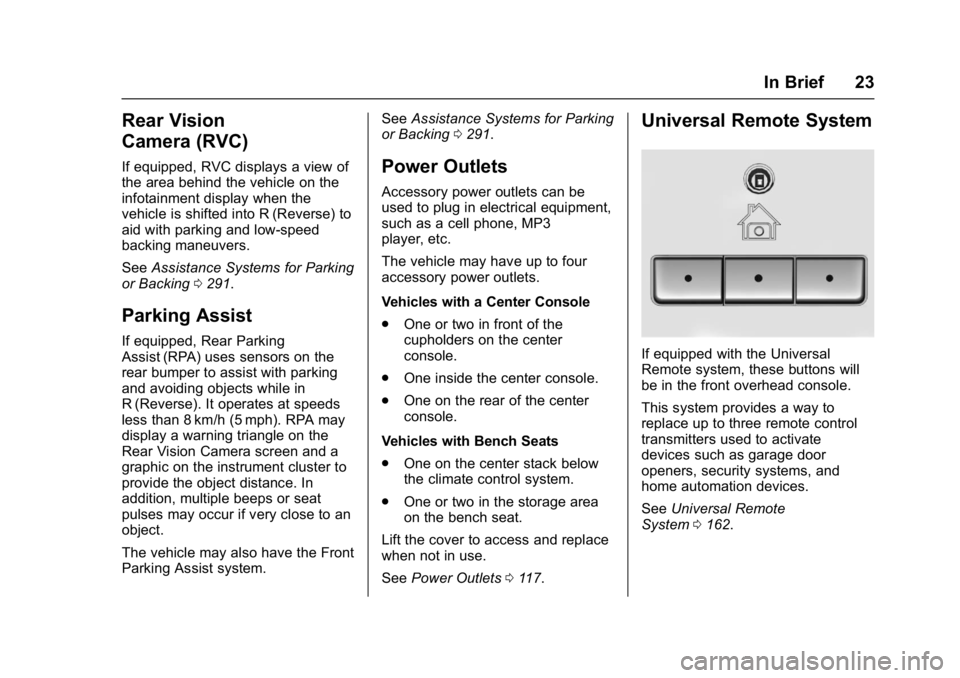
If equipped with the Universal
Remote system, these buttons will
be in the front overhead console.
This system provides a way to
replace up to three remote control
transmitters used to activate
devices such as garage door
openers, security systems, and
home automation devices.
See Universal Remote
System 0162.
Page 110 of 494

GMC Sierra/Sierra Denali Owner Manual (GMNA-Localizing-U.S./Canada/
Mexico-9955992) - 2017 - crc - 5/3/16
Storage 109
Rear
If equipped, pull the rear seat
armrest down to access the
cupholders.
Sunglasses Storage
If equipped, sunglasses storage is
on the overhead console. Press the
fixed button on the cover and
release to access.
Center Console Storage
Press the latch and lift to open.
Depending on the options there may
be a tote compartment, accessory
power outlet, auxiliary jack, and
USB port(s) inside. There are
openings for power cords on the
edge of the storage area.
SeePower Outlets 0117 and the
infotainment manual.
Page 114 of 494
GMC Sierra/Sierra Denali Owner Manual (GMNA-Localizing-U.S./Canada/
Mexico-9955992) - 2017 - crc - 5/3/16
Instruments and Controls 113
Airbag System Messages . . . . 150
Safety Belt Messages . . . . . . . . 150
Security Messages . . . . . . . . . . . 150
Steering SystemMessages . . . . . . . . . . . . . . . . . . . 151
Tire Messages . . . . . . . . . . . . . . . . 151
Transmission Messages . . . . . . 152
Vehicle Reminder Messages . . . . . . . . . . . . . . . . . . . 153
Vehicle Speed Messages . . . . . 154
Washer Fluid Messages . . . . . . 154
Vehicle Personalization
Vehicle Personalization . . . . . . . 155
Universal Remote System
Universal Remote System . . . . 162
Universal Remote System Programming . . . . . . . . . . . . . . . 162
Universal Remote System Operation . . . . . . . . . . . . . . . . . . . 164
Controls
Steering Wheel
Adjustment
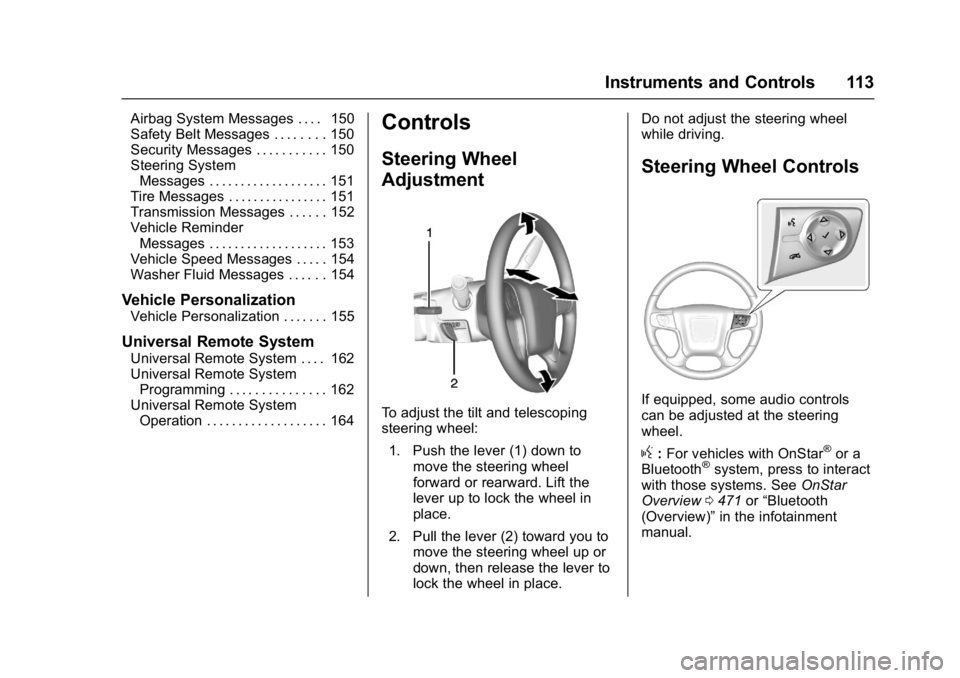
To adjust the tilt and telescoping
steering wheel:
1. Push the lever (1) down to move the steering wheel
forward or rearward. Lift the
lever up to lock the wheel in
place.
2. Pull the lever (2) toward you to move the steering wheel up or
down, then release the lever to
lock the wheel in place. Do not adjust the steering wheel
while driving.
Steering Wheel Controls
If equipped, some audio controls
can be adjusted at the steering
wheel.
g:
For vehicles with OnStar®or a
Bluetooth®system, press to interact
with those systems. See OnStar
Overview 0471 or“Bluetooth
(Overview)” in the infotainment
manual.
Page 115 of 494
GMC Sierra/Sierra Denali Owner Manual (GMNA-Localizing-U.S./Canada/
Mexico-9955992) - 2017 - crc - 5/3/16
114 Instruments and Controls
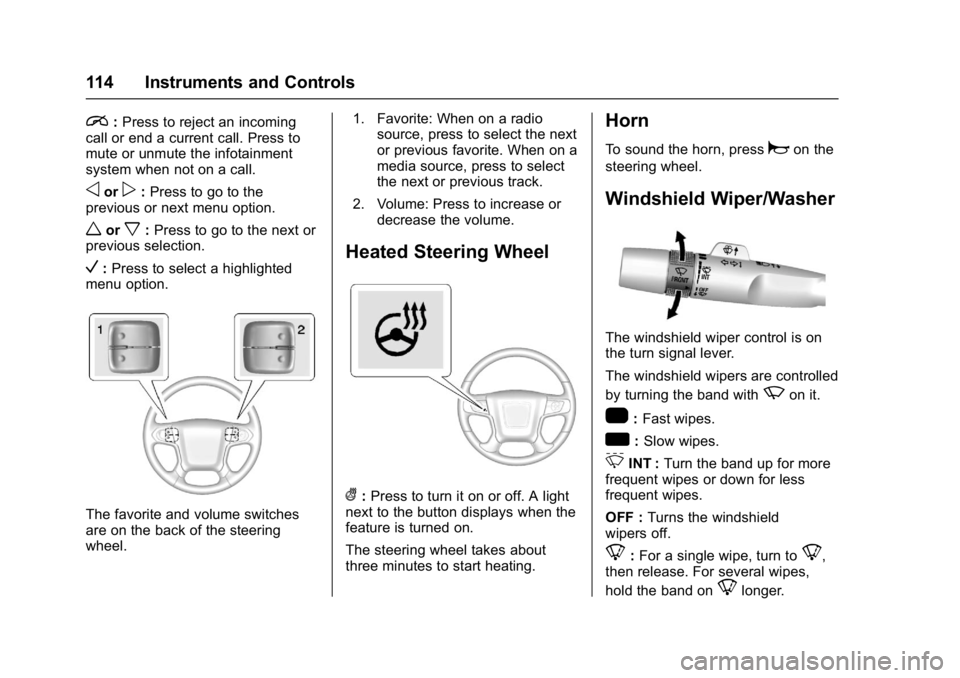
i:Press to reject an incoming
call or end a current call. Press to
mute or unmute the infotainment
system when not on a call.
oorp: Press to go to the
previous or next menu option.
worx: Press to go to the next or
previous selection.
V: Press to select a highlighted
menu option.
The favorite and volume switches
are on the back of the steering
wheel. 1. Favorite: When on a radio
source, press to select the next
or previous favorite. When on a
media source, press to select
the next or previous track.
2. Volume: Press to increase or decrease the volume.
Heated Steering Wheel
(:Press to turn it on or off. A light
next to the button displays when the
feature is turned on.
The steering wheel takes about
three minutes to start heating.
Horn
To sound the horn, pressaon the
steering wheel.
Windshield Wiper/Washer
The windshield wiper control is on
the turn signal lever.
The windshield wipers are controlled
by turning the band with
zon it.
1: Fast wipes.
w:Slow wipes.
3INT : Turn the band up for more
frequent wipes or down for less
frequent wipes.
OFF : Turns the windshield
wipers off.
8: For a single wipe, turn to8,
then release. For several wipes,
hold the band on
8longer.
Page 120 of 494
GMC Sierra/Sierra Denali Owner Manual (GMNA-Localizing-U.S./Canada/
Mexico-9955992) - 2017 - crc - 5/3/16
Instruments and Controls 119
{Warning
Wireless charging can affect the
operation of an implanted
pacemaker or other medical
devices. If you have one, it is
recommended to consult with
your doctor before using the
wireless charging system.
The vehicle must be in ON/RUN,
ACC/ACCESSORY, or Retained
Accessory Power (RAP). The
wireless charging feature may not
correctly indicate charging when the
vehicle is in RAP. See Retained
Accessory Power (RAP) 0262.
The operating temperature is −20 °C
(−4 °F) to 60 °C (140 °F) for the
charging system and 0 °C (32 °F) to
35 °C (95 °F) for the phone.
{Warning
Remove all metal objects from the
charging pad before charging
your mobile device. Metal objects,
(Continued)
Warning (Continued)
such as coins, keys, rings,
or paper clips, between the phone
and charging pad will become
very hot. On the rare occasion
that the charging system does not
detect a metal object, and the
object gets wedged between the
phone and charger, remove the
phone and allow the metallic
object to cool before removing it
from the charging pad, to prevent
burns.
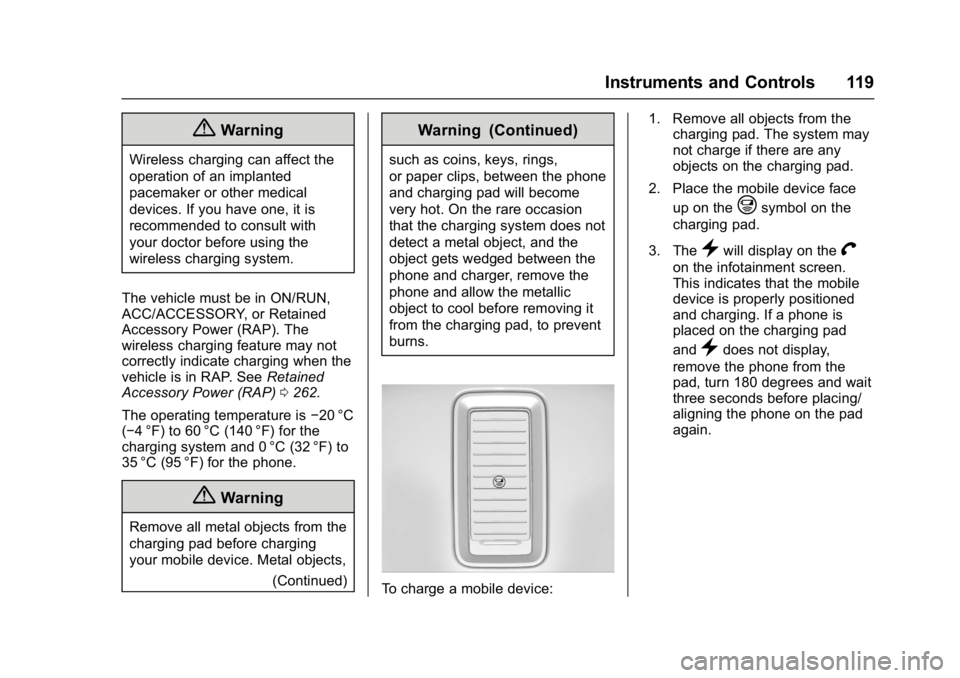
To charge a mobile device: 1. Remove all objects from the
charging pad. The system may
not charge if there are any
objects on the charging pad.
2. Place the mobile device face up on the
@symbol on the
charging pad.
3. The
}will display on theV
on the infotainment screen.
This indicates that the mobile
device is properly positioned
and charging. If a phone is
placed on the charging pad
and
}does not display,
remove the phone from the
pad, turn 180 degrees and wait
three seconds before placing/
aligning the phone on the pad
again.