ECO mode GMC SIERRA 1993 Owners Manual
[x] Cancel search | Manufacturer: GMC, Model Year: 1993, Model line: SIERRA, Model: GMC SIERRA 1993Pages: 436, PDF Size: 23.88 MB
Page 51 of 436
P
Ll A , .-.w!vm
AN1 50031 R1
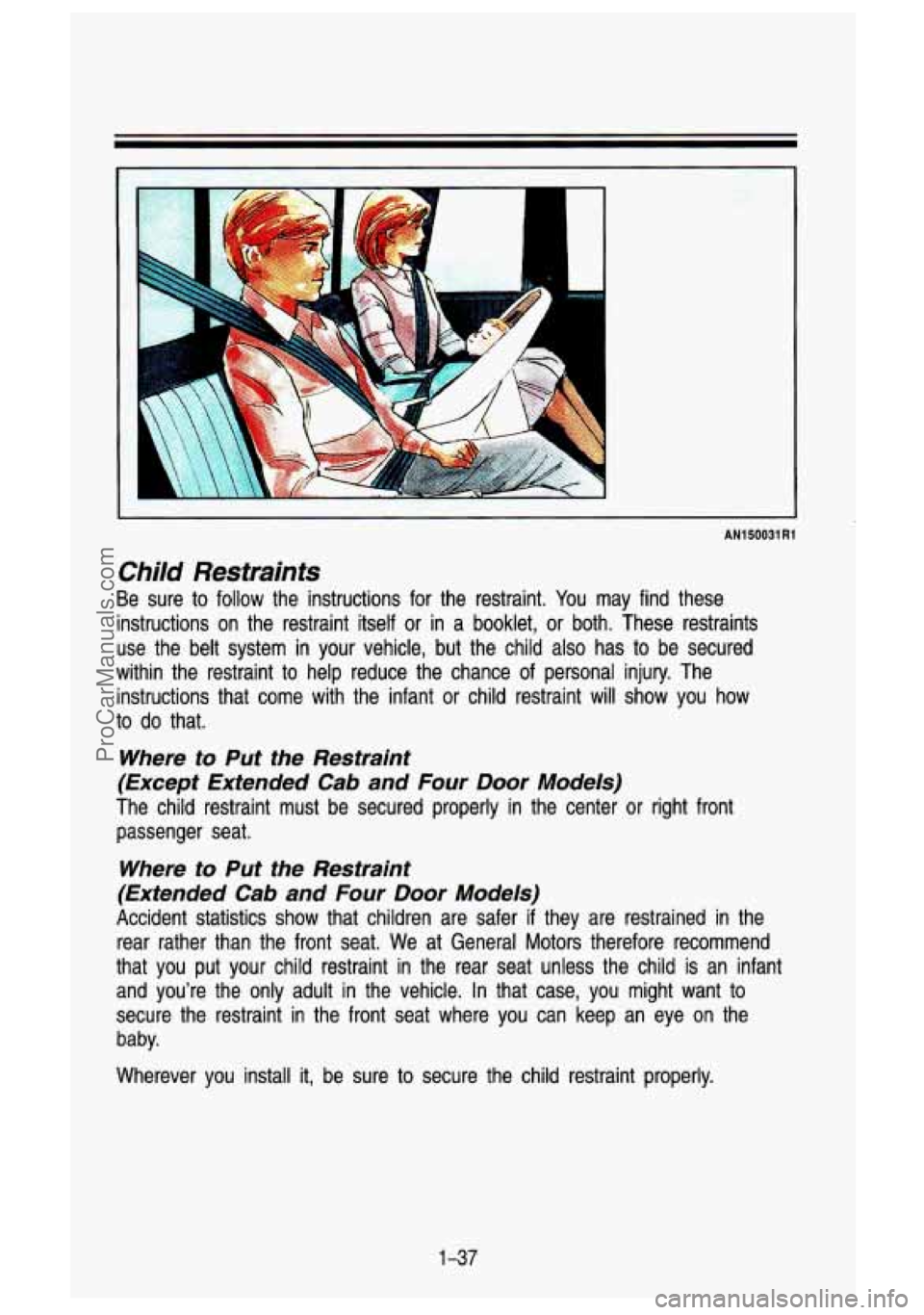
Child Restraints
Be sure to follow the instructions for the restraint. You may find these
instructions on the restraint itself or in a booklet,
or both. These restraints
use the belt system in your vehicle, but the child also has to be secured
within the restraint to help reduce the chance of personal inj\
ury. The
instructions that come with the infant
or child restraint will show you how
to do that.
Where to Put the Restraint
(Except Extended Cab and Four
Door Models)
The child restraint must be secured properly in the center or right front
passenger seat.
Where to Put the Restraint
(Extended Cab and
Four Door Models)
Accident statistics show that children are safer if they are restrained in the
rear rather than the front seat. We at General Motors therefore recommend
that you put your child restraint in the rear seat unless the child is an infant
and you’re the only adult in the vehicle. In that case, you might want to
secure the restraint in the front seat where you can keep an \
eye on the
baby.
Wherever you install
it, be sure to secure the child restraint properly.
1-37
ProCarManuals.com
Page 98 of 436
Features & Controls
Propshaft Brake Burnish Procedure
If you have a 3500 HD Model, it is recommended that the propshaft mounted
parking brake be burnished as part of the new vehicle break in. The parking
brake
will work best after it has been burnished following these instructions.
Make
10 stops, using the parking brake foot pedal, from 20 mph (32 k\
m/h)
about 2
112 miles (4 km) apart. In between stops, drive the vehicle at 20
mph (32 kmlh).
Torque Lock
The parking brake should be set first whenever leaving the dri\
ver’s seat. If
you are parked on a hill and the transmission is placed in P (Park) before
the parking brake is set, the weight of the vehicle may put too much force
on the parking pawl in the transmission.
It may be difficult to pull the selector
lever out of
P (Park). This is called “torque lock.” To prevent this, the parking
brake should be set
BEFORE moving the selector lever to P (Park).
When preparing
to move the vehicle, the selector lever should be moved out
of
P (Park) BEFORE releasing the parking brake. Set the parking brake first,
then release the transmission from
P (Park), even on level surfaces.
If “torque lock” does occur, you may have to have another vehicle nudge
your vehicle uphill a little
to take some of the pressure off the transmission
while you pull the selector lever out of
P (Park).
Shifting Into P (Park) (Automatic Transmission Models Only)
1 CAUTION
It can be dangerous to get out of your vehicle if the shift lever is not
fully in
P (Park) with the parking brake firmly set. Your vehicle can
roll.
If you have left the engine running, the vehicle can move suddenly.
You
or others could be injured. TO be sure your vehicle won’t move,
when you’re
on fairly level ground, use the steps that follow.
If you have four-wheel drive and your transfer case is in N (Neutral),
your vehicle will be free to roll-even if your shift lever is in P
{Park). So, be sure the transfer case is in a drive gear-not N
(Neutral).
If you are parking on a hill, or if you’re pulling a trailer, also see
“Parking on Hills9’ or “Towing a Trailer” in the Index. I
2-30
ProCarManuals.com
Page 144 of 436

Features & Contmls
Instrument CIuster
Your instrument cluster is designed to let you know at a glance how your
vehicle is running. You’ll know how fast you’re going, ab\
out how much fuel
you have and many other things you’ll need to know to driv\
e safely and economically.
Tachometer Cluster
If you have the tachometer cluster, it looks different but will t\
ell you
everything the standard cluster does, with the addition
of displaying your
engines revolutions per minute (rpm).
Speedometer and Odometer
K2322
Your speedometer lets you see your speed in both miles per hour (\
mph) and
kilometers per hour (kmlh). Your odometer shows how far your vehicle has
been driven, in either miles (used in the U.S.) or kilometers (used in
Canada).
If you have the Sport Performance Model (RPO B4U), your speedome\
ter
reading will
go to 110 mph (1 80 km/h).
Tamper-Resistant Odometer
Your odometer is tamper-resistant. The odometer will show silver line\
s
between the numbers
if someone tries to turn it back.
You may wonder what happens
if your vehicle needs a new odometer
installed.
If the new one can be set to the mileage total of the old odometer,
then it must be. But
if it can’t, then it’s set at zero, and a label must be p\
ut
2-76
ProCarManuals.com
Page 146 of 436
.
If you have the Sport Performance Model (RPO B4U), your")
Features & Controls
Tachometer
If you have a tachometer, it displays the engine speed in revolut\
ions per
minute (rpm).
If you have the Sport Performance Model (RPO B4U), your tachometer
reading will go
to 6,000 RPM.
'I I Do not operate the engine with the tachometer in the red area, your
engine
or other parts could be damagec' I
Damage to your engine or vehicle caused by operating the engine in 1
red area isn't covered by your vehicle warranty.
Warning and lndicator Lights
This section describes the warning lights and gages that are o\
n your vehicle.
The pictures
will help you locate them.
Warning lights and gages can signal that something is wrong be\
fore
it
becomes serious enough to cause expensive repair or replacement. Paying
attention
to your warning lights and gages could also save you or others from
injury.
Warning lights go on when there may be or
is a problem with one of your
vehicle's functions.
As you will see in the details on the next few pages,
some warning lights come on briefly when you turn the ignition\
key just
to let
2-78
ProCarManuals.com
Page 153 of 436
SHlFT Indicator Light
I
K2317
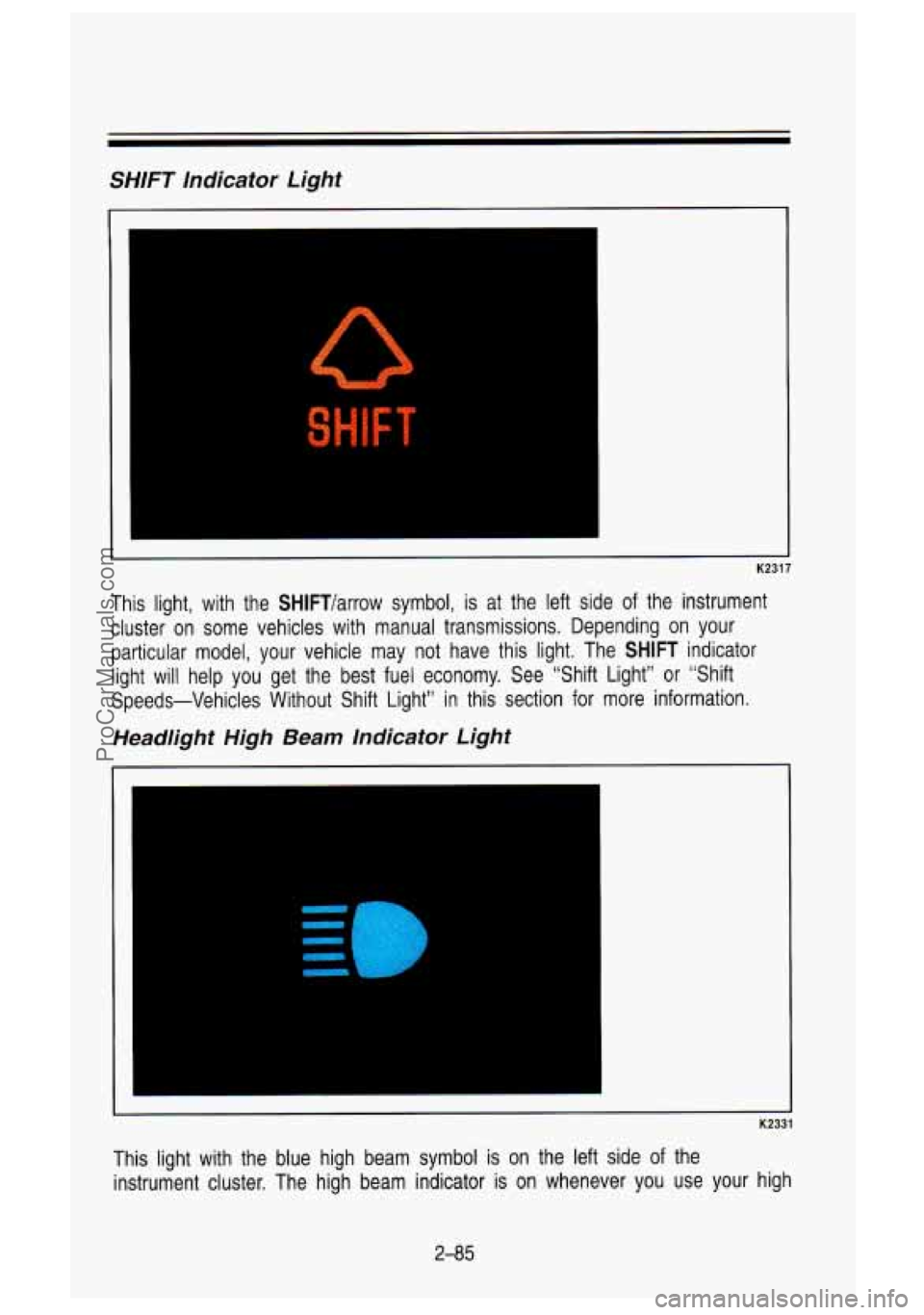
This light, with the SHlFTlarrow symbol, is at the left side of the instrument
cluster on some vehicles with manual transmissions. Depending on your
particular model, your vehicle may not have this light. The SH\
IFT indicator light will help you get the best fuel economy. See “Shift \
Light” or “Shift
Speeds-Vehicles Without Shift Light” in this section for more\
information.
Headlight High Beam Indicator Light
-4
K2331
This light with the blue high beam symbol is on the left sid\
e of the
instrument cluster. The high beam indicator is on whenever you \
use your high
2-85
ProCarManuals.com
Page 172 of 436

Comfort Contmls & Audio Systems
and bottom buttons adjusts the front and rear speaker volume, \
or fade. The relative balance and fade adjustments are shown on the VF display.
TUNE
Press the (t) to increase frequency and (-) to decrease frequency.
AM/FM
Push to get AM or FM.
SEEK
Press the SEEK button to make the receiver seek, and stop at, the next
higher available station.
SCAN
Press the SCAN button to make the receiver scan, and momentarily pause at
all available stations.
SCAN will appear in the VF display while the receiver is
in the scan mode. Press
SCAN again to cancel the scan mode and hold the
current station.
Pushbuttons
The six pushbuttons let you return to favorite stations. You can set the
pushbuttons for up to twelve favorite stations
(6 AM and 6 FM). To set the
pushbuttons, just:
Tune in the station you want.
Press the SET button. (SET appears in the VF display for a few
seconds.)
0 Within 5 seconds, push one of the six pushbuttons to store the station.
After that, whenever you press that button, the preset station \
will return.
Ciock
To set the clock, just:
Press the SET button. The word SET will light up in the VF display.
Within 5 seconds, press and hold the SEEK button until the correct hour
Then, press and hold the SCAN button until the correct minute appears
After you set the time, the word SET will remain in the VF display for a
appears on the display.
on
the display.
few seconds.
TREBLE
Push (t) to hear more treble.
Push
(-) to hear less treble.
3-1 2
ProCarManuals.com
Page 175 of 436
TUNE
To tune in radio stations, push the (t) to increase frequency and (-) to
decrease frequency.
A MIFM
Push to get AM or FM.
SEEK
Press the SEEK button to make the receiver seek, and stop at, the next
higher available station.
SCAN
Press the SCAN button to make the receiver scan, and momentarily pause
at, all available stations.
SCAN will appear in the VF display while the
receiver is in the scan mode. Press
SCAN again to cancel the scan mode
and hold the current station.
Pushbuttons
The six pushbuttons let you return to favorite stations. You can set the
pushbuttons for up to twelve favorite stations
(6 AM and 6 FM). To set the
pushbuttons, just:
Tune in the station you want.
Press the SET button. (SET appears in the VF display for a few
seconds.)
Within 5 seconds, push one of the six pushbuttons to store the station.
After that, whenever you press that button, the preset station will return.
Clock
To set the clock, just:
Press the SET button. The word SET will light up in the VF display.
Within 5 seconds, press and hold the SEEK button until the correct hour
Then, press and hold the SCAN button until the correct minute appears
appears on the display.
on the display.
After you set the time, the word SET will remain
in the VF display for a
few seconds.
Tone
To adjust the tone of this radio combination, see the instructions for the
graphic equalizer tape deck.
3-1 5
ProCarManuals.com
Page 177 of 436
Press (+) to emphasize a frequency, press (-) to de-emphasize it. It’s best
to begin with all the controls in the middle position, then adjust each control
as you like. Observe the
VF display for relative emphasis.
Cr02
This button sets tape bias. When playing high bias chrome or metal tapes,
press
Cr02 (the light in the button will come on). When playing standard
tapes, press the button again (the light will go out).
PROG
To go from one side of the tape to the other, press the PROG button.
Observe the lighted arrows to determine which side of the tape is being
played.
If a tape is inserted with side “1” (or ‘X,) up, men the up arrow means that
that side is being played. Likewise, a down arrow would indicate that side
“2”
(or “B”) had been selected. The player will automatically switch to the other
side of the tape when the first side ends.
EJECT
Press EJECT to eject the cassette tape from the player (the radio will t\
hen
FWD
To rapidly advance the tape, press FWD. The light in the button will be lit
and the tape will rapidly advance until you press the
REV button lightly.
play.)
SEEK
To
search for the next selection on the tape, forward or back, press SEEK
(the light in the SEEK button will be lit) and either FWD or REV. For the
seek mode to stop, there must be at least a 4-second gap between
selections on the tape.
REV
To rapidly reverse the tape, press REV. The light in the button will be lit and
the tape will rapidly reverse until you press the
FWD button lightly.
REPT
Press REPT to repeat the currently playing selection on the tape. For the
repeat to stop, there must be at least
a 4-second gap between selections.
3-1 7
ProCarManuals.com
Page 374 of 436
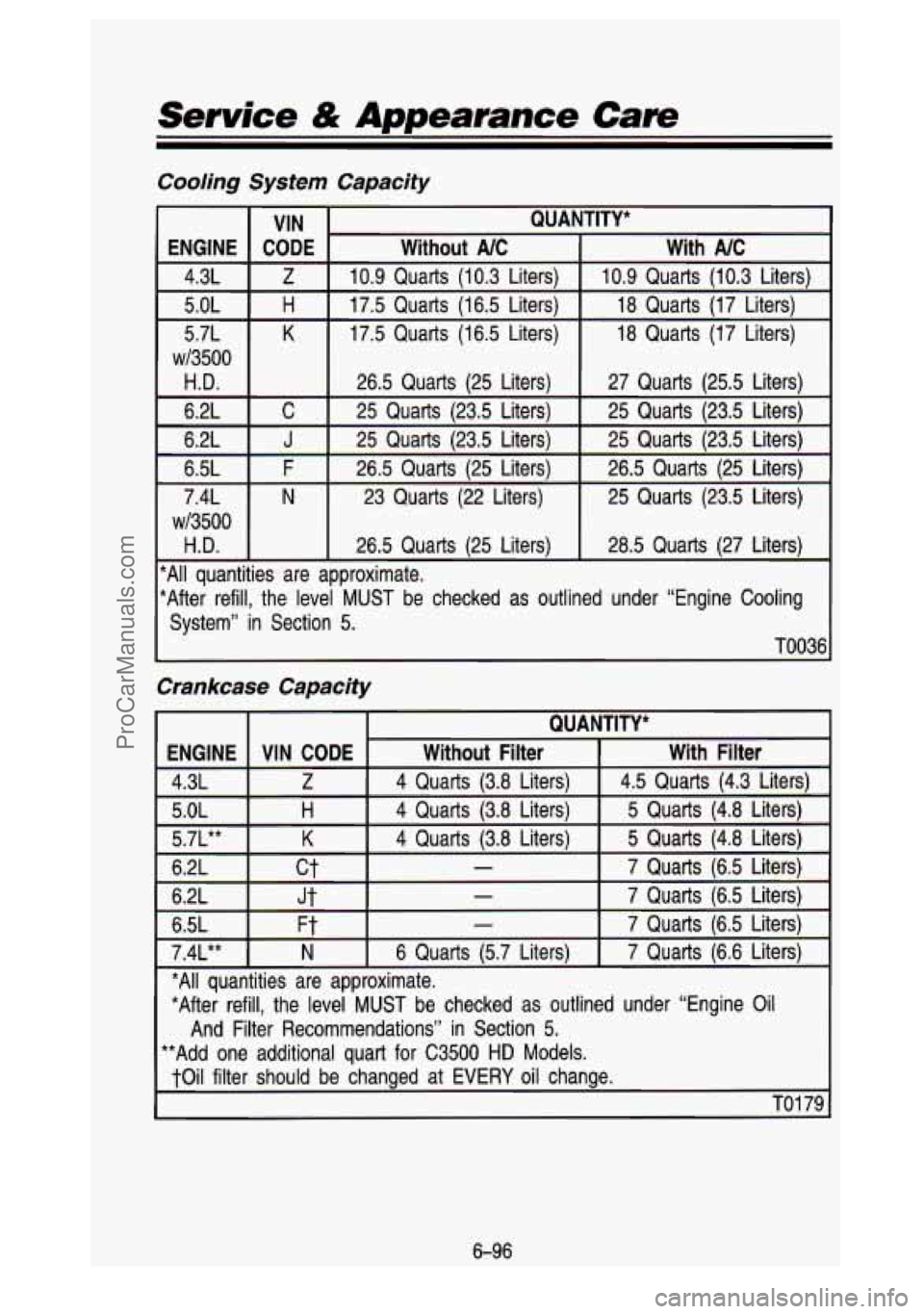
Service & Appearance Care
Cooling Systen
VIN
ENGINE
K 5.7L
H 5.0L
Z 4.3L
CODE
~13500
H.D.
6.2L C
6.2L
J
6.5L F
7.4L
N
w/3500
H.D.
Capacity
QUA
Without NC
10.9 Quarts (10.3 Liters)
17.5 Quarts (16.5 Liters)
17.5 Quarts (1 6.5 Liters)
26.5 Quarts (25 Liters)
25 Quarts (23.5 Liters)
25 Quarts (23.5 Liters)
26.5 Quarts (25 Liters) 23 Quarts (22 Liters)
26.5 Quarts (25 Liters)
ITITY*
With NC
10.9 Quarts (10.3 Liters)
18 Quarts (17 Liters)
18 Quarts (17 Liters)
27 Quarts (25.5 Liters)
25 Quarts (23.5 Liters)
25 Quarts 123.5 Liters)
26.5 Quarts (25 Liters)
25 Quarts (23.5 Liters)
28.5 Quarts (27 Liters)
*All quantities are approximate.
*After refill, the level
MUST be checked as outlined under “Engine Cooling
System” in Section
5.
TO036
Crankcase Capacity
ENGINE
5.0L
With Filter
Without Filter VIN CODE
7 Quarts (6.5 Liters) - ct 6.2L
5 Quarts (4.8 Liters) 4 Quarts (3.8 Liters) H
6.2L Jt - 7 Quarts (6.5 Liters)
6.5L
*All quantities are approximate. 7
Quarts (6.5 Liters)
- Ft
*After refill, the level MUST be checked as outlined under “Engine Oil
4.3L
5 Quarts (4.8 Liters)
4 Quarts (3.8 Liters) K 5.7L**
4.5 Quarts (4.3 Liters)
4 Quarts (3.8 Liters) Z
7.4L** 7
Quarts (6.6 Liters)
6 Quarts (5.7 Liters) N
And Filter Recommendations” in Section 5.
**Add one additional quart for C3500 HD Models.
toil filter should be changed at
EVERY oil change.
TO1 79
6-96
ProCarManuals.com
Page 417 of 436
Individual PSP’S
If you don’t want to buy all the PSP’s issued by GMC Truck for all models in
the model year, you can buy individual PSP’s, such as those which may
pertain to a particular model. To do this, you will first need
to see our index
of PSP’s.
It provides a variety of information. Here’s what you’ll find in the
index and how you can get one:
What You’ll Find in the Index:
A list of all PSP’s published by GMC Truck in a model year (1989 or
later). PSP’s covering all models of GMC Truck light trucks (less than
10,000 pounds [4536 kg] GVWR) are listed in the same index.
Ordering information so you can buy the specific PSP’s you may want.
Price information for the PSP’s you may want to buy.
How You Can Get an Index:
Indexes are published periodically. Most of the PSP’s which could potentially
apply
to the most recent GMC Truck models will be listed in the most recent
publication for that model year. This means you may want
to wait until the
end
of the model year before ordering an index, if you are interested in
buying PSP’s pertaining to a current model year truck.
Some PSP’s pertaining
to a particular model year vehicle may be published in
later years, and these would be listed in the later year’s index. When you
order an index for a model year that is not over yet, we’\
ll send you the most recently published issue. Check the ordering form for indexes f\
or earlier model
years.
Cut out the ordering form,
fill it out, and mail it in. We will then see to it that
an index is mailed
to you. There is no charge for indexes for the 1989-1 993
model years.
Toll-Free Telephone Number
If you want an additional ordering form for an index or a subscription, just
call toll-free and we’ll be happy
to send you one. Automated recording
equipment will take your name and mailing address. The number
to call is
1-800-551
-41 23.
8-7
ProCarManuals.com