GVWR GMC SIERRA 1993 Owners Manual
[x] Cancel search | Manufacturer: GMC, Model Year: 1993, Model line: SIERRA, Model: GMC SIERRA 1993Pages: 436, PDF Size: 23.88 MB
Page 82 of 436
Features &
Don’t try to shift to P (Park) if your vehicle is moving. If you do, you
could damage the transmission. Shift to
P (Park) only when your vehicle is
stopped.
m
Manual Transmission
Shift your gear selector to neutral and hold the clutch pedal to the floor
while starting the engine. Your vehicle won’t start
if the clutch pedal is
not all the way down-that’s a safety feature.
2. Don’t push the accelerator pedal before starting your engine.\
In some
other vehicles you might need
to do this, but because of your vehicle’s
computer systems, you don’t.
3. Turn your ignition key to Start. When the engine starts, let go of the
key. The idle speed will
go down as your engine gets warm.
7.4L Engine Cold Start: In cold weather, below 60” F (16” C), start the
engine the same way but push the accelerator pedal one-quarter \
of the
way down and hold it there for about
2 seconds after the engine starts.
Holding your key
in Start for longer than 15 seconds at a time will cause
vwr battery
to be drained much sooner. And the excessive heat can
,clmage your starter motor.
4. If it doesn’t start right away, hold your key in Start. If it doesn’t start in
three seconds, push the accelerator pedal about one-quarter of \
the way down for 12 more seconds, or until it starts.
flooded with
too much gasoline. Try this:
5. If your engine still won’t start (or starts but then stops), it could be
Wait 15 seconds to let the starter motor cool down. Then push your
accelerator pedal all the way
to the floor. Hold it there. Then, hold the
key in
Start for no more than ten seconds. This clears the extra
gasoline from the engine.
If the engine still doesn’t start, wait another 15
seconds and do Step 5 again.
Hot Engine Restart, 5.7L and 7.4L Engines (Vehicles Over 8500 GVWR): If
your engine is already hot and then stalls, turn your ignition\
key to Off. Then,
turn your key
to Run, and wait about 20 seconds before you restart your
engine.
2-1
4
ProCarManuals.com
Page 301 of 436
HOT
WEATHER
COLD
WEATHER
LA t
i SAE low-30
SAE SW-30
PREFERRED
IF NEiTHER SAE 5W-30 NOR SAE 1OW-30
GRADE OILS ARE AVAILABLE, SAE 30
GRADE MAY BE USED AT TEMPERATURES
ABOVE
40 DEGREES F (4 DEGREES C).
ANY OTHER GRADE
OIL NOT RECOMMENDED
DO
NOT USE
SAE 1OW-40, SAE 2OW-50 OR
PO344
SAE 5W-30
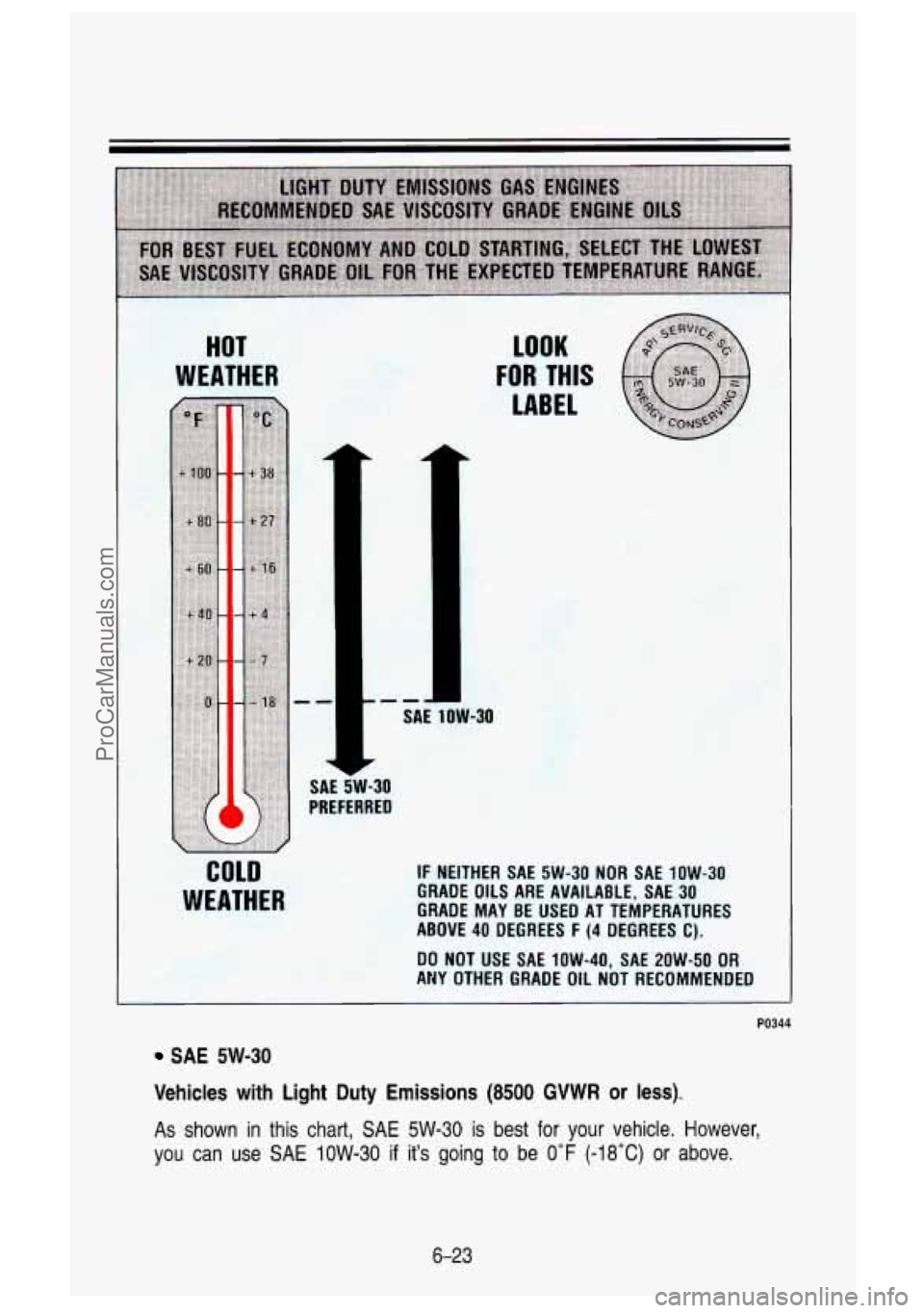
Vehicles with Light Duty Emissions (8500 GVWR or less).
As
shown in this chart, SAE 5W-30 is best for your vehicle. However,
you can use
SAE IOW-30 if it’s going to be 0°F (-18°C) or above.
6-23
ProCarManuals.com
Page 302 of 436
Service & Appearance Care
HOT
WEATHER LOOK FOR THIS
LABEL
SAE 5W-30
SAE 1OW-30
PREFERRED
above 0°F (-18°C)
IF NEITHER
SAE 5W-30 NOR SAE 1OW-30
GRADE
OILS ARE AVAILABLE, SAE 30
GRADE MAY BE USED AT TEMPERATURES
ABOVE
40 DEGREES F (4 DEGREES C).
DO NOT USE SAE 1OW-40, SAE 2OW-50 OR
ANY OTHER GRADE OIL NOT RECOMMENDED
PO347
SAE 1OW-30
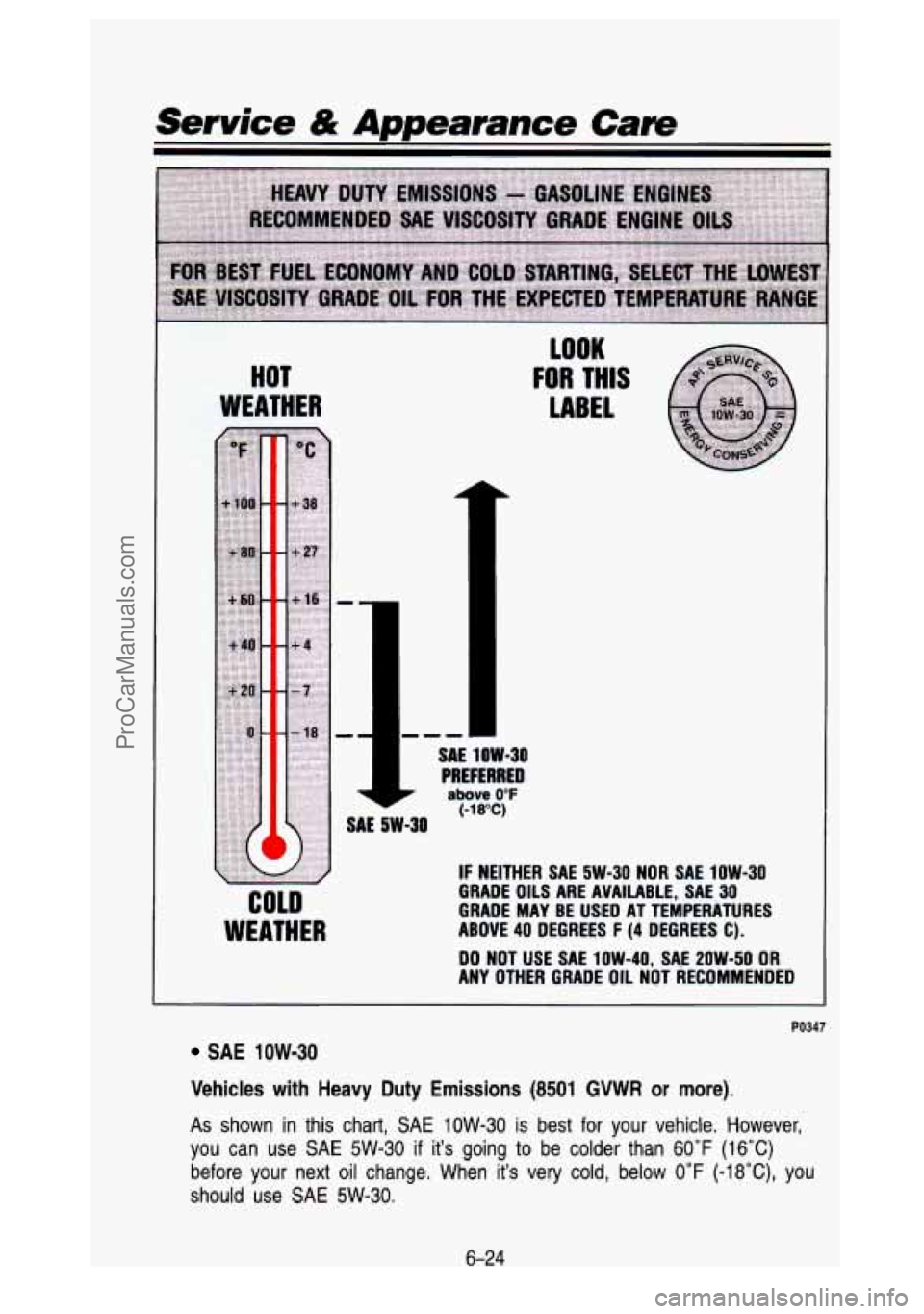
Vehicles with Heavy Duty
Emissions (8501 GVWR or more).
As shown in this chart, SAE 1OW-30 is best for your vehicle. However,
you can use
SAE 5W-30 if it's going to be colder than 60°F (16°C)
before your next oil change. When it's very cold, below 0°F (-18"C), you
should use
SAE 5W-30.
6-24
ProCarManuals.com
Page 303 of 436
These numbers on an oil container show its viscosity, or thickness.
Do not use other viscosity oils such as
SAE IOW-40 or SAE 2OW-50.
Energy Conserving II
Oils with these words on the container will help you save fuel.
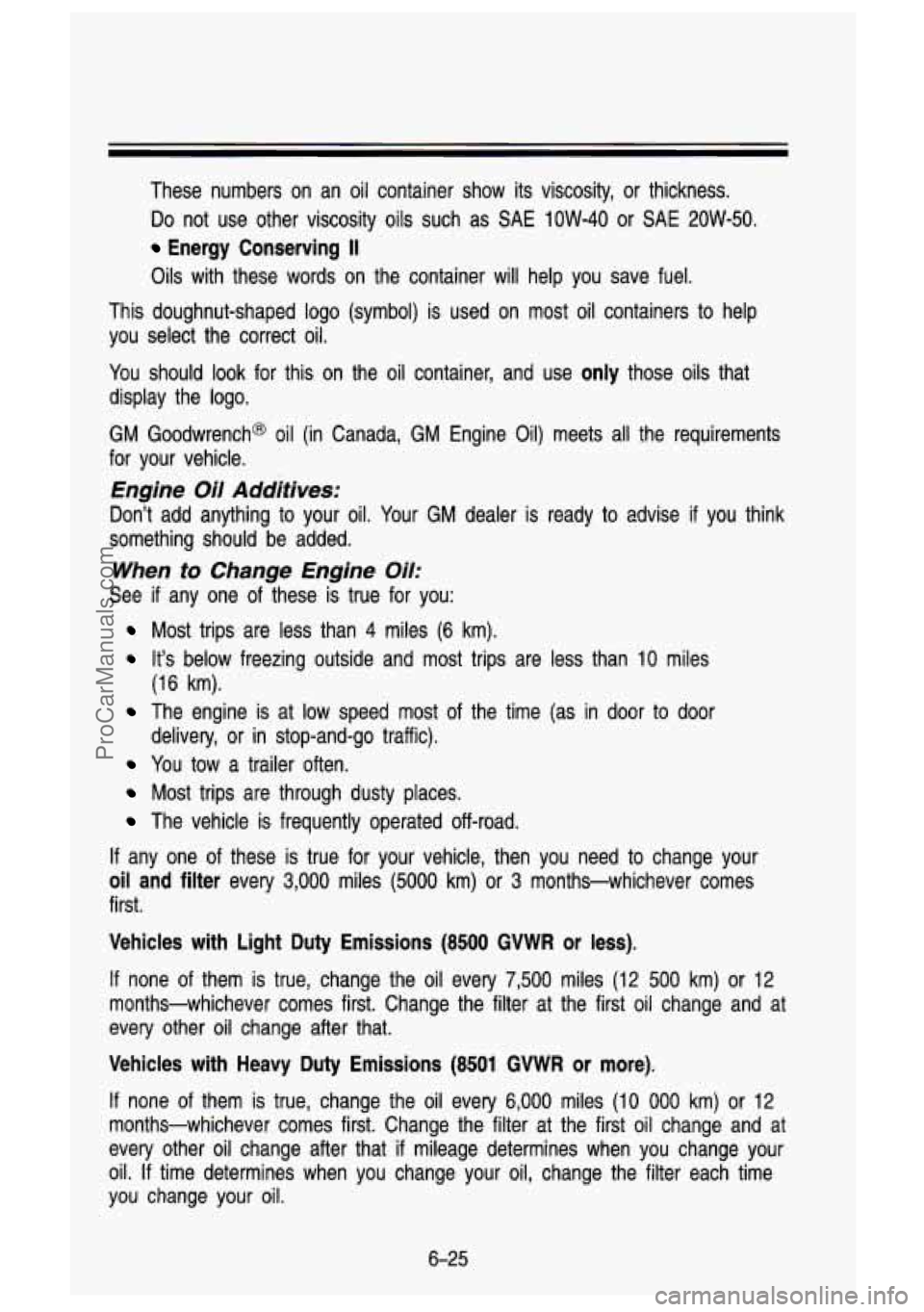
This doughnut-shaped logo (symbol) is used on most oil containers to help
you select the correct oil.
You should look for this on the oil container, and use
only those oils that
display the logo.
GM Goodwrench@ oil (in Canada, GM Engine Oil) meets all the requirements
for your vehicle.
Engine Oil Additives:
Don’t add anything to your oil. Your GM dealer is ready to advise if you think
something should be added.
When to Change Engine Oil:
See if any one of these is true for you:
Most trips are less than 4 miles (6 km).
It’s below freezing outside and most trips are less than 10 miles
(16 km).
The engine is at low speed most of the time (as in door to door
delivery, or in stop-and-go traffic).
You tow a trailer often.
Most trips are through dusty places.
The vehicle is frequently operated off-road.
If any one of these is true for your vehicle, then you need to change your
oil and filter every 3,000 miles (5000 km) or 3 months-whichever comes
first.
Vehicles with Light Duty Emissions (8500 GVWR or less).
If none of them is true, change the oil every 7,500 miles (12 500 km) or 12
months-whichever comes first. Change the filter at the first oil change and at
every other oil change after that.
Vehicles with Heavy Duty Emissions (8501 GVWR or more).
If none of them is true, change the oil every 6,000 miles (10 000 km) or 12
months-whichever comes first. Change the filter at the first oil change and at
every other oil change after that
‘if mileage determines when you change your
oil.
If time determines when you change your oil, change the filter ea\
ch time
you change your oil.
6-25
ProCarManuals.com
Page 344 of 436
you use leaded fuel, you could damage your three-way catalytic converter,
and other engine components.
Computer Command Control System (All TBI equipped
vehicles and diesel engine vehicles below
8,500 lbs. GVWR)
Gasoline Engines
This system has an oxygen (OS) sensor that helps keep your engine’s air-fuel
mixture at a proper level. Use only unleaded fuel in your veh\
icle.
If you use
leaded fuel, you could damage your oxygen
(OS) sensor and three-way
catalytic converter.
Diesel Vehicles Below 8,500 LBS. GVWR
This system monitors engine speed and throttle position. It adj\
usts exhaust gas recirculation to limit emissions.
The Malfunction Indicator Lamp
(SERVICE ENGINE SOON) on your
instrument panel lets you know when your emission control syste\
m needs
service. The light will come on briefly when you start your e\
ngine to let you
know that the system is working. If
it does not come on when you start your
engine, or
if it comes on and stays on while you’re driving your system may \
need service. Your vehicle should still be driveable, but you should have your
system serviced right away.
Secondary Air Injection (AIR) System
You may have this system. It lets you know if your engine control module,
wiring harness or solenoid need service.
If the Malfunction Indicator Lamp
(Service Engine Soon) comes on, you need service.
6-66
ProCarManuals.com
Page 345 of 436

Loading Your Vehicle
The CertificationKire label is found on the rear edge of the driver’s door or in
the incomplete vehicle document in the cab. The label shows th\
e size of your
original tires and the inflation pressures needed
to obtain the gross weight
capacity of your vehicle. This is called the GVWR (Gross Vehicle Weight
Rating). The
GWVR includes the weight of the vehicle, all occupants, fuel and
cargo.
The CertificationKire label also tells you the maximum weights for the front
and rear axles, called Gross Axle Weight Rating (GAWR). To find out the
actual loads on .your front and rear axles, you need to go to a weigh station
and weigh your vehicle. Your dealer can help you with this. .Be sure to
spread out your load equally on both sides of the centerline+
.. , - :I. -I lrT1 I I -
Never exceed the GVWR for your vehicle, or the Gross, Axle Weight Rating-
(GAWR) for either the front or rear axle.
And,
if you do have a heavy load, you should spread it out.
. -1 r,
In the case of a sudden stop or collision, things carried in the bed of 7
injuring you and others. If you put things in the bed of your truck,
you should make sure they are properly secured.
r! your truck could shift forward and come into the passenger are\
a,
-
6-67
ProCarManuals.com
Page 349 of 436
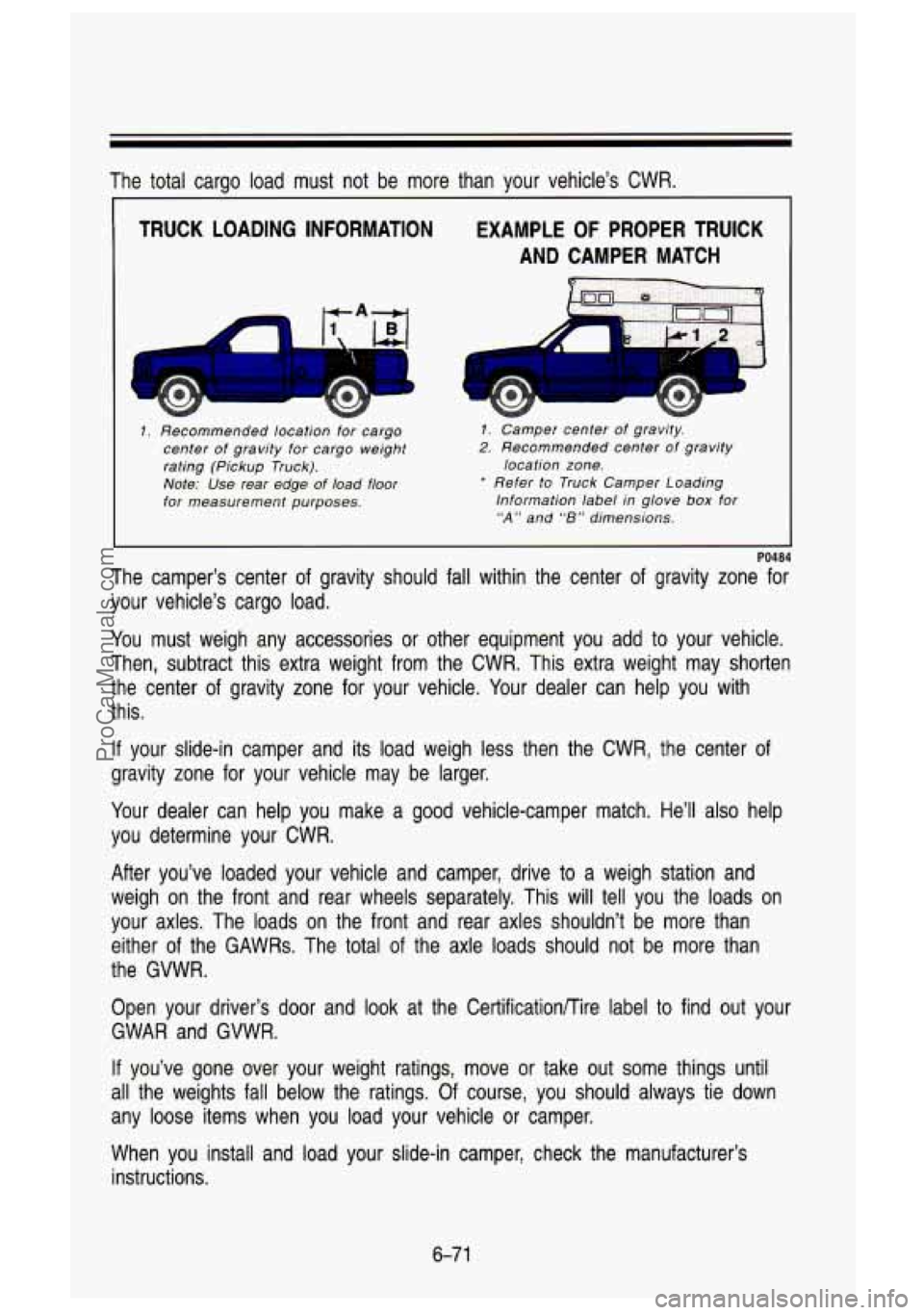
The total carqo load must not be more than your vehicle’s CWR.
TRUCK LOADING INFORMATION
--7 c ‘nl
1. Recommended location for cargo
center of gravity for cargo weight
rating (Pickup Truck).
Note: Use rear edge
of load floor
for measurement purposes.
EXAMPLE OF PROPER TRUCK
AND CAMPER MATCH
I
PO484
The camper’s center of gravity should fall within the center of gravity zone for
your vehicle’s cargo load.
1. Camper center of gravity,
2. Recommended center of gravity
* Refer to Truck Camper Loading
location zone.
Information label in glove
box for
“A” and “8” dimensions.
You must weigh any accessories or other equipment you add to your vehicle.
Then, subtract this extra weight from the CWR. This extra weig\
ht may shorten
the center of gravity zone for your vehicle. Your dealer can help you with
this.
If your slide-in camper and its load weigh less then the CWR, the center of
gravity zone for your vehicle may be larger.
Your dealer can help you make a good vehicle-camper match. He’ll \
also help
you determine your CWR.
After you’ve loaded your vehicle and camper, drive to a weigh station and
weigh on the front and rear wheels separately. This will tell you the loads on
your axles. The loads on the front and rear axles shouldn’t\
be more than
either of the GAWRs. The total of the axle loads should not be more than
the GVWR.
Open your driver’s door and look at the Certificationnire label
to find out your
GWAR and GVWR.
If you’ve gone over your weight ratings, move or take out some\
things until
all the weights fall below the ratings. Of course, you should always tie down
any loose items when you load your vehicle or camper.
When you install and load your slide-in camper, check the manufacturer’s
instructions.
6-7 1
ProCarManuals.com
Page 350 of 436
Service & Appearance Care
Trailer Recommendations
You must subtract your hitch loads from the CWR for your vehicle. Weigh
your vehicle with your trailer attached,
so that you won’t go over the GVWR
or the GAWR.
You’ll get the best performance
if you spread out the weight of your load the
right way, and
if you choose the correct hitch and trailer brakes.
For more information, see “Trailer Towing” in the Index.
If you want more information on curb weights, cargo weights, cargo wei\
ght
rating and the correct center of gravity zone for your vehicle, your dealer can
help you. Just ask for a copy of “Consumer Information, Truck-Cam\
per
Loading.”
Pickup Conversion lo. Chassis Cab
General Motors is aware that some vehicle owners may consider having the
pickup box removed and a commercial
or recreational body installed. Before
you do
so, first contact the GM Zone Office for your area for information on
such conversions. (See the “Warranty and Owner Assistance”\
booklet for
Zone Office.) Owners should be aware that, as manufactured, th\
ere are
differences between a chassis cab and a pickup with the box r\
emoved which may affect vehicle safety. The components necessary to adapt the pickup to
permit its safe use with a specialized body should be installed by a bod\
y
builder in accordance with the information available from the Z\
one Office.
Tires
We don’t make tires. Your new vehicle comes with high quali\
ty tires made by
a leading tire manufacturer. These tires are warranted by the \
tire
manufacturers and their warranties are delivered with every new \
vehicle.
If
your spare tire is a different brand than your road tires, you will have a tire
warranty folder from each of these manufacturers.
6-72
ProCarManuals.com
Page 373 of 436

Specification Charts
Replacement Parts
Replacement part numbers listed in this section are based on the latest
information available at the time of printing, and are subject \
to change. If a
part listed in this manual is not the same as the part used \
in your vehicle
when it was built, or
if you have any questions, please contact your GM truck
dealer.
Engine Identification
Liter Produced Fuel VIN
Displacement Type
U.S. TBI N
V8 7.4 H.D.
us. Diesel F V8 6.5
H.D. U.S. Diesel J V8 6.2
L. D. us. Diesel C V8 6.2
US., Can.
TBI K V8
5.7
L. D. US., Can.
TBI H
V8 5.0
U.S. TBI 2 V6
4.3
Emissions
BY
System
Engine Code
*
*
*
*Light Duty Emissions with 8500 GVWR and below or:
Heavy Duty Emissions with 8501 GVWR and above.
TO035
Wheel Nut Torque
MODEL I DESCRIPTION I TORQUE I
C 1500 5 bolts (14mm) 120 ft. Ibs. (160 Nmm)
K 1500 & C-K 2500 6 bolts f14mm) 120 ft. Ibs. (1 60 N.m)
C-K
2500 (w/C6P) 8 bolts (14mm) 120 ft. Ibs. (160 Nmm)
C-K 3500 Single Rear Wheels 8 bolts (14mm) 120
ft. Ibs.
(1 60 N-m)
C3500 Dual Rear Wheels
8 bolts (14mm) 140 ft. Ibs. (190
N-m)
C3500 HD -Front
5 bolts (5/8 in.) 175 ft. Ibs. (240 Nsm)
TO040
--Rear
10 bolts (5/8 in.)
6-95
ProCarManuals.com
Page 384 of 436

Scheduled Maintenance Services
Scheduled Maintenance Services
This part tells you the maintenance services that you should h\
ave done and
the times you should schedule them. Your GM dealer knows your vehicle best
and wants you
to be happy with it. If you go to your dealer for your service
needs, you’ll know that GM-trained and supported service peop\
le will perform
the work using genuine GM parts.
These schedules are for vehicles that:
carry passengers and cargo within the recommended limits. You will find
these limits on your vehicle’s Certification Label. See “L\
oading Your
Vehicle” in the Index.
are driven on regular road surfaces, and within legal driving \
limits.
are driven off-road in the recommended manner. See the Index U\
nder
use the recommended fuel. See “Fuel” in the Index.
“Off Road Driving With Your Four Wheel Drive Vehicle.”
selecting The Proper Maintenance Services
To find the proper maintenance schedule for your vehicle, you must\
know two
things. What engine your vehicle has, and how you use your ve\
hicle. Your
engine type will tell you which chart to use, and your drivin\
g conditions will
tell you which schedule to use. The charts are found later in\
this section.
Selecting the Proper Maintenance Chart
Your engine type (Gasoline or Diesel) and its emissions classificat\
ion (Light
Duty 3r Heavy Duty Emissions) will tell you which maintenance \
chart
to use.
Find your Vehicle Identification Number (VIN), and look at th\
e eighth character
to see what your engine code is. Then use the following Engine E\
missions
Classifications table
to find your emissions classification.
Your VIN is on the plate on the top left corner of your instrument panel,
the Certification Label and on the Service Parts Identification \
Label. See “Vehicle Identification Number” in the Index.
If your engine has more than one emissions classification, look at\
your
Certification Label to see what your Gross Vehicle Weight Ratin\
g
(GVWR)
is. See “Loading Your Vehicle” in the Index.
7-4
ProCarManuals.com