four wheel drive GMC SIERRA 1996 User Guide
[x] Cancel search | Manufacturer: GMC, Model Year: 1996, Model line: SIERRA, Model: GMC SIERRA 1996Pages: 404, PDF Size: 21.57 MB
Page 93 of 404
CAUTION:
.*. .
It can be dangerous to get out of your vehicle if
the shift lever is not fully in
PARK (P) with the
parking brake firmly set. Your vehicle can roll.
Don’t leave your vehicle when the engine
is
running unless you have to. If you’ve left the
engine running, the vehicle can move suddenly.
You or others could be injured.
To be sure your
vehicle won’t move, even when you’re on
fairly
level ground, always set your parking brake and
move the shift lever to PARK (P).
If you have four-wheel drive and your transfer case is
in NEUTRAL (N), your vehicle will be free to roll,
even
if your shift lever is in PARK (P). So, be sure the
transfer case is
in a drive gear -- not in NEUTRAL (N).
Always set your parking brake. Follow the proper steps
, See “Shifting Into to be sure your vehicle won’t move
PARK
(P)“ in the Index.
If you‘re pulling a trailer. see “Tow
the Index. ing
a Trailer“
in
Windows
Manual Windows
Turn the hand crank on each door to raise or lower
manual windows.
Power Windows
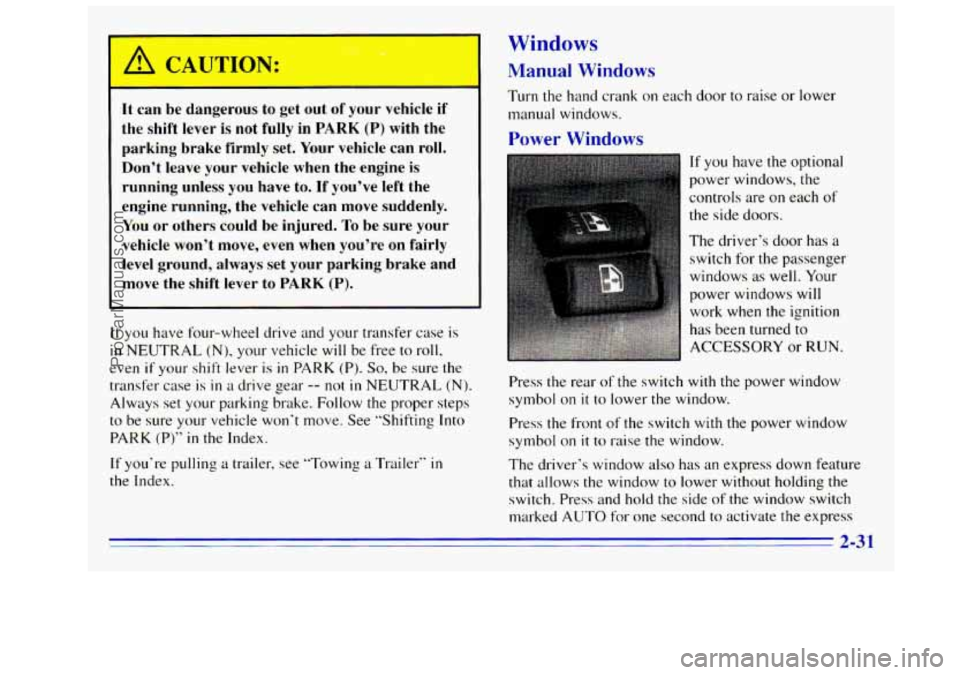
If you have the optional
power windows, the
controls are
on each of
the side doors.
The driver’s door has a
switch for the passenger
windows as well. Your
power windows will
work when the ignition
has been turned to
ACCESSORY or
RUN.
Press the rear of the switch with the power window
symbol on
it to lower the window.
Press the front of the switch with the power window
symbol on
it to raise the window.
The driver’s window also
has an express down feature
that allows the window to lower without holding the
switch. Press and hold the side
of the window switch
marked AUTO for one second to activate the express
2-3 1
ProCarManuals.com
Page 101 of 404
Lamps
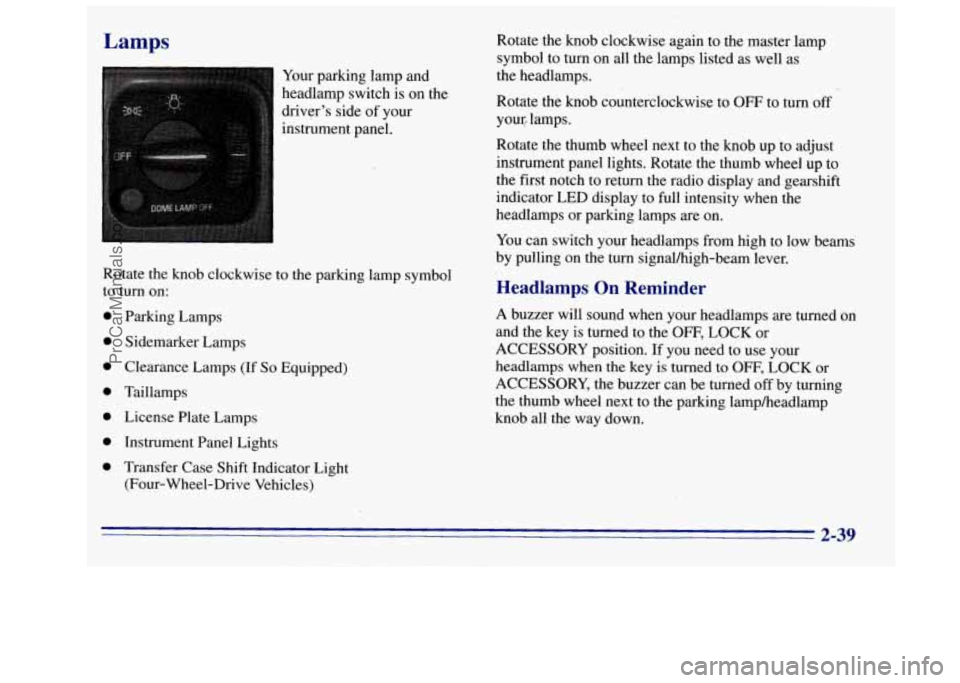
Your parking lamp and
headlamp switch is on the
driver's side of your
instrument panel.
0
0
0
0
0
0
0
Parking Lamps
Sidemarker Lamps
Clearance Lamps
(If So Equipped)
Taillamps
License Plate Lamps Instrument Panel Lights
Transfer Case Shift Indicator Light
(Four-Wheel-Drive Vehicles) Rotate the knob clockwise again
to the master lamp
symbol to turn on all the lamps listed as well as
the headlamps.
Rotate the knob counterclockwise to
OFF to turn off
your, lamps.
Rotate the thumb wheel next
to the knob up 'to adjust
instrument panel lights. Rotate the thumb wheel up to
the first notch to return the radio display and gearshift
indicator LED display to full intensity when the
headlamps or parking lamps are on.
You can switch your headlamps from high to low beams
by pulling on the
turn signalhigh-beam lever.
Headlamps On Reminder
A buzzer will sound when your headlamps are turned on
and the key is turned to the
OFF, LOCK or
ACCESSORY position.
If you need to use your
headlamps when the key is turned to
OFF, LOCK or
ACCESSORY, the buzzer can be turned off by turning
the thumb wheel next to the parking lampheadlamp
knob all the way down.
2-39
ProCarManuals.com
Page 162 of 404
Remember: Anti-lock doesn’t change the time you need
to get your foot up to the brake pedal or always decrease
stopping distance. If
you get too close to the vehicle in
front of you, you won’t have time to apply your brakes
if that vehicle suddenly slows or stops. Always leave
enough room up ahead to stop, even though you have
anti-lock brakes.
Using Anti-Lock
Don’t pump the brakes. Just hold the brake pedal down
and
let anti-lock work for you. You may feel the brakes
vibrate, or you may notice some noise, but this
is
normal. On vehicles with four-wheel drive, your
anti-lock brakes work at all times
-- whether you are in
two-wheel drive
or four-wheel drive.
Braking in Emergencies
Use your anti-lock braking system when you need to.
With anti-lock, you can steer and brake at the same
time. In many emergencies, steering can help
you more
than even the very best braking.
Steering
Power Steering
If you lose power steering assist because the engine
stops or the system is not functioning, you can steer but
it will take much more effort.
Steering Tips
Driving on Curves
It’s important to take curves at a reasonable speed.
A lot of the “driver lost control” accidents mentioned on
the news happen on curves. Here’s why:
Experienced driver or beginner, each
of us is subject to
the same laws
of physics when driving on curves. The
traction
of the tires against the road surface makes it
possible for the vehicle to change its path when you turn
the front wheels. If there’s no traction, inertia will keep
the vehicle going
in the same direction. If you’ve ever
tried to steer a vehicle on wet ice, you’ll understand
this.
The traction you can get in a curve depends on the
condition of your tires and
the road surface, the angle at
which
the curve is banked, and your speed. While you’re
in a curve, speed is the one factor you can control.
4-8
ProCarManuals.com
Page 167 of 404
A cornering skid and an acceleration skid are best
handled by easing your
foot off the accelerator pedal.
If your vehicle starts to slide, ease your foot off the
accelerator pedal and quickly
steer the way you want the
vehicle to go. If you start steering quickly enough, your
vehicle may straighten out. Always be ready for
a
second skid if it occurs.
Of course, traction is reduced when water, snow, ice,
gravel or other material is on the road. For safety,
you’ll
want to slow down and adjust your driving to these
conditions. It is important to slow down on slippery
surfaces because stopping distance will be longer and
vehicle control more limited.
While driving
on a surface with reduced traction, try
your best to avoid sudden steering, acceleration or
braking (including engine braking by shifting
to a lower
gear).
Any sudden changes could cause the tires to
slide. You may not realize the surface is slippery until
your vehicle is skidding. Learn to recognize warning
clues
-- such as enough water, ice or packed snow on
the road
to make a “mirrored surface” -- and slow
down when you have any doubt.
Remember:
Any anti-lock brake system (ABS) helps
avoid
only the braking skid.
Driving Guidelines
Off-Road Driving with Your
Four-Wheel-Drive Vehicle
This off-road guide is for vehicles that have
four-wheel drive.
Also, see “Anti-Lock Brakes” in the Index.
If your vehicle doesn’t have four-wheel drive, you
shouldn’t drive off-road unless you’re on a level,
solid surface.
Off-road driving can be great
fun. But it does have
some definite hazards.
The greatest of these is the
terrain itself.
“Off-roading” means you’ve left
the great North
American road system behind. Traffic lanes aren’t
marked. Curves aren’t banked. There are
no road signs.
Surfxes can
be slippery, rough, uphill or downhill. In
short, you’ve gone right back to nature.
Off-road driving involves some new skills. And that’s
why it’s very important that
you read this guide. You’ll
find many driving tips and suggestions. These
will help
make your off-road driving safer and more enjoyable.
4-13
ProCarManuals.com
Page 168 of 404
Before You Go Off-Roading
There are some things to do before you go out. For
example,
be sure to have all necessary maintenance and
service work done. Check
to make sure all underbody
shields (if
so equipped) are properly attached. Be sure
you read all the information about your four-wheel-drive
vehicle in
this manual. Is there enough fuel? Is the spare
tire fully inflated? Are
the fluid levels up where they
should be? What are the local laws that apply
to
off-roading where you’ll be driving? If you don’t know,
you should check with law enforcement people in the
area. Will you be on someone’s private land? If so, be
sure to get the necessary permission.
Loading Your Vehicle for Off-Road Driving
There are some important things to remember about
how
to load your vehicle.
The heaviest things should be on the load floor and
forward
of your rear axle. Put heavier items as far
forward
as you can.
Be sure the load is secured properly, so driving on
the off-road terrain doesn’t toss things around.
4 CAUTION: ‘ ’
0
0
e
Cargo on the load floor piled higher than
the seatbacks can be thrown forward
during a sudden stop.
You or your
passengers could be injured. Keep cargo
below the top of the seatbacks.
Unsecured cargo
on the load floor can
be tossed about when driving over rough
terrain.
You or your passengers can
be struck by flying objects. Secure the
cargo properly. Heavy
loads on the roof raise the vehicle’s
center of gravity, making it more likely to
roll over.
You can be seriously or fatally
injured if the vehicle rolls over. Put heavy
loads inside the cargo area, not on the roof.
Keep cargo in the cargo
area as far forward
and low as possible.
You’ll find other important information
in this manual.
See “Vehicle Loading,” “Luggage Carrier” and “Tires”
in the Index.
4-14
ProCarManuals.com
Page 212 of 404
Parking on Hills
You really should not park your vehicle, with a trailer
attached,
on a hill. If something goes wrong, your rig
could start
to move. People can be injured, and both
your vehicle and the trailer can be damaged.
But if
you ever have to park your rig on a hill, here’s
how to do it:
1.
2.
3.
4.
5.
6.
Apply your regular brakes, but don’t shift into
PARK (P) yet for an automatic transmission, or into
gear for
a manual transmission.
Have someone place chocks under the trailer wheels.
When
the wheel chocks are in place, release the
regular brakes until the chocks absorb the load.
Reapply the regular brakes. Then apply your
parking brake and shift
into PARK (P) for an
automatic transmission, or REVERSE
(R) for a
manual transmission.
If you have a four-wheel-drive vehicle, be sure
the transfer case
is in a drive gear and not in
NEUTRAL
(N).
Release the regular brakes. It can
be dangerous to get out of your vehicle if
the shift lever
is not fully in PARK (P) with the
parking brake firmly set. Your vehicle can roll.
If you have left the engine running, the vehicle
can move suddenly. You or others could be
injured.
To be sure your vehicle won’t move, even
when you’re on fairly level ground, use the steps
that follow.
If you have four-wheel drive and your transfer
case is in
NEUTRAL (N), your vehicle will be free
to roll, even if your shift lever is in
PARK (P). So,
be sure the transfer case is in a drive gear -- not
in
NEUTRAL (N).
ProCarManuals.com
Page 215 of 404
To engage a PTO:
1. Set the parking brake.
2. Shift the transmission into NEUTRAL (Nj.
3. Hold the clutch pedal down and engage the PTO.
NOTICE:
Using a PTO for more than four hours without
driving your vehicle can damage the transfer case
or transmission. If using a PTO for more than
four hours without driving your vehicle, drive
your vehicle for
a while to allow the transfer case
and transmission
to cool.
If you are going to drive the vehicle, shift the
transmission
into the gear you want. Then shift the
transfer case
into the range you want (if you have
four-wheel drive), apply the regular brakes and
release the parking brake.
4. Release the clutch (and the regular brakes) as you
normally would. When you release the clutch, the
PTO will start.
Using a Transfer Case Mounted Power
Take-Off
(Manual Transmission)
1. Set the parking brake,
2. Shift the transfer case into NEUTRAL (N).
3. Hold the clutch pedal down. If the vehicle will
remain
in the same place, shift the transmission into
the highest gear.
4. Engage the PTO.
If you are going to drive the vehicle, shift the
transmission into the gear
you want. Then shift the
transfer case
into the range you want, apply the
regular brakes and release the parking brake.
5. Release the clutch (and the regular brakes) as you
nor~nally would. When you release the clutch, the
PTO will start.
4-61
ProCarManuals.com
Page 219 of 404
2. Get the vehicles close enough so the jumper cables
can reach, but be sure the ve.hicles aren’t touching
each other.
If they are, it could cause a ground
connection you don’t want. You wouldn’t be able to
start
your vehicle, and the bad grounding could
damage the electrical systems.
To avoid the possibility
of the vehicles rolling,
set the parking brake firmly on both vehicles
involved
in the jump start procedure. Put an
automatic transmission
in PARK (P) or a manual
transmission
in NEUTRAL (N). If you have a
four-wheel-drive vehicle, be sure the transfer
case is not in NEUTRAL
(N).
3. Turn off the ignition on both vehicles. Unplug
unnecessary accessories plugged into the cigarette
lighter or accessory power outlets,
if you have this
option. Turn
off all lamps that aren’t needed as well
as radios. This will avoid sparks and help save both
batteries.
In addition, it could save your radio!
NOTICE:
I
~~~ ~
If you leave your radio on, it could be badly
damaged. The repairs wouldn’t be covered by
your warranty.
4. Open the hoods and locate the batteries. Find
the positive
(+) and negative (-) terminals 011
each battery.
A CAUTION:
If your vehicle has air conditioning, the auxiliary
electric fan under the hood can start up even
when the engine
is not running and can injure
you. Keep hands, clothing and tools
away from
any underhood electric fan.
5-3
ProCarManuals.com
Page 223 of 404
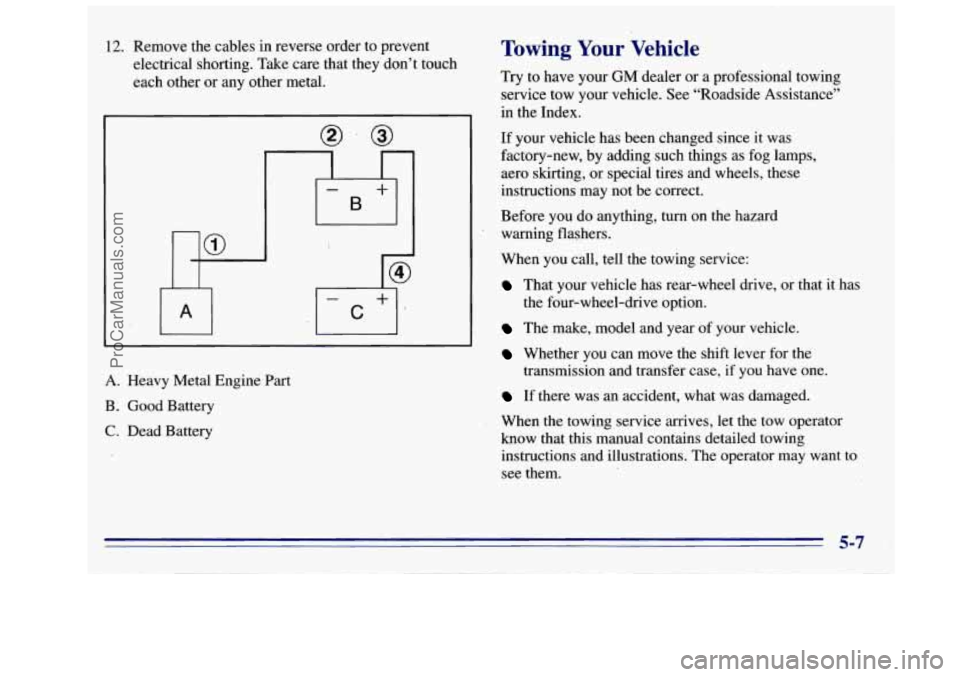
12. Remove the cables in reverse order to prevent
electrical shorting. Take care that they don’t touch
each other or any other metal.
I
A. Heavy Metal Engine Part
B. Good Battery
C. Dead Battery
Towing Your Vehicle
Try to have your GM dealer or a professional towing
service tow your vehicle. See “Roadside Assistance”
in the Index.
If your vehicle has been changed since it was
factory-new, by adding such things as fog lamps,
aero skirting, or special tires and wheels, these’
instructions may not be correct.
Before you do anything, turn on the hazard
warning flashers.
When you call, tell the towing service:
That your vehicle .has rear-wheel drive, or that it has
The make, model and year of your vehicle.
Whether you can move the shift lever for the
If there was an accident, what was damaged.
When the towing service arrives, let the tow operator
know that this manual contains detailed towing
instructions and illustrations. The operator may want to
see them.
the four-wheel-drive
option.
transmission
and transfer case, if you have one.
5-7
ProCarManuals.com
Page 237 of 404
Changing a Flat Tire
If a tire goes flat, avoid further tire and wheel damage
by driving slowly to a level place. Turn on your hazard
warning
flashers.
Changing a tire can cause an injury. The vehicle
can slip
off the jack and roll over you or other
people.
You and they could be badly injured.
Find a level place to change your tire.
To help
prevent the vehicle from moving:
1. Set the parking brake firmly.
2. Put an automatic transmission shift lever in
PARK (P) or shift a manual transmission to
FIRST (1) or REVERSE: (K).
3. If you have a four-wheel-drive vehicle,
be sure the transfer case is
in a drive
gear
-- not in NEUTRAL (N).
4. Turn off the engine.
CAUTION: (Continued)
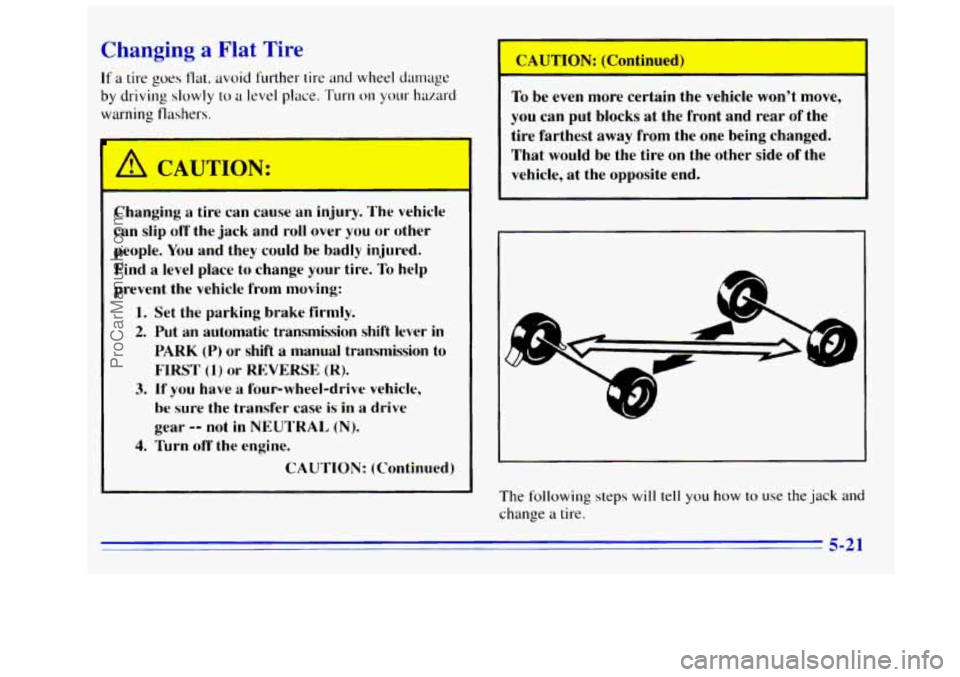
To be even more certain the vehicle won't move,
you can put blocks at the front and rear of the
tire farthest away from the one being changed.
That would be the tire on the other side of the
vehicle, at the opposite end.
The following
steps will tell you how to use the jack and
change a tire.
5-21
ProCarManuals.com