instrument panel GMC SIERRA 1997 Owner's Manual
[x] Cancel search | Manufacturer: GMC, Model Year: 1997, Model line: SIERRA, Model: GMC SIERRA 1997Pages: 436, PDF Size: 23.38 MB
Page 141 of 436
Safety Belt Reminder Light
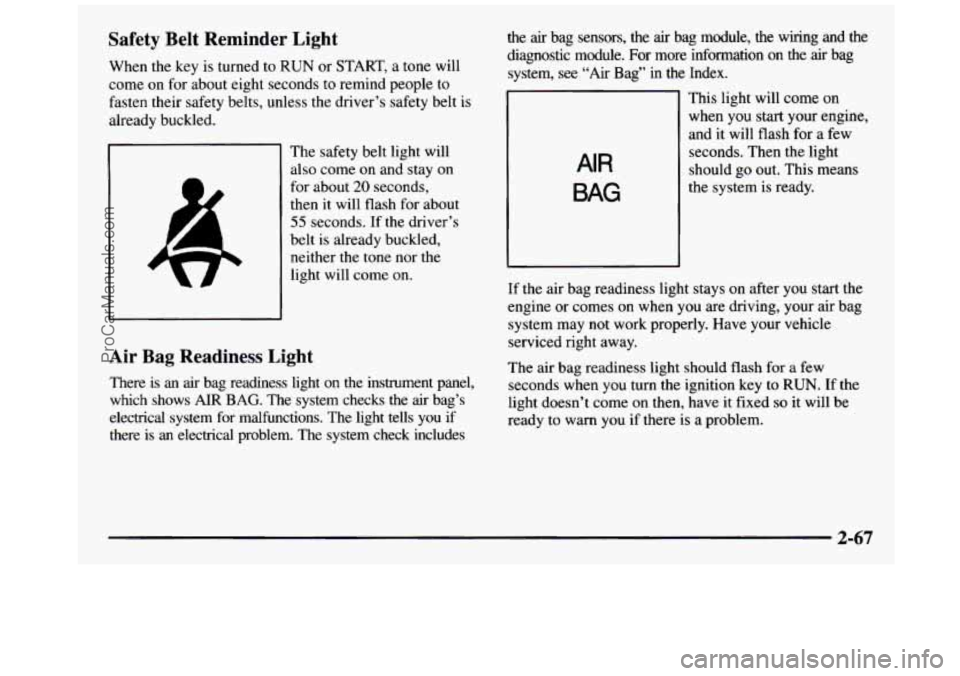
When the key is turned to RUN or START, a tone will
come on for about eight seconds to remind people to
fasten their
safety belts, unless the driver’s safety belt is
already buckled.
The safety belt light will
also come on and stay on
for about
20 seconds,
then it will flash for about
55 seconds. If the driver’s
belt is already buckled,
neither the tone nor the
light will come on.
Air Bag Readiness Light
There is an air bag readiness light on the instrument panel,
which shows
AIR BAG. The system checks the air bag’s
electrical system for malfunctions. The light tells you if there is an electrical problem. The system check includes the
air bag sensors, the air bag module, the wiring and the
diagnostic module.
For more information on the air bag
system,
see “Air Bag” in the Index.
AIR
BAG
This light will come on
when you start your engine,
and it will
flash for a few
seconds. Then the light
should go out. This means
the system is ready.
If the air bag readiness light stays on after you start the
engine or comes on when you are driving, your air bag
system may not work properly. Have your vehicle
serviced right away.
The air bag readiness light should flash for
a few
seconds when you turn the ignition key to
RUN. If the
light doesn’t come on then, have it fixed
so it will be
ready to warn you if there
is a problem.
2-67
ProCarManuals.com
Page 154 of 436
Comfort Controls
Heater Control System
the relative air temperature independently of the function
knob setting. Move the knob clockwise toward the red
area for warmer
air. Move the knob counterclockwise
toward the blue area for cooler air.
Mode Knob
The right knob on the control panel allows you to
choose the direction of
air delivery. The control knob
can be placed in any position between two mode settings
to blend the flow of
air.
-0
/J VENT: This setting directs air through the
instrument panel outlets.
+# VENTEEAT: Use this setting to divide airflow
+0
between the floor outlets and instrument panel outlets.
HEATER: This setting directs air through the
floor outlets.
w
DEFOG: This setting directs air to the heater
outlets and toward the windshield.
DEFROST This setting directs air toward
the windshield.
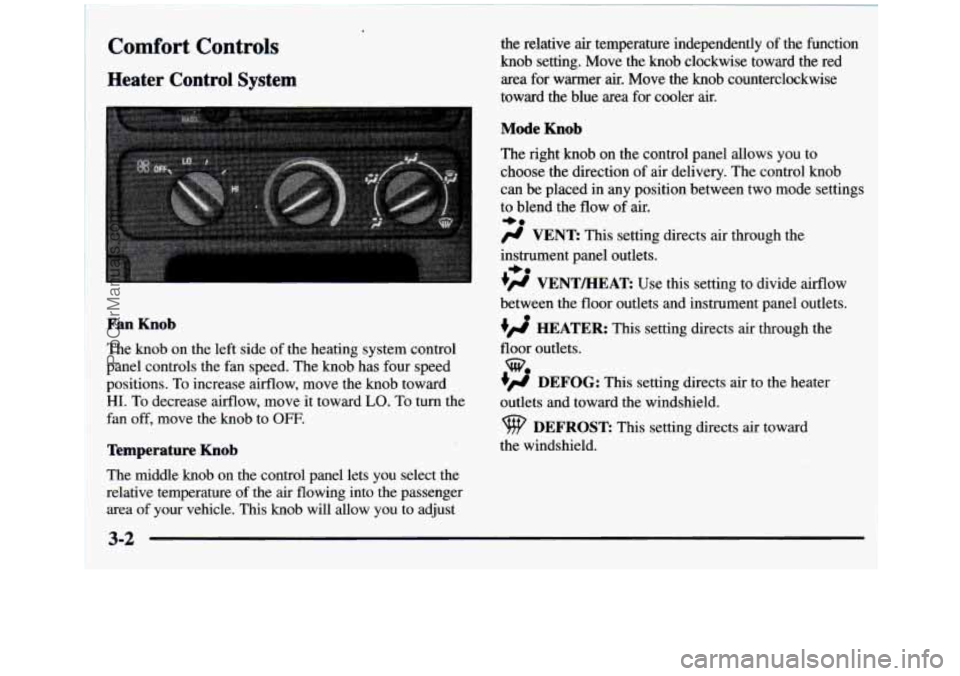
Fan Knob
The knob on the left side of the heating system control
panel controls the fan speed. The knob has four speed
positions. To increase airflow, move the knob toward
HI. To decrease airflow, move it toward LO. To turn the
fan off, move
the knob to OFF.
Temperature Knob
The middle knob on the control panel lets you select the
relative temperature of the air flowing into the passenger
area of your vehicle. This knob will allow you to adjust
3-2
ProCarManuals.com
Page 155 of 436
Heater and Air Conditioning Control
System
(If Equipped)
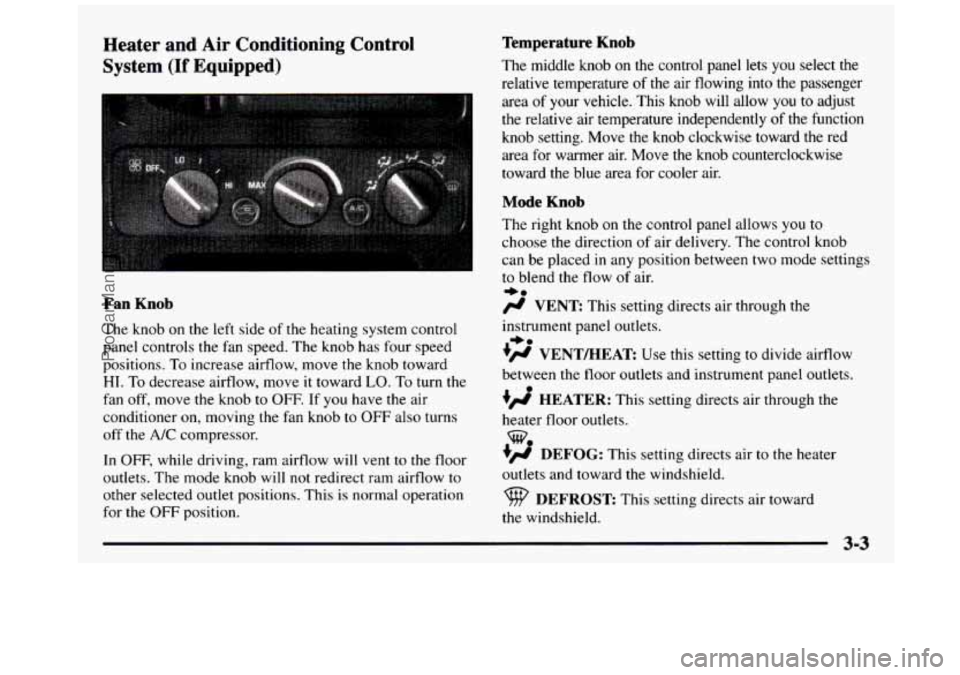
Fan Knob
The knob on the le.ft side of the heating system control
panel controls the fan speed. The knob has four speed
positions. To increase airflow, move
the knob toward
HI. To decrease airflow, move it toward LO. To turn the
fan off, move the knob to OFF. If you have the air
conditioner
on, moving the fan knob to OFF also turns
off the A/C compressor.
In
OFF, while driving, ram airflow will vent to the floor
outlets. The mode knob will not redirect ram airflow
to
other selected outlet positions. This is normal operation
for the
OFF position.
Temperature Knob
The middle knob on the control panel lets you select the
relative temperature
of the air flowing into the passenger
area
of your vehicle. This knob will allow you to adjust
the relative air temperature independently of the function
knob setting. Move the
knob clockwise toward the red
area
for warmer air. Move the knob counterclockwise
toward the blue area for cooler air.
Mode Knob
The right knob on the control panel allows you to
choose the direction of air delivery. The control knob
can be placed in any position between two mode settings
to blend the flow of air.
e0
/J VENT: This setting directs air through the
instrument panel outlets.
?# VENT/HEAT Use this setting to divide airflow
between the
floor outlets and instrument panel outlets.
+’ HEATER: This setting directs air through the
heater floor outlets.
+’ DEFOG: This setting directs air to the heater
outlets and toward
the windshield.
*.
w.
DEFROST This setting directs air toward
the windshield.
ProCarManuals.com
Page 157 of 436
Ventilation System
For mild outside temperatures when little heating or
cooling is needed, use
VENT to direct outside air
through your vehicle.
Air will flow through the
instrument panel outlets.
Your vehicle’s ventilation system supplies outside
air to
the inside
of your vehicle when it is moving. With the side
windows closed,
air will flow into the front air inlet grrlles,
through the vehicle, and out the
air exhaust valves.
Outside air will also enter the vehicle when the heater or
the air conditioning fan is running, unless you have the
recirculation button pushed in. For more information on
the recirculation button, see “Air Conditioning” earlier
in this section.
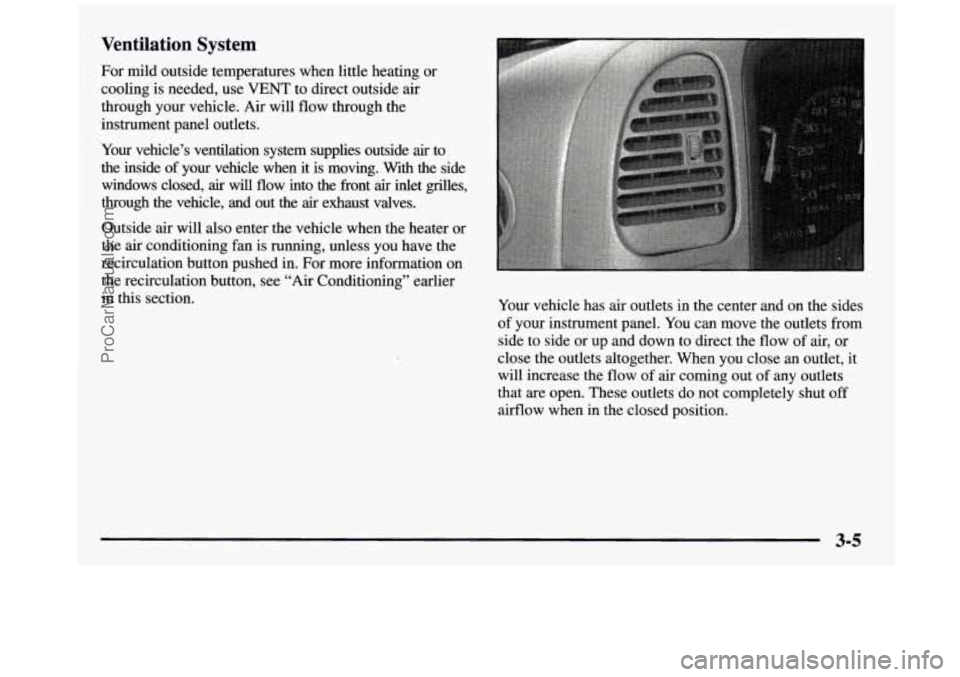
Your vehicle has air outlets in the center and on the sides
of your instrument panel. You can move the outlets from
side to side or up and down to direct the flow of air, or
close the outlets altogether. When you close
an outlet, it
will increase the flow
of air coming out of any outlets
that are open. These outlets do not completely shut
off
airflow when in the closed position.
ProCarManuals.com
Page 234 of 436
Turn Signals When Towing a Trailer
The arrows on your instrument panel will flash
whenever you signal a turn or lane change. Properly
hooked up, the trailer lamps will also flash, telling other
drivers you’re about to turn, change lanes or stop.
When towing a trailer, the arrows on your instrument
panel will flash for turns even if the bulbs
on the trailer
are burned out. Thus, you may think drivers behind you
are seeing your signal when they are not. It’s important
to check occasionally to be sure the trailer bulbs are
still working.
Driving On Grades
Reduce speed and shift to a lower gear before you start
down a long or steep downgrade. If you don’t shift
down,
you might have to use your brakes so much that
they would get hot and no longer work well.
On
a long uphill grade, shift down and reduce your
speed
to around 45 mph (70 km/h) to reduce the
possibility of engine and transmission overheating. If you have an automatic transmission, you can tow
in
AUTOMATIC OVERDRIVE (a). You
may want to
shift the transmission to THIRD
(3) or, if necessary, a
lower gear selection if the transmission shifts too often
(e.g., under heavy loads and/or hilly conditions).
If you have a manual transmission and you are towing a
trailer, it’s better not to use
FIFTH (5) gear. Just drive in
FOURTH
(4) gear (or, as you need to, a lower gear).
When towing at high altitude on steep uphill grades,
consider the following: Engine coolant will boil at a
lower temperature than at normal altitudes. If
you turn
your engine off immediately after towing at high altitude
on steep uphill grades, your vehicle may show signs
similar to engine overheating.
To avoid this, let the
engine run while parked (preferably on level ground)
with the automatic transmission in
PARK (P) (or the
manual transmission out of gear and the parking brake
applied) for a few minutes before turning the engine
off.
If you do get the overheat warning, see “Engine
Overheating”
in the Index.
4-56
ProCarManuals.com
Page 251 of 436
Rear Towing
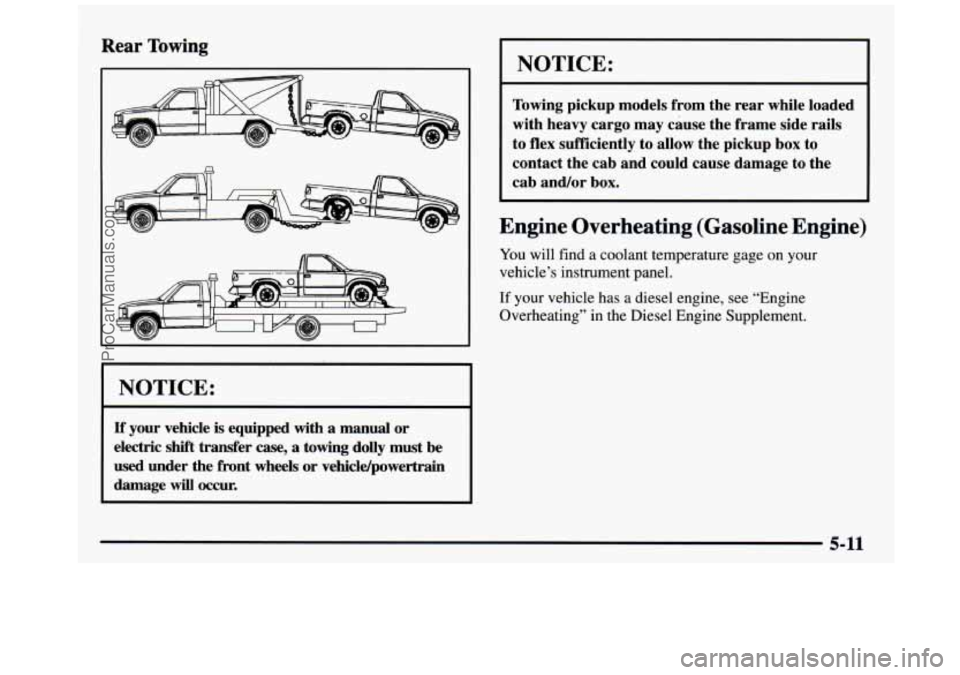
I NOTICE:
If your vehicle is equipped with a manual or
electric shift transfer
case, a towing dolly must be
used under the front wheels or vehicldpowertrain
damage
will occur.
NOTICE:
Towing pickup models from the rear while loaded
with heavy cargo may cause the frame side rails
to flex sufficiently
to allow the pickup box to
contact the cab and could cause damage to the
cab and/or box.
Engine Overheating (Gasoline Engine)
You will find a coolant temperature gage on your
vehicle’s instrument panel.
If your vehicle has a diesel engine, see “Engine
Overheating” in the Diesel Engine Supplement.
5-11
ProCarManuals.com
Page 279 of 436
Adding Equipment to the Outside of
Your Vehicle
Things you might add to the outside of your vehicle can
affect the airflow around it. This may cause wind noise
and affect windshield washer performance. Check with
your GM dealer before adding equipment to
the outside
of your vehicle.
Fuel (Gasoline Engine)
If your vehicle has a diesel engine, see “Diesel Fuel
Requirements and Fuel System”
in the Diesel Engine
Supplement. For vehicles with gasoline engines, please
read this.
Use regular unleaded gasoline rated at
87 octane or
higher. At a minimum, it should meet specifications
ASTM D4814 in the United States and CGSB
3.5-M93
in Canada. Improved gasoline specifications have been
developed by
the American Automobile Manufacturers
Association (AAMA) for better vehicle performance
and engine protection. Gasolines meeting
the AAMA
specification could provide improved driveability and
emission control system protection compared to
other gasolines. Be sure
the posted octane is at least 87. If
the octane is
less than
87, you may get a heavy knocking noise when
you drive. If it’s bad enough, it can damage your engine.
If you’re using fuel rated at
87 octane or higher and you
still hear heavy knocking, your engine needs service.
But don’t worry if you hear a little pinging noise when
you’re accelerating or driving up a
hill. That’s normal,
and
you don’t have to buy a higher octane fuel to get rid
of pinging. It’s the heavy, constant knock that means
you have a problem.
If your vehicle is certified to meet California Emission
Standards (indicated
on the underhood tune-up label),
it is designed to operate
on fuels that meet California
specifications. If such fuels are
not available in states
adopting California emissions standards, your vehicle
will operate satisfactorily
on fuels meeting federal
specifications, but emission control system performance
may be affected. The malfunction indicator lamp
on
your instrument panel may turn on andor your vehicle
may fail a smog-check test. If this occurs, return
to your
authorized GM dealer for diagnosis
to determine the
cause of failure. In the event it is determined that the
cause of
the condition is the type of fuels used, repairs
may not be covered by your warranty.
ProCarManuals.com
Page 280 of 436
Some gasolines that are not reformulated for low
emissions contain
an octane-enhancing additive called
methylcyclopentadlenyl manganese tricarbonyl
(MMT);
ask your service station operator whether or not his fuel
contains
"T. General Motors does not recommend the
use of such gasolines.
If fuels containing MMT are used,
spark plug life may
be reduced and your emission control
system performance may
be affected. The malfunction
indicator lamp on your instrument panel may
turn on. If this
occurs, return to your authorized GM dealer for service.
To provide cleaner air, all gasolines in the United States
are now required to contain additives that
will help prevent
deposits from forming
in your engine and fuel system,
allowing your emission control system to function
properly. Therefore, you should not have to add anything
to the fuel. In addition, gasolines containing oxygenates,
such
as ethers and ethanol, and reformulated gasolines
may
be available in your area to help clean the air. General
Motors recommends that you use these gasolines
if they
comply
with the specifications described earlier.
NOTICE:
Your vehicle was not designed for fuel that
contains methanol. Don't use it. It can corrode
NOTICE: (Continued)
I NOTICE: (Continued) I
metal parts in your fuel system and also damage
plastic and rubber parts. That damage wouldn't
be covered under your warranty.
Fuels in Foreign Countries -- Gasoline
Engines
If you plan on driving in another country outside the
United States or Canada, the proper fuel may be hard
to find. Never use leaded gasoline or
any other fuel not
recommended
in the previous text on fuel. Costly repairs
caused
by use of improper fuel wouldn't be covered by
your warranty.
To check on fuel availability, ask an auto club, or
contact
a major oil company that does business in the
country where you'll be driving.
You can also write us
at the following address for
advice. Just tell
us where you're going and give your
Vehicle Identification Number (VIN).
General Motors International Product Center 1908 Colonel Sam Drive
Oshawa, Ontario
L 1 H 8P7
6-4
ProCarManuals.com
Page 339 of 436
Cleaning the Top of the Instrument Panel
Use only mild soap and water to clean the top surfaces
of the instrument panel. Sprays containing silicones or
waxes may cause annoying reflections in the windshield
and even make it difficult to see through the windshield
under certain conditions.
Care of Safety Belts
Keep belts clean and dry.
A CAUTION:
Do not bleach or dye safety belts. If you do, it
may severely weaken them. In a crash, they
might not be able to provide adequate protection. Clean safety belts only with mild soap and
lukewarm water.
Glass
Glass should be cleaned often. GM Glass Cleaner (GM
Part No. 1050427) or a liquid household glass cleaner
will remove normal tobacco smoke and dust films on
interior glass.
I
Don’t use abrasive cleaners on glass, because they may
cause scratches. Avoid placing decals on the inside rear
window, since they may have to be scraped
off later.
If abrasive cleaners are used on the inside
of the rear
window, an electric defogger element may be damaged.
Any temporary license should not be attached across the
defogger grid.
Cleaning the Outside of the
Windshield and Wiper Blades
If the windshield is not clear after using the windshield
washer, or if the wiper blade chatters when running,
wax, sap or other material may be on the blade
or windshield.
Clean the outside of the windshield with
GM Windshield
Cleaner, Bon
Ami@ (non-scratching glass cleaning
powder),
GM Part No. 1050011 or equivalent. The
windshield
is clean if beads do not form when you rinse
it with water.
Grime from the windshield will stick to
the wiper blades
and affect their performance. Clean the blade by wiping
vigorously with a cloth soaked in full-strength windshield
washer solvent. Then rinse the blade with water.
Check the wiper blades and clean them as necessary;
replace blades that look worn.
6-63
ProCarManuals.com
Page 345 of 436
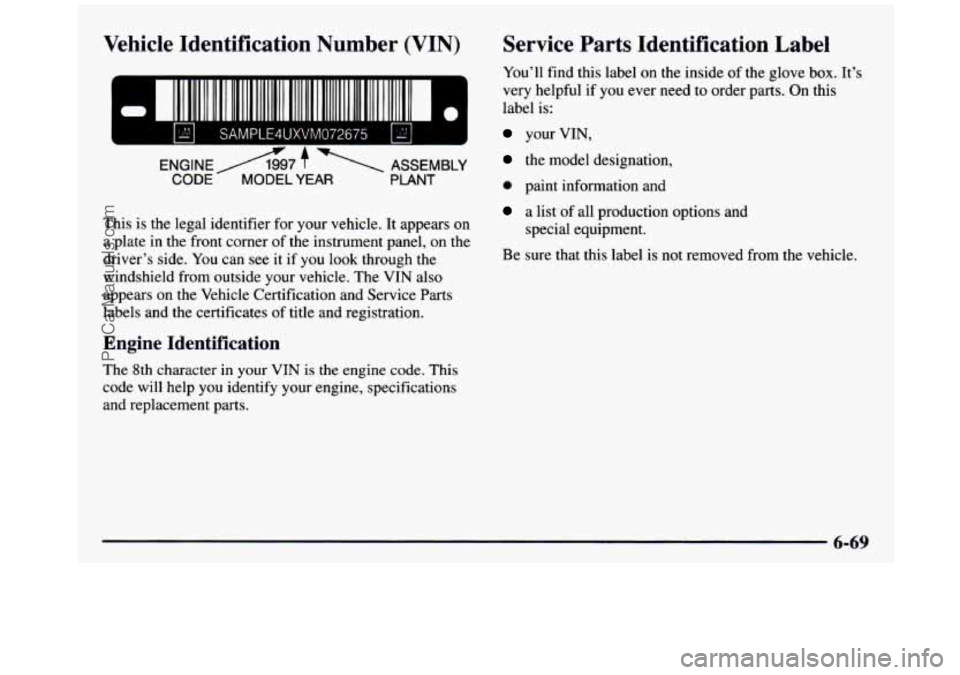
Vehicle Identification Number (VIN)
111 111 111111 II
SAMPLE4UXVM072675 IS1 I
ENGINEA7 f 1 ASSEMBLY
CODE MODEL YEAR PLANT
This is the legal identifier for your vehicle. It appears on
a plate in the front corner of the instrument panel, on the
driver’s side. You can see
it if you look through the
windshield from outside your vehicle. The VIN also
appears on the Vehicle Certification
and Service Parts
labels and the certificates
of title and registration.
Engine Identification
The 8th character in your VIN is the engine code. This
code will help you identify your engine, specifications
and replacement parts.
Service Parts Identification Label
You’ll find this label on the inside of the glove box. It’s
very helpful
if you ever need to order parts. On this
label is:
your VIN,
the model designation,
0 paint information and
a list of all production options and
special equipment.
Be sure that this label is not removed from the vehicle.
6-69
ProCarManuals.com