DIC GMC SIERRA 2003 User Guide
[x] Cancel search | Manufacturer: GMC, Model Year: 2003, Model line: SIERRA, Model: GMC SIERRA 2003Pages: 408, PDF Size: 2.58 MB
Page 73 of 408

restraint in the right front passenger seat unless your
vehicle has the passenger sensing system and the
passenger air bag status indicator shows off. Never put
a rear-facing child restraint in the right front passenger
seat unless the air bag is off.
{CAUTION:
A child in a rear-facing child restraint can be
seriously injured or killed if the right front
passenger’s air bag inates. This is because
the back of the rear-facing child restraint
would be very close to the inating air bag.
Be sure the air bag is off before using a
rear-facing child restraint in the right front seat
position.
Even though the passenger sensing system is
designed to turn off the passenger’s frontal air
bag if the system detects a rear-facing child
restraint, no system is fail-safe, and no one
can guarantee that an air bag will not deploy
under some unusual circumstance, even
CAUTION: (Continued)
CAUTION: (Continued)
though it is turned off. General Motors,
therefore, recommends that rear-facing child
restraints be secured in the rear seat whenever
possible, even if the air bag is off.
The passenger sensing system is designed to turn off
the right front passenger’s frontal air bag if:
•the right front passenger seat is unoccupied
•the system determines that an infant is present in a
rear-facing infant seat
•the system determines that a small child is present
in a forward-facing child restraint
•the system determines that a small child is present
in a booster seat
•a right front passenger takes his/her weight off of
the seat for a period of time
•the right front passenger seat is occupied by a
smaller person, such as a child who has outgrown
child restraints
•the air bag off switch is in the off position
•or if there is a critical problem with the air bag
system or the passenger sensing system
1-67
2003 - Sierra Denali
Page 74 of 408

When the passenger’s frontal air bag has been turned
off either by the passenger sensing system or by the air
bag off switch, the off indicator will light and stay lit to
remind you that the air bag is off.
The passenger sensing system is designed to turn off
the passenger’s frontal air bag when a rear facing infant
seat, a forward-facing child restraint or a booster seat
is detected. If the child restraint has been installed
and the on indicator is lit, turn the vehicle off, remove
the child restraint from the vehicle and reinstall the
restraint following the child restraint manufacturer’s
directions and refer toSecuring a Child Restraint in the
Right Front Seat Position on page 1-49of this manual.
If after reinstalling the child restraint and restarting
the vehicle, the on indicator is still lit, secure the child in
the child restraint in a rear seat position in the vehicle
and check with your dealer.
The passenger sensing system is designed to enable
(may inflate) the right front passenger’s frontal air
bag anytime the system senses that a person of adult
size is sitting properly in the right front passenger’s seat.
When the passenger sensing system has allowed the
air bag to be enabled, the on indicator will light and stay
lit to remind you that the air bag is active.For some children who have outgrown child restraints
and for very small adults, the passenger sensing system
may or may not turn off the right front passenger’s
frontal air bag, depending upon the person’s seating
posture and body build. Everyone in your vehicle
who has outgrown child restraints should wear a safety
belt properly—whether or not there is an air bag
for that person.
If a person of adult-size is sitting in the right front
passenger’s seat, but the off indicator is lit, it could be
because that person isn’t sitting properly in the seat
or the air bag off switch is in the off position. If this
happens and the switch is in the proper position, turn
the vehicle off and ask the person to place the seatback
in the full upright position, then sit upright in the seat,
centered on the seat cushion, with the person’s
legs comfortably extended. Restart the vehicle and have
the person remain in this position for about two
minutes. This will allow the system to detect that person
and then enable the passenger’s air bag.
1-68
2003 - Sierra Denali
Page 82 of 408

At times you may notice a decrease in range.
This is normal for any remote keyless entry system.
If the transmitter does not work or if you have to stand
closer to your vehicle for the transmitter to work,
try this:
Check the distance. You may be too far from your
vehicle. You may need to stand closer during
rainy or snowy weather.
Check the location. Other vehicles or objects may
be blocking the signal. Take a few steps to the
left or right, hold the transmitter higher, and
try again.
Check to determine if battery replacement or
resynchronization is necessary. See“Battery
Replacement”and‘‘Resynchronization’’under
Remote Keyless Entry System Operation on
page 2-4.
If you are still having trouble, see your dealer or a
qualied technician for service.
Remote Keyless Entry System
Operation
You can lock and unlock your doors from about 3 feet
(1 m) up to 100 feet (30 m) away using the remote
keyless entry transmitter supplied with your vehicle.
UNLOCK:Pressing this button once will unlock
the driver’s door. The interior lamps will come on.
Pressing UNLOCK again within three seconds will cause
the remaining doors to unlock.
You can choose different feedback options for each
press of the UNLOCK button. SeeDIC Operation and
Displays on page 3-42for more information.
LOCK:Pressing this button once will lock all of the
doors. You can choose different feedback options
for each press of the LOCK button. SeeDIC Operation
and Displays on page 3-42for more information.
Operating the keyless entry transmitter may interact with
the theft-deterrent system. SeeContent Theft-Deterrent
on page 2-13andDIC Operation and Displays on
page 3-42for more information.
Remote Alarm
When the horn symbol on the keyless entry transmitter
is pressed, the horn will sound and the headlamps
and taillamps willash for up to 30 seconds. This can
be turned off by pressing the horn button again, waiting
for 30 seconds, or starting the vehicle.
2-4
2003 - Sierra Denali
Page 85 of 408

1. lock the door from the
inside by sliding the
manual lock lever
rearward. To unlock
the door, slide the
manual lock lever
forward.
Power Door Locks
If your vehicle is equipped
with power door locks,
press the raised side of the
switch, with the lock
symbol, on either front
door to lock all the doors
at once.
Press the recessed side of the switch with the unlock
symbol, to unlock all the doors at once.The power door locks will operate at any time even
when the ignition is off.
Operating the power locks may interact with the
theft-deterrent system (if equipped). SeeContent
Theft-Deterrent on page 2-13.
Programmable Automatic
Door Locks
Your vehicle is equipped with an automatic lock/unlock
feature which enables you to program your vehicle’s
power door locks. You can program this feature through
the Driver Information Center (DIC), or by the following
method.
Programmable Locking Feature
The following is the list of available programming
options:
Mode 1:All doors lock when the transmission is shifted
into gear. This is the mode that is pre-programmed in
the factory for your vehicle.
Mode 2:All doors lock when the vehicle speed is
greater than 8 mph (13 km/h).
Mode 3:No automatic door locking.
2-7
2003 - Sierra Denali
Page 86 of 408

The following instructions tell you how to change the
automatic door lock mode. Choose one of the three
programming options listed above before entering the
program mode. To enter the program mode, do the
following:
1. Begin with the ignition off. Then pull the turn
signal/multifunction lever toward you and hold
it there while you perform the next step.
2. Turn the key to RUN then back to LOCK twice.
Then, with the key in LOCK, release the turn
signal/multifunction lever. Once you do this, the
doors will lock and unlock, the horn will chirp twice,
and a 30-second timer will begin. You are now
ready to program the automatic door lock feature.
3. Press the door lock switch once. You will hear one,
two, or three chimes. The number of chimes tells
you which lock mode is currently selected. Continue
to press the door lock switch until the number of
chimes that you hear matches the number of
the mode that you want. If you take longer than 30
seconds, the locks will automatically lock and
unlock and the horn will chirp twice to indicate that
you have left the program mode. If this occurs,
you can repeat the procedure beginning with Step 1
to re-enter the programming mode.
You can exit the program mode any time by turning the
ignition to RUN (the doors will automatically lock and
unlock and the horn will chirp twice to indicate that you
are leaving the program mode). If the lock/unlockswitches are not pressed while in the programming
mode, the current automatic settings will not be
modied.
See your dealer for more information.
Programmable Unlocking Feature
The following is the list of available programming
options:
Mode 1:Driver’s door unlocks when the transmission is
shifted into PARK (P).
Mode 2:All doors unlock when the transmission is
shifted into PARK (P). This is the mode that is
pre-programmed in the factory for your vehicle.
Mode 3:All doors unlock when the key is removed
from the ignition.
Mode 4:No automatic door unlock.
The following instructions tell you how to change the
automatic door unlock mode. Choose one of the
four programming options listed above before entering
the program mode. To enter the program mode, do
the following:
1. Begin with the ignition off. Then pull the turn
signal/multifunction lever toward you and hold
it there while you perform the next step.
2. Turn the key to RUN and LOCK twice. Then, with
the key in LOCK, release the turn
signal/multifunction lever. Once you do this, the
2-8
2003 - Sierra Denali
Page 87 of 408

doors will lock and unlock, the horn will chirp twice,
and a 30-second timer will begin. You are now
ready to program the automatic door unlock feature.
3. Press the door unlock switch once. You will hear
one, two, three, or four chimes. The number of
chimes tells you which unlock mode is currently
selected. Continue to press the door unlock switch
until the number of chimes that you hear matches the
number of the mode that you want. If you take longer
than 30 seconds, the locks will automatically lock and
unlock and the horn will chirp twice to indicate that
you have left the program mode. If this occurs, you
can repeat the procedure beginning with Step 1 to
re-enter the programming mode.
You can exit the program mode any time by turning the
ignition to RUN (the doors will automatically lock and
unlock and the horn will chirp twice to indicate that you
are leaving the program mode). If the lock/unlock
switches are not pressed while in the programming
mode, the current automatic settings will not be
modied.
See your dealer for more information.
Rear Doors
Your vehicle is equipped with rear access doors that
allow easier access to the rear area of the extended cab.To open a rear access
door from the outside,rst
open the front door.
Then, use the handle
located on the front edge
of the rear access door
to open it.
You must fully close a rear access door before you can
close the front door.
To open a rear access
door from the inside, the
front door must be opened
rst. Then, use the
handle located on the
inside of the rear access
door to open it.
2-9
2003 - Sierra Denali
Page 92 of 408

Once the system is armed, if a door is opened without
the key or the remote keyless entry transmitter, the
alarm will go off. Depending on how you have
programmed the alarm in the secondary information
center, the horn may sound, the headlamps mayash
or both the headlamps and the horn will activate.
Remember, the theft-deterrent system won’t activate if
you lock the doors with a key or use the manual
door lock. It activates only if you use a power door lock
switch with the door open, or with the remote keyless
entry transmitter. You should also remember that
you can start your vehicle with the correct ignition key if
the alarm has been set off.
Here’s how to avoid setting off the alarm by accident:
If you don’t want to activate the theft-deterrent
system, the vehicle should be locked with the door
key after the doors are closed.
Always unlock a door with a key, or use the remote
keyless entry transmitter. Unlocking a door any
other way will set off the alarm if the system
has been armed.
If you set off the alarm by accident, unlock any door
with the key. You can also turn off the alarm by pressing
UNLOCK on the remote keyless entry transmitter or
by placing the key in the ignition and turning it to
START.
Testing the Alarm
The alarm can be tested by following these steps:
1. From inside the vehicle, lower the driver’s window
and open the driver’s door.
2. Activate the system by locking the doors with the
power door lock switch while the door is open, or
with the remote keyless entry transmitter.
3. Get out of the vehicle, close the door and wait for
the security message to go out.
4. Then reach in through the window, unlock the door
with the manual door lock and open the door. This
should set off the alarm.
If the alarm does not sound and the headlamps do not
ash, you may have the feature turned off. SeeDIC
Operation and Displays on page 3-42for more
information.
2-14
2003 - Sierra Denali
Page 97 of 408

Automatic Transmission Operation
Your vehicle is equipped with an automatic transmission
that features an electronic shift position indicator
located within the instrument panel cluster. This display
is powered anytime the shift lever is capable of being
moved out of PARK (P). SeeFuses and Circuit Breakers
on page 5-91.
There are several different positions for your shift lever.
PARK (P):This position locks your wheels. It’s the
best position to use when you start your engine because
your vehicle can’t move easily.
{CAUTION:
It is dangerous to get out of your vehicle if the
shift lever is not fully in PARK (P) with the
parking brakefirmly set. Your vehicle can roll.
Don’t leave your vehicle when the engine is
running unless you have to. If you have left the
engine running, the vehicle can move
suddenly. You or others could be injured.
CAUTION: (Continued)
CAUTION: (Continued)
To be sure your vehicle won’t move, even
when you’re on fairly level ground, always set
your parking brake and move the shift lever to
PARK (P). See“Shifting Into Park (P)”in the
Index. If you’re pulling a trailer, see“Towing a
Trailer”in the Index.
REVERSE (R):Use this gear to back up.
Notice:Shifting to REVERSE (R) while your vehicle
is moving forward could damage your transmission.
Shift to REVERSE (R) only after your vehicle is
stopped.
To rock your vehicle back and forth to get out of snow,
ice or sand without damaging your transmission,
seeIf You Are Stuck: In Sand, Mud, Ice or Snow on
page 4-44.
NEUTRAL (N):In this position, your engine doesn’t
connect with the wheels. To restart when you’re already
moving, use NEUTRAL (N) only. Also, use
NEUTRAL (N) when your vehicle is being towed.
2-19
2003 - Sierra Denali
Page 106 of 408
Mirrors
Automatic Dimming Rearview Mirror
with OnStar
®, Compass and
Temperature Display
Your vehicle may have this feature. When on, an
electrochromic mirror automatically dims to the proper
level to minimize glare from lights behind you after dark.
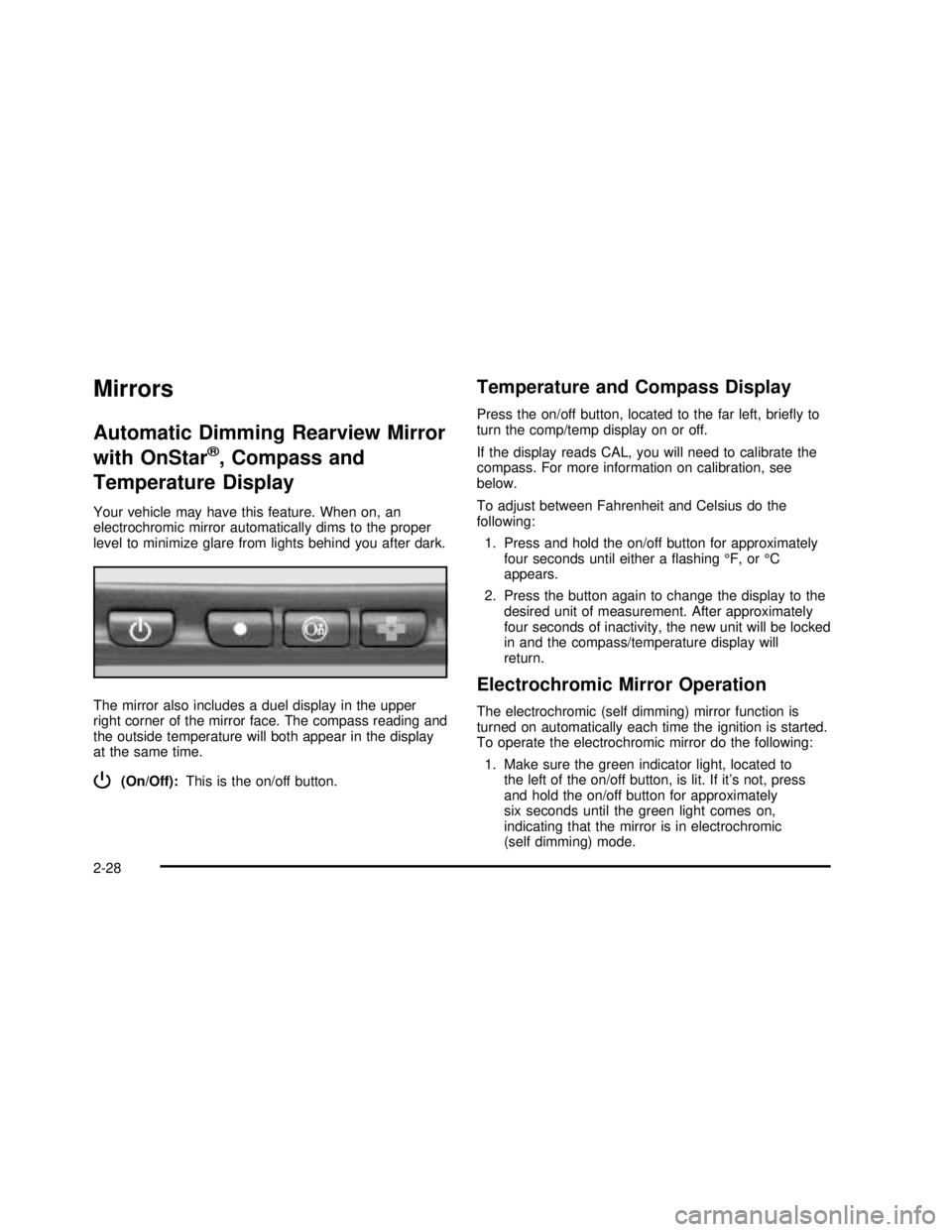
The mirror also includes a duel display in the upper
right corner of the mirror face. The compass reading and
the outside temperature will both appear in the display
at the same time.
P(On/Off):This is the on/off button.
Temperature and Compass Display
Press the on/off button, located to the far left, brieyto
turn the comp/temp display on or off.
If the display reads CAL, you will need to calibrate the
compass. For more information on calibration, see
below.
To adjust between Fahrenheit and Celsius do the
following:
1. Press and hold the on/off button for approximately
four seconds until either aashing°F, or°C
appears.
2. Press the button again to change the display to the
desired unit of measurement. After approximately
four seconds of inactivity, the new unit will be locked
in and the compass/temperature display will
return.
Electrochromic Mirror Operation
The electrochromic (self dimming) mirror function is
turned on automatically each time the ignition is started.
To operate the electrochromic mirror do the following:
1. Make sure the green indicator light, located to
the left of the on/off button, is lit. If it’s not, press
and hold the on/off button for approximately
six seconds until the green light comes on,
indicating that the mirror is in electrochromic
(self dimming) mode.
2-28
2003 - Sierra Denali
Page 107 of 408

2. Turn off the electrochromic mirror function by
pressing and holding the on/off button for
approximately six seconds until the green indicator
light turns off.
Compass Variance
The mirror is set in zone eight upon leaving the factory.
It will be necessary to adjust the compass to
compensate for compass variance if you live outside of
zone eight. Under certain circumstances, as during a
long distance cross-country trip, it will be necessary to
adjust for compass variance. Compass variance is
the difference between earth’s magnetic north and true
geographic north. If not adjusted to account for
compass variance, your compass could give false
readings.
To adjust for compass variance do the following:
1. Find your current location and variance zone
number on the following zone map.2. Press and hold the on/off button until a Z and a
zone number appears in the display. The compass
is now in zone mode.
3. Keep pressing the on/off button until the desired
zone number appears in the display. Release the
button. After approximately four seconds of
inactivity, the new zone number will be locked in
and the comp/temp display will return.
4. Calibrate the compass as described below.
2-29
2003 - Sierra Denali