ECO mode GMC SIERRA 2003 User Guide
[x] Cancel search | Manufacturer: GMC, Model Year: 2003, Model line: SIERRA, Model: GMC SIERRA 2003Pages: 408, PDF Size: 2.58 MB
Page 162 of 408
Driver Information Center (DIC)
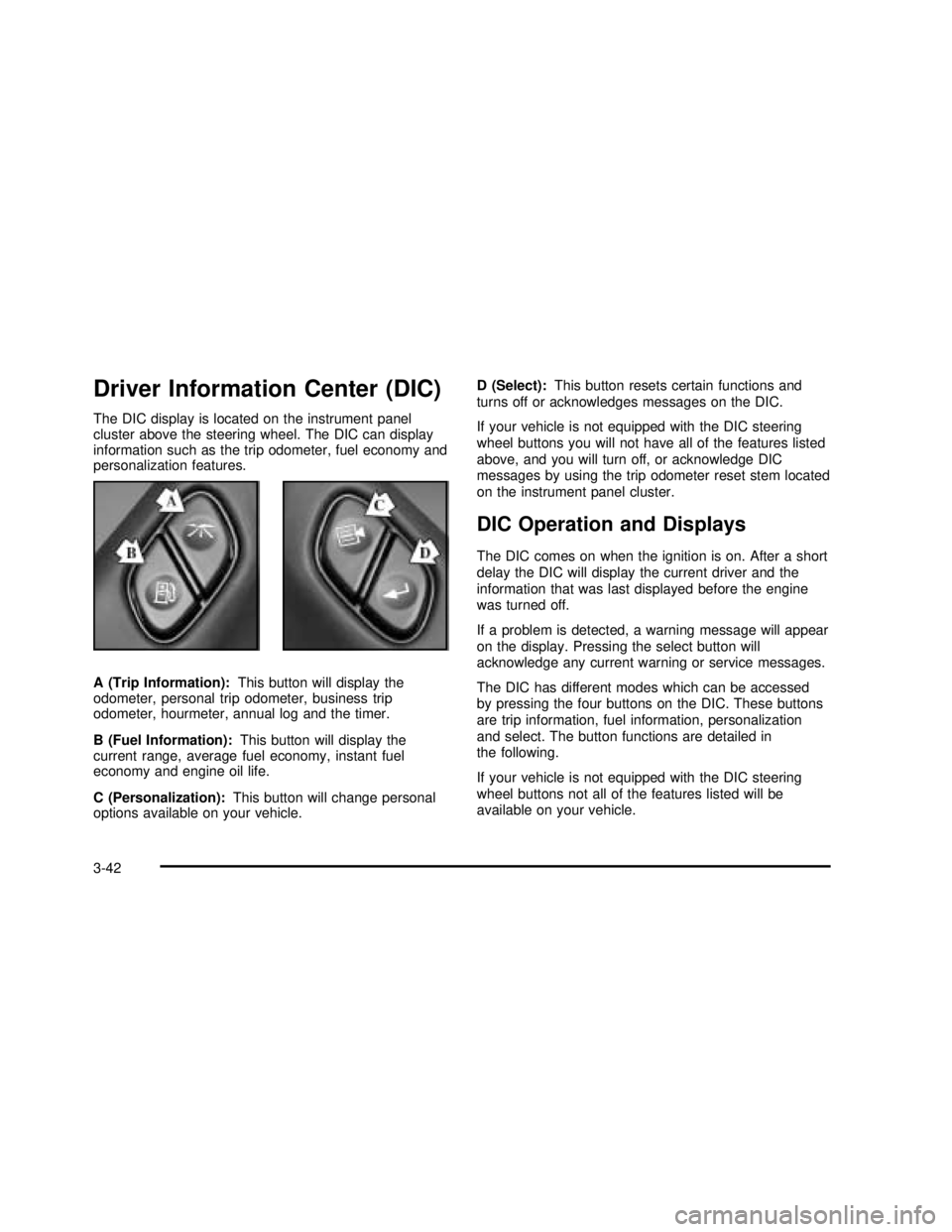
The DIC display is located on the instrument panel
cluster above the steering wheel. The DIC can display
information such as the trip odometer, fuel economy and
personalization features.
A (Trip Information):This button will display the
odometer, personal trip odometer, business trip
odometer, hourmeter, annual log and the timer.
B (Fuel Information):This button will display the
current range, average fuel economy, instant fuel
economy and engine oil life.
C (Personalization):This button will change personal
options available on your vehicle.D (Select):This button resets certain functions and
turns off or acknowledges messages on the DIC.
If your vehicle is not equipped with the DIC steering
wheel buttons you will not have all of the features listed
above, and you will turn off, or acknowledge DIC
messages by using the trip odometer reset stem located
on the instrument panel cluster.
DIC Operation and Displays
The DIC comes on when the ignition is on. After a short
delay the DIC will display the current driver and the
information that was last displayed before the engine
was turned off.
If a problem is detected, a warning message will appear
on the display. Pressing the select button will
acknowledge any current warning or service messages.
The DIC has different modes which can be accessed
by pressing the four buttons on the DIC. These buttons
are trip information, fuel information, personalization
and select. The button functions are detailed in
the following.
If your vehicle is not equipped with the DIC steering
wheel buttons not all of the features listed will be
available on your vehicle.
3-42
2003 - Sierra Denali
Page 163 of 408

Trip Information Button
Use the trip information button to scroll through the
ODOMETER, PERSONAL TRIP ON/OFF, BUSINESS
TRIP ON/OFF, HOURMETER, ANNUAL LOG and
TIMER. If the personal trip and/or the business trip are
set to ON, you will also be able to scroll through
more messages. SeePersonal TripandBusiness Trip
next for more information.
If your vehicle is not equipped with the DIC steering
wheel buttons you can select the trip information
by pressing the trip odometer reset stem on the
instrument panel cluster.
Personal Trip
If the PERSONAL TRIP is on (turn it on or off by
pressing the select button) you will also be able to scroll
through the following:
•PERSONAL: XX MI—This shows the current
distance traveled since the last reset for the
personal trip odometer in either miles or kilometers.
•PERSONAL: XX.X GAL—This shows the amount
of fuel used for the personal trip.
•PERSONAL: XX.X MPG—This shows the amount
of fuel used for the personal trip.
•PERSONAL: AVG MPH—This shows the vehicle’s
average speed for the personal trip.
•PERSONAL: % ANNUAL—This shows the ratio of
personal trip miles to annual miles as a percent.
You can reset the personal trip odometer by pressing
and holding the trip odometer reset stem.
Business Trip
If the BUSINESS TRIP is on (turn it on or off by
pressing the select button) you will also be able to scroll
through the following:
•BUSINESS: XX MI—This shows the current
distance traveled since the last reset for the
business trip odometer in either miles or kilometers.
•BUSINESS: XX.X MPG—This shows the amount
of fuel used for the business trip.
•BUSINESS: XX.X GAL—This shows the amount
of fuel used for the business trip.
•BUSINESS: AVG MPH—This shows the vehicle’s
average speed for the business trip.
•BUSINESS: % ANNUAL—This shows the ratio of
business trip miles to annual miles as a percent.
To reset the personal or business trip information, do
the following: press and hold select button for two
seconds while in one of the personal or business trip
modes. This will reset all of the information for the
personal or business trip, or if your vehicle does not
have the DIC steering wheel control buttons, press the
reset stem on the instrument panel cluster.
3-43
2003 - Sierra Denali
Page 171 of 408

If you choose English, all information will be displayed
in English units. For example, distance in miles and fuel
economy in miles per gallon.
Choose one of the two options and press the
personalization button while it is displayed on the DIC to
select it and end out of the personalization options.
Display Language
To select your personalization for display language,
press the select button while DISPLAY LANGUAGE is
displayed on the DIC. Pressing the select button
will scroll through the following languages:
•English
•French
•Spanish
You can also scroll through the different languages by
pressing and holding the trip reset stem for four
seconds, as long as you are in the season odometer
mode.
Choose one of the three options and press the
personalization button while it is displayed on the DIC to
select it.
If you accidentally choose a language that you don’t
want or understand, press and hold the personalization
button and the trip information button at the same
time. The DIC will begin scrolling through the languages
in their particular language. English will be in English,French will be in French and so on. When you see the
language that you would like, release both buttons.
The DIC will then display the information in the language
you chose.
Select Button
The select button is used to reset certain functions and
turn off or acknowledge messages on the DIC display.
The select button also toggles through the options
available in each personalization menu. For example, this
button will reset the trip odometers, turn off the FUEL
LEVEL LOW message, and toggle through the languages
you can select the DIC to display information in.
DIC Warnings and Messages
Warning messages are displayed on the DIC to notify
the driver that the status of the vehicle has changed and
that some action may be needed by the driver to
correct the condition. If there is more than one message
that needs to be displayed they will appear one after
another. Some messages may not require immediate
action but you should press the select button to
acknowledge that you received the message and clear it
from the display because they are more urgent. These
messages require action before they can be removed
from the DIC display. The following are the possible
messages that can be displayed and some information
about them.
3-51
2003 - Sierra Denali
Page 172 of 408

CHANGE ENGINE OIL
This message is displayed when the engine oil needs to
be changed.
When you change the engine oil, be sure to reset the
CHANGE ENGINE OIL message. SeeEngine Oil, When
to ChangeunderEngine Oil on page 5-13.
OIL LIFE RESET
This message will appear on the display for about 10
seconds after resetting the change engine oil message.
LOW COOLANT LEVEL
If the engine coolant level is low, this message will
appear on the DIC. Adding coolant will clear the
message.
ENGINE COOLANT HOT
If the cooling system temperature gets hot, this message
will appear in the DIC. Stop the vehicle and let the
engine idle in PARK (P) to allow the coolant to reach a
safe temperature. This message will clear when the
coolant temperature drops to safe operating
temperature.
ENGINE OVERHEATED
If the engine cooling system reaches unsafe
temperatures for operation, this message will
appear in the DIC and you will hear a chime.Stop and turn off the vehicle as soon as it is safe to do
so to avoid severe damage. This message will clear
when the engine has cooled to a safe operating
temperature.
OIL PRESSURE LOW
If low oil pressure levels occur, this message will be
displayed on the DIC and a chime will sound. Stop the
vehicle as soon as safely possible and do not operate
it until the cause of the low oil pressure has been
corrected. Check your oil as soon as possible and have
your vehicle serviced.
REDUCED ENGINE POWER
This message is displayed when the cooling system
temperature gets too hot and the engine further enters
the engine coolant protection mode.
SeeEngine Overheating on page 5-26for further
information.
BATTERY NOT CHARGING
If the battery is not charging during operation, this
message will appear on the DIC. Driving with this
problem could drain your battery. Have the electrical
system checked as soon as possible. Pressing the
select button will acknowledge this message and clear it
from the DIC display.
3-52
2003 - Sierra Denali
Page 175 of 408

SERVICE 4 WHEEL STEER
If a problem occurs with the 4 wheel steer system, this
message will appear on the DIC. If this message
appears, stop as soon as possible and turn off the
vehicle. Restart the vehicle and check for the message
on the DIC display. If the message is still displayed,
or appears again when you begin driving, the four wheel
steer system needs service.
TRACTION ACTIVE
When the traction control system had detected that any
of the vehicle’s wheels are slipping, the traction
control system will activate and this message will appear
on the DIC. For more information see“Traction Assist”
in the Index.
TRANSMISSION HOT
If the transmissionfluid temperature becomes high, the
message center will display this message.
When the transmission enters the protection mode, you
may notice a change in the transmission shifting
patterns. When the transmissionfluid temperature
returns to normal, the display will turn off and the
transmission shifting patterns will return to normal.Notice:If you keep driving your vehicle with the
transmission TRANS FLUID HOT message
displayed, you can damage the transmission. This
could lead to costly repairs that may not be covered
under your warranty.
The following situations can cause the transmission to
operate at higher temperatures:
•Towing a trailer
•Hot outside air temperatures
•Hauling a large or heavy load
•Low transmissionfluid level
•High transmissionfluid level
•Restricted airflow to the radiator and the auxiliary
transmission oil cooler.
A temporary solution to hotter transmission operating
temperatures may be to let the transmission cool down.
If the transmission is operated at higher temperatures
on a frequent basis, seeScheduled Maintenance
on page 6-5for the proper transmission maintenance
intervals.
3-55
2003 - Sierra Denali
Page 186 of 408

If you want to insert a tape while the ignition is off,first
press the eject symbol or DISP.
If an error appears on the display, see“Cassette Tape
Messages”later in this section.
1 PREV (Previous):Your tape must have at least three
seconds of silence between each selection for previous
to work. Press this pushbutton to go to the previous
selection on the tape if the current selection has been
playing for less than three seconds. If pressed when the
current selection has been playing from 3 to 13 seconds,
it will go to the beginning of the previous selection or
the beginning of the current selection, depending upon
the position on the tape. If pressed when the current
selection has been playing for more than 13 seconds, it
will go to the beginning of the current selection.
SEEK and a negative number will appear on the display
while the cassette player is in the previous mode.
Pressing this pushbutton multiple times will increase the
number of selections to be searched back, up to -9.
2 NEXT:Your tape must have at least three seconds of
silence between each selection for next to work.
Press this pushbutton to go to the next selection on the
tape. If you press the pushbutton more than once,
the player will continue moving forward through the tape.
SEEK and a positive number will appear on the
display.3 REV (Reverse):Press this pushbutton to reverse the
tape rapidly. Press it again to return to playing speed.
The radio will play while the tape reverses. The
station frequency and REV will appear on the display.
You may select stations during reverse operation
by using the TUNE and SEEK.
4 FWD (Forward):Press this pushbutton to advance
quickly to another part of the tape. Press this pushbutton
again to return to playing speed. The radio will play
while the tape advances. The station frequency
and FWD will appear on the display. You may select
stations during forward operation by using TUNE
and SEEK.
5 SIDE:Press this pushbutton to play the other side of
the tape.
qSEEKr:The right arrow is the same as the
NEXT pushbutton, and the left arrow is the same as the
PREV pushbutton. If the arrow is held or pressed
more than once, the player will continue moving forward
or backward through the tape. SEEK and a positive
or negative number will appear on the display.
3-66
2003 - Sierra Denali
Page 210 of 408

QUADRASTEER™
The QUADRASTEER™System has a control and
diagnostic module that monitors and records current
system status and operational information.
If your vehicle is equipped with the 4 Wheel Steer
system it has the ability to steer the vehicle with all four
wheels.
Once the 4 Wheel Steer mode is selected, it is
recommended to leave the vehicle in this mode at all
times, and during all driving and weather conditions.
You can select this mode at any speed, however, if you
are turning the system will not engage until the turn
is complete.
The 4 Wheel Steer system is equipped with three
different driving modes:
Two wheel steering (2)
Four wheel steering (4)
Four wheel steering with a trailer mode (_)The switch is located on the instrument panel.
2:In this mode the vehicle will operate like any other
vehicle with two wheel steering. If you want to use
2 wheel steering and your vehicle is not in this mode,
press the button until the 2 indicator, located to the right
of the 4 Wheel Steer button, lights up. If the 2 indicator
isashing you will have to center the steering wheel
by turning it to the left or right.
Your vehicle will return to 2 (two wheel steering) when
the transmission is shifted into NEUTRAL, for
example when entering a car wash.
4-12
2003 - Sierra Denali
Page 211 of 408

4:In this mode all four wheels will help steer the
vehicle. If you want to use 4 wheel steering, and your
vehicle is not in this mode, press the button, until
the 4 indicator, located to the right of the 4 Wheel Steer
button, lights up. If the 4 indicator isashing you will
have to center the steering wheel by turning it to the left
or right.
At slower speeds the front and rear wheels will turn in
opposite directions. This helps the vehicle make
tighter turns, such as during parking, cornering and
turning into tight spaces.At higher speeds the front and rear wheels will turn in
the same direction. This improves stability of the vehicle
during lane changes and sweeping turns.
_(4 Wheel Steer tow mode):When towing a
trailer the 4 wheel steer tow mode provides enhanced
stability allowing the trailer to follow the path of the
tow vehicle more closely, especially during lane
changes.
In this mode the system operates much like the 4 mode,
but is enhanced for trailer towing. It is recommended
for all types and weights of trailers. Slower Speeds (below 40 m.p.h./64 km/h)
Higher Speeds (40 m.p.h./64 km/h and above)
4-13
2003 - Sierra Denali
Page 252 of 408

You can tow in DRIVE (D). You may want to shift
the transmission to THIRD (3) or, if necessary, a
lower gear selection if the transmission shifts
too often (e.g., under heavy loads and/or hilly
conditions).
Three important considerations have to do with weight:
the weight of the trailer,
the weight of the trailer tongue
and the weight on your vehicle’s tires.
Tow/Haul Mode
Tow/haul is a feature that assists when pulling a heavy
trailer or a large or heavy load. The purpose of the
tow/haul mode is to:
Reduce the frequency and improve the predictability
of transmission shifts when pulling a heavy trailer or
a large or heavy load.
Provide the same solid shift feel when pulling a
heavy trailer or a large or heavy load as when
the vehicle is unloaded.
Improve control of vehicle speed while requiring
less throttle pedal activity when pulling a heavy
trailer or a large or heavy load.
Your vehicle may be equipped with a switch at the end
of the shift lever which when pressed enables
tow/haul. When the switch is pressed, a light on theinstrument panel will illuminate to indicate that tow/haul
has been selected. Tow/haul may be turned off by
pressing the switch again, at which time the indicator
light on the instrument panel will turn off. The vehicle will
automatically turn off tow/haul every time it is started.
Tow/haul is designed to be most effective when the
vehicle and trailer combined weight is at least 75 percent
of the vehicle’s Gross Combined Weight Rating
(GCWR). See Weight of the Trailer later in this section.
Tow/haul is most useful under the following driving
conditions:
When pulling a heavy trailer or a large or heavy
load through rolling terrain.
When pulling a heavy trailer or a large or heavy
load in stop and go traffic.
When pulling a heavy trailer or a large or heavy
load in busy parking lots where improved low
speed control of the vehicle is desired.
Operating the vehicle in tow/haul when lightly loaded or
with no trailer at all will not cause damage. However,
there is no benet to the selection of tow/haul when the
vehicle is unloaded. Such a selection when unloaded
may result in unpleasant engine and transmission driving
characteristics and reduced fuel economy. Tow/haul
is recommended only when pulling a heavy trailer or a
large or heavy load.
4-54
2003 - Sierra Denali
Page 400 of 408

O
Odometer......................................................3-26
Off-Road Recovery..........................................4-15
Oil
Engine.......................................................5-13
Pressure Gage............................................3-40
OIL LIFE RESET............................................3-52
OIL PRESSURE LOW .....................................3-52
Older Children, Restraints................................1-29
Online Owner Center........................................ 7-3
OnStar
®Personal Calling.................................2-34
OnStar®Services............................................2-33
OnStar®Steering Wheel Controls......................2-34
OnStar®System.............................................2-33
OnStar®Virtual Advisor....................................2-34
Operating Your All-Wheel-Drive Vehicle Off
Paved Roads..............................................4-18
Other Warning Devices...................................... 3-4
Outlet Adjustment............................................3-23
Outside
Automatic Dimming Mirror.............................2-32
Convex Mirror
.............................................2-32
Curb View Assist Mirrors
..............................2-32
Heated Mirrors
............................................2-32
Power Foldaway Mirrors
...............................2-31
Power Mirrors
.............................................2-31
Overheated Engine Protection Operating Mode
.....5-26
Owners, Canadian
............................................... ii
Owner’s Information
........................................7-10
P
Park (P)
Shifting Out of............................................2-25
Parking
Brake........................................................2-22
Over Things That Burn.................................2-26
Parking Brake and Automatic Transmission
Park (P) Mechanism Check...........................6-13
Parking on Hills..............................................4-60
Park(P)
Shifting Into................................................2-23
Part A - Scheduled Maintenance Services............ 6-4
Part B - Owner Checks and Services................6-10
Part C - Periodic Maintenance Inspections..........6-14
Part D - Recommended Fluids and Lubricants....6-15
PartE-Maintenance Record...........................6-17
Passenger Air Bag Indicator.............................2-30
Passenger Air Bag Status Indicator...................3-31
PASSENGER DOOR AJAR..............................3-56
Passenger Sensing System..............................1-66
Passing.................................................4-15, 4-58
Passlock
®......................................................2-15
Payload.........................................................4-49
Personalization Button.....................................3-46
Pickup Conversion to Chassis Cab
....................4-52
Plan Ahead When Possible
................................ 7-7
Playing a Cassette Tape
..................................3-65
Playing a Compact Disc
...................................3-68
Playing the Radio
...........................................3-58
10
2003 - Sierra Denali