light GMC SIERRA 2003 Workshop Manual
[x] Cancel search | Manufacturer: GMC, Model Year: 2003, Model line: SIERRA, Model: GMC SIERRA 2003Pages: 408, PDF Size: 2.58 MB
Page 158 of 408

Notice:If you keep driving your vehicle with this
light on, after a while, your emission controls
may not work as well, your fuel economy may not
be as good and your engine may not run as
smoothly. This could lead to costly repairs that may
not be covered by your warranty.
Notice:Modications made to the engine,
transmission, exhaust, intake or fuel system of your
vehicle or the replacement of the original tires
with other than those of the same Tire Performance
Criteria (TPC) can affect your vehicle’s emission
controls and may cause this light to come on.
Modications to these systems could lead to costly
repairs not covered by your warranty. This may
also result in a failure to pass a required Emission
Inspection/Maintenance test.
This light should come on, as a check to show you it is
working, when the ignition is on and the engine is
not running. If the light doesn’t come on, have it
repaired. This light will also come on during a
malfunction in one of two ways:
•Light Flashing—Amisfire condition has been
detected. A misfire increases vehicle emissions
and may damage the emission control system on
your vehicle. Diagnosis and service may be
required.
•Light On Steady—An emission control system
malfunction has been detected on your vehicle.
Diagnosis and service may be required.
If the Light is Flashing
The following may prevent more serious damage to
your vehicle:
•Reducing vehicle speed.
•Avoiding hard accelerations.
•Avoiding steep uphill grades.
•If you are towing a trailer, reduce the amount of
cargo being hauled as soon as it is possible.
If the light stopsflashing and remains on steady, see“If
the Light Is On Steady”following.
If the light continues toflash, when it is safe to do so,
stop the vehicle.Find a safe place to park your vehicle.
Turn the key off, wait at least 10 seconds and restart
the engine. If the light remains on steady, see“If
the Light Is On Steady”following. If the light is still
flashing, follow the previous steps, and see your dealer
for service as soon as possible.
If the Light Is On Steady
You may be able to correct the emission system
malfunction by considering the following:
Did you recently put fuel into your vehicle?
If so, reinstall the fuel cap, making sure to fully install
the cap. SeeFilling Your Tank on page 5-7. The
diagnostic system can determine if the fuel cap has
been left off or improperly installed. A loose or missing
3-38
2003 - Sierra Denali
Page 159 of 408

fuel cap will allow fuel to evaporate into the atmosphere.
A few driving trips with the cap properly installed
should turn the light off.
Did you just drive through a deep puddle of water?
If so, your electrical system may be wet. The condition
will usually be corrected when the electrical system
dries out. A few driving trips should turn the light off.
Have you recently changed brands of fuel?
If so, be sure to fuel your vehicle with quality fuel. See
Gasoline Octane on page 5-4. Poor fuel quality will
cause your engine not to run as efficiently as designed.
You may notice this as stalling after start-up, stalling
when you put the vehicle into gear, misfiring, hesitation
on acceleration or stumbling on acceleration. (These
conditions may go away once the engine is warmed up.)
This will be detected by the system and cause the
light to turn on.
If you experience one or more of these conditions,
change the fuel brand you use. It will require at least
one full tank of the proper fuel to turn the light off.
If none of the above steps have made the light turn off,
your dealer can check the vehicle. Your dealer has
the proper test equipment and diagnostic tools tofix any
mechanical or electrical problems that may have
developed.Emissions Inspection and Maintenance
Programs
Some state/provincial and local governments have or
may begin programs to inspect the emission control
equipment on your vehicle. Failure to pass this
inspection could prevent you from getting a vehicle
registration.
Here are some things you need to know to help your
vehicle pass an inspection:
Your vehicle will not pass this inspection if the Check
Engine light is on or not working properly.
Your vehicle will not pass this inspection if the OBD
(on-board diagnostic) system determines that critical
emission control systems have not been completely
diagnosed by the system. The vehicle would be
considered not ready for inspection. This can happen if
you have recently replaced your battery or if your
battery has run down. The diagnostic system is
designed to evaluate critical emission control systems
during normal driving. This may take several days
of routine driving. If you have done this and your vehicle
still does not pass the inspection for lack of OBD
system readiness, your GM dealer can prepare the
vehicle for inspection.
3-39
2003 - Sierra Denali
Page 160 of 408
Oil Pressure Gage
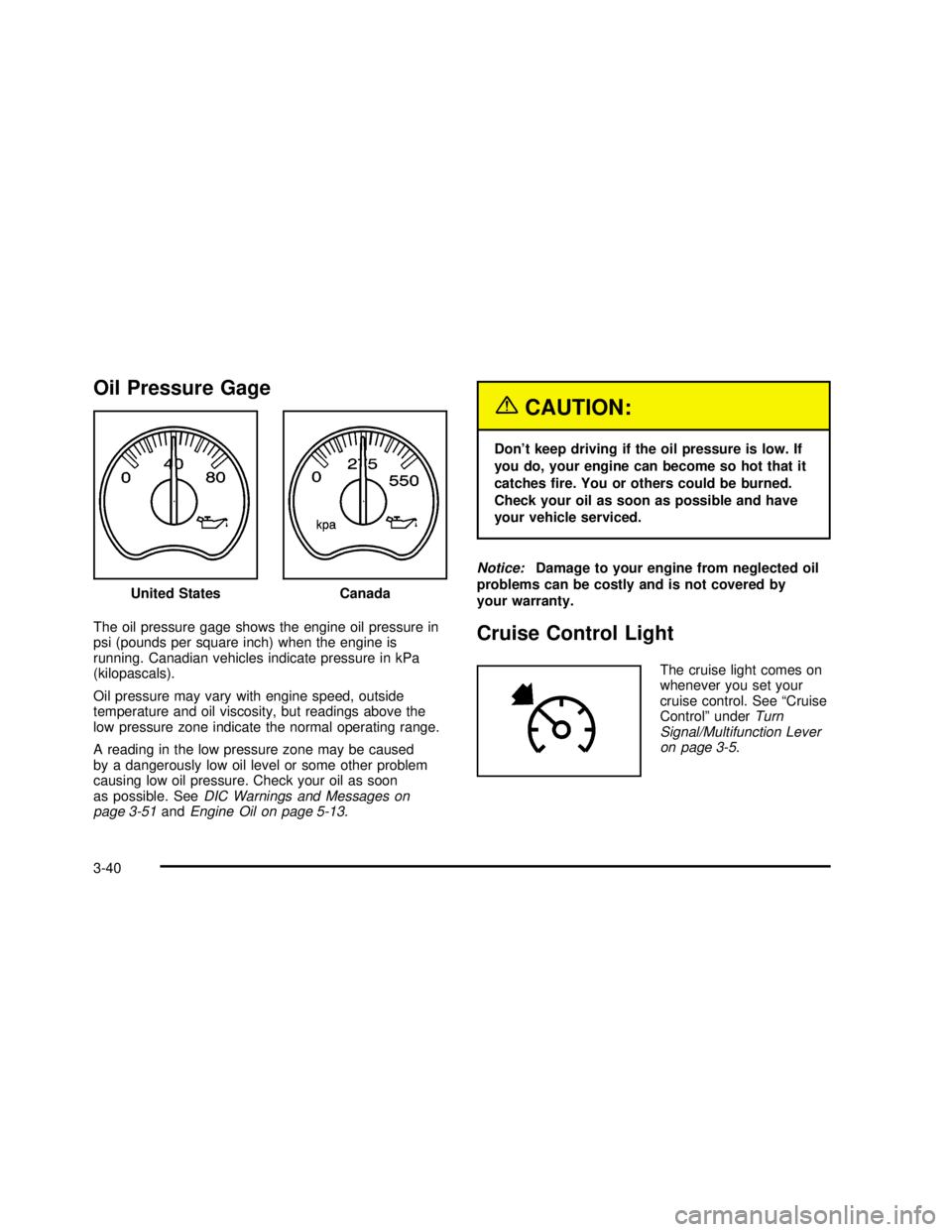
The oil pressure gage shows the engine oil pressure in
psi (pounds per square inch) when the engine is
running. Canadian vehicles indicate pressure in kPa
(kilopascals).
Oil pressure may vary with engine speed, outside
temperature and oil viscosity, but readings above the
low pressure zone indicate the normal operating range.
A reading in the low pressure zone may be caused
by a dangerously low oil level or some other problem
causing low oil pressure. Check your oil as soon
as possible. SeeDIC Warnings and Messages on
page 3-51andEngine Oil on page 5-13.
{CAUTION:
Don’t keep driving if the oil pressure is low. If
you do, your engine can become so hot that it
catchesre. You or others could be burned.
Check your oil as soon as possible and have
your vehicle serviced.
Notice:Damage to your engine from neglected oil
problems can be costly and is not covered by
your warranty.
Cruise Control Light
The cruise light comes on
whenever you set your
cruise control. See“Cruise
Control”underTurn
Signal/Multifunction Lever
on page 3-5. United States
Canada
3-40
2003 - Sierra Denali
Page 161 of 408

Tow/Haul Mode Light
This light is displayed
when the tow/haul mode
has been activated.
For more information, seeTowing a Trailer on
page 4-53.
Fuel Gage
When the ignition is on, the fuel gage tells you about
how much fuel you have left in your tank.
The gage willfirst indicate empty before you are out of
fuel, and you should get more fuel as soon as
possible.
Here are some situations you may experience with your
fuel gage. None of these indicate a problem with the
fuel gage.
•At the gas station, the fuel pump shuts off before
the gage reads full.
•It takes a little more or less fuel tofill up than the
fuel gage indicated. For example, the gage may
have indicated the tank was half full, but it actually
took a little more or less than half the tank’s
capacity tofill the tank.
•The gage goes back to empty when you turn off the
ignition.
Low Fuel Warning Light
The light next to the fuel gage will come on briefly when
you are starting the engine.
This light comes on when the fuel tank is low on fuel.
To turn it off, add fuel to the fuel tank. SeeFuel on
page 5-4.
United StatesCanada
3-41
2003 - Sierra Denali
Page 166 of 408

Personalization Button
You can program certain features to a preferred setting
for up to two people. Press the personalization button
to scroll through the following personalization features.
All of the personalization options may not be available
on your vehicle. only the options available will be
displayed on your DIC.
If your vehicle is not equipped with the DIC steering
wheel buttons you will not have any of these
personalization options except for DISPLAY
LANGUAGE. See DISPLAY LANGUAGE later in this
section for more information.
•AUTOMATIC LOCKING
•AUTOMATIC UNLOCKING
•REMOTE LOCK FEEDBACK
•ALARM WARNING TYPE
•REMOTE UNLOCK FEEDBACK
•HEADLAMPS ON AT EXIT
•PERIMETER LIGHTING
•SEAT POSITION RECALL
•EASY EXIT DRIVER SEAT
•CURB VIEW ASSIST
•DISPLAY LANGUAGE
•DISPLAY UNITS (ENG/MET)The default options for the above features were set
when your vehicle left the factory. The default options
are noted in the text following, but may have been
changed from their default state since then. The driver’s
preferences are recalled by pressing the unlock
button on the remote keyless entry transmitter or by
pressing the appropriate memory button 1 or 2 located
on the driver’s door.
Alarm Warning Type
Press the personalization button until ALARM
WARNING TYPE appears in the display. To select your
personalization for alarm warning type, press the
select button while ALARM WARNING TYPE is
displayed on the DIC. Pressing the select button will
scroll through the following choices:
ALARM WARNING: BOTH (default):The headlamps
willflash and the horn will chirp when the alarm is
active.
ALARM WARNING: OFF:There will be no alarm
warning on activation.
ALARM WARNING: HORN:The horn will chirp when
the alarm is active.
ALARM WARNING: LAMPS:The headlamps willflash
when the alarm is active.
3-46
2003 - Sierra Denali
Page 168 of 408

SEAT POSITION RECALL OFF (default):The memory
seat position you saved will only be recalled when the
memory button 1 or 2 is pressed on the driver’s
door panel.
SEAT POSITION RECALL AT KEY IN:The memory
seat position you saved will be recalled when you
put the key in the ignition.
SEAT POSITION RECALL ON REMOTE:The memory
seat position you saved will be recalled when you
unlock the vehicle with the remote keyless entry
transmitter.
Choose one of the three options and press the
personalization button while it is displayed on the DIC to
select it and move on to the next feature. For more
information on seat position recall seeMemory Seat on
page 2-41.
Perimeter Lighting
Press the personalization button until PERIMETER
LIGHTING appears in the display. To select your
personalization for perimeter lighting, press the select
button while PERIMETER LIGHTING is displayed on the
DIC. Pressing the select button will scroll through the
following choices:
PERIMETER LIGHTING ON (default):The headlamps
and back-up lamps will come on for 40 seconds, if it
is dark enough outside, when you unlock the vehicle
with the remote keyless entry transmitter.PERIMETER LIGHTING OFF:The perimeter lights will
not come on when you unlock the vehicle with the
remote keyless entry transmitter.
Choose on of the two options and press the
personalization button while it is displayed on the DIC to
select it and move on to the next feature.
Remote Lock Feedback
Press the personalization button until REMOTE LOCK
FEEDBACK appears in the display. To select your
personalization for the feedback you will receive when
locking the vehicle with the remote keyless entry
transmitter, press the select button while REMOTE
LOCK FEEDBACK is displayed on the DIC. Pressing
the select button will scroll through the following choices:
LOCK FEEDBACK: BOTH (default):The parking
lamps willflash each time you press the button with the
lock symbol on the remote keyless entry transmitter
and the horn will chirp the second time you press the
lock button.
LOCK FEEDBACK: OFF:There will be no feedback
when locking the vehicle.
LOCK FEEDBACK: HORN:The horn will chirp the
second time you press the button with the lock symbol
on the remote keyless entry transmitter.
3-48
2003 - Sierra Denali
Page 173 of 408
SERVICE AIRBAG
If there is a problem with the air bag system, this
message will be displayed on the DIC. Have a qualified
technician inspect the system for problems. Pressing
the select button will acknowledge this message
and clear it from the DIC display.
SERVICE BRAKE SYSTEM
If there is a problem with the brake system, this
message will be displayed on the DIC. If this message
appears, stop as soon as possible and turn off the
vehicle. Restart the vehicle and check for the message
on the DIC display. If the message is still displayed,
or appears again when you begin driving, the brake
system needs service.
SERVICE BRAKE BOOSTER
If your vehicle has vaccum assist power brakes, this
message will be displayed on the DIC when there is a
problem with the Supplemental Brake Assist system.
If the message is displayed immediately after starting
the vehicle or the message appears while driving,
your Supplemental Brake Assist system needs service.
SeeBrake System Warning Light on page 3-34.
{CAUTION:
Your brake system may not be working
properly if the SERVICE BRAKE BOOSTER
message is displayed.
If the brake system warning light is also on,
you should have the vehicle towed for service.
See“Brake System Warning Light”in the
Index.
If the brake system warning light isn’t on, you
still have brakes, but the supplemental brake
assist system may not operate properly. In the
event of a vacuum loss, you may not have
vacuum power assist for braking. The brake
pedal will be harder to push and it will take
longer to stop. If you continue to drive with
this message displayed it can lead to a crash.
Have the brake system serviced as soon as
possible.
3-53
2003 - Sierra Denali
Page 193 of 408
CD Changer
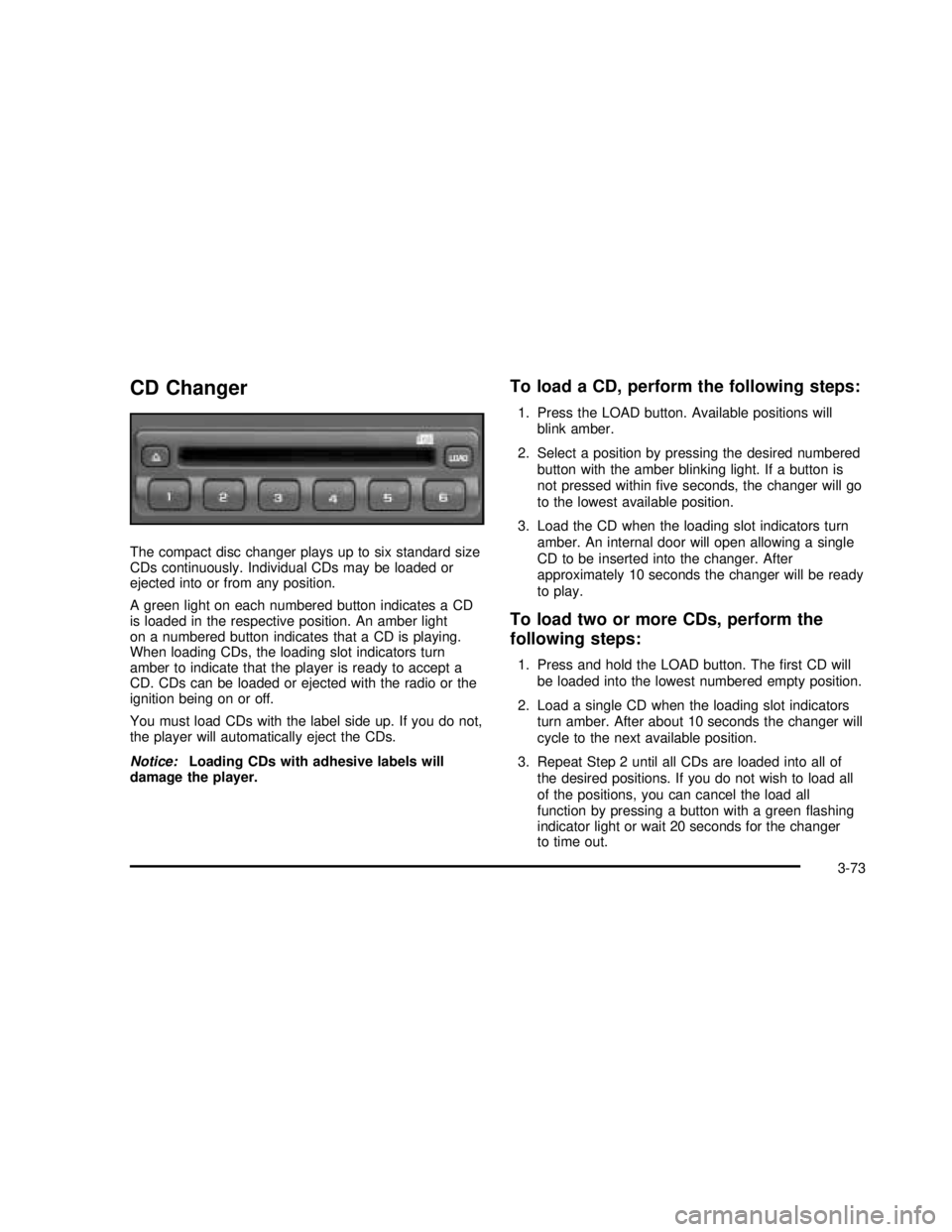
The compact disc changer plays up to six standard size
CDs continuously. Individual CDs may be loaded or
ejected into or from any position.
A green light on each numbered button indicates a CD
is loaded in the respective position. An amber light
on a numbered button indicates that a CD is playing.
When loading CDs, the loading slot indicators turn
amber to indicate that the player is ready to accept a
CD. CDs can be loaded or ejected with the radio or the
ignition being on or off.
You must load CDs with the label side up. If you do not,
the player will automatically eject the CDs.
Notice:Loading CDs with adhesive labels will
damage the player.
To load a CD, perform the following steps:
1. Press the LOAD button. Available positions will
blink amber.
2. Select a position by pressing the desired numbered
button with the amber blinking light. If a button is
not pressed withinfive seconds, the changer will go
to the lowest available position.
3. Load the CD when the loading slot indicators turn
amber. An internal door will open allowing a single
CD to be inserted into the changer. After
approximately 10 seconds the changer will be ready
to play.
To load two or more CDs, perform the
following steps:
1. Press and hold the LOAD button. Thefirst CD will
be loaded into the lowest numbered empty position.
2. Load a single CD when the loading slot indicators
turn amber. After about 10 seconds the changer will
cycle to the next available position.
3. Repeat Step 2 until all CDs are loaded into all of
the desired positions. If you do not wish to load all
of the positions, you can cancel the load all
function by pressing a button with a greenflashing
indicator light or wait 20 seconds for the changer
to time out.
3-73
2003 - Sierra Denali
Page 194 of 408

To eject a single CD, perform the following
steps:
1. Press the eject button (upward pointing arrow).
The buttons with loaded CDs will blink amber.
2. Press one of the amber blinking buttons to select
the location of the CD you want to eject. The
changer will move to that location and eject the CD.
If you do not remove the CD from the player
within 10 seconds, it will be reloaded. If the eject
button is pressed and a numbered location button is
not pressed withinfive seconds, the current or
last played CD will be ejected.
To eject all CDs, press and hold the eject button.
There are two ways to play a CD. Perform
one of the following:
•
With the radio on, press the desired numbered
button with a green indicator light on the CD
changer.
•Press the TAPE DISC button on the radio. The CD
changer will go to its last played position.
CD Functions
1 PREV (Previous):Press this pushbutton to go to the
previous track if the current track has been playing
for less than eight seconds. If pressed when the current
track has been playing for more than eight seconds,
it will go to the beginning of the current track. If you hold
or press this pushbutton more than once, the player
will continue moving back through the CD.
2 NEXT:Press this pushbutton to go to the next track.
If you hold this pushbutton or press it more than
once, the player will continue moving forward through
the CD.
3 REV (Reverse):Press and hold this pushbutton to
reverse quickly through a track. Release it to resume
playing.
4 FWD (Forward):Press and hold this pushbutton to
advance quickly through a track. Release it to resume
playing.
5
X:Press this pushbutton to select a CD. The CD
number and track number will be displayed.
3-74
2003 - Sierra Denali
Page 195 of 408

6 RDM (Random):Press this button to hear the tracks
in random, rather than sequential, order. RDM ALL
will appear on the radio display, which will randomly play
all of the loaded CDs. Press and hold this button until
you hear a beep and the radio will display RDM
ONE, which will randomly play the tracks on the current
CD. Press this button again to turn off random play,
RDM OFF will appear on the radio display.
qSEEKr:Press the right or the left SEEK arrow to
go to the next or to the previous track on the CD.
BAND:Press BAND to listen to the radio when a CD is
playing.
TAPE DISC:Press this button if you have a CD loaded
in the changer and the radio is turned on, to play a
CD. Press this button to switch between playing a tape
and the CD changer if all are loaded.
Compact Disc Changer Errors
CHK CD (Check):If this message appears on the
display, it could be for one of the following reasons:
•You are driving on a very rough road. The CD
should play when the road gets smoother.
•A CD is upside down.
•It is dirty, scratched or wet.
•It is very humid. If so, wait about an hour and try
again.
•The CD player is very hot.
If any error occurs repeatedly or if an error cannot be
corrected, contact your dealership.
Theft-Deterrent Feature
THEFTLOCK®is designed to discourage theft of your
radio. The feature works automatically by learning
a portion of the Vehicle Identification Number (VIN).
If the radio is moved to a different vehicle, it will
not operate and LOCKED will be displayed.
When the radio and vehicle are turned off, the blinking
red light indicates that THEFTLOCK
®is armed.
With THEFTLOCK
®activated, your radio will not operate
if stolen.
3-75
2003 - Sierra Denali