oil life system GMC SIERRA 2003 Owner's Manual
[x] Cancel search | Manufacturer: GMC, Model Year: 2003, Model line: SIERRA, Model: GMC SIERRA 2003Pages: 408, PDF Size: 2.58 MB
Page 157 of 408

SeeDriver Information Center (DIC) on page 3-42for
further information.
If the transmissionfluid reaches temperatures of
approximately 275°F (135°C) or greater, the Driver
Information Center will display a TRANS HOT IDLE
ENG warning message. Pull the vehicle off the roadway
when it is safe to do so. Set the parking brake, place
the transmission in PARK (P) and allow the engine
to idle until the transmission temperature falls below
260°F (127°C). If the transmission continues to operate
above 265°F (130°C), contact your nearest dealer or
the GM Roadside Assistance Center. SeeRoadside
Assistance Program on page 7-5.
Notice:If you keep driving your vehicle with the
transmission temperature gage above the normal
operating range, you can damage the transmission.
This could lead to costly repairs that may not be
covered under your warranty.
The following situations can cause the transmission to
operate at higher temperatures:
•Towing a trailer
•Hot outside air temperatures
•Hauling a large or heavy load
•Low transmissionfluid level
•High transmissionfluid level
•Restricted airflow to the radiator and the auxiliary
transmission oil cooler (if equipped).A temporary solution to hotter transmission operating
temperatures may be to let the transmission cool down.
If the transmission is operated at higher temperatures
on a frequent basis, seeScheduled Maintenance
on page 6-5for the proper transmission maintenance
intervals.
Malfunction Indicator Lamp
Check Engine Light
Your vehicle is equipped
with a computer which
monitors operation of the
fuel, ignition and emission
control systems.
This system is called OBD II (On-Board
Diagnostics-Second Generation) and is intended to
assure that emissions are at acceptable levels for the
life of the vehicle, helping to produce a cleaner
environment. The Check Engine light comes on to
indicate that there is a problem and service is required.
Malfunctions often will be indicated by the system
before any problem is apparent. This may prevent more
serious damage to your vehicle. This system is also
designed to assist your service technician in correctly
diagnosing any malfunction.
3-37
2003 - Sierra Denali
Page 164 of 408

You can also reset the PERSONAL: XX MI, or
BUSINESS: XX MI, while they are displayed by pressing
the reset stem on the cluster. If you press and hold
the reset stem or select button for four seconds,
the display will show the distance traveled since the last
ignition cycle for the personal or business trip.
Odometer
Press the trip information button, or the trip odometer
reset step, until SEASON ODOMETER appears on
the display. This shows the total distance the vehicle has
been driven in either miles or kilometers. Pressing the
reset stem located on the instrument cluster with
the vehicle off will also display the season odometer.
Hourmeter
Press the trip button to scroll to the hourmeter. The
hourmeter shows the total number of hours the engine
has run. Pressing the reset stem on the instrument
cluster will also display the hourmeter after the season
odometer is displayed.
Annual Log
Press the trip button, or the reset stem on the instrument
panel cluster, to scroll to the annual log. The annual
log shows the mileage accumulated since it was
last reset. To reset the annual log, press and hold the
select button, or the trip odometer reset stem for
approximately two seconds.
Timer
The DIC can be used as a stopwatch. Press the select
button, or the trip odometer reset stem, while TIMER
is displayed to start the timer. The display will show the
amount of time that has passed since the timer was
last reset (not including time the ignition is off). Time will
continue to be counted as long as the ignition is on,
even if another display is being shown on the DIC. The
timer will record up to 99 hours, 59 minutes and
59 seconds (99:59:59) after which the display will roll
back to zero.
To stop the counting of time, press the select button
briefly while TIMER is displayed.
To reset the timer to zero, press and hold the select
button, or the trip odometer reset stem, while TIMER is
displayed.
Fuel Information Button
Use the fuel information button to scroll through the
range, average fuel economy, instant fuel economy and
the GM Oil Life System™.
If your vehicle is not equipped with the DIC steering
wheel control buttons you will not be able to display the
fuel information.
3-44
2003 - Sierra Denali
Page 165 of 408

Fuel Range
Press the fuel information button until RANGE appears
to display the remaining distance you can drive
without refueling. It’s based on fuel economy and the
fuel remaining in the tank. The display will show LOW if
the fuel level is low.
The fuel economy data used to determine fuel range is
an average of recent driving conditions. As your
driving conditions change, this data is gradually updated.
Fuel range cannot be reset.
Average Fuel Economy
Press the fuel information button until AVG appears in
the display. Average fuel economy is how many
miles per gallon your vehicle is getting based on current
and past driving conditions.
Press and hold the select button while AVG.ECON is
displayed to reset the average fuel economy. Average
fuel economy will then be calculated starting from
that point. If the average fuel economy is not reset, it
will be continually updated each time you drive.
Instant Fuel Economy
Press the fuel information button until INST appears in
the display. Instant fuel economy is how many miles
per gallon your vehicle is at the particular moment
in time. The instant fuel economy cannot be reset.
GM Oil Life System™
Press the fuel information button until ENGINE OIL LIFE
appears in the display. The GM Oil Life System™
shows an estimate of the oil’s remaining useful life. It
will show 100% when the system is reset after an
oil change. It will alert you to change your oil on a
schedule consistent with your driving conditions.
Always reset the engine oil life after and oil change.
To reset the Oil Life System press and hold the select
button while ENGINE OIL LIFE is displayed. OIL
LIFE RESET will appear on the display for 10 seconds
to let you know the system is reset.
The DIC does not replace the need to maintain your
vehicle as recommended in the Maintenance Schedule
in this manual. Also, the oil change reminder does
not measure how much oil you have in your engine.
So, be sure to check your oil level often. SeeEngine Oil
on page 5-13.
3-45
2003 - Sierra Denali
Page 172 of 408

CHANGE ENGINE OIL
This message is displayed when the engine oil needs to
be changed.
When you change the engine oil, be sure to reset the
CHANGE ENGINE OIL message. SeeEngine Oil, When
to ChangeunderEngine Oil on page 5-13.
OIL LIFE RESET
This message will appear on the display for about 10
seconds after resetting the change engine oil message.
LOW COOLANT LEVEL
If the engine coolant level is low, this message will
appear on the DIC. Adding coolant will clear the
message.
ENGINE COOLANT HOT
If the cooling system temperature gets hot, this message
will appear in the DIC. Stop the vehicle and let the
engine idle in PARK (P) to allow the coolant to reach a
safe temperature. This message will clear when the
coolant temperature drops to safe operating
temperature.
ENGINE OVERHEATED
If the engine cooling system reaches unsafe
temperatures for operation, this message will
appear in the DIC and you will hear a chime.Stop and turn off the vehicle as soon as it is safe to do
so to avoid severe damage. This message will clear
when the engine has cooled to a safe operating
temperature.
OIL PRESSURE LOW
If low oil pressure levels occur, this message will be
displayed on the DIC and a chime will sound. Stop the
vehicle as soon as safely possible and do not operate
it until the cause of the low oil pressure has been
corrected. Check your oil as soon as possible and have
your vehicle serviced.
REDUCED ENGINE POWER
This message is displayed when the cooling system
temperature gets too hot and the engine further enters
the engine coolant protection mode.
SeeEngine Overheating on page 5-26for further
information.
BATTERY NOT CHARGING
If the battery is not charging during operation, this
message will appear on the DIC. Driving with this
problem could drain your battery. Have the electrical
system checked as soon as possible. Pressing the
select button will acknowledge this message and clear it
from the DIC display.
3-52
2003 - Sierra Denali
Page 266 of 408

Additives
To provide cleaner air, all gasolines in the United States
are now required to contain additives that will help
prevent engine and fuel system deposits from forming,
allowing your emission control system to work
properly. You should not have to add anything to your
fuel. Gasolines containing oxygenates, such as
ethers and ethanol, and reformulated gasolines may be
available in your area to contribute to clean air.
General Motors recommends that you use these
gasolines, particularly if they comply with the
specifications described earlier.
Notice:Your vehicle was not designed for fuel that
contains methanol. Don’t use fuel containing
methanol. It can corrode metal parts in your fuel
system and also damage the plastic and rubber
parts. That damage wouldn’t be covered under your
warranty.Some gasolines that are not reformulated for low
emissions may contain an octane-enhancing additive
called methylcyclopentadienyl manganese tricarbonyl
(MMT); ask the attendant where you buy gasoline
whether the fuel contains MMT. General Motors does
not recommend the use of such gasolines. Fuels
containing MMT can reduce the life of spark plugs and
the performance of the emission control system may
be affected. The malfunction indicator lamp may turn on.
If this occurs, return to your authorized GM dealer for
service.
Fuels in Foreign Countries
If you plan on driving in another country outside the
United States or Canada, the proper fuel may be hard
tofind. Never use leaded gasoline or any other fuel
not recommended in the previous text on fuel. Costly
repairs caused by use of improper fuel wouldn’tbe
covered by your warranty.
To check the fuel availability, ask an auto club, or
contact a major oil company that does business in the
country where you’ll be driving.
5-6
2003 - Sierra Denali
Page 276 of 408

As in the chart shown previously, SAE 5W-30 is the
only viscosity grade recommended for your vehicle.
You should look for and use only oils which have the
API Starburst symbol and which are also identified
as SAE 5W-30. If you cannotfind such SAE 5W-30 oils,
you can use an SAE 10W-30 oil which has the API
Starburst symbol, if it’s going to be 0°F(−18°C)
or above. Do not use other viscosity grade oils, such as
SAE 10W-40 or SAE 20W-50 under any conditions.
Notice:Use only engine oil with the American
Petroleum Institute Certified For Gasoline Engines
starburst symbol. Failure to use the recommended
oil can result in engine damage not covered by
your warranty.
GM Goodwrench
®oil meets all the requirements for
your vehicle.
If you are in an area of extreme cold, where the
temperature falls below−20°F(−29°C),itis
recommended that you use either an SAE 5W-30
synthetic oil or an SAE 0W-30 oil. Both will provide
easier cold starting and better protection for your engine
at extremely low temperatures.
Engine Oil Additives
Don’t add anything to your oil. The recommended oils
with the starburst symbol are all you will need for
good performance and engine protection.
When to Change Engine Oil (GM Oil
Life System)
Your vehicle has a computer system that lets you know
when to change the engine oil andfilter. This is
based on engine revolutions and engine temperature,
and not on mileage. Based on driving conditions,
the mileage at which an oil change will be indicated can
vary considerably. For the oil life system to work
properly, you must reset the system every time the oil is
changed.
When the system has calculated that oil life has been
diminished, it will indicate that an oil change is
necessary. A CHANGE ENGINE OIL SOON message
will come on. Change your oil as soon as possible within
the next two times you stop for fuel. It is possible that,
if you are driving under the best conditions, the oil
life system may not indicate that an oil change is
necessary for over a year. However, your engine oil and
filter must be changed at least once a year and at
this time the system must be reset. Your dealer has
GM-trained service people who will perform this
work using genuine GM parts and reset the system. It is
also important to check your oil regularly and keep it
at the proper level.
If the system is ever reset accidentally, you must
change your oil at 3,000 miles (5 000 km) since your
last oil change. Remember to reset the oil life system
whenever the oil is changed.
5-16
2003 - Sierra Denali
Page 277 of 408

How to Reset the CHANGE ENGINE OIL
Message
The GM Oil Life System calculates when to change
your engine oil andfilter based on vehicle use. Anytime
your oil is changed, reset the system so it can
calculate when the next oil change is required. If a
situation occurs where you can change your oil prior to
a CHANGE ENGINE OIL message being turned on,
reset the system.
To reset the CHANGE ENGINE OIL message, see“GM
Oil Life System”underDIC Operation and Displays
on page 3-42for vehicles equipped with the DIC, or do
the following:
1. Turn the ignition key to RUN with the engine off.
2. Fully press and release the accelerator pedal three
times withinfive seconds.
If the OIL LIFE RESET messageflashes for 10 seconds,
the system is reset. If the system will not reset, try the
procedure again. If the system still does not reset,
see your dealer for service.
What to Do with Used Oil
Used engine oil contains certain elements that may be
unhealthy for your skin and could even cause cancer.
Don’t let used oil stay on your skin for very long. Clean
your skin and nails with soap and water, or a good
hand cleaner. Wash or properly dispose of clothing or
rags containing used engine oil. See the manufacturer’s
warnings about the use and disposal of oil products.
Used oil can be a threat to the environment. If you
change your own oil, be sure to drain all the oil from the
filter before disposal. Never dispose of oil by putting it
in the trash, pouring it on the ground, into sewers, or into
streams or bodies of water. Instead, recycle it by
taking it to a place that collects used oil. If you have a
problem properly disposing of your used oil, ask
your dealer, a service station or a local recycling center
for help.
5-17
2003 - Sierra Denali
Page 283 of 408

Engine Coolant
The cooling system in your vehicle isfilled with
DEX-COOL®engine coolant. This coolant is designed
to remain in your vehicle for 5 years or 150,000 miles
(240 000 km), whichever occursfirst, if you add only
DEX-COOL
®extended life coolant.
The following explains your cooling system and how to
add coolant when it is low. If you have a problem
with engine overheating, seeEngine Overheating on
page 5-26.
A 50/50 mixture of clean, drinkable water and
DEX-COOL
®coolant will:
•Give freezing protection down to−34°F(−37°C).
•Give boiling protection up to 265°F (129°C).
•Protect against rust and corrosion.
•Help keep the proper engine temperature.
•Let the warning lights and gages work as they
should.
Notice:When adding coolant, it is important that
you use only DEX-COOL
®(silicate-free) coolant.
If coolant other than DEX-COOL®is added to
the system, premature engine, heater core or
radiator corrosion may result. In addition, the engine
coolant will require change sooner -- at 30,000 miles
(50,000 km) or 24 months, whichever occursfirst.
Damage caused by the use of coolant other
than DEX-COOL
®is not covered by your new vehicle
warranty.
5-23
2003 - Sierra Denali
Page 286 of 408
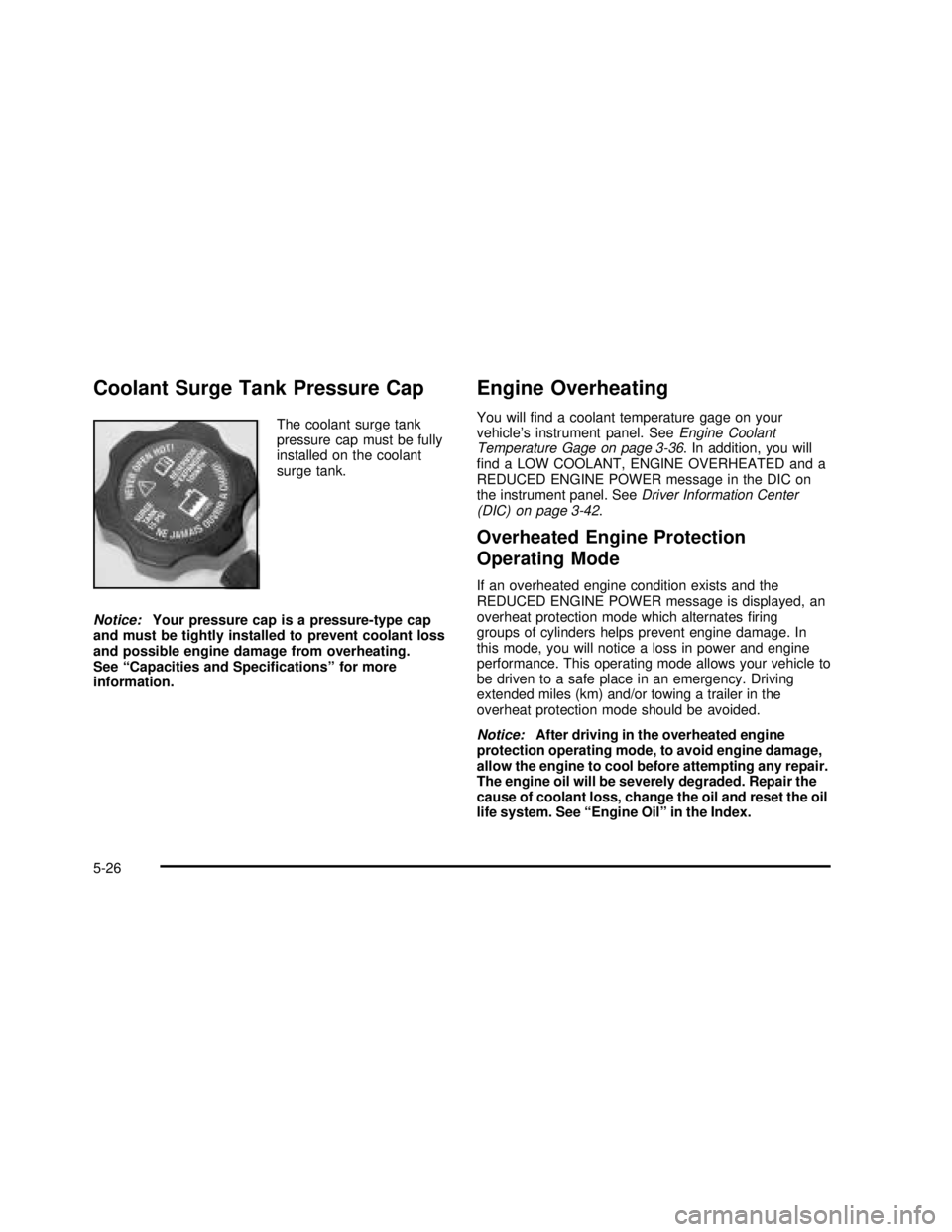
Coolant Surge Tank Pressure Cap
The coolant surge tank
pressure cap must be fully
installed on the coolant
surge tank.
Notice:Your pressure cap is a pressure-type cap
and must be tightly installed to prevent coolant loss
and possible engine damage from overheating.
See“Capacities and Specifications”for more
information.
Engine Overheating
You willfind a coolant temperature gage on your
vehicle’s instrument panel. SeeEngine Coolant
Temperature Gage on page 3-36. In addition, you will
find a LOW COOLANT, ENGINE OVERHEATED and a
REDUCED ENGINE POWER message in the DIC on
the instrument panel. SeeDriver Information Center
(DIC) on page 3-42.
Overheated Engine Protection
Operating Mode
If an overheated engine condition exists and the
REDUCED ENGINE POWER message is displayed, an
overheat protection mode which alternatesfiring
groups of cylinders helps prevent engine damage. In
this mode, you will notice a loss in power and engine
performance. This operating mode allows your vehicle to
be driven to a safe place in an emergency. Driving
extended miles (km) and/or towing a trailer in the
overheat protection mode should be avoided.
Notice:After driving in the overheated engine
protection operating mode, to avoid engine damage,
allow the engine to cool before attempting any repair.
The engine oil will be severely degraded. Repair the
cause of coolant loss, change the oil and reset the oil
life system. See“Engine Oil”in the Index.
5-26
2003 - Sierra Denali
Page 364 of 408

Part A: Scheduled Maintenance
Services
This part contains engine oil and chassis lubrication
scheduled maintenance which explains the engine oil life
system and how it indicates when to change the
engine oil andfilter. Lubricate chassis components with
each oil change. Also, listed are scheduled maintenance
services which are to be performed at the mileage
intervals specified.
Using Your Maintenance Schedule
We at General Motors want to help you keep your
vehicle in good condition. But we don’t know exactly how
you’ll drive it. You may drive very short distances only
a few times a week. Or you may drive long distances in
very hot, dusty weather. You may use your vehicle in
making deliveries. Or you may drive it to work, to
do errands or in many other ways.
Because of all the different ways people use their
vehicles, maintenance needs vary. You may need more
frequent checks and replacements. So please read
the following and note how you drive. If you have any
questions on how to keep your vehicle in good condition,
see your dealer.This part tells you the maintenance services you should
have done and when to schedule them.
When you go to your dealer for your service needs,
you’ll know that GM-trained and supported service
people will perform the work using genuine GM parts.
The properfluids and lubricants to use are listed in
Part D. Make sure whoever services your vehicle uses
these. All parts should be replaced and all necessary
repairs done before you or anyone else drives the
vehicle.
This schedule is for vehicles that:•carry passengers and cargo within recommended
limits. You willfind these limits on your vehicle’s
Certification/Tire label. SeeLoading Your Vehicle on
page 4-47.
•are driven on reasonable road surfaces within legal
driving limits.
•are driven off-road in the recommended manner.
SeeOperating Your All-Wheel-Drive Vehicle Off
Paved Roads on page 4-18.
•use the recommended fuel. SeeGasoline Octane
on page 5-4.
6-4
2003 - Sierra Denali