charging GMC SIERRA 2004 Owner's Manual
[x] Cancel search | Manufacturer: GMC, Model Year: 2004, Model line: SIERRA, Model: GMC SIERRA 2004Pages: 588, PDF Size: 3.74 MB
Page 206 of 588
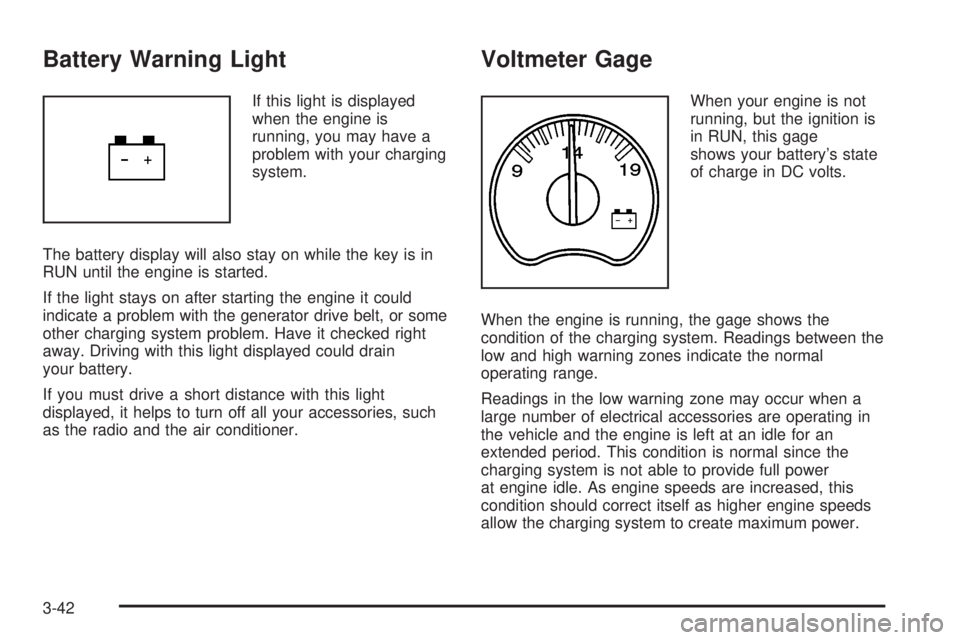
Battery Warning Light
If this light is displayed
when the engine is
running, you may have a
problem with your charging
system.
The battery display will also stay on while the key is in
RUN until the engine is started.
If the light stays on after starting the engine it could
indicate a problem with the generator drive belt, or some
other charging system problem. Have it checked right
away. Driving with this light displayed could drain
your battery.
If you must drive a short distance with this light
displayed, it helps to turn off all your accessories, such
as the radio and the air conditioner.
Voltmeter Gage
When your engine is not
running, but the ignition is
in RUN, this gage
shows your battery's state
of charge in DC volts.
When the engine is running, the gage shows the
condition of the charging system. Readings between the
low and high warning zones indicate the normal
operating range.
Readings in the low warning zone may occur when a
large number of electrical accessories are operating in
the vehicle and the engine is left at an idle for an
extended period. This condition is normal since the
charging system is not able to provide full power
at engine idle. As engine speeds are increased, this
condition should correct itself as higher engine speeds
allow the charging system to create maximum power.
3-42
Page 230 of 588
If you accidentally choose a language that you don't want
or understand, press and hold the personalization button
and the trip information button at the same time. The DIC
will begin scrolling through the languages in their
particular language. English will be in English, French will
be in French and so on. When you see the language that
you would like, release both buttons. The DIC will then
display the information in the language you chose.
You can also scroll through the different languages by
pressing and holding the trip reset stem for four
seconds, as long as you are in the odometer mode.
Select Button
The select button is used to reset certain functions and
turn off or acknowledge messages on the DIC display.
The select button also toggles through the options
available in each personalization menu. For example, this
button will reset the trip odometers, turn off the FUEL
LEVEL LOW message, and toggle through the languages
you can select the DIC to display information in.
DIC Warnings and Messages
Warning messages are displayed on the DIC to notify
the driver that the status of the vehicle has changed and
that some action may be needed by the driver to
correct the condition. If there is more than one message
that needs to be displayed they will appear one after
another. Some messages may not require immediate
action but you should press the select button, or
the reset stem, to acknowledge that you received the
message and clear it from the display. Some messages
cannot be cleared from the display because they are
more urgent. These messages require action before they
can be removed from the DIC display. The following
are the possible messages that can be displayed
and some information about them.
BATTERY NOT CHARGING
If the battery is not charging during operation, this
message will appear on the DIC. Driving with this
problem could drain your battery. Have the electrical
system checked as soon as possible. Press the select
button to acknowledge the message and clear it
from the DIC display.
3-66
Page 572 of 588
Audio System(s) (cont.)
Radio with CD............................................3-77
Radio with Six-Disc CD..............................3-102
Rear Seat Audio (RSA)...............................3-126
Setting the Time for Radios with Radio Data
Systems (RDS)........................................3-74
Setting the Time for Radios without Radio
Data Systems (RDS)................................3-74
Theft-Deterrent Feature...............................3-127
Understanding Radio Reception...................3-129
XMŸ Satellite Radio Antenna System...........3-131
Automatic Dimming Mirror Operation..........2-56, 2-58
Automatic Headlamp System............................3-15
Automatic Transfer Case..................................2-39
Automatic Transmission...................................2-23
Fluid..................................................5-25, 5-28
Operation...................................................2-26
Auxiliary Battery............................................4-100
Auxiliary Roof Mounted Lamp Switch.................3-18
B
Backing Up....................................................4-92
Battery..........................................................5-52
BATTERY NOT CHARGING.............................3-66
Battery Replacement......................................... 2-6
Battery Run-Down Protection............................3-20Battery Warning Light......................................3-42
Before Leaving on a Long Trip.........................4-44
Before You Drive...........................................3-116
Before You Go Off-Roading..............................4-22
Brake
Parking......................................................2-48
System Warning Light..................................3-43
Brake Adjustment............................................5-51
Brake Fluid....................................................5-48
Brake Pedal Travel.........................................5-51
Brake Wear...................................................5-51
Brakes..........................................................5-48
Braking........................................................... 4-6
Braking in Emergencies..................................... 4-8
Break-In, New Vehicle.....................................2-21
BUCKLE PASSENGER....................................3-67
BUCKLE SEATBELT.......................................3-67
Bulb Replacement...........................................5-64
Center High-Mounted Stoplamp (CHMSL) and
Cargo Lamp............................................5-69
Front Turn Signal, Sidemarker and Daytime
Running Lamps........................................5-66
Halogen Bulbs............................................5-64
Headlamps.................................................5-64
Pickup Box Identi®cation and Fender Marker
Lamps....................................................5-70
Replacement Bulbs......................................5-74
2