starting GMC SIERRA 2005 User Guide
[x] Cancel search | Manufacturer: GMC, Model Year: 2005, Model line: SIERRA, Model: GMC SIERRA 2005Pages: 574, PDF Size: 2.95 MB
Page 204 of 574
Battery Warning Light
If this light is displayed
when the engine is
running, you may have a
problem with your charging
system.
The battery display will also stay on while the key is in
RUN until the engine is started.
If the light stays on after starting the engine it could
indicate a problem with the generator drive belt, or some
other charging system problem. Have it checked right
away. Driving with this light displayed could drain
your battery.
If you must drive a short distance with this light
displayed, it helps to turn off all your accessories, such
as the radio and the air conditioner.
Voltmeter Gage
When your engine is not
running, but the ignition is
in RUN, this gage
shows your battery’s state
of charge in DC volts.
When the engine is running, the gage shows the
condition of the charging system. The gage may
transition from a higher to lower or a lower to higher
reading, this is normal. Readings between the low and
high warning zones indicate the normal operating
range. The voltmeter gage may also read lower when in
fuel economy mode. This is normal.
3-38
Page 216 of 574
Here are some situations you may experience with your
fuel gage. None of these indicate a problem with the
fuel gage.
At the gas station, the fuel pump shuts off before
the gage reads full.
It takes a little more or less fuel to ll up than the
fuel gage indicated. For example, the gage may
have indicated the tank was half full, but it actually
took a little more or less than half the tank’s
capacity to ll the tank.
The gage goes back to empty when you turn off the
ignition.
If you have a diesel engine, see “Fuel Gage” in the
Diesel Engine Supplement.
Low Fuel Warning Light
The light next to the fuel gage will come on briey when
you are starting the engine.
This light comes on when the fuel tank is low on fuel.
To turn it off, add fuel to the fuel tank. SeeFuel on
page 5-6.
Driver Information Center (DIC)
The Driver Information Center (DIC) display is located
on the instrument panel cluster, below the speedometer.
The DIC buttons, if equipped, are located on the
steering wheel. The DIC can display information such
as the trip odometer, fuel economy, customization
features and warning/status messages.
If your vehicle is not equipped with the DIC steering
wheel buttons, you will not have all of the features listed.
You will scroll through the odometer, trip odometer
and engine hours by pressing the trip odometer reset
stem located on the instrument panel cluster. You
will also turn off, or acknowledge, DIC messages by
pressing the trip odometer reset stem. SeeSpeedometer
and Odometer on page 3-33for information on
features for vehicles without DIC buttons.
3-50
Page 219 of 574
Fuel Used:Press the fuel information button until
FUEL USED appears on the display. This mode shows
the number of gallons or liters of fuel used since the
last reset of this menu item. To reset the fuel used
information, press and hold the select button for
one second while FUEL USED is displayed.
Average Fuel Economy:Press the fuel information
button until AVG ECON appears on the display.
This mode shows how many miles per gallon (MPG) or
liters per 100 kilometers (L/100 km) your vehicle is
getting based on current and past driving conditions.
Press and hold the select button for one second while
AVG ECON is displayed to reset the average fuel
economy. Average fuel economy will then be calculated
starting from that point. If the average fuel economy is not
reset, it will be continually updated each time you drive.
Engine Oil Life System:Press the fuel information
button until ENGINE OIL LIFE appears on the display.
The engine oil life system shows an estimate of the oil’s
remaining useful life. It will show 100% when the
system is reset after an oil change. It will alert you to
change your oil on a schedule consistent with your
driving conditions.Always reset the engine oil life system after an oil
change. To reset the engine oil life system, use the fuel
button to reach the ENGINE OIL LIFE screen and
then press and hold the select button for ve seconds
while ENGINE OIL LIFE is displayed. OIL LIFE
RESET will appear on the display for 10 seconds to let
you know the system is reset. SeeEngine Oil Life
System (Gasoline Engine) on page 5-23for more
information.
In addition to the engine oil life system monitoring the
oil life, additional maintenance is recommended in
the Maintenance Schedule in this manual. SeeEngine
Oil (Gasoline Engine) on page 5-20andScheduled
Maintenance on page 6-4.
Customization Button
4
(Customization):Press the customization button to
access the VEHICLE SETTINGS menu and customize
the settings to your vehicle. SeeDIC Vehicle
Customization on page 3-63for more information.
Select Button
r
(Select):Press the select button to reset certain
DIC functions and set your customization settings.
For example, this button will reset the trip odometers
and scroll through the languages in which you can select
the DIC to display information.
3-53
Page 226 of 574
SERVICE AIRBAG
If there is a problem with the airbag system, this
message will be displayed on the DIC. Have your
GM dealer inspect the system for problems. SeeAirbag
Readiness Light on page 3-34andAirbag System on
page 1-66for more information. Pressing any of the
four DIC buttons, if equipped, will acknowledge
the message and clear it from the DIC display. If your
vehicle is not equipped with the four DIC buttons,
pressing the trip odometer reset stem will acknowledge
the message and clear it from the DIC display.
SERVICE BRAKE BOOSTER
If your vehicle has vacuum assist power brakes, this
message will be displayed on the DIC when there is a
problem with the Supplemental Brake Assist system.
If the message is displayed immediately after starting
the vehicle or the message appears while driving,
your Supplemental Brake Assist system needs service.
See your GM dealer. SeeBrake System Warning
Light on page 3-39for additional information.
{CAUTION:
Your brake system may not be working
properly if the SERVICE BRAKE BOOSTER
message is displayed.
If the brake system warning light is also on,
you should have the vehicle towed for service.
SeeBrake System Warning Light on page 3-39.
If the brake system warning light is not on, you
still have brakes, but the supplemental brake
assist system on vehicles with rear disc
brakes may not operate properly. In the event
of a vacuum loss, you may not have vacuum
power assist for braking. The brake pedal will
be harder to push and it will take longer to
stop. If you continue to drive with this
message displayed it can lead to a crash.
Have the brake system serviced as soon
as possible.
3-60
Page 234 of 574
ALARM WARNING: LAMPS:The headlamps will ash
when the alarm is active.
Choose one of the available options and press the
customization button while your choice is displayed on
the DIC to select it and move on to the next feature.
For more information on alarm warning type, see
Content Theft-Deterrent on page 2-19.
Elevated Idle (DURAMAX™ Diesel
Engine only)
The elevated idle feature is available on diesel engine
vehicles only. Press the customization button until
ELEVATED IDLE appears in the display. To select your
preference for elevated idle, press the select button
while ELEVATED IDLE is displayed on the DIC.
Pressing the select button will scroll through the
following choices:
ELEVATED IDLE: OFF (default):The elevated
idle/exhaust restrictor feature is turned off. See
“Elevated Idle/Exhaust Restrictor” under Starting and
Operating Your Vehicle in your DURAMAX™ Diesel
supplement.
ELEVATED IDLE: ON:The elevated idle/exhaust
restrictor feature is turned on. See “Elevated
Idle/Exhaust Restrictor” under Starting and Operating
Your Vehicle in your DURAMAX™ Diesel supplement.Choose one of the available options and press the
customization button while your choice is displayed on
the DIC to select it and move on to the next feature.
Language
To select your preference for display language, press
the select button while LANGUAGE is displayed on the
DIC. Pressing the select button will scroll through the
following languages:
ENGLISH
FRANCAIS (French)
ESPANOL (Spanish)
Choose one of the available options and press the
customization button while it is displayed on the DIC to
select it.
If you accidentally choose a language that you do not
want or understand, press and hold the customization
button and the trip information button at the same
time. The DIC will begin scrolling through the languages
in their particular language. English will be in English,
Francais will be in French and Espanol will be in
Spanish. When you see the language that you would
like, release both buttons. The DIC will then display the
information in the language you chose.
You can also scroll through the different languages
by pressing and holding the trip reset stem for
four seconds, as long as you are in the odometer mode.
3-68
Page 312 of 574
Do not get too close to the vehicle you want to
pass while you are awaiting an opportunity. For one
thing, following too closely reduces your area of
vision, especially if you are following a larger
vehicle. Also, you will not have adequate space if
the vehicle ahead suddenly slows or stops.
Keep back a reasonable distance.
When it looks like a chance to pass is coming up,
start to accelerate but stay in the right lane and
do not get too close. Time your move so you will be
increasing speed as the time comes to move into
the other lane. If the way is clear to pass, you
will have a running start that more than makes up
for the distance you would lose by dropping
back. And if something happens to cause you to
cancel your pass, you need only slow down
and drop back again and wait for another
opportunity.
If other vehicles are lined up to pass a slow vehicle,
wait your turn. But take care that someone is not
trying to pass you as you pull out to pass the slow
vehicle. Remember to glance over your shoulder
and check the blind spot.
Check your mirrors, glance over your shoulder and
start your left lane change signal before moving out
of the right lane to pass. When you are far
enough ahead of the passed vehicle to see its front
in your inside mirror, activate your right lane
change signal and move back into the right lane.
Remember that if your right outside mirror is convex,
the vehicle you just passed may seem to be
farther away from you than it really is.
Try not to pass more than one vehicle at a time on
two-lane roads. Reconsider before passing the
next vehicle.
Do not overtake a slowly moving vehicle too rapidly.
Even though the brake lamps are not ashing, it
may be slowing down or starting to turn.
If you are being passed, make it easy for the
following driver to get ahead of you. Perhaps
you can ease a little to the right.
4-18
Page 326 of 574
{CAUTION:
Driving across an incline that is too steep will
make your vehicle roll over. You could be
seriously injured or killed. If you have any
doubt about the steepness of the incline, do
not drive across it. Find another route instead.
Q:What if I am driving across an incline that is not
too steep, but I hit some loose gravel and start
to slide downhill. What should I do?
A:If you feel your vehicle starting to slide sideways,
turn downhill. This should help straighten out the
vehicle and prevent the side slipping. However,
a much better way to prevent this is to get out and
“walk the course” so you know what the surface
is like before you drive it.
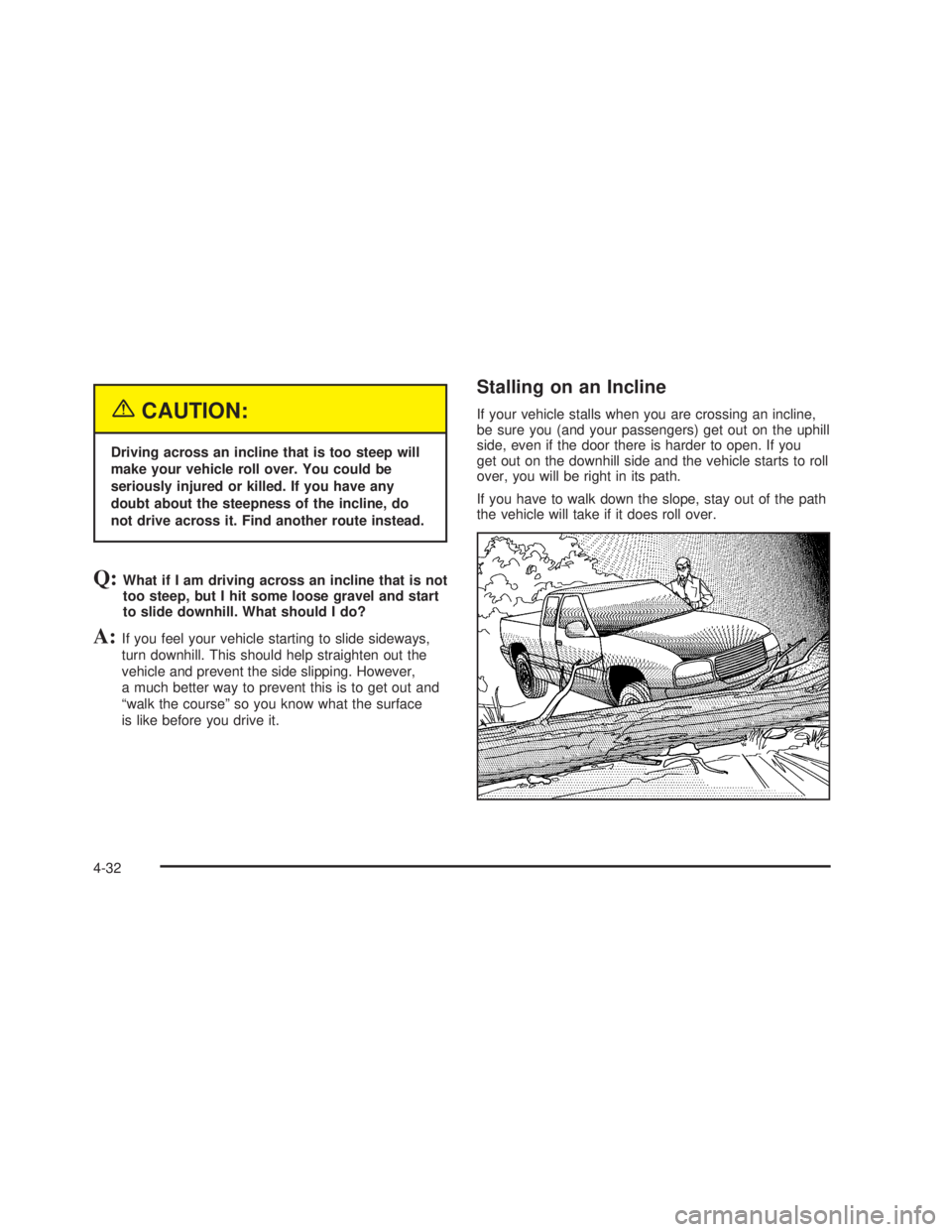
Stalling on an Incline
If your vehicle stalls when you are crossing an incline,
be sure you (and your passengers) get out on the uphill
side, even if the door there is harder to open. If you
get out on the downhill side and the vehicle starts to roll
over, you will be right in its path.
If you have to walk down the slope, stay out of the path
the vehicle will take if it does roll over.
4-32
Page 335 of 574
When you want to leave the freeway, move to the
proper lane well in advance. If you miss your exit, do
not, under any circumstances, stop and back up. Drive
on to the next exit.
The exit ramp can be curved, sometimes quite sharply.
The exit speed is usually posted.
Reduce your speed according to your speedometer, not
to your sense of motion. After driving for any distance
at higher speeds, you may tend to think you are
going slower than you actually are.
Before Leaving on a Long Trip
Make sure you are ready. Try to be well rested. If you
must start when you are not fresh — such as after
a day’s work — do not plan to make too many miles that
rst part of the journey. Wear comfortable clothing
and shoes you can easily drive in.
Is your vehicle ready for a long trip? If you keep it
serviced and maintained, it is ready to go. If it needs
service, have it done before starting out. Of course, you
will nd experienced and able service experts in
GM dealerships all across North America. They will be
ready and willing to help if you need it.Here are some things you can check before a trip:
Windshield Washer Fluid:Is the reservoir full? Are
all windows clean inside and outside?
Wiper Blades:Are they in good shape?
Fuel, Engine Oil, Other Fluids:Have you checked
all levels?
Lamps:Are they all working? Are the lenses clean?
Tires:They are vitally important to a safe,
trouble-free trip. Is the tread good enough for
long-distance driving? Are the tires all inated to the
recommended pressure?
Weather Forecasts:What is the weather outlook
along your route? Should you delay your trip a
short time to avoid a major storm system?
Maps:Do you have up-to-date maps?
4-41
Page 382 of 574
Driving with a Trailer
{CAUTION:
If you have a rear-most window open and you
pull a trailer with your vehicle, carbon
monoxide (CO) could come into your vehicle.
You cannot see or smell CO. It can cause
unconsciousness or death. SeeEngine
Exhaust on page 2-53. To maximize your safety
when towing a trailer:
Have your exhaust system inspected for
leaks, and make necessary repairs before
starting on your trip.
Keep the rear-most windows closed.
If exhaust does come into your vehicle
through a window in the rear or another
opening, drive with your front, main
heating or cooling system on and with the
fan on any speed. This will bring fresh,
outside air into your vehicle. Do not use
the climate control setting for maximum air
because it only recirculates the air inside
your vehicle. SeeClimate Control System
on page 3-21.Towing a trailer requires a certain amount of experience.
Before setting out for the open road, you’ll want to get
to know your rig. Acquaint yourself with the feel of
handling and braking with the added weight of the trailer.
And always keep in mind that the vehicle you are
driving is now a good deal longer and not nearly as
responsive as your vehicle is by itself.
Before you start, check all trailer hitch parts and
attachments, safety chains, electrical connector, lamps,
tires and mirror adjustment. If the trailer has electric
brakes, start your vehicle and trailer moving and then
apply the trailer brake controller by hand to be sure
the brakes are working. This lets you check your
electrical connection at the same time.
During your trip, check occasionally to be sure that the
load is secure, and that the lamps and any trailer
brakes are still working.
While towing a trailer or when exposed to long periods
of sunshine, the oor of the truck bed may become
very warm. Avoid putting items in the truck bed
that might be affected by high ambient temperatures.
Following Distance
Stay at least twice as far behind the vehicle ahead as
you would when driving your vehicle without a trailer.
This can help you avoid situations that require
heavy braking and sudden turns.
4-88
Page 395 of 574
Service............................................................5-4
Doing Your Own Service Work.........................5-5
Adding Equipment to the Outside
of Your Vehicle...........................................5-6
Fuel................................................................5-6
Gasoline Octane............................................5-6
Gasoline Specications....................................5-7
California Fuel...............................................5-7
Additives.......................................................5-7
Fuel E-85 (85% Ethanol).................................5-8
Fuels in Foreign Countries...............................5-9
Filling Your Tank..........................................5-10
Filling a Portable Fuel Container.....................5-12
Checking Things Under the Hood....................5-12
Hood Release..............................................5-13
Engine Compartment Overview.......................5-14
Engine Oil (Gasoline Engine)..........................5-20
Engine Oil Life System (Gasoline Engine)........5-23
Engine Air Cleaner/Filter................................5-25
Automatic Transmission Fluid
(Except Allison Transmission
®) ....................5-27
Automatic Transmission Fluid
(Allison Transmission
®) ...............................5-30
Manual Transmission Fluid.............................5-33
Hydraulic Clutch...........................................5-34Engine Coolant.............................................5-35
Coolant Surge Tank Pressure Cap..................5-37
Engine Overheating.......................................5-37
Overheated Engine Protection Operating
Mode (V8 Engines Only)............................5-39
Cooling System............................................5-40
Engine Fan Noise.........................................5-45
Power Steering Fluid.....................................5-46
Windshield Washer Fluid................................5-48
Brakes........................................................5-49
Battery........................................................5-52
Jump Starting...............................................5-53
Rear Axle.......................................................5-58
Four-Wheel Drive............................................5-58
Front Axle......................................................5-60
Noise Control System.....................................5-61
Tampering with Noise Control System
Prohibited.................................................5-61
Bulb Replacement..........................................5-62
Halogen Bulbs..............................................5-62
Headlamps..................................................5-63
Front Turn Signal, Sidemarker and
Daytime Running Lamps.............................5-64
Roof Marker Lamps......................................5-65
Section 5 Service and Appearance Care
5-1