automatic transmission GMC SIERRA 2005 Owner's Guide
[x] Cancel search | Manufacturer: GMC, Model Year: 2005, Model line: SIERRA, Model: GMC SIERRA 2005Pages: 574, PDF Size: 2.95 MB
Page 164 of 574
Vehicle Personalization
Memory Seat
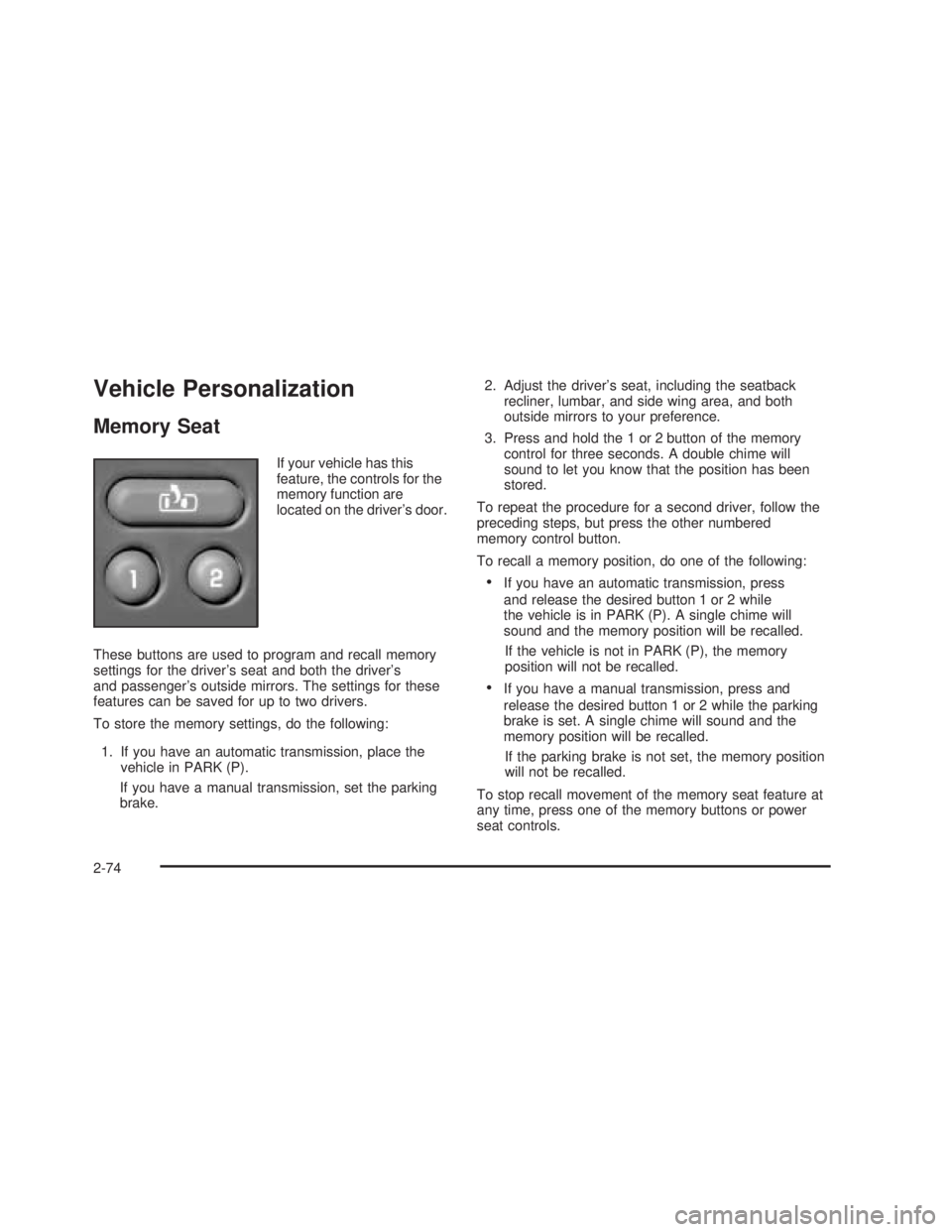
If your vehicle has this
feature, the controls for the
memory function are
located on the driver’s door.
These buttons are used to program and recall memory
settings for the driver’s seat and both the driver’s
and passenger’s outside mirrors. The settings for these
features can be saved for up to two drivers.
To store the memory settings, do the following:
1. If you have an automatic transmission, place the
vehicle in PARK (P).
If you have a manual transmission, set the parking
brake.2. Adjust the driver’s seat, including the seatback
recliner, lumbar, and side wing area, and both
outside mirrors to your preference.
3. Press and hold the 1 or 2 button of the memory
control for three seconds. A double chime will
sound to let you know that the position has been
stored.
To repeat the procedure for a second driver, follow the
preceding steps, but press the other numbered
memory control button.
To recall a memory position, do one of the following:
If you have an automatic transmission, press
and release the desired button 1 or 2 while
the vehicle is in PARK (P). A single chime will
sound and the memory position will be recalled.
If the vehicle is not in PARK (P), the memory
position will not be recalled.
If you have a manual transmission, press and
release the desired button 1 or 2 while the parking
brake is set. A single chime will sound and the
memory position will be recalled.
If the parking brake is not set, the memory position
will not be recalled.
To stop recall movement of the memory seat feature at
any time, press one of the memory buttons or power
seat controls.
2-74
Page 165 of 574
Easy Exit Seat
The controls for this memory function are located on the
driver’s door.
B(Easy Exit Seat):This button is used to program
and recall the desired driver’s seat position when
exiting/entering the vehicle. The seat position can be
saved for up to two drivers.
To store the seat exit position, do the following:
1. If you have an automatic transmission, place the
vehicle in PARK (P).
If you have a manual transmission, set the parking
brake.
2. Press and release the 1 or 2 button. The seat will
move to the stored memory position.
3. Adjust the seat to the desired exit position.
4. Press and hold the exit button of the memory
control for three seconds. A double chime will sound
to let you know that the position has been stored
for the selected button 1 or 2.
To repeat the procedure for a second driver, follow
the preceding steps, but press the other numbered
memory control button.To use the seat exit position, do one of the following:
If you have an automatic transmission, press
and release the exit button on the memory control
while the vehicle is in PARK (P).
If you have a manual transmission, press and
release the exit button on the memory control while
the parking brake is set.
Or, if this feature is activated in the DIC, removing
the key from the ignition will move the seat to the
exit position.
See “Easy Exit Seat” underDIC Vehicle Customization
on page 3-63for more information on activating this
feature in the DIC.
2-75
Page 167 of 574
Instrument Panel Overview...............................3-4
Hazard Warning Flashers................................3-6
Other Warning Devices...................................3-6
Horn.............................................................3-6
Tilt Wheel.....................................................3-7
Turn Signal/Multifunction Lever.........................3-7
Turn and Lane-Change Signals........................3-8
Headlamp High/Low-Beam Changer..................3-9
Flash-to-Pass.................................................3-9
Windshield Wipers..........................................3-9
Windshield Washer.......................................3-10
Cruise Control..............................................3-10
Headlamps..................................................3-13
Headlamps on Reminder................................3-14
Daytime Running Lamps (DRL).......................3-14
Automatic Headlamp System..........................3-15
Fog Lamps..................................................3-16
Auxiliary Roof Mounted Lamp.........................3-17
Instrument Panel Brightness...........................3-17
Dome Lamps...............................................3-17
Dome Lamp Override....................................3-18
Entry Lighting...............................................3-18
Exit Lighting.................................................3-18
Front Reading Lamps....................................3-18
Cargo Lamp.................................................3-19
Accessory Power Outlets...............................3-19
Ashtrays and Cigarette Lighter........................3-20Climate Controls............................................3-21
Climate Control System.................................3-21
Dual Climate Control System..........................3-22
Dual Automatic Climate Control System...........3-25
Outlet Adjustment.........................................3-30
Warning Lights, Gages, and Indicators............3-31
Instrument Panel Cluster................................3-32
Speedometer and Odometer...........................3-33
Trip Odometer..............................................3-33
Tachometer.................................................3-33
Safety Belt Reminder Light.............................3-33
Airbag Readiness Light..................................3-34
Airbag Off Light............................................3-34
Passenger Airbag Status Indicator...................3-36
Battery Warning Light....................................3-38
Voltmeter Gage............................................3-38
Up-Shift Light (Manual Transmission)...............3-39
Brake System Warning Light..........................3-39
Anti-Lock Brake System Warning Light.............3-41
Traction Off Light..........................................3-41
Engine Coolant Temperature Gage..................3-42
Transmission Temperature Gage.....................3-43
Malfunction Indicator Lamp.............................3-44
Oil Pressure Gage........................................3-47
Security Light...............................................3-48
Cruise Control Light......................................3-48
Highbeam On Light.......................................3-48
Section 3 Instrument Panel
3-1
Page 171 of 574
The main components of your instrument panel are the following:
A. Dome Lamp Button. SeeDome Lamps on page 3-17.
B. Headlamp Controls. SeeHeadlamps on page 3-13.
C. Air Outlets. SeeOutlet Adjustment on page 3-30.
D. Automatic Transfer Case/Electronic Transfer
Case/Traction Assist System (TAS). SeeFour-Wheel
Drive on page 2-37.
E. Multifunction Lever. SeeTurn Signal/Multifunction
Lever on page 3-7.
F. Instrument Panel Cluster. SeeInstrument Panel
Cluster on page 3-32.
G. Gearshift Lever (Automatic Transmission). See
Automatic Transmission Operation on page 2-26.
H. Tow/Haul Selector and Overdrive Disable (Allison
Transmission
®Only) Button (If Equipped). See
Tow/Haul Mode on page 2-29.
I. Audio System. SeeAudio System(s) on page 3-69.
J. Climate Control System. SeeClimate Control
System on page 3-21,Dual Climate Control System
on page 3-22andDual Automatic Climate Control
System on page 3-25.
K. Instrument Panel Fuse Block.Instrument Panel Fuse
Block on page 5-122.
L. Cargo Lamp Button. SeeCargo Lamp on page 3-19.
M. Hood Release. SeeHood Release on page 5-13.N. Steering Wheel Control Buttons (If Equipped). See
Driver Information Center (DIC) on page 3-50.
O. Center Instrument Panel Block. SeeCenter
Instrument Panel Fuse Block on page 5-124.
P. Parking Brake Release. SeeParking Brake on
page 2-48.
Q. Tilt Wheel Lever. SeeTilt Wheel on page 3-7.
R. Lighter and Accessory Power Outlet. SeeAccessory
Power Outlets on page 3-19, andAshtrays and
Cigarette Lighter on page 3-20.
S. Storage Area. SeeFront Storage Area on page 2-71.
T. Ashtray. SeeAshtrays and Cigarette Lighter on
page 3-20.
U. Manual Selectable Ride Control (If Equipped).
SeeManual Selectable Ride on page 4-10.
V. 4-Wheel Steer Button (If Equipped). See
QUADRASTEER™ on page 4-14.
W. Passenger Airbag Off Switch (If Equipped).
SeeAirbag Off Switch on page 1-73.
X. Auxiliary Roof Mounted Lamp Button (If Equipped).
SeeAuxiliary Roof Mounted Lamp on page 3-17.
Y. Glove Box. SeeGlove Box on page 2-70.
3-5
Page 179 of 574
Using Cruise Control on Hills
How well your cruise control will work on hills depends
upon your speed, load and the steepness of the
hills. When going up steep hills, you may want to step
on the accelerator pedal to maintain your speed.
When going downhill, you may have to brake or shift to
a lower gear to keep your speed down. Of course,
applying the brake takes you out of cruise control. Many
drivers nd this to be too much trouble and don’t use
cruise control on steep hills.
Ending Cruise Control
There are four ways to turn off the cruise control:
Step lightly on the brake pedal,
move the cruise control switch to off, or
shift the transmission to NEUTRAL (N).
If your vehicle has the Stabilitrak®feature, cruise
control will turn off if road conditions cause
Stabilitrak
®to activate.
If the accelerator pedal is held for 60 seconds or
longer, cruise control will turn off.
Erasing Speed Memory
When you turn off the cruise control or the ignition, your
cruise control set speed memory is erased.
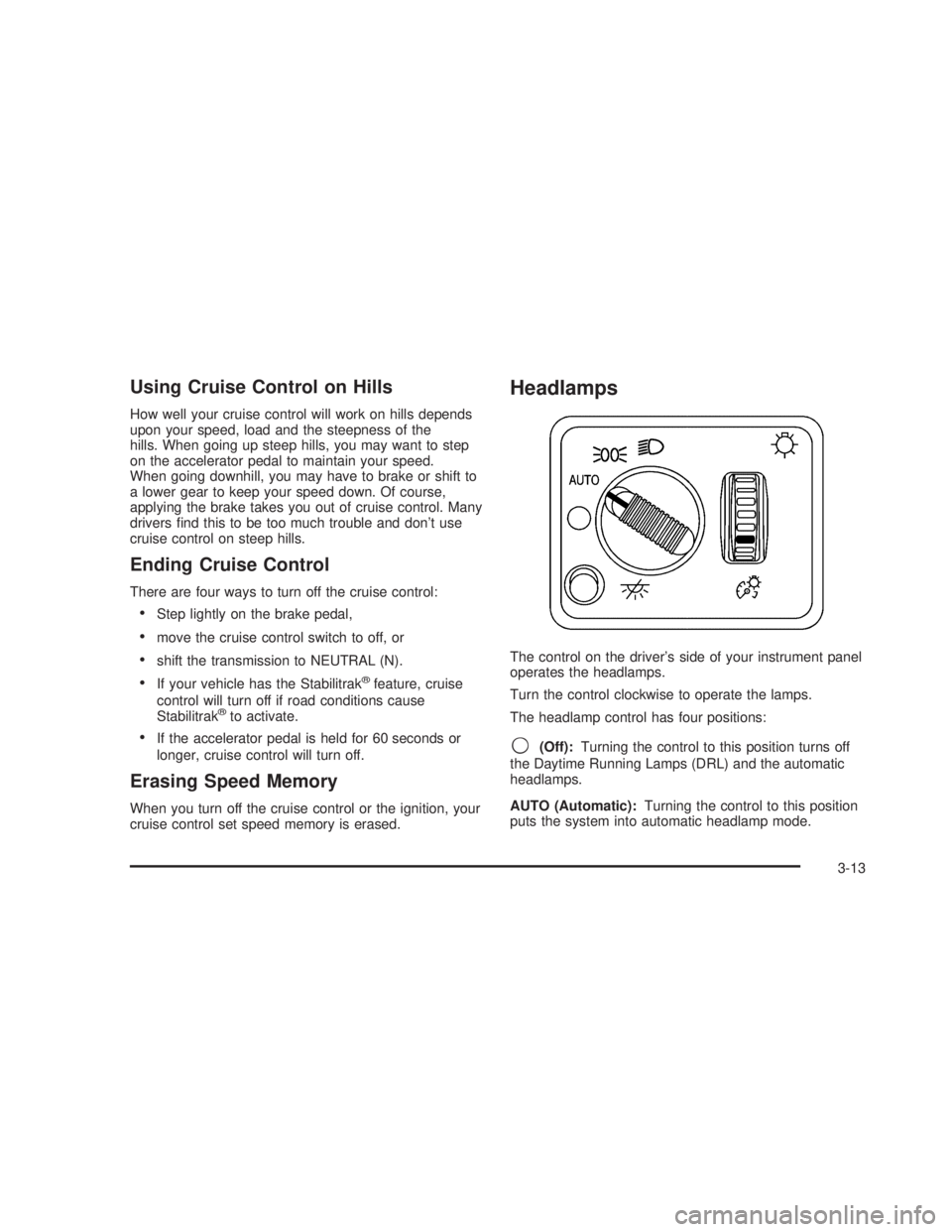
Headlamps
The control on the driver’s side of your instrument panel
operates the headlamps.
Turn the control clockwise to operate the lamps.
The headlamp control has four positions:
9(Off):Turning the control to this position turns off
the Daytime Running Lamps (DRL) and the automatic
headlamps.
AUTO (Automatic):Turning the control to this position
puts the system into automatic headlamp mode.
3-13
Page 180 of 574
;(Parking Lamps):Turning the control to this
position turns on the parking lamps, together with the
following:
Sidemarker Lamps
Taillamps
License Plate Lamps
Instrument Panel Lights
Roof Marker Lamps (If Equipped)
5(Headlamps):Turning the control to this position
turns on the headlamps, together with the previously
listed lamps and lights.
You can switch your headlamps from high to low-beam
by pushing the turn signal/high-beam lever towards
the instrument panel.
A circuit breaker protects your headlamps. If you have
an electrical overload, your headlamps will icker on and
off. Have your headlamp wiring checked right away if
this happens.
Headlamps on Reminder
A reminder chime will sound when your headlamps or
parking lamps are manually turned on and your
ignition is off, in LOCK, ACCESSORY, or your door is
open. To disable the chime, turn the light off then
back on.
Daytime Running Lamps (DRL)
Daytime Running Lamps (DRL) can make it easier for
others to see the front of your vehicle during the
day. DRL can be helpful in many different driving
conditions, but they can be especially helpful in the short
periods after dawn and before sunset. Fully functional
daytime running lamps are required on all vehicles
rst sold in Canada.
The DRL system will come on when the following
conditions are met:
The ignition is on
The exterior lamps control is AUTO
The automatic transmission is not in PARK (P)
The light sensor determines it is daytime
When the DRL are on, only your DRL lamps will be on.
The taillamps, sidemarker and other lamps won’t be
on. The instrument panel won’t be lit up either.
3-14
Page 181 of 574
When it begins to get dark, the automatic headlamp
system will switch from DRL to the headlamps.
When you turn the headlamp switch off, the headlamps
will go off, and your DRL lamps will illuminate,
provided it is not dark outside.
Shifting the transmission into PARK (P) will allow you to
idle the vehicle with the DRL off. The DRL will stay
off until you shift the transmission out of PARK (P).
This procedure applies only to vehicles rst sold in the
United States.
Automatic Headlamp System
When it is dark enough outside, your automatic
headlamp system will turn on your headlamps at the
normal brightness along with other lamps such as
the taillamps, sidemarker, parking lamps and the
instrument panel lights. The radio lights will also be dim.
To turn off the automatic headlamp system, turn the
exterior lamps switch to the off position and then
release. Turning off the automatic headlamp system
with the headlamp switch is not available for vehicles
rst sold in Canada. For vehicles rst sold in Canada,
you can turn off the automatic headlamp systemwhen parked at night by applying the parking brake
before starting your vehicle. The headlamps will remain
off once the vehicle is started for as long as you are
parked. If you release the parking brake, the lights will
turn on. If the parking brake is not released before
you begin to drive, the exterior lamps will turn on above
2 mph (3.2 km/h).
Your vehicle is equipped with a light sensor located on
the top of the instrument panel in the defroster grille.
Be sure it is not covered, or the system will be on
whenever the ignition is on.
The system may also turn on your headlamps when
driving through a parking garage, heavy overcast
weather or a tunnel. This is normal.
There is a delay in the transition between the daytime
and nighttime operation of the Daytime Running
Lamps (DRL) and the automatic headlamp systems so
that driving under bridges or bright overhead street
lights does not affect the system. The DRL and
automatic headlamp system will only be affected when
the light sensor sees a change in lighting lasting
longer than the delay.
3-15
Page 198 of 574
Instrument Panel Cluster
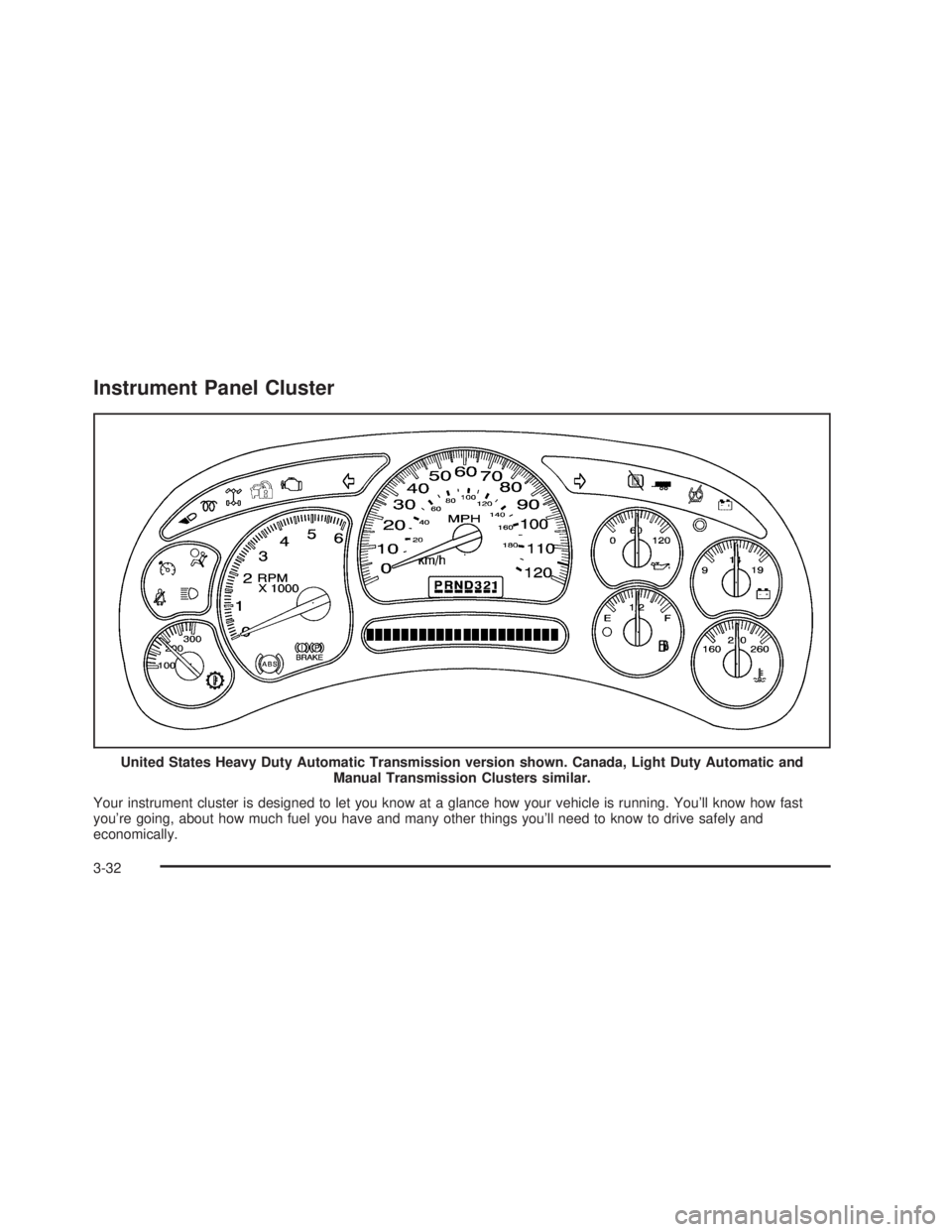
Your instrument cluster is designed to let you know at a glance how your vehicle is running. You’ll know how fast
you’re going, about how much fuel you have and many other things you’ll need to know to drive safely and
economically.United States Heavy Duty Automatic Transmission version shown. Canada, Light Duty Automatic and
Manual Transmission Clusters similar.
3-32
Page 229 of 574
TURN SIGNAL ON
If a turn signal is left on for 3/4 of a mile (1.2 km), this
message will appear on the display and you will
hear a chime. Move the turn signal/multifunction lever to
the off position. Pressing any of the four DIC buttons,
if equipped, will acknowledge the message and
clear it from the DIC display. If your vehicle is not
equipped with the four DIC buttons, pressing the trip
odometer reset stem will acknowledge the message and
clear it from the DIC display.
DIC Vehicle Customization
Your vehicle may have customization capabilities that
allow you to program some features to one setting
based on your preference. All of the customizable
options listed may not be available on your vehicle. Only
the options available will be displayed on your Driver
Information Center (DIC).
The default settings for the customization features were
set when your vehicle left the factory, but may have
been changed from their default state since then.
To change feature preferences, make sure the ignition
is on and the vehicle is in PARK (P). Press the
customization button to scroll through the available
customizable options.After pressing the customization button, VEHICLE
SETTINGS will momentarily display before going to a
customization option.
Lock Doors (Automatic Transmission only)
If you have an automatic transmission vehicle, press
the customization button until LOCK DOORS appears in
the display. To select your preference for automatic
locking, press the select button while LOCK DOORS is
displayed on the DIC. Pressing the select button will
scroll through the following choices:
LOCK DOORS: IN GEAR (default):The doors will lock
when the vehicle is shifted out of PARK (P).
LOCK DOORS: WITH SPEED:The doors will lock
when the vehicle speed is above 8 mph (13 km/h) for
three seconds.
Choose one of the available options and press the
customization button while it is displayed on the DIC to
select it and move on to the next feature. For more
information on automatic door locks, seeProgrammable
Automatic Door Locks on page 2-10.
3-63
Page 230 of 574
Unlock Doors (Automatic
Transmission only)
If you have an automatic transmission vehicle, press the
customization button until UNLOCK DOORS appears
in the display. To select your preference for automatic
unlocking, press the select button while UNLOCK
DOORS is displayed on the DIC. Pressing the select
button will scroll through the following choices:
UNLOCK DOORS: IN PARK (default):All of the doors
will unlock when the vehicle is shifted into PARK (P).
UNLOCK DRIVER: IN PARK:The driver’s door will be
unlocked when the vehicle is shifted into PARK (P).
UNLOCK DOORS: KEY OUT:All of the doors
will unlock when the key is taken out of the ignition.
UNLOCK DOORS: MANUALLY:The doors will not be
unlocked automatically.
Choose one of the available options and press the
customization button while it is displayed on the DIC to
select it and move on to the next feature. For more
information on automatic door locks, seeProgrammable
Automatic Door Locks on page 2-10.
Door Lock Delay (Crew Cab only)
If your DIC does not have this feature, you still may be
able to program the delayed locking feature. See
Delayed Locking on page 2-10for more information.When locking the doors with the power lock switch or
the keyless entry transmitter and a door is open,
the delayed locking feature will delay locking the doors
until ve seconds after the last door is closed.
Press the customization button until DOOR LOCK
DELAY appears in the display. To select your
preference for delayed locking, press the select button
while DOOR LOCK DELAY is displayed on the DIC.
Pressing the select button will scroll through the
following choices:
DOOR LOCK DELAY: OFF (default):The doors will
lock immediately when pressing the power lock switch or
the lock button on the keyless entry transmitter.
DOOR LOCK DELAY: ON:The doors will not lock until
ve seconds after the last door is closed. You will
hear three chimes to signal that the delayed locking
feature is in use. You can temporarily override delayed
locking by pressing the lock button on the door or
keyless entry transmitter a second time.
Choose one of the available options and press the
customization button while it is displayed on the DIC to
select it and move on to the next feature. For more
information on automatic door locks, seeProgrammable
Automatic Door Locks on page 2-10.
This feature will not operate if the key is in the ignition.
3-64