change wheel GMC SIERRA 2007 User Guide
[x] Cancel search | Manufacturer: GMC, Model Year: 2007, Model line: SIERRA, Model: GMC SIERRA 2007Pages: 680, PDF Size: 3.42 MB
Page 390 of 680
If your vehicle starts to slide, ease your foot off
the accelerator pedal and quickly steer the
way you want the vehicle to go. If you start
steering quickly enough, your vehicle may
straighten out. Always be ready for a second skid
if it occurs.
Of course, traction is reduced when water, snow,
ice, gravel, or other material is on the road.
For safety, you will want to slow down and adjust
your driving to these conditions. It is important
to slow down on slippery surfaces because
stopping distance will be longer and vehicle control
more limited.
While driving on a surface with reduced traction, try
your best to avoid sudden steering, acceleration, or
braking, including reducing vehicle speed by
shifting to a lower gear. Any sudden changes could
cause the tires to slide. You may not realize the
surface is slippery until your vehicle is skidding.
Learn to recognize warning clues — such as
enough water, ice, or packed snow on the road to
make a mirrored surface — and slow down when
you have any doubt.
Remember: Any Anti-Lock Brake System (ABS)
helps avoid only the braking skid.Off-Road Driving
This off-road guide is for vehicles that have
four-wheel drive. Also, seeBraking on page 378.If
your vehicle does not have four-wheel drive or
is equipped with 20-inch tire/wheel assemblies,
you should not drive off-road unless you are on a
level, solid surface.
The airbag system is designed to work properly
under a wide range of conditions, including off-road
usage. Observe safe driving speeds, especially
on rough terrain. As always, wear your safety belt.
Off-road driving can be great fun. But it does
have some denite hazards. The greatest of these
is the terrain itself.
“Off-roading” means you have left the great North
American road system behind. Traffic lanes
are not marked. Curves are not banked. There are
no road signs. Surfaces can be slippery, rough,
uphill, or downhill. In short, you have gone
right back to nature.
Off-road driving involves some new skills. And that
is why it is very important that you read this
guide. You will nd many driving tips and
suggestions. These will help make your off-road
driving safer and more enjoyable.
390
Page 395 of 680
Scanning the Terrain
Off-road driving can take you over many different
kinds of terrain. You need to be familiar with
the terrain and its many different features. Here
are some things to consider.
Surface Conditions:Off-roading can take you
over hard-packed dirt, gravel, rocks, grass, sand,
mud, snow, or ice. Each of these surfaces
affects the steering, acceleration, and braking of
your vehicle in different ways. Depending upon the
kind of surface you are on, you may experience
slipping, sliding, wheel spinning, delayed
acceleration, poor traction, and longer braking
distances.Surface Obstacles:Unseen or hidden obstacles
can be hazardous. A rock, log, hole, rut, or
bump can startle you if you are not prepared for
them. Often these obstacles are hidden by
grass, bushes, snow, or even the rise and fall of
the terrain itself. Here are some things to consider:
Is the path ahead clear?
Will the surface texture change abruptly up
ahead?
Does the travel take you uphill or downhill?
There is more discussion of these subjects
later.
Will you have to stop suddenly or change
direction quickly?
When you drive over obstacles or rough terrain,
keep a rm grip on the steering wheel. Ruts,
troughs, or other surface features can jerk
the wheel out of your hands if you are not
prepared.
395
Page 405 of 680
Driving in Mud, Sand, Snow, or Ice
When you drive in mud, snow, or sand, your
wheels will not get good traction. You cannot
accelerate as quickly, turning is more difficult, and
you will need longer braking distances. If your
vehicle has four-wheel drive, seeFour-Wheel Drive
on page 147for transfer case mode selection.
It is best to use a low gear when you are in
mud — the deeper the mud, the lower the gear.
In really deep mud, the idea is to keep your vehicle
moving so you do not get stuck.
When you drive on sand, you will sense a change
in wheel traction. But it will depend upon how
loosely packed the sand is. On loosely packed
sand, such as on beaches or sand dunes,
your tires will tend to sink into the sand. This has
an effect on steering, accelerating, and braking.
Drive at a reduced speed and avoid sharp turns or
abrupt maneuvers.Hard packed snow and ice offer the worst tire
traction. On these surfaces, it is very easy to lose
control. On wet ice, for example, the traction is
so poor that you will have difficulty accelerating.
And if you do get moving, poor steering and
difficult braking can cause you to slide out of
control.
{CAUTION:
Driving on frozen lakes, ponds, or rivers
can be dangerous. Underwater springs,
currents under the ice, or sudden thaws
can weaken the ice. Your vehicle could
fall through the ice and you and your
passengers could drown. Drive your
vehicle on safe surfaces only.
405
Page 471 of 680
4. Adjust the Trailer Gain by using the gain
adjustment (+ / -) buttons on the Trailer
Brake Control Panel.
5. Drive the vehicle with the trailer attached on a
level road surface representative of the towing
condition and free of traffic at about 20 to
25 mph (32 to 40 km/h) and fully apply
the Manual Trailer Brake Apply lever.
Adjusting trailer gain at speeds lower than
20 to 25 mph (32 to 40 km/h) may result in an
incorrect gain setting.
6. Adjust the Trailer Gain to just below the point
of trailer wheel lock-up, indicated by trailer
wheel squeal or puffs of tire smoke when
a trailer wheel locks.
Trailer wheel lock-up may not occur if towing
a heavily loaded trailer. In this case, adjust
the Trailer Gain to the highest allowable
setting for the towing condition.
7. Re-adjust Trailer Gain any time vehicle
loading, trailer loading or road surface
conditions change or if you notice trailer wheel
lock-up at any time while you are towingOther ITBC Related DIC Messages
In addition to displaying TRAILER GAIN and
TRAILER OUTPUT through the DIC, trailer
connection and ITBC system status is displayed in
the DIC.
TRAILER CONNECTED – This message will be
briey displayed when a trailer with electric brakes
is rst connected to the vehicle. This message
will automatically turn off in about ten seconds.
The driver can also acknowledge this message
before it automatically turns off.
CHECK TRAILER WIRING – This message will be
displayed if:
1. The ITBC system rst determines connection
to a trailer with electric brakes and then the
trailer harness becomes disconnected
from the vehicle.
If the disconnect occurs while the vehicle is
stationary, this message will automatically turn
off in about thirty seconds. This message
will also turn off if the driver acknowledges this
message off or if the trailer harness is
re-connected.
471
Page 565 of 680
Federal Communications Commission
(FCC) and Industry and Science
Canada
The Tire Pressure Monitor System (TPMS)
operates on a radio frequency and complies with
Part 15 of the FCC Rules. Operation is subject
to the following two conditions:
1. This device may not cause harmful
interference.
2. This device must accept any interference
received, including interference that may
cause undesired operation.
The Tire Pressure Monitor System (TPMS)
operates on a radio frequency and complies
with RSS-210 of Industry and Science Canada.
Operation is subject to the following
two conditions:
1. This device may not cause interference.
2. This device must accept any interference
received, including interference that may
cause undesired operation of the device.
Changes or modications to this system by other
than an authorized service facility could void
authorization to use this equipment.
Tire Inspection and Rotation
Tires should be rotated every 5,000 to 8,000 miles
(8 000 to 13 000 km).
Any time you notice unusual wear, rotate your
tires as soon as possible and check wheel
alignment. Also check for damaged tires or wheels.
SeeWhen It Is Time for New Tires on page 568
andWheel Replacement on page 573for
more information.
Make sure the spare tire is stored securely. Push,
pull, and then try to rotate or turn the tire. If it
moves, use the wheel wrench/hoist shaft to tighten
the cable. SeeChanging a Flat Tire on page 576.
If your vehicle has dual rear wheels, also see
Dual Tire Operation on page 560.
The purpose of regular rotation is to achieve more
uniform wear for all tires on the vehicle. The
rst rotation is the most important. SeeScheduled
Maintenance (Gasoline Engine) on page 623.
565
Page 567 of 680
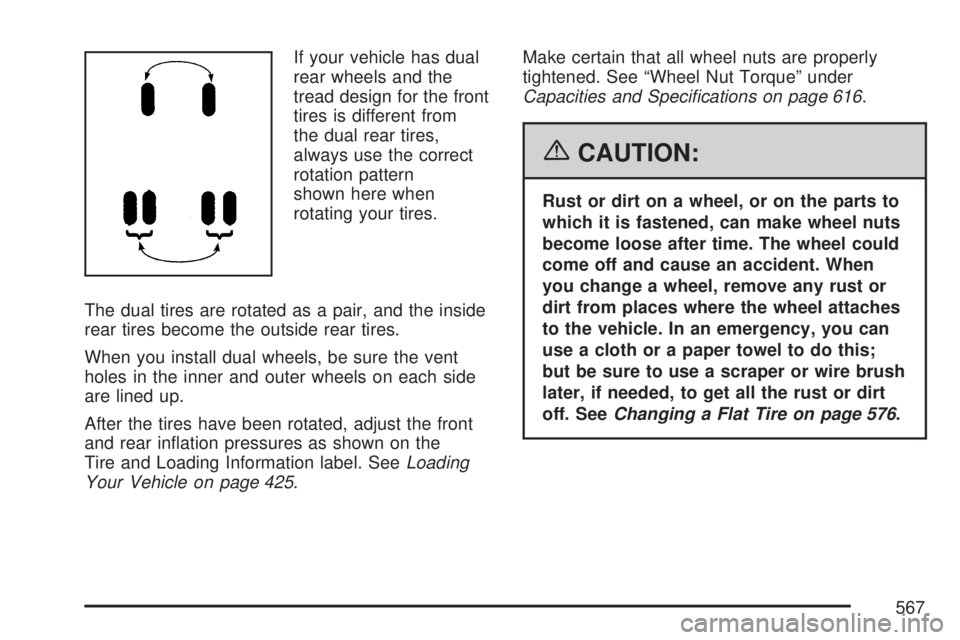
If your vehicle has dual
rear wheels and the
tread design for the front
tires is different from
the dual rear tires,
always use the correct
rotation pattern
shown here when
rotating your tires.
The dual tires are rotated as a pair, and the inside
rear tires become the outside rear tires.
When you install dual wheels, be sure the vent
holes in the inner and outer wheels on each side
are lined up.
After the tires have been rotated, adjust the front
and rear ination pressures as shown on the
Tire and Loading Information label. SeeLoading
Your Vehicle on page 425.Make certain that all wheel nuts are properly
tightened. See “Wheel Nut Torque” under
Capacities and Specications on page 616.
{CAUTION:
Rust or dirt on a wheel, or on the parts to
which it is fastened, can make wheel nuts
become loose after time. The wheel could
come off and cause an accident. When
you change a wheel, remove any rust or
dirt from places where the wheel attaches
to the vehicle. In an emergency, you can
use a cloth or a paper towel to do this;
but be sure to use a scraper or wire brush
later, if needed, to get all the rust or dirt
off. SeeChanging a Flat Tire on page 576.
567
Page 576 of 680
If a Tire Goes Flat
It is unusual for a tire to blowout while you are
driving, especially if you maintain your vehicle’s
tires properly. If air goes out of a tire, it is
much more likely to leak out slowly. But if you
should ever have a blowout, here are a few tips
about what to expect and what to do:
If a front tire fails, the at tire will create a drag
that pulls the vehicle toward that side. Take your
foot off the accelerator pedal and grip the
steering wheel rmly. Steer to maintain lane
position, and then gently brake to a stop well out
of the traffic lane.
A rear blowout, particularly on a curve, acts much
like a skid and may require the same correction
you would use in a skid. In any rear blowout
remove your foot from the accelerator pedal. Get
the vehicle under control by steering the way
you want the vehicle to go. It may be very bumpy
and noisy, but you can still steer. Gently brake
to a stop, well off the road if possible.{CAUTION:
Lifting a vehicle and getting under it to do
maintenance or repairs is dangerous
without the appropriate safety equipment
and training. The jack provided with your
vehicle is designed only for changing a
at tire. If it is used for anything else, you
or others could be badly injured or killed
if the vehicle slips off the jack. Use the
jack provided with your vehicle only for
changing a at tire.
If a tire goes at, the next part shows how to use
the jacking equipment to change a at tire safely.
Changing a Flat Tire
If a tire goes at, avoid further tire and wheel
damage by driving slowly to a level place. Turn on
your hazard warning ashers. SeeHazard
Warning Flashers on page 211for more
information.
576
Page 577 of 680
{CAUTION:
Changing a tire can be dangerous. The
vehicle can slip off the jack and roll over
or fall on you or other people. You and
they could be badly injured or even killed.
Find a level place to change your tire. To
help prevent the vehicle from moving:
1. Set the parking brake rmly.
2. Put the shift lever in PARK (P).
3. If you have a four-wheel-drive vehicle,
be sure the transfer case is in a drive
gear – not in NEUTRAL.
4. Turn off the engine and do not restart
while the vehicle is raised.
5. Do not allow passengers to remain in
the vehicle.
CAUTION: (Continued)
CAUTION: (Continued)
To be even more certain the vehicle will
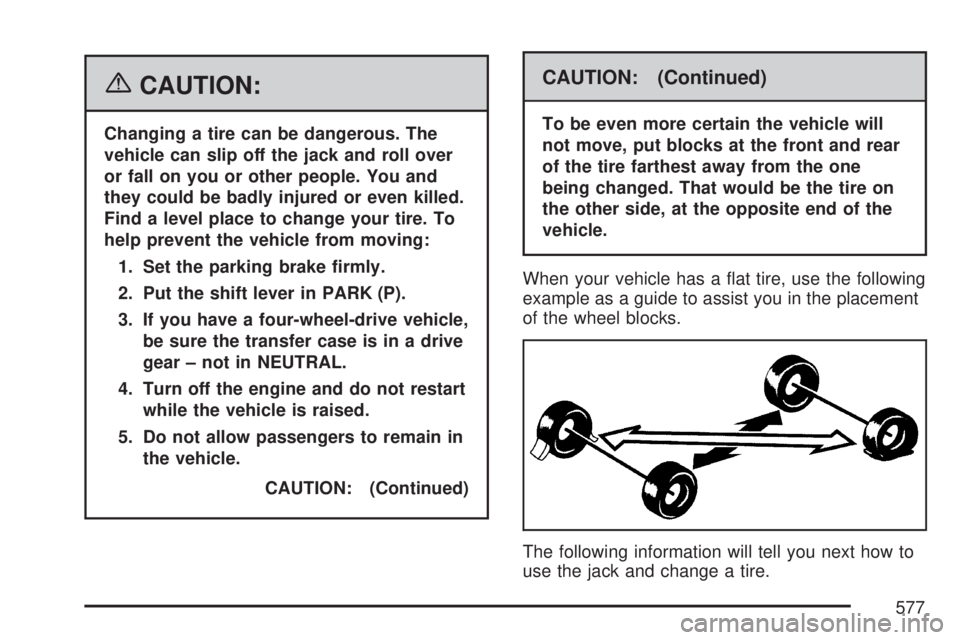
not move, put blocks at the front and rear
of the tire farthest away from the one
being changed. That would be the tire on
the other side, at the opposite end of the
vehicle.
When your vehicle has a at tire, use the following
example as a guide to assist you in the placement
of the wheel blocks.
The following information will tell you next how to
use the jack and change a tire.
577
Page 628 of 680
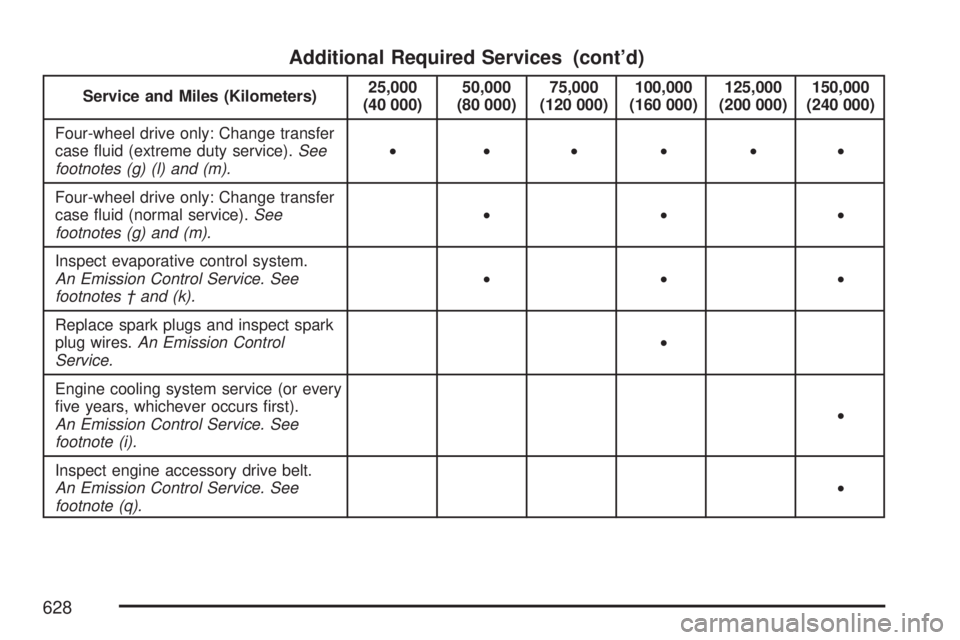
Additional Required Services (cont’d)
Service and Miles (Kilometers)25,000
(40 000)50,000
(80 000)75,000
(120 000)100,000
(160 000)125,000
(200 000)150,000
(240 000)
Four-wheel drive only: Change transfer
case uid (extreme duty service).See
footnotes (g) (l) and (m).• •••••
Four-wheel drive only: Change transfer
case uid (normal service).See
footnotes (g) and (m).•••
Inspect evaporative control system.
An Emission Control Service. See
footnotes † and (k).•••
Replace spark plugs and inspect spark
plug wires.An Emission Control
Service.•
Engine cooling system service (or every
ve years, whichever occurs rst).
An Emission Control Service. See
footnote (i).•
Inspect engine accessory drive belt.
An Emission Control Service. See
footnote (q).•
628
Page 631 of 680
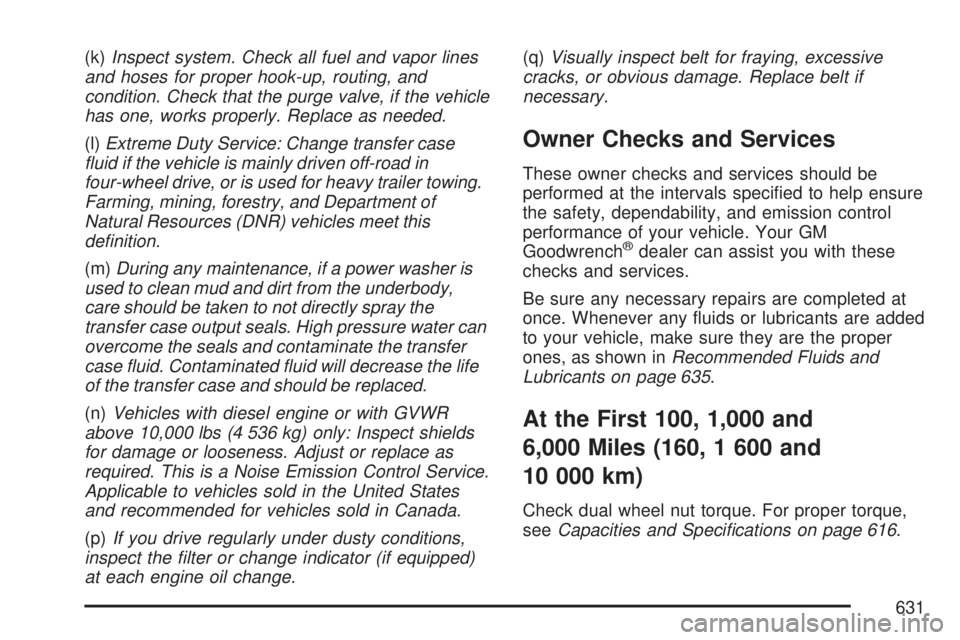
(k)Inspect system. Check all fuel and vapor lines
and hoses for proper hook-up, routing, and
condition. Check that the purge valve, if the vehicle
has one, works properly. Replace as needed.
(l)Extreme Duty Service: Change transfer case
uid if the vehicle is mainly driven off-road in
four-wheel drive, or is used for heavy trailer towing.
Farming, mining, forestry, and Department of
Natural Resources (DNR) vehicles meet this
denition.
(m)During any maintenance, if a power washer is
used to clean mud and dirt from the underbody,
care should be taken to not directly spray the
transfer case output seals. High pressure water can
overcome the seals and contaminate the transfer
case uid. Contaminated uid will decrease the life
of the transfer case and should be replaced.
(n)Vehicles with diesel engine or with GVWR
above 10,000 lbs (4 536 kg) only: Inspect shields
for damage or looseness. Adjust or replace as
required. This is a Noise Emission Control Service.
Applicable to vehicles sold in the United States
and recommended for vehicles sold in Canada.
(p)If you drive regularly under dusty conditions,
inspect the lter or change indicator (if equipped)
at each engine oil change.(q)Visually inspect belt for fraying, excessive
cracks, or obvious damage. Replace belt if
necessary.
Owner Checks and Services
These owner checks and services should be
performed at the intervals specied to help ensure
the safety, dependability, and emission control
performance of your vehicle. Your GM
Goodwrench
®dealer can assist you with these
checks and services.
Be sure any necessary repairs are completed at
once. Whenever any uids or lubricants are added
to your vehicle, make sure they are the proper
ones, as shown inRecommended Fluids and
Lubricants on page 635.
At the First 100, 1,000 and
6,000 Miles (160, 1 600 and
10 000 km)
Check dual wheel nut torque. For proper torque,
seeCapacities and Specications on page 616.
631