towing GMC SIERRA 2007 Owner's Guide
[x] Cancel search | Manufacturer: GMC, Model Year: 2007, Model line: SIERRA, Model: GMC SIERRA 2007Pages: 680, PDF Size: 3.42 MB
Page 256 of 680
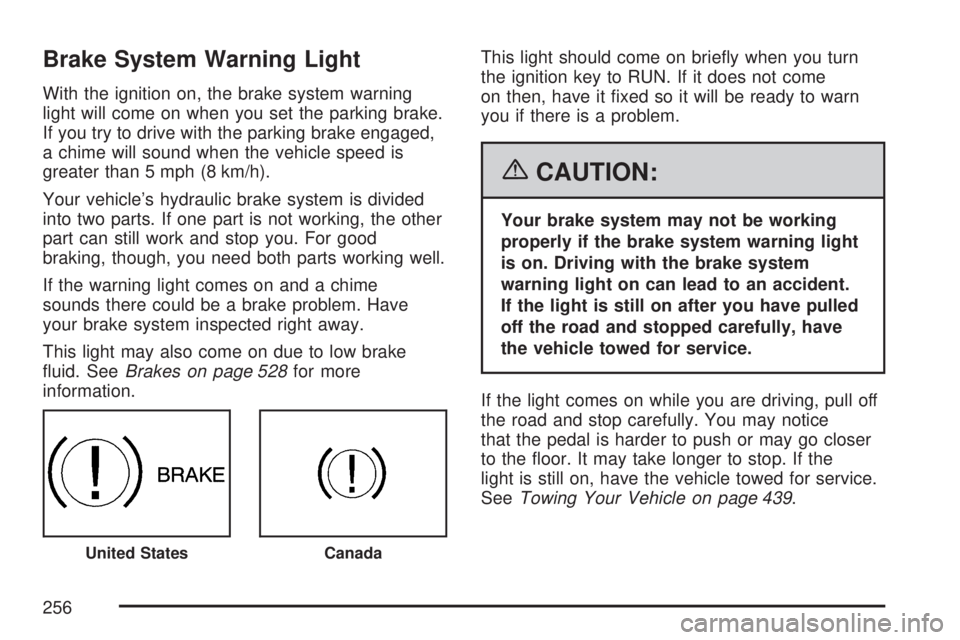
Brake System Warning Light
With the ignition on, the brake system warning
light will come on when you set the parking brake.
If you try to drive with the parking brake engaged,
a chime will sound when the vehicle speed is
greater than 5 mph (8 km/h).
Your vehicle’s hydraulic brake system is divided
into two parts. If one part is not working, the other
part can still work and stop you. For good
braking, though, you need both parts working well.
If the warning light comes on and a chime
sounds there could be a brake problem. Have
your brake system inspected right away.
This light may also come on due to low brake
uid. SeeBrakes on page 528for more
information.This light should come on briey when you turn
the ignition key to RUN. If it does not come
on then, have it xed so it will be ready to warn
you if there is a problem.
{CAUTION:
Your brake system may not be working
properly if the brake system warning light
is on. Driving with the brake system
warning light on can lead to an accident.
If the light is still on after you have pulled
off the road and stopped carefully, have
the vehicle towed for service.
If the light comes on while you are driving, pull off
the road and stop carefully. You may notice
that the pedal is harder to push or may go closer
to the oor. It may take longer to stop. If the
light is still on, have the vehicle towed for service.
SeeTowing Your Vehicle on page 439.
United StatesCanada
256
Page 261 of 680
This light should come on, as a check to show
you it is working, when the ignition is on and the
engine is not running. If the light does not
come on, have it repaired. This light will also
come on during a malfunction in one of two ways:
Light Flashing— A misre condition has
been detected. A misre increases vehicle
emissions and may damage the emission
control system on your vehicle. Diagnosis and
service may be required.
Light On Steady— An emission control
system malfunction has been detected on your
vehicle. Diagnosis and service may be
required.
If the Light is Flashing
The following may prevent more serious damage
to your vehicle:
Reducing vehicle speed
Avoiding hard accelerations
Avoiding steep uphill grades
If you are towing a trailer, reduce the amount
of cargo being hauled as soon as it is
possibleIf the light stops ashing and remains on steady,
see “If the Light Is On Steady” following.
If the light continues to ash, when it is safe to do
so, stop the vehicle. Find a safe place to park
your vehicle. Turn the key off, wait at least
10 seconds and restart the engine. If the light
remains on steady, see “If the Light Is On Steady”
following. If the light is still ashing, follow the
previous steps, and see your dealer for service as
soon as possible.
If the Light Is On Steady
You may be able to correct the emission system
malfunction by considering the following:
Did you recently put fuel into your vehicle?
If so, reinstall the fuel cap, making sure to fully
install the cap. SeeFilling the Tank on page 493.
The diagnostic system can determine if the
fuel cap has been left off or improperly installed. A
loose or missing fuel cap will allow fuel to
evaporate into the atmosphere. A few driving trips
with the cap properly installed should turn the
light off.
261
Page 273 of 680
Remember, you must reset the OIL LIFE display
yourself after each oil change. It will not reset
itself. Also, be careful not to reset the OIL LIFE
display accidentally at any time other than
when the oil has just been changed. It cannot be
reset accurately until the next oil change. To
reset the engine oil life system, seeEngine Oil
Life System on page 503.
Units
Press the vehicle information button until UNITS
displays. This display allows you to select between
English or Metric units of measurement. Once in
this display, press the set/reset button to select
between ENGLISH or METRIC units. All of
the vehicle information will then be displayed in
the unit of measurement selected.
Tire Pressure
If your vehicle has a Tire Pressure Monitor (TPM)
system, the pressure for each tire can be
viewed in the DIC. The tire pressure will be shown
in either pounds per square inch (psi) or
kilopascals (kPa). Press the vehicle information
button until the DIC displays FRONT TIRES
PSI (kPa) LEFT ## RIGHT ##. Press the vehicle
information button again until the DIC displays
REAR TIRES PSI (kPa) LEFT ## RIGHT ##.If a low or high tire pressure condition is detected
by the system while driving, a message advising
you to check the pressure in a specic tire
will appear in the display. SeeInation - Tire
Pressure on page 559andDIC Warnings
and Messages on page 279for more information.
If the tire pressure display shows dashes
instead of a value, there may be a problem with
your vehicle. If this consistently occurs, see
your dealer for service.
Trailer Gain and Output
On vehicles with the Integrated Trailer Brake
Control (ITBC) system, the trailer brake display
appears in the DIC. Press the vehicle information
button until TRAILER GAIN and OUTPUT display.
TRAILER GAIN shows the trailer gain setting. This
setting can be adjusted from 0.0 to 10.0 with
either a trailer connected or disconnected.
To adjust this setting, see “Integrated Trailer
Brake Control System” underTowing a Trailer on
page 445for more information.
273
Page 274 of 680
OUTPUT shows the power output to the trailer
anytime a trailer with electric brakes is connected.
Output is displayed in 0 to 10 bars. Dashes
may appear in the OUTPUT display. See
“Integrated Trailer Brake Control System” under
Towing a Trailer on page 445for more information.
Engine Hours
Press the vehicle information button until ENGINE
HOURS displays. This display shows the total
number of hours the engine has run.
Relearn Tire Positions
If your vehicle has a Tire Pressure Monitor (TPM)
system, after rotating the tires or after replacing a
tire or sensor, the system must re-learn the tire
positions. To re-learn the tire positions, seeTire
Pressure Monitor System on page 561. SeeTire
Inspection and Rotation on page 565andDIC
Warnings and Messages on page 279for more
information.
Relearn Remote Key
This display allows you to match Remote Keyless
Entry (RKE) transmitters to your vehicle. To
match an RKE transmitter to your vehicle, do the
following:
1. Press the vehicle information button until
PRESS
VTO RELEARN REMOTE KEY
displays.
2. Press the set/reset button until REMOTE KEY
LEARNING ACTIVE is displayed.
3. Press and hold the lock and unlock buttons
on the rst transmitter at the same time for
about 15 seconds.
On vehicles with memory recall seats, the rst
transmitter learned will match driver 1 and
the second will match driver 2.
A chime will sound indicating that the
transmitter is matched.
4. To match additional transmitters at this time,
repeat Step 3.
Each vehicle can have a maximum of
eight transmitters matched to it.
5. To exit the programming mode, you must
cycle the key to LOCK.
274
Page 277 of 680
To adjust this setting, see “Integrated Trailer
Brake Control System” underTowing a Trailer on
page 445for more information.
OUTPUT shows the power output to the trailer
anytime a trailer with electric brakes is connected.
Output is displayed in 0 to 10 bars. Dashes
may appear in the OUTPUT display. See
“Integrated Trailer Brake Control System” under
Towing a Trailer on page 445for more information.
Oil Life
To access this display, the vehicle must be in
PARK (P). Press the trip odometer reset stem until
OIL LIFE REMAINING displays. This display
shows an estimate of the oil’s remaining useful
life. If you see 99% OIL LIFE REMAINING on the
display, that means 99% of the current oil life
remains. The engine oil life system will alert you to
change your oil on a schedule consistent with
your driving conditions.
When the remaining oil life is low, the CHANGE
ENGINE OIL SOON message will appear on the
display. See “CHANGE ENGINE OIL SOON” under
DIC Warnings and Messages on page 279. You
should change your oil as soon as you can.SeeEngine Oil (Gasoline Engine) on page 500.In
addition to the engine oil life system monitoring the
oil life, additional maintenance is recommended in
the Maintenance Schedule in this manual. See
Scheduled Maintenance (Gasoline Engine) on
page 623for more information.
Remember, you must reset the OIL LIFE display
yourself after each oil change. It will not reset
itself. Also, be careful not to reset the OIL LIFE
display accidentally at any time other than
when the oil has just been changed. It cannot be
reset accurately until the next oil change. To
reset the engine oil life system, seeEngine Oil
Life System on page 503.
Relearn Tire Positions
To access this display, the vehicle must be in
PARK (P). If your vehicle has a Tire Pressure
Monitor (TPM) system, after rotating the tires or
after replacing a tire or sensor, the system
must re-learn the tire positions. To re-learn the tire
positions, seeTire Pressure Monitor System on
page 561. SeeTire Inspection and Rotation
on page 565andDIC Warnings and Messages on
page 279for more information.
277
Page 281 of 680
As soon as it is safe to do so, carefully pull your
vehicle over to the side of the road and turn
the ignition off. Check the wiring connection to the
trailer and turn the ignition back on. This
message clears if the trailer is reconnected. This
message also clears if you acknowledge it. If
this message still displays, either your vehicle or
the trailer needs service. See your dealer.
See “Integrated Trailer Brake Control System”
underTowing a Trailer on page 445for more
information.
DRIVER DOOR OPEN
This message displays and a chime sounds if the
driver’s door is not fully closed and the vehicle
is in a drive gear. Stop and turn off the vehicle,
check the door for obstructions, and close the door
again. Check to see if the message still appears
on the DIC.
ENGINE HOT A/C (Air Conditioning)
TURNED OFF
This message displays when the engine coolant
becomes hotter than the normal operating
temperature. SeeEngine Coolant Temperature
Gage on page 258. To avoid added strain on a hot
engine, the air conditioning compressor
automatically turns off. When the coolant
temperature returns to normal, the air conditioning
compressor turns back on. You can continue to
drive your vehicle.
If this message continues to appear, have the
system repaired by your dealer as soon as
possible to avoid damage to the engine.
ENGINE OIL LOW ADD OIL
If your vehicle has an oil level sensor, this
message displays if the oil level in the vehicle is
low. Check the oil level and correct it as
necessary. You may need to let the vehicle cool
or warm up and cycle the ignition to be sure
this message clears.
This message clears itself after 10 seconds, until
the next ignition cycle. SeeEngine Oil (Gasoline
Engine) on page 500for additional information.
281
Page 287 of 680
SERVICE TRAILER BRAKE SYSTEM
On vehicles with the Integrated Trailer Brake
Control (ITBC) system, this message displays and
a chime sounds when there is a problem with
the ITBC system.
When this message displays, power is no longer
available to the trailer brakes.
As soon as it is safe to do so, carefully pull your
vehicle over to the side of the road and turn
the ignition off. Check the wiring connection to the
trailer and turn the ignition back on. If this
message still displays, either your vehicle or the
trailer needs service. See your dealer.
See “Integrated Trailer Brake Control System”
underTowing a Trailer on page 445for more
information.
STABILITRAK OFF
If your vehicle has StabiliTrak®, this message
displays when you turn off StabiliTrak®, or when
the stability control has been automatically
disabled. To limit wheel spin and realize the full
benets of the stability enhancement system, you
should normally leave StabiliTrak
®on. However,
you should turn StabiliTrak®off if your vehicle gets
stuck in sand, mud, ice, or snow and you wantto rock your vehicle to attempt to free it, or if you
are driving in extreme off-road conditions and
require more wheel spin. SeeIf Your Vehicle is
Stuck in Sand, Mud, Ice, or Snow on page 422.To
turn the StabiliTrak
®system on or off, see
StabiliTrak®System on page 381.
There are several conditions that can cause this
message to appear.
One condition is overheating, which could
occur if StabiliTrak®activates continuously
for an extended period of time.
The message also displays if the brake
system warning light is on. SeeBrake System
Warning Light on page 256.
The message could display if the stability
system takes longer than usual to complete its
diagnostic checks due to driving conditions.
The message displays if an engine or vehicle
related problem has been detected and the
vehicle needs service. See your dealer.
The message also displays if the vehicle is
shifted into 4LO.
The message turns off as soon as the conditions
that caused the message to be displayed are
no longer present.
287
Page 288 of 680
TIGHTEN GAS CAP
This message may display along with the check
engine light on the instrument panel cluster if
the vehicle’s fuel cap is not tightened properly. See
Malfunction Indicator Lamp on page 260.
Reinstall the fuel cap fully. SeeFilling the Tank on
page 493. The diagnostic system can determine
if the fuel cap has been left off or improperly
installed. A loose or missing fuel cap allows fuel to
evaporate into the atmosphere. A few driving
trips with the cap properly installed should turn this
light and message off.
TIRE LEARNING ACTIVE
If your vehicle has a Tire Pressure Monitor (TPM)
system, this message displays when the system
is re-learning the tire positions on your vehicle.
SeeDIC Operation and Displays (With DIC
Buttons) on page 268orDIC Operation and
Displays (Without DIC Buttons) on page 275for
more information. The tire positions must be
re-learned after rotating the tires or after replacing
a tire or sensor. SeeTire Inspection and
Rotation on page 565,Tire Pressure Monitor
System on page 561, andInation - Tire Pressure
on page 559for more information.
TRACTION CONTROL OFF
If your vehicle has StabiliTrak®, this message
displays when the Traction Control System (TCS)
is turned off. Adjust your driving accordingly.
SeeStabiliTrak
®System on page 381for more
information.
TRAILER CONNECTED
On vehicles with the Integrated Trailer Brake
Control (ITBC) system, this message displays
briey when a trailer with electric brakes is
rst connected to the vehicle.
This message clears itself after several seconds.
This message also clears if you acknowledge
it. After this message clears, the TRAILER
GAIN/OUTPUT display appears in the DIC.
See “TRAILER GAIN/OUTPUT” underDIC
Operation and Displays (With DIC Buttons) on
page 268orDIC Operation and Displays (Without
DIC Buttons) on page 275and “Integrated
Trailer Brake Control System” underTowing a
Trailer on page 445for more information.
288
Page 373 of 680
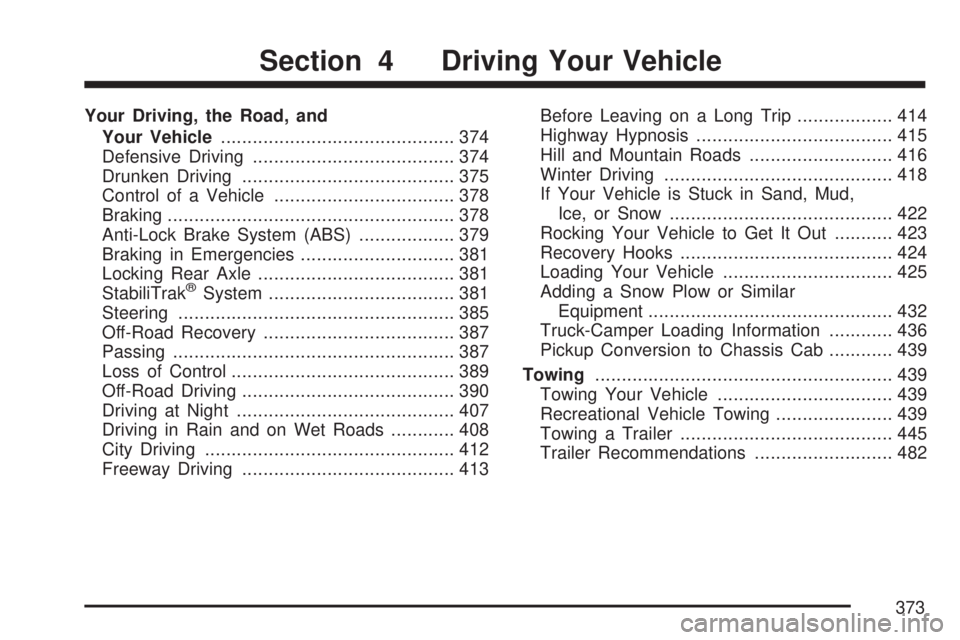
Your Driving, the Road, and
Your Vehicle............................................ 374
Defensive Driving...................................... 374
Drunken Driving........................................ 375
Control of a Vehicle.................................. 378
Braking...................................................... 378
Anti-Lock Brake System (ABS).................. 379
Braking in Emergencies............................. 381
Locking Rear Axle..................................... 381
StabiliTrak
®System................................... 381
Steering.................................................... 385
Off-Road Recovery.................................... 387
Passing..................................................... 387
Loss of Control.......................................... 389
Off-Road Driving........................................ 390
Driving at Night......................................... 407
Driving in Rain and on Wet Roads............ 408
City Driving............................................... 412
Freeway Driving........................................ 413Before Leaving on a Long Trip.................. 414
Highway Hypnosis..................................... 415
Hill and Mountain Roads........................... 416
Winter Driving........................................... 418
If Your Vehicle is Stuck in Sand, Mud,
Ice, or Snow.......................................... 422
Rocking Your Vehicle to Get It Out........... 423
Recovery Hooks........................................ 424
Loading Your Vehicle................................ 425
Adding a Snow Plow or Similar
Equipment.............................................. 432
Truck-Camper Loading Information............ 436
Pickup Conversion to Chassis Cab............ 439
Towing........................................................ 439
Towing Your Vehicle................................. 439
Recreational Vehicle Towing...................... 439
Towing a Trailer........................................ 445
Trailer Recommendations.......................... 482
Section 4 Driving Your Vehicle
373
Page 423 of 680
Notice:Spinning the wheels can destroy parts
of your vehicle as well as the tires. If you
spin the wheels too fast while shifting
the transmission back and forth, you can
destroy the transmission.
For information about using tire chains on your
vehicle, seeTire Chains on page 574.
Rocking Your Vehicle to Get It Out
First, turn the steering wheel left and right.
That will clear the area around the front wheels. If
you have a four-wheel-drive vehicle, shift into
Four-Wheel High. If your vehicle has StabiliTrak
®,
you should turn the system off. SeeStabiliTrak®
System on page 381. Then shift back and
forth between REVERSE (R) and a forward gear,
spinning the wheels as little as possible.Release the accelerator pedal while you shift, and
press lightly on the accelerator pedal when the
transmission is in gear. By slowly spinning
the wheels in the forward and reverse directions,
you will cause a rocking motion that may free
your vehicle. If that does not get your vehicle out
after a few tries, it may need to be towed out.
Or, you can use the recovery hooks if your vehicle
has them. If your vehicle does need to be towed
out, seeTowing Your Vehicle on page 439.
423