instrument panel GMC SIERRA 2007 Repair Manual
[x] Cancel search | Manufacturer: GMC, Model Year: 2007, Model line: SIERRA, Model: GMC SIERRA 2007Pages: 680, PDF Size: 3.42 MB
Page 516 of 680
Coolant Surge Tank Pressure Cap
Notice:If the pressure cap is not tightly
installed, coolant loss and possible engine
damage may occur. Be sure the cap is properly
and tightly secured.
The coolant surge tank pressure cap must be fully
installed on the coolant surge tank. SeeEngine
Compartment Overview on page 498for more
information on location.
Engine Overheating
If your vehicle has the DURAMAX®Diesel engine,
see the DURAMAX®Diesel manual for more
information.
You will nd a coolant temperature gage on your
vehicle’s instrument panel. SeeEngine Coolant
Temperature Gage on page 258.
In addition, you will nd ENGINE OVERHEATED
STOP ENGINE, ENGINE OVERHEATED IDLE
ENGINE, and ENGINE POWER IS REDUCED
messages in the Driver Information Center (DIC)
on the instrument panel. SeeDIC Warnings
and Messages on page 279.
516
Page 561 of 680
Tire Pressure Monitor System
The Tire Pressure Monitor System (TPMS) uses
radio and sensor technology to check tire pressure
levels. If your vehicle has this feature, sensors
are mounted on each tire and wheel assembly,
except the spare tire. The TPMS sensors monitor
the air pressure in your vehicle’s tires and
transmit tire pressure readings to a receiver
located in the vehicle.
The TPMS is designed to alert the driver, if a low
tire pressure condition exists. If your vehicle has the
Driver Information Center (DIC), the driver may also
check tire pressure levels using the DIC.
When a low tire pressure condition is detected,
the TPMS will illuminate the low tire pressure
warning symbol located on the instrument panel
cluster. If your vehicle has the DIC feature, a
message to check the pressure in a specic tire
will also appear on the DIC display. The low
tire pressure warning symbol on the instrument
panel cluster and the CHECK TIRE PRESSURE
warning message on the DIC display will appear at
each ignition cycle until the tires are inated to
the correct ination pressure.For additional information and details about the
DIC operation and displays seeDIC Operation and
Displays (With DIC Buttons) on page 268orDIC
Operation and Displays (Without DIC Buttons)
on page 275andDIC Warnings and Messages on
page 279.
You may notice, during cooler weather conditions,
that the tire pressure monitor light, located on
the instrument panel cluster, and the CHECK TIRE
PRESSURE message will appear when the
vehicle is rst started and then turn off as you
start to drive the vehicle. This could be an early
indicator that the tire pressures are getting low and
need to be inated to the proper pressure.
Each tire, including the spare (if provided), should
be checked monthly when cold and inated to
the ination pressure recommended by the vehicle
manufacturer on the vehicle placard or tire
ination pressure label. (If your vehicle has tires of
a different size than the size indicated on the
vehicle placard or tire ination pressure label, you
should determine the proper tire ination
pressure for those tires.)
561
Page 564 of 680
3. Using the DIC, press the vehicle information
button until the RELEARN TIRE POSITIONS
message displays. If your vehicle does not
have the DIC buttons, press the trip odometer
reset stem located on the instrument panel
cluster until the RELEARN TIRE POSITIONS
message displays.
4. If your vehicle has the DIC buttons, press the
set/reset button. The horn will sound twice to
indicate the TPMS receiver is ready, and the
TIRE LEARNING ACTIVE message will
display. If your vehicle does not have the DIC
buttons, press and hold the trip odometer reset
stem until the horn chirps twice and the TIRE
LEARNING ACTIVE message is displayed.
5. Start with the driver’s side front tire.
6. Remove the valve cap from the valve cap
stem. Activate the TPMS sensor by
increasing or decreasing the tire’s air pressure
for ve seconds, or until a horn chirp
sounds. The horn chirp, which make take up
to 30 seconds to sound, conrms that the
sensor identication code has been matched
to this tire and wheel position. To decreaseair-pressure out of a tire you can use the
pointed end of the valve cap, a pencil-style air
pressure gage, or a key.
7. Proceed to the passenger’s side front tire, and
repeat the procedure in Step 6.
8. Proceed to the passenger’s side rear tire, and
repeat the procedure in Step 6.
9. Proceed to the driver’s side rear tire, and
repeat the procedure in Step 6.
10. After hearing the conrming horn chirp for the
driver’s side rear tire, the horn chirp will sound
two more times to signal the tire learning
mode is no longer active. Turn the ignition
switch to LOCK.
11. Set all four tires to the recommended air
pressure level as indicated on the Tire
and Loading Information label.
12. Put the valve caps back on the valve stems
The spare tire does not have a TPMS sensor.
If you replace one of the road tires with the spare,
the SERVICE TIRE MONITOR message will be
displayed on the DIC screen. This message should
go off once you re-install the road tire containing
the TPMS sensor.
564
Page 600 of 680
Leather
A soft cloth dampened with water may be used to
remove dust. If a more thorough cleaning is
necessary, a soft cloth dampened with a mild soap
solution can be used. Allow the leather to dry
naturally. Do not use heat to dry. Never use steam
to clean leather. Never use spot lifters or spot
removers on leather. Many commercial leather
cleaners and coatings that are sold to preserve
and protect leather may permanently change
the appearance and feel of your leather and are
not recommended. Do not use silicone or
wax-based products, or those containing organic
solvents to clean your vehicle’s interior because
they can alter the appearance by increasing
the gloss in a non-uniform manner. Never use
shoe polish on your leather.
Instrument Panel, Vinyl, and Other
Plastic Surfaces
A soft cloth dampened with water may be used to
remove dust. If a more thorough cleaning is
necessary, a clean soft cloth dampened with a
mild soap solution can be used to gently remove
dust and dirt. Never use spot lifters or removers
on plastic surfaces. Many commercial cleaners and
coatings that are sold to preserve and protect
soft plastic surfaces may permanently change the
appearance and feel of your interior and are
not recommended. Do not use silicone or
wax-based products, or those containing organic
solvents to clean your vehicle’s interior because
they can alter the appearance by increasing
the gloss in a non-uniform manner.
Some commercial products may increase gloss on
your instrument panel. The increase in gloss
may cause annoying reections in the windshield
and even make it difficult to see through the
windshield under certain conditions.
600
Page 607 of 680
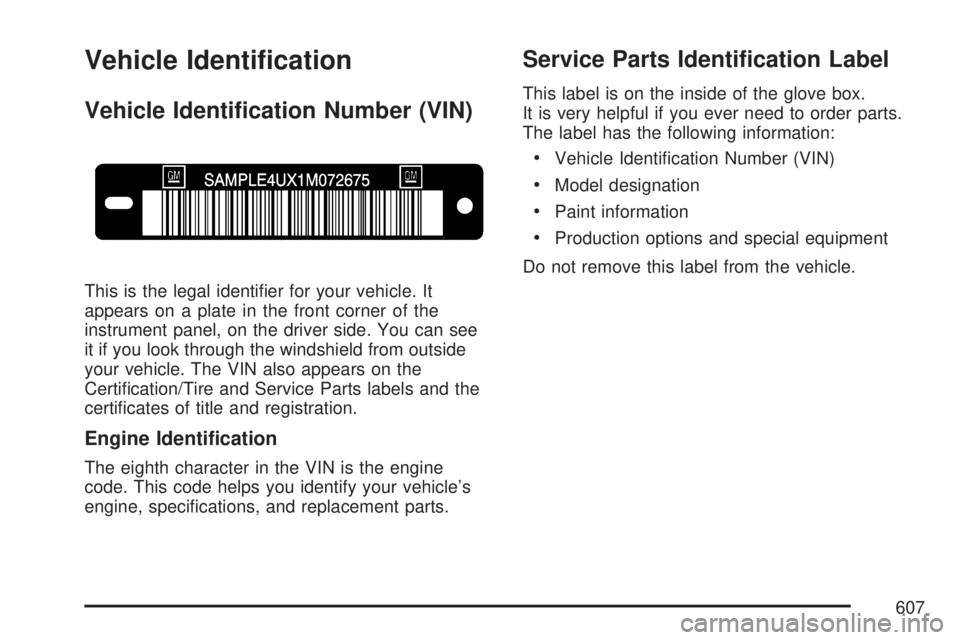
Vehicle Identication
Vehicle Identication Number (VIN)
This is the legal identier for your vehicle. It
appears on a plate in the front corner of the
instrument panel, on the driver side. You can see
it if you look through the windshield from outside
your vehicle. The VIN also appears on the
Certication/Tire and Service Parts labels and the
certicates of title and registration.
Engine Identication
The eighth character in the VIN is the engine
code. This code helps you identify your vehicle’s
engine, specications, and replacement parts.
Service Parts Identication Label
This label is on the inside of the glove box.
It is very helpful if you ever need to order parts.
The label has the following information:
Vehicle Identication Number (VIN)
Model designation
Paint information
Production options and special equipment
Do not remove this label from the vehicle.
607
Page 609 of 680
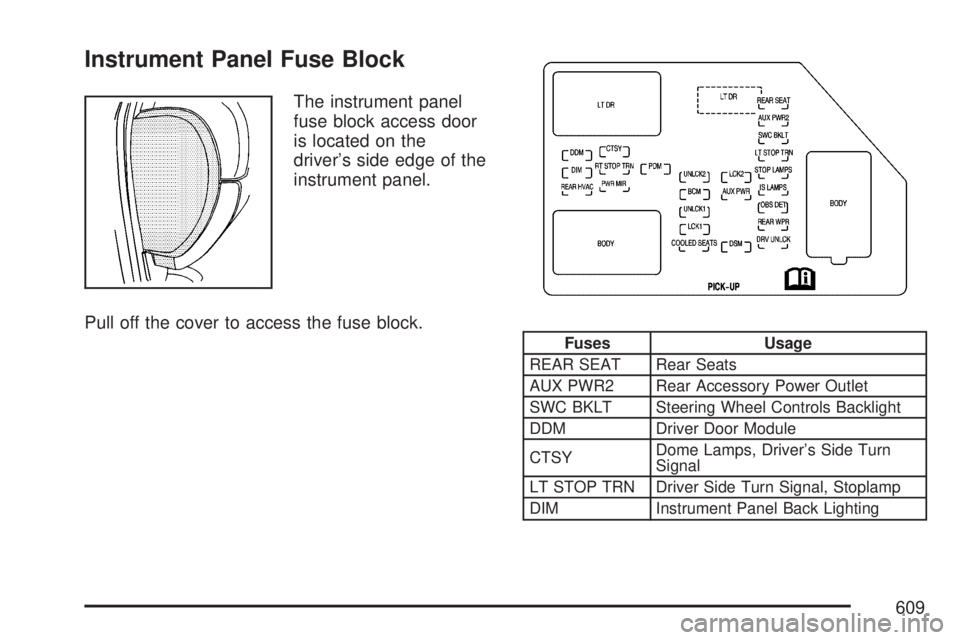
Instrument Panel Fuse Block
The instrument panel
fuse block access door
is located on the
driver’s side edge of the
instrument panel.
Pull off the cover to access the fuse block.
Fuses Usage
REAR SEAT Rear Seats
AUX PWR2 Rear Accessory Power Outlet
SWC BKLT Steering Wheel Controls Backlight
DDM Driver Door Module
CTSYDome Lamps, Driver’s Side Turn
Signal
LT STOP TRN Driver Side Turn Signal, Stoplamp
DIM Instrument Panel Back Lighting
609
Page 611 of 680

Center Instrument Panel Fuse Block
The center instrument panel fuse block is
located underneath the instrument panel, to the
left of the steering column.
Top View
Harness
ConnectorUsage
BODY 2 Body Harness Connector 2
BODY 1 Body Harness Connector 1
BODY 3 Body Harness Connector 3
HEADLINER 3 Headliner Harness Connector 3
HEADLINER 2 Headliner Harness Connector 2
HEADLINER 1 Headliner Harness Connector 1
BRAKE
CLUTCHBrake Clutch Harness Connector
SEO/UPFITTERSpecial Equipment Option Uptter
Harness Connector
Circuit Breaker Usage
CB1Passenger’s Side Power Window
Circuit Breaker
CB2 Passenger’s Seat Circuit Breaker
CB3 Driver’s Seat Circuit Breaker
CB4 Not Used
611
Page 614 of 680
Fuses Usage
9 Oxygen Sensors
10 Anti-lock Brakes System 2
11 Trailer Back-up Lamps
12 Driver’s Side Low-Beam Headlamp
13 Engine Control Module (Battery)
14 Fuel Injectors, Ignition Coils (Right Side)
15 Transmission Control Module (Battery)
16 Vehicle Back-up Lamps
17 Passenger’s Side Low-Beam Headlamp
18 Air Conditioning Compressor
19 Oxygen Sensors
20 Transmission Controls (Ignition)
21 Fuel Pump
22 Fuel System Control Module
23 Not Used
24 Not Used
25 Fuel Injectors, Ignition Coils (Left Side)
26 Trailer Park Lamps
27 Driver’s Side Park Lamps
28 Passenger’s Side Park Lamps
29 Fog Lamps
30 Horn
31 Passenger’s Side High-Beam HeadlampFuses Usage
32 Daytime Running Lamps
33 Driver’s Side High-Beam Headlamp
34 Not Used
35 Sunroof
36Key Ignition System, Theft Deterrent
System
37 Windshield Wiper
38 SEO B2 Uptter Usage (Battery)
39 Electric Adjustable Pedals
40 Climate Controls (Battery)
41 Airbag System (Ignition)
42 Amplier
43 Audio System
44 Miscellaneous (Ignition), Cruise Control
45 Tailgate Open/Close Assist
46 Airbag System (Battery)
47OnStar
®, Rear Seat Entertainment
Display
48 Instrument Panel Cluster
49 Power Take-Off
50Auxiliary Climate Control (Ignition),
Compass-Temperature Mirror
51Center High-Mounted Stoplamp
(CHMSL)
614
Page 644 of 680
Customer Assistance and
Information
Customer Satisfaction Procedure
Your satisfaction and goodwill are important
to your dealer/retailer and to GMC. Normally, any
concerns with the sales transaction or the
operation of the vehicle will be resolved by your
dealer’s/retailer’s sales or service departments.
Sometimes, however, despite the best intentions of
all concerned, misunderstandings can occur. If
your concern has not been resolved to your
satisfaction, the following steps should be taken:
STEP ONE:Discuss your concern with a member
of dealership/retailer management. Normally,
concerns can be quickly resolved at that level. If the
matter has already been reviewed with the sales,
service or parts manager, contact the owner of the
dealership/retailer or the general manager.STEP TWO:If after contacting a member of
dealership/retailer management, it appears your
concern cannot be resolved by the
dealership/retailer without further help, in the U.S.,
contact the GMC Consumer Relations Manager
by calling 1-800-GMC-8782 (1-800-462-8782,
Customer Assistance prompt). In Canada, contact
General Motors of Canada Customer
Communication by calling 1-800-263-3777
(English) or 1-800-263-7854 (French).
We encourage you to call the toll-free number in
order to give your inquiry prompt attention. Please
have the following information available to give
the Customer Assistance Representative:
Vehicle Identication Number (VIN). This is
available from the vehicle registration or
title, or the plate at the top left of the
instrument panel and visible through the
windshield.
Dealership/retailer name and location.
Vehicle delivery date and present mileage.
644
Page 665 of 680

A
Accessories and Modications..................... 486
Adding a Snow Plow or Similar
Equipment................................................ 432
Adding Equipment to Your Airbag-Equipped
Vehicle..................................................... 102
Additives, Fuel............................................ 490
Add-On Electrical Equipment....................... 608
Adjustable Throttle and Brake Pedal............ 136
Air Cleaner/Filter, Engine............................. 505
Air Conditioning.........................234, 237, 238
Airbag
Off Light.................................................. 250
Passenger Status Indicator....................... 252
Readiness Light....................................... 250
Airbag Sensing and Diagnostic
Module (SDM).......................................... 656
Airbag System............................................... 83
What Will You See After an Airbag
Inates?................................................. 92
When Should an Airbag Inate?................. 89
Where Are the Airbags?............................. 86
Airbag Systems
Adding Equipment to Your
Airbag-Equipped Vehicle....................... 102
Airbag Off Switch....................................... 93Airbag Systems (cont.)
How Does an Airbag Restrain?.................. 91
Passenger Sensing System....................... 97
Servicing Your Airbag-Equipped Vehicle.... 102
What Makes an Airbag Inate?.................. 91
AM-FM Radio.............................................. 304
Antenna, Fixed Mast................................... 371
Antenna, XM™ Satellite Radio Antenna
System.................................................... 371
Anti-Lock Brake System.............................. 379
Anti-Lock Brake, System Warning Light....... 257
Appearance Care
Aluminum or Chrome-Plated Wheels........ 603
Care of Safety Belts................................ 601
Chemical Paint Spotting........................... 605
Cleaning Exterior Lamps/Lenses.............. 602
Cleaning the Inside of Your Vehicle.......... 597
Fabric/Carpet........................................... 599
Finish Care.............................................. 602
Finish Damage......................................... 605
Instrument Panel, Vinyl, and Other
Plastic Surfaces.................................... 600
Leather.................................................... 600
Sheet Metal Damage............................... 604
Tires........................................................ 604
Underbody Maintenance........................... 605
Vehicle Care/Appearance Materials.......... 606
665