lock GMC SIERRA 2009 Owner's Manual
[x] Cancel search | Manufacturer: GMC, Model Year: 2009, Model line: SIERRA, Model: GMC SIERRA 2009Pages: 596, PDF Size: 3.25 MB
Page 358 of 596
Loading the Vehicle
It is very important to know how much weight your
vehicle can carry. This weight is called the vehicle
capacity weight and includes the weight of all
occupants, cargo, and all nonfactory-installed
options. Two labels on your vehicle show how
much weight it was designed to carry, the Tire
and Loading Information label and the Certication/
Tire label.
{CAUTION:
Do not load the vehicle any heavier than
the Gross Vehicle Weight Rating (GVWR), or
either the maximum front or rear Gross Axle
Weight Rating (GAWR). If you do, parts on the
vehicle can break, and it can change the way
your vehicle handles. These could cause you
to lose control and crash. Also, overloading
can shorten the life of the vehicle.Tire and Loading Information Label
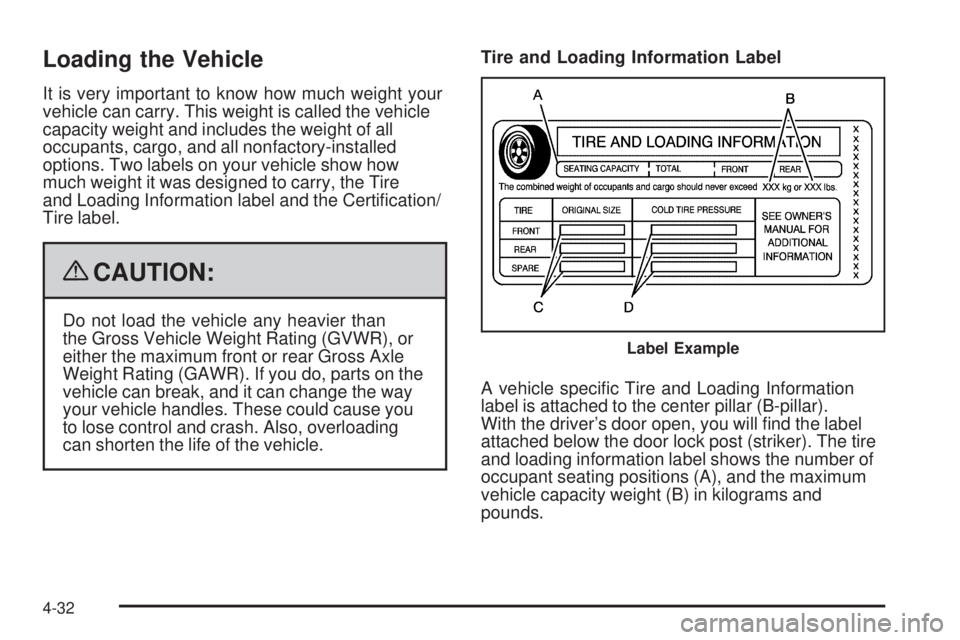
A vehicle specic Tire and Loading Information
label is attached to the center pillar (B-pillar).
With the driver’s door open, you will nd the label
attached below the door lock post (striker). The tire
and loading information label shows the number of
occupant seating positions (A), and the maximum
vehicle capacity weight (B) in kilograms and
pounds.
Label Example
4-32
Page 373 of 596
{CAUTION:
Shifting a four-wheel-drive vehicle’s transfer case
into N (Neutral) can cause the vehicle to roll even
if the transmission is in P (Park). The driver or
others could be injured. Make sure the parking
brake is rmly set before the transfer case is
shifted to N (Neutral).
4. Shift the transfer case to N (Neutral). See “Shifting
into Neutral” underFour-Wheel Drive on page 2-37
for the proper procedure to select the Neutral
position for the vehicle.
5. Release the parking brake only after the vehicle
being towed is rmly attached to the towing vehicle.
6. Turn the ignition to LOCK/OFF and remove the
key — the steering wheel will still turn.
After towing, see “Shifting Out of Neutral” under
Four-Wheel Drive on page 2-37for the proper procedure
to take the vehicle out of the Neutral position.
Dolly Towing
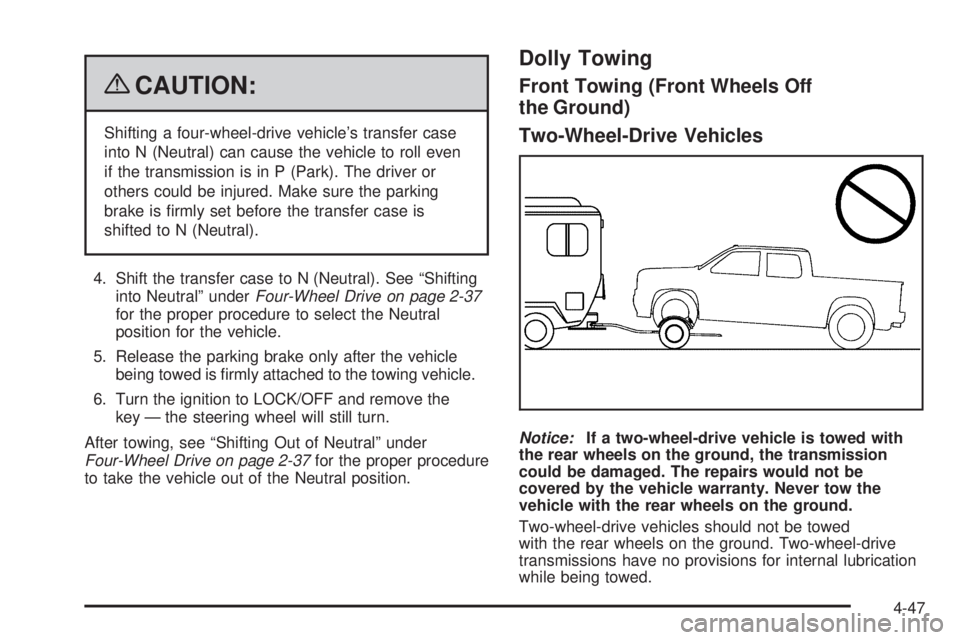
Front Towing (Front Wheels Off
the Ground)
Two-Wheel-Drive Vehicles
Notice:If a two-wheel-drive vehicle is towed with
the rear wheels on the ground, the transmission
could be damaged. The repairs would not be
covered by the vehicle warranty. Never tow the
vehicle with the rear wheels on the ground.
Two-wheel-drive vehicles should not be towed
with the rear wheels on the ground. Two-wheel-drive
transmissions have no provisions for internal lubrication
while being towed.
4-47
Page 374 of 596
To dolly tow a two-wheel-drive vehicle, the vehicle
must be towed with the rear wheels on the dolly.
See “Rear Towing (Rear Wheels Off the Ground)”
later in this section for more information.
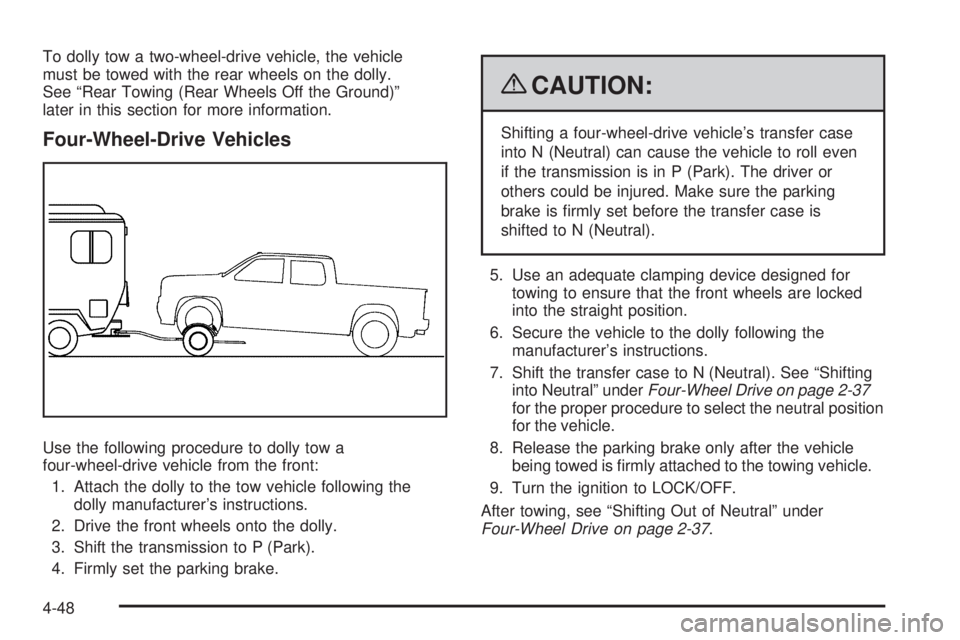
Four-Wheel-Drive Vehicles
Use the following procedure to dolly tow a
four-wheel-drive vehicle from the front:
1. Attach the dolly to the tow vehicle following the
dolly manufacturer’s instructions.
2. Drive the front wheels onto the dolly.
3. Shift the transmission to P (Park).
4. Firmly set the parking brake.
{CAUTION:
Shifting a four-wheel-drive vehicle’s transfer case
into N (Neutral) can cause the vehicle to roll even
if the transmission is in P (Park). The driver or
others could be injured. Make sure the parking
brake is rmly set before the transfer case is
shifted to N (Neutral).
5. Use an adequate clamping device designed for
towing to ensure that the front wheels are locked
into the straight position.
6. Secure the vehicle to the dolly following the
manufacturer’s instructions.
7. Shift the transfer case to N (Neutral). See “Shifting
into Neutral” underFour-Wheel Drive on page 2-37
for the proper procedure to select the neutral position
for the vehicle.
8. Release the parking brake only after the vehicle
being towed is rmly attached to the towing vehicle.
9. Turn the ignition to LOCK/OFF.
After towing, see “Shifting Out of Neutral” under
Four-Wheel Drive on page 2-37.
4-48
Page 375 of 596
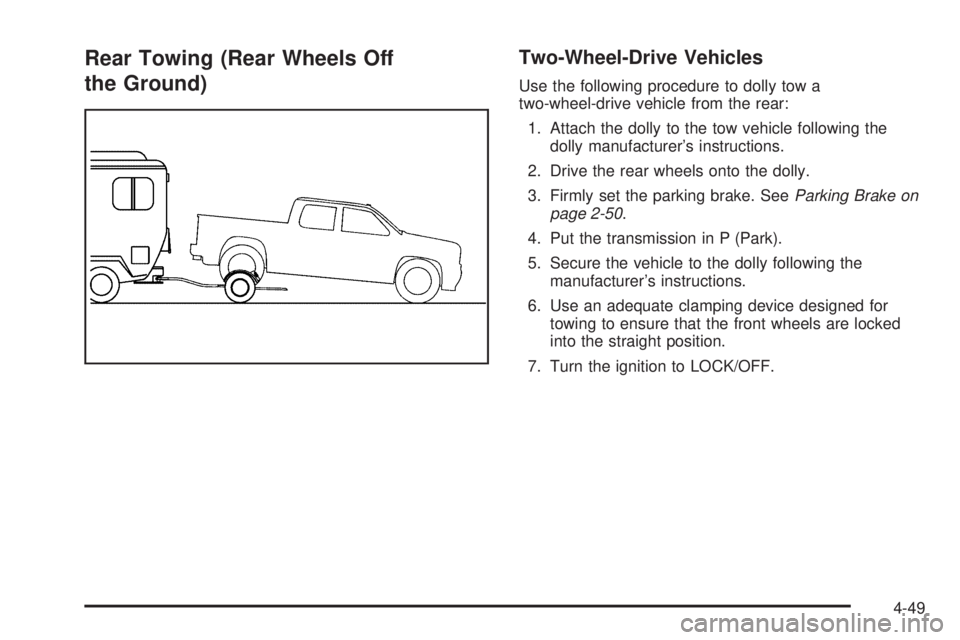
Rear Towing (Rear Wheels Off
the Ground)Two-Wheel-Drive Vehicles
Use the following procedure to dolly tow a
two-wheel-drive vehicle from the rear:
1. Attach the dolly to the tow vehicle following the
dolly manufacturer’s instructions.
2. Drive the rear wheels onto the dolly.
3. Firmly set the parking brake. SeeParking Brake on
page 2-50.
4. Put the transmission in P (Park).
5. Secure the vehicle to the dolly following the
manufacturer’s instructions.
6. Use an adequate clamping device designed for
towing to ensure that the front wheels are locked
into the straight position.
7. Turn the ignition to LOCK/OFF.
4-49
Page 376 of 596
Four-Wheel-Drive Vehicles
Use the following procedure to dolly tow a
four-wheel-drive vehicle from the rear:
1. Attach the dolly to the tow vehicle following the
dolly manufacturer’s instructions.
2. Drive the rear wheels onto the dolly.
3. Firmly set the parking brake. SeeParking Brake on
page 2-50.
4. Put the transmission in P (Park).
5. Secure the vehicle to the dolly following the
manufacturer’s instructions.
6. Use an adequate clamping device designed for
towing to ensure that the front wheels are locked
into the straight position.{CAUTION:
Shifting a four-wheel-drive vehicle’s transfer case
into N (Neutral) can cause the vehicle to roll even
if the transmission is in P (Park). The driver or
others could be injured. Make sure the parking
brake is rmly set before the transfer case is
shifted to N (Neutral).
7. Shift the transfer case to N (Neutral). See “Shifting
into Neutral” underFour-Wheel Drive on page 2-37
for the proper procedure to select the neutral
position for the vehicle.
8. Turn the ignition to LOCK/OFF.
After towing, see “Shifting Out of Neutral” under
Four-Wheel Drive on page 2-37.
4-50
Page 396 of 596
Trailer Brakes
A loaded trailer that weighs more than 2,000 lbs
(900 kg) needs to have its own brake system that is
adequate for the weight of the trailer. Be sure to read
and follow the instructions for the trailer brakes so
they are installed, adjusted and maintained properly.
If the vehicle is equipped with StabiliTrak
®, the
trailer cannot tap into the vehicle’s hydraulic brake
system.
The trailer brake system can tap into the vehicle’s
hydraulic brake system only if:
The trailer parts can withstand
3,000 psi (20 650 kPa) of pressure.
The trailer’s brake system will use less than
0.02 cubic inch (0.3 cc) of uid from the vehicle’s
master cylinder. Otherwise, both braking systems
will not work well or at all.
If everything checks out this far, make the brake tap
at the port on the master cylinder that sends the uid to
the rear brakes. Use only steel brake tubing to make
the tap.
Integrated Trailer Brake Control
System
The vehicle may have an
Integrated Trailer Brake
Control (ITBC) system for
electric trailer brakes.
This symbol is located on the Trailer Brake Control
Panel on vehicles with an Integrated Trailer Brake
Control System. The power output to the trailer brakes
is based on the amount of brake pressure being
applied by the vehicle’s brake system. This available
power output to the trailer brakes can be adjusted to
a wide range of trailering situations.
The ITBC system is integrated with the vehicle’s brake,
anti-lock brake and StabiliTrak (if equipped) systems.
In trailering conditions that cause the vehicle’s anti-lock
brake or StabiliTrak systems to activate, power sent
to the trailer’s brakes will be automatically adjusted to
minimize trailer wheel lock-up. This does not imply
that the trailer has the StabiliTrak system.
4-70
Page 397 of 596
If the vehicle’s brake, anti-lock brake or StabiliTrak
systems are not functioning properly, the ITBC system
may not be fully functional or may not function at all.
Make sure all of these systems are fully operational
to ensure full functionality of the ITBC system.
The ITBC system is powered through the vehicle’s
electrical system. Turning the ignition off will also turn
off the ITBC system. The ITBC system is fully functional
only when the ignition is in ON or in RUN.
The ITBC system can only be used with trailers with
electric brakes.
{CAUTION:
Connecting a trailer that is not compatible with the
ITBC system may result in reduced or complete
loss of trailer braking. There may be an increase in
stopping distance or trailer instability which could
result in personal injury or damage to the vehicle,
trailer, or other property. An aftermarket controller
may be available for use with trailers with surge,
air or electric-over-hydraulic trailer brake systems.
To determine the type of brakes on the trailer and
the availability of controllers, check with your trailer
manufacturer or dealer/retailer.When trailering, make sure of the following:
The ITBC system is used only with trailers that are
equipped with electric brakes.
All applicable local and federal laws and regulations
are followed.
All electrical and mechanical connections to the
trailer are made correctly.
The trailer’s brakes are in proper working condition.
The trailer and vehicle are properly loaded for
the towing condition.
The ITBC system is a factory installed item.
Out-of-factory installation of this system should not
be attempted. GM is not responsible for warranty
or performance of the system resulting from
out-of-factory installation.
4-71
Page 400 of 596
The Trailer Output will indicate “------“ontheTrailer
Brake Display Page whenever the following occur:
No trailer is connected.
A trailer without electric brakes is connected
(no DIC message is displayed).
A trailer with electric brakes has become
disconnected (a CHECK TRAILER WIRING
message will also be displayed on the DIC).
There is a fault present in the wiring to the electric
trailer brakes (a CHECK TRAILER WIRING
message will also be displayed on the DIC).
There is a fault in the ITBC system (a SERVICE
TRAILER BRAKE SYSTEM message will also
be displayed in the DIC).
Manual Trailer Brake Apply
The Manual Trailer Brake Apply Lever is located on
the Trailer Brake Control Panel and is used to apply the
trailer’s electric brakes independent of the vehicle’s
brakes. This lever is used in the Trailer Gain Adjustment
Procedure to properly adjust the power output to the
trailer brakes. Sliding the lever to the left will apply only
the trailer brakes. The power output to the trailer is
indicated in the Trailer Brake Display Page in the DIC.If the vehicle’s service brakes are applied while using
the Manual Trailer Brake Apply Lever, the trailer output
power will be the greater of the two.
The trailer and the vehicle’s brake lamps will come on
when either vehicle braking or manual trailer brakes are
applied.
Trailer Gain Adjustment Procedure
Trailer Gain should be set for a specic trailering
condition and must be adjusted any time vehicle loading,
trailer loading or road surface conditions change.
Setting the Trailer Gain properly is needed for the best
trailer stopping performance. A trailer that is over-gained
may result in locked trailer brakes. A trailer that is
under-gained may result in not enough trailer braking.
Both of these conditions may result in poorer stopping
and stability of the vehicle and trailer.
Use the following procedure to correctly adjust Trailer
Gain for each towing condition:
1. Make sure the trailer brakes are in proper working
condition.
2. Connect a properly loaded trailer to the vehicle
and make all necessary mechanical and electrical
connections. SeeLoading the Vehicle on page 4-32
for more information.
4-74
Page 401 of 596
3. After the electrical connection is made to a trailer
equipped with electric brakes:
A TRAILER CONNECTED message will be
briey displayed on the DIC display.
The Trailer Brake Display Page will appear on
the DIC showing TRAILER GAIN and TRAILER
OUTPUT.
In the Trailer Output display on the DIC, “------“
will disappear if there is no error present.
Connecting a trailer without electric brakes
will not clear the six dashed lines.
4. Adjust the Trailer Gain by using the gain adjustment
(+ / -) buttons on the Trailer Brake Control Panel.
5. Drive the vehicle with the trailer attached on a
level road surface representative of the towing
condition and free of traffic at about 20 to 25 mph
(32 to 40 km/h) and fully apply the Manual Trailer
Brake Apply lever.
Adjusting trailer gain at speeds lower than
20 to 25 mph (32 to 40 km/h) may result in
an incorrect gain setting.6. Adjust the Trailer Gain to just below the point of
trailer wheel lock-up, indicated by trailer wheel
squeal or tire smoke when a trailer wheel locks.
Trailer wheel lock-up may not occur if towing
a heavily loaded trailer. In this case, adjust the
Trailer Gain to the highest allowable setting for
the towing condition.
7. Re-adjust Trailer Gain any time vehicle loading,
trailer loading or road surface conditions change
or if trailer wheel lock-up is noticed at any time
while towing.
Other ITBC Related DIC Messages
In addition to displaying TRAILER GAIN and TRAILER
OUTPUT through the DIC, trailer connection and ITBC
system status is displayed in the DIC.
TRAILER CONNECTED – This message will be
briey displayed when a trailer with electric brakes
is rst connected to the vehicle. This message will
automatically turn off in about ten seconds. The driver
can also acknowledge this message before it
automatically turns off.
4-75
Page 413 of 596
Aluminum or Chrome-Plated Wheels
and Trim................................................5-119
Tires.........................................................5-120
Sheet Metal Damage...................................5-120
Finish Damage...........................................5-120
Underbody Maintenance...............................5-120
Chemical Paint Spotting...............................5-120
Vehicle Identication.....................................5-121
Vehicle Identication Number (VIN)................5-121
Service Parts Identication Label...................5-121Electrical System..........................................5-122
Add-On Electrical Equipment.........................5-122
Windshield Wiper Fuses...............................5-122
Power Windows and Other
Power Options........................................5-122
Fuses and Circuit Breakers..........................5-122
Instrument Panel Fuse Block........................5-123
Center Instrument Panel Fuse Block..............5-125
Underhood Fuse Block................................5-126
Capacities and Specications........................5-129
Section 5 Service and Appearance Care
5-3