ignition GMC SIERRA 2009 Owner's Guide
[x] Cancel search | Manufacturer: GMC, Model Year: 2009, Model line: SIERRA, Model: GMC SIERRA 2009Pages: 596, PDF Size: 3.25 MB
Page 120 of 596
Starting and Operating Your
Vehicle
New Vehicle Break-In
Notice:The vehicle does not need an elaborate
break-in. But it will perform better in the long run
if you follow these guidelines:
Keep your speed at 55 mph (88 km/h) or less for
the rst 500 miles (805 km).
Do not drive at any one constant speed, fast
or slow, for the rst 500 miles (805 km). Do not
make full-throttle starts. Avoid downshifting to
brake or slow the vehicle.
Avoid making hard stops for the rst 200 miles
(322 km) or so. During this time the new brake
linings are not yet broken in. Hard stops with
new linings can mean premature wear and earlier
replacement. Follow this breaking-in guideline
every time you get new brake linings.
Do not tow a trailer during break-in. SeeTowing
a Trailer on page 4-51for the trailer towing
capabilities of the vehicle and more information.
Following break-in, engine speed and load can be
gradually increased.
Ignition Positions
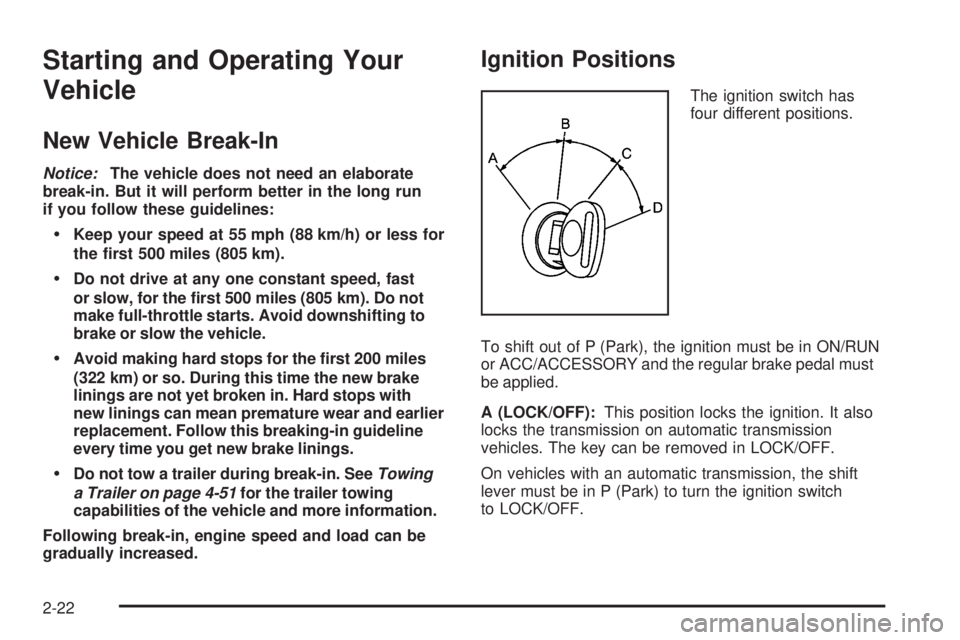
The ignition switch has
four different positions.
To shift out of P (Park), the ignition must be in ON/RUN
or ACC/ACCESSORY and the regular brake pedal must
be applied.
A (LOCK/OFF):This position locks the ignition. It also
locks the transmission on automatic transmission
vehicles. The key can be removed in LOCK/OFF.
On vehicles with an automatic transmission, the shift
lever must be in P (Park) to turn the ignition switch
to LOCK/OFF.
2-22
Page 121 of 596
The steering can bind with the wheels turned off center.
If this happens, move the steering wheel from right
to left while turning the key to ACC/ACCESSORY.
If this doesn’t work, then the vehicle needs service.
Notice:Using a tool to force the key to turn in
the ignition could cause damage to the switch or
break the key. Use the correct key, make sure it
is all the way in, and turn it only with your hand.
If the key cannot be turned by hand, see your
dealer/retailer.
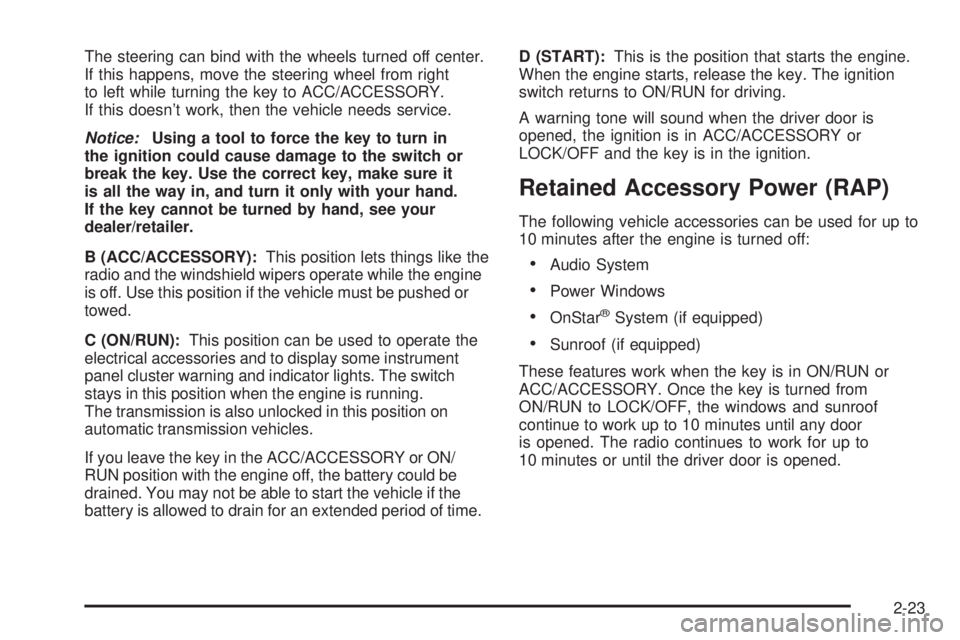
B (ACC/ACCESSORY):This position lets things like the
radio and the windshield wipers operate while the engine
is off. Use this position if the vehicle must be pushed or
towed.
C (ON/RUN):This position can be used to operate the
electrical accessories and to display some instrument
panel cluster warning and indicator lights. The switch
stays in this position when the engine is running.
The transmission is also unlocked in this position on
automatic transmission vehicles.
If you leave the key in the ACC/ACCESSORY or ON/
RUN position with the engine off, the battery could be
drained. You may not be able to start the vehicle if the
battery is allowed to drain for an extended period of time.D (START):This is the position that starts the engine.
When the engine starts, release the key. The ignition
switch returns to ON/RUN for driving.
A warning tone will sound when the driver door is
opened, the ignition is in ACC/ACCESSORY or
LOCK/OFF and the key is in the ignition.
Retained Accessory Power (RAP)
The following vehicle accessories can be used for up to
10 minutes after the engine is turned off:
Audio System
Power Windows
OnStar®System (if equipped)
Sunroof (if equipped)
These features work when the key is in ON/RUN or
ACC/ACCESSORY. Once the key is turned from
ON/RUN to LOCK/OFF, the windows and sunroof
continue to work up to 10 minutes until any door
is opened. The radio continues to work for up to
10 minutes or until the driver door is opened.
2-23
Page 122 of 596
Starting the Engine
If the vehicle has the DURAMAX®Diesel engine, see
the DURAMAX®Diesel manual for more information.
If the vehicle is a Two-mode Hybrid, see the Two-mode
Hybrid manual for more information.
Notice:Do not try to shift to P (Park) if the
vehicle is moving. If you do, you could damage the
transmission. Shift to P (Park) only when the vehicle
is stopped.
Move the shift lever to P (Park) or N (Neutral).
The engine will not start in any other position.
To restart the engine when the vehicle is already
moving, use N (Neutral) only.
Starting Procedure
1. With your foot off the accelerator pedal, turn the
ignition key to START. When the engine starts,
let go of the key. The idle speed will go down as
your engine gets warm. Do not race the engine
immediately after starting it. Operate the engine
and transmission gently to allow the oil to warm
up and lubricate all moving parts.The vehicle has a Computer-Controlled Cranking
System. This feature assists in starting the engine
and protects components. If the ignition key is turned
to the START position, and then released when the
engine begins cranking, the engine will continue
cranking for a few seconds or until the vehicle starts.
If the engine does not start and the key is held in
START for many seconds, cranking will be stopped
after 15 seconds to prevent cranking motor damage.
To prevent gear damage, this system also prevents
cranking if the engine is already running. Engine
cranking can be stopped by turning the ignition
switch to the ACC/ACCESSORY or LOCK/OFF
position.
Notice:Cranking the engine for long periods of
time, by returning the key to the START position
immediately after cranking has ended, can overheat
and damage the cranking motor, and drain the
battery. Wait at least 15 seconds between each try,
to let the cranking motor cool down.
2-24
Page 126 of 596
Active Fuel Management™
Vehicles with V8 engines may have Active Fuel
Management™. This system allows the engine to
operate on either all or half of its cylinders, depending
on the driving conditions.
When less power is required, such as cruising at a
constant vehicle speed, the system will operate in the half
cylinder mode, allowing the vehicle to achieve better fuel
economy. When greater power demands are required,
such as accelerating from a stop, passing, or merging
onto a freeway, the system will maintain full-cylinder
operation.
If your vehicle has an Active Fuel Management™
indicator, seeDIC Operation and Displays (With DIC
Buttons) on page 3-53orDIC Operation and Displays
(Without DIC Buttons) on page 3-59for more information
on using this display.
Automatic Transmission Operation
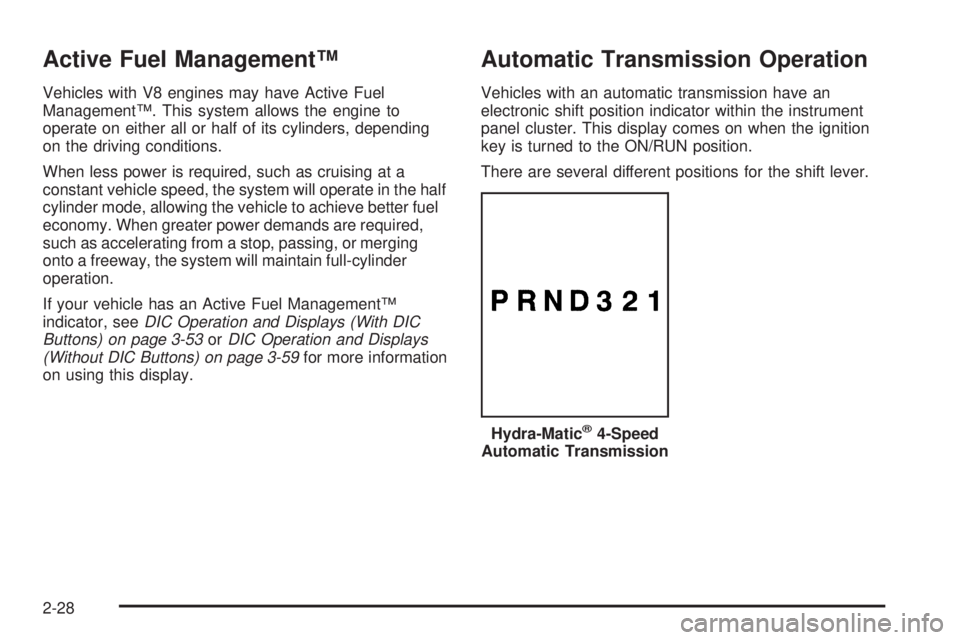
Vehicles with an automatic transmission have an
electronic shift position indicator within the instrument
panel cluster. This display comes on when the ignition
key is turned to the ON/RUN position.
There are several different positions for the shift lever.
Hydra-Matic
®4-Speed
Automatic Transmission
2-28
Page 139 of 596
Shifting In or Out of Neutral
1. With the vehicle running and the engine at an idle
set the parking brake.
2. Place the transmission into N (Neutral).
Shift the transfer case in one continuous motion into or
out of the N (Neutral) position.
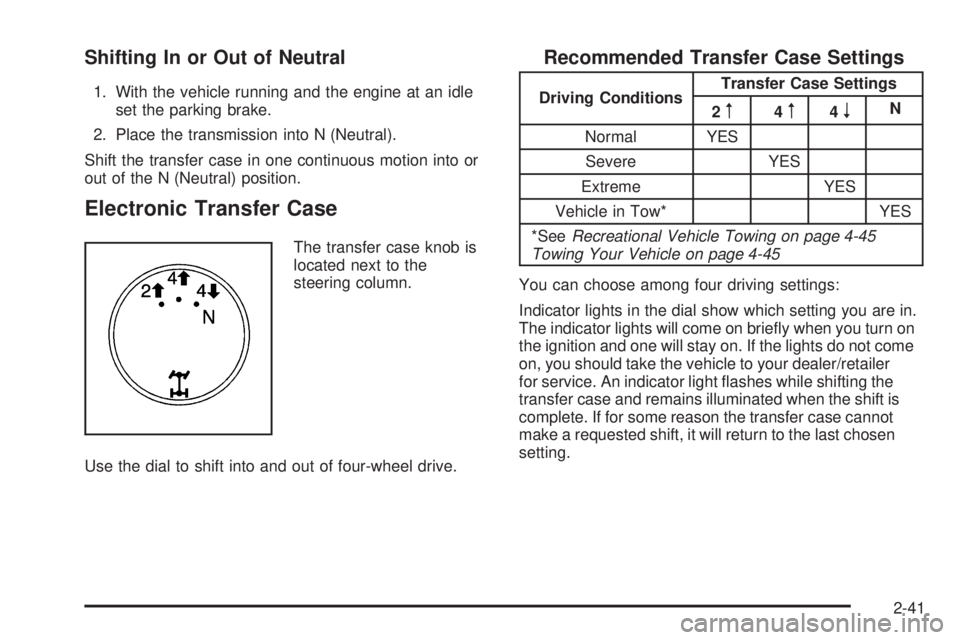
Electronic Transfer Case
The transfer case knob is
located next to the
steering column.
Use the dial to shift into and out of four-wheel drive.
Recommended Transfer Case Settings
Driving ConditionsTransfer Case Settings
2m4m4nN
Normal YES
Severe YES
Extreme YES
Vehicle in Tow* YES
*SeeRecreational Vehicle Towing on page 4-45
Towing Your Vehicle on page 4-45
You can choose among four driving settings:
Indicator lights in the dial show which setting you are in.
The indicator lights will come on briey when you turn on
the ignition and one will stay on. If the lights do not come
on, you should take the vehicle to your dealer/retailer
for service. An indicator light ashes while shifting the
transfer case and remains illuminated when the shift is
complete. If for some reason the transfer case cannot
make a requested shift, it will return to the last chosen
setting.
2-41
Page 141 of 596
Shifting Into Two-Wheel-Drive High
Turn the knob to the Two-Wheel-Drive High position.
This can be done at any speed, except when shifting
from Four-Wheel-Drive Low. See Shifting Out of
Four-Wheel-Drive Low for more information.
Shifting Into Four-Wheel Drive Low
When Four-Wheel-Drive Low is engaged, vehicle speed
should be kept below 45 mph. Extended high-speed
operation in Four-Wheel-Drive Low may damage
or shorten the life of the drivetrain.
To shift to the Four-Wheel-Drive Low position, the
ignition must be in ON/RUN and the vehicle must be
stopped or moving less than 3 mph (5 km/h) with the
transmission in N (Neutral). The preferred method for
shifting into Four-Wheel-Drive Low is to have the vehicle
moving 1 to 2 mph (1.6 to 3.2 km/h). Turn the knob to the
Four-Wheel-Drive Low position. You must wait for the
Four-Wheel-Drive Low indicator light to stop ashing
and remain on before shifting the transmission in gear.Notice:Shifting the transmission into gear before
the requested mode indicator light has stopped
ashing could damage the transfer case. To help
avoid damaging the vehicle, always wait for the
mode indicator lights to stop ashing before
shifting the transmission into gear.
It is typical for the vehicle to exhibit signicant
engagement noise and bump when shifting between
Four-Wheel-Drive Low and Four-Wheel-Drive High
ranges or from transfer case N (Neutral) with the
engine running.
If the knob is turned to the Four-Wheel-Drive Low
position when the vehicle is in gear and/or moving,
the Four-Wheel-Drive Low indicator light will ash for
30 seconds and not complete the shift unless the vehicle
is moving less than 3 mph (5 km/h) and the transmission
is in N (Neutral). After 30 seconds the transfer case
will shift to Four-Wheel-Drive High mode.
2-43
Page 142 of 596
Shifting Out of Four-Wheel-Drive Low
To shift from Four-Wheel-Drive Low to
Four-Wheel-Drive High, or Two-Wheel-Drive High,
the vehicle must be stopped or moving less than
3 mph (5 km/h) with the transmission in N (Neutral)
and the ignition in ON/RUN. The preferred method for
shifting out of Four-Wheel-Drive Low is to have the
vehicle moving 1 to 2 mph (1.6 to 3.2 km/h). Turn the
knob to the Four-Wheel-Drive High, or Two-Wheel-Drive
High position. You must wait for the Four-Wheel-Drive
High, or Two-Wheel-Drive High indicator light to stop
ashing and remain on before shifting the transmission
into gear.
Notice:Shifting the transmission into gear before
the requested mode indicator light has stopped
ashing could damage the transfer case. To help
avoid damaging the vehicle, always wait for the
mode indicator lights to stop ashing before shifting
the transmission into gear.It is typical for the vehicle to exhibit signicant
engagement noise and bump when shifting between
Four-Wheel-Drive Low and Four-Wheel-Drive High
ranges or from transfer case N (Neutral) with the
engine running.
If the knob is turned to the Four-Wheel-Drive High,
or Two-Wheel-Drive High switch position when the
vehicle is in gear and/or moving, the Four-Wheel-Drive
High, or Two-Wheel-Drive High indicator light will ash
for 30 seconds but will not complete the shift unless your
vehicle is moving less than 3 mph (5 km/h) and the
transmission is in N (Neutral).
2-44
Page 143 of 596
Shifting into Neutral
To shift the transfer case to N (Neutral) do the following:
1. Make sure the vehicle is parked so that it will not roll.
2. Set the parking brake and press and hold the
regular brake pedal. SeeParking Brake on
page 2-50for more information.
3. Start the vehicle or turn the ignition to ON/RUN.
4. Shift the transmission to N (Neutral).
5. Shift the transfer case to Two-Wheel-Drive High.
6. Turn the transfer case dial clockwise to N (Neutral)
until it stops and hold it there until the Neutral light
starts blinking. This will take at least 10 seconds.
Then slowly release the dial to the four low position.
The N (Neutral) light will come on when the transfer
case shift to N (Neutral) is complete.
7. If the engine is running, verify that the transfer
case is in N (Neutral) by shifting the transmission
to R (Reverse) for one second, then shift the
transmission to D (Drive) for one second.
8. Turn the ignition to ACC/ACCESSORY, which will
turn the engine off.
9. Place the transmission shift lever in P (Park).
10. Release the parking brake prior to moving the
vehicle.
11. Turn the ignition to LOCK/OFF.
Shifting Out of Neutral
To shift the transfer case out of N (Neutral) do the
following:
1. Set the parking brake and apply the regular
brake pedal.
2. Turn the ignition to ON/RUN with the engine off,
and shift the transmission to N (Neutral).
3. Turn the transfer case dial to Two-Wheel-Drive High.
After the transfer case has shifted out of N (Neutral),
the N (Neutral) light will go out.
4. Release the parking brake prior to moving the
vehicle.
Notice:Shifting the transmission into gear before
the requested mode indicator light has stopped
ashing could damage the transfer case. To help
avoid damaging the vehicle, always wait for the mode
indicator lights to stop ashing before shifting the
transmission into gear.
5. Start the engine and shift the transmission to the
desired position.
Excessively shifting the transfer case into or out of the
different modes may cause the transfer case to enter the
shift protection mode. This will protect the transfer case
from possible damage and will only allow the transfer
case to respond to one shift per 10 seconds. The transfer
case may stay in this mode for up to three minutes.
2-45
Page 144 of 596
Automatic Transfer Case
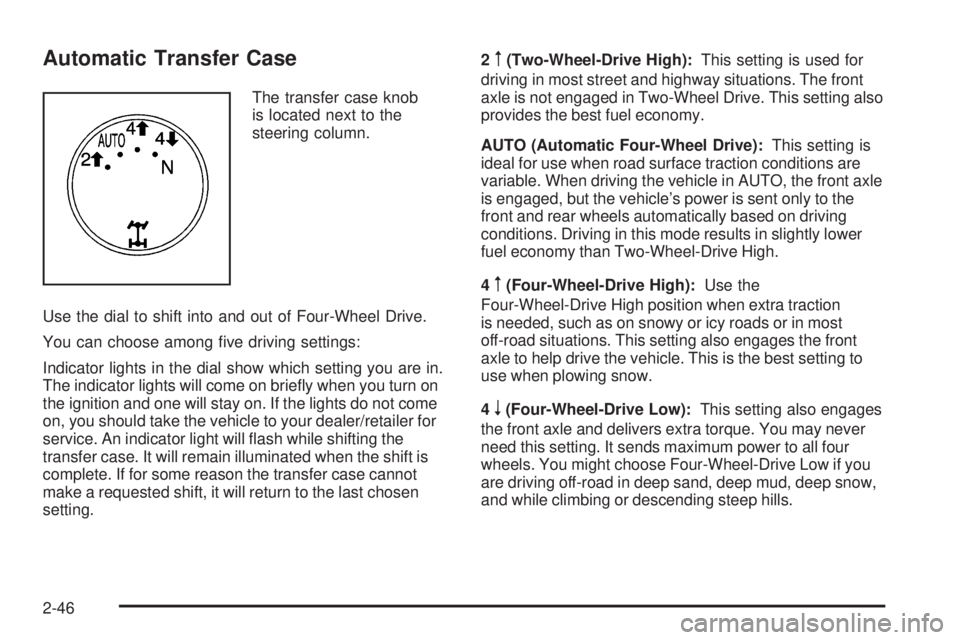
The transfer case knob
is located next to the
steering column.
Use the dial to shift into and out of Four-Wheel Drive.
You can choose among ve driving settings:
Indicator lights in the dial show which setting you are in.
The indicator lights will come on briey when you turn on
the ignition and one will stay on. If the lights do not come
on, you should take the vehicle to your dealer/retailer for
service. An indicator light will ash while shifting the
transfer case. It will remain illuminated when the shift is
complete. If for some reason the transfer case cannot
make a requested shift, it will return to the last chosen
setting.2
m(Two-Wheel-Drive High):This setting is used for
driving in most street and highway situations. The front
axle is not engaged in Two-Wheel Drive. This setting also
provides the best fuel economy.
AUTO (Automatic Four-Wheel Drive):This setting is
ideal for use when road surface traction conditions are
variable. When driving the vehicle in AUTO, the front axle
is engaged, but the vehicle’s power is sent only to the
front and rear wheels automatically based on driving
conditions. Driving in this mode results in slightly lower
fuel economy than Two-Wheel-Drive High.
4
m(Four-Wheel-Drive High):Use the
Four-Wheel-Drive High position when extra traction
is needed, such as on snowy or icy roads or in most
off-road situations. This setting also engages the front
axle to help drive the vehicle. This is the best setting to
use when plowing snow.
4
n(Four-Wheel-Drive Low):This setting also engages
the front axle and delivers extra torque. You may never
need this setting. It sends maximum power to all four
wheels. You might choose Four-Wheel-Drive Low if you
are driving off-road in deep sand, deep mud, deep snow,
and while climbing or descending steep hills.
2-46
Page 146 of 596
Shifting Into Four-Wheel-Drive Low
When Four-Wheel-Drive Low is engaged, vehicle speed
should be kept below 45 mph. Extended high-speed
operation in Four-Wheel-Drive Low may damage
or shorten the life of the drivetrain.
To shift to the Four-Wheel-Drive Low position, the
ignition must be in ON/RUN and the vehicle must be
stopped or moving less than 3 mph (5 km/h) with the
transmission in N (Neutral). The preferred method for
shifting into Four-Wheel-Drive Low is to have the vehicle
moving 1 to 2 mph (1.6 to 3.2 km/h). Turn the knob to the
Four-Wheel-Drive Low position. You must wait for the
Four-Wheel-Drive Low indicator light to stop ashing and
remain on before shifting the transmission into gear.
Notice:Shifting the transmission into gear before
the requested mode indicator light has stopped
ashing could damage the transfer case. To help
avoid damaging the vehicle, always wait for the
mode indicator lights to stop ashing before
shifting the transmission into gear.It is typical for the vehicle to exhibit signicant
engagement noise and bump when shifting between
Four-Wheel-Drive Low and Four-Wheel-Drive High
ranges or from N (Neutral) with the engine running.
If the knob is turned to the Four-Wheel-Drive Low
position when the vehicle is in gear and/or moving,
the Four-Wheel-Drive Low indicator light will ash for
30 seconds and not complete the shift unless the vehicle
is moving less than 3 mph (5 km/h) and the transmission
is in N (Neutral). After 30 seconds the transfer case
will shift to Four-Wheel-Drive High mode.
Shifting Out of Four-Wheel-Drive Low
To shift from Four-Wheel-Drive Low to
Four-Wheel-Drive High, AUTO or Two-Wheel-Drive
High, the vehicle must be stopped or moving less than
3 mph (5 km/h) with the transmission in N (Neutral) and
the ignition in ON/RUN. The preferred method for shifting
out of Four-Wheel-Drive Low is to have the vehicle
moving 1 to 2 mph (1.6 to 3.2 km/h). Turn the knob to the
Four-Wheel-Drive High, AUTO or Two-Wheel-Drive High
position. You must wait for the Four-Wheel-Drive High,
AUTO or Two-Wheel-Drive High indicator light to stop
ashing and remain on before shifting the transmission
into gear.
2-48