sunroof GMC SIERRA 2010 Owner's Manual
[x] Cancel search | Manufacturer: GMC, Model Year: 2010, Model line: SIERRA, Model: GMC SIERRA 2010Pages: 630, PDF Size: 4.65 MB
Page 1 of 630

2010 GMC Sierra Owner ManualM
In Brief. . . . . . . . . . . . . . . . . . . . . . . . . . . . . . . . . . . . . . . . . . . . 1-1
Instrument Panel . . . . . . . . . . . . . . . . . . . . . . . . . . . . . . . . . 1-2
Initial Drive Information . . . . . . . . . . . . . . . . . . . . . . . . . . . 1-6
Vehicle Features . . . . . . . . . . . . . . . . . . . . . . . . . . . . . . . . 1-24
Performance and Maintenance . . . . . . . . . . . . . . . . . . 1-31
Seats and Restraint System . . . . . . . . . . . . . . . . . . . . . . 2-1
Head Restraints . . . . . . . . . . . . . . . . . . . . . . . . . . . . . . . . . . 2-3
Front Seats . . . . . . . . . . . . . . . . . . . . . . . . . . . . . . . . . . . . . . . 2-4
Rear Seats . . . . . . . . . . . . . . . . . . . . . . . . . . . . . . . . . . . . . . 2-14
Safety Belts . . . . . . . . . . . . . . . . . . . . . . . . . . . . . . . . . . . . . 2-16
Child Restraints . . . . . . . . . . . . . . . . . . . . . . . . . . . . . . . . . 2-39
Airbag System . . . . . . . . . . . . . . . . . . . . . . . . . . . . . . . . . . 2-73
Restraint System Check . . . . . . . . . . . . . . . . . . . . . . . . . 2-93 Features and Controls
. . . . . . . . . . . . . . . . . . . . . . . . . . . . 3-1
Keys . . . . . . . . . . . . . . . . . . . . . . . . . . . . . . . . . . . . . . . . . . . . . 3-3
Doors and Locks . . . . . . . . . . . . . . . . . . . . . . . . . . . . . . . . . 3-9
Windows . . . . . . . . . . . . . . . . . . . . . . . . . . . . . . . . . . . . . . . . 3-14
Theft-Deterrent Systems . . . . . . . . . . . . . . . . . . . . . . . . 3-17
Starting and Operating Your Vehicle . . . . . . . . . . . . . 3-21
Mirrors . . . . . . . . . . . . . . . . . . . . . . . . . . . . . . . . . . . . . . . . . . 3-56
Object Detection Systems . . . . . . . . . . . . . . . . . . . . . . . 3-60
Universal Home Remote System . . . . . . . . . . . . . . . . 3-69
Storage Areas . . . . . . . . . . . . . . . . . . . . . . . . . . . . . . . . . . . 3-75
Sunroof . . . . . . . . . . . . . . . . . . . . . . . . . . . . . . . . . . . . . . . . . 3-80
Page 7 of 630
Section 1 In Brief
Instrument Panel. . . . . . . . . . . . . . . . . . . . . . . . . . . . . . . . . . . 1-2
Instrument Panel (Base/Uplevel Version) . . . . . . . . 1-2
Instrument Panel (Premium Version) . . . . . . . . . . . . 1-4
Initial Drive Information . . . . . . . . . . . . . . . . . . . . . . . . . . . 1-6
Remote Keyless Entry (RKE) System . . . . . . . . . . . 1-6
Remote Vehicle Start . . . . . . . . . . . . . . . . . . . . . . . . . . . 1-7
Door Locks . . . . . . . . . . . . . . . . . . . . . . . . . . . . . . . . . . . . . 1-7
Windows . . . . . . . . . . . . . . . . . . . . . . . . . . . . . . . . . . . . . . . . 1-8
Seat Adjustment . . . . . . . . . . . . . . . . . . . . . . . . . . . . . . . . 1-9
Heated Seats . . . . . . . . . . . . . . . . . . . . . . . . . . . . . . . . . . 1-13
Head Restraint Adjustment . . . . . . . . . . . . . . . . . . . . 1-13
Safety Belt . . . . . . . . . . . . . . . . . . . . . . . . . . . . . . . . . . . . . 1-13
Sensing System for Passenger Airbag . . . . . . . . . 1-14
Mirror Adjustment . . . . . . . . . . . . . . . . . . . . . . . . . . . . . . 1-15
Steering Wheel Adjustment . . . . . . . . . . . . . . . . . . . . 1-16
Throttle and Brake Pedal Adjustment . . . . . . . . . . 1-17
Interior Lighting . . . . . . . . . . . . . . . . . . . . . . . . . . . . . . . . 1-17
Exterior Lighting . . . . . . . . . . . . . . . . . . . . . . . . . . . . . . . 1-18
Windshield Wiper/Washer . . . . . . . . . . . . . . . . . . . . . . 1-19
Climate Controls . . . . . . . . . . . . . . . . . . . . . . . . . . . . . . . 1-19
Transmission . . . . . . . . . . . . . . . . . . . . . . . . . . . . . . . . . . 1-21
Four-Wheel Drive . . . . . . . . . . . . . . . . . . . . . . . . . . . . . . 1-21 Vehicle Features
. . . . . . . . . . . . . . . . . . . . . . . . . . . . . . . . . . 1-24
Radio(s) . . . . . . . . . . . . . . . . . . . . . . . . . . . . . . . . . . . . . . . 1-24
Satellite Radio . . . . . . . . . . . . . . . . . . . . . . . . . . . . . . . . . 1-25
Portable Audio Devices . . . . . . . . . . . . . . . . . . . . . . . . 1-25
Steering Wheel Controls . . . . . . . . . . . . . . . . . . . . . . . 1-26
Bluetooth
®. . . . . . . . . . . . . . . . . . . . . . . . . . . . . . . . . . . . . 1-26
Navigation System . . . . . . . . . . . . . . . . . . . . . . . . . . . . . 1-26
Driver Information Center (DIC) . . . . . . . . . . . . . . . . 1-27
Cruise Control . . . . . . . . . . . . . . . . . . . . . . . . . . . . . . . . . 1-28
Rear Vision Camera (RVC) . . . . . . . . . . . . . . . . . . . . 1-29
Ultrasonic Parking Assist . . . . . . . . . . . . . . . . . . . . . . 1-29
Power Outlets . . . . . . . . . . . . . . . . . . . . . . . . . . . . . . . . . 1-29
Universal Remote System . . . . . . . . . . . . . . . . . . . . . 1-30
Sunroof . . . . . . . . . . . . . . . . . . . . . . . . . . . . . . . . . . . . . . . . 1-30
Performance and Maintenance . . . . . . . . . . . . . . . . . .1-31
StabiliTrak
®. . . . . . . . . . . . . . . . . . . . . . . . . . . . . . . . . . . . 1-31
Tire Pressure Monitor . . . . . . . . . . . . . . . . . . . . . . . . . . 1-32
Engine Oil Life System . . . . . . . . . . . . . . . . . . . . . . . . 1-32
Fuel E85 (85% Ethanol) . . . . . . . . . . . . . . . . . . . . . . . 1-33
Driving for Better Fuel Economy . . . . . . . . . . . . . . . 1-33
Roadside Assistance Program . . . . . . . . . . . . . . . . . 1-34
OnStar
®. . . . . . . . . . . . . . . . . . . . . . . . . . . . . . . . . . . . . . . 1-34
1-1
Page 36 of 630
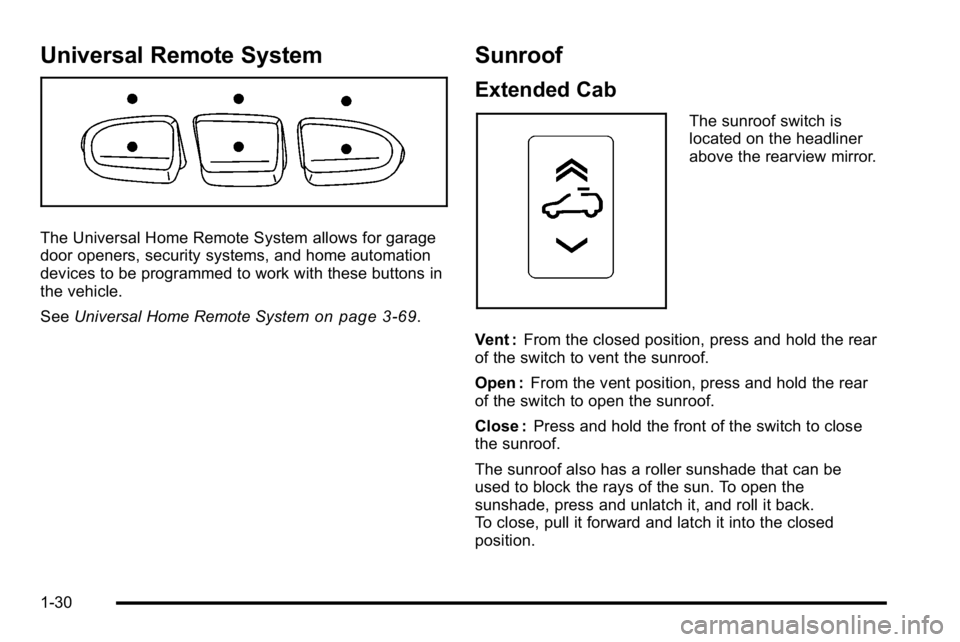
Universal Remote System
The Universal Home Remote System allows for garage
door openers, security systems, and home automation
devices to be programmed to work with these buttons in
the vehicle.
SeeUniversal Home Remote System
on page 3‑69.
Sunroof
Extended Cab
The sunroof switch is
located on the headliner
above the rearview mirror.
Vent : From the closed position, press and hold the rear
of the switch to vent the sunroof.
Open : From the vent position, press and hold the rear
of the switch to open the sunroof.
Close : Press and hold the front of the switch to close
the sunroof.
The sunroof also has a roller sunshade that can be
used to block the rays of the sun. To open the
sunshade, press and unlatch it, and roll it back.
To close, pull it forward and latch it into the closed
position.
1-30
Page 37 of 630
Crew Cab
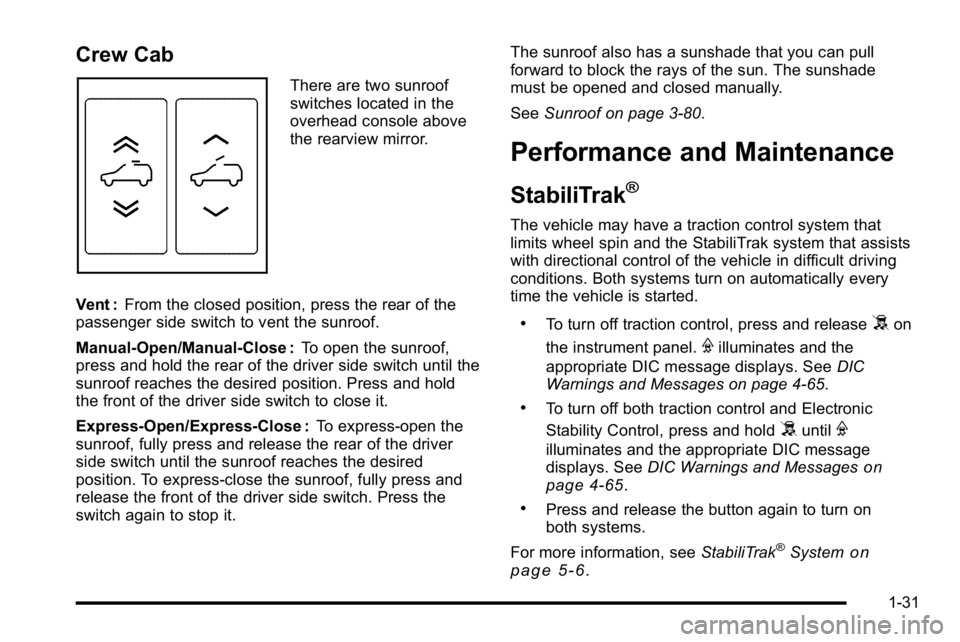
There are two sunroof
switches located in the
overhead console above
the rearview mirror.
Vent : From the closed position, press the rear of the
passenger side switch to vent the sunroof.
Manual-Open/Manual-Close : To open the sunroof,
press and hold the rear of the driver side switch until the
sunroof reaches the desired position. Press and hold
the front of the driver side switch to close it.
Express-Open/Express-Close : To express-open the
sunroof, fully press and release the rear of the driver
side switch until the sunroof reaches the desired
position. To express-close the sunroof, fully press and
release the front of the driver side switch. Press the
switch again to stop it. The sunroof also has a sunshade that you can pull
forward to block the rays of the sun. The sunshade
must be opened and closed manually.
See
Sunroof on page 3‑80.
Performance and Maintenance
StabiliTrak®
The vehicle may have a traction control system that
limits wheel spin and the StabiliTrak system that assists
with directional control of the vehicle in difficult driving
conditions. Both systems turn on automatically every
time the vehicle is started.
.To turn off traction control, press and release5on
the instrument panel.
Filluminates and the
appropriate DIC message displays. See DIC
Warnings and Messages on page 4‑65.
.To turn off both traction control and Electronic
Stability Control, press and hold
5untilF
illuminates and the appropriate DIC message
displays. See DIC Warnings and Messageson
page 4‑65.
.Press and release the button again to turn on
both systems.
For more information, see StabiliTrak
®Systemon
page 5‑6.
1-31
Page 138 of 630
Section 3 Features and Controls
Mirrors. . . . . . . . . . . . . . . . . . . . . . . . . . . . . . . . . . . . . . . . . . . . 3-56
Manual Rearview Mirror . . . . . . . . . . . . . . . . . . . . . . . . 3-56
Automatic Dimming Rearview Mirror . . . . . . . . . . . 3-56
Outside Manual Mirrors . . . . . . . . . . . . . . . . . . . . . . . . 3-56
Outside Towing Mirrors . . . . . . . . . . . . . . . . . . . . . . . . 3-57
Outside Power Mirrors . . . . . . . . . . . . . . . . . . . . . . . . . 3-57
Outside Power Foldaway Mirrors . . . . . . . . . . . . . . 3-58
Park Tilt Mirrors . . . . . . . . . . . . . . . . . . . . . . . . . . . . . . . . 3-59
Outside Convex Mirror . . . . . . . . . . . . . . . . . . . . . . . . . 3-59
Outside Heated Mirrors . . . . . . . . . . . . . . . . . . . . . . . . 3-59
Object Detection Systems . . . . . . . . . . . . . . . . . . . . . . .3-60
Ultrasonic Rear Parking Assist (URPA) . . . . . . . . 3-60
Rear Vision Camera (RVC) . . . . . . . . . . . . . . . . . . . . 3-63 Universal Home Remote System
. . . . . . . . . . . . . . . .3-69
Universal Home Remote System Operation (With Three Round LED) . . . . . . . . . . . . . . . . . . . . 3-69
Storage Areas . . . . . . . . . . . . . . . . . . . . . . . . . . . . . . . . . . . . 3-75
Glove Box . . . . . . . . . . . . . . . . . . . . . . . . . . . . . . . . . . . . . 3-75
Cupholders . . . . . . . . . . . . . . . . . . . . . . . . . . . . . . . . . . . . 3-75
Instrument Panel Storage . . . . . . . . . . . . . . . . . . . . . 3-76
Center Console Storage . . . . . . . . . . . . . . . . . . . . . . 3-76
Roof Rack System . . . . . . . . . . . . . . . . . . . . . . . . . . . . . 3-77
Rear Seat Armrest . . . . . . . . . . . . . . . . . . . . . . . . . . . . . 3-78
Cargo Management System . . . . . . . . . . . . . . . . . . . 3-78
Sunroof . . . . . . . . . . . . . . . . . . . . . . . . . . . . . . . . . . . . . . . . . . . 3-80
3-2
Page 159 of 630
D (START) :This is the position that starts the engine.
When the engine starts, release the key. The ignition
switch returns to ON/RUN for driving.
A warning tone will sound when the driver door is
opened, the ignition is in ACC/ACCESSORY or
LOCK/OFF and the key is in the ignition.
Retained Accessory Power (RAP)
The following vehicle accessories can be used for up to
10 minutes after the engine is turned off:
.Audio System
.Power Windows
.OnStar®System (if equipped)
.Sunroof (if equipped)
These features work when the key is in ON/RUN or
ACC/ACCESSORY. Once the key is turned from
ON/RUN to LOCK/OFF, the windows and sunroof
continue to work up to 10 minutes until any door is
opened. The radio continues to work for up to
10 minutes or until the driver door is opened.
Starting the Engine
If the vehicle has the DURAMAX®Diesel engine, see
the DURAMAX®Diesel manual for more information.
If the vehicle is a Two-mode Hybrid, see the Two-mode
Hybrid manual for more information.
Notice: Do not try to shift to P (Park) if the vehicle
is moving. If you do, you could damage the
transmission. Shift to P (Park) only when the
vehicle is stopped.
Move the shift lever to P (Park) or N (Neutral).
The engine will not start in any other position.
To restart the engine when the vehicle is already
moving, use N (Neutral) only.
3-23
Page 216 of 630
Sunroof
On vehicle with a power sliding sunroof, the ignition
needs to be turned to RUN, or the Retained Accessory
Power (RAP) must be activated to open or close the
sunroof. When RAP is active, the sunroof will work for
10 minutes after the ignition is turned off, or until the
driver's door is opened. SeeRetained Accessory
Power (RAP)
on page 3‑23for more information.
Do not leave the sunroof open for long periods of time
while the vehicle is not in use. Debris can collect in the
tracks and damage the sunroof operation and plug the
water draining system.
Extended Cab
If your vehicle is an
extended cab, the
sunroof switch is
located on the
headliner above the
rearview mirror. Vent :
From the closed position, press and hold the rear
of the switch to vent the sunroof. To close the sunroof,
press and hold the front of the switch.
Open : From the vent position, the sunroof can be fully
opened either manually or by using the express-open
feature. To open manually, press the rear of the switch
to the first depression and hold until the sunroof
has reached the desired position. To open using
express-open, press the rear of the switch fully and
release. The sunroof will move to the full open position.
To stop the sunroof partway, press the switch a
second time.
Close : From the vent, or open position, press and hold
the front of the switch to close the sunroof.
The sunroof also has a roller sunshade that can be
used to block the rays of the sun. The roller sunshade
can be manually operated with the sunroof in an open
or closed position. To open the sunshade, press and
unlatch it, and roll it back. To close, pull it forward and
latch it into the closed position.
When the sunroof is opened, an air deflector will
automatically raise. The air deflector will retract when
the sunroof is closed.
3-80
Page 217 of 630
Crew Cab
If your vehicle is a crew
cab, there are two sunroof
switches located in the
overhead console above
the rearview mirror.
Vent : From the closed position, press the rear of the
passenger's side switch to vent the sunroof. To close
the sunroof, press and hold the front of the passenger's
side switch.
Manual-Open/Manual-Close : To open the sunroof
press and hold the rear of the driver's side switch until
the sunroof reaches the desired position. To close the
sunroof, press and hold the front of the driver's side
switch until the sunroof reaches the desired position.
When the sunroof is opened, an air deflector will
automatically raise. The air deflector will retract when
the sunroof is closed. Express-Open/Express-Close :
To express-open the
sunroof, fully press and release the rear of the driver's
side switch. The sunroof will open automatically. To stop
the sunroof partway, press the switch a second time.
To express-close the sunroof, fully press and release
the front of the driver's side switch. The sunroof will
close automatically. To stop the sunroof partway, press
the switch a second time.
The sunroof also has a sunshade which you can pull
forward to block sun rays. The sunshade must be
opened and closed manually.
Anti-Pinch Feature (Crew Cab Only) : If an object is in
the path of the sunroof while it is closing, the anti-pinch
feature will detect the object and stop the sunroof from
closing at the point of the obstruction. The sunroof
will then open halfway, and the air deflector will raise.
To close the sunroof once it has re-opened, refer to the
Express-Close or Manual-Close functions described
previously. If the sunroof is in the vent position, and
there is an object in the path of the sunroof when it
closing, the anti-pinch feature will detect the object
and stop the sunroof. To close the sunroof once it
has stopped, refer to the Vent functions described
previously.
3-81
Page 282 of 630

Compass Calibration
The compass can be manually calibrated. Only calibrate
the compass in a magnetically clean and safe location,
such as an open parking lot, where driving the vehicle
in circles is not a danger. It is suggested to calibrate
away from tall buildings, utility wires, manhole covers,
or other industrial structures, if possible.
If CAL should ever appear in the DIC display,
the compass should be calibrated.
If the DIC display does not show a heading, for
example, N for North, or the heading does not change
after making turns, there may be a strong magnetic field
interfering with the compass. Such interference may be
caused by a magnetic CB or cell phone antenna mount,
a magnetic emergency light, magnetic note pad holder,
or any other magnetic item. Turn off the vehicle, move
the magnetic item, then turn on the vehicle and calibrate
the compass.To calibrate the compass, use the following procedure:Compass Calibration Procedure
1. Before calibrating the compass, make sure the
compass zone is set to the variance zone in which
the vehicle is located. See “Compass Variance
(Zone) Procedure” earlier in this section.
Do not operate any switches such as window,
sunroof, climate controls, seats, etc. during the
calibration procedure.
2. Press the vehicle information button until PRESS
VTO CALIBRATE COMPASS displays. Or, if the
vehicle does not have DIC buttons, press the trip
odometer reset stem until CALIBRATE COMPASS
displays.
3. Press the set/reset button to start the compass calibration. Or, if the vehicle does not have DIC
buttons, press and hold the trip odometer reset
stem for two seconds to start the compass
calibration.
4. The DIC will display CALIBRATING: DRIVE IN CIRCLES. Drive the vehicle in tight circles at less
than 5 mph (8 km/h) to complete the calibration.
The DIC will display CALIBRATION COMPLETE
for a few seconds when the calibration is complete.
The DIC display will then return to the
previous menu.
4-64
Page 367 of 630
XM™Satellite Radio Service
XM Satellite Radio Service gives digital radio reception
from coast-to-coast in the 48 contiguous United States,
and in Canada. Just as with FM, tall buildings or hills
can interfere with satellite radio signals, causing the
sound to fade in and out. In addition, traveling or
standing under heavy foliage, bridges, garages,
or tunnels may cause loss of the XM signal for a
period of time.
Cellular Phone Usage
Cellular phone usage may cause interference
with the vehicle's radio. This interference may occur
when making or receiving phone calls, charging
the phone's battery, or simply having the phone on.
This interference causes an increased level of static
while listening to the radio. If static is received while
listening to the radio, unplug the cellular phone
and turn it off.
Fixed Mast Antenna
The fixed mast antenna can withstand most car washes
without being damaged as long as it is securely
attached to the base. If the mast becomes slightly bent,
straighten it out by hand. If the mast is badly bent,
replace it.
Occasionally check to make sure the antenna is
tightened to its base. If tightening is required, tighten
by hand until fully seated plus one quarter turn.
XM™Satellite Radio Antenna
System
The XM Satellite Radio antenna is located on the roof of
the vehicle. Keep the antenna clear of obstructions for
clear radio reception.
If the vehicle has a sunroof, the performance of the
XM system may be affected if the sunroof is open.
4-149