engine GMC SIERRA 2011 Owner's Manual
[x] Cancel search | Manufacturer: GMC, Model Year: 2011, Model line: SIERRA, Model: GMC SIERRA 2011Pages: 594, PDF Size: 6.55 MB
Page 485 of 594
Black plate (61,1)GMC Sierra Owner Manual - 2011
Vehicle Care 10-61
Tire Designations
Tire Size
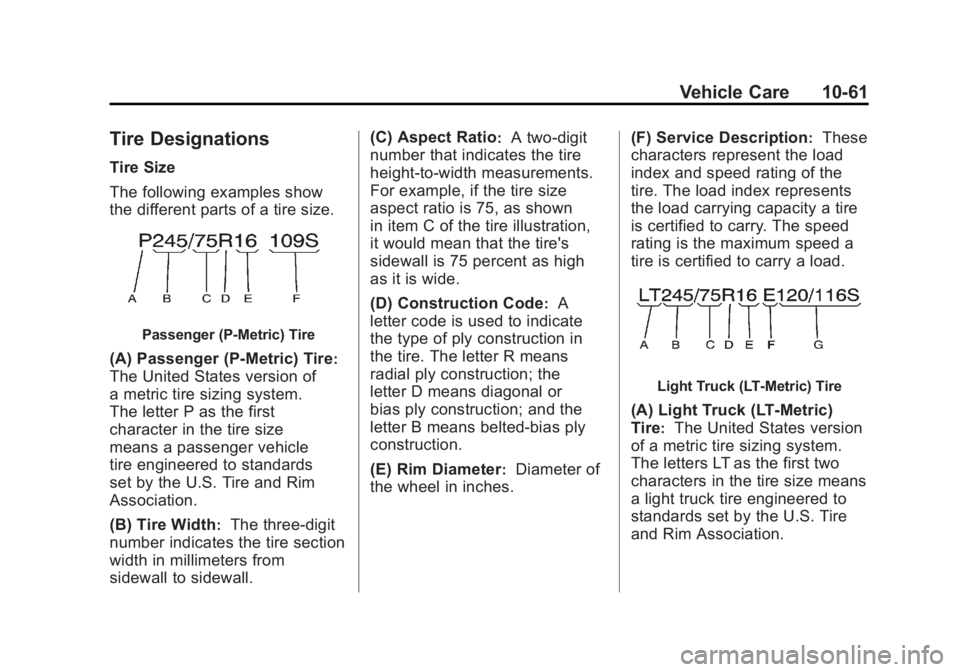
The following examples show
the different parts of a tire size.
Passenger (P‐Metric) Tire
(A) Passenger (P‐Metric) Tire:
The United States version of
a metric tire sizing system.
The letter P as the first
character in the tire size
means a passenger vehicle
tire engineered to standards
set by the U.S. Tire and Rim
Association.
(B) Tire Width
:The three‐digit
number indicates the tire section
width in millimeters from
sidewall to sidewall. (C) Aspect Ratio
:A two‐digit
number that indicates the tire
height‐to‐width measurements.
For example, if the tire size
aspect ratio is 75, as shown
in item C of the tire illustration,
it would mean that the tire's
sidewall is 75 percent as high
as it is wide.
(D) Construction Code
:A
letter code is used to indicate
the type of ply construction in
the tire. The letter R means
radial ply construction; the
letter D means diagonal or
bias ply construction; and the
letter B means belted‐bias ply
construction.
(E) Rim Diameter
:Diameter of
the wheel in inches. (F) Service Description
:These
characters represent the load
index and speed rating of the
tire. The load index represents
the load carrying capacity a tire
is certified to carry. The speed
rating is the maximum speed a
tire is certified to carry a load.
Light Truck (LT‐Metric) Tire
(A) Light Truck (LT‐Metric)
Tire
:The United States version
of a metric tire sizing system.
The letters LT as the first two
characters in the tire size means
a light truck tire engineered to
standards set by the U.S. Tire
and Rim Association.
Page 496 of 594
Black plate (72,1)GMC Sierra Owner Manual - 2011
10-72 Vehicle Care
There are two minutes to match
the first tire/wheel position, and
five minutes overall to match all
four tire/wheel positions. If it takes
longer, the matching process stops
and must be restarted.
The TPMS sensor matching
process is:
1. Set the parking brake.
2. Turn the ignition to ON/RUN withthe engine off.
3. Press the Remote Keyless Entry (RKE) transmitter's LOCK
and UNLOCK buttons at the
same time for approximately
five seconds. The horn sounds
twice to signal the receiver
is in relearn mode and TIRE
LEARNING ACTIVE message
displays on the DIC screen.
If the vehicle does not have
RKE, press the Driver
Information Center (DIC) vehicle
information button until the
PRESS
VTO RELEARN TIRE
POSITIONS message displays. The horn sounds twice to signal
the receiver is in relearn mode
and TIRE LEARNING ACTIVE
message displays on the DIC
screen.
If the vehicle does not have RKE
or DIC buttons, press the trip
odometer reset stem located on
the instrument panel cluster until
the PRESS
VTO RELEARN
TIRE POSITIONS message
displays. The horn sounds
twice to signal the receiver
is in relearn mode and TIRE
LEARNING ACTIVE message
displays on the DIC screen.
4. Start with the driver side front tire.
5. Place the relearn tool against the tire sidewall, near the valve
stem. Then press the button
to activate the TPMS sensor.
A horn chirp confirms that the
sensor identification code has
been matched to this tire and
wheel position. 6. Proceed to the passenger
side front tire, and repeat the
procedure in Step 5.
7. Proceed to the passenger side rear tire, and repeat the
procedure in Step 5.
8. Proceed to the driver side rear tire, and repeat the procedure
in Step 5. The horn sounds two
times to indicate the sensor
identification code has been
matched to the driver side rear
tire, and the TPMS sensor
matching process is no longer
active. The TIRE LEARNING
ACTIVE message on the DIC
display screen goes off.
9. Turn the ignition switch to LOCK/OFF.
10. Set all four tires to the recommended air pressure
level as indicated on the Tire
and Loading Information label.
Page 509 of 594
Black plate (85,1)GMC Sierra Owner Manual - 2011
Vehicle Care 10-85
If a tire goes flat, avoid further tire
and wheel damage by driving slowly
to a level place, well off the road,
if possible. Turn on the hazard
warning flashers. SeeHazard
Warning Flashers on page 6‑5.
{WARNING
Changing a tire can be
dangerous. The vehicle can
slip off the jack and roll over
or fall on you or other people.
You and they could be badly
injured or even killed. Find a level
place to change your tire. To help
prevent the vehicle from moving:
1. Set the parking brake firmly.
2. Put an automatic transmission shift lever in
P (Park), or shift a manual
transmission to 1 (First) or
R (Reverse).
(Continued)
WARNING (Continued)
3. If you have afour-wheel-drive vehicle,
be sure the transfer case
is in a drive gear –not in
N (Neutral).
4. Turn off the engine and do not restart while the vehicle
is raised.
5. Do not allow passengers to remain in the vehicle.
To be even more certain the
vehicle will not move, put blocks
at the front and rear of the tire
farthest away from the one being
changed. That would be the tire
on the other side, at the opposite
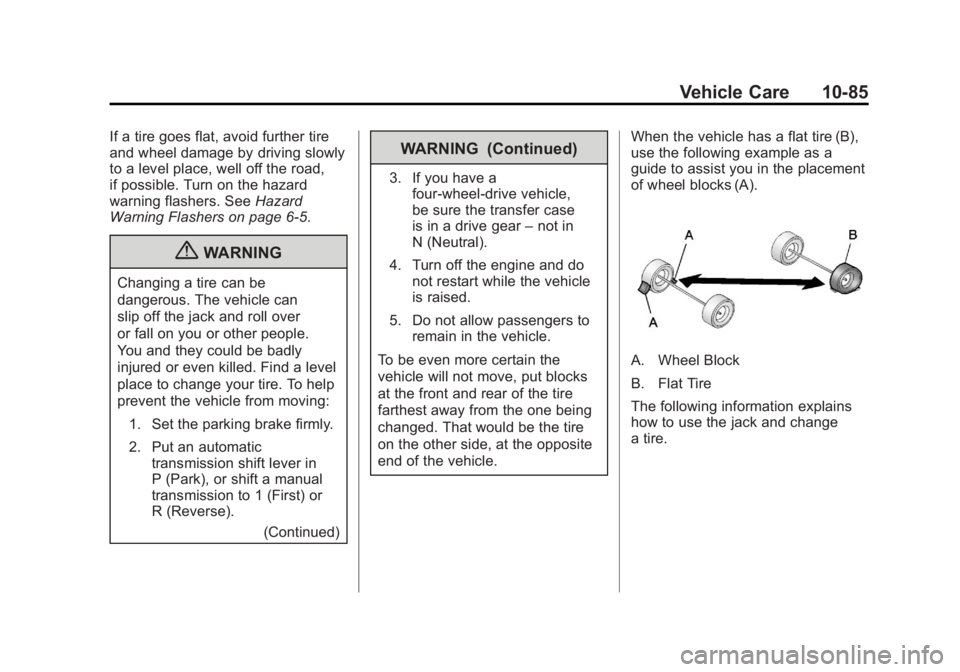
end of the vehicle. When the vehicle has a flat tire (B),
use the following example as a
guide to assist you in the placement
of wheel blocks (A).
A. Wheel Block
B. Flat Tire
The following information explains
how to use the jack and change
a tire.
Page 522 of 594
Black plate (98,1)GMC Sierra Owner Manual - 2011
10-98 Vehicle Care
Jump Starting
For more information about the
vehicle battery, seeBattery on
page 10‑34.
If the vehicle is a hybrid, see
the hybrid supplement for more
information.
If the vehicle's battery (or batteries)
has run down, you may want to use
another vehicle and some jumper
cables to start your vehicle. Be sure
to use the following steps to do it
safely.
{WARNING
Batteries can hurt you. They can
be dangerous because:
.They contain acid that can
burn you.
.They contain gas that can
explode or ignite.
.They contain enough
electricity to burn you.
If you do not follow these steps
exactly, some or all of these
things can hurt you.
Notice: Ignoring these steps
could result in costly damage
to the vehicle that would not be
covered by the warranty.
Trying to start the vehicle by
pushing or pulling it will not
work, and it could damage the
vehicle.
1. Check the other vehicle. It must have a 12-volt battery with a
negative ground system. Notice:
Only use a vehicle
that has a 12-volt system with
a negative ground for jump
starting. If the other vehicle does
not have a 12-volt system with a
negative ground, both vehicles
can be damaged.
2. If you have a vehicle with a diesel engine with two batteries,
you should know before you
begin that, especially in cold
weather, you may not be able
to get enough power from a
single battery in another vehicle
to start your diesel engine.
If your vehicle has more than
one battery, using the battery
that is closer to the starter will
reduce electrical resistance.
This is located on the passenger
side, in the rear of the engine
compartment.
Page 523 of 594
Black plate (99,1)GMC Sierra Owner Manual - 2011
Vehicle Care 10-99
3. Get the vehicles close enoughso the jumper cables can reach,
but be sure the vehicles are not
touching each other. If they are,
it could cause an unwanted
ground connection. You would
not be able to start your vehicle,
and the bad grounding could
damage the electrical systems.
To avoid the possibility of the
vehicles rolling, set the parking
brake firmly on both vehicles
involved in the jump start
procedure. Put the automatic
transmission in P (Park) or a
manual transmission in Neutral
before setting the parking brake.
If you have a four-wheel-drive
vehicle, be sure the transfer
case is in a drive gear, not in
Neutral.
Notice: If the radio or other
accessories are left on during
the jump starting procedure, they
could be damaged. The repairs would not be covered by the
warranty. Always turn off the
radio and other accessories
when jump starting the vehicle.
4. Turn off the ignition on both
vehicles. Unplug unnecessary
accessories plugged into the
cigarette lighter or the accessory
power outlets. Turn off the radio
and all the lamps that are not
needed. This will avoid sparks
and help save both batteries.
And it could save the radio!
5. Open the hood on the other vehicle and locate the
positive (+) and negative (−)
terminal locations on that
vehicle.
The positive (+) terminal, is
located under a red plastic
cover at the positive battery
post. To uncover the positive (+)
terminal, open the red plastic
cover.
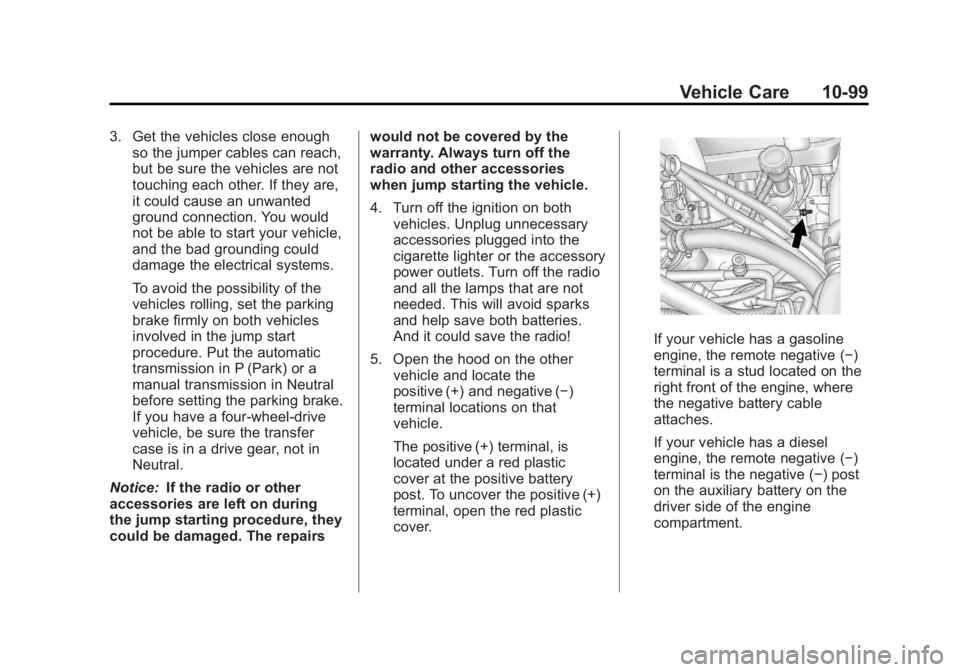
If your vehicle has a gasoline
engine, the remote negative (−)
terminal is a stud located on the
right front of the engine, where
the negative battery cable
attaches.
If your vehicle has a diesel
engine, the remote negative (−)
terminal is the negative (−) post
on the auxiliary battery on the
driver side of the engine
compartment.
Page 524 of 594
Black plate (100,1)GMC Sierra Owner Manual - 2011
10-100 Vehicle Care
For more information on
the location of the remote
positive (+) and remote
negative (−) terminals,
seeEngine Compartment
Overview on page 10‑6
{WARNING
An electric fan can start up even
when the engine is not running
and can injure you. Keep hands,
clothing and tools away from any
underhood electric fan.
{WARNING
Using an open flame near a
battery can cause battery gas to
explode. People have been hurt
doing this, and some have been
blinded. Use a flashlight if you
need more light.
(Continued)
WARNING (Continued)
Be sure the battery has enough
water. You do not need to add
water to the battery installed in
your new vehicle. But if a battery
has filler caps, be sure the right
amount of fluid is there. If it is low,
add water to take care of that
first. If you do not, explosive
gas could be present.
Battery fluid contains acid that
can burn you. Do not get it on
you. If you accidentally get it in
your eyes or on your skin, flush
the place with water and get
medical help immediately.
{WARNING
Fans or other moving engine
parts can injure you badly. Keep
your hands away from moving
parts once the engine is running. 6. Check that the jumper cables
do not have loose or missing
insulation. If they do, you could
get a shock. The vehicles could
be damaged too.
Before you connect the cables,
here are some basic things you
should know. Positive (+) will go
to positive (+) or to a remote
positive (+) terminal if the vehicle
has one. Negative (−) will go to a
heavy, unpainted metal engine
part or to a remote negative (−)
terminal if the vehicle has one.
Do not connect positive (+) to
negative (−) or you will get a
short that would damage the
battery and maybe other parts
too. And do not connect the
negative (−) cable to the
negative (−) terminal on the
dead battery because this
can cause sparks.
Page 525 of 594
Black plate (101,1)GMC Sierra Owner Manual - 2011
Vehicle Care 10-101
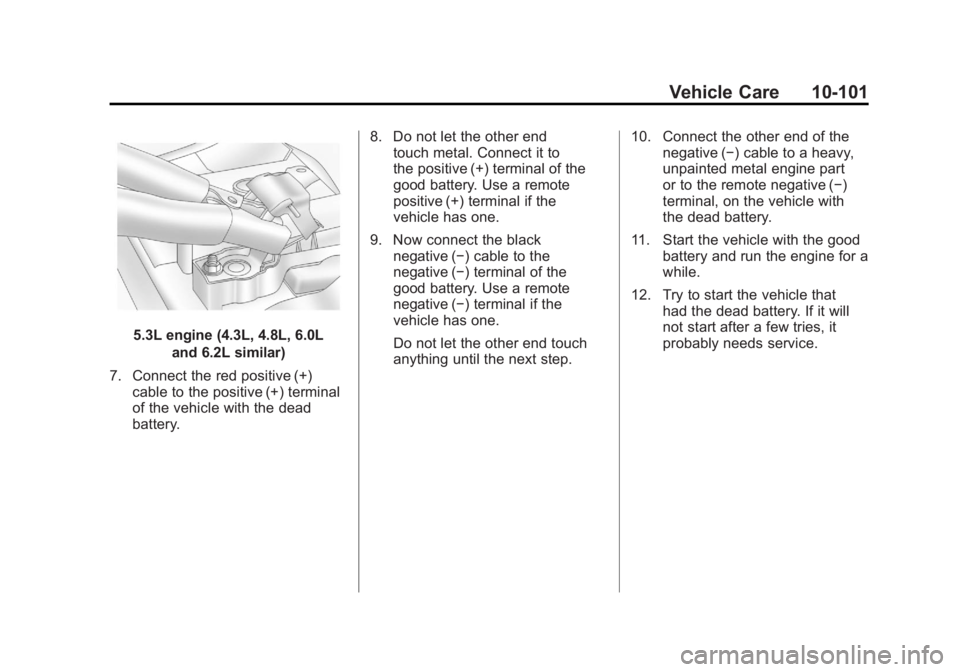
5.3L engine (4.3L, 4.8L, 6.0Land 6.2L similar)
7. Connect the red positive (+) cable to the positive (+) terminal
of the vehicle with the dead
battery. 8. Do not let the other end
touch metal. Connect it to
the positive (+) terminal of the
good battery. Use a remote
positive (+) terminal if the
vehicle has one.
9. Now connect the black negative (−) cable to the
negative (−) terminal of the
good battery. Use a remote
negative (−) terminal if the
vehicle has one.
Do not let the other end touch
anything until the next step. 10. Connect the other end of the
negative (−) cable to a heavy,
unpainted metal engine part
or to the remote negative (−)
terminal, on the vehicle with
the dead battery.
11. Start the vehicle with the good battery and run the engine for a
while.
12. Try to start the vehicle that had the dead battery. If it will
not start after a few tries, it
probably needs service.
Page 526 of 594
Black plate (102,1)GMC Sierra Owner Manual - 2011
10-102 Vehicle Care
Notice:If the jumper cables are
connected or removed in the
wrong order, electrical shorting
may occur and damage the
vehicle. The repairs would not be
covered by the vehicle warranty.
Always connect and remove the
jumper cables in the correct
order, making sure that the
cables do not touch each other
or other metal.
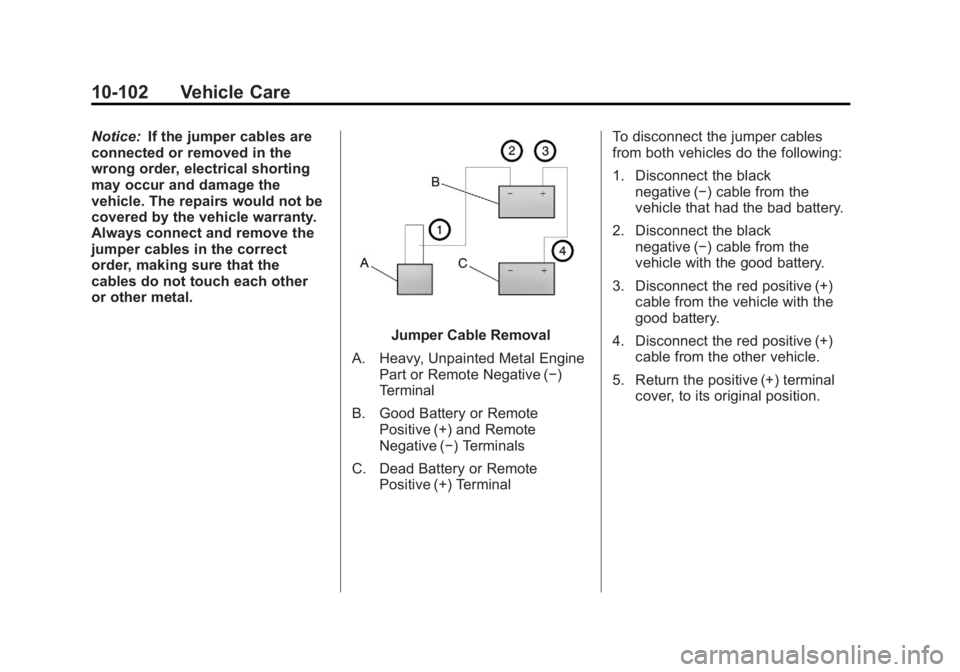
Jumper Cable Removal
A. Heavy, Unpainted Metal Engine Part or Remote Negative (−)
Terminal
B. Good Battery or Remote Positive (+) and Remote
Negative (−) Terminals
C. Dead Battery or Remote Positive (+) Terminal To disconnect the jumper cables
from both vehicles do the following:
1. Disconnect the black
negative (−) cable from the
vehicle that had the bad battery.
2. Disconnect the black negative (−) cable from the
vehicle with the good battery.
3. Disconnect the red positive (+) cable from the vehicle with the
good battery.
4. Disconnect the red positive (+) cable from the other vehicle.
5. Return the positive (+) terminal cover, to its original position.
Page 528 of 594
Black plate (104,1)GMC Sierra Owner Manual - 2011
10-104 Vehicle Care
Dinghy Towing
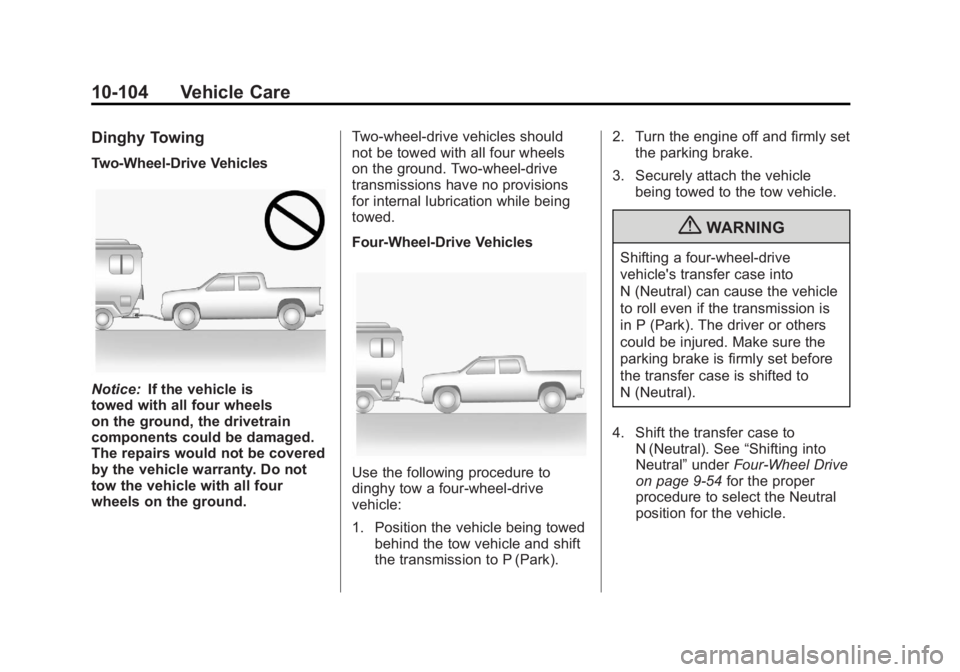
Two-Wheel-Drive Vehicles
Notice:If the vehicle is
towed with all four wheels
on the ground, the drivetrain
components could be damaged.
The repairs would not be covered
by the vehicle warranty. Do not
tow the vehicle with all four
wheels on the ground. Two-wheel-drive vehicles should
not be towed with all four wheels
on the ground. Two-wheel-drive
transmissions have no provisions
for internal lubrication while being
towed.
Four-Wheel-Drive Vehicles
Use the following procedure to
dinghy tow a four-wheel-drive
vehicle:
1. Position the vehicle being towed
behind the tow vehicle and shift
the transmission to P (Park). 2. Turn the engine off and firmly set
the parking brake.
3. Securely attach the vehicle being towed to the tow vehicle.
{WARNING
Shifting a four-wheel-drive
vehicle's transfer case into
N (Neutral) can cause the vehicle
to roll even if the transmission is
in P (Park). The driver or others
could be injured. Make sure the
parking brake is firmly set before
the transfer case is shifted to
N (Neutral).
4. Shift the transfer case to N (Neutral). See “Shifting into
Neutral” underFour-Wheel Drive
on page 9‑54 for the proper
procedure to select the Neutral
position for the vehicle.
Page 541 of 594
Black plate (1,1)GMC Sierra Owner Manual - 2011
Service and Maintenance 11-1
Service and
Maintenance
General Information
General Information . . . . . . . . . . 11-1
Scheduled Maintenance
Scheduled Maintenance . . . . . 11-2
Recommended Fluids,
Lubricants, and Parts
Recommended Fluids andLubricants . . . . . . . . . . . . . . . . . . 11-8
Maintenance Replacement Parts . . . . . . . . . . . . . . . . . . . . . . 11-11
Maintenance Records
Maintenance Records . . . . . . 11-12
General Information
This maintenance section applies
to vehicles with a gasoline engine.
For diesel engine vehicles, see the
maintenance schedule section in
the Duramax Diesel Supplement.
Notice: Maintenance
intervals, checks, inspections,
recommended fluids, and
lubricants are necessary to
keep this vehicle in good
working condition. Damage
caused by failure to follow
scheduled maintenance might
not be covered by the vehicle
warranty.
As the vehicle owner, you are
responsible for the scheduled
maintenance in this section.
We recommend having your
dealer perform these services.
Proper vehicle maintenance helps
to keep the vehicle in good working
condition, improves fuel economy,
and reduces vehicle emissions for
better air quality. Because of all the different ways
people use vehicles, maintenance
needs vary. The vehicle might need
more frequent checks and services.
Please read the information under
Scheduled Maintenance. To keep
the vehicle in good condition, see
your dealer.
The maintenance schedule is for
vehicles that:
.Carry passengers and cargo
within recommended limits on
the Tire and Loading Information
label. See
Vehicle Load Limits
on page 9‑25.
.Are driven on reasonable road
surfaces within legal driving
limits.
.Are driven off-road in the
recommended manner.
See Off-Road Driving on
page 9‑7.
.Use the recommended fuel.
See Recommended Fuel on
page 9‑84.