light GMC SIERRA 2011 Owner's Manual
[x] Cancel search | Manufacturer: GMC, Model Year: 2011, Model line: SIERRA, Model: GMC SIERRA 2011Pages: 594, PDF Size: 6.55 MB
Page 455 of 594
Black plate (31,1)GMC Sierra Owner Manual - 2011
Vehicle Care 10-31
Some driving conditions or climates
can cause a brake squeal when
the brakes are first applied or
lightly applied. This does not mean
something is wrong with the brakes.
Properly torqued wheel nuts are
necessary to help prevent brake
pulsation. When tires are rotated,
inspect brake pads for wear and
evenly tighten wheel nuts in
the proper sequence to torque
specifications inCapacities and
Specifications on page 12‑2.
If the vehicle has rear drum brakes,
they do not have wear indicators,
but if a rear brake rubbing noise is
heard, have the rear brake linings
inspected immediately. Rear brake
drums should be removed and
inspected each time the tires are
removed for rotation or changing. Drum brakes have an inspection
hole to inspect lining wear during
scheduled maintenance. When
the front brake pads are replaced,
have the rear brakes inspected, too.
Brake linings should always be
replaced as complete axle sets.
Brake Pedal Travel
See your dealer if the brake pedal
does not return to normal height,
or if there is a rapid increase in
pedal travel. This could be a
sign that brake service might
be required.
Brake Adjustment
Every time the brakes are applied,
with or without the vehicle moving,
the brakes adjust for wear.
Replacing Brake System Parts
The braking system on a vehicle is
complex. Its many parts have to be
of top quality and work well together
if the vehicle is to have really good
braking. The vehicle was designed
and tested with top-quality brake
parts. When parts of the braking
system are replaced, be sure to get
new, approved replacement parts.
If this is not done, the brakes might
not work properly. For example,
installing disc brake pads that
are wrong for the vehicle, can
change the balance between the
front and rear brakes
—for the
worse. The braking performance
expected can change in many
other ways if the wrong replacement
brake parts are installed.
Page 456 of 594
Black plate (32,1)GMC Sierra Owner Manual - 2011
10-32 Vehicle Care
Brake Fluid
The brake master cylinder reservoir
is filled with DOT 3 brake fluid.
SeeEngine Compartment Overview
on page 10‑6 for the location of the
reservoir.
There are only two reasons why
the brake fluid level in the reservoir
might go down:
.The brake fluid level goes down
because of normal brake lining
wear. When new linings are
installed, the fluid level goes
back up.
.A fluid leak in the brake
hydraulic system can also
cause a low fluid level. Have
the brake hydraulic system fixed,
since a leak means that sooner
or later the brakes will not
work well.
Do not top off the brake fluid.
Adding fluid does not correct a
leak. If fluid is added when the
linings are worn, there will be too
much fluid when new brake linings
are installed. Add or remove brake
fluid, as necessary, only when work
is done on the brake hydraulic
system.
{WARNING
If too much brake fluid is added,
it can spill on the engine and
burn, if the engine is hot enough.
You or others could be burned, (Continued)
WARNING (Continued)
and the vehicle could be
damaged. Add brake fluid only
when work is done on the brake
hydraulic system. See “Checking
Brake Fluid” in this section.
When the brake fluid falls to a low
level, the brake warning light comes
on. See Brake System Warning
Light on page 5‑27.
Refer to the Maintenance Schedule
to determine when to check the
brake fluid. See Scheduled
Maintenance on page 11‑2.
Page 466 of 594
Black plate (42,1)GMC Sierra Owner Manual - 2011
10-42 Vehicle Care
Headlamp Aiming
The vehicle has a visual optical
headlamp aiming system. The aim
of the headlamps has been preset
at the factory and should need no
further adjustment.
However, if the vehicle is damaged
in a crash, the aim of the headlamps
may be affected and adjustment
may be necessary.
If oncoming vehicles flash their high
beams at you, this may mean the
vertical aim of the headlamps needs
to be adjusted.
It is recommended that the vehicle
be taken to the dealer for service if
the headlamps need to be adjusted.
It is possible, however, to re-aim the
headlamps as described.The vehicle should:.Be placed so the headlamps
are 7.6 m (25 ft) from a
light‐colored wall.
.Have all four tires on a level
surface which is level all the
way to the wall.
.Be placed so it is perpendicular
to the wall.
.Not have any snow, ice, or mud
on it.
.Be fully assembled and all other
work stopped while headlamp
aiming is being performed.
.Be loaded with a full tank of
fuel and one person or 75 kg
(160 lbs) sitting on the
driver seat.
.Have the tires properly inflated.
.Have the spare tire in its proper
location in the vehicle.Headlamp aiming is done with the
vehicle's low-beam headlamps.
The high-beam headlamps will be
correctly aimed if the low-beam
headlamps are aimed properly.
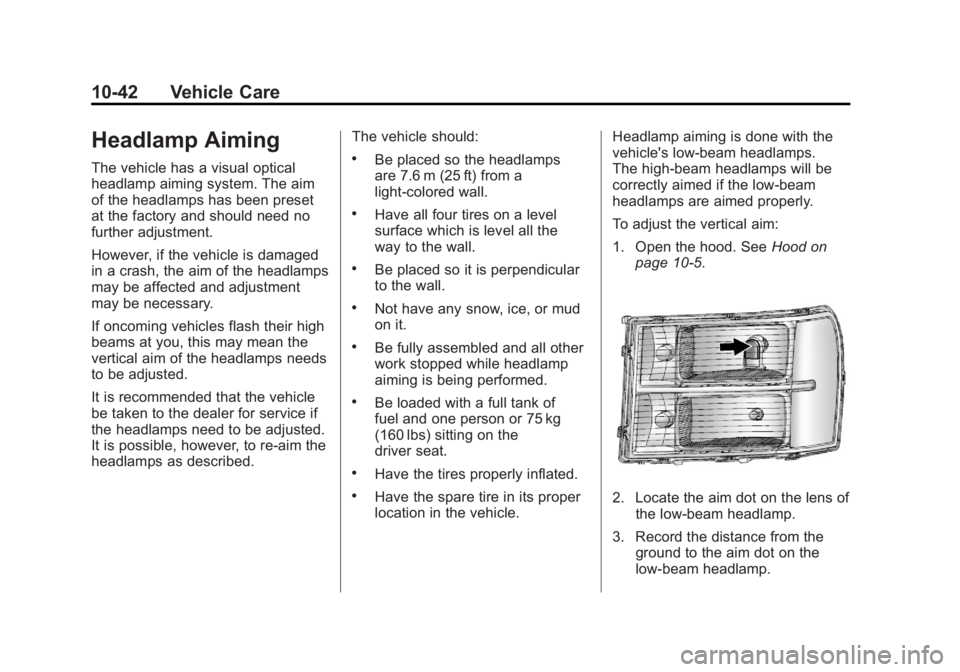
To adjust the vertical aim:
1. Open the hood. See
Hood on
page 10‑5.2. Locate the aim dot on the lens of the low‐beam headlamp.
3. Record the distance from the ground to the aim dot on the
low‐beam headlamp.
Page 467 of 594
Black plate (43,1)GMC Sierra Owner Manual - 2011
Vehicle Care 10-43
4. At a wall, measure from theground upward (A) to the
recorded distance from
Step 3 and mark it.
5. Draw or tape a horizontal line (B) on the wall the width of the
vehicle at the height of the
mark in Step 4. Notice:
Do not cover a headlamp
to improve beam cut-off when
aiming. Covering a headlamp may
cause excessive heat build-up
which may cause damage to the
headlamp.
6. Turn on the low-beam
headlamps and place a
piece of cardboard or equivalent
in front of the headlamp not
being adjusted. This allows
only the beam of light from the
headlamp being adjusted to be
seen on the flat surface.
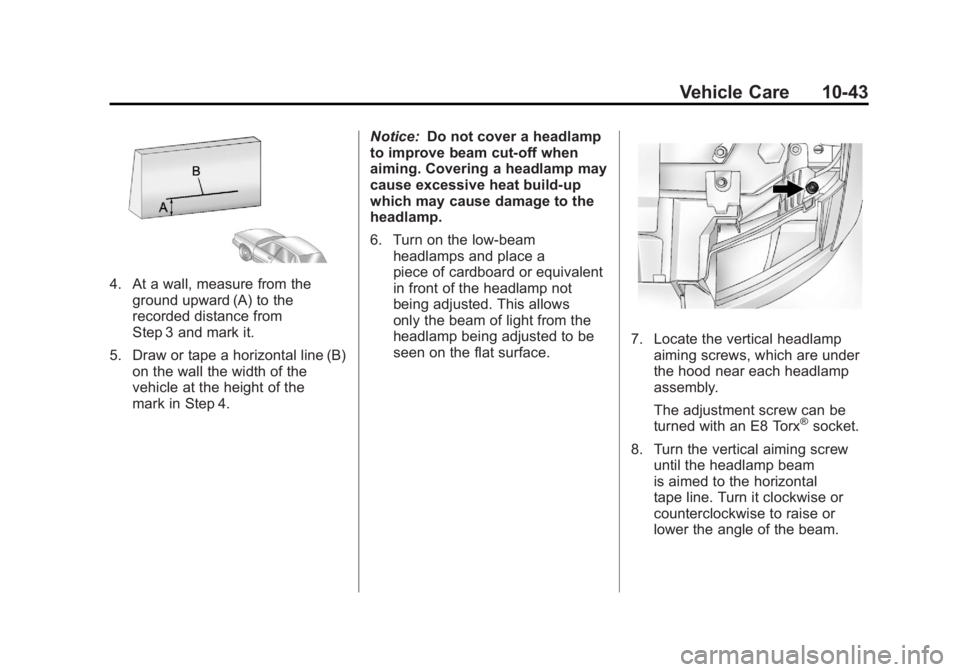
7. Locate the vertical headlampaiming screws, which are under
the hood near each headlamp
assembly.
The adjustment screw can be
turned with an E8 Torx
®socket.
8. Turn the vertical aiming screw until the headlamp beam
is aimed to the horizontal
tape line. Turn it clockwise or
counterclockwise to raise or
lower the angle of the beam.
Page 468 of 594
Black plate (44,1)GMC Sierra Owner Manual - 2011
10-44 Vehicle Care
9. Make sure that the light from theheadlamp is positioned at the
bottom edge of the horizontal
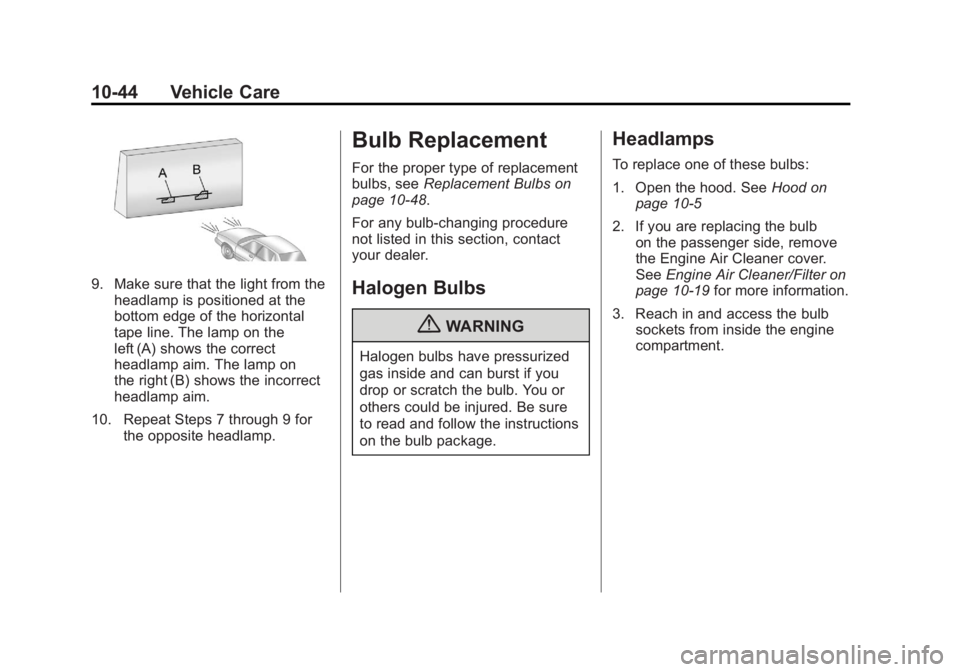
tape line. The lamp on the
left (A) shows the correct
headlamp aim. The lamp on
the right (B) shows the incorrect
headlamp aim.
10. Repeat Steps 7 through 9 for the opposite headlamp.
Bulb Replacement
For the proper type of replacement
bulbs, see Replacement Bulbs on
page 10‑48.
For any bulb‐changing procedure
not listed in this section, contact
your dealer.
Halogen Bulbs
{WARNING
Halogen bulbs have pressurized
gas inside and can burst if you
drop or scratch the bulb. You or
others could be injured. Be sure
to read and follow the instructions
on the bulb package.
Headlamps
To replace one of these bulbs:
1. Open the hood. See Hood on
page 10‑5
2. If you are replacing the bulb on the passenger side, remove
the Engine Air Cleaner cover.
See Engine Air Cleaner/Filter on
page 10‑19 for more information.
3. Reach in and access the bulb sockets from inside the engine
compartment.
Page 469 of 594
Black plate (45,1)GMC Sierra Owner Manual - 2011
Vehicle Care 10-45
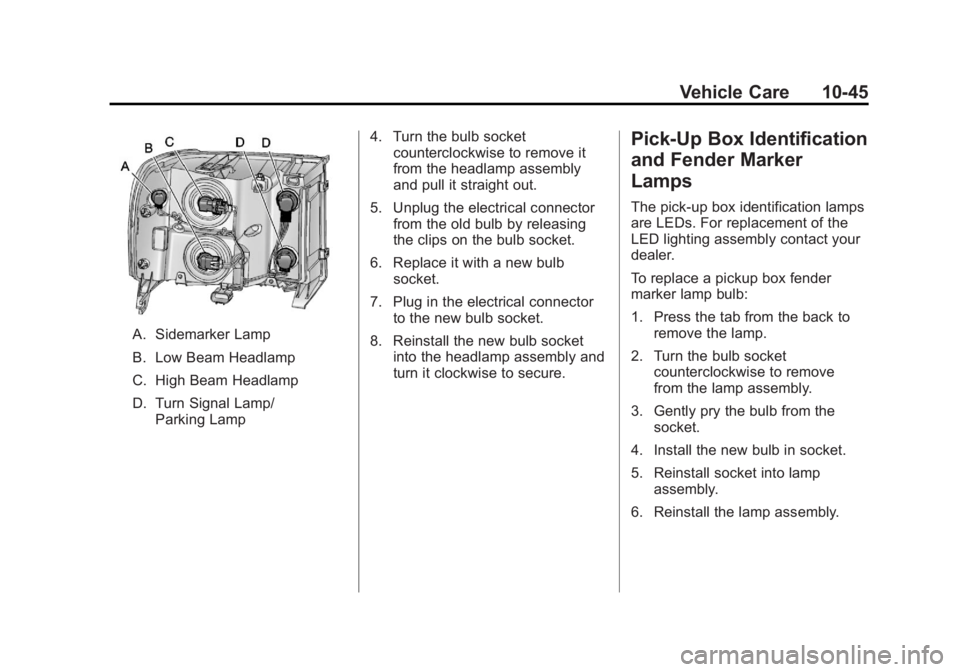
A. Sidemarker Lamp
B. Low Beam Headlamp
C. High Beam Headlamp
D. Turn Signal Lamp/Parking Lamp 4. Turn the bulb socket
counterclockwise to remove it
from the headlamp assembly
and pull it straight out.
5. Unplug the electrical connector from the old bulb by releasing
the clips on the bulb socket.
6. Replace it with a new bulb socket.
7. Plug in the electrical connector to the new bulb socket.
8. Reinstall the new bulb socket into the headlamp assembly and
turn it clockwise to secure.
Pick-Up Box Identification
and Fender Marker
Lamps
The pick-up box identification lamps
are LEDs. For replacement of the
LED lighting assembly contact your
dealer.
To replace a pickup box fender
marker lamp bulb:
1. Press the tab from the back to
remove the lamp.
2. Turn the bulb socket counterclockwise to remove
from the lamp assembly.
3. Gently pry the bulb from the socket.
4. Install the new bulb in socket.
5. Reinstall socket into lamp assembly.
6. Reinstall the lamp assembly.
Page 474 of 594
Black plate (50,1)GMC Sierra Owner Manual - 2011
10-50 Vehicle Care
Fuses and Circuit
Breakers
If the vehicle is a hybrid, see
the hybrid supplement for more
information.
The wiring circuits in the vehicle
are protected from short circuits
by a combination of fuses, circuit
breakers and fusible thermal links.
This greatly reduces the chance of
fires caused by electrical problems.
Look at the silver-colored band
inside the fuse. If the band is broken
or melted, replace the fuse. Be sure
you replace a bad fuse with a new
one of the identical size and rating.
If you ever have a problem on the
road and don't have a spare fuse,
you can borrow one that has the
same amperage. Just pick somefeature of your vehicle that you can
get along without
–like the radio
or cigarette lighter –and use its
fuse, if it is the correct amperage.
Replace it as soon as you can.
Engine Compartment
Fuse Block
If the vehicle has a diesel engine,
see the Duramax Diesel supplement
for more information.
If the vehicle is a hybrid, see
the hybrid supplement for more
information.
The Engine Compartment Fuse
Block is located in the engine
compartment, on the driver side
of the vehicle.
Lift the cover to access the fuse
block.
Notice: Spilling liquid on any
electrical component on the
vehicle may damage it. Always
keep the covers on any electrical
component.
To remove fuses, hold the end of
the fuse between your thumb and
index finger and pull straight out.
Page 477 of 594
Black plate (53,1)GMC Sierra Owner Manual - 2011
Vehicle Care 10-53
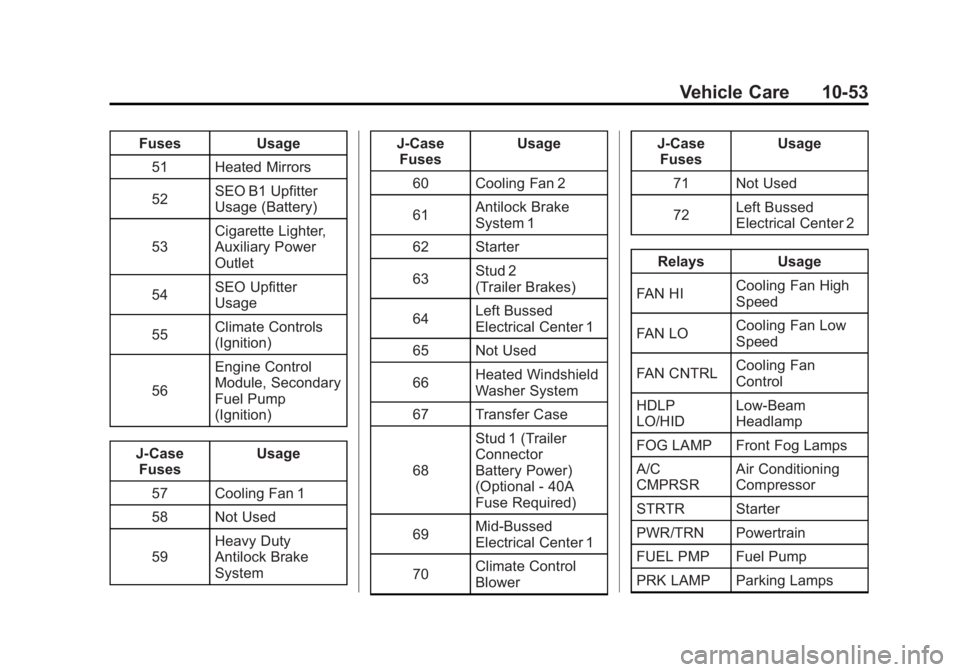
FusesUsage
51 Heated Mirrors
52 SEO B1 Upfitter
Usage (Battery)
53 Cigarette Lighter,
Auxiliary Power
Outlet
54 SEO Upfitter
Usage
55 Climate Controls
(Ignition)
56 Engine Control
Module, Secondary
Fuel Pump
(Ignition)
J-Case Fuses Usage
57 Cooling Fan 1
58 Not Used
59 Heavy Duty
Antilock Brake
System J-Case
Fuses Usage
60 Cooling Fan 2
61 Antilock Brake
System 1
62 Starter
63 Stud 2
(Trailer Brakes)
64 Left Bussed
Electrical Center 1
65 Not Used
66 Heated Windshield
Washer System
67 Transfer Case
68 Stud 1 (Trailer
Connector
Battery Power)
(Optional - 40A
Fuse Required)
69 Mid-Bussed
Electrical Center 1
70 Climate Control
Blower J-Case
Fuses Usage
71 Not Used
72 Left Bussed
Electrical Center 2
Relays Usage
FAN HI Cooling Fan High
Speed
FAN LO Cooling Fan Low
Speed
FAN CNTRL Cooling Fan
Control
HDLP
LO/HID Low-Beam
Headlamp
FOG LAMP Front Fog Lamps
A/C
CMPRSR Air Conditioning
Compressor
STRTR Starter
PWR/TRN Powertrain
FUEL PMP Fuel Pump
PRK LAMP Parking Lamps
Page 478 of 594
Black plate (54,1)GMC Sierra Owner Manual - 2011
10-54 Vehicle Care
RelaysUsage
REAR
DEFOG Rear Defogger
RUN/CRNK Switched Power
Instrument Panel Fuse
Block
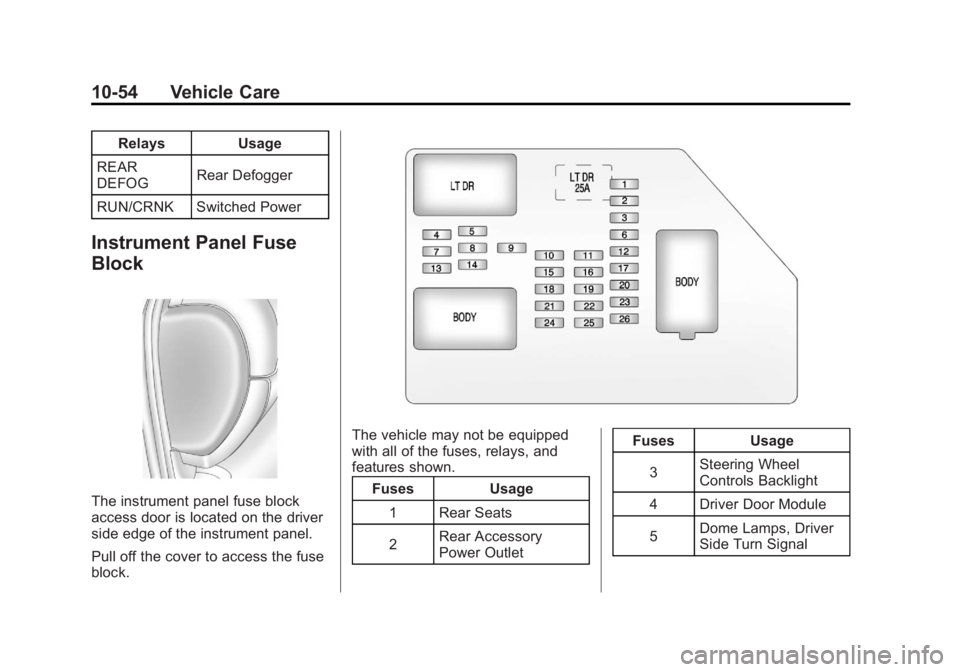
The instrument panel fuse block
access door is located on the driver
side edge of the instrument panel.
Pull off the cover to access the fuse
block.
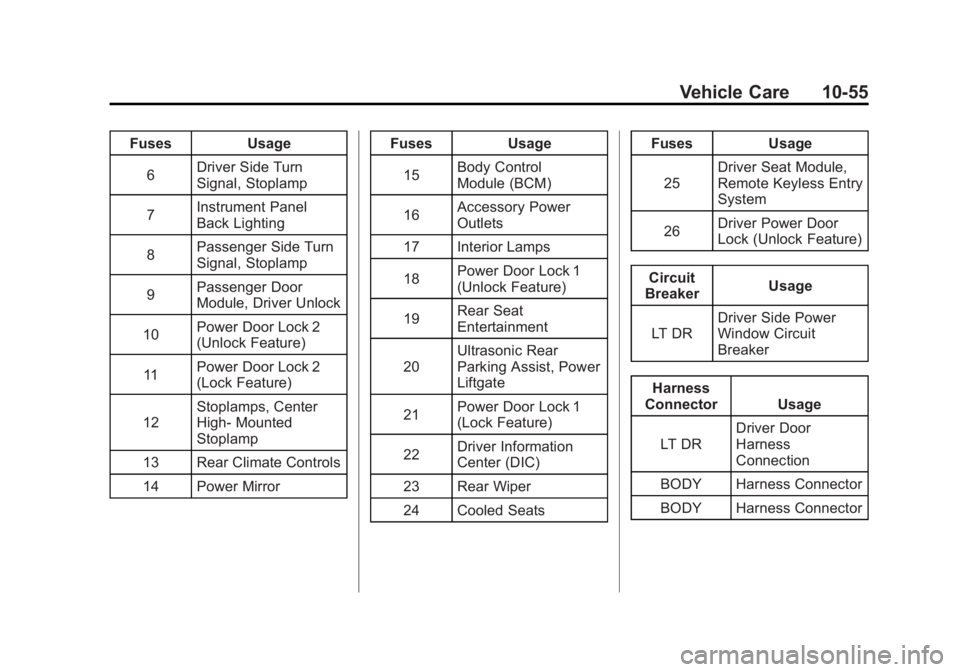
The vehicle may not be equipped
with all of the fuses, relays, and
features shown. Fuses Usage
1 Rear Seats
2 Rear Accessory
Power Outlet Fuses Usage
3 Steering Wheel
Controls Backlight
4 Driver Door Module
5 Dome Lamps, Driver
Side Turn Signal
Page 479 of 594
Black plate (55,1)GMC Sierra Owner Manual - 2011
Vehicle Care 10-55
FusesUsage
6 Driver Side Turn
Signal, Stoplamp
7 Instrument Panel
Back Lighting
8 Passenger Side Turn
Signal, Stoplamp
9 Passenger Door
Module, Driver Unlock
10 Power Door Lock 2
(Unlock Feature)
11 Power Door Lock 2
(Lock Feature)
12 Stoplamps, Center
High‐
Mounted
Stoplamp
13 Rear Climate Controls
14 Power Mirror Fuses
Usage
15 Body Control
Module (BCM)
16 Accessory Power
Outlets
17 Interior Lamps
18 Power Door Lock 1
(Unlock Feature)
19 Rear Seat
Entertainment
20 Ultrasonic Rear
Parking Assist, Power
Liftgate
21 Power Door Lock 1
(Lock Feature)
22 Driver Information
Center (DIC)
23 Rear Wiper
24 Cooled Seats Fuses
Usage
25 Driver Seat Module,
Remote Keyless Entry
System
26 Driver Power Door
Lock (Unlock Feature)
Circuit
Breaker Usage
LT DR Driver Side Power
Window Circuit
Breaker
Harness
Connector Usage
LT DR Driver Door
Harness
Connection
BODY Harness Connector
BODY Harness Connector