buttons GMC SIERRA 2011 User Guide
[x] Cancel search | Manufacturer: GMC, Model Year: 2011, Model line: SIERRA, Model: GMC SIERRA 2011Pages: 594, PDF Size: 6.55 MB
Page 48 of 594
Black plate (4,1)GMC Sierra Owner Manual - 2011
2-4 Keys, Doors and Windows
K(Unlock):Press once to unlock
only the driver door. If
Kis pressed
again within three seconds, all
remaining doors unlock. The interior
lamps may come on and stay on for
20 seconds or until the ignition is
turned on.
If enabled through the DIC, the turn
signal lamps flash twice to indicate
unlocking has occurred. See Vehicle
Personalization (with DIC Buttons)
on page 5‑52. If enabled through
the DIC, the exterior lights may turn
on. See “Approach Lighting” under
Vehicle Personalization (with DIC
Buttons) on page 5‑52.
Pressing
Kon the RKE transmitter
disarms the content theft‐deterrent
system. See Anti-Theft Alarm
System on page 2‑12.
L(Vehicle Locator/Panic
Alarm): Press and release to
locate the vehicle. The turn signal
lamps flash and the horn sounds
three times. Press and hold
Lfor more than
two seconds to activate the panic
alarm. The turn signal lamps flash
and the horn sounds repeatedly
for 30 seconds. The alarm turns
off when the ignition is moved to
ON/RUN or
Lis pressed again.
The ignition must be in LOCK/OFF
for the panic alarm to work.
The vehicle comes with two
transmitters. Each transmitter will
have a number on it: "1" or "2."
These numbers correspond to the
driver of the vehicle. For example,
the memory seat position for
driver 1 will be recalled when
using the transmitter labeled "1",
if enabled through the DIC.
See “Memory Seat, Mirrors,
and Pedals” underPower Seat
Adjustment on page 3‑4 andVehicle
Personalization (with DIC Buttons)
on page 5‑52 for more information.
Programming Transmitters to
the Vehicle
Only RKE transmitters programmed
to this vehicle will work. If a
transmitter is lost or stolen, a
replacement can be purchased and
programmed through your dealer.
When the replacement transmitter
is programmed to this vehicle, all
remaining transmitters must also
be reprogrammed. Any lost or
stolen transmitters will no longer
work once the new transmitter
is programmed. Each vehicle
can have up to eight transmitters
programmed to it. See your dealer
for transmitter programming.
Battery Replacement
Replace the battery if the REPLACE
BATTERY IN REMOTE KEY
message displays in the DIC.
Notice:When replacing the
battery, do not touch any of the
circuitry on the transmitter. Static
from your body could damage the
transmitter.
Page 53 of 594
Black plate (9,1)GMC Sierra Owner Manual - 2011
Keys, Doors and Windows 2-9
Pressing the power lock switch
twice will override the delayed
locking feature and immediately
lock all the doors.
This feature will not operate if the
key is in the ignition.
This feature can be programmed
using the Driver Information
Center (DIC). See“Delay Door
Lock” under Vehicle Personalization
(with DIC Buttons) on page 5‑52.
Automatic Door Locks
The vehicle may have an automatic
lock/unlock feature. This feature
can be programmed using the
Driver Information Center (DIC).
See Vehicle Personalization (with
DIC Buttons) on page 5‑52 for more
information on DIC programming.
Lockout Protection
If the driver side power door lock
switch is pressed when the driver
door is open and the key is in the
ignition, all of the doors will lock and
then the driver door will unlock.
If the passenger side power door
lock switch is pressed when the
front passenger door is open and
the key is in the ignition, all of the
doors will lock and then the front
passenger door will unlock.
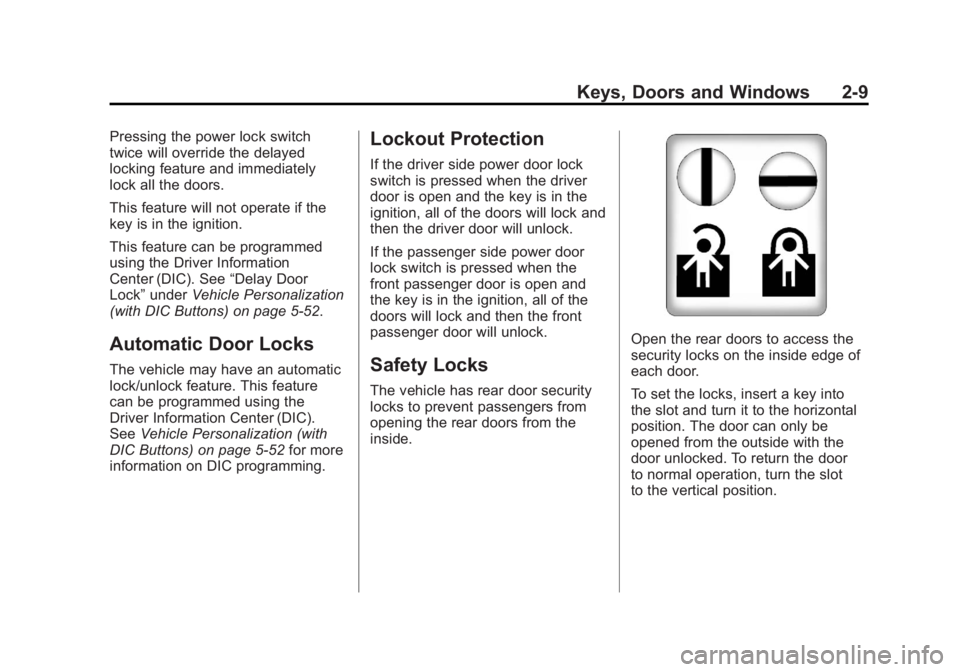
Safety Locks
The vehicle has rear door security
locks to prevent passengers from
opening the rear doors from the
inside.
Open the rear doors to access the
security locks on the inside edge of
each door.
To set the locks, insert a key into
the slot and turn it to the horizontal
position. The door can only be
opened from the outside with the
door unlocked. To return the door
to normal operation, turn the slot
to the vertical position.
Page 61 of 594
Black plate (17,1)GMC Sierra Owner Manual - 2011
Keys, Doors and Windows 2-17
Manual Foldaway
Manually fold the mirrors inward
to prevent damage when going
through an automatic car wash.
To fold, pull the mirror toward the
vehicle. Push the mirror outward,
to return to its original position.
Automatic Dimming
If equipped with an automatic
dimming mirror, the driver outside
mirror adjusts for the glare of
the headlamps behind you.
SeeAutomatic Dimming Rearview
Mirror on page 2‑18.
Turn Signal Indicator
The vehicle may also have a
turn signal indicator on the mirror.
An arrow on the mirror flashes in the
direction of the turn or lane change.
Heated Mirrors
For vehicles with heated mirrors:
<(Rear Window Defogger):
Press to heat the mirrors. If the
vehicle has a towing mirror, only the
upper glass of the mirror is heated.
The lower convex part of the towing
mirror is not heated.
Depending on the vehicle's features,
see “Rear Window Defogger”
under Climate Control Systems
(with Air Conditioning) on page 8‑1
or Climate Control Systems (with
Heater Only) on page 8‑4 orDual
Automatic Climate Control System
on page 8‑5 for more information.
Park Tilt Mirrors
If the vehicle has the memory
package, the passenger and/or
driver mirror tilts to a preselected
position when the vehicle is in
R (Reverse). This feature lets the
driver view the curb when parallel
parking. The mirror(s) return to the
original position when the vehicle
is shifted out of R (Reverse),
or the ignition is turned off or to
OFF/LOCK.
Turn this feature on or off through
the Driver Information Center (DIC).
SeeVehicle Personalization (with
DIC Buttons) on page 5‑52 for more
information.
Page 62 of 594
Black plate (18,1)GMC Sierra Owner Manual - 2011
2-18 Keys, Doors and Windows
Interior Mirrors
Manual Rearview Mirror
Hold the mirror in the center to
move it for a clearer view of behind
your vehicle. Adjust the mirror to
avoid glare from the headlamps
behind you. Push the tab at the
bottom of the mirror forward
for daytime use and pull it for
nighttime use.
Automatic Dimming
Rearview Mirror
The vehicle may have an automatic
dimming inside rearview mirror.
Automatic dimming reduces the
glare from the headlamps of the
vehicle behind you. The dimming
feature comes on and the indicator
light illuminates each time the
ignition is turned to start.
O(On/Off):Press to turn the
dimming feature on or off. The vehicle may also have a Rear
Vision Camera (RVC). See
Rear
Vision Camera (RVC) on page 9‑78
for more information.
If the vehicle has RVC, the
Obutton
for turning the dimming feature on or
off will not be available.
Vehicles with OnStar have three
additional control buttons for the
OnStar system. See your dealer
for more information about OnStar
and how to subscribe to it. See the
OnStar Owner Guide for more
information about the services
OnStar provides.
Cleaning the Mirror
Do not spray glass cleaner directly
on the mirror. Use a soft towel
dampened with water.
Windows
{WARNING
Leaving children, helpless adults,
or pets in a vehicle with the
windows closed is dangerous.
They can be overcome by
the extreme heat and suffer
permanent injuries or even death
from heat stroke. Never leave a
child, a helpless adult, or a pet
alone in a vehicle, especially with
the windows closed in warm or
hot weather.
Page 73 of 594
Black plate (5,1)GMC Sierra Owner Manual - 2011
Seats and Restraints 3-5
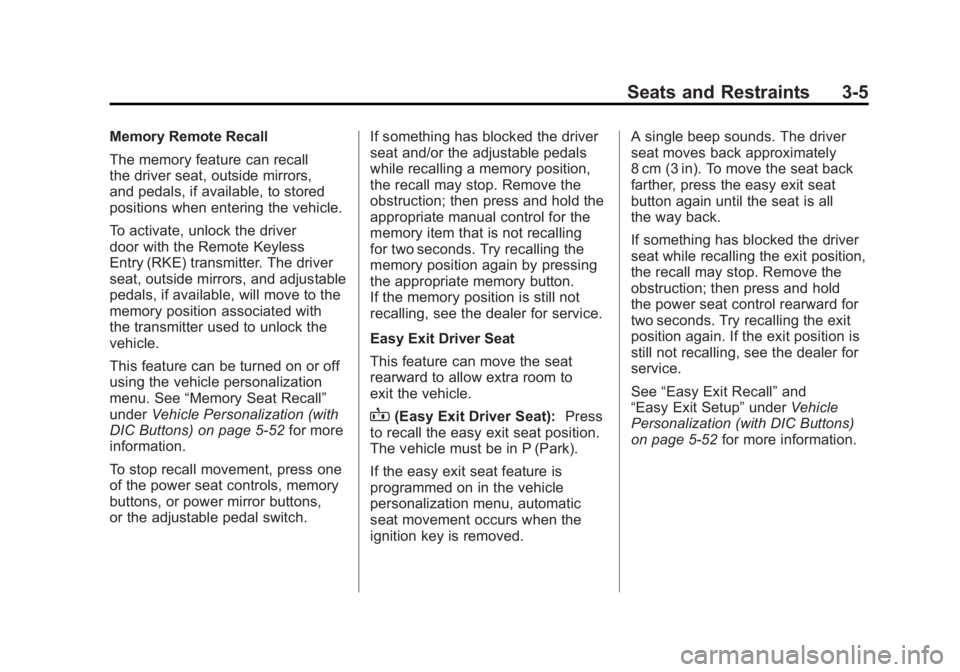
Memory Remote Recall
The memory feature can recall
the driver seat, outside mirrors,
and pedals, if available, to stored
positions when entering the vehicle.
To activate, unlock the driver
door with the Remote Keyless
Entry (RKE) transmitter. The driver
seat, outside mirrors, and adjustable
pedals, if available, will move to the
memory position associated with
the transmitter used to unlock the
vehicle.
This feature can be turned on or off
using the vehicle personalization
menu. See“Memory Seat Recall”
under Vehicle Personalization (with
DIC Buttons) on page 5‑52 for more
information.
To stop recall movement, press one
of the power seat controls, memory
buttons, or power mirror buttons,
or the adjustable pedal switch. If something has blocked the driver
seat and/or the adjustable pedals
while recalling a memory position,
the recall may stop. Remove the
obstruction; then press and hold the
appropriate manual control for the
memory item that is not recalling
for two seconds. Try recalling the
memory position again by pressing
the appropriate memory button.
If the memory position is still not
recalling, see the dealer for service.
Easy Exit Driver Seat
This feature can move the seat
rearward to allow extra room to
exit the vehicle.
B(Easy Exit Driver Seat):
Press
to recall the easy exit seat position.
The vehicle must be in P (Park).
If the easy exit seat feature is
programmed on in the vehicle
personalization menu, automatic
seat movement occurs when the
ignition key is removed. A single beep sounds. The driver
seat moves back approximately
8 cm (3 in). To move the seat back
farther, press the easy exit seat
button again until the seat is all
the way back.
If something has blocked the driver
seat while recalling the exit position,
the recall may stop. Remove the
obstruction; then press and hold
the power seat control rearward for
two seconds. Try recalling the exit
position again. If the exit position is
still not recalling, see the dealer for
service.
See
“Easy Exit Recall” and
“Easy Exit Setup” underVehicle
Personalization (with DIC Buttons)
on page 5‑52 for more information.
Page 77 of 594
Black plate (9,1)GMC Sierra Owner Manual - 2011
Seats and Restraints 3-9
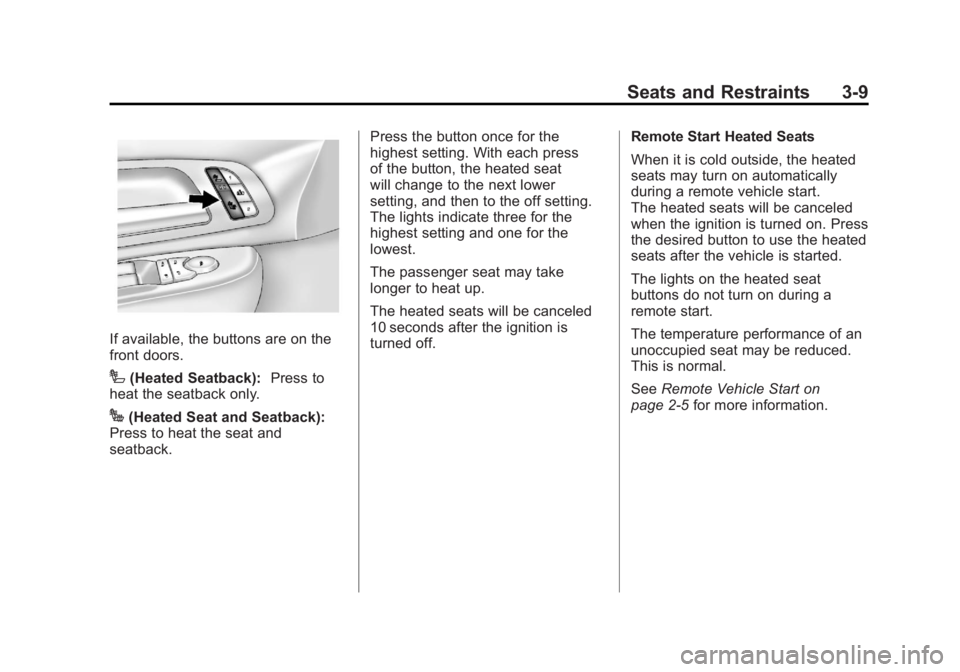
If available, the buttons are on the
front doors.
I(Heated Seatback):Press to
heat the seatback only.
J(Heated Seat and Seatback):
Press to heat the seat and
seatback. Press the button once for the
highest setting. With each press
of the button, the heated seat
will change to the next lower
setting, and then to the off setting.
The lights indicate three for the
highest setting and one for the
lowest.
The passenger seat may take
longer to heat up.
The heated seats will be canceled
10 seconds after the ignition is
turned off.
Remote Start Heated Seats
When it is cold outside, the heated
seats may turn on automatically
during a remote vehicle start.
The heated seats will be canceled
when the ignition is turned on. Press
the desired button to use the heated
seats after the vehicle is started.
The lights on the heated seat
buttons do not turn on during a
remote start.
The temperature performance of an
unoccupied seat may be reduced.
This is normal.
See
Remote Vehicle Start on
page 2‑5 for more information.
Page 91 of 594
Black plate (23,1)GMC Sierra Owner Manual - 2011
Seats and Restraints 3-23
Shoulder Belt Height Adjuster
The vehicle has a shoulder belt
height adjuster for the driver and
right front passenger.
Adjust the height so the shoulder
portion of the belt is on the
shoulder and not falling off of it.
The belt should be close to, but
not contacting, the neck. Improper
shoulder belt height adjustment
could reduce the effectiveness of
the safety belt in a crash. SeeHow
to Wear Safety Belts Properly on
page 3‑15.
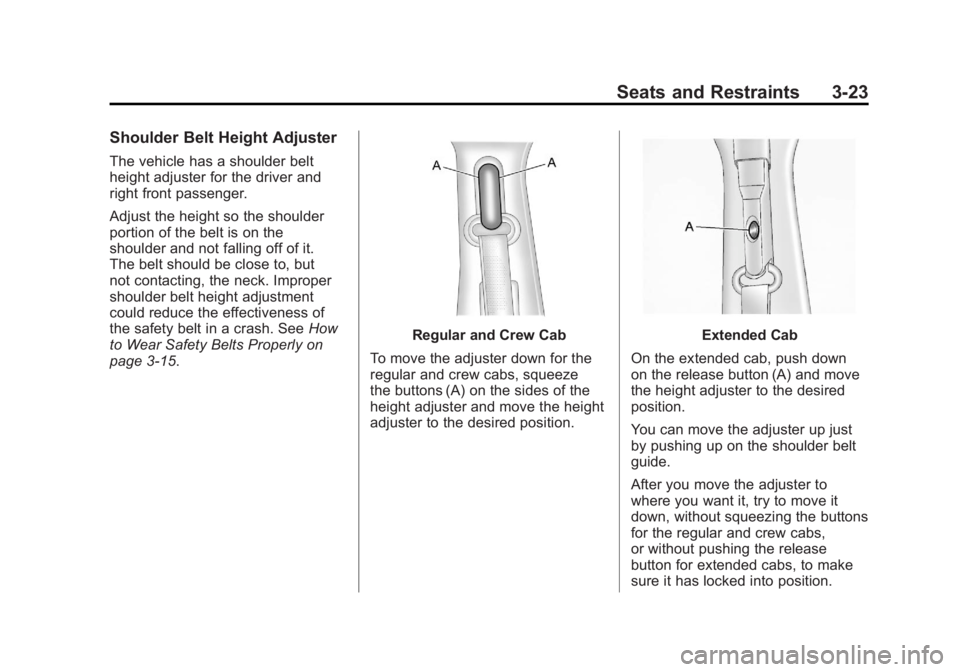
Regular and Crew Cab
To move the adjuster down for the
regular and crew cabs, squeeze
the buttons (A) on the sides of the
height adjuster and move the height
adjuster to the desired position.Extended Cab
On the extended cab, push down
on the release button (A) and move
the height adjuster to the desired
position.
You can move the adjuster up just
by pushing up on the shoulder belt
guide.
After you move the adjuster to
where you want it, try to move it
down, without squeezing the buttons
for the regular and crew cabs,
or without pushing the release
button for extended cabs, to make
sure it has locked into position.
Page 150 of 594
Black plate (2,1)GMC Sierra Owner Manual - 2011
5-2 Instruments and Controls
Tire Messages . . . . . . . . . . . . . . . 5-49
Transmission Messages . . . . . 5-50
Vehicle ReminderMessages . . . . . . . . . . . . . . . . . . 5-50
Washer Fluid Messages . . . . . 5-51
Vehicle Personalization
Vehicle Personalization
(with DIC Buttons) . . . . . . . . . . 5-52
Universal Remote System
Universal Remote System . . . 5-61
Universal Remote SystemProgramming . . . . . . . . . . . . . . . 5-61
Universal Remote System Operation . . . . . . . . . . . . . . . . . . 5-67
Controls
Steering Wheel
Adjustment
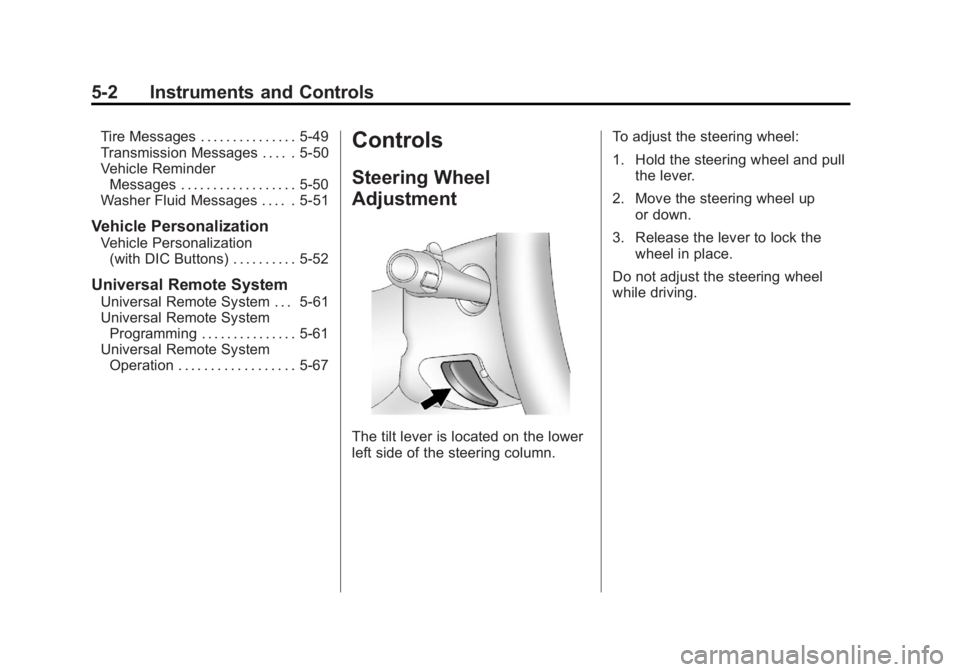
The tilt lever is located on the lower
left side of the steering column. To adjust the steering wheel:
1. Hold the steering wheel and pull
the lever.
2. Move the steering wheel up or down.
3. Release the lever to lock the wheel in place.
Do not adjust the steering wheel
while driving.
Page 154 of 594
Black plate (6,1)GMC Sierra Owner Manual - 2011
5-6 Instruments and Controls
Windshield Washer
{WARNING
In freezing weather, do not use
the washer until the windshield
is warmed. Otherwise the
washer fluid can form ice on the
windshield, blocking your vision.
L(Washer Fluid):Push the
paddle marked with the windshield
washer symbol at the top of the
multifunction lever, to spray washer
fluid on the windshield. The wipers
clear the window and then either
stop or return to the preset speed.
Compass
The vehicle may have a compass in
the Driver Information Center (DIC).
Compass Zone
The zone is set to zone eight upon
leaving the factory. Your dealer
will set the correct zone for your
location.
Under certain circumstances,
such as during a long-distance,
cross-country trip or moving to
a new state or province, it will
be necessary to compensate for
compass variance by resetting the
zone through the DIC if the zone
is not set correctly.
Compass variance is the difference
between the earth's magnetic north
and true geographic north. If the
compass is not set to the zone
where you live, the compass may
give false readings. The compass
must be set to the variance zone in
which the vehicle is traveling. To adjust for compass variance, use
the following procedure:
Compass Variance (Zone)
Procedure
1. Do not set the compass zone
when the vehicle is moving.
Only set it when the vehicle
is in P (Park).
Press the vehicle information
button until PRESS
VTO
CHANGE COMPASS ZONE
displays. Or, if the vehicle does
not have DIC buttons, press the
trip odometer reset stem until
CHANGE COMPASS ZONE
displays.
Page 155 of 594
Black plate (7,1)GMC Sierra Owner Manual - 2011
Instruments and Controls 5-7
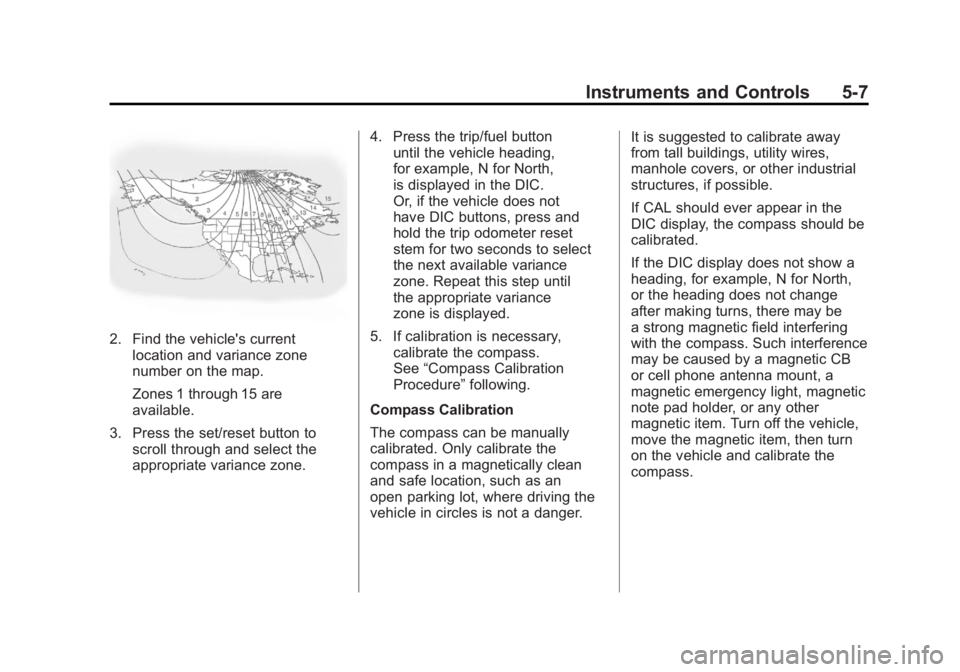
2. Find the vehicle's currentlocation and variance zone
number on the map.
Zones 1 through 15 are
available.
3. Press the set/reset button to scroll through and select the
appropriate variance zone. 4. Press the trip/fuel button
until the vehicle heading,
for example, N for North,
is displayed in the DIC.
Or, if the vehicle does not
have DIC buttons, press and
hold the trip odometer reset
stem for two seconds to select
the next available variance
zone. Repeat this step until
the appropriate variance
zone is displayed.
5. If calibration is necessary, calibrate the compass.
See “Compass Calibration
Procedure” following.
Compass Calibration
The compass can be manually
calibrated. Only calibrate the
compass in a magnetically clean
and safe location, such as an
open parking lot, where driving the
vehicle in circles is not a danger. It is suggested to calibrate away
from tall buildings, utility wires,
manhole covers, or other industrial
structures, if possible.
If CAL should ever appear in the
DIC display, the compass should be
calibrated.
If the DIC display does not show a
heading, for example, N for North,
or the heading does not change
after making turns, there may be
a strong magnetic field interfering
with the compass. Such interference
may be caused by a magnetic CB
or cell phone antenna mount, a
magnetic emergency light, magnetic
note pad holder, or any other
magnetic item. Turn off the vehicle,
move the magnetic item, then turn
on the vehicle and calibrate the
compass.