check engine GMC SIERRA 2011 User Guide
[x] Cancel search | Manufacturer: GMC, Model Year: 2011, Model line: SIERRA, Model: GMC SIERRA 2011Pages: 594, PDF Size: 6.55 MB
Page 174 of 594
Black plate (26,1)GMC Sierra Owner Manual - 2011
5-26 Instruments and Controls
To prevent more serious damage to
the vehicle:
.Reduce vehicle speed.
.Avoid hard accelerations.
.Avoid steep uphill grades.
.If towing a trailer, reduce the
amount of cargo being hauled
as soon as it is possible.
If the light continues to flash, when
it is safe to do so, stop the vehicle.
Find a safe place to park the
vehicle. Turn the vehicle off, wait at
least 10 seconds, and restart the
engine. If the light is still flashing,
follow the previous steps and see
your dealer for service as soon as
possible.
Light On Steady: An emission
control system malfunction has
been detected on the vehicle.
Diagnosis and service might be
required. The following may correct an
emissions system malfunction:
.Make sure the fuel cap is
fully installed. See
Filling
the Tank on page 9‑88.
The diagnostic system can
determine if the fuel cap has
been left off or improperly
installed. A loose or missing fuel
cap allows fuel to evaporate into
the atmosphere. A few driving
trips with the cap properly
installed should turn the light off.
.Make sure the electrical system
is not wet. The system could
be wet if the vehicle was driven
through a deep puddle of water.
The condition is usually
corrected when the electrical
system dries out. A few driving
trips should turn the light off.
.Make sure to fuel the vehicle
with quality fuel. Poor fuel quality
causes the engine not to run as
efficiently as designed and can
cause: stalling after start-up,
stalling when the vehicle is
changed into gear, misfiring,
hesitation on acceleration,
or stumbling on acceleration.
These conditions might go away
once the engine is warmed up.
If one or more of these
conditions occurs, change the
fuel brand used. It will require at
least one full tank of the proper
fuel to turn the light off.
See Recommended Fuel on
page 9‑84.
If none of the above have made
the light turn off, your dealer can
check the vehicle. The dealer
has the proper test equipment
and diagnostic tools to fix any
mechanical or electrical problems
that might have developed.
Page 179 of 594
Black plate (31,1)GMC Sierra Owner Manual - 2011
Instruments and Controls 5-31
Engine Oil Pressure Light
{WARNING
Do not keep driving if the oil
pressure is low. The engine can
become so hot that it catches fire.
Someone could be burned. Check
the oil as soon as possible and
have the vehicle serviced.Notice:
Lack of proper engine oil
maintenance can damage the
engine. The repairs would not be
covered by the vehicle warranty.
Always follow the maintenance
schedule for changing engine oil.
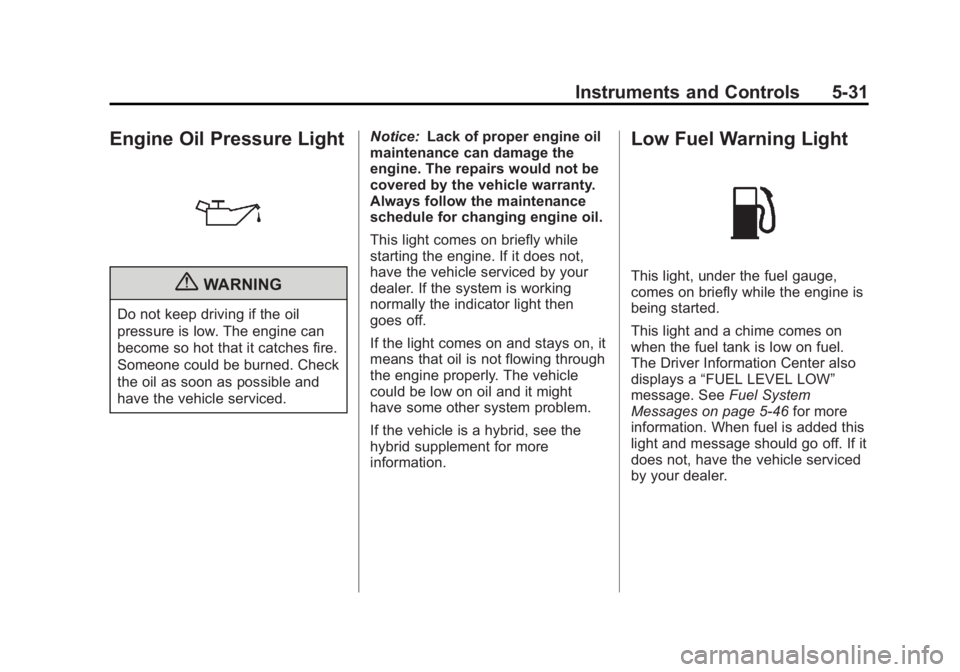
This light comes on briefly while
starting the engine. If it does not,
have the vehicle serviced by your
dealer. If the system is working
normally the indicator light then
goes off.
If the light comes on and stays on, it
means that oil is not flowing through
the engine properly. The vehicle
could be low on oil and it might
have some other system problem.
If the vehicle is a hybrid, see the
hybrid supplement for more
information.
Low Fuel Warning Light
This light, under the fuel gauge,
comes on briefly while the engine is
being started.
This light and a chime comes on
when the fuel tank is low on fuel.
The Driver Information Center also
displays a “FUEL LEVEL LOW”
message. See Fuel System
Messages on page 5‑46 for more
information. When fuel is added this
light and message should go off. If it
does not, have the vehicle serviced
by your dealer.
Page 193 of 594
Black plate (45,1)GMC Sierra Owner Manual - 2011
Instruments and Controls 5-45
Engine Oil Messages
CHANGE ENGINE OIL SOON
This message displays when the
engine oil needs to be changed.
When you change the engine oil,
be sure to reset the CHANGE
ENGINE OIL SOON message.
SeeEngine Oil Life System on
page 10‑11 for information on how
to reset the message. See Engine
Oil on page 10‑7 andScheduled
Maintenance on page 11‑2 for
more information.
ENGINE OIL HOT IDLE
ENGINE
This message displays when the
engine oil becomes hotter than the
normal operating temperature. Stop
and allow the vehicle to idle until it
cools down. See Engine Coolant
Temperature Gauge on page 5‑17.
OIL PRESSURE LOW STOP
ENGINE
Notice: If you drive the vehicle
while the engine oil pressure
is low, severe engine damage
may occur. If a low oil pressure
warning appears on the Driver
Information Center (DIC), stop
the vehicle as soon as possible.
Do not drive the vehicle until the
cause of the low oil pressure is
corrected. See Engine Oil on
page 10‑7 for more information.
This message displays if low oil
pressure levels occur. Stop the
vehicle as soon as safely possible
and do not operate it until the cause
of the low oil pressure has been
corrected. Check the oil as soon
as possible and have the vehicle
serviced by your dealer. See Engine
Oil on page 10‑7.
Engine Power Messages
ENGINE POWER IS REDUCED
This message displays and a
chime may sound when the cooling
system temperature gets too hot
and the engine further enters the
engine coolant protection mode.
See Engine Overheating on
page 10‑25 for more information.
This message also displays when
the vehicle's engine power is
reduced. Reduced engine power
can affect the vehicle's ability
to accelerate. If this message
is on, but there is no reduction
in performance, proceed to your
destination. The performance may
be reduced the next time the vehicle
is driven. The vehicle may be driven
at a reduced speed while this
message is on, but acceleration and
speed may be reduced. Anytime
this message stays on, the vehicle
should be taken to your dealer for
service as soon as possible.
Page 194 of 594
Black plate (46,1)GMC Sierra Owner Manual - 2011
5-46 Instruments and Controls
Fuel System Messages
FUEL LEVEL LOW
This message displays and a
chime may sound if the fuel level
is low. Refuel as soon as possible.
SeeFuel Gauge on page 5‑15
and Fuel on page 9‑84 for more
information.
TIGHTEN GAS CAP
This message may display along
with the check engine light on
the instrument panel cluster if the
vehicle's fuel cap is not tightened
properly. See Malfunction Indicator
Lamp on page 5‑25. Reinstall
the fuel cap fully. See Filling the
Tank on page 9‑88. The diagnostic
system can determine if the fuel
cap has been left off or improperly
installed. A loose or missing fuel
cap allows fuel to evaporate into the
atmosphere. A few driving trips with
the cap properly installed should
turn this light and message off.
Key and Lock Messages
REPLACE BATTERY IN
REMOTE KEY
This message displays if a Remote
Keyless Entry (RKE) transmitter
battery is low. The battery needs
to be replaced in the transmitter.
See “Battery Replacement” under
Remote Keyless Entry (RKE)
System Operation on page 2‑3.
Lamp Messages
TURN SIGNAL ON
This message displays and a chime
sounds if a turn signal is left on for
1.2 km (0.75 mile). Move the turn
signal/multifunction lever to the off
position.
Object Detection System
Messages
PARK ASST BLOCKED SEE
OWNERS MANUAL
If the vehicle has the Ultrasonic
Rear Parking Assist (URPA) system,
this message displays if there is
something interfering with the park
assist system. See Ultrasonic
Parking Assist on page 9‑76 for
more information.
PARK ASSIST OFF
If the vehicle has the Ultrasonic
Rear Parking Assist (URPA) system,
after the vehicle has been started,
this message displays to remind the
driver that the URPA system has
been turned off. Press the set/reset
button or the trip odometer reset
stem to acknowledge this message
and clear it from the DIC display.
To turn the URPA system back on,
see Ultrasonic Parking Assist on
page 9‑76.
Page 196 of 594
Black plate (48,1)GMC Sierra Owner Manual - 2011
5-48 Instruments and Controls
There are several conditions that
can cause this message to appear.
.If the vehicle is overheating,
which could occur if StabiliTrak
activates continuously for an
extended period of time.
.If the brake system warning
light is on. SeeBrake System
Warning Light on page 5‑27.
.If the stability system takes
longer than usual to complete its
diagnostic checks due to driving
conditions.
.If an engine or vehicle related
problem has been detected
and the vehicle needs service.
See your dealer.
.If the vehicle is shifted into 4LO.
The message turns off as soon
as the conditions that caused the
message to be displayed are no
longer present.
TRACTION CONTROL OFF
If the vehicle has StabiliTrak, this
message displays when the Traction
Control System (TCS) is turned off.
Adjust your driving accordingly. See
StabiliTrak
®System on page 9‑70
for more information.
Airbag System Messages
SERVICE AIR BAG
This message displays if there is
a problem with the airbag system.
Have your dealer inspect the
system for problems. See Airbag
Readiness Light on page 5‑20 and
Airbag System on page 3‑29 for
more information.
Anti-Theft Alarm System
Messages
SERVICE THEFT DETERRENT
SYSTEM
This message displays when there
is a problem with the theft-deterrent
system. The vehicle may or may not
restart so you may want to take the
vehicle to your dealer before turning
off the engine. See Immobilizer
Operation on page 2‑13 for more
information.
Starting the Vehicle
Messages
FAST IDLE ON
If your vehicle has this feature, this
message displays when the fast idle
feature is on. See Fast Idle System
on page 9‑39 for more information.
Page 198 of 594
Black plate (50,1)GMC Sierra Owner Manual - 2011
5-50 Instruments and Controls
Transmission Messages
SERVICE 4 WHEEL DRIVE
If the vehicle has four-wheel
drive, this message may display
if a problem occurs with the
four-wheel-drive system. If this
message appears, stop as soon
as possible and turn off the vehicle.
Make sure the key is in the
LOCK/OFF position for at least
one minute and then restart the
vehicle and check for the message
on the DIC display. If the message
is still displayed or appears again
when you begin driving, the
four-wheel-drive system needs
service. See your dealer.
TRANSMISSION HOT IDLE
ENGINE
Notice:If you drive the vehicle
while the transmission fluid is
overheating and the transmission
temperature warning is displayed
on the instrument panel cluster
and/or DIC, you can damage the
transmission. This could lead to
costly repairs that would not be
covered by the warranty. Do not
drive the vehicle with overheated
transmission fluid or while the
transmission temperature
warning is displayed.
This message displays and a chime
may sound if the transmission fluid
in the vehicle gets hot. Driving with
the transmission fluid temperature
high can cause damage to the
vehicle. Stop the vehicle and let it
idle to allow the transmission to
cool. This message clears and
the chime stops when the fluid
temperature reaches a safe level.
Vehicle Reminder
Messages
CHECK TRAILER WIRING
On vehicles with the Integrated
Trailer Brake Control (ITBC) system,
this message may display and a
chime may sound when one of the
following conditions exists:
.A trailer with electric brakes
becomes disconnected from the
vehicle.
‐ If the disconnect occurs while
the vehicle is stopped, this
message clears itself after a
short time.
‐ If the disconnect occurs while
the vehicle is moving, this
message stays on until the
ignition is turned off.
.There is a short in the wiring to
the electric trailer brakes.
Page 199 of 594
Black plate (51,1)GMC Sierra Owner Manual - 2011
Instruments and Controls 5-51
When this message displays, power
is no longer available to the trailer
brakes.
As soon as it is safe to do so,
carefully pull the vehicle over to the
side of the road and turn the ignition
off. Check the wiring connection to
the trailer and turn the ignition back
on. This message clears if the trailer
is reconnected. This message also
clears if you acknowledge it. If this
message still displays, either the
vehicle or the trailer needs service.
See your dealer.
See“Integrated Trailer Brake
Control System” underTowing
Equipment on page 9‑112 for more
information.
ICE POSSIBLE DRIVE
WITH CARE
This message displays when ice
conditions are possible.
TRAILER CONNECTED
On vehicles with the Integrated
Trailer Brake Control (ITBC) system,
this message displays briefly when
a trailer with electric brakes is first
connected to the vehicle.
This message clears itself after
several seconds. This message also
clears if you acknowledge it. After
this message clears, the TRAILER
GAIN/OUTPUT display appears in
the DIC.
See “TRAILER GAIN/OUTPUT”
under Driver Information Center
(DIC) on page 5‑33 and“Integrated
Trailer Brake Control System” under
Towing Equipment on page 9‑112
for more information.
Washer Fluid Messages
WASHER FLUID LOW ADD
FLUID
This message displays when the
windshield washer fluid is low.
Fill the windshield washer fluid
reservoir as soon as possible.
See Engine Compartment Overview
on page 10‑6 for the location
of the windshield washer fluid
reservoir. Also, see Washer Fluid on
page 10‑29 for more information.
Page 304 of 594
Black plate (10,1)GMC Sierra Owner Manual - 2011
9-10 Driving and Operating
Traveling to Remote Areas
It makes sense to plan your trip,
especially when going to a remote
area. Know the terrain and plan
your route. Get accurate maps of
trails and terrain. Check to see if
there are any blocked or closed
roads.
It is also a good idea to travel with
at least one other vehicle in case
something happens to one of them.
For vehicles with a winch, be sure
to read the winch instructions. In a
remote area, a winch can be handy
if you get stuck but you will want to
know how to use it properly.
Getting Familiar with Off-Road
Driving
It is a good idea to practice in an
area that is safe and close to home
before you go into the wilderness.
Off-roading requires some new and
different skills.
Tune your senses to different kinds
of signals. Your eyes need to
constantly sweep the terrain for
unexpected obstacles. Your ears
need to listen for unusual tire or
engine sounds. Use your arms,
hands, feet, and body to respond
to vibrations and vehicle bounce.
Controlling the vehicle is the key to
successful off-road driving. One of
the best ways to control the vehicle
is to control the speed. At higher
speeds:
.You approach things faster and
have less time to react.
.There is less time to scan the
terrain for obstacles.
.The vehicle has more bounce
when driving over obstacles.
.More braking distance is
needed, especially on an
unpaved surface.
{WARNING
When you are driving off-road,
bouncing and quick changes in
direction can easily throw you
out of position. This could cause
you to lose control and crash.
So, whether you are driving on
or off the road, you and your
passengers should wear safety
belts.
Page 312 of 594
Black plate (18,1)GMC Sierra Owner Manual - 2011
9-18 Driving and Operating
Driving in Water
{WARNING
Driving through rushing water can
be dangerous. Deep water can
sweep your vehicle downstream
and you and your passengers
could drown. If it is only shallow
water, it can still wash away the
ground from under your tires, and
you could lose traction and roll
the vehicle over. Do not drive
through rushing water.
Heavy rain can mean flash flooding,
and flood waters demand extreme
caution. Find out how deep the water is
before driving through it. Do not
try it if it is deep enough to cover
the wheel hubs, axles, or exhaust
pipe
—you probably will not get
through. Deep water can damage
the axle and other vehicle parts.
If the water is not too deep, drive
slowly through it. At faster speeds,
water splashes on the ignition
system and the vehicle can stall.
Stalling can also occur if you get the
tailpipe under water. If the tailpipe is
under water, you will never be able
to start the engine. When going
through water, remember that when
the brakes get wet, it might take
longer to stop. See Driving on Wet
Roads on page 9‑19.
After Off-Road Driving
Remove any brush or debris that
has collected on the underbody,
chassis, or under the hood. These
accumulations can be a fire hazard.
After operation in mud or sand,
have the brake linings cleaned and
checked. These substances can
cause glazing and uneven braking.
Check the body structure, steering,
suspension, wheels, tires, and
exhaust system for damage and
check the fuel lines and cooling
system for any leakage.
The vehicle requires more frequent
service due to off-road use. Refer
to the Maintenance Schedule for
additional information.
Page 314 of 594
Black plate (20,1)GMC Sierra Owner Manual - 2011
9-20 Driving and Operating
Other Rainy Weather Tips
Besides slowing down, other wet
weather driving tips include:
.Allow extra following distance.
.Pass with caution.
.Keep windshield wiping
equipment in good shape.
.Keep the windshield washer fluid
reservoir filled.
.Have good tires with proper
tread depth. SeeTires on
page 10‑57.
.Turn off cruise control.
Highway Hypnosis
Always be alert and pay attention
to your surroundings while driving.
If you become tired or sleepy, find
a safe place to park the vehicle
and rest.
Other driving tips include:
.Keep the vehicle well ventilated.
.Keep interior temperature cool.
.Keep your eyes moving —scan
the road ahead and to the sides.
.Check the rearview mirror and
vehicle instruments often.
Hill and Mountain Roads
Driving on steep hills or through
mountains is different than driving
on flat or rolling terrain. Tips for
driving in these conditions include:
.Keep the vehicle serviced and in
good shape.
.Check all fluid levels and brakes,
tires, cooling system, and
transmission.
.Shift to a lower gear when going
down steep or long hills.
{WARNING
If you do not shift down, the
brakes could get so hot that they
would not work well. You would
then have poor braking or even
none going down a hill. You could
crash. Shift down to let the engine
assist the brakes on a steep
downhill slope.