seat adjustment GMC SIERRA 2011 User Guide
[x] Cancel search | Manufacturer: GMC, Model Year: 2011, Model line: SIERRA, Model: GMC SIERRA 2011Pages: 594, PDF Size: 6.55 MB
Page 74 of 594
Black plate (6,1)GMC Sierra Owner Manual - 2011
3-6 Seats and Restraints
Lumbar Adjustment
Manual Lumbar
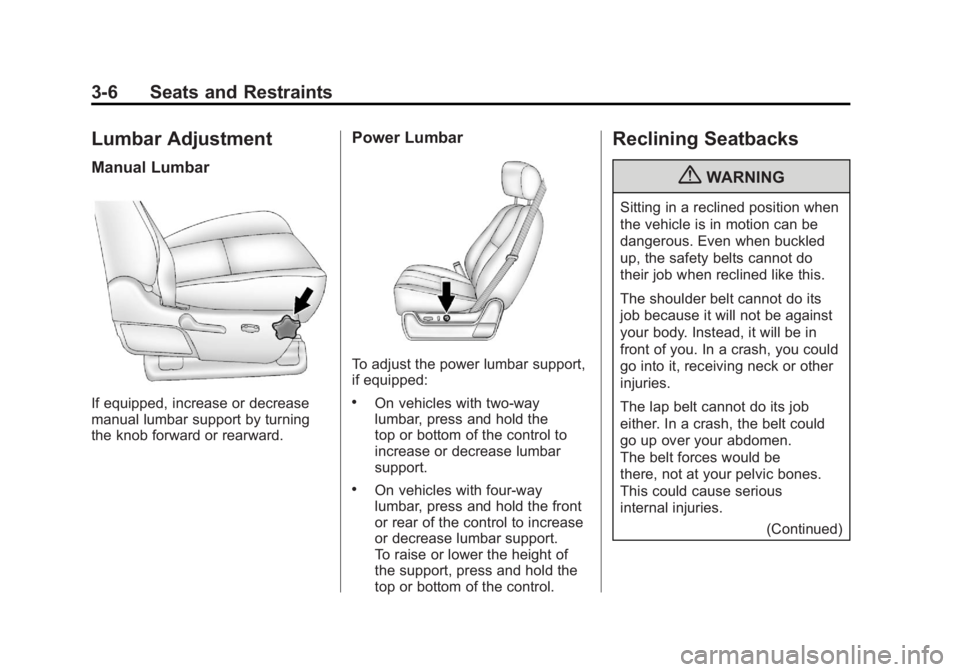
If equipped, increase or decrease
manual lumbar support by turning
the knob forward or rearward.
Power Lumbar
To adjust the power lumbar support,
if equipped:
.On vehicles with two-way
lumbar, press and hold the
top or bottom of the control to
increase or decrease lumbar
support.
.On vehicles with four-way
lumbar, press and hold the front
or rear of the control to increase
or decrease lumbar support.
To raise or lower the height of
the support, press and hold the
top or bottom of the control.
Reclining Seatbacks
{WARNING
Sitting in a reclined position when
the vehicle is in motion can be
dangerous. Even when buckled
up, the safety belts cannot do
their job when reclined like this.
The shoulder belt cannot do its
job because it will not be against
your body. Instead, it will be in
front of you. In a crash, you could
go into it, receiving neck or other
injuries.
The lap belt cannot do its job
either. In a crash, the belt could
go up over your abdomen.
The belt forces would be
there, not at your pelvic bones.
This could cause serious
internal injuries.(Continued)
Page 91 of 594
Black plate (23,1)GMC Sierra Owner Manual - 2011
Seats and Restraints 3-23
Shoulder Belt Height Adjuster
The vehicle has a shoulder belt
height adjuster for the driver and
right front passenger.
Adjust the height so the shoulder
portion of the belt is on the
shoulder and not falling off of it.
The belt should be close to, but
not contacting, the neck. Improper
shoulder belt height adjustment
could reduce the effectiveness of
the safety belt in a crash. SeeHow
to Wear Safety Belts Properly on
page 3‑15.
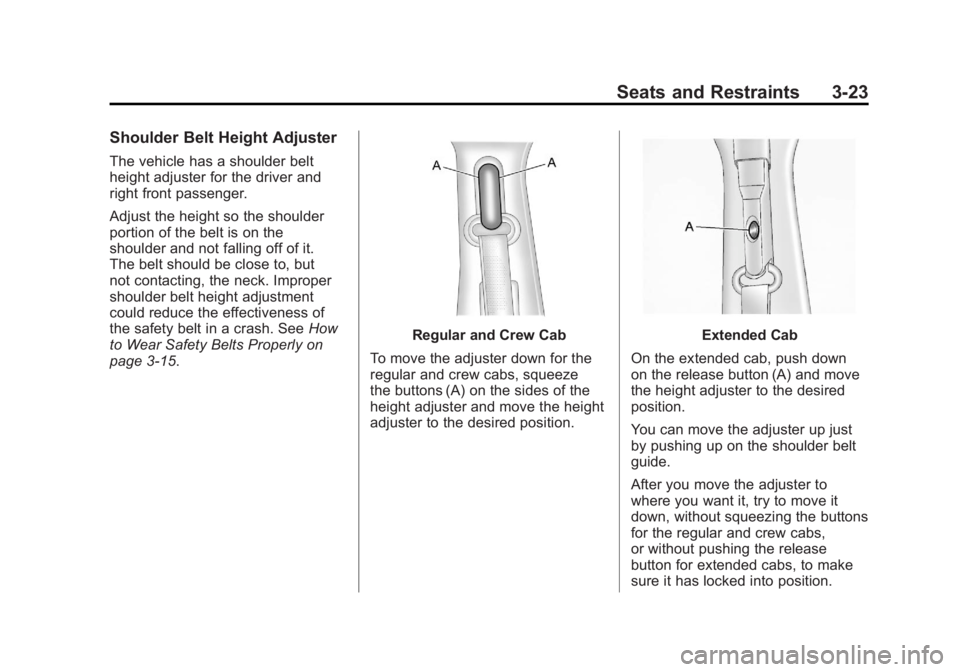
Regular and Crew Cab
To move the adjuster down for the
regular and crew cabs, squeeze
the buttons (A) on the sides of the
height adjuster and move the height
adjuster to the desired position.Extended Cab
On the extended cab, push down
on the release button (A) and move
the height adjuster to the desired
position.
You can move the adjuster up just
by pushing up on the shoulder belt
guide.
After you move the adjuster to
where you want it, try to move it
down, without squeezing the buttons
for the regular and crew cabs,
or without pushing the release
button for extended cabs, to make
sure it has locked into position.
Page 206 of 594
Black plate (58,1)GMC Sierra Owner Manual - 2011
5-58 Instruments and Controls
PASSENGER MIRROR:The
passenger outside mirror will be
tilted down when the vehicle is
shifted into R (Reverse).
BOTH MIRRORS: The driver and
passenger outside mirrors will be
tilted down when the vehicle is
shifted into R (Reverse).
NO CHANGE: No change will be
made to this feature. The current
setting will remain.
To select a setting, press the
set/reset button while the desired
setting is displayed on the DIC. EASY EXIT RECALL
If the vehicle has this feature,
it allows you to select your
preference for the automatic easy
exit seat feature. See
“Memory
Seat, Mirrors, and Pedals” inPower
Seat Adjustment on page 3‑4 for
more information.
Press the customization button until
EASY EXIT RECALL appears on
the DIC display. Press the set/reset
button once to access the settings
for this feature. Then press the
customization button to scroll
through the following settings:
DOOR BUTTON ONLY: No
automatic seat exit recall will occur.
The recall will only occur after
pressing the easy exit seat button. BUTTON & KEY OUT (default):
If the features are enabled through
the EASY EXIT SETUP menu, the
driver seat will move back when the
key is removed from the ignition or
the easy exit seat button is pressed.
The automatic easy exit seat
movement will only occur one time
after the key is removed from the
ignition. If the automatic movement
has already occurred, and you put
the key back in the ignition and
remove it again, the seat will stay
in the original exit position, unless
a memory recall took place prior to
removing the key again.
NO CHANGE:
No change will be
made to this feature. The current
setting will remain.
To select a setting, press the
set/reset button while the desired
setting is displayed on the DIC.
Page 207 of 594
Black plate (59,1)GMC Sierra Owner Manual - 2011
Instruments and Controls 5-59
EASY EXIT SETUP
If the vehicle has this feature, it
allows you to select which areas
will recall with the automatic easy
exit seat feature. It also allows
you to turn off the automatic easy
exit feature. See“Memory Seat,
Mirrors, and Pedals” inPower
Seat Adjustment on page 3‑4 and
“EASY EXIT RECALL” earlier for
more information.
Press the customization button until
EASY EXIT SETUP appears on the
DIC display. Press the set/reset
button once to access the settings
for this feature. Then press the
menu up/down button to scroll
through the following settings:
OFF: No automatic seat exit will
recall.
SEAT ONLY (default): The driver
seat will recall. NO CHANGE:
No change will be
made to this feature. The current
setting will remain.
To select a setting, press the
set/reset button while the desired
setting is displayed on the DIC.
MEMORY SEAT RECALL
If the vehicle has this feature, it
allows you to select your preference
for the remote memory seat recall
feature. See “Memory Seat,
Mirrors, and Pedals” inPower Seat
Adjustment on page 3‑4 for more
information.
Press the customization button
until MEMORY SEAT RECALL
appears on the DIC display. Press
the set/reset button once to access
the settings for this feature. Then
press the customization button to
scroll through the following settings:
OFF (default): No remote memory
seat recall will occur. ON:
The driver seat and, on
some vehicles, the outside mirrors
will automatically move to the
stored driving position when the
unlock button on the Remote
Keyless Entry (RKE) transmitter
is pressed. On some vehicles with
the adjustable throttle and brake
pedal feature, the pedals will also
automatically move.
NO CHANGE: No change will be
made to this feature. The current
setting will remain.
To select a setting, press the
set/reset button while the desired
setting is displayed on the DIC.
REMOTE START
If your vehicle has this feature, it
allows you to turn the remote start
off or on. The remote start feature
allows you to start the engine from
outside of the vehicle using the
Remote Keyless Entry (RKE)
transmitter. See Remote Vehicle
Start on page 2‑5 for more
information.
Page 227 of 594
Black plate (1,1)GMC Sierra Owner Manual - 2011
Infotainment System 7-1
Infotainment
System
Introduction
Infotainment . . . . . . . . . . . . . . . . . . . 7-1
Theft-Deterrent Feature . . . . . . . 7-2
Operation . . . . . . . . . . . . . . . . . . . . . 7-2
Radio
AM-FM Radio . . . . . . . . . . . . . . . . . 7-8
Satellite Radio . . . . . . . . . . . . . . . 7-10
Radio Reception . . . . . . . . . . . . . 7-14
Fixed Mast Antenna . . . . . . . . . 7-15
Satellite Radio Antenna . . . . . . 7-15
Audio Players
CD Player . . . . . . . . . . . . . . . . . . . 7-15
CD/DVD Player . . . . . . . . . . . . . . 7-22
Auxiliary Devices . . . . . . . . . . . . 7-34
Rear Seat Infotainment
Rear Seat Entertainment(RSE) System . . . . . . . . . . . . . . 7-39
Rear Seat Audio (RSA) System . . . . . . . . . . . . . . . . . . . . . 7-48
Phone
Bluetooth . . . . . . . . . . . . . . . . . . . . 7-50
Introduction
Infotainment
Determine which radio the vehicle
has and read the following pages to
become familiar with its features.
{WARNING
Taking your eyes off the road
for extended periods could
cause a crash resulting in
injury or death to you or others.
Do not give extended attention to
entertainment tasks while driving.
This system provides access to
many audio and non‐audio listings. To minimize taking your eyes off the
road while driving, do the following
while the vehicle is parked:
.Become familiar with the
operation and controls of
the audio system.
.Set up the tone, speaker
adjustments, and preset
radio stations.
For more information, see Defensive
Driving on page 9‑2.
Notice: Contact your dealer
before adding any equipment.
Adding audio or communication
equipment could interfere with
the operation of the engine, radio,
or other systems, and could
damage them. Follow federal
rules covering mobile radio
and telephone equipment.
Page 329 of 594
Black plate (35,1)GMC Sierra Owner Manual - 2011
Driving and Operating 9-35
Adjustable Throttle and
Brake Pedal
On vehicles with this feature, you
can change the position of the
throttle and brake pedals.
No adjustment to the pedals can
be made when the vehicle is in
R (Reverse) or while using cruise
control.
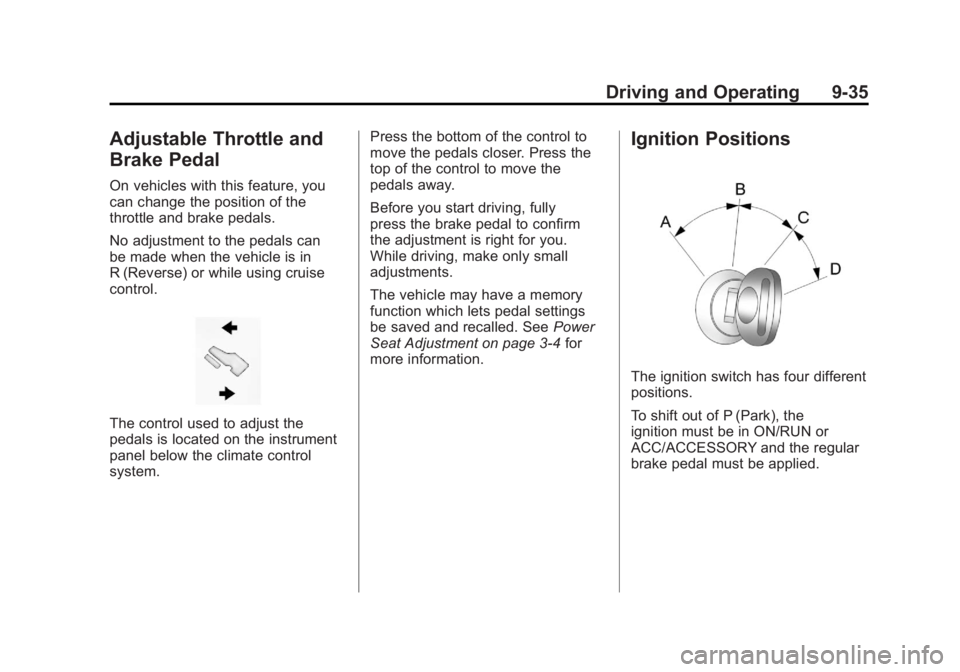
The control used to adjust the
pedals is located on the instrument
panel below the climate control
system.Press the bottom of the control to
move the pedals closer. Press the
top of the control to move the
pedals away.
Before you start driving, fully
press the brake pedal to confirm
the adjustment is right for you.
While driving, make only small
adjustments.
The vehicle may have a memory
function which lets pedal settings
be saved and recalled. See
Power
Seat Adjustment on page 3‑4 for
more information.
Ignition Positions
The ignition switch has four different
positions.
To shift out of P (Park), the
ignition must be in ON/RUN or
ACC/ACCESSORY and the regular
brake pedal must be applied.
Page 466 of 594
Black plate (42,1)GMC Sierra Owner Manual - 2011
10-42 Vehicle Care
Headlamp Aiming
The vehicle has a visual optical
headlamp aiming system. The aim
of the headlamps has been preset
at the factory and should need no
further adjustment.
However, if the vehicle is damaged
in a crash, the aim of the headlamps
may be affected and adjustment
may be necessary.
If oncoming vehicles flash their high
beams at you, this may mean the
vertical aim of the headlamps needs
to be adjusted.
It is recommended that the vehicle
be taken to the dealer for service if
the headlamps need to be adjusted.
It is possible, however, to re-aim the
headlamps as described.The vehicle should:.Be placed so the headlamps
are 7.6 m (25 ft) from a
light‐colored wall.
.Have all four tires on a level
surface which is level all the
way to the wall.
.Be placed so it is perpendicular
to the wall.
.Not have any snow, ice, or mud
on it.
.Be fully assembled and all other
work stopped while headlamp
aiming is being performed.
.Be loaded with a full tank of
fuel and one person or 75 kg
(160 lbs) sitting on the
driver seat.
.Have the tires properly inflated.
.Have the spare tire in its proper
location in the vehicle.Headlamp aiming is done with the
vehicle's low-beam headlamps.
The high-beam headlamps will be
correctly aimed if the low-beam
headlamps are aimed properly.
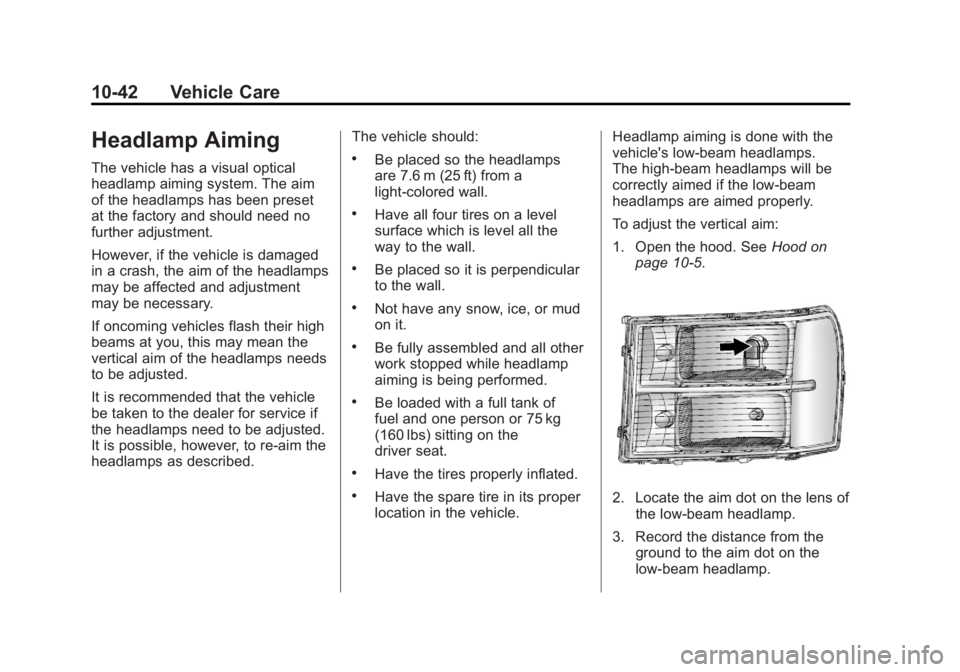
To adjust the vertical aim:
1. Open the hood. See
Hood on
page 10‑5.2. Locate the aim dot on the lens of the low‐beam headlamp.
3. Record the distance from the ground to the aim dot on the
low‐beam headlamp.
Page 581 of 594
Black plate (1,1)GMC Sierra Owner Manual - 2011
INDEX i-1
A
Accessories andModifications . . . . . . . . . . . . . . . . . 10-3
Accessory Power . . . . . . . . . . . . . . 9-40
Active Fuel Management
®. . . . . 9-44
Add-On Electrical Equipment . . . . . . . . . . . . . . . . . . 9-125
Adding a Snow Plow or Similar Equipment . . . . . . . . . . . 9-125
Adjustable Throttle and Brake Pedal . . . . . . . . . . . . . . . . . . 9-35
Adjustments Lumbar, Front Seats . . . . . . . . . . . 3-6
Air Cleaner/Filter, Engine . . . . . 10-19
Air Vents . . . . . . . . . . . . . . . . . . . . . . 8-11
Airbag Light On-Off . . . . . . . . . . . . . . . . . . 5-21
Airbag System Check . . . . . . . . . . . . . . . . . . . . . . . . 3-48
How Does an AirbagRestrain? . . . . . . . . . . . . . . . . . . . 3-35
Passenger Sensing System . . . . . . . . . . . . . . . . . . . . . . 3-40
What Makes an Airbag Inflate? . . . . . . . . . . . . . . . . . . . . . . 3-34 Airbag System (cont.)
What Will You See After
an Airbag Inflates? . . . . . . . . . . 3-35
When Should an Airbag
Inflate? . . . . . . . . . . . . . . . . . . . . . . 3-32
Where Are the Airbags? . . . . . . 3-31
Airbags Adding Equipment to theVehicle . . . . . . . . . . . . . . . . . . . . . . 3-46
On-Off Light . . . . . . . . . . . . . . . . . . 5-21
On-Off Switch . . . . . . . . . . . . . . . . 3-37
Passenger Status Indicator . . . 5-23
Readiness Light . . . . . . . . . . . . . . 5-20
Servicing Airbag-Equipped Vehicles . . . . . . . . . . . . . . . . . . . . . 3-46
System Check . . . . . . . . . . . . . . . . 3-29
Alarm System Anti-Theft . . . . . . . . . . . . . . . . . . . . . 2-12
AM-FM Radio . . . . . . . . . . . . . . . . . . . 7-8
Antenna Satellite Radio . . . . . . . . . . . . . . . . 7-15
Anti-Theft Alarm System . . . . . . . . . . . . . . . . 2-12
Alarm System Messages . . . . . 5-48 Antilock Brake
System (ABS) . . . . . . . . . . . . . . . . 9-68
Warning Light . . . . . . . . . . . . . . . . . 5-28
Appearance Care Exterior . . . . . . . . . . . . . . . . . . . . 10-108
Interior . . . . . . . . . . . . . . . . . . . . . 10-112
Armrest Storage . . . . . . . . . . . . . . . . 4-1
Ashtrays . . . . . . . . . . . . . . . . . . . . . . . 5-12
Assistance Program,
Roadside . . . . . . . . . . . . . . 13-8, 13-10
Audio Players . . . . . . . . . . . . . . . . . 7-15
CD . . . . . . . . . . . . . . . . . . . . . . . . . . . 7-15
CD/DVD . . . . . . . . . . . . . . . . . . . . . . 7-22
Audio System Fixed Mast Antenna . . . . . . . . . . 7-15
Radio Reception . . . . . . . . . . . . . . 7-14
Rear Seat (RSA) . . . . . . . . . . . . . 7-48
Theft-Deterrent Feature . . . . . . . . 7-2
Automatic Door Locks . . . . . . . . . . . . . . . . . . . . 2-9
Headlamp System . . . . . . . . . . . . . 6-4
Automatic Transmission . . . . . . . 9-46 Fluid . . . . . . . . . . . . . . . . . 10-13, 10-16
Manual Mode . . . . . . . . . . . . . . . . . 9-50
Shift Lock ControlFunction Check . . . . . . . . . . . 10-40
Page 585 of 594
Black plate (5,1)GMC Sierra Owner Manual - 2011
INDEX i-5
Engine (cont.)Cooling System Messages . . . 5-44
Drive Belt Routing . . . . . . . . . . . . 12-6
Exhaust . . . . . . . . . . . . . . . . . . . . . . 9-44
Fan . . . . . . . . . . . . . . . . . . . . . . . . . 10-28
Oil Pressure Gauge . . . . . . . . . . 5-16
Overheated Protection
Operating Mode . . . . . . . . . . . 10-28
Overheating . . . . . . . . . . . . . . . . 10-25
Power Messages . . . . . . . . . . . . . 5-45
Pressure Light . . . . . . . . . . . . . . . . 5-31
Running While Parked . . . . . . . . 9-45
Starting . . . . . . . . . . . . . . . . . . . . . . . 9-37
Engine Oil
Life System . . . . . . . . . . . . . . . . . .10-11
Messages . . . . . . . . . . . . . . . . . . . . 5-45
Entry Lighting . . . . . . . . . . . . . . . . . . . 6-9
Equipment, Towing . . . . . . . . . . . 9-112
Event Data Recorders . . . . . . . . 13-17
Exit Lighting . . . . . . . . . . . . . . . . . . . . 6-9
Extender, Safety Belt . . . . . . . . . . 3-27
Exterior Lamp Controls . . . . . . . . . 6-1
Exterior Lamps Off Reminder . . . 6-3F
Fan Engine . . . . . . . . . . . . . . . . . . . . . . 10-28
Fast Idle System . . . . . . . . . . . . . . . 9-39
Features Memory . . . . . . . . . . . . . . . . . . . . . . . 1-13
Filter
Engine Air Cleaner . . . . . . . . . 10-19
Flash-to-Pass . . . . . . . . . . . . . . . . . . . 6-3
Flashers, Hazard Warning . . . . . . 6-5
Flat Tire . . . . . . . . . . . . . . . . . . . . . . 10-84 Changing . . . . . . . . . . . . . . . . . . . 10-86
Floor Mats . . . . . . . . . . . . . . . . . . . 10-116
Fluid AutomaticTransmission . . . . . . . 10-13, 10-16
Brakes . . . . . . . . . . . . . . . . . . . . . . 10-32
Four-Wheel Drive Transfer Case . . . . . . . . . . . . . . . 9-54
Power Steering . . . . . . . . . . . . . 10-29
Washer . . . . . . . . . . . . . . . . . . . . . 10-29 Fog Lamps
Bulb Replacement . . . . . . . . . . . . . 6-6
Folding Mirrors . . . . . . . . . . . . . . . . 2-16
Four-Wheel Drive . . . . . . . 10-34, 9-54
Four-Wheel-Drive Light . . . . . . . . 5-29
Front Axle . . . . . . . . . . . . . . . . . . . . 10-36
Front Fog Lamps Light . . . . . . . . . . . . . . . . . . . . . . . . . . 5-32
Front Seats Adjustment . . . . . . . . . . . . . . . . . . . . 3-3
Heated . . . . . . . . . . . . . . . . . . . . . . . . 3-8
Fuel . . . . . . . . . . . . . . . . . . . . . . . . . . . 9-84 Additives . . . . . . . . . . . . . . . . . . . . . 9-86
E85 (85% Ethanol) . . . . . . . . . . . 9-87
Filling a Portable FuelContainer . . . . . . . . . . . . . . . . . . . 9-90
Filling the Tank . . . . . . . . . . . . . . . 9-88
Fuels in Foreign Countries . . . . 9-86
Gasoline Specifications . . . . . . . 9-85
Gauge . . . . . . . . . . . . . . . . . . . . . . . . 5-15
Low Fuel Warning Light . . . . . . . 5-31
Page 588 of 594
Black plate (8,1)GMC Sierra Owner Manual - 2011
i-8 INDEX
Lap Belt . . . . . . . . . . . . . . . . . . . . . . . 3-26
Lap-Shoulder Belt . . . . . . . . . . . . . 3-21
LATCH SystemReplacing Parts After aCrash . . . . . . . . . . . . . . . . . . . . . . . 3-66
Latch, Lower Anchors and Tethers for Children . . . . . . . . . . 3-57
Lighter, Cigarette . . . . . . . . . . . . . . 5-11
Lighting Entry . . . . . . . . . . . . . . . . . . . . . . . . . . 6-9
Exit . . . . . . . . . . . . . . . . . . . . . . . . . . . . 6-9
Illumination Control . . . . . . . . . . . . 6-7
Lights Airbag On-Off . . . . . . . . . . . . . . . . . 5-21
Airbag Readiness . . . . . . . . . . . . . 5-20
Antilock Brake System(ABS) Warning . . . . . . . . . . . . . . 5-28
Brake System Warning . . . . . . . 5-27
Charging System . . . . . . . . . . . . . 5-24
Cruise Control . . . . . . . . . . . . . . . . 5-32
Engine Oil Pressure . . . . . . . . . . 5-31
Flash-to-Pass . . . . . . . . . . . . . . . . . . 6-3
Four-Wheel-Drive . . . . . . . . . . . . . 5-29
Front Fog Lamps . . . . . . . . . . . . . 5-32 Lights (cont.)
High-Beam On . . . . . . . . . . . . . . . . 5-32
High/Low Beam Changer . . . . . . 6-3
Low Fuel Warning . . . . . . . . . . . . 5-31
Safety Belt Reminders . . . . . . . . 5-19
Security . . . . . . . . . . . . . . . . . . . . . . 5-32
StabiliTrak
®Indicator . . . . . . . . . 5-30
Tire Pressure . . . . . . . . . . . . . . . . . 5-30
Tow/Haul Mode . . . . . . . . . . . . . . . 5-29
Locking Rear Axle . . . . . . . . . . . . . 9-73
Locks Automatic Door . . . . . . . . . . . . . . . . 2-9
Delayed Locking . . . . . . . . . . . . . . . 2-8
Door . . . . . . . . . . . . . . . . . . . . . . . . . . . 2-8
Lockout Protection . . . . . . . . . . . . . 2-9
Power Door . . . . . . . . . . . . . . . . . . . . 2-8
Safety . . . . . . . . . . . . . . . . . . . . . . . . . 2-9
Loss of Control . . . . . . . . . . . . . . . . . 9-6
Low Fuel Warning Light . . . . . . . . 5-31
Lower Anchors and
Tethers for Children
(LATCH SYSTEM) . . . . . . . . . . . 3-57
Lumbar Adjustment . . . . . . . . . . . . . 3-6
Front Seats . . . . . . . . . . . . . . . . . . . . 3-6
M
MaintenanceRecords . . . . . . . . . . . . . . . . . . . . .11-12
Maintenance Schedule Recommended Fluids andLubricants . . . . . . . . . . . . . . . . . . . 11-8
Scheduled Maintenance . . . . . . 11-2
Transfer Case . . . . . . . . . . . . . . . . 9-54
Malfunction Indicator Lamp . . . . 5-25
Manual Mirrors . . . . . . . . . . . . . . . . 2-15
Manual Mode . . . . . . . . . . . . . . . . . . 9-50
Manual Windows . . . . . . . . . . . . . . 2-19
Memory Features . . . . . . . . . . . . . . 1-13
Messages Airbag System . . . . . . . . . . . . . . . . 5-48
Anti-Theft Alarm System . . . . . . 5-48
Battery Voltage andCharging . . . . . . . . . . . . . . . . . . . . 5-41
Brake System . . . . . . . . . . . . . . . . 5-42
Door Ajar . . . . . . . . . . . . . . . . . . . . . 5-43
Engine Cooling System . . . . . . . 5-44
Engine Oil . . . . . . . . . . . . . . . . . . . . 5-45
Engine Power . . . . . . . . . . . . . . . . 5-45