trailer GMC SIERRA 2011 Workshop Manual
[x] Cancel search | Manufacturer: GMC, Model Year: 2011, Model line: SIERRA, Model: GMC SIERRA 2011Pages: 594, PDF Size: 6.55 MB
Page 405 of 594
Black plate (111,1)GMC Sierra Owner Manual - 2011
Driving and Operating 9-111
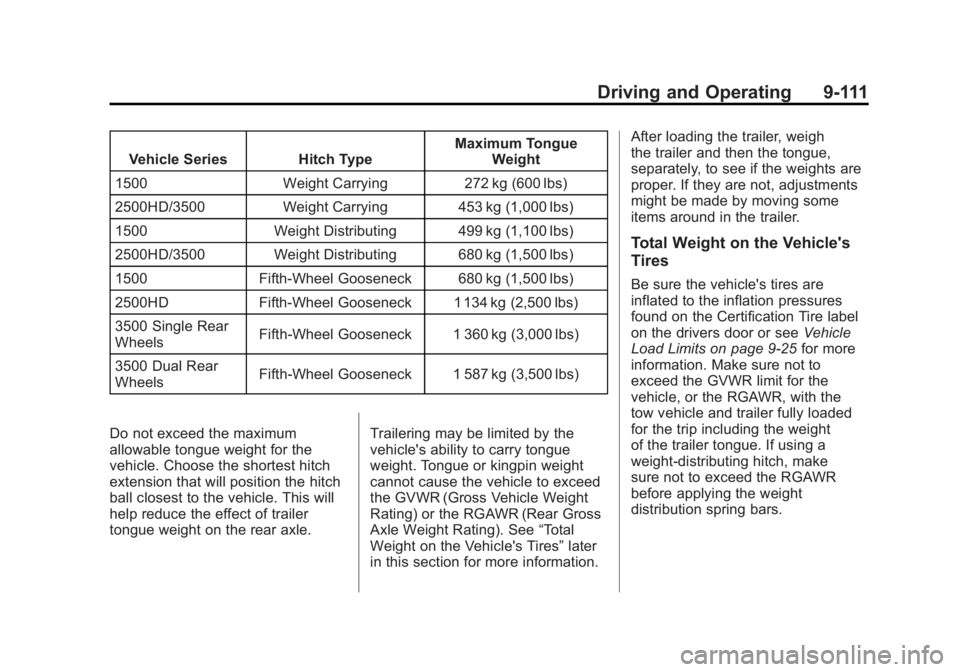
Vehicle Series Hitch TypeMaximum Tongue
Weight
1500 Weight Carrying 272 kg (600 lbs)
2500HD/3500 Weight Carrying 453 kg (1,000 lbs)
1500 Weight Distributing 499 kg (1,100 lbs)
2500HD/3500 Weight Distributing 680 kg (1,500 lbs)
1500 Fifth-Wheel Gooseneck 680 kg (1,500 lbs)
2500HD Fifth-Wheel Gooseneck 1 134 kg (2,500 lbs)
3500 Single Rear
Wheels Fifth-Wheel Gooseneck 1 360 kg (3,000 lbs)
3500 Dual Rear
Wheels Fifth-Wheel Gooseneck 1 587 kg (3,500 lbs)
Do not exceed the maximum
allowable tongue weight for the
vehicle. Choose the shortest hitch
extension that will position the hitch
ball closest to the vehicle. This will
help reduce the effect of trailer
tongue weight on the rear axle. Trailering may be limited by the
vehicle's ability to carry tongue
weight. Tongue or kingpin weight
cannot cause the vehicle to exceed
the GVWR (Gross Vehicle Weight
Rating) or the RGAWR (Rear Gross
Axle Weight Rating). See
“Total
Weight on the Vehicle's Tires” later
in this section for more information. After loading the trailer, weigh
the trailer and then the tongue,
separately, to see if the weights are
proper. If they are not, adjustments
might be made by moving some
items around in the trailer.
Total Weight on the Vehicle's
Tires
Be sure the vehicle's tires are
inflated to the inflation pressures
found on the Certification Tire label
on the drivers door or see
Vehicle
Load Limits on page 9‑25 for more
information. Make sure not to
exceed the GVWR limit for the
vehicle, or the RGAWR, with the
tow vehicle and trailer fully loaded
for the trip including the weight
of the trailer tongue. If using a
weight-distributing hitch, make
sure not to exceed the RGAWR
before applying the weight
distribution spring bars.
Page 406 of 594
Black plate (112,1)GMC Sierra Owner Manual - 2011
9-112 Driving and Operating
Weight of the Trailering
Combination
It is important that the combination
of the tow vehicle and trailer
does not exceed any of its weight
ratings—GCWR, GVWR, RGAWR,
Trailer Weight Rating, or Tongue
Weight. The only way to be sure it is
not exceeding any of these ratings
is to weigh the tow vehicle and
trailer combination, fully loaded for
the trip, getting individual weights
for each of these items.
Towing Equipment
Hitches
The correct hitch equipment helps
maintain combination control.
Most small-to-medium trailers can
be towed with a weight-carrying
hitch which simply features a
coupler latched to the hitch ball. Larger trailers may require a
weight-distributing hitch that
uses spring bars to distribute
the trailer tongue weight among
the two vehicle and trailer axles.
Fifth-wheel and gooseneck hitches
may also be used. See
“Weight of
the Trailer Tongue” underTrailer
Towing on page 9‑95 for rating
limits with various hitch types.
If a step-bumper hitch will be used,
the bumper could be damaged
in sharp turns. Make sure there
is ample room when turning to
avoid contact between the trailer
and the bumper.
Consider using sway controls
with any trailer. Ask a trailering
professional about sway controls
or refer to the trailer manufacturer's
recommendations and instructions.
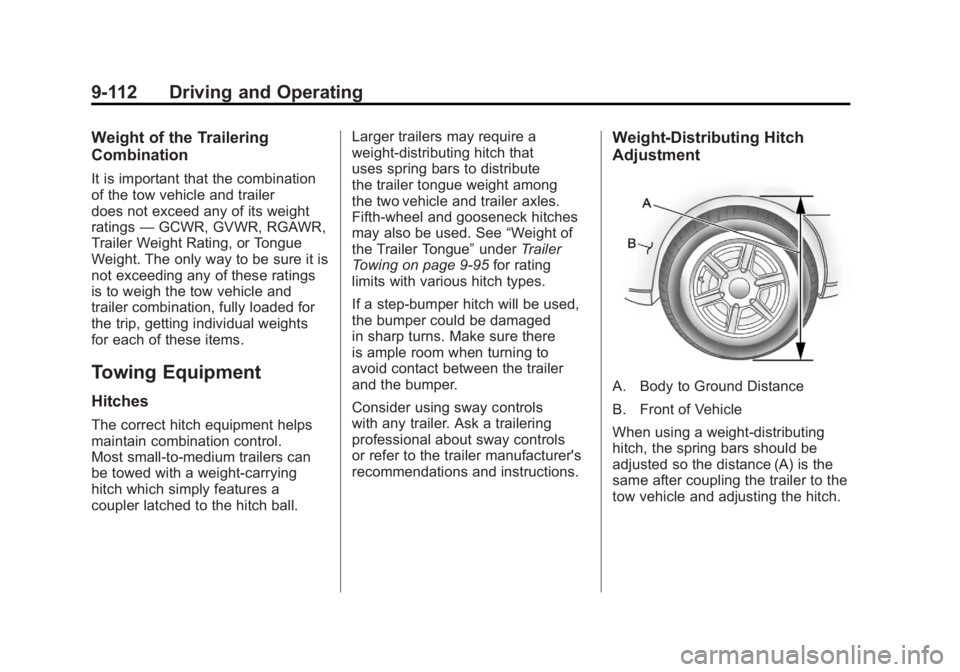
Weight‐Distributing Hitch
Adjustment
A. Body to Ground Distance
B. Front of Vehicle
When using a weight-distributing
hitch, the spring bars should be
adjusted so the distance (A) is the
same after coupling the trailer to the
tow vehicle and adjusting the hitch.
Page 407 of 594
Black plate (113,1)GMC Sierra Owner Manual - 2011
Driving and Operating 9-113
Fifth-Wheel and Gooseneck
Trailering
Fifth-wheel and gooseneck trailers
can be used with many pickup
models. These trailers place a
larger percentage of the weight
(kingpin weight) on the tow vehicle
than conventional trailers. Make
sure this weight does not cause the
vehicle to exceed GAWR or GVWR.
Fifth-wheel or gooseneck kingpin
weight should be 15 to 25 percent of
the trailer weight up to the maximum
amount specified in the trailering
chart for the vehicle. See“Weight of
the Trailer” underTrailer Towing on
page 9‑95 for more information. The hitch should be located in the
pickup bed so that its centerline is
over or slightly in front of the rear
axle. Take care that it is not so far
forward that it will contact the back
of the cab in sharp turns. This is
especially important for short box
pickups. Trailer pin box extensions
and sliding fifth-wheel hitch
assemblies can help this condition.
There should be at least six inches
of clearance between the top of the
pickup box and the bottom of the
trailer shelf that extends over
the box.
Make sure the hitch is attached to
the tow vehicle frame rails. Do not
use the pickup box for support.
Safety Chains
Always attach chains between the
vehicle and the trailer. Cross the
safety chains under the tongue
of the trailer to help prevent the
tongue from contacting the road
if it becomes separated from the
hitch. Instructions about safety
chains may be provided by the
hitch manufacturer or by the trailer
manufacturer. If the trailer being
towed weighs up to 2 271 kg
(5,000 lbs) with a factory-installed
step bumper, safety chains may
be attached to the attaching points
on the bumper; otherwise, safety
chains should be attached to holes
on the trailer hitch platform. Always
leave just enough slack so the
combination can turn. Never allow
safety chains to drag on the ground.
Page 408 of 594
Black plate (114,1)GMC Sierra Owner Manual - 2011
9-114 Driving and Operating
Trailer Brakes
A loaded trailer that weighs more
than 900 kg (2,000 lbs) needs to
have its own brake system that
is adequate for the weight of the
trailer. Be sure to read and follow
the instructions for the trailer brakes
so they are installed, adjusted, and
maintained properly.
If the vehicle is equipped with
StabiliTrak, the trailer cannot tap
into the vehicle's hydraulic brake
system.
The trailer brake system can tap
into the vehicle's hydraulic brake
system only if:
.The trailer parts can withstand
20 650 kPa (3,000 psi) of
pressure.
.The trailer's brake system
will use less than 0.3 cc
(0.02 cubic inch) of fluid from
the vehicle's master cylinder.
Otherwise, both braking systems
will not work well or at all.If everything checks out this far,
make the brake tap at the port on
the master cylinder that sends the
fluid to the rear brakes. Use only
steel brake tubing to make the tap.
Auxiliary Battery
The auxiliary battery provision can
be used to supply electrical power
to additional equipment that may be
added, such as a slide-in camper.
If the vehicle has this provision,
this relay will be located on the
driver side of the vehicle, next to
the underhood electrical center.
Be sure to follow the proper
installation instructions included
with any electrical equipment that
is installed.
Notice:
Leaving electrical
equipment on for extended
periods will drain the battery.
Always turn off electrical
equipment when not in use
and do not use equipment that
exceeds the maximum amperage
rating for the auxiliary battery
provision.
Trailer Wiring Harness
The vehicle is equipped with one of
the following wiring harnesses for
towing a trailer or hauling a slide-in
camper.
Basic Trailer Wiring
All regular, extended cab and crew
cab pickups have a seven‐wire
trailer towing harness.
For vehicles not equipped with
heavy duty trailering, the harness
is secured to the vehicle's frame
behind the spare tire mount.
The harness requires the installation
of a trailer connector, which is
available through your dealer.
If towing a light‐duty trailer with
a standard four‐way round pin
connector, an adapter is available
from your dealer.
Page 409 of 594
Black plate (115,1)GMC Sierra Owner Manual - 2011
Driving and Operating 9-115
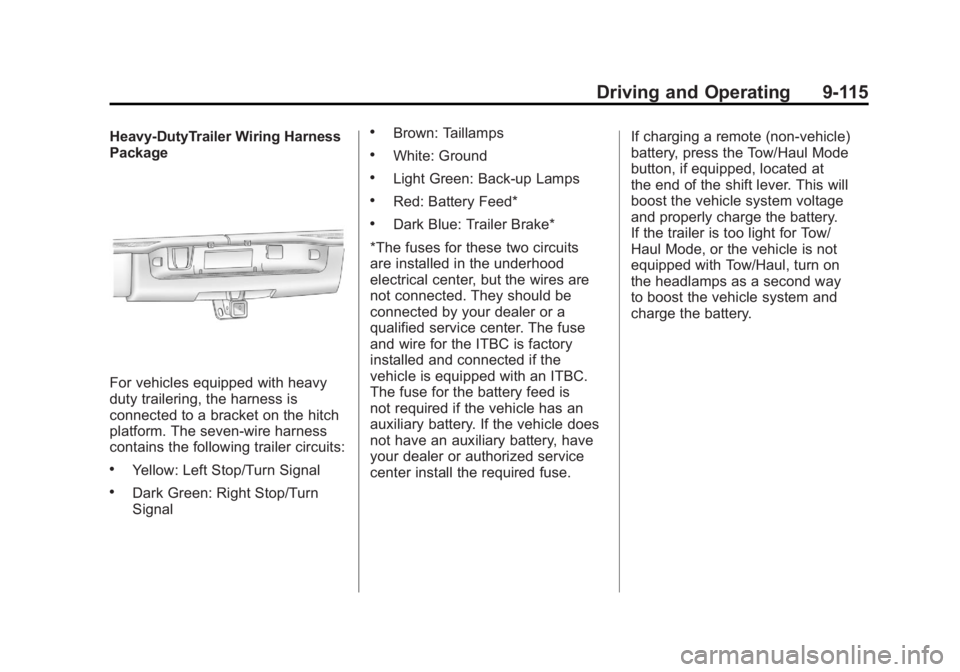
Heavy-DutyTrailer Wiring Harness
Package
For vehicles equipped with heavy
duty trailering, the harness is
connected to a bracket on the hitch
platform. The seven-wire harness
contains the following trailer circuits:
.Yellow: Left Stop/Turn Signal
.Dark Green: Right Stop/Turn
Signal
.Brown: Taillamps
.White: Ground
.Light Green: Back-up Lamps
.Red: Battery Feed*
.Dark Blue: Trailer Brake*
*The fuses for these two circuits
are installed in the underhood
electrical center, but the wires are
not connected. They should be
connected by your dealer or a
qualified service center. The fuse
and wire for the ITBC is factory
installed and connected if the
vehicle is equipped with an ITBC.
The fuse for the battery feed is
not required if the vehicle has an
auxiliary battery. If the vehicle does
not have an auxiliary battery, have
your dealer or authorized service
center install the required fuse. If charging a remote (non-vehicle)
battery, press the Tow/Haul Mode
button, if equipped, located at
the end of the shift lever. This will
boost the vehicle system voltage
and properly charge the battery.
If the trailer is too light for Tow/
Haul Mode, or the vehicle is not
equipped with Tow/Haul, turn on
the headlamps as a second way
to boost the vehicle system and
charge the battery.
Page 410 of 594
Black plate (116,1)GMC Sierra Owner Manual - 2011
9-116 Driving and Operating
Camper/Fifth-Wheel Trailer Wiring
Package
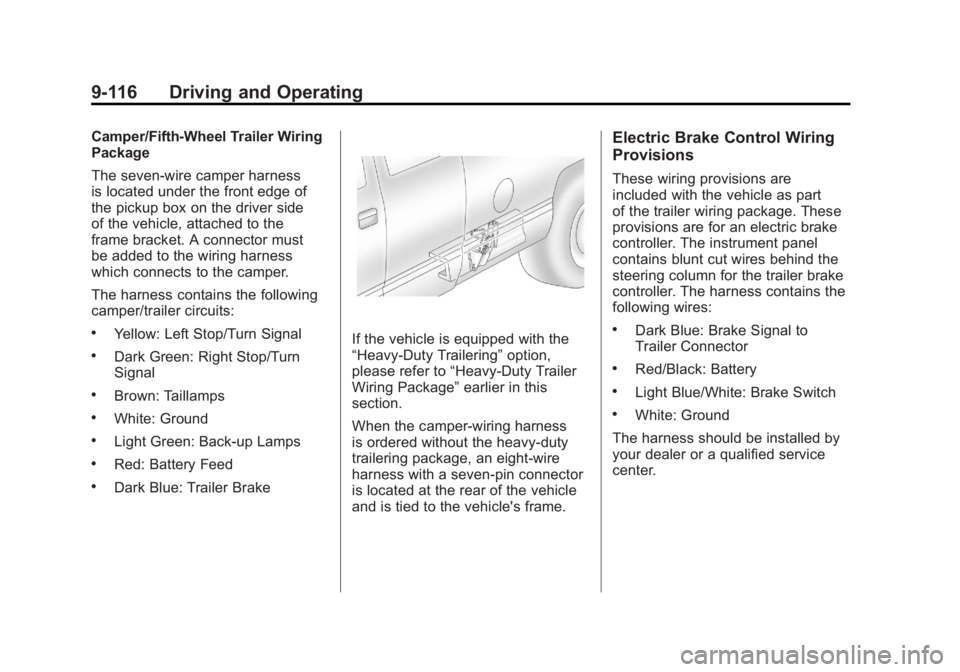
The seven-wire camper harness
is located under the front edge of
the pickup box on the driver side
of the vehicle, attached to the
frame bracket. A connector must
be added to the wiring harness
which connects to the camper.
The harness contains the following
camper/trailer circuits:
.Yellow: Left Stop/Turn Signal
.Dark Green: Right Stop/Turn
Signal
.Brown: Taillamps
.White: Ground
.Light Green: Back-up Lamps
.Red: Battery Feed
.Dark Blue: Trailer Brake
If the vehicle is equipped with the
“Heavy-Duty Trailering”option,
please refer to “Heavy-Duty Trailer
Wiring Package” earlier in this
section.
When the camper-wiring harness
is ordered without the heavy-duty
trailering package, an eight-wire
harness with a seven-pin connector
is located at the rear of the vehicle
and is tied to the vehicle's frame.
Electric Brake Control Wiring
Provisions
These wiring provisions are
included with the vehicle as part
of the trailer wiring package. These
provisions are for an electric brake
controller. The instrument panel
contains blunt cut wires behind the
steering column for the trailer brake
controller. The harness contains the
following wires:
.Dark Blue: Brake Signal to
Trailer Connector
.Red/Black: Battery
.Light Blue/White: Brake Switch
.White: Ground
The harness should be installed by
your dealer or a qualified service
center.
Page 411 of 594
Black plate (117,1)GMC Sierra Owner Manual - 2011
Driving and Operating 9-117
If the vehicle is equipped with an
Integrated Trailer Brake Control
(ITBC) System, the blunt cuts
exist, but are not connected further
in the harness. If an aftermarket
trailer brake controller is installed,
the ITBC must be disconnected.
Do not power both ITBC and
aftermarket controllers to control
the trailer brakes at the same time.
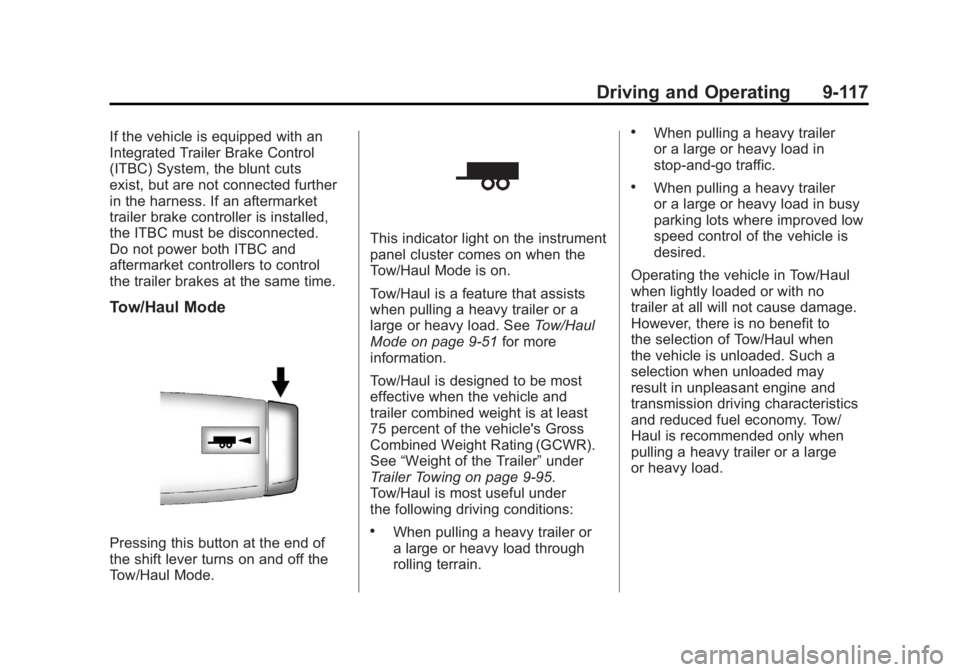
Tow/Haul Mode
Pressing this button at the end of
the shift lever turns on and off the
Tow/Haul Mode.
This indicator light on the instrument
panel cluster comes on when the
Tow/Haul Mode is on.
Tow/Haul is a feature that assists
when pulling a heavy trailer or a
large or heavy load. SeeTow/Haul
Mode on page 9‑51 for more
information.
Tow/Haul is designed to be most
effective when the vehicle and
trailer combined weight is at least
75 percent of the vehicle's Gross
Combined Weight Rating (GCWR).
See “Weight of the Trailer” under
Trailer Towing on page 9‑95.
Tow/Haul is most useful under
the following driving conditions:
.When pulling a heavy trailer or
a large or heavy load through
rolling terrain.
.When pulling a heavy trailer
or a large or heavy load in
stop-and-go traffic.
.When pulling a heavy trailer
or a large or heavy load in busy
parking lots where improved low
speed control of the vehicle is
desired.
Operating the vehicle in Tow/Haul
when lightly loaded or with no
trailer at all will not cause damage.
However, there is no benefit to
the selection of Tow/Haul when
the vehicle is unloaded. Such a
selection when unloaded may
result in unpleasant engine and
transmission driving characteristics
and reduced fuel economy. Tow/
Haul is recommended only when
pulling a heavy trailer or a large
or heavy load.
Page 412 of 594
Black plate (118,1)GMC Sierra Owner Manual - 2011
9-118 Driving and Operating
Integrated Trailer Brake
Control System
The vehicle may have an Integrated
Trailer Brake Control (ITBC) system
for electric trailer brakes.
This symbol is located on the
Trailer Brake Control Panel on
vehicles with an Integrated Trailer
Brake Control system. The power
output to the trailer brakes is based
on the amount of brake pressure
being applied by the vehicle’s brake
system. This available power output
to the trailer brakes can be adjusted
to a wide range of trailering
situations.
The ITBC system is integrated
with the vehicle’s brake, antilock
brake, and StabiliTrak (if equipped)
systems. In trailering conditions thatcause the vehicle’s antilock brake
or StabiliTrak systems to activate,
power sent to the trailer's brakes
will be automatically adjusted to
minimize trailer wheel lock-up.
This does not imply that the trailer
has StabiliTrak.
2500 and 3500 series vehicles
with StabiliTrak have a Trailer Sway
Control (TSC) feature. See
Trailer
Sway Control (TSC) on page 9‑124.
2500 and 3500 series vehicles
with StabiliTrak have a Hill Start
Assist (HSA) feature. See Hill Start
Assist (HSA) on page 9‑70.
If the vehicle’s brake, antilock
brake, or StabiliTrak systems are
not functioning properly, the ITBC
system may not be fully functional
or may not function at all. Make
sure all of these systems are
fully operational to ensure full
functionality of the ITBC system.
The ITBC system is powered
through the vehicle's electrical
system. Turning the ignition off
will also turn off the ITBC system. The ITBC system is fully functional
only when the ignition is in ON or
in RUN.
The ITBC system can only be used
with trailers with electric brakes.
{WARNING
Connecting a trailer that is not
compatible with the ITBC system
may result in reduced or complete
loss of trailer braking. There
may be an increase in stopping
distance or trailer instability which
could result in personal injury or
damage to the vehicle, trailer,
or other property. An aftermarket
controller may be available for
use with trailers with surge, air,
or electric‐over‐hydraulic trailer
brake systems. To determine the
type of brakes on the trailer and
the availability of controllers,
check with your trailer
manufacturer or dealer.
Page 413 of 594
Black plate (119,1)GMC Sierra Owner Manual - 2011
Driving and Operating 9-119
When trailering, make sure of the
following:
.The ITBC system is used only
with trailers that are equipped
with electric brakes.
.All applicable local and federal
laws and regulations are
followed.
.All electrical and mechanical
connections to the trailer are
made correctly.
.The trailer’s brakes are in proper
working condition.
.The trailer and vehicle are
properly loaded for the towing
condition.
The ITBC system is a
factory-installed item. Out‐of‐factory
installation of this system should not
be attempted. GM is not responsible
for warranty or performance of the
system resulting from out‐of‐factory
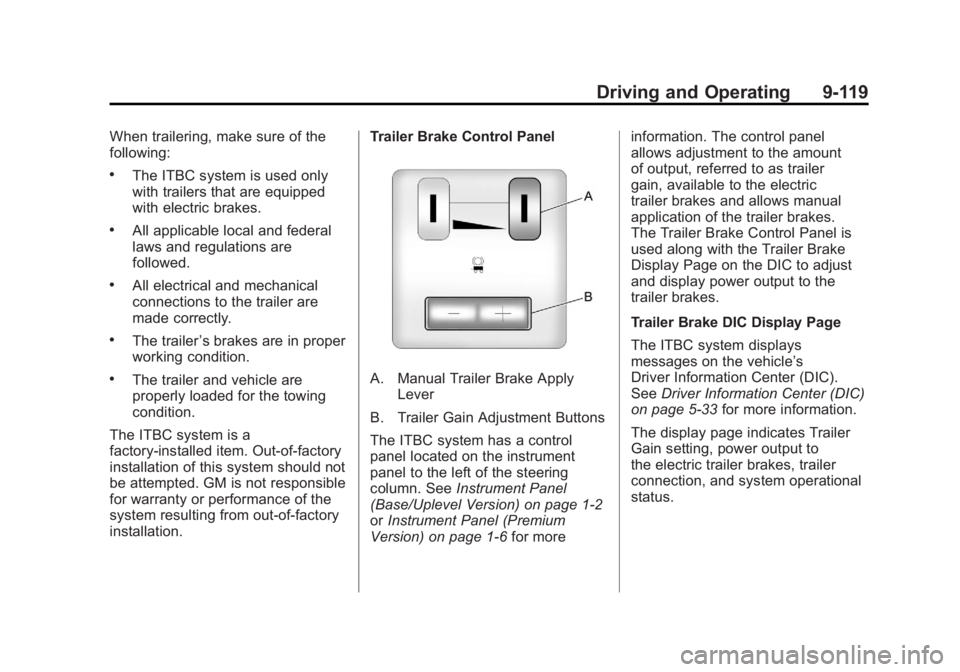
installation. Trailer Brake Control PanelA. Manual Trailer Brake Apply
Lever
B. Trailer Gain Adjustment Buttons
The ITBC system has a control
panel located on the instrument
panel to the left of the steering
column. See Instrument Panel
(Base/Uplevel Version) on page 1‑2
or Instrument Panel (Premium
Version) on page 1‑6 for moreinformation. The control panel
allows adjustment to the amount
of output, referred to as trailer
gain, available to the electric
trailer brakes and allows manual
application of the trailer brakes.
The Trailer Brake Control Panel is
used along with the Trailer Brake
Display Page on the DIC to adjust
and display power output to the
trailer brakes.
Trailer Brake DIC Display Page
The ITBC system displays
messages on the vehicle’s
Driver Information Center (DIC).
See
Driver Information Center (DIC)
on page 5‑33 for more information.
The display page indicates Trailer
Gain setting, power output to
the electric trailer brakes, trailer
connection, and system operational
status.
Page 414 of 594
Black plate (120,1)GMC Sierra Owner Manual - 2011
9-120 Driving and Operating
The Trailer Brake Display Page can
be displayed by performing any of
the following actions:
.Scrolling through the DIC menu
pages using the odometer
trip stem or the DIC Vehicle
Information button (if equipped).
.Pressing a Trailer Gain
button—If the Trailer Brake
Display Page is not currently
displayed, pressing a Trailer
Gain button will first recall the
current Trailer Gain setting.
After the Trailer Brake Display
Page is displayed, each press
and release of the gain buttons
will then cause the Trailer Gain
setting to change.
.Activating the Manual Trailer
Brake Apply lever.
.Connecting a trailer equipped
with electric trailer brakes.All DIC warning and service
messages must first be
acknowledged by the driver
by pressing the odometer trip stem
or the DIC Vehicle Information
button (if equipped) before the
Trailer Brake Display Page can
be displayed and Trailer Gain
can be adjusted.
TRAILER GAIN: This setting is
displayed any time the Trailer Brake
Display Page is active. This setting
can be adjusted from 0.0 to 10.0
with either a trailer connected or
disconnected. To adjust the Trailer
Gain, press one of the Trailer Gain
adjustment buttons located on the
Trailer Brake Control Panel. Press
and hold a gain button to cause the
Trailer Gain to continuously adjust.
To turn the output to the trailer off,
adjust the Trailer Gain setting to
0.0 (zero).
0.0 (zero) gain is the factory default
setting. To properly adjust trailer
gain, see
“Trailer Gain Adjustment
Procedure” later in this section.
TRAILER OUTPUT: This is
displayed any time a trailer with
electric brakes is connected.
Output to the electric brakes is
based on the amount of vehicle
braking present and relative to
the Trailer Gain setting. Output
is displayed from 0 to 10 bars for
each gain setting.
On vehicles with Trailer Sway
Control (TSC) or Hill Start Assist
(HSA), output to the electric trailer
brakes may be displayed when the
systems are active. See Trailer
Sway Control (TSC) on page 9‑124
and Hill Start Assist (HSA) on
page 9‑70.