warning light GMC SIERRA 2011 Workshop Manual
[x] Cancel search | Manufacturer: GMC, Model Year: 2011, Model line: SIERRA, Model: GMC SIERRA 2011Pages: 594, PDF Size: 6.55 MB
Page 468 of 594
Black plate (44,1)GMC Sierra Owner Manual - 2011
10-44 Vehicle Care
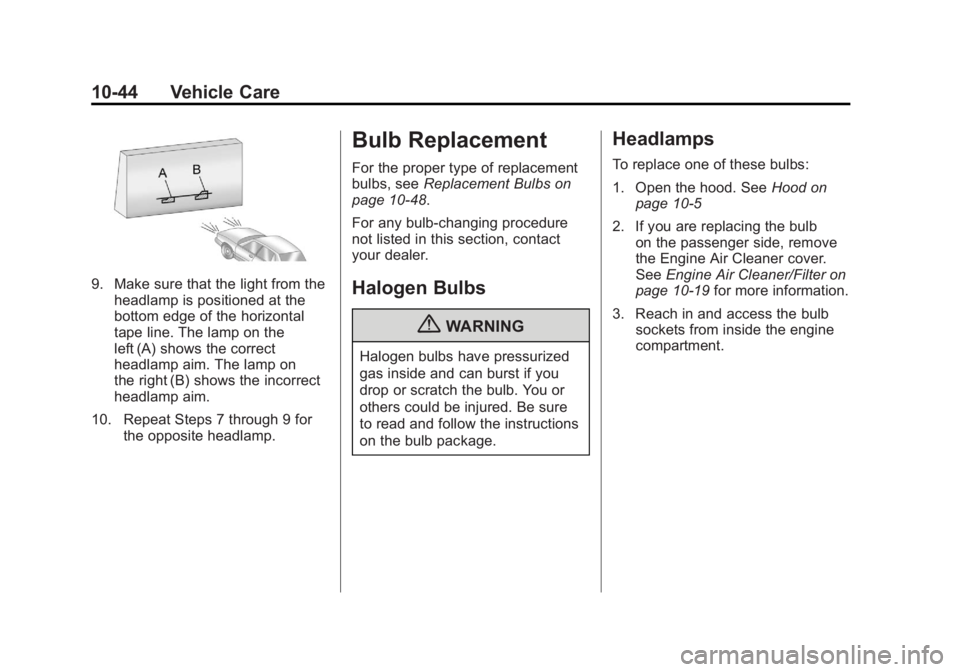
9. Make sure that the light from theheadlamp is positioned at the
bottom edge of the horizontal
tape line. The lamp on the
left (A) shows the correct
headlamp aim. The lamp on
the right (B) shows the incorrect
headlamp aim.
10. Repeat Steps 7 through 9 for the opposite headlamp.
Bulb Replacement
For the proper type of replacement
bulbs, see Replacement Bulbs on
page 10‑48.
For any bulb‐changing procedure
not listed in this section, contact
your dealer.
Halogen Bulbs
{WARNING
Halogen bulbs have pressurized
gas inside and can burst if you
drop or scratch the bulb. You or
others could be injured. Be sure
to read and follow the instructions
on the bulb package.
Headlamps
To replace one of these bulbs:
1. Open the hood. See Hood on
page 10‑5
2. If you are replacing the bulb on the passenger side, remove
the Engine Air Cleaner cover.
See Engine Air Cleaner/Filter on
page 10‑19 for more information.
3. Reach in and access the bulb sockets from inside the engine
compartment.
Page 493 of 594

Black plate (69,1)GMC Sierra Owner Manual - 2011
Vehicle Care 10-69
When the malfunction indicator
is illuminated, the system may
not be able to detect or signal low
tire pressure as intended. TPMS
malfunctions may occur for a variety
of reasons, including the installation
of replacement or alternate tires or
wheels on the vehicle that prevent
the TPMS from functioning properly.
Always check the TPMS malfunction
telltale after replacing one or more
tires or wheels on your vehicle to
ensure that the replacement or
alternate tires and wheels allow
the TPMS to continue to function
properly.
SeeTire Pressure Monitor
Operation on page 10‑69 for
additional information.Federal Communications
Commission (FCC) and
Industry Canada
See Radio Frequency Statement on
page 13‑19 for information
regarding Part 15 of the Federal
Communications Commission
(FCC) rules and Industry Canada
Standards RSS-210/220/310.
Tire Pressure Monitor
Operation
This vehicle may have a Tire
Pressure Monitor System (TPMS).
The TPMS is designed to warn the
driver when a low tire pressure
condition exists. TPMS sensors are
mounted onto each tire and wheel
assembly, excluding the spare tire
and wheel assembly. The TPMS
sensors monitor the air pressure
in the tires and transmit the tire
pressure readings to a receiver
located in the vehicle.
When a low tire pressure condition
is detected, the TPMS illuminates
the low tire pressure warning light
located on the instrument cluster.
If the warning light comes on, stop
as soon as possible and inflate the
tires to the recommended pressure
shown on the Tire and Loading
Information label. See Vehicle
Load Limits on page 9‑25.
A message to check the pressure
in a specific tire displays in the
Driver Information Center (DIC).
The low tire pressure warning
light and the DIC warning message
come on at each ignition cycle
until the tires are inflated to the
correct inflation pressure. If the
vehicle has DIC buttons, tire
pressure levels can be viewed.
Page 494 of 594

Black plate (70,1)GMC Sierra Owner Manual - 2011
10-70 Vehicle Care
For additional information and
details about the DIC operation and
displays, seeDriver Information
Center (DIC) on page 5‑33 and
Tire Messages on page 5‑49.
The low tire pressure warning light
may come on in cool weather when
the vehicle is first started, and then
turn off as the vehicle is driven.
This could be an early indicator that
the air pressure is getting low and
needs to be inflated to the proper
pressure.
A Tire and Loading Information
label shows the size of the original
equipment tires and the correct
inflation pressure for the tires when
they are cold. See Vehicle Load
Limits on page 9‑25, for an example
of the Tire and Loading Information
label and its location. Also see
Tire Pressure on page 10‑66. The TPMS can warn about a
low tire pressure condition but
it does not replace normal tire
maintenance. See
Tire Inspection
on page 10‑73, Tire Rotation on
page 10‑73 andTires on
page 10‑57.
Notice: Tire sealant materials are
not all the same. A non-approved
tire sealant could damage the
TPMS sensors. TPMS sensor
damage caused by using
an incorrect tire sealant is
not covered by the vehicle
warranty. Always use only
the GM-approved tire sealant
available through your dealer
or included in the vehicle.TPMS Malfunction Light and
Message
The TPMS will not function properly
if one or more of the TPMS sensors
are missing or inoperable. When
the system detects a malfunction,
the low tire pressure warning light
flashes for about one minute and
then stays on for the remainder of
the ignition cycle. A DIC warning
message also displays. The
malfunction light and DIC warning
message come on at each ignition
cycle until the problem is corrected.
Some of the conditions that can
cause these to come on are:
.One of the road tires has been
replaced with the spare tire.
The spare tire does not have a
TPMS sensor. The malfunction
light and the DIC message
should go off after the road
tire is replaced and the sensor
matching process is performed
successfully. See "TPMS Sensor
Matching Process" later in this
section.
Page 499 of 594
Black plate (75,1)GMC Sierra Owner Manual - 2011
Vehicle Care 10-75
{WARNING
Rust or dirt on a wheel, or on
the parts to which it is fastened,
can make wheel nuts become
loose after time. The wheel could
come off and cause an accident.
When changing a wheel, remove
any rust or dirt from places where
the wheel attaches to the vehicle.
In an emergency, use a cloth or a
paper towel to do this; but be sure
to use a scraper or wire brush
later, if needed, to get all the rust
or dirt off. SeeIf a Tire Goes Flat
on page 10‑84.
Lightly coat the center of the
wheel hub with wheel bearing
grease after a wheel change or
tire rotation to prevent corrosion
or rust build-up. Do not get
grease on the flat wheel
mounting surface or on
the wheel nuts or bolts.
If your vehicle has a Tire
Pressure Monitor System
(TPMS), reset the TPMS
sensors after rotating the tires.
See Tire Pressure Monitor
Operation on page 10‑69. Make sure the spare tire, if your
vehicle has one, is stored
securely. Push, pull, and then
try to rotate or turn the tire.
If it moves, tighten the cable.
See
“Storing a Flat or Spare
Tire and Tools” underTire
Changing on page 10‑86.
Dual Tire Rotation
When the vehicle is new,
or whenever a wheel, wheel
bolt or wheel nut is replaced,
check the wheel nut torque
after 160, 1 600 and 10 000 km
(100, 1,000 and 6,000 miles) of
driving. For proper torque and
wheel nut tightening information,
see “Removing the Spare Tire and
Tools” underTire Changing on
page 10‑86.
Page 524 of 594
Black plate (100,1)GMC Sierra Owner Manual - 2011
10-100 Vehicle Care
For more information on
the location of the remote
positive (+) and remote
negative (−) terminals,
seeEngine Compartment
Overview on page 10‑6
{WARNING
An electric fan can start up even
when the engine is not running
and can injure you. Keep hands,
clothing and tools away from any
underhood electric fan.
{WARNING
Using an open flame near a
battery can cause battery gas to
explode. People have been hurt
doing this, and some have been
blinded. Use a flashlight if you
need more light.
(Continued)
WARNING (Continued)
Be sure the battery has enough
water. You do not need to add
water to the battery installed in
your new vehicle. But if a battery
has filler caps, be sure the right
amount of fluid is there. If it is low,
add water to take care of that
first. If you do not, explosive
gas could be present.
Battery fluid contains acid that
can burn you. Do not get it on
you. If you accidentally get it in
your eyes or on your skin, flush
the place with water and get
medical help immediately.
{WARNING
Fans or other moving engine
parts can injure you badly. Keep
your hands away from moving
parts once the engine is running. 6. Check that the jumper cables
do not have loose or missing
insulation. If they do, you could
get a shock. The vehicles could
be damaged too.
Before you connect the cables,
here are some basic things you
should know. Positive (+) will go
to positive (+) or to a remote
positive (+) terminal if the vehicle
has one. Negative (−) will go to a
heavy, unpainted metal engine
part or to a remote negative (−)
terminal if the vehicle has one.
Do not connect positive (+) to
negative (−) or you will get a
short that would damage the
battery and maybe other parts
too. And do not connect the
negative (−) cable to the
negative (−) terminal on the
dead battery because this
can cause sparks.
Page 532 of 594
Black plate (108,1)GMC Sierra Owner Manual - 2011
10-108 Vehicle Care
6. Use an adequate clampingdevice designed for towing to
ensure that the front wheels are
locked into the straight position.
{WARNING
Shifting a four-wheel-drive
vehicle's transfer case into
N (Neutral) can cause the vehicle
to roll even if the transmission is
in P (Park). The driver or others
could be injured. Make sure the
parking brake is firmly set before
the transfer case is shifted to
N (Neutral).
7. Shift the transfer case to N (Neutral). See “Shifting into
Neutral” underFour-Wheel Drive
on page 9‑54 for the proper
procedure to select the neutral
position for the vehicle.
8. Turn the ignition to LOCK/OFF.
After towing, see “Shifting Out of
Neutral” underFour-Wheel Drive on
page 9‑54.
Appearance Care
Exterior Care
Silicone grease on weatherstrips
will make them last longer, seal
better, and not stick or squeak.
Apply silicone grease with a clean
cloth. During very cold, damp
weather frequent application may
be required. See Recommended
Fluids and Lubricants on page 11‑8.
Washing the Vehicle
The best way to preserve the
vehicle's finish is to keep it clean
by washing it often.
Notice: Certain cleaners contain
chemicals that can damage the
emblems or nameplates on the
vehicle. Check the cleaning
product label. If it states that it
should not be used on plastic
parts, do not use it on the vehicle
or damage may occur and it
would not be covered by the
warranty. Do not wash the vehicle in direct
sunlight. Use a car washing soap.
Do not use cleaning agents that
are petroleum based or that contain
acid or abrasives, as they can
damage the paint, metal or plastic
on the vehicle. Approved cleaning
products can be obtained from your
dealer. Follow all manufacturers'
directions regarding correct
product usage, necessary safety
precautions and appropriate
disposal of any vehicle care
product.
Rinse the vehicle well, before
washing and after to remove all
cleaning agents completely. If they
are allowed to dry on the surface,
they could stain.
Dry the finish with a soft, clean
chamois or an all-cotton towel to
avoid surface scratches and water
spotting.
Page 581 of 594
Black plate (1,1)GMC Sierra Owner Manual - 2011
INDEX i-1
A
Accessories andModifications . . . . . . . . . . . . . . . . . 10-3
Accessory Power . . . . . . . . . . . . . . 9-40
Active Fuel Management
®. . . . . 9-44
Add-On Electrical Equipment . . . . . . . . . . . . . . . . . . 9-125
Adding a Snow Plow or Similar Equipment . . . . . . . . . . . 9-125
Adjustable Throttle and Brake Pedal . . . . . . . . . . . . . . . . . . 9-35
Adjustments Lumbar, Front Seats . . . . . . . . . . . 3-6
Air Cleaner/Filter, Engine . . . . . 10-19
Air Vents . . . . . . . . . . . . . . . . . . . . . . 8-11
Airbag Light On-Off . . . . . . . . . . . . . . . . . . 5-21
Airbag System Check . . . . . . . . . . . . . . . . . . . . . . . . 3-48
How Does an AirbagRestrain? . . . . . . . . . . . . . . . . . . . 3-35
Passenger Sensing System . . . . . . . . . . . . . . . . . . . . . . 3-40
What Makes an Airbag Inflate? . . . . . . . . . . . . . . . . . . . . . . 3-34 Airbag System (cont.)
What Will You See After
an Airbag Inflates? . . . . . . . . . . 3-35
When Should an Airbag
Inflate? . . . . . . . . . . . . . . . . . . . . . . 3-32
Where Are the Airbags? . . . . . . 3-31
Airbags Adding Equipment to theVehicle . . . . . . . . . . . . . . . . . . . . . . 3-46
On-Off Light . . . . . . . . . . . . . . . . . . 5-21
On-Off Switch . . . . . . . . . . . . . . . . 3-37
Passenger Status Indicator . . . 5-23
Readiness Light . . . . . . . . . . . . . . 5-20
Servicing Airbag-Equipped Vehicles . . . . . . . . . . . . . . . . . . . . . 3-46
System Check . . . . . . . . . . . . . . . . 3-29
Alarm System Anti-Theft . . . . . . . . . . . . . . . . . . . . . 2-12
AM-FM Radio . . . . . . . . . . . . . . . . . . . 7-8
Antenna Satellite Radio . . . . . . . . . . . . . . . . 7-15
Anti-Theft Alarm System . . . . . . . . . . . . . . . . 2-12
Alarm System Messages . . . . . 5-48 Antilock Brake
System (ABS) . . . . . . . . . . . . . . . . 9-68
Warning Light . . . . . . . . . . . . . . . . . 5-28
Appearance Care Exterior . . . . . . . . . . . . . . . . . . . . 10-108
Interior . . . . . . . . . . . . . . . . . . . . . 10-112
Armrest Storage . . . . . . . . . . . . . . . . 4-1
Ashtrays . . . . . . . . . . . . . . . . . . . . . . . 5-12
Assistance Program,
Roadside . . . . . . . . . . . . . . 13-8, 13-10
Audio Players . . . . . . . . . . . . . . . . . 7-15
CD . . . . . . . . . . . . . . . . . . . . . . . . . . . 7-15
CD/DVD . . . . . . . . . . . . . . . . . . . . . . 7-22
Audio System Fixed Mast Antenna . . . . . . . . . . 7-15
Radio Reception . . . . . . . . . . . . . . 7-14
Rear Seat (RSA) . . . . . . . . . . . . . 7-48
Theft-Deterrent Feature . . . . . . . . 7-2
Automatic Door Locks . . . . . . . . . . . . . . . . . . . . 2-9
Headlamp System . . . . . . . . . . . . . 6-4
Automatic Transmission . . . . . . . 9-46 Fluid . . . . . . . . . . . . . . . . . 10-13, 10-16
Manual Mode . . . . . . . . . . . . . . . . . 9-50
Shift Lock ControlFunction Check . . . . . . . . . . . 10-40
Page 582 of 594
Black plate (2,1)GMC Sierra Owner Manual - 2011
i-2 INDEX
AuxiliaryRoof Mounted Lamp . . . . . . . . . . . 6-7
Auxiliary Devices . . . . . . . . . . . . . . 7-34
Axle, Front . . . . . . . . . . . . . . . . . . . . 10-36
Axle, Rear . . . . . . . . . . . . . . . . . . . . 10-37
B
Battery . . . . . . . . . . . . . . . . . . . . . . . 10-34 Jump Starting . . . . . . . . . . . . . . . 10-98
Load Management . . . . . . . . . . . . . 6-9
Power Protection . . . . . . . . . . . . . 6-10
Voltage and ChargingMessages . . . . . . . . . . . . . . . . . . . 5-41
Blade Replacement, Wiper . . . 10-41
Bluetooth . . . . . . . . . . . . . . . . . . . . . . 7-50
Brake Pedal and AdjustableThrottle . . . . . . . . . . . . . . . . . . . . . . 9-35
Brake System Warning Light . . . 5-27
Brakes . . . . . . . . . . . . . . . . . . . . . . . . 10-30 Antilock . . . . . . . . . . . . . . . . . . . . . . . 9-68
Assist . . . . . . . . . . . . . . . . . . . . . . . . . 9-69 Brakes (cont.)
Fluid . . . . . . . . . . . . . . . . . . . . . . . . 10-32
Parking . . . . . . . . . . . . . . . . . . . . . . . 9-69
System Messages . . . . . . . . . . . . 5-42
Braking . . . . . . . . . . . . . . . . . . . . . . . . . 9-3
Break-In, New Vehicle . . . . . . . . . 9-34
Bulb Replacement . . . . . . . . . . . . 10-48 Center High-MountedStoplamp (CHMSL) and
Cargo Lamp . . . . . . . . . . . . . . . 10-47
Fog Lamps . . . . . . . . . . . . . . . . . . . . 6-6
Halogen Bulbs . . . . . . . . . . . . . . 10-44
Headlamp Aiming . . . . . . . . . . . 10-42
Headlamps . . . . . . . . . . . . . . . . . 10-44
License Plate Lamps . . . . . . . 10-48
Pickup-Box Identification and Fender Marker
Lamps . . . . . . . . . . . . . . . . . . . . 10-45
Taillamps . . . . . . . . . . . . . . . . . . . 10-46
Taillamps, Turn Signal, Stoplamps, and
Back-Up Lamps . . . . . . . . . . . 10-46
Buying New Tires . . . . . . . . . . . . . 10-77
C
Calibration . . . . . . . . . . . . . . . . . . . . . . 5-6
California
Fuel Requirements . . . . . . . . . . . 9-85
Perchlorate MaterialsRequirements . . . . . . . . . . . . . . . 10-3
Warning . . . . . . . . . . . . . . . . . . . . . . 10-3
Camera, Rear Vision . . . . . . . . . . 9-78
Canadian Vehicle Owners . . . . . . . . iii
Capacities and Specifications . . . . . . . . . . . . . . . . 12-2
Carbon Monoxide Engine Exhaust . . . . . . . . . . . . . . . 9-44
Tailgate . . . . . . . . . . . . . . . . . . . . . . . 2-10
Winter Driving . . . . . . . . . . . . . . . . 9-21
Cargo Lamp . . . . . . . . . . . . . . . . . . . . 6-8
Cautions, Danger, and
Warnings . . . . . . . . . . . . . . . . . . . . . . . . iv
CD Player . . . . . . . . . . . . . . . . . . . . . 7-15
CD/DVD Player . . . . . . . . . . . . . . . . 7-22
Center Console Storage . . . . . . . . 4-2
Page 584 of 594
Black plate (4,1)GMC Sierra Owner Manual - 2011
i-4 INDEX
D
Damage Repair, Collision . . . . . 13-12
Danger, Warnings, andCautions . . . . . . . . . . . . . . . . . . . . . . . . iv
Data Recorders, Event . . . . . . . 13-17
Daytime Running Lamps (DRL) . . . . . . . . . . . . . . . . . . 6-4
Defensive Driving . . . . . . . . . . . . . . . 9-2
Delayed Locking . . . . . . . . . . . . . . . . 2-8
Devices, Auxiliary . . . . . . . . . . . . . 7-34
Dome Lamps . . . . . . . . . . . . . . . . . . . 6-8
Door Ajar Messages . . . . . . . . . . . . . . . 5-43
Delayed Locking . . . . . . . . . . . . . . . 2-8
Locks . . . . . . . . . . . . . . . . . . . . . . . . . . 2-8
Power Locks . . . . . . . . . . . . . . . . . . . 2-8
Rear Doors . . . . . . . . . . . . . . . . . . . 2-10
Driver Information Center (DIC) . . . . . . . . . . . . . . . . . 5-33 Driving
Characteristics and
Towing Tips . . . . . . . . . . . . . . . . . 9-91
Defensive . . . . . . . . . . . . . . . . . . . . . . 9-2
Drunk . . . . . . . . . . . . . . . . . . . . . . . . . . 9-2
Highway Hypnosis . . . . . . . . . . . . 9-20
Hill and Mountain Roads . . . . . . 9-20
If the Vehicle is Stuck . . . . . . . . . 9-23
Loss of Control . . . . . . . . . . . . . . . . 9-6
Off-Road . . . . . . . . . . . . . . . . . . . . . . 9-7
Off-Road Recovery . . . . . . . . . . . . 9-5
Vehicle Load Limits . . . . . . . . . . . 9-25
Wet Roads . . . . . . . . . . . . . . . . . . . 9-19
Winter . . . . . . . . . . . . . . . . . . . . . . . . 9-21
Driving for Better Fuel Economy . . . . . . . . . . . . . . . . . . . . . 1-35
Dual Automatic Climate Control System . . . . . . . . . . . . . . . . 8-5
Dual Tire Rotation . . . . . . . . . . . . . . . . . . . . 10-75
DVD
Rear Seat EntertainmentSystem . . . . . . . . . . . . . . . . . . . . . . 7-39
DVD/CD Player . . . . . . . . . . . . . . . . 7-22
E
E85 Fuel . . . . . . . . . . . . . . . . . . . . . . . 9-87
Electrical Equipment, Add-On . . . . . . . . . . . . . . . . . . . . . 9-125
Electrical System Engine CompartmentFuse Block . . . . . . . . . . . . . . . . 10-50
Fuses and Circuit Breakers . . . . . . . . . . . . . . . . . . 10-50
Instrument Panel Fuse Block . . . . . . . . . . . . . . . . . . . . . . 10-54
Overload . . . . . . . . . . . . . . . . . . . 10-49
Engine Air Cleaner/Filter . . . . . . . . . . . 10-19
Check and Service EngineSoon Light . . . . . . . . . . . . . . . . . . 5-25
Compartment Overview . . . . . . . 10-6
Coolant . . . . . . . . . . . . . . . . . . . . . 10-22
Coolant Heater . . . . . . . . . . . . . . . 9-40
Coolant Temperature Gauge . . . . . . . . . . . . . . . . . . . . . . 5-17
Cooling System . . . . . . . . . . . . . 10-20
Page 585 of 594
Black plate (5,1)GMC Sierra Owner Manual - 2011
INDEX i-5
Engine (cont.)Cooling System Messages . . . 5-44
Drive Belt Routing . . . . . . . . . . . . 12-6
Exhaust . . . . . . . . . . . . . . . . . . . . . . 9-44
Fan . . . . . . . . . . . . . . . . . . . . . . . . . 10-28
Oil Pressure Gauge . . . . . . . . . . 5-16
Overheated Protection
Operating Mode . . . . . . . . . . . 10-28
Overheating . . . . . . . . . . . . . . . . 10-25
Power Messages . . . . . . . . . . . . . 5-45
Pressure Light . . . . . . . . . . . . . . . . 5-31
Running While Parked . . . . . . . . 9-45
Starting . . . . . . . . . . . . . . . . . . . . . . . 9-37
Engine Oil
Life System . . . . . . . . . . . . . . . . . .10-11
Messages . . . . . . . . . . . . . . . . . . . . 5-45
Entry Lighting . . . . . . . . . . . . . . . . . . . 6-9
Equipment, Towing . . . . . . . . . . . 9-112
Event Data Recorders . . . . . . . . 13-17
Exit Lighting . . . . . . . . . . . . . . . . . . . . 6-9
Extender, Safety Belt . . . . . . . . . . 3-27
Exterior Lamp Controls . . . . . . . . . 6-1
Exterior Lamps Off Reminder . . . 6-3F
Fan Engine . . . . . . . . . . . . . . . . . . . . . . 10-28
Fast Idle System . . . . . . . . . . . . . . . 9-39
Features Memory . . . . . . . . . . . . . . . . . . . . . . . 1-13
Filter
Engine Air Cleaner . . . . . . . . . 10-19
Flash-to-Pass . . . . . . . . . . . . . . . . . . . 6-3
Flashers, Hazard Warning . . . . . . 6-5
Flat Tire . . . . . . . . . . . . . . . . . . . . . . 10-84 Changing . . . . . . . . . . . . . . . . . . . 10-86
Floor Mats . . . . . . . . . . . . . . . . . . . 10-116
Fluid AutomaticTransmission . . . . . . . 10-13, 10-16
Brakes . . . . . . . . . . . . . . . . . . . . . . 10-32
Four-Wheel Drive Transfer Case . . . . . . . . . . . . . . . 9-54
Power Steering . . . . . . . . . . . . . 10-29
Washer . . . . . . . . . . . . . . . . . . . . . 10-29 Fog Lamps
Bulb Replacement . . . . . . . . . . . . . 6-6
Folding Mirrors . . . . . . . . . . . . . . . . 2-16
Four-Wheel Drive . . . . . . . 10-34, 9-54
Four-Wheel-Drive Light . . . . . . . . 5-29
Front Axle . . . . . . . . . . . . . . . . . . . . 10-36
Front Fog Lamps Light . . . . . . . . . . . . . . . . . . . . . . . . . . 5-32
Front Seats Adjustment . . . . . . . . . . . . . . . . . . . . 3-3
Heated . . . . . . . . . . . . . . . . . . . . . . . . 3-8
Fuel . . . . . . . . . . . . . . . . . . . . . . . . . . . 9-84 Additives . . . . . . . . . . . . . . . . . . . . . 9-86
E85 (85% Ethanol) . . . . . . . . . . . 9-87
Filling a Portable FuelContainer . . . . . . . . . . . . . . . . . . . 9-90
Filling the Tank . . . . . . . . . . . . . . . 9-88
Fuels in Foreign Countries . . . . 9-86
Gasoline Specifications . . . . . . . 9-85
Gauge . . . . . . . . . . . . . . . . . . . . . . . . 5-15
Low Fuel Warning Light . . . . . . . 5-31