manual radio set GMC SIERRA 2011 Owner's Manual
[x] Cancel search | Manufacturer: GMC, Model Year: 2011, Model line: SIERRA, Model: GMC SIERRA 2011Pages: 594, PDF Size: 6.55 MB
Page 33 of 594
Black plate (27,1)GMC Sierra Owner Manual - 2011
In Brief 1-27
Storing Radio Stations
A maximum of 36 stations can
be stored as favorites using the
six softkeys located below the
radio station frequency tabs and by
using the radio FAV button. Press
FAV to go through up to six pages
of favorites, each having six favorite
stations available per page. Each
page of favorites can contain any
combination of AM, FM, or XM
stations.
For more information, see“Storing
Radio Stations” inAM-FM Radio on
page 7‑8.
Setting the Clock
To set the time and date for the
radio with CD, DVD, and USB Port:
1. Turn the ignition key to
ACC/ACCESSORY or ON/RUN,
then press
O, to turn the
radio on.
2. Press
Hto display HR, MIN,
MM, DD, and YYYY (hour,
minute, month, day, and year).
3. Press the softkey located under any one of the labels to be
changed.
4. To increase or decrease the time or date, turn
fclockwise or
counter‐clockwise.
For detailed instructions on setting
the clock for the vehicle's specific
audio system, see Clock on
page 5‑8.
Satellite Radio
XM is a satellite radio service
that is based in the 48 contiguous
United States and 10 Canadian
provinces. XM satellite radio has a
wide variety of programming and
commercial-free music, coast to
coast, and in digital-quality sound.
A fee is required to receive the
XM service.
For more information, refer to:
.www.xmradio.com or call
1-800-929-2100 (U.S.)
.www.xmradio.ca or call
1-877-438-9677 (Canada)
See Satellite Radio on page 7‑10.
Page 34 of 594
Black plate (28,1)GMC Sierra Owner Manual - 2011
1-28 In Brief
Portable Audio Devices
This vehicle may have an auxiliary
input located on the radio faceplate
and a USB port located in the
center console or on the dashboard.
External devices such as an iPod
®,
laptop computer, MP3 player, CD
changer, or USB storage device.
can be connected to the auxiliary
port using a 3.5 mm (1/8 in) input
cable or the USB port depending
on the audio system.
See “Using the Auxiliary Input Jack”
and “Using the USB Port” in
Auxiliary Devices on page 7‑34.
Bluetooth®
For vehicles with a Bluetooth
system, it allows users with a
Bluetooth‐enabled cell phone to
make and receive hands-free calls
using the vehicle’ s audio system
and controls.
The Bluetooth‐enabled cell phone
must be paired with the Bluetooth
system before it can be used in the
vehicle. Not all phones will support
all functions. For more information,
visit www.gm.com/bluetooth.
For more information, see Bluetooth
on page 7‑50.
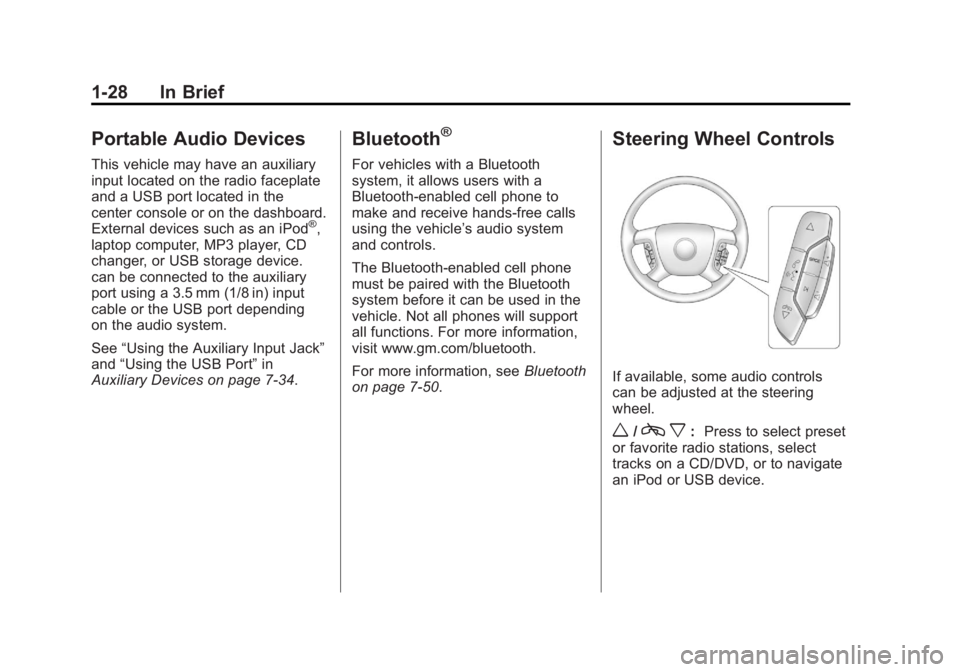
Steering Wheel Controls
If available, some audio controls
can be adjusted at the steering
wheel.
w/c x:Press to select preset
or favorite radio stations, select
tracks on a CD/DVD, or to navigate
an iPod or USB device.
Page 35 of 594
Black plate (29,1)GMC Sierra Owner Manual - 2011
In Brief 1-29
bg: Press to silence the vehicle
speakers only. Press again to turn
the sound on. Press and hold longer
than two seconds to interact with
OnStar
®or Bluetooth systems,
if equipped.
+
e−e: Press to increase or
decrease volume.
c x:Press to reject an
incoming call, or to end a call.
SRCE: Press to switch between
the radio and CD, and for equipped
vehicles, the DVD, front auxiliary,
and rear auxiliary.
¨: Press to seek the next radio
station, the next track or chapter
while sourced to the CD or DVD
slot, or to select tracks and folders
on an iPod or USB device.
For more information, see Steering
Wheel Controls on page 5‑3.
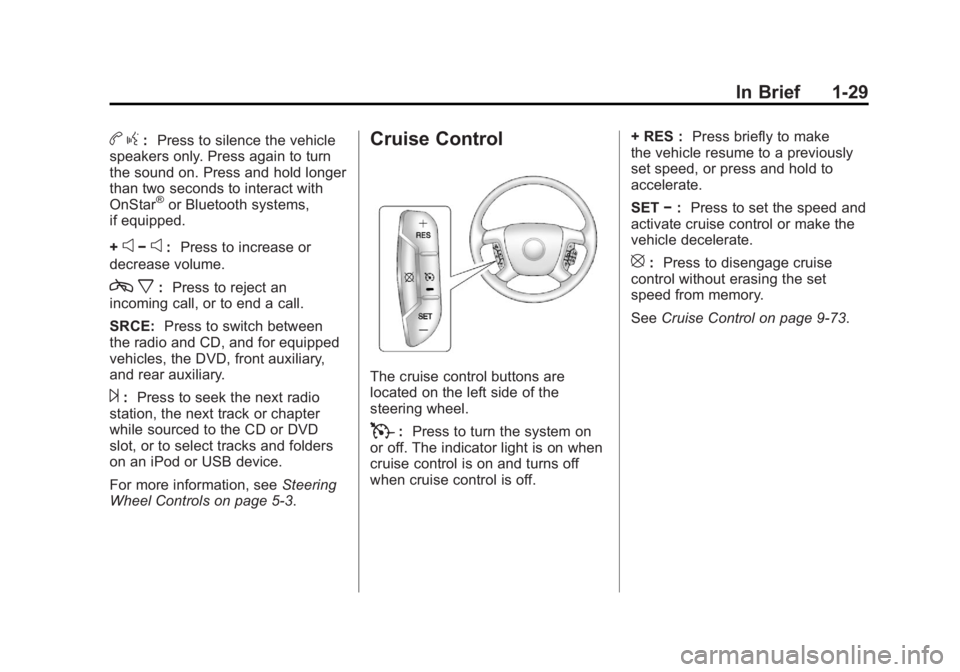
Cruise Control
The cruise control buttons are
located on the left side of the
steering wheel.
T: Press to turn the system on
or off. The indicator light is on when
cruise control is on and turns off
when cruise control is off. + RES :
Press briefly to make
the vehicle resume to a previously
set speed, or press and hold to
accelerate.
SET −: Press to set the speed and
activate cruise control or make the
vehicle decelerate.
[: Press to disengage cruise
control without erasing the set
speed from memory.
See Cruise Control on page 9‑73.
Page 36 of 594

Black plate (30,1)GMC Sierra Owner Manual - 2011
1-30 In Brief
Navigation System
If the vehicle has a navigation
system, there is a separate
Navigation System Manual that
includes information on the radio,
audio players, and navigation
system.
The navigation system provides
detailed maps of most major
freeways and roads. After a
destination has been set, the
system provides turn-by-turn
instructions for reaching the
destination. In addition, the system
can help locate a variety of points
of interest (POI), such as banks,
airports, restaurants, and more.
See the Navigation System Manual
for more information.
Driver Information
Center (DIC)
The DIC display is located at
the bottom of the instrument
panel cluster. It shows the status of
many vehicle systems and enables
access to the personalization menu.
The DIC buttons are located on
the instrument panel, next to the
steering wheel.
Some vehicles do not have the
buttons shown, however some of
the menus can be viewed by using
the trip odometer reset stem.
3:Press to display the
odometer, trip odometer, fuel
range, average economy, fuel
used, timer, instantaneous economy
and Active Fuel Management™
indicator, and transmission
temperature. The compass
and outside air temperature
will also be shown in the display.
The temperature will be shown
in °C or °F depending on the
units selected.
T: Press to display the oil life,
units, tire pressure readings for
vehicles with the Tire Pressure
Monitor System (TPMS), trailer
brake gain and output information
for vehicles with the Integrated
Trailer Brake Control (ITBC) system,
engine hours, compass zone
setting, and compass recalibration.
U: Press to customize the
feature settings on your vehicle.
See Vehicle Personalization (with
DIC Buttons) on page 5‑52 for more
information.
Page 37 of 594
Black plate (31,1)GMC Sierra Owner Manual - 2011
In Brief 1-31
V:Press to set or reset
certain functions and to turn
off or acknowledge messages
on the DIC.
For more information, see Driver
Information Center (DIC) on
page 5‑33.
Vehicle Customization
Some vehicle features can be
programmed by using the DIC
buttons next to the steering wheel.
These features include:
.Language
.Door Lock and Unlock Settings
.RKE Lock and Unlock Feedback
.Lighting
.Chime Volume
.Memory Features
See Vehicle Personalization (with
DIC Buttons) on page 5‑52.
Rear Vision
Camera (RVC)
If available, the rear vision camera
displays a view of the area behind
the vehicle when the vehicle is
shifted into R (Reverse). This is
displayed on the inside rearview
mirror or the navigation screen,
if equipped.
To clean the camera lens, located
in the bezel for the tailgate handle,
rinse it with water and wipe it with
a soft cloth.
For more information, see Rear
Vision Camera (RVC) on page 9‑78.
Ultrasonic Parking Assist
If available, Ultrasonic Rear Parking
Assist (URPA) uses sensors on the
rear bumper to detect objects while
parking the vehicle. URPA comes
on automatically when the shift
lever is moved into R (Reverse) and
operates at speeds less than 8 km/h
(5 mph). URPA uses audio beeps
to provide distance and system
information.
Keep the sensors on the vehicle's
rear bumper clean to ensure proper
operation.
The system can be disabled by
pressing the rear park aid disable
button located next to the radio.
See Ultrasonic Parking Assist on
page 9‑76 for more information.
Page 57 of 594
Black plate (13,1)GMC Sierra Owner Manual - 2011
Keys, Doors and Windows 2-13
Testing the Alarm
To test the alarm:
1. Lower the driver window andopen the driver door.
2. Press lock on the RKE transmitter.
3. Close the door and wait for the security light to go out.
4. Reach in through the window, unlock the door with the manual
door lock, and open the door.
This should set off the alarm.
If the alarm does not sound when
it should but the headlamps flash,
check to see if the horn works. The
horn fuse may be blown. To replace
the fuse, see Fuses and Circuit
Breakers on page 10‑50.
If the alarm does not sound or the
headlamps do not flash, see your
dealer for service.
Immobilizer
See Radio Frequency Statement on
page 13‑19 for information
regarding Part 15 of the Federal
Communications Commission
(FCC) rules and Industry Canada
Standards RSS-210/220/310.
Immobilizer Operation
This vehicle has PASS-Key®III+
(Personalized Automotive Security
System) theft-deterrent system.
PASS-Key III+ is a passive
theft-deterrent system.
The system is automatically armed
when the key is removed from the
ignition.
The system is automatically
disarmed when the key is turned
to ON/RUN, ACC/ACCESSORY,
or START from the LOCK/OFF
position. You do not have to manually arm or
disarm the system.
The security light will come on if
there is a problem with arming or
disarming the theft-deterrent
system.
When the PASS-Key III+ system
senses that someone is using the
wrong key, it prevents the vehicle
from starting. Anyone using a
trial-and-error method to start the
vehicle will be discouraged because
of the high number of electrical key
codes.
If the engine does not start and
the security light on the instrument
panel cluster comes on when trying
to start the vehicle, there may be
a problem with the theft-deterrent
system. Turn the ignition off and
try again.
Page 151 of 594
Black plate (3,1)GMC Sierra Owner Manual - 2011
Instruments and Controls 5-3
Steering Wheel Controls
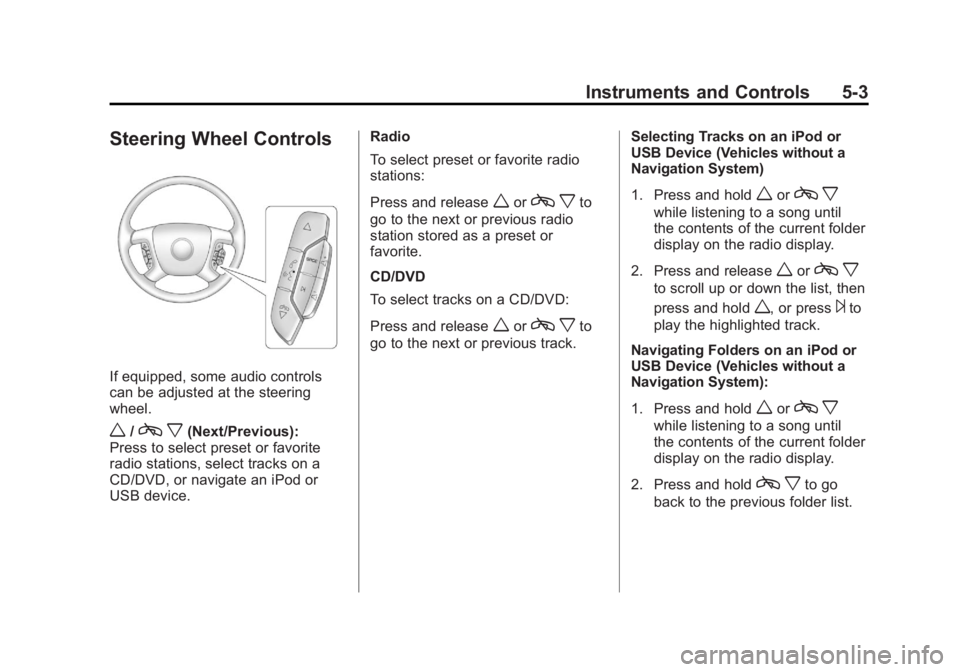
If equipped, some audio controls
can be adjusted at the steering
wheel.
w/cx(Next/Previous):
Press to select preset or favorite
radio stations, select tracks on a
CD/DVD, or navigate an iPod or
USB device. Radio
To select preset or favorite radio
stations:
Press and release
worc
xto
go to the next or previous radio
station stored as a preset or
favorite.
CD/DVD
To select tracks on a CD/DVD:
Press and release
worc xto
go to the next or previous track. Selecting Tracks on an iPod or
USB Device (Vehicles without a
Navigation System)
1. Press and hold
worc
x
while listening to a song until
the contents of the current folder
display on the radio display.
2. Press and release
worc x
to scroll up or down the list, then
press and hold
w, or press¨to
play the highlighted track.
Navigating Folders on an iPod or
USB Device (Vehicles without a
Navigation System):
1. Press and hold
worc x
while listening to a song until
the contents of the current folder
display on the radio display.
2. Press and hold
c xto go
back to the previous folder list.
Page 156 of 594
Black plate (8,1)GMC Sierra Owner Manual - 2011
5-8 Instruments and Controls
To calibrate the compass, use the
following procedure:
Compass Calibration Procedure
1. Before calibrating the compass,make sure the compass zone
is set to the variance zone in
which the vehicle is located.
See “Compass Variance (Zone)
Procedure” earlier in this
section.
Do not operate any switches
such as window, sunroof,
climate controls, or seats during
the calibration procedure.
2. Press the vehicle information button until PRESS
VTO
CALIBRATE COMPASS
displays. Or, if the vehicle
does not have DIC buttons,
press the trip odometer
reset stem until CALIBRATE
COMPASS displays. 3. Press the set/reset button to
start the compass calibration.
Or, if the vehicle does not have
DIC buttons, press and hold
the trip odometer reset stem
for two seconds to start the
compass calibration.
4. The DIC will display CALIBRATING: DRIVE IN
CIRCLES. Drive the vehicle
in tight circles at less than
8 km/h (5 mph) to complete the
calibration. The DIC will display
CALIBRATION COMPLETE
for a few seconds when the
calibration is complete. The DIC
display will then return to the
previous menu.
Clock
AM-FM Radio and AM‐FM
Radio with CD Player
To set the clock:
1. Turn the ignition key to
ACC/ACCESSORY or ON/RUN,
then press the
Obutton to turn
the radio on.
2. Press the
Hbutton until the hour
numbers begin to flash, then
turn the
fknob to increase or
decrease the hour.
3. Press the
Hbutton until the
minute numbers begin to flash,
then turn the
fknob to increase
or decrease the minutes.
Page 157 of 594
Black plate (9,1)GMC Sierra Owner Manual - 2011
Instruments and Controls 5-9
4. Press theHbutton until the
12HR or 24HR time format
begins to flash, then turn the
f
knob to change the time format.
5. Press the
Hbutton again until
the clock display stops flashing
to set the currently displayed
time, or wait until the flashing
stops after five seconds and
the current time displayed
automatically sets.
MP3 Radios with a Single CD
or a Single CD and DVD Player
To adjust the time and date:
1. Turn the ignition key to ACC/ACCESSORY or ON/RUN,
then press the
Obutton to turn
the radio on.
2. Press the
Hbutton to display
HR, MIN, MM, DD, YYYY (hour,
minute, month, day, and year). 3. Press the softkey located under
any one of the tabs to change
that setting.
4. To increase the time or date, do one of the following:
.Press the softkey below the
selected tab.
.Press the¨SEEK button.
.Press the\FWD button.
.Turn thefknob clockwise.
5. To decrease the time or date, do one of the following:
.Press the©SEEK button.
.Press thesREV button.
.Turn thefknob
counterclockwise. To change the time default setting
from 12 hour to 24 hour or to change
the date default setting from month/
day/year to day/month/year:
1. Press the
Hbutton and then
the softkey located below the
forward arrow tab. 12H, 24H, the
date MM/DD (month and day),
and DD/MM (day and month)
displays.
2. Press the softkey located below the desired option.
3. Press the
Hbutton again to
apply the desired option, or let
the screen time out.
Page 158 of 594
Black plate (10,1)GMC Sierra Owner Manual - 2011
5-10 Instruments and Controls
MP3 Radio with a Six-Disc CD
Player
To set the time and date:
1. Turn the ignition key toACC/ACCESSORY or ON/RUN,
then press the
Obutton to turn
the radio on.
2. Press the MENU button and then the softkey under the
Htab
to display HR, MIN, MM, DD,
YYYY (hour, minute, month, day,
and year).
3. Press the softkey located under any one of the tabs to change
that setting.
4. To increase the time or date, do one of the following:
.Press the softkey below the
selected tab.
.Press the¨SEEK button.
.Press the\FWD button.
.Turn thefknob clockwise. 5. To decrease the time or date, do
one of the following:
.Press the©SEEK button.
.Press thesREV button.
.Turn thefknob
counterclockwise.
To change the time default setting
from 12 hour to 24 hour or to change
the date default setting from month/
day to day/month:
1. Press the MENU button and then the softkey under
the
Htab.
2. Press the softkey located below the forward arrow tab. 12H, 24H,
the date MM/DD (month and
day), and DD/MM (day and
month) displays.
3. Press the softkey located below the desired option.
4. Press the MENU button again to apply the desired option, or let
the screen time out.
Power Outlets
Accessory power outlets can
be used to plug in electrical
equipment, such as a cell phone,
MP3 player, etc.
The vehicle may have two
accessory power outlets located
below the climate control system,
or may have one accessory power
outlet and one cigarette lighter.
The cigarette lighter is designed
to fit only in the receptacle closest
to the driver.
There may be another accessory
power outlet in the rear cargo area.
If the vehicle has a floor console,
there is an accessory power outlet
inside the storage bin and one on
the rear of the floor console.
Remove the cover to access and
replace when not in use.