trailer GMC SIERRA 2011 Owner's Manual
[x] Cancel search | Manufacturer: GMC, Model Year: 2011, Model line: SIERRA, Model: GMC SIERRA 2011Pages: 594, PDF Size: 6.55 MB
Page 9 of 594
Black plate (3,1)GMC Sierra Owner Manual - 2011
In Brief 1-3
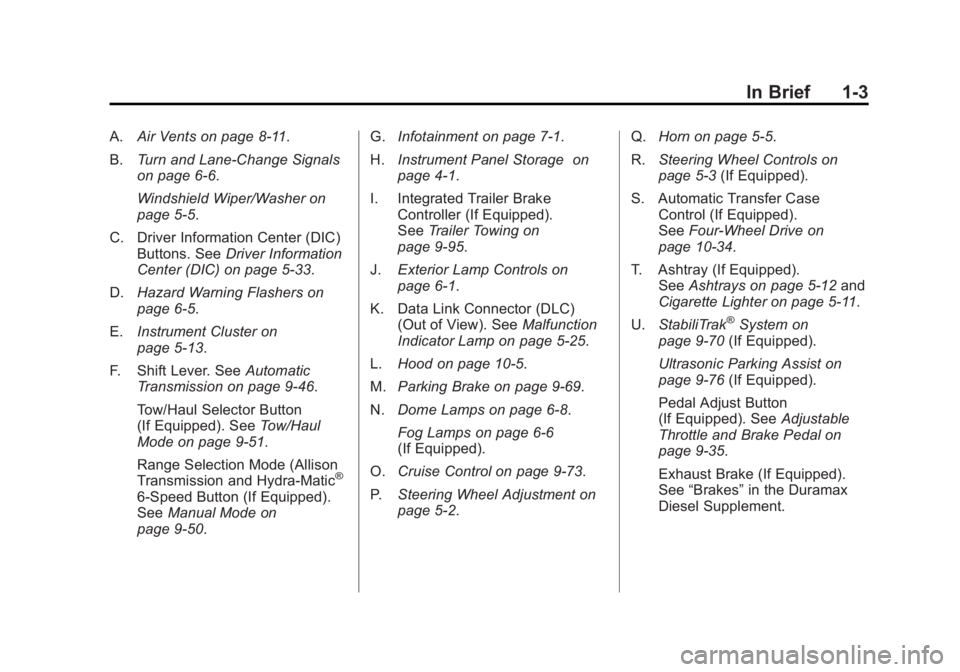
A.Air Vents on page 8‑11.
B. Turn and Lane-Change Signals
on page 6‑6.
Windshield Wiper/Washer on
page 5‑5.
C. Driver Information Center (DIC) Buttons. See Driver Information
Center (DIC) on page 5‑33.
D. Hazard Warning Flashers on
page 6‑5.
E. Instrument Cluster on
page 5‑13.
F. Shift Lever. See Automatic
Transmission on page 9‑46.
Tow/Haul Selector Button
(If Equipped). See Tow/Haul
Mode on page 9‑51.
Range Selection Mode (Allison
Transmission and Hydra-Matic
®
6‐Speed Button (If Equipped).
See Manual Mode on
page 9‑50. G.
Infotainment on page 7‑1.
H. Instrument Panel Storage on
page 4‑1.
I. Integrated Trailer Brake Controller (If Equipped).
See Trailer Towing on
page 9‑95.
J. Exterior Lamp Controls on
page 6‑1.
K. Data Link Connector (DLC) (Out of View). See Malfunction
Indicator Lamp on page 5‑25.
L. Hood on page 10‑5.
M. Parking Brake on page 9‑69.
N. Dome Lamps on page 6‑8.
Fog Lamps on page 6‑6
(If Equipped).
O. Cruise Control on page 9‑73.
P. Steering Wheel Adjustment on
page 5‑2. Q.
Horn on page 5‑5.
R. Steering Wheel Controls on
page 5‑3 (If Equipped).
S. Automatic Transfer Case Control (If Equipped).
See Four-Wheel Drive on
page 10‑34.
T. Ashtray (If Equipped). See Ashtrays on page 5‑12 and
Cigarette Lighter on page 5‑11.
U. StabiliTrak
®System on
page 9‑70 (If Equipped).
Ultrasonic Parking Assist on
page 9‑76 (If Equipped).
Pedal Adjust Button
(If Equipped). See Adjustable
Throttle and Brake Pedal on
page 9‑35.
Exhaust Brake (If Equipped).
See “Brakes” in the Duramax
Diesel Supplement.
Page 13 of 594
Black plate (7,1)GMC Sierra Owner Manual - 2011
In Brief 1-7
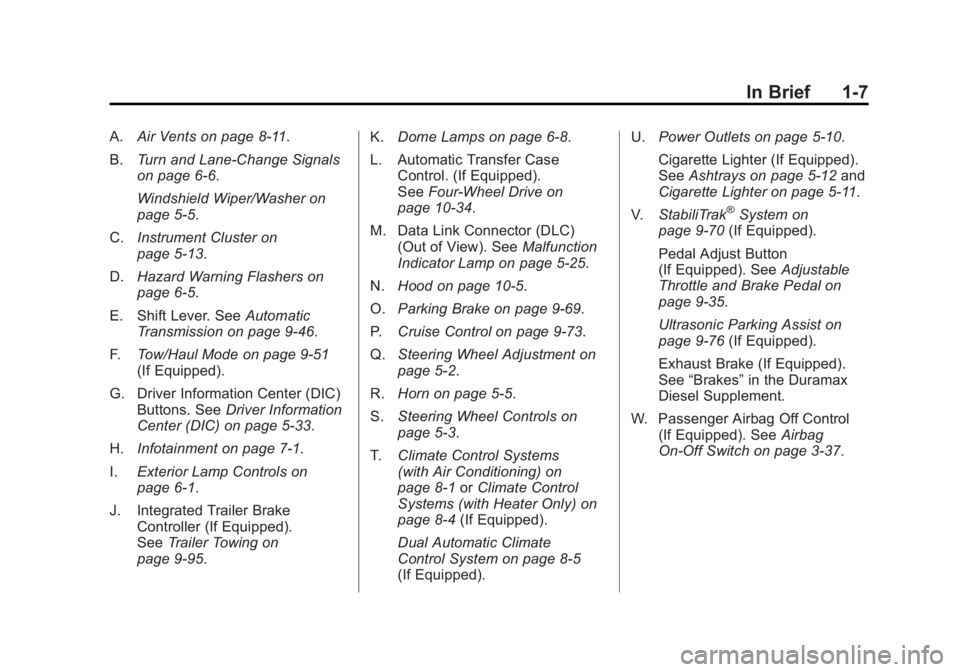
A.Air Vents on page 8‑11.
B. Turn and Lane-Change Signals
on page 6‑6.
Windshield Wiper/Washer on
page 5‑5.
C. Instrument Cluster on
page 5‑13.
D. Hazard Warning Flashers on
page 6‑5.
E. Shift Lever. See Automatic
Transmission on page 9‑46.
F. Tow/Haul Mode on page 9‑51
(If Equipped).
G. Driver Information Center (DIC) Buttons. See Driver Information
Center (DIC) on page 5‑33.
H. Infotainment on page 7‑1.
I. Exterior Lamp Controls on
page 6‑1.
J. Integrated Trailer Brake Controller (If Equipped).
See Trailer Towing on
page 9‑95. K.
Dome Lamps on page 6‑8.
L. Automatic Transfer Case Control. (If Equipped).
See Four-Wheel Drive on
page 10‑34.
M. Data Link Connector (DLC) (Out of View). See Malfunction
Indicator Lamp on page 5‑25.
N. Hood on page 10‑5.
O. Parking Brake on page 9‑69.
P. Cruise Control on page 9‑73.
Q. Steering Wheel Adjustment on
page 5‑2.
R. Horn on page 5‑5.
S. Steering Wheel Controls on
page 5‑3.
T. Climate Control Systems
(with Air Conditioning) on
page 8‑1 orClimate Control
Systems (with Heater Only) on
page 8‑4 (If Equipped).
Dual Automatic Climate
Control System on page 8‑5
(If Equipped). U.
Power Outlets on page 5‑10.
Cigarette Lighter (If Equipped).
See Ashtrays on page 5‑12 and
Cigarette Lighter on page 5‑11.
V. StabiliTrak
®System on
page 9‑70 (If Equipped).
Pedal Adjust Button
(If Equipped). See Adjustable
Throttle and Brake Pedal on
page 9‑35.
Ultrasonic Parking Assist on
page 9‑76 (If Equipped).
Exhaust Brake (If Equipped).
See “Brakes” in the Duramax
Diesel Supplement.
W. Passenger Airbag Off Control (If Equipped). See Airbag
On-Off Switch on page 3‑37.
Page 23 of 594
Black plate (17,1)GMC Sierra Owner Manual - 2011
In Brief 1-17
SeeManual Mirrors on page 2‑15 or
Power Mirrors on page 2‑16.
If the vehicle has towing mirrors,
they can be adjusted for a clearer
view of the objects behind you.
Manually pull out the mirror head to
extend it for better visibility when
towing a trailer. See Trailer-Tow
Mirrors on page 2‑15.
Power Foldaway Mirrors
To fold the mirrors:
1. Press (C) to fold the mirrors out
to the driving position.
2. Press (D) to fold the mirrors in to the folded position.
Manual Foldaway Mirrors
Manually fold the mirrors inward
to prevent damage when going
through an automatic car wash.
To fold, pull the mirror toward the
vehicle. Push the mirror outward,
to return to its original position.
See Folding Mirrors on page 2‑16.Interior Mirror
Vehicles with a manual rearview
mirror can be adjusted to see
clearly behind the vehicle. Hold the
mirror in the center to move it up or
down and side to side. To reduce
headlamp glare during nighttime
use, push the tab forward for
daytime use and pull it for
nighttime use.
Vehicles with the automatic dimming
feature will automatically reduce
the glare of lights from behind the
vehicle. The dimming feature comes
on and the indicator light illuminates
each time the vehicle is started.
SeeAutomatic Dimming Rearview
Mirror on page 2‑18 for more
information.
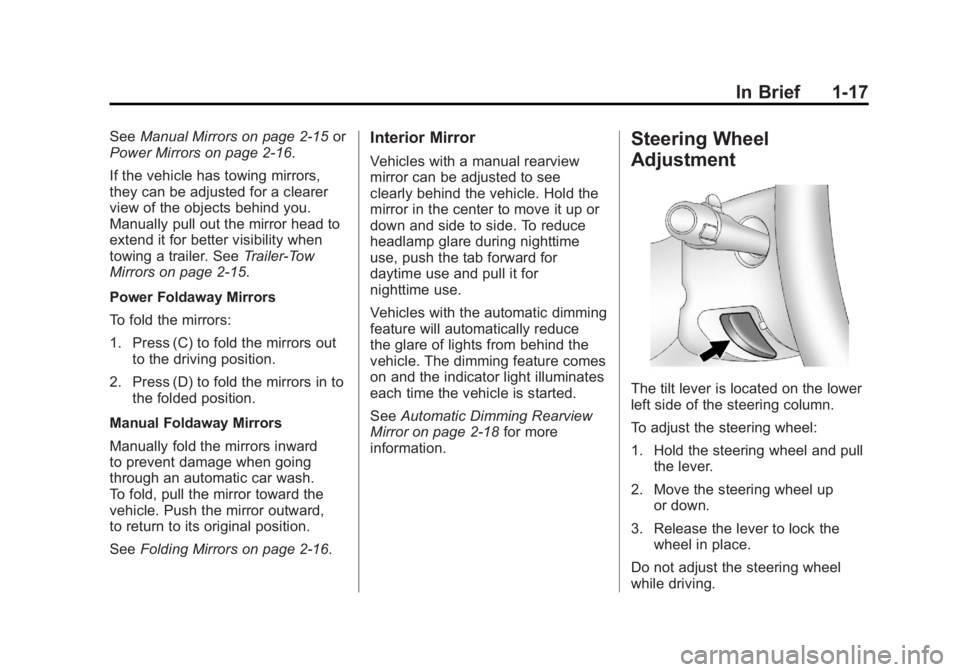
Steering Wheel
Adjustment
The tilt lever is located on the lower
left side of the steering column.
To adjust the steering wheel:
1. Hold the steering wheel and pull the lever.
2. Move the steering wheel up or down.
3. Release the lever to lock the wheel in place.
Do not adjust the steering wheel
while driving.
Page 31 of 594
Black plate (25,1)GMC Sierra Owner Manual - 2011
In Brief 1-25
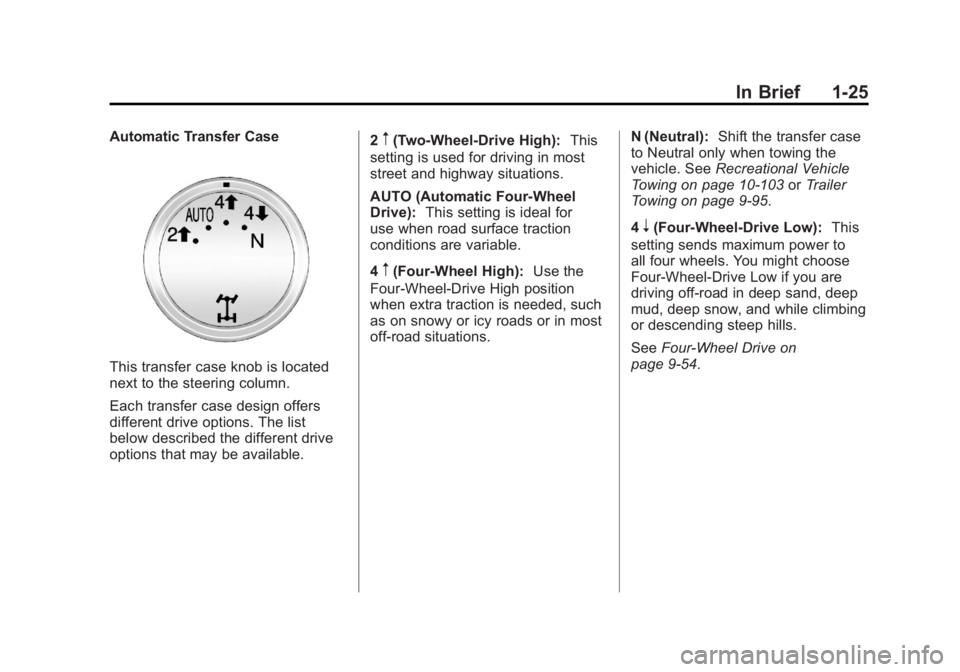
Automatic Transfer Case
This transfer case knob is located
next to the steering column.
Each transfer case design offers
different drive options. The list
below described the different drive
options that may be available.2
m(Two-Wheel-Drive High):
This
setting is used for driving in most
street and highway situations.
AUTO (Automatic Four-Wheel
Drive): This setting is ideal for
use when road surface traction
conditions are variable.
4
m(Four-Wheel High): Use the
Four-Wheel-Drive High position
when extra traction is needed, such
as on snowy or icy roads or in most
off-road situations. N (Neutral):
Shift the transfer case
to Neutral only when towing the
vehicle. See Recreational Vehicle
Towing on page 10‑103 orTrailer
Towing on page 9‑95.
4
n(Four-Wheel-Drive Low): This
setting sends maximum power to
all four wheels. You might choose
Four-Wheel-Drive Low if you are
driving off-road in deep sand, deep
mud, deep snow, and while climbing
or descending steep hills.
See Four-Wheel Drive on
page 9‑54.
Page 36 of 594

Black plate (30,1)GMC Sierra Owner Manual - 2011
1-30 In Brief
Navigation System
If the vehicle has a navigation
system, there is a separate
Navigation System Manual that
includes information on the radio,
audio players, and navigation
system.
The navigation system provides
detailed maps of most major
freeways and roads. After a
destination has been set, the
system provides turn-by-turn
instructions for reaching the
destination. In addition, the system
can help locate a variety of points
of interest (POI), such as banks,
airports, restaurants, and more.
See the Navigation System Manual
for more information.
Driver Information
Center (DIC)
The DIC display is located at
the bottom of the instrument
panel cluster. It shows the status of
many vehicle systems and enables
access to the personalization menu.
The DIC buttons are located on
the instrument panel, next to the
steering wheel.
Some vehicles do not have the
buttons shown, however some of
the menus can be viewed by using
the trip odometer reset stem.
3:Press to display the
odometer, trip odometer, fuel
range, average economy, fuel
used, timer, instantaneous economy
and Active Fuel Management™
indicator, and transmission
temperature. The compass
and outside air temperature
will also be shown in the display.
The temperature will be shown
in °C or °F depending on the
units selected.
T: Press to display the oil life,
units, tire pressure readings for
vehicles with the Tire Pressure
Monitor System (TPMS), trailer
brake gain and output information
for vehicles with the Integrated
Trailer Brake Control (ITBC) system,
engine hours, compass zone
setting, and compass recalibration.
U: Press to customize the
feature settings on your vehicle.
See Vehicle Personalization (with
DIC Buttons) on page 5‑52 for more
information.
Page 45 of 594
Black plate (1,1)GMC Sierra Owner Manual - 2011
Keys, Doors and Windows 2-1
Keys, Doors and
Windows
Keys and Locks
Keys . . . . . . . . . . . . . . . . . . . . . . . . . . 2-2
Remote Keyless Entry (RKE)System . . . . . . . . . . . . . . . . . . . . . . 2-3
Remote Keyless Entry (RKE) System Operation . . . . . . . . . . . 2-3
Remote Vehicle Start . . . . . . . . . 2-5
Door Locks . . . . . . . . . . . . . . . . . . . 2-8
Power Door Locks . . . . . . . . . . . . 2-8
Delayed Locking . . . . . . . . . . . . . . 2-8
Automatic Door Locks . . . . . . . . . 2-9
Lockout Protection . . . . . . . . . . . . 2-9
Safety Locks . . . . . . . . . . . . . . . . . . 2-9
Doors
Rear Doors (Extended Cab) . . . . . . . . . . . . 2-10
Tailgate . . . . . . . . . . . . . . . . . . . . . . 2-10
Vehicle Security
Vehicle Security . . . . . . . . . . . . . . 2-12
Anti-Theft Alarm System . . . . . 2-12
Immobilizer . . . . . . . . . . . . . . . . . . 2-13
Immobilizer Operation . . . . . . . 2-13
Exterior Mirrors
Convex Mirrors . . . . . . . . . . . . . . 2-15
Manual Mirrors . . . . . . . . . . . . . . . 2-15
Trailer-Tow Mirrors . . . . . . . . . . . 2-15
Power Mirrors . . . . . . . . . . . . . . . . 2-16
Folding Mirrors . . . . . . . . . . . . . . . 2-16
Heated Mirrors . . . . . . . . . . . . . . . 2-17
Park Tilt Mirrors . . . . . . . . . . . . . . 2-17
Interior Mirrors
Manual Rearview Mirror . . . . . . 2-18
Automatic Dimming Rearview Mirror . . . . . . . . . . . . . . . . . . . . . . . 2-18
Windows
Windows . . . . . . . . . . . . . . . . . . . . . 2-18
Manual Windows . . . . . . . . . . . . 2-19
Power Windows . . . . . . . . . . . . . 2-19
Rear Windows . . . . . . . . . . . . . . . 2-20
Sun Visors . . . . . . . . . . . . . . . . . . . 2-20
Roof
Sunroof (Extended Cab) . . . . . 2-21
Sunroof (Crew Cab) . . . . . . . . . 2-22
Page 59 of 594
Black plate (15,1)GMC Sierra Owner Manual - 2011
Keys, Doors and Windows 2-15
Exterior Mirrors
Convex Mirrors
{WARNING
A convex mirror can make things,
like other vehicles, look farther
away than they really are. If you
cut too sharply into the right lane,
you could hit a vehicle on the
right. Check the inside mirror or
glance over your shoulder before
changing lanes.
The passenger side mirror is convex
shaped. A convex mirror's surface is
curved so more can be seen from
the driver seat.
Manual Mirrors
Adjust the outside mirrors for a
clearer view.
Using hood-mounted air deflectors
and add-on convex mirror
attachments could decrease
mirror performance.
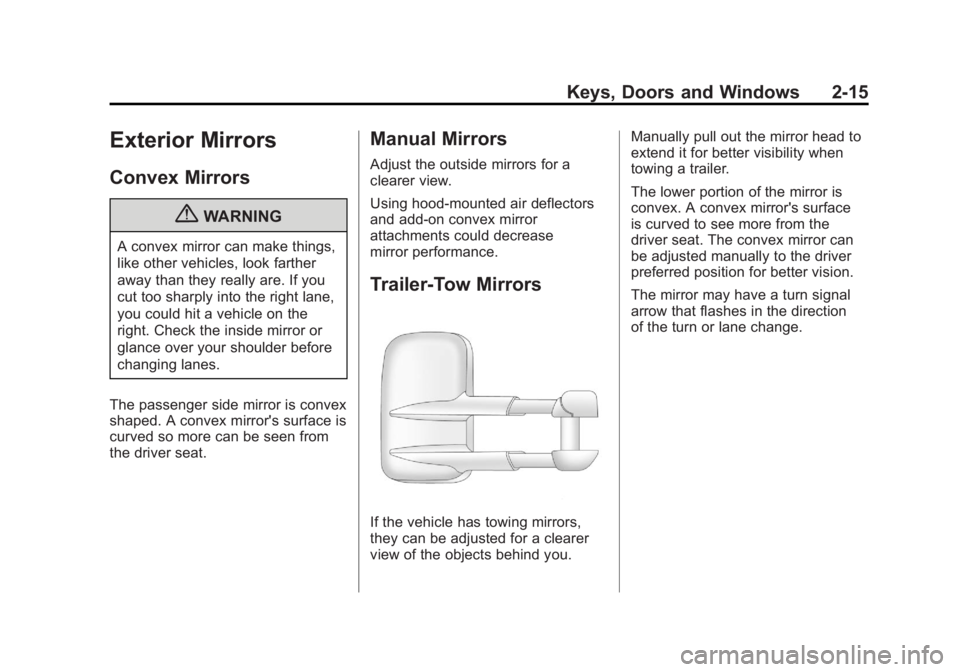
Trailer-Tow Mirrors
If the vehicle has towing mirrors,
they can be adjusted for a clearer
view of the objects behind you. Manually pull out the mirror head to
extend it for better visibility when
towing a trailer.
The lower portion of the mirror is
convex. A convex mirror's surface
is curved to see more from the
driver seat. The convex mirror can
be adjusted manually to the driver
preferred position for better vision.
The mirror may have a turn signal
arrow that flashes in the direction
of the turn or lane change.
Page 174 of 594
Black plate (26,1)GMC Sierra Owner Manual - 2011
5-26 Instruments and Controls
To prevent more serious damage to
the vehicle:
.Reduce vehicle speed.
.Avoid hard accelerations.
.Avoid steep uphill grades.
.If towing a trailer, reduce the
amount of cargo being hauled
as soon as it is possible.
If the light continues to flash, when
it is safe to do so, stop the vehicle.
Find a safe place to park the
vehicle. Turn the vehicle off, wait at
least 10 seconds, and restart the
engine. If the light is still flashing,
follow the previous steps and see
your dealer for service as soon as
possible.
Light On Steady: An emission
control system malfunction has
been detected on the vehicle.
Diagnosis and service might be
required. The following may correct an
emissions system malfunction:
.Make sure the fuel cap is
fully installed. See
Filling
the Tank on page 9‑88.
The diagnostic system can
determine if the fuel cap has
been left off or improperly
installed. A loose or missing fuel
cap allows fuel to evaporate into
the atmosphere. A few driving
trips with the cap properly
installed should turn the light off.
.Make sure the electrical system
is not wet. The system could
be wet if the vehicle was driven
through a deep puddle of water.
The condition is usually
corrected when the electrical
system dries out. A few driving
trips should turn the light off.
.Make sure to fuel the vehicle
with quality fuel. Poor fuel quality
causes the engine not to run as
efficiently as designed and can
cause: stalling after start-up,
stalling when the vehicle is
changed into gear, misfiring,
hesitation on acceleration,
or stumbling on acceleration.
These conditions might go away
once the engine is warmed up.
If one or more of these
conditions occurs, change the
fuel brand used. It will require at
least one full tank of the proper
fuel to turn the light off.
See Recommended Fuel on
page 9‑84.
If none of the above have made
the light turn off, your dealer can
check the vehicle. The dealer
has the proper test equipment
and diagnostic tools to fix any
mechanical or electrical problems
that might have developed.
Page 182 of 594

Black plate (34,1)GMC Sierra Owner Manual - 2011
5-34 Instruments and Controls
The compass and outside
temperature will also be shown
in the display. The temperature
will be shown in °C or °F depending
on the units selected.
T(Vehicle Information):Press
this button to display the oil life,
units, tire pressure readings for
vehicles with the Tire Pressure
Monitor System (TPMS), trailer
brake gain and output information
for vehicles with the Integrated
Trailer Brake Control (ITBC) system,
engine hours, compass zone
setting, and compass recalibration.
U(Customization): Press this
button to customize the feature
settings on the vehicle. See Vehicle
Personalization (with DIC Buttons)
on page 5‑52 for more information.
V(Set/Reset):Press this button to
set or reset certain functions and to
turn off or acknowledge messages
on the DIC.
Trip/Fuel Menu Items
(with DIC Buttons)
3(Trip/Fuel): Press this button
to scroll through the following menu
items:
Odometer
Press the trip/fuel button until
ODOMETER displays. This display
shows the distance the vehicle has
been driven in either kilometers (km)
or miles. Pressing the trip odometer
reset stem will also display the
odometer.
To switch between metric and
English measurements, see “Units”
later in this section.
Trip Odometer
Press the trip/fuel button until TRIP
displays. This display shows the
current distance traveled in either
kilometers (km) or miles since the
last reset for the trip odometer.
Pressing the trip odometer reset
stem will also display the trip
odometer. The trip odometer can be reset to
zero by pressing the set/reset
button while the trip odometer is
displayed. You can also reset the
trip odometer while it is displayed
by pressing and holding the trip
odometer reset stem.
The trip odometer has a feature
called the retro-active reset. This
can be used to set the trip odometer
to the number of miles (kilometers)
driven since the ignition was last
turned on. This can be used if the
trip odometer is not reset at the
beginning of the trip.
To use the retro-active reset feature,
press and hold the set/reset button
for at least four seconds. The trip
odometer will display the number of
kilometers (km) or miles driven since
the ignition was last turned on and
the vehicle was moving. Once the
vehicle begins moving, the trip
odometer will accumulate mileage.
Page 185 of 594

Black plate (37,1)GMC Sierra Owner Manual - 2011
Instruments and Controls 5-37
recommended in the Maintenance
Schedule in this manual.
SeeScheduled Maintenance on
page 11‑2 for more information.
Remember, you must reset the
OIL LIFE display after each oil
change. It will not reset itself. Also,
be careful not to reset the OIL LIFE
display accidentally at any time
other than when the oil has just
been changed. It cannot be reset
accurately until the next oil change.
To reset the engine oil life system,
see Engine Oil Life System on
page 10‑11.
Units
Press the vehicle information button
until UNITS displays. This display
allows you to select between metric
or English units of measurement.
Once in this display, press the
set/reset button to select between
METRIC or ENGLISH units.
All of the vehicle information will
then be displayed in the unit of
measurement selected. Tire Pressure
If the vehicle has the Tire Pressure
Monitor System (TPMS), the
pressure for each tire can be viewed
in the DIC. The tire pressure will be
shown in either kilopascals (kPa)
or pounds per square inch (psi).
Press the vehicle information
button until the DIC displays
FRONT TIRES kPa (PSI) LEFT ##
RIGHT ##. Press the vehicle
information button again until the
DIC displays REAR TIRES kPa
(PSI) LEFT ## RIGHT ##.
If a low tire pressure condition
is detected by the system while
driving, a message advising you to
add pressure in a specific tire will
appear in the display. See
Tire
Pressure on page 10‑66 andTire
Messages on page 5‑49 for more
information.
If the tire pressure display shows
dashes instead of a value, there
may be a problem with the vehicle.
If this consistently occurs, see your
dealer for service. Trailer Gain and Output
On vehicles with the Integrated
Trailer Brake Control (ITBC)
system, the trailer brake display
appears in the DIC. Press the
vehicle information button until
TRAILER GAIN and OUTPUT
display.
TRAILER GAIN shows the trailer
gain setting. This setting can be
adjusted from 0.0 to 10.0 with either
a trailer connected or disconnected.
OUTPUT shows the power output
to the trailer any time a trailer with
electric brakes is connected. Output
is displayed in 0 to 10 bars. Dashes
may appear in the OUTPUT display.
To adjust trailer gain see
“Integrated
Trailer Brake Control System” under
Towing Equipment on page 9‑112
for more information.
Engine Hours
Press the vehicle information button
until ENGINE HOURS displays.
This display shows the total number
of hours the engine has run.