brake GMC SIERRA 2013 User Guide
[x] Cancel search | Manufacturer: GMC, Model Year: 2013, Model line: SIERRA, Model: GMC SIERRA 2013Pages: 534, PDF Size: 6.47 MB
Page 68 of 534
Black plate (6,1)GMC Sierra Owner Manual - 2013 - crc - 8/14/12
3-6 Seats and Restraints
To adjust a manual seatback:
1. Lift the lever.The seatback will automatically
fold forward.
2. To recline, move the seatback rearward to the desired position,
then release the lever to lock the
seatback in place.
3. Push and pull on the seatback to make sure it is locked.
To return the seatback to the upright
position:
1. Lift the lever fully without applying pressure to the
seatback, and the seatback will
return to the upright position.
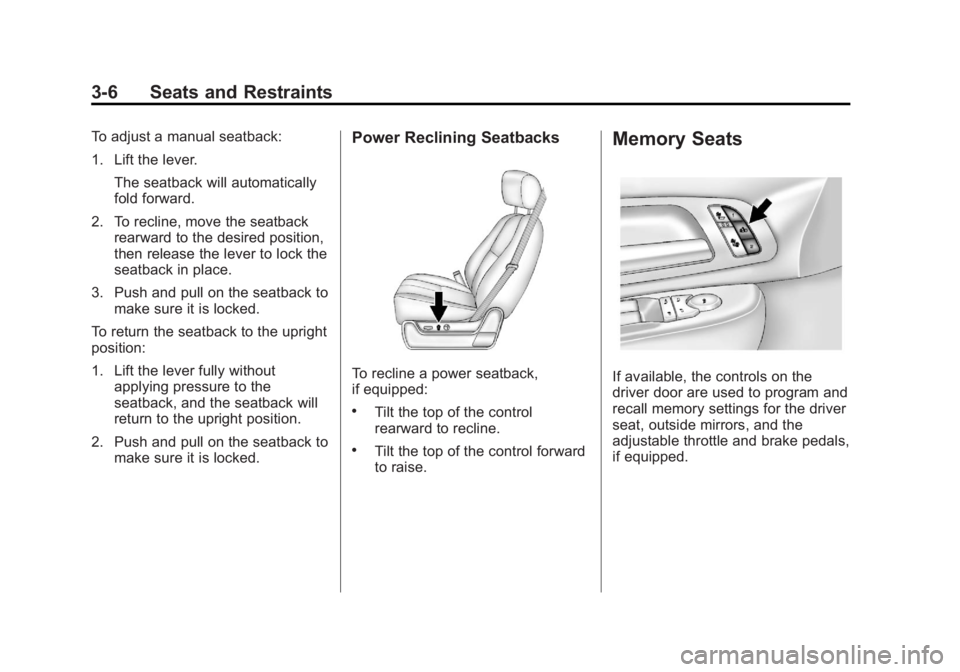
2. Push and pull on the seatback to make sure it is locked.Power Reclining Seatbacks
To recline a power seatback,
if equipped:
.Tilt the top of the control
rearward to recline.
.Tilt the top of the control forward
to raise.
Memory Seats
If available, the controls on the
driver door are used to program and
recall memory settings for the driver
seat, outside mirrors, and the
adjustable throttle and brake pedals,
if equipped.
Page 69 of 534
Black plate (7,1)GMC Sierra Owner Manual - 2013 - crc - 8/14/12
Seats and Restraints 3-7
Storing Memory Positions
To save into memory:
1. Adjust the driver seat, seatbackrecliner, both outside mirrors,
and the throttle and brake
pedals, if equipped.
See Power Mirrors on page 2‑14
and Adjustable Throttle and
Brake Pedal on page 9‑23.
Not all mirrors and adjustable
throttle and brake pedals will
have the ability to save and
recall their positions.
2. Press and hold “1”until
two beeps sound.
3. Repeat for a second driver position using “2.”
To recall, press and release “1”or
“2.” The vehicle must be in P (Park).
A single beep will sound. The seat,
outside mirrors, and adjustable
throttle and brake pedals will move
to the position previously stored for
the identified driver. Memory Remote Recall
The memory feature can recall the
driver seat, outside mirrors, and
pedals, if equipped, to stored
positions when entering the vehicle.
To activate, unlock the driver door
with the Remote Keyless
Entry (RKE) transmitter. The driver
seat, outside mirrors, and adjustable
pedals, if equipped, will move to the
memory position associated with the
transmitter used to unlock the
vehicle.
This feature can be turned on or off
using the vehicle personalization
menu. See
Vehicle Personalization
(With DIC Buttons) on page 5‑46.
To stop recall movement, press one
of the power seat controls, memory
buttons, or power mirror buttons,
or the adjustable pedal switch. If something has blocked the driver
seat and/or the adjustable pedals
while recalling a memory position,
the recall may stop. Remove the
obstruction; then press and hold the
appropriate manual control for the
memory item that is not recalling for
two seconds. Try recalling the
memory position again by pressing
the appropriate memory button.
If the memory position is still not
recalling, see your dealer for
service.
Easy Exit Driver Seat
This feature can move the seat
rearward to allow extra room to exit
the vehicle.
B(Easy Exit Driver Seat):
Press
to recall the easy exit seat position.
The vehicle must be in P (Park).
If the easy exit seat feature is
programmed on in the vehicle
personalization menu, automatic
seat movement occurs when the
ignition key is removed.
Page 89 of 534
Black plate (27,1)GMC Sierra Owner Manual - 2013 - crc - 8/14/12
Seats and Restraints 3-27
The parts of the airbag that come
into contact with you may be warm,
but not too hot to touch. There may
be some smoke and dust coming
from the vents in the deflated
airbags. Airbag inflation does not
prevent the driver from seeing out of
the windshield or being able to steer
the vehicle, nor does it prevent
people from leaving the vehicle.
{WARNING
When an airbag inflates, there
may be dust in the air. This dust
could cause breathing problems
for people with a history of
asthma or other breathing trouble.
To avoid this, everyone in the
vehicle should get out as soon as
it is safe to do so. If you have
breathing problems but cannot
get out of the vehicle after an
airbag inflates, then get fresh air
by opening a window or a door.
If you experience breathing(Continued)
WARNING (Continued)
problems following an airbag
deployment, you should seek
medical attention.
The vehicle may have a feature that
may automatically unlock the doors,
turn on the interior lamps and
hazard warning flashers, and shut
off the fuel system after the airbags
inflate. You can lock the doors, turn
off the interior lamps and hazard
warning flashers by using the
controls for those features.
{WARNING
A crash severe enough to inflate
the airbags may have also
damaged important functions in
the vehicle, such as the fuel
system, brake and steering
systems, etc. Even if the vehicle
appears to be drivable after a (Continued)
WARNING (Continued)
moderate crash, there may be
concealed damage that could
make it difficult to safely operate
the vehicle.
Use caution if you should attempt
to restart the engine after a crash
has occurred.
In many crashes severe enough to
inflate the airbag, windshields are
broken by vehicle deformation.
Additional windshield breakage may
also occur from the right front
passenger airbag.
.Airbags are designed to inflate
only once. After an airbag
inflates, you will need some new
parts for the airbag system.
If you do not get them, the
airbag system will not be there
to help protect you in another
crash. A new system will include
airbag modules and possibly
Page 131 of 534
Black plate (1,1)GMC Sierra Owner Manual - 2013 - crc - 8/14/12
Instruments and Controls 5-1
Instruments and
Controls
Controls
Steering Wheel Adjustment . . . 5-2
Steering Wheel Controls . . . . . . 5-2
Horn . . . . . . . . . . . . . . . . . . . . . . . . . . 5-4
Windshield Wiper/Washer . . . . . 5-4
Compass . . . . . . . . . . . . . . . . . . . . . 5-5
Clock . . . . . . . . . . . . . . . . . . . . . . . . . 5-7
Power Outlets . . . . . . . . . . . . . . . . . 5-9
Cigarette Lighter . . . . . . . . . . . . . . 5-9
Ashtrays . . . . . . . . . . . . . . . . . . . . . 5-10
Warning Lights, Gauges, and
Indicators
Warning Lights, Gauges, andIndicators . . . . . . . . . . . . . . . . . . 5-10
Instrument Cluster . . . . . . . . . . . 5-11
Speedometer . . . . . . . . . . . . . . . . 5-12
Odometer . . . . . . . . . . . . . . . . . . . . 5-12
Trip Odometer . . . . . . . . . . . . . . . 5-12
Tachometer . . . . . . . . . . . . . . . . . . 5-12
Fuel Gauge . . . . . . . . . . . . . . . . . . 5-13
Engine Oil Pressure Gauge . . . . . . . . . . . . . . . . . . . . . . 5-14 Engine Coolant Temperature
Gauge . . . . . . . . . . . . . . . . . . . . . . 5-15
Voltmeter Gauge . . . . . . . . . . . . . 5-15
Safety Belt Reminders . . . . . . . 5-16
Airbag Readiness Light . . . . . . 5-17
Airbag On-Off Light . . . . . . . . . . 5-18
Passenger Airbag Status Indicator . . . . . . . . . . . . . . . . . . . . 5-19
Charging System Light . . . . . . 5-20
Malfunction Indicator Lamp . . . . . . . . . . . . . 5-21
Brake System Warning Light . . . . . . . . . . . . . . . . . . . . . . . 5-23
Antilock Brake System (ABS) Warning Light . . . . . . . . . . . . . . 5-24
Four-Wheel-Drive Light . . . . . . 5-25
Tow/Haul Mode Light . . . . . . . . 5-25
StabiliTrak
®OFF Light . . . . . . . 5-25
Traction Control System (TCS)/StabiliTrak
®Light . . . . 5-26
Tire Pressure Light . . . . . . . . . . 5-26
Engine Oil Pressure Light . . . . 5-26
Low Fuel Warning Light . . . . . . 5-27
Security Light . . . . . . . . . . . . . . . . 5-27
High-Beam On Light . . . . . . . . . 5-28
Front Fog Lamp Light . . . . . . . . 5-28
Cruise Control Light . . . . . . . . . 5-28
Information Displays
Driver Information Center (DIC) . . . . . . . . . . . . . . . 5-28
Vehicle Messages
Vehicle Messages . . . . . . . . . . . 5-37
Battery Voltage and ChargingMessages . . . . . . . . . . . . . . . . . . 5-37
Brake System Messages . . . . 5-38
Door Ajar Messages . . . . . . . . . 5-38
Engine Cooling System Messages . . . . . . . . . . . . . . . . . . 5-39
Engine Oil Messages . . . . . . . . 5-40
Engine Power Messages . . . . 5-40
Fuel System Messages . . . . . . 5-41
Key and Lock Messages . . . . . 5-41
Lamp Messages . . . . . . . . . . . . . 5-41
Object Detection System Messages . . . . . . . . . . . . . . . . . . 5-41
Ride Control System Messages . . . . . . . . . . . . . . . . . . 5-42
Airbag System Messages . . . . 5-43
Security Messages . . . . . . . . . . 5-43
Starting the Vehicle Messages . . . . . . . . . . . . . . . . . . 5-43
Tire Messages . . . . . . . . . . . . . . . 5-43
Page 153 of 534
Black plate (23,1)GMC Sierra Owner Manual - 2013 - crc - 8/14/12
Instruments and Controls 5-23
Emissions Inspection and
Maintenance Programs
Depending on where you live, your
vehicle may be required to
participate in an emission control
system inspection and maintenance
program. For the inspection, the
emission system test equipment will
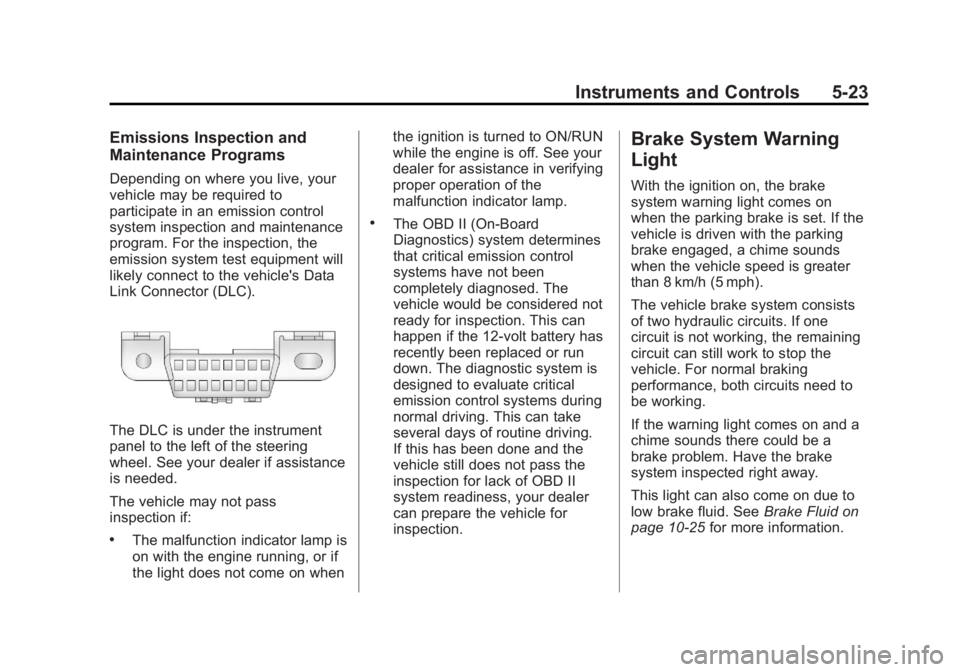
likely connect to the vehicle's Data
Link Connector (DLC).
The DLC is under the instrument
panel to the left of the steering
wheel. See your dealer if assistance
is needed.
The vehicle may not pass
inspection if:
.The malfunction indicator lamp is
on with the engine running, or if
the light does not come on whenthe ignition is turned to ON/RUN
while the engine is off. See your
dealer for assistance in verifying
proper operation of the
malfunction indicator lamp.
.The OBD II (On-Board
Diagnostics) system determines
that critical emission control
systems have not been
completely diagnosed. The
vehicle would be considered not
ready for inspection. This can
happen if the 12-volt battery has
recently been replaced or run
down. The diagnostic system is
designed to evaluate critical
emission control systems during
normal driving. This can take
several days of routine driving.
If this has been done and the
vehicle still does not pass the
inspection for lack of OBD II
system readiness, your dealer
can prepare the vehicle for
inspection.
Brake System Warning
Light
With the ignition on, the brake
system warning light comes on
when the parking brake is set. If the
vehicle is driven with the parking
brake engaged, a chime sounds
when the vehicle speed is greater
than 8 km/h (5 mph).
The vehicle brake system consists
of two hydraulic circuits. If one
circuit is not working, the remaining
circuit can still work to stop the
vehicle. For normal braking
performance, both circuits need to
be working.
If the warning light comes on and a
chime sounds there could be a
brake problem. Have the brake
system inspected right away.
This light can also come on due to
low brake fluid. See
Brake Fluid on
page 10‑25 for more information.
Page 154 of 534
Black plate (24,1)GMC Sierra Owner Manual - 2013 - crc - 8/14/12
5-24 Instruments and Controls
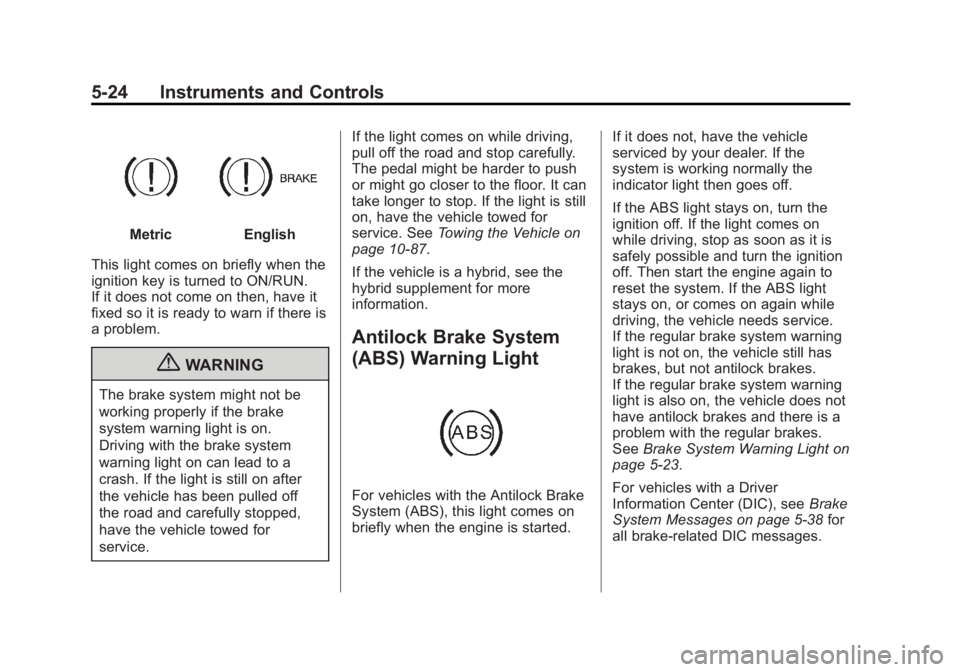
MetricEnglish
This light comes on briefly when the
ignition key is turned to ON/RUN.
If it does not come on then, have it
fixed so it is ready to warn if there is
a problem.
{WARNING
The brake system might not be
working properly if the brake
system warning light is on.
Driving with the brake system
warning light on can lead to a
crash. If the light is still on after
the vehicle has been pulled off
the road and carefully stopped,
have the vehicle towed for
service. If the light comes on while driving,
pull off the road and stop carefully.
The pedal might be harder to push
or might go closer to the floor. It can
take longer to stop. If the light is still
on, have the vehicle towed for
service. See
Towing the Vehicle on
page 10‑87.
If the vehicle is a hybrid, see the
hybrid supplement for more
information.
Antilock Brake System
(ABS) Warning Light
For vehicles with the Antilock Brake
System (ABS), this light comes on
briefly when the engine is started. If it does not, have the vehicle
serviced by your dealer. If the
system is working normally the
indicator light then goes off.
If the ABS light stays on, turn the
ignition off. If the light comes on
while driving, stop as soon as it is
safely possible and turn the ignition
off. Then start the engine again to
reset the system. If the ABS light
stays on, or comes on again while
driving, the vehicle needs service.
If the regular brake system warning
light is not on, the vehicle still has
brakes, but not antilock brakes.
If the regular brake system warning
light is also on, the vehicle does not
have antilock brakes and there is a
problem with the regular brakes.
See
Brake System Warning Light on
page 5‑23.
For vehicles with a Driver
Information Center (DIC), see Brake
System Messages on page 5‑38 for
all brake‐related DIC messages.
Page 159 of 534
Black plate (29,1)GMC Sierra Owner Manual - 2013 - crc - 8/14/12
Instruments and Controls 5-29
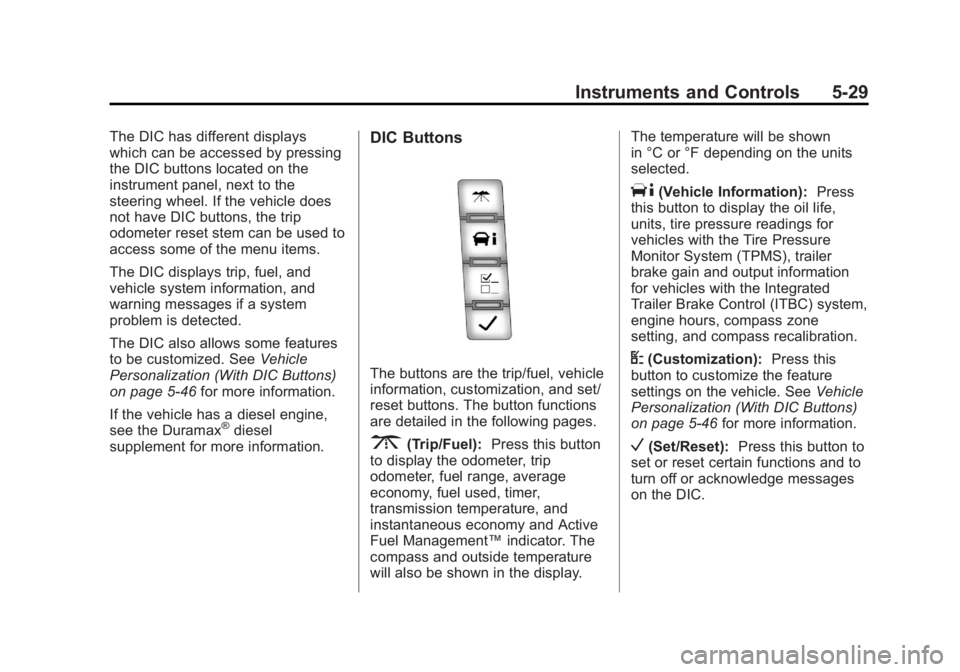
The DIC has different displays
which can be accessed by pressing
the DIC buttons located on the
instrument panel, next to the
steering wheel. If the vehicle does
not have DIC buttons, the trip
odometer reset stem can be used to
access some of the menu items.
The DIC displays trip, fuel, and
vehicle system information, and
warning messages if a system
problem is detected.
The DIC also allows some features
to be customized. SeeVehicle
Personalization (With DIC Buttons)
on page 5‑46 for more information.
If the vehicle has a diesel engine,
see the Duramax
®diesel
supplement for more information.
DIC Buttons
The buttons are the trip/fuel, vehicle
information, customization, and set/
reset buttons. The button functions
are detailed in the following pages.
3(Trip/Fuel): Press this button
to display the odometer, trip
odometer, fuel range, average
economy, fuel used, timer,
transmission temperature, and
instantaneous economy and Active
Fuel Management™ indicator. The
compass and outside temperature
will also be shown in the display. The temperature will be shown
in °C or °F depending on the units
selected.
T(Vehicle Information):
Press
this button to display the oil life,
units, tire pressure readings for
vehicles with the Tire Pressure
Monitor System (TPMS), trailer
brake gain and output information
for vehicles with the Integrated
Trailer Brake Control (ITBC) system,
engine hours, compass zone
setting, and compass recalibration.
U(Customization): Press this
button to customize the feature
settings on the vehicle. See Vehicle
Personalization (With DIC Buttons)
on page 5‑46 for more information.
V(Set/Reset):Press this button to
set or reset certain functions and to
turn off or acknowledge messages
on the DIC.
Page 163 of 534
Black plate (33,1)GMC Sierra Owner Manual - 2013 - crc - 8/14/12
Instruments and Controls 5-33
information button again until the
DIC displays REAR TIRES kPa
(PSI) LEFT ## RIGHT ##.
If a low tire pressure condition is
detected by the system while
driving, a message advising you to
add pressure in a specific tire will
appear in the display. SeeTire
Pressure on page 10‑55 andTire
Messages on page 5‑43 for more
information.
If the tire pressure display shows
dashes instead of a value, there
may be a problem with the vehicle.
If this consistently occurs, see your
dealer for service.
Trailer Gain and Output
On vehicles with the Integrated
Trailer Brake Control (ITBC) system,
the trailer brake display appears in
the DIC. Press the vehicle
information button until TRAILER
GAIN and OUTPUT display. TRAILER GAIN shows the trailer
gain setting. This setting can be
adjusted from 0.0 to 10.0 with either
a trailer connected or disconnected.
OUTPUT shows the power output to
the trailer any time a trailer with
electric brakes is connected. Output
is displayed in 0 to 10 bars. Dashes
may appear in the OUTPUT display.
To adjust trailer gain see
“Integrated
Trailer Brake Control System” under
Towing Equipment on page 9‑89 for
more information.
Battery
This display shows the current
battery voltage. If the voltage is in
the normal range, the value will
display. For example, the display
may read BATTERY 13 VOLTS.
Your vehicle's charging system
regulates voltage based on the state
of the battery. The battery voltage
may fluctuate when viewing this
information on the DIC. This is
normal. Oil Pressure
This display shows the oil pressure
in either kilopascals (kPa) or pounds
per square inch (psi).
Engine Hours
Press the vehicle information button
until ENGINE HOURS displays. This
display shows the total number of
hours the engine has run.
Compass Zone Setting
This display allows for setting the
compass zone. See
Compass on
page 5‑5 for more information.
Compass Recalibration
This display allows for calibrating
the compass. See Compass on
page 5‑5 for more information.
Blank Display
This display shows no information.
Page 166 of 534
Black plate (36,1)GMC Sierra Owner Manual - 2013 - crc - 8/14/12
5-36 Instruments and Controls
Transmission Temperature
Press the trip odometer reset stem
until TRANS TEMP displays. This
display shows the temperature of
the automatic transmission fluid in
either degrees Celsius (°C) or
degrees Fahrenheit (°F).
Trailer Gain and Output
On vehicles with the Integrated
Trailer Brake Control (ITBC) system,
the trailer brake display appears in
the DIC. Press the trip odometer
reset stem until TRAILER GAIN and
OUTPUT display.
TRAILER GAIN shows the trailer
gain setting. This setting can be
adjusted from 0.0 to 10.0 with either
a trailer connected or disconnected.
OUTPUT shows the power output to
the trailer any time a trailer with
electric brakes is connected. Output
is displayed in 0 to 10 bars. Dashes
may appear in the OUTPUT display.To adjust trailer gain see
“Integrated
Trailer Brake Control System” under
Towing Equipment on page 9‑89 for
more information.
Speedometer
The speedometer shows how fast
the vehicle is moving in either
kilometers per hour (km/h) or miles
per hour (mph). The speedometer
cannot be reset.
Battery
This display shows the current
battery voltage. If the voltage is in
the normal range, the value will
display. For example, the display
may read BATTERY 13 VOLTS.
Your vehicle's charging system
regulates voltage based on the state
of the battery. The battery voltage
may fluctuate when viewing this
information on the DIC. This is
normal.
Oil Pressure
This display shows the oil pressure
in either kilopascals (kPa) or pounds
per square inch (psi). Compass Zone Setting
This display allows for setting the
compass zone. See
Compass on
page 5‑5 for more information.
Compass Recalibration
This display allows for calibrating
the compass. See Compass on
page 5‑5 for more information.
Oil Life
To access this display, the vehicle
must be in P (Park). Press the trip
odometer reset stem until OIL LIFE
REMAINING displays. This display
shows an estimate of the oil's
remaining useful life. If you see
99% OIL LIFE REMAINING on the
display, that means 99% of the
current oil life remains. The engine
oil life system will alert you to
change the oil on a schedule
consistent with your driving
conditions.
Page 168 of 534
Black plate (38,1)GMC Sierra Owner Manual - 2013 - crc - 8/14/12
5-38 Instruments and Controls
could drain the battery. Turn off all
unnecessary accessories. Have the
electrical system checked as soon
as possible. See your dealer.
Brake System Messages
SERVICE BRAKE SYSTEM
This message displays along with
the brake system warning light if
there is a problem with the brake
system. SeeBrake System Warning
Light on page 5‑23. If this message
appears, stop as soon as possible
and turn off the vehicle. Restart the
vehicle and check for the message
on the DIC display. If the message
is still displayed or appears again
when you begin driving, the brake
system needs service as soon as
possible. See your dealer.
SERVICE BRAKES SOON
On some vehicles, this message
displays if there is a problem with
the brake system. If this message
appears, stop as soon as possible
and turn off the vehicle. Restart the vehicle and check for the message
on the DIC display. If the message
is still displayed or appears again
when you begin driving, the brake
system needs service. See your
dealer.
SERVICE TRAILER BRAKE
SYSTEM
On vehicles with the Integrated
Trailer Brake Control (ITBC) system,
this message displays and a chime
may sound when there is a problem
with the ITBC system.
When this message displays, power
is no longer available to the trailer
brakes.
As soon as it is safe to do so,
carefully pull your vehicle over to
the side of the road and turn the
ignition off. Check the wiring
connection to the trailer and turn the
ignition back on. If this message still
displays, either your vehicle or the
trailer needs service. See your
dealer.
See
“Integrated Trailer Brake
Control System” underTowing
Equipment on page 9‑89 for more
information.
Door Ajar Messages
DRIVER DOOR OPEN
This message displays and a chime
may sound if the driver door is not
fully closed and the vehicle is
shifted out of P (Park). Stop and turn
off the vehicle, check the door for
obstructions, and close the door
again. Check to see if the message
still appears on the DIC.
HOOD OPEN
This message displays and a chime
may sound if the hood is not fully
closed. Stop and turn off the
vehicle, check the hood for
obstructions, and close the hood
again. Check to see if the message
still appears on the DIC.