brake light GMC SIERRA 2013 User Guide
[x] Cancel search | Manufacturer: GMC, Model Year: 2013, Model line: SIERRA, Model: GMC SIERRA 2013Pages: 534, PDF Size: 6.47 MB
Page 168 of 534
Black plate (38,1)GMC Sierra Owner Manual - 2013 - crc - 8/14/12
5-38 Instruments and Controls
could drain the battery. Turn off all
unnecessary accessories. Have the
electrical system checked as soon
as possible. See your dealer.
Brake System Messages
SERVICE BRAKE SYSTEM
This message displays along with
the brake system warning light if
there is a problem with the brake
system. SeeBrake System Warning
Light on page 5‑23. If this message
appears, stop as soon as possible
and turn off the vehicle. Restart the
vehicle and check for the message
on the DIC display. If the message
is still displayed or appears again
when you begin driving, the brake
system needs service as soon as
possible. See your dealer.
SERVICE BRAKES SOON
On some vehicles, this message
displays if there is a problem with
the brake system. If this message
appears, stop as soon as possible
and turn off the vehicle. Restart the vehicle and check for the message
on the DIC display. If the message
is still displayed or appears again
when you begin driving, the brake
system needs service. See your
dealer.
SERVICE TRAILER BRAKE
SYSTEM
On vehicles with the Integrated
Trailer Brake Control (ITBC) system,
this message displays and a chime
may sound when there is a problem
with the ITBC system.
When this message displays, power
is no longer available to the trailer
brakes.
As soon as it is safe to do so,
carefully pull your vehicle over to
the side of the road and turn the
ignition off. Check the wiring
connection to the trailer and turn the
ignition back on. If this message still
displays, either your vehicle or the
trailer needs service. See your
dealer.
See
“Integrated Trailer Brake
Control System” underTowing
Equipment on page 9‑89 for more
information.
Door Ajar Messages
DRIVER DOOR OPEN
This message displays and a chime
may sound if the driver door is not
fully closed and the vehicle is
shifted out of P (Park). Stop and turn
off the vehicle, check the door for
obstructions, and close the door
again. Check to see if the message
still appears on the DIC.
HOOD OPEN
This message displays and a chime
may sound if the hood is not fully
closed. Stop and turn off the
vehicle, check the hood for
obstructions, and close the hood
again. Check to see if the message
still appears on the DIC.
Page 173 of 534
Black plate (43,1)GMC Sierra Owner Manual - 2013 - crc - 8/14/12
Instruments and Controls 5-43
.One condition is overheating,
which could occur if StabiliTrak
activates continuously for an
extended period of time.
.The message also displays if the
brake system warning light is on.
SeeBrake System Warning
Light on page 5‑23.
.The message could display if the
stability system takes longer
than usual to complete its
diagnostic checks due to driving
conditions.
.The message displays if an
engine or vehicle related
problem has been detected and
the vehicle needs service. See
your dealer.
The message turns off as soon as
the conditions that caused the
message to be displayed are no
longer present.
Airbag System Messages
SERVICE AIR BAG
This message displays if there is a
problem with the airbag system.
Have your dealer inspect the
system for problems. See Airbag
Readiness Light on page 5‑17 and
Airbag System on page 3‑20 for
more information.
Security Messages
SERVICE THEFT DETERRENT
SYSTEM
This message displays when there
is a problem with the theft-deterrent
system. The vehicle may or may not
restart so you may want to take the
vehicle to your dealer before turning
off the engine. See Immobilizer
Operation on page 2‑11 for more
information.
Starting the Vehicle
Messages
FAST IDLE ON
If your vehicle has this feature, this
message displays when the fast idle
feature is on. See Fast Idle System
on page 9‑27 for more information.
Tire Messages
SERVICE TIRE MONITOR
SYSTEM
If the vehicle has the Tire Pressure
Monitor System (TPMS), this
message displays if a part on the
system is not working properly. The
tire pressure light also flashes and
then remains on during the same
ignition cycle. See Tire Pressure
Light on page 5‑26. Several
conditions may cause this message
to appear. See Tire Pressure
Monitor Operation on page 10‑58 for
more information. If the warning
Page 274 of 534
Black plate (8,1)GMC Sierra Owner Manual - 2013 - crc - 8/14/12
9-8 Driving and Operating
{WARNING
If the vehicle has the two‐speed
automatic transfer case, shifting
the transfer case to N (Neutral)
can cause your vehicle to roll
even if the transmission is in
P (Park). This is because the
N (Neutral) position on the
transfer case overrides the
transmission. You or someone
else could be injured. If leaving
the vehicle, set the parking brake
and shift the transmission to
P (Park). Shift the transfer case to
any position but N (Neutral).
.When driving down a hill, keep
the vehicle headed straight
down. Use a low gear because
the engine will work with the
brakes to slow the vehicle and
help keep the vehicle under
control.
{WARNING
Heavy braking when going down
a hill can cause your brakes to
overheat and fade. This could
cause loss of control and you or
others could be injured or killed.
Apply the brakes lightly when
descending a hill and use a low
gear to keep vehicle speed under
control.
If the vehicle stalls on a hill:
1. Apply the brakes to stop the vehicle, and then apply the
parking brake.
2. Shift into P (Park) and then restart the engine.
.If driving uphill when the
vehicle stalls, shift to
R (Reverse), release the
parking brake, and back
straight down.
.Never try to turn the vehicle
around. If the hill is steep
enough to stall the vehicle,
it is steep enough to cause
it to roll over.
.If you cannot make it up the
hill, back straight down
the hill.
.Never back down a hill in
N (Neutral) using only the
brake.
.The vehicle can roll
backward quickly and you
could lose control.
.If driving downhill when the
vehicle stalls, shift to a
lower gear, release the
parking brake, and drive
straight down the hill.
3. If the vehicle cannot be restarted after stalling, set the parking
brake, shift an automatic
transmission into P (Park), and
turn the vehicle off.
3.1. Leave the vehicle and seek help.
Page 276 of 534
Black plate (10,1)GMC Sierra Owner Manual - 2013 - crc - 8/14/12
9-10 Driving and Operating
Driving in Water
{WARNING
Driving through rushing water can
be dangerous. Deep water can
sweep your vehicle downstream
and you and your passengers
could drown. If it is only shallow
water, it can still wash away the
ground from under your tires.
Traction could be lost, and the
vehicle could roll over. Do not
drive through rushing water.
Notice: Do not drive through
standing water if it is deep
enough to cover the wheel hubs,
axles or exhaust pipe. Deep water
can damage the axle and other
vehicle parts.
If the standing water is not too deep,
drive slowly through it. At faster
speeds, water splashes on the
ignition system and the vehicle can
stall. Stalling can also occur if you
get the tailpipe under water. While the tailpipe is under water, you will
not be able to start the engine.
When going through water, the
brakes get wet, and it might take
longer to stop. See Driving on Wet
Roads.
After Off-Road Driving
Remove any brush or debris that
has collected on the underbody,
or chassis, or under the hood.
These accumulations can be a fire
hazard.
After operation in mud or sand,
have the brake linings cleaned and
checked. These substances can
cause glazing and uneven braking.
Check the body structure, steering,
suspension, wheels, tires, and
exhaust system for damage and
check the fuel lines and cooling
system for any leakage.
More frequent maintenance service
is required. Refer to the
Maintenance Schedule for more
information.
Driving on Wet Roads
Rain and wet roads can reduce
vehicle traction and affect your
ability to stop and accelerate.
Always drive slower in these types
of driving conditions and avoid
driving through large puddles and
deep‐standing or flowing water.
{WARNING
Wet brakes can cause crashes.
They might not work as well in a
quick stop and could cause
pulling to one side. You could
lose control of the vehicle.
After driving through a large
puddle of water or a car/vehicle
wash, lightly apply the brake
pedal until the brakes work
normally.
Flowing or rushing water creates
strong forces. Driving through
flowing water could cause the
vehicle to be carried away. If this
(Continued)
Page 291 of 534
Black plate (25,1)GMC Sierra Owner Manual - 2013 - crc - 8/14/12
Driving and Operating 9-25
{WARNING
Turning off the vehicle while
moving may cause loss of power
assist in the brake and steering
systems and disable the airbags.
While driving, only shut the
vehicle off in an emergency.
If the vehicle cannot be pulled over,
and must be shut off while driving,
turn the ignition to ACC/
ACCESSORY.
Notice: Using a tool to force the
key to turn in the ignition could
cause damage to the switch or
break the key. Use the correct
key, make sure it is all the way in,
and turn it only with your hand.
If the key cannot be turned by
hand, see your dealer.
B (ACC/ACCESSORY): This
position lets things like the radio
and the windshield wipers operate while the engine is off. Use this
position if the vehicle must be
pushed or towed.
C (ON/RUN):
This position can be
used to operate the electrical
accessories and to display some
instrument panel cluster warning
and indicator lights. This position
can also be used for service and
diagnostics, and to verify the proper
operation of the malfunction
indicator lamp as may be required
for emission inspection purposes.
The switch stays in this position
when the engine is running. The
transmission is also unlocked in this
position on automatic transmission
vehicles.
If you leave the key in the ACC/
ACCESSORY or ON/RUN position
with the engine off, the battery could
be drained. You may not be able to
start the vehicle if the battery is
allowed to drain for an extended
period of time. D (START):
This is the position that
starts the engine. When the engine
starts, release the key. The ignition
switch returns to ON/RUN for
driving.
A warning tone will sound when the
driver door is opened and the
ignition is in ACC/ACCESSORY or
LOCK/OFF, and the key is in the
ignition.
Starting the Engine
If the vehicle has a diesel engine,
see the Duramax®diesel
supplement for more information.
If the vehicle is a hybrid, see the
hybrid supplement for more
information.
Notice: Do not try to shift to
P (Park) if the vehicle is moving.
If you do, you could damage the
transmission. Shift to P (Park)
only when the vehicle is stopped.
Page 293 of 534
Black plate (27,1)GMC Sierra Owner Manual - 2013 - crc - 8/14/12
Driving and Operating 9-27
If the vehicle starts briefly but
then stops again, do the same
thing. This clears the extra
gasoline from the engine. Do not
race the engine immediately
after starting it. Operate the
engine and transmission gently
until the oil warms up and
lubricates all moving parts.
Fast Idle System
If the vehicle has this feature it is
available only with cruise control.
The manual fast idle switch is
operated using the cruise control
buttons located on the left hand side
of the steering wheel.
This system can be used to
increase engine idle speed
whenever the following conditions
are met:
.The parking brake is set.
.The brake pedal is not pressed.
.The vehicle must not be moving
and the accelerator must not be
pressed.To control the fast idle:
.To enable the Fast Idle System,
press and release the cruise
control on/off button and ensure
that the switch indicator light
is lit.
.Press and release the cruise
control SET-button. Engine
speed will be held at
approximately 1200 RPM.
When the fast idle is active the
Driver Information Center (DIC) will
display “FAST IDLE ON.”
One of the following actions will turn
off the fast idle:
.Pressing the brake.
.Selecting the cruise control
cancel button.
.Releasing the parking brake.
.The transmission shift lever is
moved out of P (Park) or
N (Neutral).
.Selecting the cruise control on/
off button when it was
previously on.
.Pressing the cruise control
SET-button a second time.
.Pressing the accelerator greater
than a quarter of the way down.
.Turning the ignition switch to the
LOCK/OFF position.
Retained Accessory
Power (RAP)
The following vehicle accessories
can be used for up to 10 minutes
after the engine is turned off:
.Audio System
.Power Windows
.OnStar System (if equipped)
.Sunroof (if equipped)
These features work when the key
is in ON/RUN or ACC/
ACCESSORY. Once the key is
turned from ON/RUN to LOCK/OFF,
the windows and sunroof continue
to work up to 10 minutes until any
door is opened. The radio continues
to work for up to 10 minutes or until
the driver door is opened.
Page 307 of 534
Black plate (41,1)GMC Sierra Owner Manual - 2013 - crc - 8/14/12
Driving and Operating 9-41
.Avoid driving in Four-Wheel
Drive on clean, dry pavement.
It may cause your tires to wear
faster, make the transfer case
harder to shift, and run noisier.
.If the transfer case shifter is in
the N (Neutral) position and you
have difficulty reaching the
selected transfer case mode,
with the engine running, shift the
transmission momentarily to
D (Drive) and then back to
N (Neutral). This will realign the
gear teeth in the transfer case
and allow you to complete the
shift.
Shifting from Two-Wheel Drive
High to Four-Wheel Drive High
.Shifts between Two-Wheel Drive
High and Four-Wheel Drive High
can be made at any vehicle
speed.
.Shift the transfer case lever in
one continuous motion into
either the Four-Wheel Drive High
or Two-Wheel Drive High
position.
.Shifting from Two-Wheel Drive
High to Four-Wheel Drive High
while the vehicle is in motion
may require that moderate force
be applied to the shift lever for a
few seconds before Four-Wheel
Drive High can be engaged,
especially in cold weather.
.In extremely cold weather, it may
be necessary to slow or stop the
vehicle to shift into Four-Wheel
Drive High.
.While in Four-Wheel Drive High,
the vehicle can be driven at any
posted legal speed limit.
Shifting In or Out of Four-Wheel
Drive Low
Notice: Shifting the transfer case
into Four-Wheel-Drive Low while
moving at speeds faster than
5 km/h (3 mph) may cause
premature wear to the transfer case, and may cause the gears to
grind. To avoid causing
premature wear, and grinding the
gears, do not shift the transfer
case into Four-Wheel-Drive Low
while the vehicle is moving faster
than 5 km/h (3 mph).
.Shifting into Four-Wheel Drive
Low should be done, if possible,
with the vehicle at a slight roll,
5 km/h (3 mph) or less.
.Shift the transmission into
N (Neutral).
{WARNING
Shifting the transfer case to
N (Neutral) can cause the vehicle
to roll even if the transmission is
in P (Park). You or someone else
could be seriously injured. Be
sure to set the parking brake
before placing the transfer case in
N (Neutral). See
Parking Brake on
page 9‑51.
Page 310 of 534
Black plate (44,1)GMC Sierra Owner Manual - 2013 - crc - 8/14/12
9-44 Driving and Operating
{WARNING
Shifting the transfer case to
N (Neutral) can cause the vehicle
to roll even if the transmission is
in P (Park). You or someone else
could be seriously injured. Be
sure to set the parking brake
before placing the transfer case in
N (Neutral). SeeParking Brake on
page 9‑51.
N (Neutral): Shift the vehicle's
transfer case to N (Neutral) only
when towing the vehicle. See
Recreational Vehicle Towing on
page 10‑87 orTowing the Vehicle
on page 10‑87 for more information.
If the SERVICE 4 WHEEL DRIVE
message stays on, you should take
the vehicle to your dealer for
service. See “SERVICE 4 WHEEL
DRIVE” underTransmission
Messages on page 5‑44. Shifting Into Two-Wheel
Drive High
Turn the knob to the Two-Wheel
Drive High position. This can be
done at any speed, except when
shifting from Four-Wheel Drive Low.
See
“Shifting Out of Four-Wheel
Drive Low” for more information.
Shifting Into Four-Wheel
Drive Low
When Four-Wheel Drive Low is
engaged, vehicle speed should be
kept below 72 km/h (45 mph).
Extended high-speed operation in
Four-Wheel Drive Low may damage
or shorten the life of the drivetrain.
To shift to the Four-Wheel Drive
Low position, the ignition must be in
ON/RUN and the vehicle must be
stopped or moving less than 5 km/h
(3 mph) with the transmission in
N (Neutral). The preferred method
for shifting into Four-Wheel Drive
Low is to have the vehicle moving
1.6 to 3.2 km/h (1 to 2 mph). Turn the
knob to the Four-Wheel Drive Low
position. You must wait for the Four-Wheel Drive Low indicator light
to stop flashing and remain on
before shifting the transmission
in gear.
Notice:
Shifting the transmission
into gear before the requested
mode indicator light has stopped
flashing could damage the
transfer case. To help avoid
damaging the vehicle, always wait
for the mode indicator lights to
stop flashing before shifting the
transmission into gear.
It is typical for the vehicle to exhibit
significant engagement noise and
bump when shifting between
Four-Wheel Drive Low and
Four-Wheel Drive High ranges or
from transfer case N (Neutral) with
the engine running.
If the knob is turned to the
Four-Wheel Drive Low position
when the vehicle is in gear and/or
moving more than 5 km/h (3 mph),
the Four-Wheel Drive Low indicator
light will flash for 30 seconds and
not complete the shift. After
Page 311 of 534
Black plate (45,1)GMC Sierra Owner Manual - 2013 - crc - 8/14/12
Driving and Operating 9-45
30 seconds the transfer case will
shift to Four-Wheel Drive
High mode. With the vehicle moving
less than 5 km/h (3 mph), and the
transmission in N (Neutral), attempt
the shift again.
Shifting Out of Four-Wheel
Drive Low
To shift from Four-Wheel Drive Low
to Four-Wheel Drive High,
or Two-Wheel Drive High, the
vehicle must be stopped or moving
less than 5 km/h (3 mph) with the
transmission in N (Neutral) and the
ignition in ON/RUN. The preferred
method for shifting out of
Four-Wheel Drive Low is to have
the vehicle moving 1.6 to 3.2 km/h
(1 to 2 mph). Turn the knob to the
Four-Wheel Drive High or
Two-Wheel Drive High position. You
must wait for the Four-Wheel Drive
High or Two-Wheel Drive High
indicator light to stop flashing and
remain on before shifting the
transmission into gear.Notice:
Shifting the transmission
into gear before the requested
mode indicator light has stopped
flashing could damage the
transfer case. To help avoid
damaging the vehicle, always wait
for the mode indicator lights to
stop flashing before shifting the
transmission into gear.
It is typical for the vehicle to exhibit
significant engagement noise and
bump when shifting between
Four-Wheel Drive Low and
Four-Wheel Drive High ranges or
from transfer case N (Neutral) with
the engine running.
If the knob is turned to the
Four-Wheel Drive High,
or Two-Wheel Drive High switch
position when the vehicle is in gear
and/or moving more than
5 km/h (3 mph), the Four-Wheel
Drive High, AUTO, or Two-Wheel
Drive High indicator light will flash
for 30 seconds but will not complete
the shift. With the vehicle moving less than 5 km/h (3 mph), and the
transmission in N (Neutral), attempt
the shift again.
Shifting into Neutral
To shift the transfer case to
N (Neutral) do the following:
1. Make sure the vehicle is parked
so that it will not roll.
2. Set the parking brake and press and hold the regular brake
pedal. See Parking Brake on
page 9‑51 for more information.
3. Start the vehicle or turn the ignition to ON/RUN.
4. Shift the transmission to N (Neutral).
5. Shift the transfer case to Two-Wheel Drive High.
6. Turn the transfer case dial clockwise to N (Neutral) until it
stops and hold it there until the
Neutral light starts blinking. This
will take at least 10 seconds.
Page 312 of 534
Black plate (46,1)GMC Sierra Owner Manual - 2013 - crc - 8/14/12
9-46 Driving and Operating
Then slowly release the dial to
the four low position. The
N (Neutral) light will come on
when the transfer case shift to
N (Neutral) is complete.
7. If the engine is running, verify that the transfer case is in
N (Neutral) by shifting the
transmission to R (Reverse) for
one second, then shift the
transmission to D (Drive) for
one second.
8. Turn the ignition to ACC/ ACCESSORY, which will turn the
engine off.
9. Place the transmission shift lever in P (Park).
10. Release the parking brake prior to moving the vehicle.
11. Turn the ignition to LOCK/OFF.
Shifting Out of Neutral
To shift the transfer case out of
N (Neutral) do the following:
1. Set the parking brake and apply the regular brake pedal. 2. Turn the ignition to ON/RUN with
the engine off, and shift the
transmission to N (Neutral).
3. Turn the transfer case dial to Two-Wheel Drive High.
After the transfer case has
shifted out of N (Neutral), the
N (Neutral) light will go out.
4. Release the parking brake prior to moving the vehicle.
Notice: Shifting the transmission
into gear before the requested
mode indicator light has stopped
flashing could damage the
transfer case. To help avoid
damaging the vehicle, always wait
for the mode indicator lights to
stop flashing before shifting the
transmission into gear.
5. Start the engine and shift the transmission to the desired
position.
Excessively shifting the transfer
case into or out of the different
modes may cause the transfer case
to enter the shift protection mode. This will protect the transfer case
from possible damage and will only
allow the transfer case to respond to
one shift per 10 seconds. The
transfer case may stay in this mode
for up to three minutes.
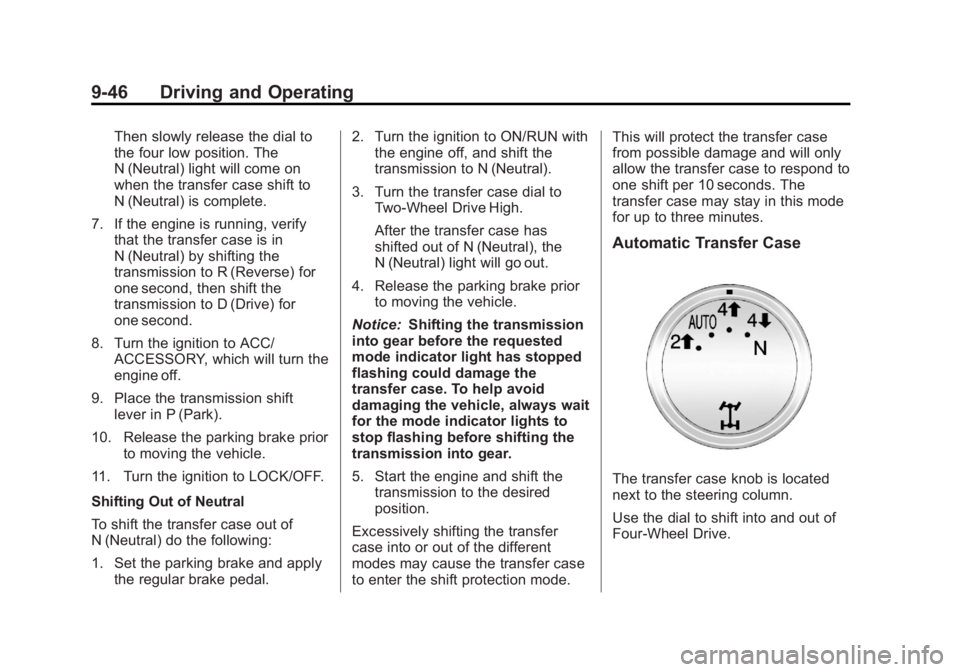
Automatic Transfer Case
The transfer case knob is located
next to the steering column.
Use the dial to shift into and out of
Four-Wheel Drive.