ABS GMC SIERRA 2013 Owner's Guide
[x] Cancel search | Manufacturer: GMC, Model Year: 2013, Model line: SIERRA, Model: GMC SIERRA 2013Pages: 534, PDF Size: 6.47 MB
Page 316 of 534
Black plate (50,1)GMC Sierra Owner Manual - 2013 - crc - 8/14/12
9-50 Driving and Operating
7. If the engine is running, makesure that the transfer case is in
N (Neutral) by shifting the
transmission to R (Reverse) for
one second, then shift the
transmission to D (Drive) for
one second.
8. Turn the ignition to ACC/ ACCESSORY, which will turn the
engine off.
9. Place the transmission shift lever in P (Park).
10. Release the parking brake prior to moving the vehicle.
11. Turn the ignition to LOCK/OFF.
Shifting Out of Neutral
To shift out of N (Neutral) do the
following:
1. Set the parking brake and apply the regular brake pedal.
2. Turn the ignition to ON/RUN with the engine off, and shift the
transmission to N (Neutral). 3. Turn the transfer case dial to
Two-Wheel Drive High,
Four-Wheel Drive High,
or AUTO.
After the transfer case has
shifted out of N (Neutral), the
N (Neutral) light will go out.
4. Release the parking brake prior to moving the vehicle.
Notice: Shifting the transmission
into gear before the requested
mode indicator light has stopped
flashing could damage the
transfer case. To help avoid
damaging the vehicle, always wait
for the mode indicator lights to
stop flashing before shifting the
transmission into gear.
5. Start the engine and shift the transmission to the desired
position.Brakes
Antilock Brake
System (ABS)
This vehicle has the Antilock Brake
System (ABS), an advanced
electronic braking system that helps
prevent a braking skid.
When the engine is started and the
vehicle begins to drive away, ABS
checks itself. A momentary motor or
clicking noise might be heard while
this test is going on, and it might
even be noticed that the brake
pedal moves a little. This is normal.
If there is a problem with ABS, this
warning light stays on. See Antilock
Brake System (ABS) Warning Light
on page 5‑24.
Page 317 of 534
Black plate (51,1)GMC Sierra Owner Manual - 2013 - crc - 8/14/12
Driving and Operating 9-51
If driving safely on a wet road and it
becomes necessary to slam on the
brakes and continue braking to
avoid a sudden obstacle, a
computer senses that the wheels
are slowing down. If one of the
wheels is about to stop rolling, the
computer will separately work the
brakes at each wheel.
ABS can change the brake pressure
to each wheel, as required, faster
than any driver could. This can help
the driver steer around the obstacle
while braking hard.
As the brakes are applied, the
computer keeps receiving updates
on wheel speed and controls
braking pressure accordingly.
Remember: ABS does not change
the time needed to get a foot up to
the brake pedal or always decrease
stopping distance. If you get too
close to the vehicle in front of you,there will not be enough time to
apply the brakes if that vehicle
suddenly slows or stops. Always
leave enough room up ahead to
stop, even with ABS.
Using ABS
Do not pump the brakes. Just hold
the brake pedal down firmly and let
ABS work. You might hear the ABS
pump or motor operating and feel
the brake pedal pulsate, but this is
normal.
Braking in Emergencies
ABS allows the driver to steer and
brake at the same time. In many
emergencies, steering can help
more than even the very best
braking.
Parking Brake
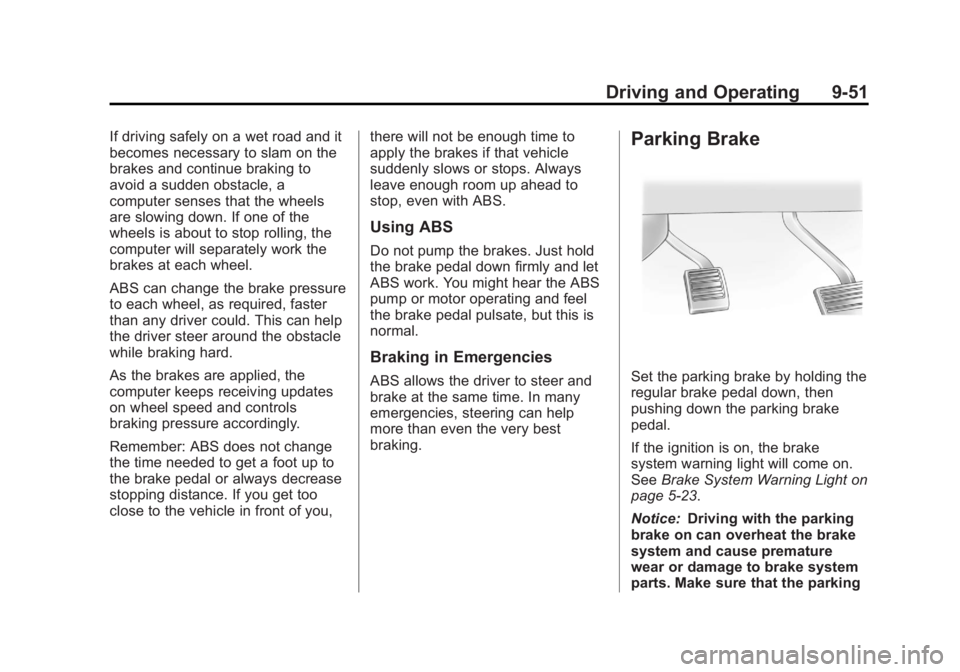
Set the parking brake by holding the
regular brake pedal down, then
pushing down the parking brake
pedal.
If the ignition is on, the brake
system warning light will come on.
See
Brake System Warning Light on
page 5‑23.
Notice: Driving with the parking
brake on can overheat the brake
system and cause premature
wear or damage to brake system
parts. Make sure that the parking
Page 318 of 534
Black plate (52,1)GMC Sierra Owner Manual - 2013 - crc - 8/14/12
9-52 Driving and Operating
brake is fully released and the
brake warning light is off before
driving.
To release the parking brake, hold
the regular brake pedal down, then
push down momentarily on the
parking brake pedal until you feel
the pedal release. Slowly pull your
foot up off the parking brake pedal.
If the parking brake is not released
when you begin to drive, the brake
system warning light will flash and a
chime will sound warning you that
the parking brake is still on.
If you are towing a trailer and are
parking on a hill, seeDriving
Characteristics and Towing Tips on
page 9‑71.
Brake Assist
If this vehicle has StabiliTrak®, it
also has a Brake Assist feature
designed to assist the driver in
stopping or decreasing vehicle
speed in emergency driving
conditions. This feature uses the
stability system hydraulic brake control module to supplement the
power brake system under
conditions where the driver has
quickly and forcefully applied the
brake pedal in an attempt to quickly
stop or slow down the vehicle. The
stability system hydraulic brake
control module increases brake
pressure at each corner of the
vehicle until the ABS activates.
Minor brake pedal pulsation or
pedal movement during this time is
normal and the driver should
continue to apply the brake pedal as
the driving situation dictates The
Brake Assist feature will
automatically disengage when the
brake pedal is released or brake
pedal pressure is quickly
decreased.Hill Start Assist (HSA)
Non‐hybrid vehicles with StabiliTrak
have a Hill Start Assist (HSA)
feature, which may be useful when
the vehicle is stopped on a grade.
This feature is designed to prevent
the vehicle from rolling, eitherforward or rearward, during vehicle
drive off. After the driver completely
stops and holds the vehicle in a
complete standstill on a grade, HSA
will be automatically activated.
During the transition period between
when the driver releases the brake
pedal and starts to accelerate to
drive off on a grade, HSA holds the
braking pressure for a maximum of
two seconds to ensure that there is
no rolling. The brakes will
automatically release when the
accelerator pedal is applied within
the two‐second window. If the
vehicle is equipped with the
Integrated Trailer Brake Control
(ITBC) system, HSA may also apply
the trailer brakes. It will not activate
if the vehicle is in a drive gear and
facing downhill or if the vehicle is
facing uphill and in R (Reverse).
There may be situations on minor
hills (less than 5% grade) with a
loaded vehicle or while pulling a
trailer where HSA will not activate.
Page 321 of 534
Black plate (55,1)GMC Sierra Owner Manual - 2013 - crc - 8/14/12
Driving and Operating 9-55
disabled. In this mode, engine
power is not reduced automatically
and the driven wheels can spin
more freely. This can cause the
brake-traction control to activate
constantly.
Notice:If the wheel(s) of one axle
is allowed to spin excessively
while the StabiliTrak
®, ABS, brake
warning lights, and any relevant
DIC messages are displayed, the
transfer case could be damaged.
The repairs would not be covered
by the vehicle warranty. Reduce
engine power and do not spin the
wheel(s) excessively while these
lights and messages are
displayed.
The TCS may activate on dry or
rough roads or under conditions
such as heavy acceleration while
turning or abrupt upshifts/downshifts
of the transmission. When this
happens, a reduction in acceleration
may be noticed, or a noise or
vibration may be heard. This is
normal. If cruise control is being used when
the system activates, the StabiliTrak
light will flash and cruise control will
automatically disengage. Cruise
control may be reengaged when
road conditions allow. See
Cruise
Control on page 9‑56.
StabiliTrak may also turn off
automatically if it determines that a
problem exists with the system.
If the problem does not clear itself
after restarting the vehicle, see your
dealer for service.
Vehicles with StabiliTrak have a
Trailer Sway Control (TSC) feature.
See Trailer Sway Control (TSC) on
page 9‑100.
Vehicles with StabiliTrak have a Hill
Start Assist (HSA) feature. See Hill
Start Assist (HSA) on page 9‑52.
Adding non-dealer accessories can
affect the vehicle's performance.
See Accessories and Modifications
on page 10‑3.
Locking Rear Axle
Vehicles with a locking rear axle can
give more traction on snow, mud,
ice, sand, or gravel. It works like a
standard axle most of the time, but
when traction is low, this feature will
allow the rear wheel with the most
traction to move the vehicle.
Page 339 of 534
Black plate (73,1)GMC Sierra Owner Manual - 2013 - crc - 8/14/12
Driving and Operating 9-73
for a few minutes before turning the
engine off. If the overheat warning
comes on, seeEngine Overheating
on page 10‑20.
Parking on Hills
{WARNING
Parking the vehicle on a hill with
the trailer attached can be
dangerous. If something goes
wrong, the rig could start to move.
People can be injured, and both
the vehicle and the trailer can be
damaged. When possible, always
park the rig on a flat surface.
If parking the rig on a hill:
1. Press the brake pedal, but do not shift into P (Park) yet. Turn
the wheels into the curb if facing
downhill or into traffic if facing
uphill.
2. Have someone place chocks under the trailer wheels. 3. When the wheel chocks are in
place, release the regular brakes
until the chocks absorb the load.
4. Reapply the brake pedal. Then apply the parking brake and shift
into P (Park).
5. Release the brake pedal.Leaving After Parking on a Hill
1. Apply and hold the brake pedal.
2. Start the engine.
3. Shift into a gear.
4. Release the parking brake.
5. Let up on the brake pedal.
6. Drive slowly until the trailer is clear of the chocks.
7. Stop and have someone pick up and store the chocks.
Maintenance when Trailer
Towing
The vehicle needs service more
often when pulling a trailer. See
Maintenance Schedule on
page 11‑3. Things that are especially important in trailer
operation are automatic
transmission fluid, engine oil, axle
lubricant, belts, cooling system, and
brake system. It is a good idea to
inspect these before and during
the trip.
Check periodically to see that all
hitch nuts and bolts are tight.
Trailer Towing
If the vehicle has a diesel engine,
see the Duramax diesel supplement
for more information.
If the vehicle is a hybrid, see the
hybrid supplement for more
information.
If the vehicle is bi-fuel, see the
bi-fuel supplement for more
information.
Do not tow a trailer during break-in.
See
New Vehicle Break-In on
page 9‑23 for more information.
Page 446 of 534
Black plate (76,1)GMC Sierra Owner Manual - 2013 - crc - 8/14/12
10-76 Vehicle Care
3. Use the wheel wrench and turn itcounterclockwise to loosen the
wheel nuts. Do not remove the
wheel nuts yet.
Front Position - 1500 Models
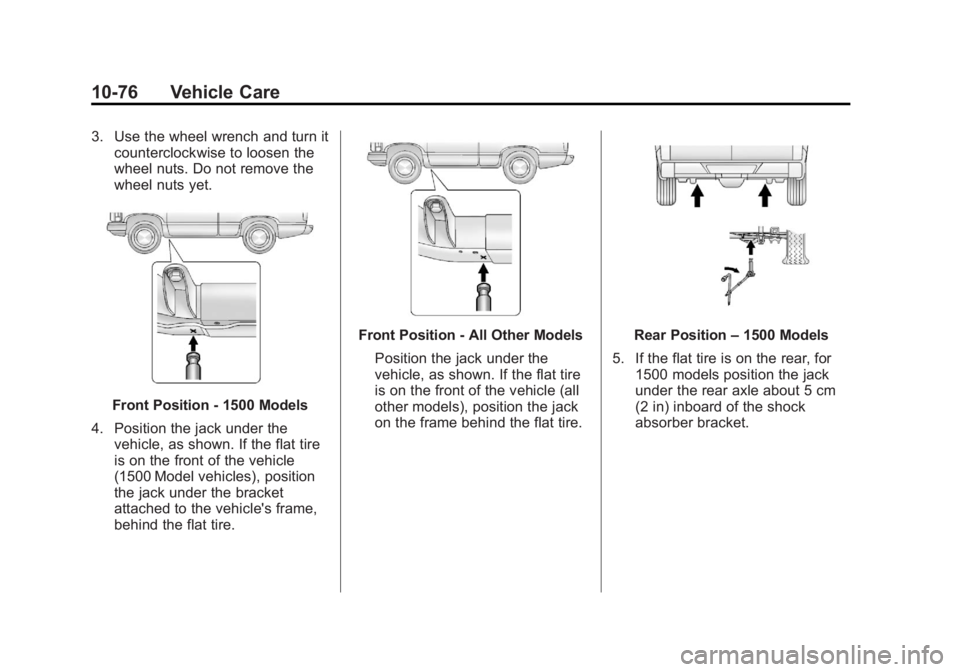
4. Position the jack under the vehicle, as shown. If the flat tire
is on the front of the vehicle
(1500 Model vehicles), position
the jack under the bracket
attached to the vehicle's frame,
behind the flat tire.
Front Position - All Other Models
Position the jack under the
vehicle, as shown. If the flat tire
is on the front of the vehicle (all
other models), position the jack
on the frame behind the flat tire.Rear Position –1500 Models
5. If the flat tire is on the rear, for 1500 models position the jack
under the rear axle about 5 cm
(2 in) inboard of the shock
absorber bracket.
Page 447 of 534
Black plate (77,1)GMC Sierra Owner Manual - 2013 - crc - 8/14/12
Vehicle Care 10-77
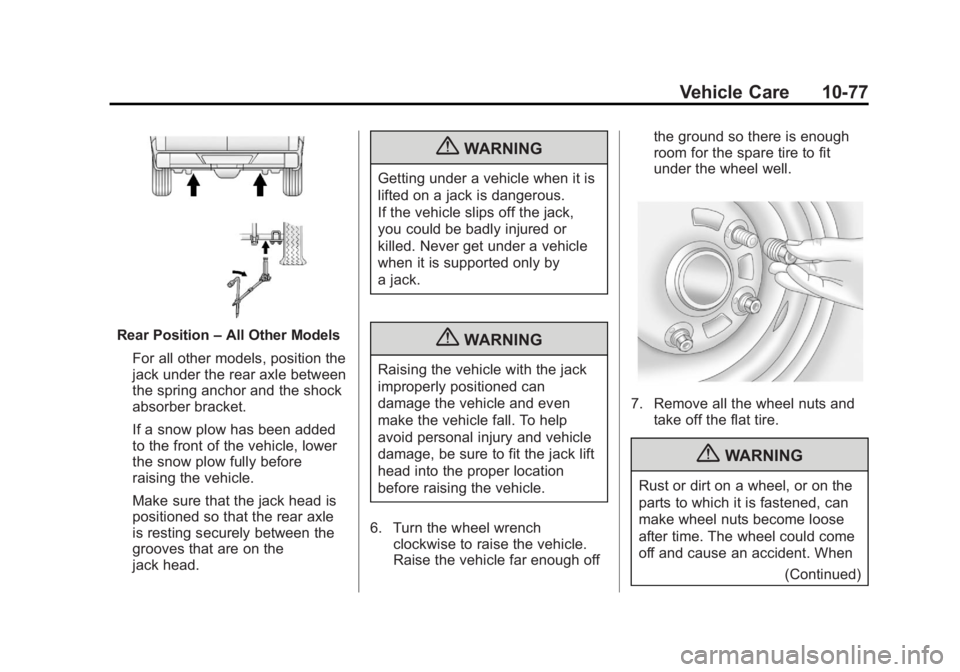
Rear Position–All Other Models
For all other models, position the
jack under the rear axle between
the spring anchor and the shock
absorber bracket.
If a snow plow has been added
to the front of the vehicle, lower
the snow plow fully before
raising the vehicle.
Make sure that the jack head is
positioned so that the rear axle
is resting securely between the
grooves that are on the
jack head.
{WARNING
Getting under a vehicle when it is
lifted on a jack is dangerous.
If the vehicle slips off the jack,
you could be badly injured or
killed. Never get under a vehicle
when it is supported only by
a jack.
{WARNING
Raising the vehicle with the jack
improperly positioned can
damage the vehicle and even
make the vehicle fall. To help
avoid personal injury and vehicle
damage, be sure to fit the jack lift
head into the proper location
before raising the vehicle.
6. Turn the wheel wrench clockwise to raise the vehicle.
Raise the vehicle far enough off the ground so there is enough
room for the spare tire to fit
under the wheel well.
7. Remove all the wheel nuts and
take off the flat tire.
{WARNING
Rust or dirt on a wheel, or on the
parts to which it is fastened, can
make wheel nuts become loose
after time. The wheel could come
off and cause an accident. When
(Continued)
Page 521 of 534
Black plate (1,1)GMC Sierra Owner Manual - 2013 - crc - 8/14/12
INDEX i-1
A
Accessories andModifications . . . . . . . . . . . . . . . . . 10-3
Accessory Power . . . . . . . . . . . . . . 9-27
Active Fuel Management
®. . . . . 9-30
Add-On Electrical Equipment . . . . . . . . . . . . . . . . . . 9-101
Adding a Snow Plow or Similar Equipment . . . . . . . . . . . 9-101
Additional Information OnStar
®. . . . . . . . . . . . . . . . . . . . . . 14-5
Adjustable Throttle and Brake Pedal . . . . . . . . . . . . . . . . . . 9-23
Adjustments Lumbar, Front Seats . . . . . . . . . . . 3-4
Air Cleaner/Filter, Engine . . . . . 10-15
Air Vents . . . . . . . . . . . . . . . . . . . . . . 8-10
Airbag System
Check . . . . . . . . . . . . . . . . . . . . . . . . 3-37
How Does an AirbagRestrain? . . . . . . . . . . . . . . . . . . . 3-26
Passenger Sensing System . . . . . . . . . . . . . . . . . . . . . . 3-31
What Makes an Airbag Inflate? . . . . . . . . . . . . . . . . . . . . . . 3-26 Airbag System (cont'd)
What Will You See after an
Airbag Inflates? . . . . . . . . . . . . . 3-26
When Should an Airbag
Inflate? . . . . . . . . . . . . . . . . . . . . . . 3-24
Where Are the Airbags? . . . . . . 3-22
Airbags Adding Equipment to theVehicle . . . . . . . . . . . . . . . . . . . . . . 3-35
Light On-Off . . . . . . . . . . . . . . . . . . 5-18
On-Off Light . . . . . . . . . . . . . . . . . . 5-18
On-Off Switch . . . . . . . . . . . . . . . . 3-28
Passenger Status Indicator . . . 5-19
Readiness Light . . . . . . . . . . . . . . 5-17
Servicing Airbag-Equipped Vehicles . . . . . . . . . . . . . . . . . . . . . 3-35
System Check . . . . . . . . . . . . . . . . 3-20
Alarm
Vehicle Security . . . . . . . . . . . . . . 2-10
AM-FM Radio . . . . . . . . . . . . . . . . . . 7-10
Antenna Satellite Radio . . . . . . . . . . . . . . . . 7-16
Antilock Brake
System (ABS) . . . . . . . . . . . . . . . . 9-50
Warning Light . . . . . . . . . . . . . . . . . 5-24 Appearance Care
Exterior . . . . . . . . . . . . . . . . . . . . . 10-91
Interior . . . . . . . . . . . . . . . . . . . . . . 10-94
Armrest Storage . . . . . . . . . . . . . . . . 4-1
Ashtrays . . . . . . . . . . . . . . . . . . . . . . . 5-10
Assistance Program, Roadside . . . . . . . . . . . . . . 13-7, 13-11
Audio Players . . . . . . . . . . . . . . . . . 7-17 CD . . . . . . . . . . . . . . . . . . . . . . . . . . . 7-17
CD/DVD . . . . . . . . . . . . . . . . . . . . . . 7-23
Audio System
Fixed Mast Antenna . . . . . . . . . . 7-16
Radio Reception . . . . . . . . . . . . . . 7-15
Rear Seat (RSA) . . . . . . . . . . . . . 7-47
Theft-Deterrent Feature . . . . . . . . 7-2
Automatic
Door Locks . . . . . . . . . . . . . . . . . . . . 2-7
Headlamp System . . . . . . . . . . . . . 6-3
Transmission . . . . . . . . . . . . . . . . . 9-32
Transmission Fluid . . 10-10, 10-12
Automatic Transmission
Manual Mode . . . . . . . . . . . . . . . . . 9-36
Shift Lock ControlFunction Check . . . . . . . . . . . 10-32
Page 527 of 534
Black plate (7,1)GMC Sierra Owner Manual - 2013 - crc - 8/14/12
INDEX i-7
Lamps (cont'd)Exterior Lamps Off
Reminder . . . . . . . . . . . . . . . . . . . . 6-2
License Plate . . . . . . . . . . . . . . . 10-37
Malfunction Indicator . . . . . . . . . 5-21
Messages . . . . . . . . . . . . . . . . . . . . 5-41
Pick-up Box Identification
and Fender Marker . . . . . . . . 10-35
Reading . . . . . . . . . . . . . . . . . . . . . . . 6-8
Taillamps . . . . . . . . . . . . . . . . . . . 10-36
Lap Belt . . . . . . . . . . . . . . . . . . . . . . . 3-18
Lap-Shoulder Belt . . . . . . . . . . . . . 3-13
LATCH System Replacing Parts after a
Crash . . . . . . . . . . . . . . . . . . . . . . . 3-54
LATCH, Lower Anchors and Tethers for Children . . . . . . . . . . 3-45
Lighter, Cigarette . . . . . . . . . . . . . . . 5-9
Lighting
Entry . . . . . . . . . . . . . . . . . . . . . . . . . . 6-8
Exit . . . . . . . . . . . . . . . . . . . . . . . . . . . . 6-8
Illumination Control . . . . . . . . . . . . 6-7
Lights
Airbag On-Off . . . . . . . . . . . . . . . . . 5-18
Airbag Readiness . . . . . . . . . . . . . 5-17
Antilock Brake System(ABS) Warning . . . . . . . . . . . . . . 5-24 Lights (cont'd)
Brake System Warning . . . . . . . 5-23
Charging System . . . . . . . . . . . . . 5-20
Cruise Control . . . . . . . . . . . . . . . . 5-28
Engine Oil Pressure . . . . . . . . . . 5-26
Flash-to-Pass . . . . . . . . . . . . . . . . . . 6-3
Four-Wheel-Drive . . . . . . . . . . . . . 5-25
Front Fog Lamp . . . . . . . . . . . . . . 5-28
High-Beam On . . . . . . . . . . . . . . . . 5-28
High/Low Beam Changer . . . . . . 6-2
Low Fuel Warning . . . . . . . . . . . . 5-27
Safety Belt Reminders . . . . . . . . 5-16
Security . . . . . . . . . . . . . . . . . . . . . . 5-27
StabiliTrak
®OFF . . . . . . . . . . . . . 5-25
Tire Pressure . . . . . . . . . . . . . . . . . 5-26
Tow/Haul Mode . . . . . . . . . . . . . . . 5-25
Traction Control System (TCS)/StabiliTrak
®. . . . . . . . . . 5-26
Locking Rear Axle . . . . . . . . . . . . . 9-55
Locks Automatic Door . . . . . . . . . . . . . . . . 2-7
Delayed Locking . . . . . . . . . . . . . . . 2-7
Door . . . . . . . . . . . . . . . . . . . . . . . . . . . 2-6
Lockout Protection . . . . . . . . . . . . . 2-8
Power Door . . . . . . . . . . . . . . . . . . . . 2-7
Safety . . . . . . . . . . . . . . . . . . . . . . . . . 2-8
Loss of Control . . . . . . . . . . . . . . . . . 9-5 Low Fuel Warning Light . . . . . . . . 5-27
Lower Anchors and Tethers
for Children (LATCH
System) . . . . . . . . . . . . . . . . . . . . . . 3-45
Lumbar Adjustment . . . . . . . . . . . . . 3-4 Front Seats . . . . . . . . . . . . . . . . . . . . 3-4
M
MaintenanceRecords . . . . . . . . . . . . . . . . . . . . .11-16
Maintenance Schedule Recommended Fluidsand Lubricants . . . . . . . . . . . . .11-12
Transfer Case . . . . . . . . . . . . . . . . 9-38
Malfunction Indicator Lamp . . . . 5-21
Manual Mirrors . . . . . . . . . . . . . . . . 2-13
Manual Mode . . . . . . . . . . . . . . . . . . 9-36
Manual Windows . . . . . . . . . . . . . . 2-18
Memory Features . . . . . . . . . . . . . . 1-12
Memory Seats . . . . . . . . . . . . . . . . . . 3-6
Messages Airbag System . . . . . . . . . . . . . . . . 5-43
Battery Voltage andCharging . . . . . . . . . . . . . . . . . . . . 5-37
Brake System . . . . . . . . . . . . . . . . 5-38
Door Ajar . . . . . . . . . . . . . . . . . . . . . 5-38