engine GMC SIERRA 2013 Manual PDF
[x] Cancel search | Manufacturer: GMC, Model Year: 2013, Model line: SIERRA, Model: GMC SIERRA 2013Pages: 534, PDF Size: 6.47 MB
Page 297 of 534
Black plate (31,1)GMC Sierra Owner Manual - 2013 - crc - 8/14/12
Driving and Operating 9-31
When less power is required, such
as cruising at a constant vehicle
speed, the system will operate in
the half cylinder mode, allowing the
vehicle to achieve better fuel
economy. When greater power
demands are required, such as
accelerating from a stop, passing,
or merging onto a freeway, the
system will maintain full-cylinder
operation.
If the vehicle has an Active Fuel
Management indicator, seeDriver
Information Center (DIC) on
page 5‑28 for more information on
using this display.Engine Exhaust
{WARNING
Engine exhaust contains carbon
monoxide (CO) which cannot be
seen or smelled. Exposure to CO
can cause unconsciousness and
even death.
Exhaust may enter the vehicle if:
.The vehicle idles in areas
with poor ventilation (parking
garages, tunnels, deep snow
that may block underbody
airflow or tail pipes).
.The exhaust smells or
sounds strange or different.
.The exhaust system leaks
due to corrosion or damage.
.The vehicle exhaust system
has been modified, damaged,
or improperly repaired.
(Continued)
WARNING (Continued)
.There are holes or openings
in the vehicle body from
damage or aftermarket
modifications that are not
completely sealed.
If unusual fumes are detected or
if it is suspected that exhaust is
coming into the vehicle:
.Drive it only with the windows
completely down.
.Have the vehicle repaired
immediately.
Never park the vehicle with the
engine running in an enclosed
area such as a garage or a
building that has no fresh air
ventilation.
Page 298 of 534
Black plate (32,1)GMC Sierra Owner Manual - 2013 - crc - 8/14/12
9-32 Driving and Operating
Running the Vehicle
While Parked
It is better not to park with the
engine running.
If the vehicle is left with the engine
running, follow the proper steps to
be sure the vehicle will not move.
SeeShifting Into Park on page 9‑28
and Engine Exhaust on page 9‑31.
If parking on a hill and pulling a
trailer, see Driving Characteristics
and Towing Tips on page 9‑71.
Automatic
Transmission
If the vehicle is a hybrid, see the
hybrid supplement for more
information.
Vehicles with an automatic
transmission have an electronic shift
position indicator within the
instrument panel cluster. This
display comes on when the ignition
key is turned to the ON/RUN
position.
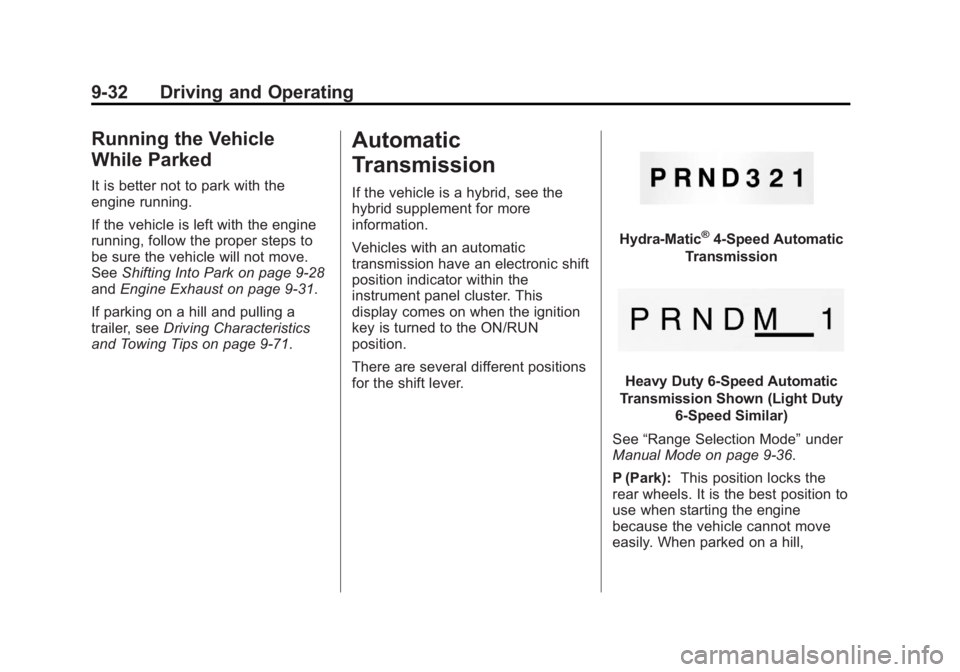
There are several different positions
for the shift lever.
Hydra-Matic®4-Speed Automatic
Transmission
Heavy Duty 6-Speed Automatic
Transmission Shown (Light Duty 6-Speed Similar)
See “Range Selection Mode” under
Manual Mode on page 9‑36.
P (Park): This position locks the
rear wheels. It is the best position to
use when starting the engine
because the vehicle cannot move
easily. When parked on a hill,
Page 299 of 534
Black plate (33,1)GMC Sierra Owner Manual - 2013 - crc - 8/14/12
Driving and Operating 9-33
especially when the vehicle has a
heavy load, you might notice an
increase in the effort to shift out of
P (Park). See“Torque Lock” under
Shifting Into Park on page 9‑28 for
more information.
{WARNING
It is dangerous to get out of the
vehicle if the shift lever is not fully
in P (Park) with the parking brake
firmly set. The vehicle can roll.
Do not leave the vehicle when the
engine is running. If you have left
the engine running, the vehicle
can move suddenly. You or others
could be injured. To be sure the
vehicle will not move, even when
you are on fairly level ground,
always set the parking brake and
move the shift lever to P (Park).
See Shifting Into Park on
page 9‑28 andDriving
Characteristics and Towing Tips
on page 9‑71.
{WARNING
If you have Four-Wheel Drive, the
vehicle will be free to roll —even
if the shift lever is in P (Park) —if
the transfer case is in Neutral. So,
be sure the transfer case is in a
drive gear, Two-Wheel Drive High
or Four-Wheel Drive High or
Four-Wheel Drive Low —not in
Neutral. See Shifting Into Park on
page 9‑28.
R (Reverse): Use this gear to
back up.
Notice: Shifting to R (Reverse)
while the vehicle is moving
forward could damage the
transmission. The repairs would
not be covered by the vehicle
warranty. Shift to R (Reverse) only
after the vehicle is stopped.
To rock the vehicle back and forth to
get out of snow, ice, or sand without
damaging the transmission, see If
the Vehicle Is Stuck on page 9‑14. N (Neutral):
In this position, the
engine does not connect with the
wheels. To restart when you are
already moving, use N (Neutral)
only. Also, use N (Neutral) when the
vehicle is being towed.
{WARNING
Shifting into a drive gear while the
engine is running at high speed is
dangerous. Unless your foot is
firmly on the brake pedal, the
vehicle could move very rapidly.
You could lose control and hit
people or objects. Do not shift
into a drive gear while the engine
is running at high speed.
Notice: Shifting out of P (Park) or
N (Neutral) with the engine
running at high speed may
damage the transmission. The
repairs would not be covered by
the vehicle warranty. Be sure the
engine is not running at high
speed when shifting the vehicle.
Page 300 of 534
Black plate (34,1)GMC Sierra Owner Manual - 2013 - crc - 8/14/12
9-34 Driving and Operating
D (Drive):This position is for
normal driving. It provides the best
fuel economy. If you need more
power for passing, and you are:
.Going less than about 55 km/h
(35 mph), push the accelerator
pedal about halfway down.
.Going about 55 km/h (35 mph) or
more, push the accelerator all
the way down.
By doing this, the vehicle shifts
down to the next gear and has
more power.
D (Drive) can be used when towing
a trailer, carrying a heavy load,
driving on steep hills, or for off-road
driving. You might want to shift the
transmission to a lower gear
selection if the transmission shifts
too often.
Downshifting the transmission in
slippery road conditions could result
in skidding. See “Skidding”under
Loss of Control on page 9‑5. The vehicle has a shift stabilization
feature that adjusts the transmission
shifting to the current driving
conditions in order to reduce rapid
upshifts and downshifts. This shift
stabilization feature is designed to
determine, before making an
upshift, if the engine is able to
maintain vehicle speed by analyzing
things such as vehicle speed,
throttle position, and vehicle load.
If the shift stabilization feature
determines that a current vehicle
speed cannot be maintained, the
transmission does not upshift and
instead holds the current gear.
In some cases, this could appear to
be a delayed shift, however the
transmission is operating normally.
The transmission uses adaptive
shift controls. Adaptive shift controls
continually compares key shift
parameters to pre-programmed
ideal shifts stored in the
transmissions computer. The
transmission constantly makes
adjustments to improve vehicle
performance according to how thevehicle is being used, such as with
a heavy load or when temperature
changes. During this adaptive shift
control process, shifting might feel
different as the transmission
determines the best settings.
When temperatures are very cold,
the Allison Transmission and
Hydra-Matic 6-Speed transmission's
gear shifting could be delayed
providing more stable shifts until the
engine warms up. Shifts could be
more noticeable with a cold
transmission. This difference in
shifting is normal.
M (Manual Mode):
This position is
available on vehicles with the
Allison Transmission or Hydra-Matic
6-Speed transmission. It lets drivers
select the range of gears
appropriate for current driving
conditions. If the vehicle has this
feature, see “Range Selection
Mode” underManual Mode on
page 9‑36.
Page 301 of 534
Black plate (35,1)GMC Sierra Owner Manual - 2013 - crc - 8/14/12
Driving and Operating 9-35
3 (Third):This position is also used
for normal driving. It reduces vehicle
speed more than D (Drive) without
using the brakes. You might choose
3 (Third) instead of D (Drive) when
driving on hilly, winding roads, when
towing a trailer, so there is less
shifting between gears and when
going down a steep hill.
2 (Second): This position reduces
vehicle speed even more than
3 (Third) without using the brakes.
You can use 2 (Second) on hills.
It can help control vehicle speed as
you go down steep mountain roads,
but then you would also want to use
the brakes off and on.
If you manually select 2 (Second) in
an automatic transmission, the
transmission will start in second
gear. You can use this feature for
reducing the speed of the rear
wheels when you are trying to start
the vehicle from a stop on slippery
road surfaces. 1 (First):
For the Hydra-Matic
4-Speed transmission this position
reduces vehicle speed even more
than 2 (Second) without using the
brakes. You can use it on very steep
hills, or in deep snow or mud. If the
shift lever is put in 1 (First) while the
vehicle is moving forward, the
transmission does not shift into first
gear until the vehicle is going slowly
enough.
For an Allison Transmission or
Hydra-Matic 6-Speed transmission,
this position reduces vehicle speed
without using the brakes. You can
use it for major/severe downgrades
and off-road driving where the
vehicle would otherwise accelerate
due to steepness of grade. When
you shift to 1 (First) it provides the
lowest gear appropriate to current
road speed and continues to
downshift as the vehicle slows,
eventually downshifting to
1 (First) gear.
Notice: Spinning the tires or
holding the vehicle in one place
on a hill using only the accelerator pedal may damage
the transmission. The repair will
not be covered by the vehicle
warranty. If you are stuck, do not
spin the tires. When stopping on
a hill, use the brakes to hold the
vehicle in place.
Normal Mode Grade Braking
Vehicles with a gasoline engine and
6-Speed automatic transmission
have Normal Mode Grade Braking
that is enabled when the vehicle is
started, but is not enabled in Range
Selection Mode. It assists in
maintaining desired vehicle speeds
when driving on downhill grades by
using the engine and transmission
to slow the vehicle. The first time
the system engages for each
ignition key cycle, a DIC message
will be displayed. See
Transmission
Messages on page 5‑44.
To disable or enable Normal Mode
Grade Braking within the current
ignition key cycle, press and hold
the Tow/Haul button for
Page 303 of 534
Black plate (37,1)GMC Sierra Owner Manual - 2013 - crc - 8/14/12
Driving and Operating 9-37
Low Traction Mode
If the vehicle has the Allison
Transmission, a 4-Speed automatic
transmission, or the Hydra-Matic
6-Speed Automatic Transmission
with the 6.0L engine, it has a Low
Traction Mode that assists in vehicle
acceleration when road conditions
are slippery, such as with ice or
snow. While the vehicle is at a stop,
select the second gear range using
Range Selection Mode. This will
limit torque to the wheels helping to
prevent the tires from spinning.
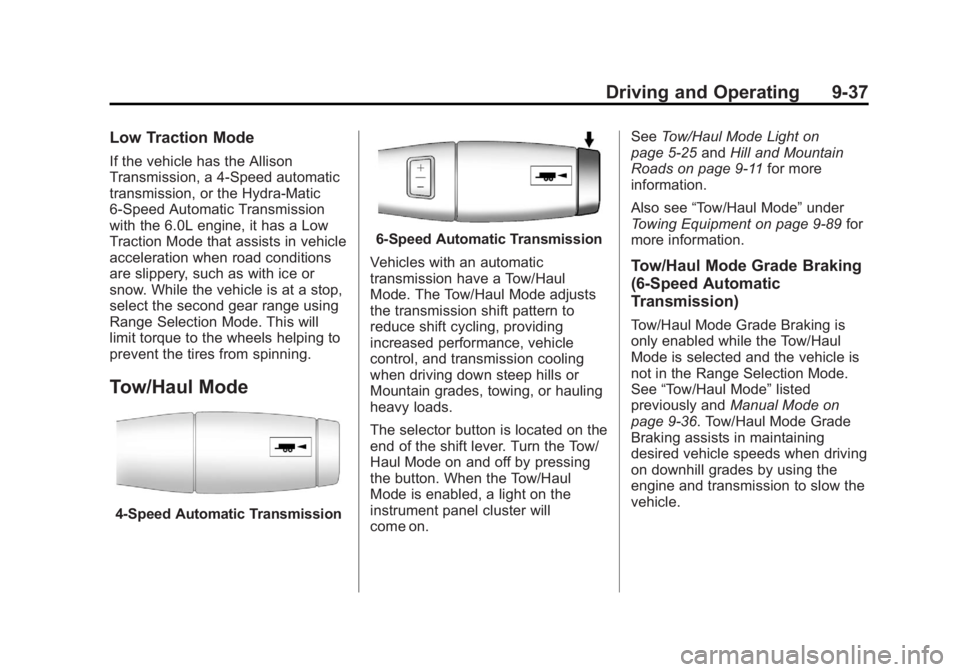
Tow/Haul Mode
4-Speed Automatic Transmission
6-Speed Automatic Transmission
Vehicles with an automatic
transmission have a Tow/Haul
Mode. The Tow/Haul Mode adjusts
the transmission shift pattern to
reduce shift cycling, providing
increased performance, vehicle
control, and transmission cooling
when driving down steep hills or
Mountain grades, towing, or hauling
heavy loads.
The selector button is located on the
end of the shift lever. Turn the Tow/
Haul Mode on and off by pressing
the button. When the Tow/Haul
Mode is enabled, a light on the
instrument panel cluster will
come on. See
Tow/Haul Mode Light on
page 5‑25 andHill and Mountain
Roads on page 9‑11 for more
information.
Also see “Tow/Haul Mode” under
Towing Equipment on page 9‑89 for
more information.
Tow/Haul Mode Grade Braking
(6-Speed Automatic
Transmission)
Tow/Haul Mode Grade Braking is
only enabled while the Tow/Haul
Mode is selected and the vehicle is
not in the Range Selection Mode.
See “Tow/Haul Mode” listed
previously and Manual Mode on
page 9‑36. Tow/Haul Mode Grade
Braking assists in maintaining
desired vehicle speeds when driving
on downhill grades by using the
engine and transmission to slow the
vehicle.
Page 304 of 534
Black plate (38,1)GMC Sierra Owner Manual - 2013 - crc - 8/14/12
9-38 Driving and Operating
On vehicles with a gasoline engine,
to disable or enable Tow/Haul
Grade Braking within the current
ignition key cycle, press and hold
the Tow/Haul button for
three seconds. A DIC message will
be displayed. SeeTransmission
Messages on page 5‑44.
On vehicles with a diesel engine.
Tow/Haul Mode Grade Braking can
be enabled or disabled by pressing
the Tow/Haul Mode button. Use the
exhaust brake and Tow/Haul Mode
for maximum grade braking.
See Towing Equipment on
page 9‑89 for more information.
For other forms of grade braking,
see Automatic Transmission on
page 9‑32 andCruise Control on
page 9‑56.Drive Systems
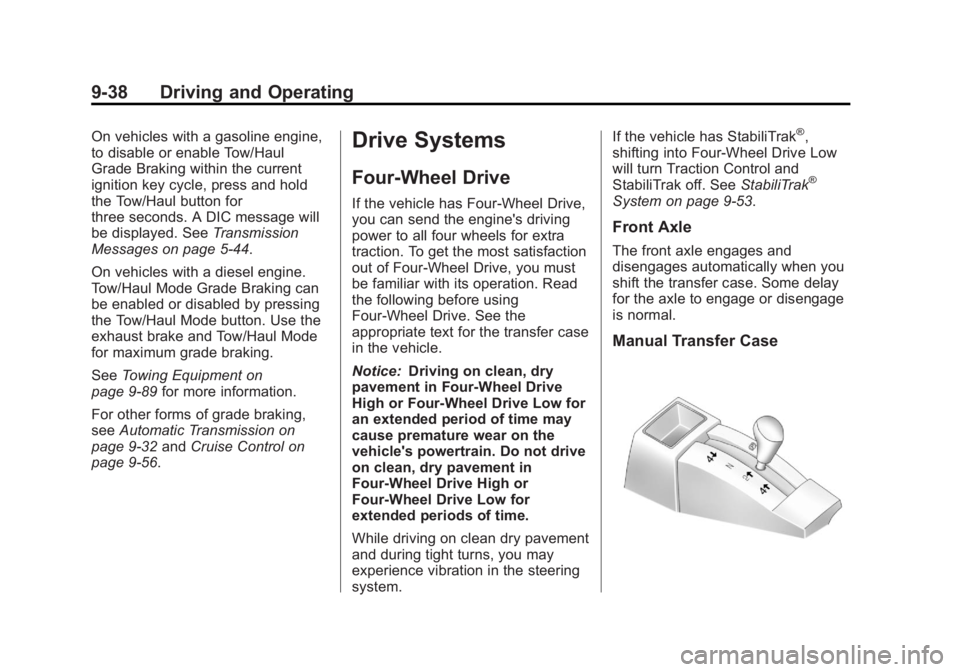
Four-Wheel Drive
If the vehicle has Four-Wheel Drive,
you can send the engine's driving
power to all four wheels for extra
traction. To get the most satisfaction
out of Four-Wheel Drive, you must
be familiar with its operation. Read
the following before using
Four-Wheel Drive. See the
appropriate text for the transfer case
in the vehicle.
Notice: Driving on clean, dry
pavement in Four-Wheel Drive
High or Four-Wheel Drive Low for
an extended period of time may
cause premature wear on the
vehicle's powertrain. Do not drive
on clean, dry pavement in
Four-Wheel Drive High or
Four-Wheel Drive Low for
extended periods of time.
While driving on clean dry pavement
and during tight turns, you may
experience vibration in the steering
system. If the vehicle has StabiliTrak
®,
shifting into Four-Wheel Drive Low
will turn Traction Control and
StabiliTrak off. See StabiliTrak
®
System on page 9‑53.
Front Axle
The front axle engages and
disengages automatically when you
shift the transfer case. Some delay
for the axle to engage or disengage
is normal.
Manual Transfer Case
Page 307 of 534
Black plate (41,1)GMC Sierra Owner Manual - 2013 - crc - 8/14/12
Driving and Operating 9-41
.Avoid driving in Four-Wheel
Drive on clean, dry pavement.
It may cause your tires to wear
faster, make the transfer case
harder to shift, and run noisier.
.If the transfer case shifter is in
the N (Neutral) position and you
have difficulty reaching the
selected transfer case mode,
with the engine running, shift the
transmission momentarily to
D (Drive) and then back to
N (Neutral). This will realign the
gear teeth in the transfer case
and allow you to complete the
shift.
Shifting from Two-Wheel Drive
High to Four-Wheel Drive High
.Shifts between Two-Wheel Drive
High and Four-Wheel Drive High
can be made at any vehicle
speed.
.Shift the transfer case lever in
one continuous motion into
either the Four-Wheel Drive High
or Two-Wheel Drive High
position.
.Shifting from Two-Wheel Drive
High to Four-Wheel Drive High
while the vehicle is in motion
may require that moderate force
be applied to the shift lever for a
few seconds before Four-Wheel
Drive High can be engaged,
especially in cold weather.
.In extremely cold weather, it may
be necessary to slow or stop the
vehicle to shift into Four-Wheel
Drive High.
.While in Four-Wheel Drive High,
the vehicle can be driven at any
posted legal speed limit.
Shifting In or Out of Four-Wheel
Drive Low
Notice: Shifting the transfer case
into Four-Wheel-Drive Low while
moving at speeds faster than
5 km/h (3 mph) may cause
premature wear to the transfer case, and may cause the gears to
grind. To avoid causing
premature wear, and grinding the
gears, do not shift the transfer
case into Four-Wheel-Drive Low
while the vehicle is moving faster
than 5 km/h (3 mph).
.Shifting into Four-Wheel Drive
Low should be done, if possible,
with the vehicle at a slight roll,
5 km/h (3 mph) or less.
.Shift the transmission into
N (Neutral).
{WARNING
Shifting the transfer case to
N (Neutral) can cause the vehicle
to roll even if the transmission is
in P (Park). You or someone else
could be seriously injured. Be
sure to set the parking brake
before placing the transfer case in
N (Neutral). See
Parking Brake on
page 9‑51.
Page 308 of 534
Black plate (42,1)GMC Sierra Owner Manual - 2013 - crc - 8/14/12
9-42 Driving and Operating
.Shifting into Four-Wheel Drive
Low with the vehicle at a stop
may be more difficult. You may
be unable to complete the shift
to Four-Wheel Drive Low, and
the transfer case will end up in
N (Neutral). This is normal, and
is a function of the gear teeth
aligning in the transfer case.
When this happens, make sure
the engine is on, shift the
transmission momentarily to
D (Drive) and back to
N (Neutral), and then complete
the transfer case shift.
.Shift the transfer case shift lever
in one continuous motion into
the Four-Wheel Drive Low
position.
.When in Four-Wheel Drive Low
do not drive faster than
72 km/h (45 mph). This will
reduce wear and extend the life
of your transfer case.Shifting In or Out of Neutral
1. With the vehicle running and the
engine at an idle, set the parking
brake.
2. Place the transmission into N (Neutral).
Shift the transfer case in one
continuous motion into or out of the
N (Neutral) position.
Electronic Transfer Case
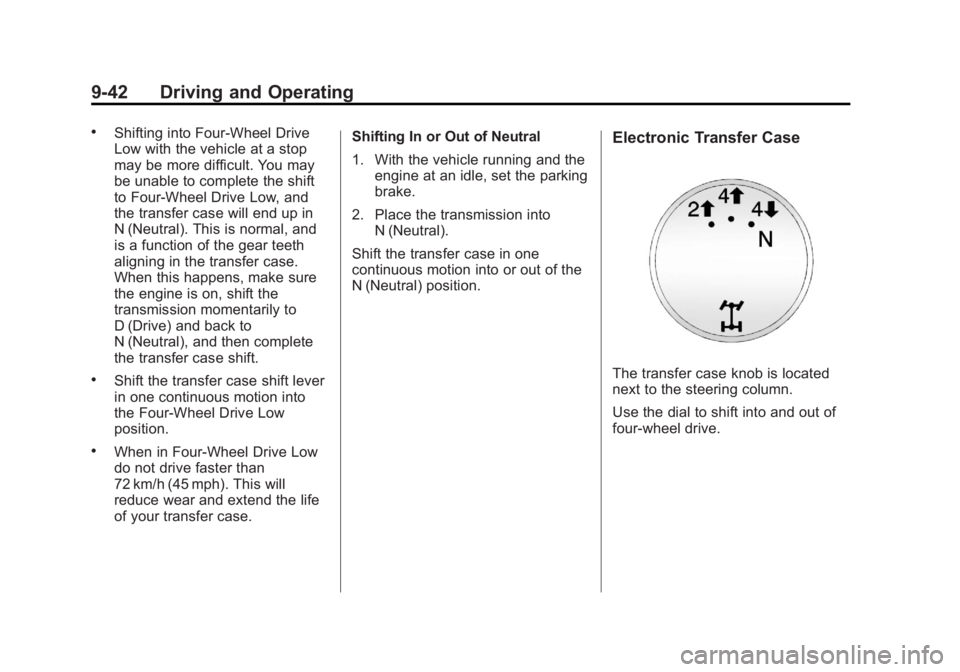
The transfer case knob is located
next to the steering column.
Use the dial to shift into and out of
four-wheel drive.
Page 310 of 534
Black plate (44,1)GMC Sierra Owner Manual - 2013 - crc - 8/14/12
9-44 Driving and Operating
{WARNING
Shifting the transfer case to
N (Neutral) can cause the vehicle
to roll even if the transmission is
in P (Park). You or someone else
could be seriously injured. Be
sure to set the parking brake
before placing the transfer case in
N (Neutral). SeeParking Brake on
page 9‑51.
N (Neutral): Shift the vehicle's
transfer case to N (Neutral) only
when towing the vehicle. See
Recreational Vehicle Towing on
page 10‑87 orTowing the Vehicle
on page 10‑87 for more information.
If the SERVICE 4 WHEEL DRIVE
message stays on, you should take
the vehicle to your dealer for
service. See “SERVICE 4 WHEEL
DRIVE” underTransmission
Messages on page 5‑44. Shifting Into Two-Wheel
Drive High
Turn the knob to the Two-Wheel
Drive High position. This can be
done at any speed, except when
shifting from Four-Wheel Drive Low.
See
“Shifting Out of Four-Wheel
Drive Low” for more information.
Shifting Into Four-Wheel
Drive Low
When Four-Wheel Drive Low is
engaged, vehicle speed should be
kept below 72 km/h (45 mph).
Extended high-speed operation in
Four-Wheel Drive Low may damage
or shorten the life of the drivetrain.
To shift to the Four-Wheel Drive
Low position, the ignition must be in
ON/RUN and the vehicle must be
stopped or moving less than 5 km/h
(3 mph) with the transmission in
N (Neutral). The preferred method
for shifting into Four-Wheel Drive
Low is to have the vehicle moving
1.6 to 3.2 km/h (1 to 2 mph). Turn the
knob to the Four-Wheel Drive Low
position. You must wait for the Four-Wheel Drive Low indicator light
to stop flashing and remain on
before shifting the transmission
in gear.
Notice:
Shifting the transmission
into gear before the requested
mode indicator light has stopped
flashing could damage the
transfer case. To help avoid
damaging the vehicle, always wait
for the mode indicator lights to
stop flashing before shifting the
transmission into gear.
It is typical for the vehicle to exhibit
significant engagement noise and
bump when shifting between
Four-Wheel Drive Low and
Four-Wheel Drive High ranges or
from transfer case N (Neutral) with
the engine running.
If the knob is turned to the
Four-Wheel Drive Low position
when the vehicle is in gear and/or
moving more than 5 km/h (3 mph),
the Four-Wheel Drive Low indicator
light will flash for 30 seconds and
not complete the shift. After