ignition GMC SIERRA 2019 Owners Manual
[x] Cancel search | Manufacturer: GMC, Model Year: 2019, Model line: SIERRA, Model: GMC SIERRA 2019Pages: 477, PDF Size: 8.7 MB
Page 392 of 477
GMC Sierra/Sierra Denali Owner Manual (GMNA-Localizing-U.S./Canada/
Mexico-1500-11698638) - 2019 - CRC - 5/14/19
Vehicle Care 391
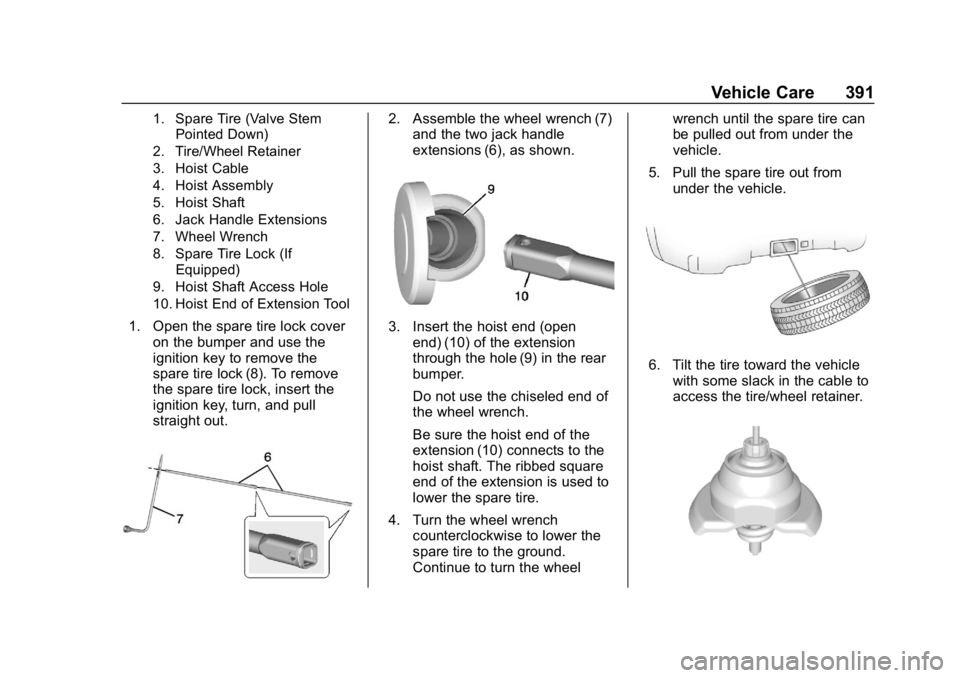
1. Spare Tire (Valve StemPointed Down)
2. Tire/Wheel Retainer
3. Hoist Cable
4. Hoist Assembly
5. Hoist Shaft
6. Jack Handle Extensions
7. Wheel Wrench
8. Spare Tire Lock (If Equipped)
9. Hoist Shaft Access Hole
10. Hoist End of Extension Tool
1. Open the spare tire lock cover on the bumper and use the
ignition key to remove the
spare tire lock (8). To remove
the spare tire lock, insert the
ignition key, turn, and pull
straight out.
2. Assemble the wheel wrench (7)and the two jack handle
extensions (6), as shown.
3. Insert the hoist end (open
end) (10) of the extension
through the hole (9) in the rear
bumper.
Do not use the chiseled end of
the wheel wrench.
Be sure the hoist end of the
extension (10) connects to the
hoist shaft. The ribbed square
end of the extension is used to
lower the spare tire.
4. Turn the wheel wrench counterclockwise to lower the
spare tire to the ground.
Continue to turn the wheel wrench until the spare tire can
be pulled out from under the
vehicle.
5. Pull the spare tire out from under the vehicle.
6. Tilt the tire toward the vehiclewith some slack in the cable to
access the tire/wheel retainer.
Page 403 of 477
GMC Sierra/Sierra Denali Owner Manual (GMNA-Localizing-U.S./Canada/
Mexico-1500-11698638) - 2019 - CRC - 5/14/19
402 Vehicle Care
4. Turn the ignition off on bothvehicles. Unplug unnecessary
accessories plugged into the
accessory power outlets. Turn
off the radio and all the lamps
that are not needed. This will
avoid sparks and help save
both batteries. And it could
save the radio!
5. Open the hood on the other vehicle and locate the
positive (+) and negative (−)
terminal locations on that
vehicle.
The positive (+) terminal is
under a red plastic cover at the
positive battery post. To
uncover the positive (+)
terminal, open the red plastic
cover.
For more information on the
location of the remote
positive (+) and remote
negative (−) terminals, see
Engine Compartment Overview
0321.{Warning
An electric fan can start up even
when the engine is not running
and can injure you. Keep hands,
clothing, and tools away from any
underhood electric fan.
{Warning
Using a match near a battery can
cause battery gas to explode.
People have been hurt doing this,
and some have been blinded.
Use a flashlight if you need more
light.
Battery fluid contains acid that
can burn you. Do not get it on
you. If you accidentally get it in
your eyes or on your skin, flush
the place with water and get
medical help immediately.
{Warning
Fans or other moving engine
parts can injure you badly. Keep
your hands away from moving
parts once the engine is running.
6. Check that the jumper cables do not have loose or missing
insulation. If they do, you could
get a shock. The vehicles
could be damaged too.
Before you connect the cables,
here are some basic things you
should know. Positive (+) will
go to positive (+) or to a remote
positive (+) terminal if the
vehicle has one. Negative (−)
will go to a heavy, unpainted
metal engine part or to a
remote negative (−) terminal if
the vehicle has one.
Do not connect positive (+) to
negative (−) or you will get a
short that would damage the
battery and maybe other parts
too. And do not connect the
negative (−) cable to the
Page 407 of 477
GMC Sierra/Sierra Denali Owner Manual (GMNA-Localizing-U.S./Canada/
Mexico-1500-11698638) - 2019 - CRC - 5/14/19
406 Vehicle Care
5. With the engine running,release the parking brake and
verify that the transfer case is
in N (Neutral) by shifting the
transmission to D (Drive) and
then to R (Reverse). There
should be no movement while
shifting the transmission.
6. Shift the transmission to D (Drive).
7. If equipped with an ignition key, turn the ignition to ACC/
ACCESSORY. If equipped with
Keyless Access, turn the
engine off. Disregard the Shift
to P (Park) DIC message. See
Ignition Positions (Key Access)
0220 or
Ignition Positions (Keyless
Access) 0222.
{Warning
To avoid death, serious injury,
or property damage, before
dinghy towing the vehicle, always
disconnect and secure the
(Continued)
Warning (Continued)
negative battery cable and cover
the negative battery post and
cable with a non-conductive
material. If the battery is left
connected or the battery cable
contacts the post, the Electric
Parking Brake may activate
during towing, which could cause
a crash.
8. Disconnect the negative (–) battery cable. See “Negative
Battery Cable Disconnection”
in Battery - North America
0 342.
9. Shift the transmission to P (Park).
Caution
If the steering column is locked,
vehicle damage may occur. 10. Move the steering wheel to
make sure the steering column
is unlocked.
11. If the vehicle has an ignition key, keep it in the towed
vehicle in ACC/ACCESSORY
to prevent the steering column
from locking. If the vehicle is
equipped with Keyless Access,
keep the RKE transmitter
outside of the vehicle and
manually lock the doors.
Access the vehicle by using
the key in the door lock. See
Door Locks 045.
Disconnecting the Towed Vehicle
Before disconnecting from the tow
vehicle: 1. Park on a level surface. Secure the vehicle with wheel blocks.
2. Re-connect the negative (–) battery. See Battery - North
America 0342.
Page 408 of 477
GMC Sierra/Sierra Denali Owner Manual (GMNA-Localizing-U.S./Canada/
Mexico-1500-11698638) - 2019 - CRC - 5/14/19
Vehicle Care 407
3. Turn on the ignition with theengine off. For vehicles with a
key, turn the ignition to ON/
RUN with the engine off. If the
vehicle is equipped with
Keyless Access, with your foot
off the brake pedal, press and
hold ENGINE START/STOP for
five seconds until the green
light comes on in the button.
See Ignition Positions (Key
Access) 0220 or
Ignition Positions (Keyless
Access) 0222.
4. Set the parking brake. See Electric Parking Brake 0245.
5. Disconnect from the tow vehicle.
6. Shift the transmission to N (Neutral).
7. Shift the transfer case to 2
m
(Two-Wheel Drive High). When
the shift to 2
m(Two-Wheel
Drive High) is complete, the
light in the instrument cluster
will stop flashing and stay lit.
See Four-Wheel-Drive Light
0 155. 8. Start the engine. Check that
the vehicle is in 2
m
(Two-Wheel Drive High) by
starting the engine and shifting
the transmission to D (Drive)
and then to R (Reverse). There
should be movement of the
vehicle while shifting.
9. Shift the transmission to P (Park) and turn off the
ignition.
10. Release the parking brake and remove the wheel blocks.
11. Reset any lost presets. The outside temperature
display will default to 0 °C
(32 °F) but will reset with
normal usage.
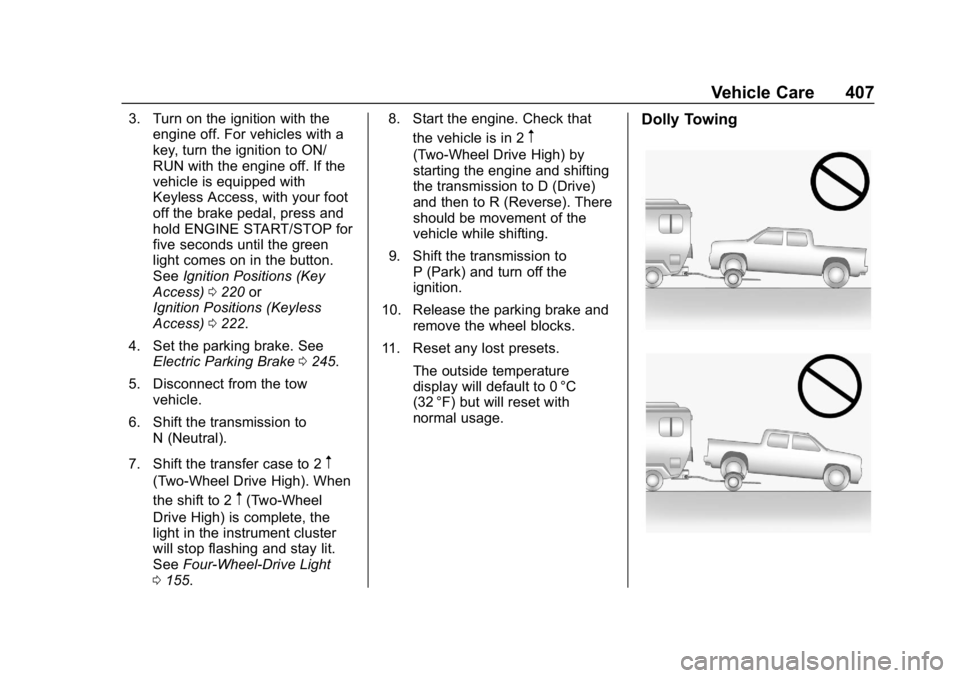
Dolly Towing
Page 423 of 477

GMC Sierra/Sierra Denali Owner Manual (GMNA-Localizing-U.S./Canada/
Mexico-1500-11698638) - 2019 - CRC - 5/13/19
422 Service and Maintenance
.Check ignition transmission lock.
See Ignition Transmission Lock
Check 0348.
. Check parking brake and
automatic transmission park
mechanism. See Park Brake and
P (Park) Mechanism Check
0 348.
. Check accelerator pedal for
damage, high effort, or binding.
Replace if needed.
. Visually inspect gas strut for
signs of wear, cracks, or other
damage. Check the hold open
ability of the strut. If the hold
open is low, service the gas
strut. See Gas Strut(s) 0350.
. Inspect sunroof track and seal,
if equipped. See Sunroof066.
. Verify spare tire key lock
operation and lubricate as
needed. See Tire Changing
0 390. .
Verify the spare tire is tightly
stowed under the vehicle.
Tighten as needed. See "Storing
a Flat or Spare Tire and Tools" in
Tire Changing 0390.
. Visually inspect the spare tire to
ensure that it is tightly stowed
under the vehicle. Push, pull,
and try to turn the tire. If the
spare tire moves, tighten as
necessary. SeeTire Changing
0390.
Page 455 of 477
GMC Sierra/Sierra Denali Owner Manual (GMNA-Localizing-U.S./Canada/
Mexico-1500-11698638) - 2019 - CRC - 5/14/19
454 OnStar
Security
If equipped, OnStar provides these
services:
.With Stolen Vehicle Assistance,
OnStar Advisors can use GPS to
pinpoint the vehicle and help
authorities quickly recover it.
. With Remote Ignition Block,
if equipped, OnStar can block
the engine from being restarted.
. With Stolen Vehicle Slowdown,
if equipped, OnStar can work
with law enforcement to
gradually slow the vehicle down.
Theft Alarm Notification
If equipped, if the doors are locked
and the vehicle alarm sounds, a
notification by text, e-mail, or phone
call will be sent. If the vehicle is
stolen, an OnStar Advisor can work
with authorities to recover the
vehicle.
OnStar Additional
Information
In-Vehicle Audio Messages
Audio messages may play important
information at the following times:
.Prior to vehicle purchase.
Press
Qto set up an account.
. After change in ownership and
at 90 days.
Transferring Service
PressQto request account transfer
eligibility information. The Advisor
can cancel or change account
information.
Selling/Transferring the
Vehicle
Call 1-888-4ONSTAR
(1-888-466-7827) immediately to
terminate your OnStar or connected
services if the vehicle is disposed
of, sold, transferred, or if the
lease ends.
Reactivation for Subsequent
Owners
PressQand follow the prompts to
speak to an Advisor as soon as
possible. The Advisor will update
vehicle records and explain OnStar
or connected service options.
How OnStar Service Works
Automatic Crash Response,
Emergency Services, Crisis Assist,
Stolen Vehicle Assistance, Remote
Services, Roadside Assistance, and
Hands-Free Calling are available on
most vehicles. Not all OnStar
services are available everywhere
or on all vehicles. For more
information, a full description of
OnStar services, system limitations,
and OnStar User Terms, Privacy
Statement, and Software Terms:
. Call 1-888-4ONSTAR
(1-888-466-7827).
. See www.onstar.com (U.S.).
. See www.onstar.ca (Canada).
. Call TTY 1-877-248-2080.
Page 457 of 477
GMC Sierra/Sierra Denali Owner Manual (GMNA-Localizing-U.S./Canada/
Mexico-1500-11698638) - 2019 - CRC - 5/14/19
456 OnStar
Languages
The vehicle can be programmed to
respond in multiple languages.
Press
Qand ask for an Advisor.
Advisors are available in English,
Spanish, and French. Available
languages may vary by country.
Potential Issues
OnStar cannot perform Remote
Door Unlock or Stolen Vehicle
Assistance after the vehicle has
been off continuously for 10 days
without an ignition cycle. If the
vehicle has not been started for
10 days, OnStar can contact
Roadside Assistance or a locksmith
to help gain access to the vehicle.
Global Positioning
System (GPS)
. Obstruction of the GPS can
occur in a large city with tall
buildings; in parking garages;
around airports; in tunnels and
underpasses; or in an area with
very dense trees. If GPS signals
are not available, the OnStar
system should still operate to call OnStar. However, OnStar
could have difficulty identifying
the exact location.
. In emergency situations, OnStar
can use the last stored GPS
location to send to emergency
responders.
A temporary loss of GPS can cause
loss of the ability to send a
Turn-by-Turn Navigation route. The
Advisor may give a verbal route or
may ask for a call back after the
vehicle is driven into an open area.
Cellular and GPS Antennas
Cellular reception is required for
OnStar to send remote signals to
the vehicle. Do not place items over
or near the antenna to prevent
blocking cellular and GPS signal
reception.
Unable to Connect to OnStar
Message
If there is limited cellular coverage
or the cellular network has reached
maximum capacity, this message may come on. Press
Qto try the
call again or try again after driving a
few miles into another cellular area.
Vehicle and Power Issues
OnStar services require a vehicle
electrical system, wireless service,
and GPS satellite technologies to be
available and operating for features
to function properly. These systems
may not operate if the battery is
discharged or disconnected.
Add-on Electrical Equipment
The OnStar system is integrated
into the electrical architecture of the
vehicle. Do not add any electrical
equipment. See Add-On Electrical
Equipment 0311. Added electrical
equipment may interfere with the
operation of the OnStar system and
cause it to not operate.
Vehicle Software Updates
OnStar or GM may remotely deliver
software updates or changes to the
vehicle without further notice or
consent. These updates or changes
may enhance or maintain safety,
Page 467 of 477

GMC Sierra/Sierra Denali Owner Manual (GMNA-Localizing-U.S./Canada/-
Mexico-1500-11698638) - 2019 - CRC - 5/13/19
466 Index
ChargingWireless . . . . . . . . . . . . . . . . . . . . . . 137
Charging System Light . . . . . . . . . 151
Check Engine Light (MalfunctionIndicator) . . . . . . . . . . . . . . . . . . . . 151
Ignition Transmission Lock . . . 348
Child Restraints Infants and Young Children . . . 101
Lower Anchors and Tethersfor Children . . . . . . . . . . . . . . . . . 107
Older Children . . . . . . . . . . . . . . . . 100
Securing . . . . . . . . . . . . . . . . . 118, 122
Systems . . . . . . . . . . . . . . . . . . . . . . 104
Circuit Breakers . . . . . . . . . . . . . . . . 355
Cleaning Exterior Care . . . . . . . . . . . . . . . . . 408
Interior Care . . . . . . . . . . . . . . . . . . 413
Climate Control Systems . . . . . . . 191 Air Conditioning . . . . . . . . . . . . . . 191
Dual Automatic . . . . . . . . . . . . . . . 193
Heating . . . . . . . . . . . . . . . . . . . . . . . 191
Clock . . . . . . . . . . . . . . . . . . . . . . . . . . . 134
Cluster, Instrument . . . . . . . . . . . . . 140
Collision Damage Repair . . . . . . . 445
Compartments Storage . . . . . . . . . . . . . . . . . . . . . . . 126
Compass . . . . . . . . . . . . . . . . . . . . . . . 134 Connected Services
Connections . . . . . . . . . . . . . . . . . . 461
Diagnostics . . . . . . . . . . . . . . . . . . . 463
Navigation . . . . . . . . . . . . . . . . . . . . 460
Connections Connected Services . . . . . . . . . . 461
Control
Hill Descent . . . . . . . . . . . . . . . . . . 249
Traction and ElectronicStability . . . . . . . . . . . . . . . . . . . . . 247
Control Light
Hill Descent . . . . . . . . . . . . . . . . . . 156
Control of a Vehicle . . . . . . . . . . . . . 201
Convex Mirrors . . . . . . . . . . . . . . . . . . 57
Coolant Engine Temperature Gauge . . 147
Engine Temperature
Warning Light . . . . . . . . . . . . . . . 158
Cooling . . . . . . . . . . . . . . . . . . . . 191, 193
Cooling System . . . . . . . . . . . . . . . . . 332
Courtesy Transportation Program . . . . . . . . . . . . . . . . . . . . . . . 444
Cruise Control . . . . . . . . . . . . . . . . . . 255 Light . . . . . . . . . . . . . . . . . . . . . . . . . . 161
Cupholders . . . . . . . . . . . . . . . . . . . . . 126
Customer Assistance . . . . . . . . . . . 441
Offices . . . . . . . . . . . . . . . . . . . . . . . . 440 Customer Assistance (cont'd)
Text Telephone (TTY)
Users . . . . . . . . . . . . . . . . . . . . . . . 441
Customer Information
Publications OrderingInformation . . . . . . . . . . . . . . . . . . 447
Customer Satisfaction Procedure . . . . . . . . . . . . . . . . . . . . . 438
D
Damage Repair, Collision . . . . . . . 445
Danger, Warning, and Caution . . . . 3
Data CollectionInfotainment System . . . . . . . . . . 451
OnStar . . . . . . . . . . . . . . . . . . . . . . . 451
Data Recorders, Event . . . . . . . . . 450
Daytime Running Lamps (DRL) . . . . . . . . . . . . . . . . . . 182
Defensive Driving . . . . . . . . . . . . . . . 201
Delayed Locking . . . . . . . . . . . . . . . . . 46
Diagnostics
Connected Services . . . . . . . . . . 463
Differential, Limited-Slip . . . . . . . . 255
Distracted Driving . . . . . . . . . . . . . . . 200
Dome Lamps . . . . . . . . . . . . . . . . . . . 186
Door Ajar Light . . . . . . . . . . . . . . . . . . . . . 161
Delayed Locking . . . . . . . . . . . . . . . . 46
Page 470 of 477

GMC Sierra/Sierra Denali Owner Manual (GMNA-Localizing-U.S./Canada/-
Mexico-1500-11698638) - 2019 - CRC - 5/13/19
Index 469
H
Halogen Bulbs . . . . . . . . . . . . . . . . . . 351
Hazard Warning Flashers . . . . . . . 183
Head Restraints . . . . . . . . . . . . . . . . . 69
Head-up Display . . . . . . . . . . . . . . . . 166
HeadlampsAiming . . . . . . . . . . . . . . . . . . . . . . . . 351
Automatic . . . . . . . . . . . . . . . . . . . . . 182
Bulb Replacement . . . . . . . . . . . . 351
Daytime RunningLamps (DRL) . . . . . . . . . . . . . . . . 182
Flash-to-Pass . . . . . . . . . . . . . . . . . 182
Headlamps, Front Turn Signal, Sidemarker, and
Parking Lamps . . . . . . . . . . . . . . 352
High-Beam On Light . . . . . . . . . . 160
High/Low Beam Changer . . . . . 181
Lamps On Reminder . . . . . . . . . 161
Heated
Rear Seats . . . . . . . . . . . . . . . . . . . . . 79
Steering Wheel . . . . . . . . . . . . . . . 133
Heated and Ventilated Front Seats . . . . . . . . . . . . . . . . . . . . . . . . . . 76
Heated Mirrors . . . . . . . . . . . . . . . . . . . 59
Heater
Engine . . . . . . . . . . . . . . . . . . . . . . . . 227
Heating . . . . . . . . . . . . . . . . . . . . 191, 193
High-Beam On Light . . . . . . . . . . . . 160 High-Speed Operation . . . . . . . . . . 373
Hill and Mountain Roads . . . . . . . . 209
Hill Descent Control (HDC) . . . . . 249
Hill Descent Control Light . . . . . . . 156
Hill Start Assist (HSA) . . . . . . . . . . 247
Hood . . . . . . . . . . . . . . . . . . . . . . . . . . . 319
Horn . . . . . . . . . . . . . . . . . . . . . . . . . . . . 133
How to Wear Seat Belts
Properly . . . . . . . . . . . . . . . . . . . . . . . . 81
HVAC . . . . . . . . . . . . . . . . . . . . . . 191, 193
I
Ignition Positions . . . . . . . . . . 220, 222
Ignition Transmission Lock Check . . . . . . . . . . . . . . . . . . . . . . . . . 348
Immobilizer . . . . . . . . . . . . . . . . . . . . . . 56
Indicator Pedestrian Ahead . . . . . . . . . . . . 156
Vehicle Ahead . . . . . . . . . . . . . . . . 156
Infants and Young Children, Restraints . . . . . . . . . . . . . . . . . . . . . 101
Information Publication Ordering . . . . . . . . . . 447
Infotainment . . . . . . . . . . . . . . . . . . . . 190
Infotainment System . . . . . . . . . . . . 451
Instrument Cluster . . . . . . . . . . . . . . 140
Interior Rearview Mirrors . . . . . . . . . 61
Introduction . . . . . . . . . . . . . . . . . . . . . . . 2
J
Jump Starting - North America . . . . . . . . . . . . . . . . . . . . . . . 400
K
Keyless EntryRemote (RKE) System . . . . . 34, 42
Keys . . . . . . . . . . . . . . . . . . . . . . . . . . . . . 31
L
Labeling, Tire Sidewall . . . . . . . . . . 365
Lamps Daytime Running (DRL) . . . . . . 182
Dome . . . . . . . . . . . . . . . . . . . . . . . . . 186
Exterior Cargo . . . . . . . . . . . . . . . . 185
Exterior Controls . . . . . . . . . . . . . . 179
Exterior Lamps OffReminder . . . . . . . . . . . . . . . . . . . 181
Exterior Lighting Battery Saver . . . . . . . . . . . . . . . . . . . . . . . 188
License Plate . . . . . . . . . . . . . . . . . 354
Malfunction Indicator
(Check Engine) . . . . . . . . . . . . . 151
On Reminder . . . . . . . . . . . . . . . . . 161
Reading . . . . . . . . . . . . . . . . . . . . . . 187
Lane Change Alert (LCA) . . . . . . . 272
Lane Departure Warning (LDW) . . . . . . . . . . . . . . . . 274
Lane Keep Assist (LKA) . . . . . . . . 274