ECO mode GMC SIERRA 2019 User Guide
[x] Cancel search | Manufacturer: GMC, Model Year: 2019, Model line: SIERRA, Model: GMC SIERRA 2019Pages: 477, PDF Size: 8.7 MB
Page 192 of 477
GMC Sierra/Sierra Denali Owner Manual (GMNA-Localizing-U.S./Canada/
Mexico-1500-11698638) - 2019 - CRC - 5/13/19
Climate Controls 191
Climate Controls
Climate Control Systems
Climate Control Systems . . . . . 191
Dual Automatic ClimateControl System . . . . . . . . . . . . . 193
Air Vents
Air Vents . . . . . . . . . . . . . . . . . . . . . 197
Maintenance
Passenger Compartment AirFilter . . . . . . . . . . . . . . . . . . . . . . . . 197
Service . . . . . . . . . . . . . . . . . . . . . . . 198
Climate Control Systems
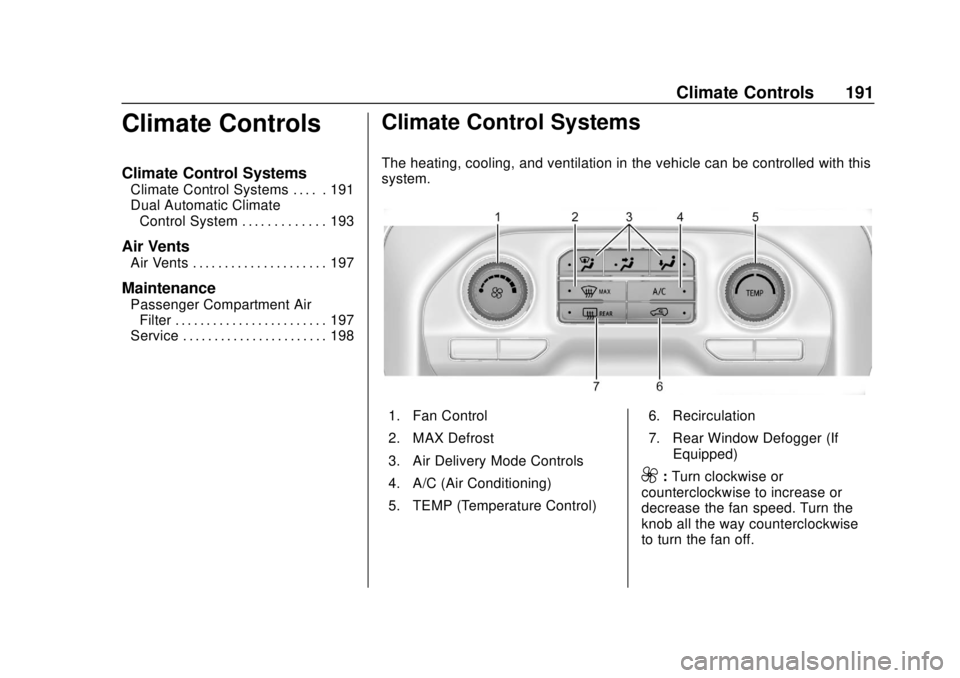
The heating, cooling, and ventilation in the vehicle can be controlled with this
system.
1. Fan Control
2. MAX Defrost
3. Air Delivery Mode Controls
4. A/C (Air Conditioning)
5. TEMP (Temperature Control) 6. Recirculation
7. Rear Window Defogger (If
Equipped)
9:Turn clockwise or
counterclockwise to increase or
decrease the fan speed. Turn the
knob all the way counterclockwise
to turn the fan off.
Page 200 of 477
GMC Sierra/Sierra Denali Owner Manual (GMNA-Localizing-U.S./Canada/
Mexico-1500-11698638) - 2019 - CRC - 5/14/19
Driving and Operating 199
Driving and
Operating
Driving Information
Distracted Driving . . . . . . . . . . . . 200
Defensive Driving . . . . . . . . . . . . . 201
Drunk Driving . . . . . . . . . . . . . . . . . 201
Control of a Vehicle . . . . . . . . . . . 201
Braking . . . . . . . . . . . . . . . . . . . . . . . 201
Steering . . . . . . . . . . . . . . . . . . . . . . 202
Off-Road Recovery . . . . . . . . . . . 202
Loss of Control . . . . . . . . . . . . . . . 203
Off-Road Driving . . . . . . . . . . . . . 203
Driving on Wet Roads . . . . . . . . 208
Hill and Mountain Roads . . . . . 209
Winter Driving . . . . . . . . . . . . . . . . 210
If the Vehicle Is Stuck . . . . . . . . . 211
Vehicle Load Limits . . . . . . . . . . . 212
Truck-Camper LoadingInformation . . . . . . . . . . . . . . . . . . 218
Starting and Operating
New Vehicle Break-In . . . . . . . . . 220
Ignition Positions (KeyAccess) . . . . . . . . . . . . . . . . . . . . . 220
Ignition Positions (Keyless Access) . . . . . . . . . . . . . . . . . . . . . 222
Starting the Engine . . . . . . . . . . . 224 Stop/Start System . . . . . . . . . . . . 225
Engine Heater . . . . . . . . . . . . . . . . 227
Retained Accessory
Power (RAP) . . . . . . . . . . . . . . . . 228
Shifting Into Park . . . . . . . . . . . . . 229
Shifting out of Park . . . . . . . . . . . 230
Parking over Things
That Burn . . . . . . . . . . . . . . . . . . . 231
Active Fuel Management . . . . . 231
Extended Parking . . . . . . . . . . . . 231
Engine Exhaust
Engine Exhaust . . . . . . . . . . . . . . 232
Running the Vehicle While Parked . . . . . . . . . . . . . . . . . . . . . . 232
Automatic Transmission
Automatic Transmission . . . . . . 233
Manual Mode . . . . . . . . . . . . . . . . . 235
Tow/Haul Mode . . . . . . . . . . . . . . . 238
Drive Systems
Four-Wheel Drive . . . . . . . . . . . . . 239
Brakes
Antilock BrakeSystem (ABS) . . . . . . . . . . . . . . . 244
Electric Parking Brake . . . . . . . . 245
Brake Assist . . . . . . . . . . . . . . . . . . 246
Hill Start Assist (HSA) . . . . . . . . 247
Ride Control Systems
Traction Control/Electronic Stability Control . . . . . . . . . . . . . 247
Hill Descent Control (HDC) . . . 249
Driver Mode Control . . . . . . . . . . 250
Limited-Slip Differential . . . . . . . 255
Locking Rear Axle . . . . . . . . . . . . 255
Cruise Control
Cruise Control . . . . . . . . . . . . . . . . 255
Driver Assistance Systems
Driver Assistance Systems . . . 258
Assistance Systems for Parking or Backing . . . . . . . . . . 259
Assistance Systems for Driving . . . . . . . . . . . . . . . . . . . . . . 265
Forward Collision Alert (FCA) System . . . . . . . . . . . . . . . . . . . . . . 265
Forward Automatic Braking (FAB) . . . . . . . . . . . . . . . 268
Front Pedestrian Braking (FPB) System . . . . . . . . . . . . . . . 269
Side Blind Zone Alert (SBZA) . . . . . . . . . . . . . . . . 271
Lane Change Alert (LCA) . . . . . 272
Lane Departure Warning (LDW) . . . . . . . . . . . . . 274
Lane Keep Assist (LKA) . . . . . . 274
Page 225 of 477
GMC Sierra/Sierra Denali Owner Manual (GMNA-Localizing-U.S./Canada/
Mexico-1500-11698638) - 2019 - CRC - 5/14/19
224 Driving and Operating
8. Release the brake pedal.
If the vehicle cannot be pulled over,
and must be shut off while driving,
press and hold ENGINE START/
STOP for longer than two seconds,
or press twice in five seconds.
ACC/ACCESSORY (Amber
Indicator Light) : This mode allows
some electrical accessories to be
used when the engine is off.
With the ignition off, pressing the
button one time without the brake
pedal applied will place the ignition
system in ACC/ACCESSORY.
The ignition will switch from ACC/
ACCESSORY to off after
five minutes to prevent battery
rundown.
ON/RUN/START (Green Indicator
Light) : This mode is for driving and
starting. With the ignition off, and
the brake pedal applied, pressing
the button once will turn the ignition
on. Once engine cranking begins,
release the button. Engine cranking
will continue until the engine starts.
See Starting the Engine 0224. Service Mode
This power mode is available for
service and diagnostics, and to
verify the proper operation of the
malfunction indicator lamp as may
be required for emission inspection
purposes. With the vehicle off, and
the brake pedal not applied,
pressing and holding the button for
more than five seconds will place
the vehicle in Service Mode. The
instruments and audio systems will
operate as they do when the ignition
is on, but the vehicle will not be able
to be driven. The engine will not
start in Service Mode. Press the
button again to turn the ignition off.
Starting the Engine
If the vehicle has a diesel engine,
see the Duramax diesel
supplement.
Caution
If you add electrical parts or
accessories, you could change
the way the engine operates. Any
resulting damage would not be
covered by the vehicle warranty.
See
Add-On Electrical Equipment
0 311.
Move the shift lever to P (Park) or
N (Neutral). To restart the engine
when the vehicle is already moving,
use N (Neutral) only.
Caution
Do not try to shift to P (Park) if the
vehicle is moving. If you do, you
could damage the transmission.
Shift to P (Park) only when the
vehicle is stopped.
Page 228 of 477
GMC Sierra/Sierra Denali Owner Manual (GMNA-Localizing-U.S./Canada/
Mexico-1500-11698638) - 2019 - CRC - 5/14/19
Driving and Operating 227
Engine Heater
The engine heater can provide
easier starting and better fuel
economy during engine warm-up in
cold weather conditions at or below
−18 °C (0 °F). Vehicles with an
engine heater should be plugged in
at least four hours before starting.
An internal thermostat in the
plug-end of the cord may exist,
which will prevent engine heater
operation at temperatures above
−18 °C (0 °F).
{Warning
Do not plug in the engine block
heater while the vehicle is parked
in a garage or under a carport.
Property damage or personal
injury may result. Always park the
vehicle in a clear open area away
from buildings or structures.
To Use the Engine Heater
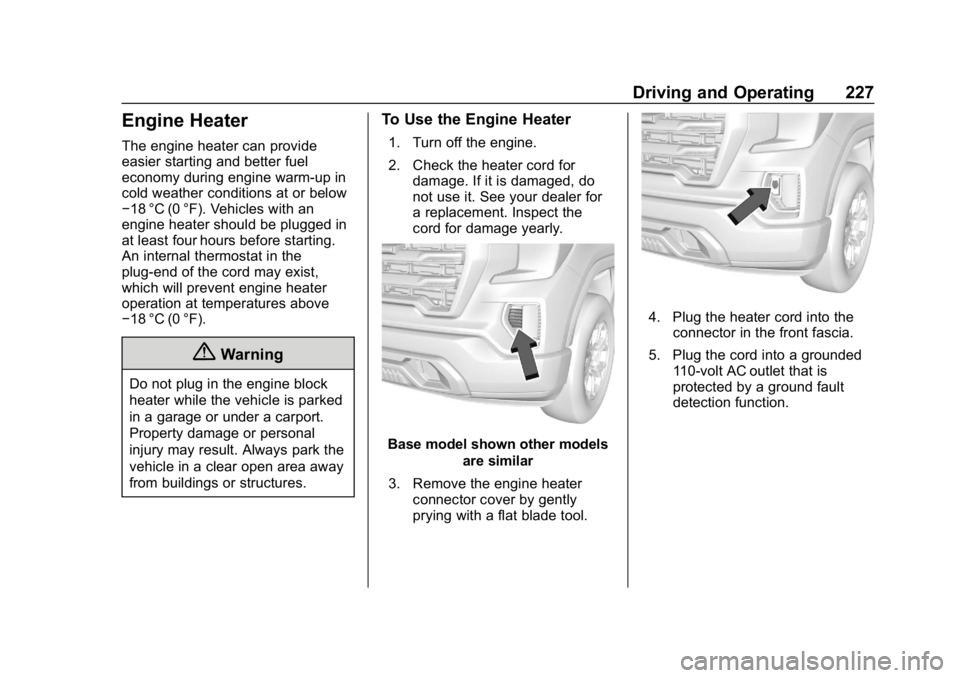
1. Turn off the engine.
2. Check the heater cord fordamage. If it is damaged, do
not use it. See your dealer for
a replacement. Inspect the
cord for damage yearly.
Base model shown other models
are similar
3. Remove the engine heater connector cover by gently
prying with a flat blade tool.
4. Plug the heater cord into theconnector in the front fascia.
5. Plug the cord into a grounded 110-volt AC outlet that is
protected by a ground fault
detection function.
Page 235 of 477
GMC Sierra/Sierra Denali Owner Manual (GMNA-Localizing-U.S./Canada/
Mexico-1500-11698638) - 2019 - CRC - 5/14/19
234 Driving and Operating
To rock the vehicle back and forth to
get out of snow, ice, or sand without
damaging the transmission, seeIf
the Vehicle Is Stuck 0211.
N : In this position, the engine does
not connect with the wheels. To
restart the engine when the vehicle
is already moving, use
N (Neutral) only.
Also, use N (Neutral) when the
vehicle is being towed.
{Warning
Shifting into a drive gear while the
engine is running at high speed is
dangerous. Unless your foot is
firmly on the brake pedal, the
vehicle could move very rapidly.
You could lose control and hit
people or objects. Do not shift
into a drive gear while the engine
is running at high speed.
Caution
Shifting out of P (Park) or
N (Neutral) with the engine
running at high speed may
damage the transmission. The
repairs would not be covered by
the vehicle warranty. Be sure the
engine is not running at high
speed when shifting the vehicle.
Caution
A transmission hot message may
display if the automatic
transmission fluid is too hot.
Driving under this condition can
damage the vehicle. Stop and idle
the engine to cool the automatic
transmission fluid. This message
clears when the transmission fluid
has cooled sufficiently. D :
This position is for normal
driving. It provides the best fuel
economy. If more power is needed
for passing, press the accelerator
pedal down.
. When going less than about
55 km/h (35 mph), push the
accelerator pedal about
halfway down.
. When going about 55 km/h
(35 mph) or more, push the
accelerator all the way down.
By doing this, the vehicle shifts
down to the next gear and has
more power.
Use D (Drive) and Tow/Haul Mode
when towing a trailer, carrying a
heavy load, driving on steep hills,
or driving off-road. Shift the
transmission to a lower gear if the
transmission shifts too often.
Downshifting the transmission in
slippery road conditions could result
in skidding. See “Skidding”under
Loss of Control 0203.
Page 240 of 477
GMC Sierra/Sierra Denali Owner Manual (GMNA-Localizing-U.S./Canada/
Mexico-1500-11698638) - 2019 - CRC - 5/14/19
Driving and Operating 239
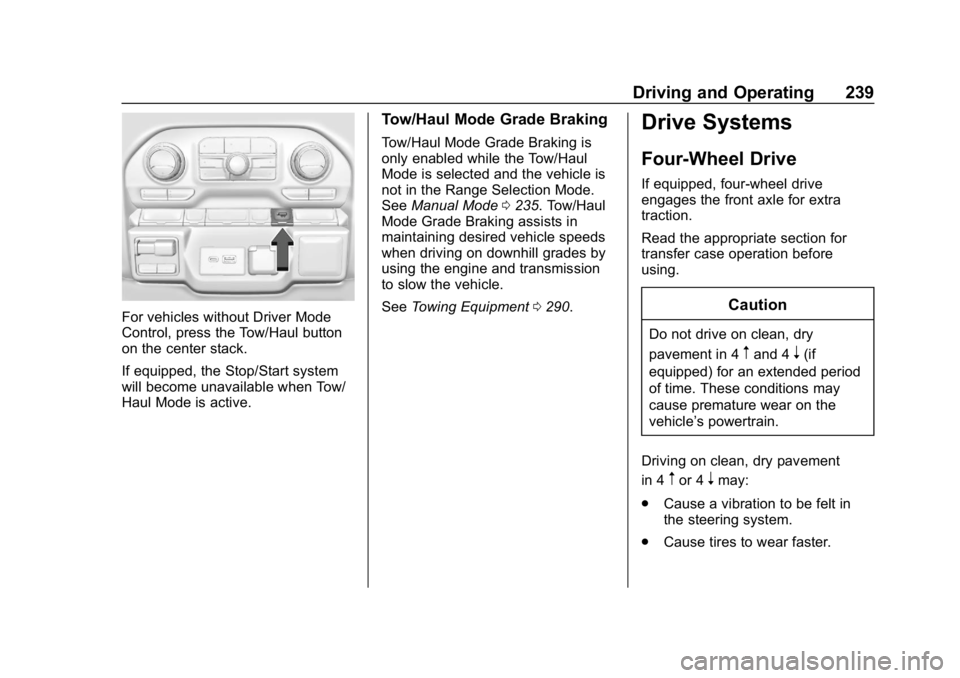
For vehicles without Driver Mode
Control, press the Tow/Haul button
on the center stack.
If equipped, the Stop/Start system
will become unavailable when Tow/
Haul Mode is active.
Tow/Haul Mode Grade Braking
Tow/Haul Mode Grade Braking is
only enabled while the Tow/Haul
Mode is selected and the vehicle is
not in the Range Selection Mode.
SeeManual Mode 0235. Tow/Haul
Mode Grade Braking assists in
maintaining desired vehicle speeds
when driving on downhill grades by
using the engine and transmission
to slow the vehicle.
See Towing Equipment 0290.
Drive Systems
Four-Wheel Drive
If equipped, four-wheel drive
engages the front axle for extra
traction.
Read the appropriate section for
transfer case operation before
using.
Caution
Do not drive on clean, dry
pavement in 4
mand 4n(if
equipped) for an extended period
of time. These conditions may
cause premature wear on the
vehicle’s powertrain.
Driving on clean, dry pavement
in 4
mor 4nmay:
. Cause a vibration to be felt in
the steering system.
. Cause tires to wear faster.
Page 243 of 477
GMC Sierra/Sierra Denali Owner Manual (GMNA-Localizing-U.S./Canada/
Mexico-1500-11698638) - 2019 - CRC - 5/14/19
242 Driving and Operating
If the transmission is not in
N (Neutral) when shift request
occurs, a DIC message displays.
The vehicle will allow 20 seconds
for the shift to occur. After this time,
a graphic in the instrument cluster
will indicate that the transfer case is
in 4
n.
Caution
Shifting the transmission into gear
before the requested mode
indicator light has stopped
flashing could damage the
transfer case.
If the transmission is not shifted into
N (Neutral) or the vehicle has not
slowed to 5 km/h (3 mph) within
20 seconds, the transfer case will
remain in its original state. This will
be indicated in the instrument
cluster.
With the vehicle moving less than
5 km/h (3 mph) and the transmission
in N (Neutral), attempt the shift
again. Shifting Out of 4
n
1. The vehicle must be stopped or
moving less than 5 km/h
(3 mph) with the transmission
in N (Neutral) and the ignition
on. It is best for the vehicle to
be moving
1.6 to 3.2 km/h (1 to 2 mph).
2. Press 4
m, AUTO, or 2m. The
actual 4x4 shift request is only
made after the button is
released. The 4x4 graphic will
remain flashing until the shift
request has completed. A DIC
message displays to indicate
the state of the request.
Once the 4x4 shift has
completed, the DIC message
disappears, the 4x4 graphic
stops flashing, and the current
setting is indicated.
If vehicle speed is higher when
shift request occurs, a DIC
message displays. Reduce
vehicle speed. If the transmission is not in
N (Neutral) when shift request
occurs, DIC messages will display.
The vehicle will allow 20 seconds
for this shift to occur. After this time,
a graphic in the instrument cluster
will indicate that the transfer case is
in 4
n.
Caution
Shifting the transmission into gear
before the requested mode
indicator light has stopped
flashing could damage the
transfer case.
If the transmission is not shifted into
N (Neutral) or the vehicle has not
slowed to 5 km/h (3 mph) within
20 seconds, the transfer case will
remain in its original state. This will
be indicated in the instrument
cluster.
With the vehicle moving less than
5 km/h (3 mph), and the
transmission in N (Neutral), attempt
the shift again.
Page 251 of 477
GMC Sierra/Sierra Denali Owner Manual (GMNA-Localizing-U.S./Canada/
Mexico-1500-11698638) - 2019 - CRC - 5/14/19
250 Driving and Operating
HDC can maintain vehicle speeds
between 1 and 22 km/h (1 and
14 mph) on grades greater than or
equal to 10%.
If HDC is to be used for more than
three minutes or on grades steeper
than 25%, the transfer case should
be put into Four-Wheel Drive Low
(4
n) to reduce the possibility of
brake overheating.
Noise from the Electronic Brake
Control Module (EBCM) is normal
when HDC is active.
When HDC is activated, the initial
HDC speed is set to the current
driving speed. It can be increased or
decreased by pressing +RES or
SET- on the steering wheel, or by
applying the accelerator or brake
pedal. This adjusted speed
becomes the new set speed.
HDC will remain enabled between
30 and 60 km/h (19 and 37 mph);
however, vehicle speed cannot be
set or maintained in this range. HDC
will automatically disable if the vehicle speed is above 80 km/h
(50 mph) or above 60 km/h
(37 mph) for at least 30 seconds.
5must be pressed again to
re-enable HDC. HDC may disable
after an extended period of use.
If this happens, HDC will require
time to cool down. The length of
time HDC remains active depends
on road conditions, grade, set
speed, vehicle loading, and outside
temperature.
When enabled, if the vehicle speed
is above 30 km/h (19 mph) and
below 60 km/h (37 mph), a DIC
message will display.
Driver Mode Control
This feature adds a sportier feel,
provides a more comfortable ride,
or assists in different weather
conditions or terrain to optimize
driving performance. Depending on
the option package, available
features, and mode selected, the
suspension, steering, and
powertrain will change settings to
achieve the desired mode characteristics. Selecting the
various Driver Modes enhances the
ride performance for the road
conditions and the selected mode.
Mode Activation
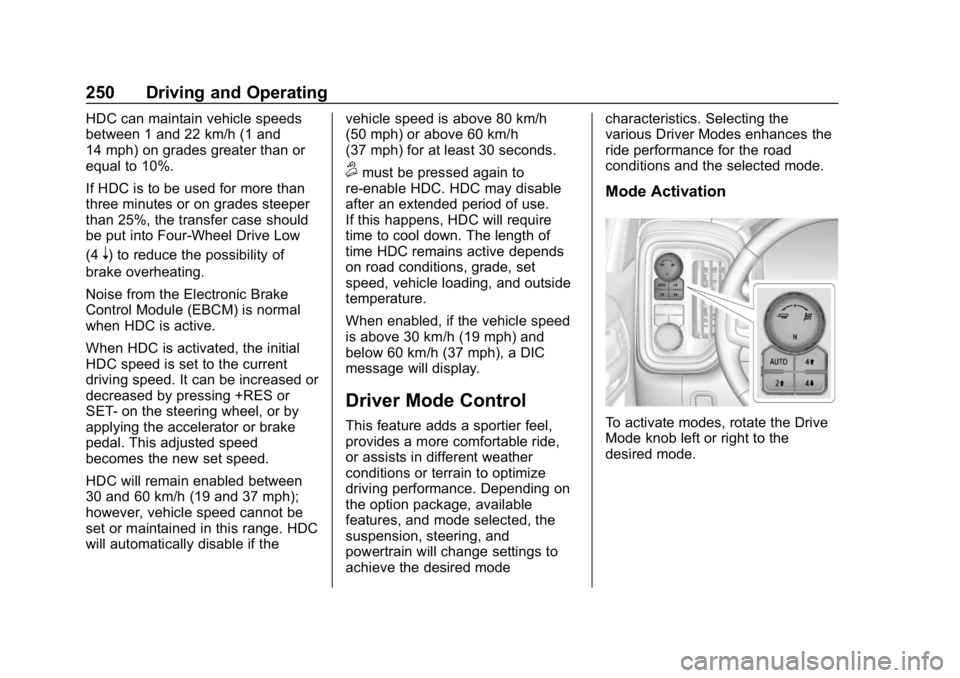
To activate modes, rotate the Drive
Mode knob left or right to the
desired mode.
Page 253 of 477
GMC Sierra/Sierra Denali Owner Manual (GMNA-Localizing-U.S./Canada/
Mexico-1500-11698638) - 2019 - CRC - 5/14/19
252 Driving and Operating
Off-Road Mode
Use to improve driving at moderate
speeds, on grass, gravel, dirt,
unpaved roads, or snow-covered
roads that have not been groomed
or plowed.
The accelerator pedal will be more
sensitive to provide finer control of
the torque at the wheels. Electronic
Stability Control (ESC), the Antilock
Brake System (ABS), and the
Traction Control System (TCS) will
change for optimal off-road
performance. Use this mode for
public off-road recreational driving.
SeeOff-Road Driving 0203.
When selected, the Off-Road Mode
indicator light displays in the
instrument cluster.
Tow/Haul Mode
This feature assists when pulling a
heavy trailer or a large or heavy
load. See Tow/Haul Mode 0238.
Tow/Haul Mode is designed to be
most effective when the vehicle and
trailer combined weight is at least
75% of the vehicle’s Gross Combined Weight Rating (GCWR).
See
“Weight of the Trailer” under
Trailer Towing 0286.
Tow/Haul Mode is most useful when
pulling a heavy trailer or a large or
heavy load under the following
conditions:
. Through rolling terrain
. In stop-and-go traffic
. In busy parking lots where
improved low speed control of
the vehicle is desired
Operating the vehicle in Tow/Haul
Mode when lightly loaded or with no
trailer at all will not cause damage.
However, there is no benefit to
selecting Tow/Haul Mode when the
vehicle is unloaded. Such a
selection when unloaded may result
in unpleasant engine and
transmission driving characteristics
and reduced fuel economy.
When selected, the Tow/Haul Mode
light will display in the instrument
cluster. If the vehicle is turned off with Tow/
Haul Mode active, Tow/Haul Mode
will remain active after the vehicle
has been turned on if the vehicle
was turned off for less than four
hours. Otherwise, the vehicle will
start up in Tour Mode.
Terrain Mode
Use for finer control during low
speed, off-road driving. When using
this mode it will mimic the
characteristics of four-wheel-drive
low without the torque capabilities.
Use when:
.
Traveling on very rough roads at
very low speeds, such as a
two-track or heavily rutted road.
. Traveling slowly in grassy fields.
. Pulling a boat out of the water
on a trailer.
. Using the vehicle for public
off-road recreational driving. See
Off-Road Driving 0203 and
Hill and Mountain Roads 0209.
Page 283 of 477
GMC Sierra/Sierra Denali Owner Manual (GMNA-Localizing-U.S./Canada/
Mexico-1500-11698638) - 2019 - CRC - 5/14/19
282 Driving and Operating
.Vehicles can tow in D (Drive).
Tow/Haul Mode is recommended
for heavier trailers. See Tow/
Haul Mode 0238. If the
transmission downshifts too
often, a lower gear may be
selected using Manual Mode.
See Manual Mode 0235.
If equipped, the following driver
assistance features should be
turned off when towing a trailer:
. Cruise Control
. Lane Keep Assist (LKA)
. Park Assist
. Reverse Automatic
Braking (RAB)
If equipped, the following driver
assistance features should be
turned to alert or off when towing a
trailer:
. Forward Automatic
Braking (FAB)
. Intelligent Brake Assist (IBA)
. Front Pedestrian Braking (FPB) If equipped with Lane Change Alert
(LCA), the LCA detection zones that
extend back from the side of the
vehicle do not move further back
when a trailer is towed. Use caution
while changing lanes when towing a
trailer.
If equipped with Rear Cross Traffic
Alert (RCTA), use caution while
backing up when towing a trailer, as
the RCTA detection zones that
extend out from the back of the
vehicle do not move further back
when a trailer is towed.
{Warning
To prevent serious injury or death
from carbon monoxide (CO),
when towing a trailer:
. Do not drive with the
liftgate, trunk/hatch,
or rear-most window open.
. Fully open the air outlets on
or under the instrument
panel.
(Continued)
Warning (Continued)
.Adjust the climate control
system to a setting that
brings in only outside air.
See “Climate Control
Systems” in the Index.
For more information about
carbon monoxide, see Engine
Exhaust 0232.
Towing a trailer requires experience.
The combination of the vehicle and
trailer is longer and not as
responsive as the vehicle itself. Get
used to the handling and braking of
the combination by driving on a
level road surface before driving on
public roads.
The trailer structure, the tires, and
the brakes must all be rated to carry
the intended cargo. Inadequate
trailer equipment can cause the
combination to operate in an
unexpected or unsafe manner.
Before driving, inspect all trailer
hitch parts and attachments, safety
chains, electrical connectors, lamps,